


WELCOME TO THE
AWS / SERVERLESS WORKSHOP
Mikael Puittinen, CTO
mikael.puittinen@sc5.io
@mpuittinen
1
22.6.2016
A SHORT INTRODUCTION TO SC5
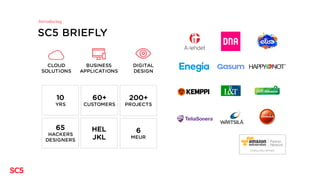
SC5 BRIEFLY
Introducing
CLOUD
SOLUTIONS
BUSINESS
APPLICATIONS
DIGITAL
DESIGN
10
YRS
60+
CUSTOMERS
200+
PROJECTS
HEL
JKL
75
HACKERS
DESIGNERS
6
MEUR
WHY SERVERLESS?
” One of the biggest revolutions we have seen in the technology world in the last
few years is the rise of serverless computing. This has been largely triggered by
the launch of AWS Lambda that no longer requires a server(physical or virtual)
to run application code. This tremendously simplifies application development
as architects only need to think about business logic and no longer need to
worry about managing fleets of servers to run their software. This makes it
easier to achieve the security and reliability to protect their business and their
customers. After all, no server is easier to manage than no server.”
Werner Wogels, CTO / VP at Amazon.com
(https://www.linkedin.com/pulse/simplification-technology-trend-2016-werner-vogels)
A short business case
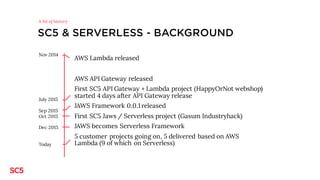
SC5 & SERVERLESS - BACKGROUND
AWS Lambda released
AWS API Gateway released
First SC5 API Gateway + Lambda project (HappyOrNot webshop)
started 4 days after API Gateway release
JAWS Framework 0.0.1 released
First SC5 Jaws / Serverless project (Gasum Industryhack)
JAWS becomes Serverless Framework
5 customer projects going on, 5 delivered based on AWS
Lambda (9 of which on Serverless)
A bit of history
Nov 2014
July 2015
Sep 2015
Oct 2015
Dec 2015
Today
INTRODUCTION TO AWS
SERVERLESS ARCHITECTURE
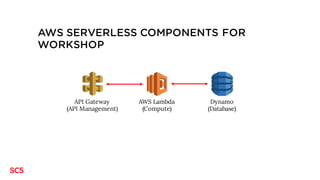
AWS SERVERLESS COMPONENTS FOR
WORKSHOP
API Gateway
(API Management)
AWS Lambda
(Compute)
Dynamo
(Database)
AWS LAMBDA
§ Compute service for running code (functions) in AWS
§ Provision resources required by single function run
§ Automatically spawns additional ”instances” if required
§ Invoiced based on actual compute time used (100 ms)
§ Input and output JSON
Serverless Compute
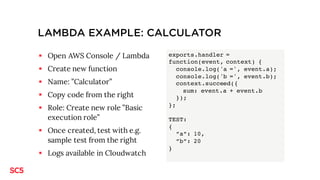
LAMBDA EXAMPLE: CALCULATOR
§ Open AWS Console / Lambda
§ Create new function
§ Name: ”Calculator”
§ Copy code from the right
§ Role: Create new role ”Basic
execution role”
§ Once created, test with e.g.
sample test from the right
§ Logs available in Cloudwatch
exports.handler =
function(event, context) {
console.log('a =', event.a);
console.log('b =', event.b);
context.succeed({
sum: event.a + event.b
});
};
TEST:
{
”a”: 10,
”b”: 20
}
API GATEWAY
§ AWS Service to implement REST (and other) APIs
§ Security via API Keys, customer authorizers
§ Connect to e.g. Lambda to publish your functions as REST
interfaces
§ Input / Output mapping (e.g. URL parameters -> JSON)
§ No need for provisioning
§ Invoicing based on # of requests + data transfer + cache size
Serverless REST API
API GATEWAY EXAMPLE
§ Launch API Gateway from AWS Console
§ Create API ”Calculator”
§ Create resourse ”calculator” (from Actions)
§ Create ”POST” method for calculator resource
§ Integration type: Lambda Function
§ Deploy API to stage ”v1”
§ Copy URL displayed for resource
§ Test API with e.g. Postman
DYNAMODB
§ noSQL database provided by AWS
§ No server instances to manage
§ Provision data read / write
Serverless Database
SERVERLESS FRAMEWORK
” Serverless is the application framework for building web, mobile and
IoT applications exclusively on Amazon Web Services' Lambda and API
Gateway. It's a command line interface that helps you build and
maintain serverless apps across teams of any size. It's also completely
extensible via Plugins. We believe AWS Lambda will be the focal point of
the AWS cloud, and the Serverless Framework interprets AWS from
Lambda's perspective.”
https://github.com/serverless/serverless
THE CHALLENGES
CHALLENGES
1. Guided challenge : Blog backend on serverless
2. Slackbot on serverless
3. Generic HTML form handler on serverless
4. Self-picked challenge
Pick your’s
CHALLENGE: BLOG BACKEND
Create a backend for the blog application running at http://hackathon-blog.serverless.fi/
(sources at https://github.com/SC5/aws-serverless-hackathon)
Backend must have a REST API with methods
1. POST /dev/posts
2. GET /dev/posts
3. PUT /dev/posts/{postId} - OPTIONAL
4. DELETE /dev/posts/{postId} – OPTIONAL
Use e.g. AWS DynamoDB as the database for blog posts.
Step-by-step walkthrough available at http://hackathon.serverless.fi/workshop.pdf
Guided challenge
RESOURCES
Blog client:
https://github.com/SC5/aws-serverless-hackathon
Sample blog backend:
https://github.com/SC5/aws-serverless-hackathon-backend
This presentation:
http://hackathon.serverless.fi/workshop.pdf
GETTING READY FOR THE
WORKSHOP / HACKATHON
PRE-TAKEOFF CHECKLIST (1/3)
q A laptop with Node 4 (recommended), 5 or 6 installed
q An AWS account (https://aws.amazon.com/free)
A credit card is required although no charges should occur from this workshop
q AWS CLI (optional)
(http://docs.aws.amazon.com/cli/latest/userguide/installing.html OR
”brew install awscli” for OSX homebrew users)
Getting prepared
PREPARE AWS IAM USER FOR HACKATHON
1. Log in to AWS
2. Go to Services -> Identity and Access Management
3. Create a new user (take note of the access key + secret). Note: a
credit / debit card is required.
4. Click on the new user and select the ”Permissions” tab
5. Attach the ”Administrator access” policy to the user
Note: In real life scenarios, you would not assign administrator
pirivileges but more finegrain permissions.
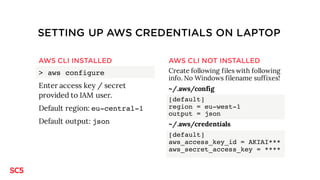
SETTING UP AWS CREDENTIALS ON LAPTOP
AWS CLI INSTALLED
> aws configure
Enter access key / secret
provided to IAM user.
Default region: eu-central-1
Default output: json
AWS CLI NOT INSTALLED
Create following files with following
info. No Windows filename suffixes!
~/.aws/config
[default]
region = eu-west-1
output = json
~/.aws/credentials
[default]
aws_access_key_id = AKIAI***
aws_secret_access_key = ****
TESTING THE SETUP
> mkdir awstest
> cd awstest
> npm install aws-sdk
Create awstest.js based on right
frame
> node awstest.js
You should get your IAM account
name as a response if set up
correctly.
awstest.js:
var AWS=require('aws-sdk');
var IAM = new AWS.IAM();
IAM.getUser(function(err, data) {
console.log(data.User.UserName)
});
INSTALL SERVERLESS
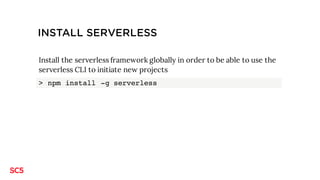
Install the serverless framework globally in order to be able to use the
serverless CLI to initiate new projects
> npm install -g serverless
SERVERLESS BLOG WALKTROUGH
INSTRUCTIONS
When copying JSON / other from presentation, beware of additional
whitespaces. Some editors seem to add whitespaces during copy /
paste.
Use the source files from github in case you run into issues.
1. CREATE SERVERLESS PROJECT
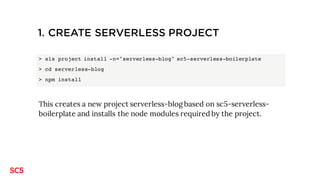
> sls project install –n "serverless-blog" sc5-serverless-boilerplate
> cd serverless-blog
> npm install
This creates a new project serverless-blog based on sc5-serverless-
boilerplate and installs the node modules required by the project.
2. CREATE DYNAMODB TABLE FOR POSTS (USING
SERVERLESS)
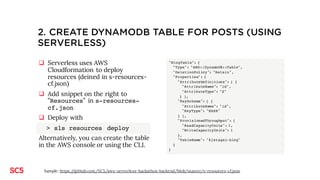
q Serverless uses AWS
Cloudformation to deploy
resources (deined in s-resources-
cf.json)
q Add snippet on the right to
”Resources” in s-resources-
cf.json
q Deploy with
> sls resources deploy
Permissions to the table are granted
by default in the boilerplate template.
"BlogTable": {
"Type": "AWS::DynamoDB::Table",
"DeletionPolicy": "Retain",
"Properties": {
"AttributeDefinitions": [ {
"AttributeName": "id",
"AttributeType": "S"
} ],
"KeySchema": [ {
"AttributeName": "id",
"KeyType": "HASH"
} ],
"ProvisionedThroughput": {
"ReadCapacityUnits": 1,
"WriteCapacityUnits": 1
},
"TableName": "${stage}-${project}-blog"
}
}
Sample: https://github.com/SC5/aws-serverless-hackathon-backend/blob/master/s-resources-cf.json
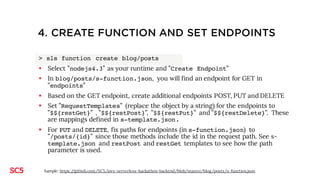
3. CREATE FUNCTION AND SET ENDPOINTS
> sls function create blog/posts
§ Select ”nodejs4.3” as your runtime and ”Create Endpoint”
§ In blog/posts/s-function.json, you will find an endpoint for GET in ”endpoints”
§ Create additional endpoints for POST, PUT, DELETE (using the plugin serverless-endpoint-helper)
> sls endpoint create posts posts POST
> sls endpoint create posts posts/{id} DELETE
> sls endpoint create posts posts/{id} PUT
§ Set ”RequestTemplates” (replace the object by a string) for the endpoints to ”$${restGet}” ,
”$${restPost}”, ”$${restPut}” and ”$${restDelete}”. These are mappings defined in s-
template.json.
§ See s-template.json and restPutand restDelete templates to see how the id is retrieved from the
path parameter is used.
Sample: https://github.com/SC5/aws-serverless-hackathon-backend/blob/master/blog/posts/s-function.json
4. ENABLE CORS HEADERS FOR ENDPOINTS
q CORS headers need to be
enabled so that the
application can access the
endpoints
q To add CORS headers, add
snippet on the right to
”custom” in blog/posts/s-
function.json
"cors": {
"allowOrigin": "*",
"allowHeaders": [
"Content-Type",
"X-Amz-Date",
"Authorization",
"X-Api-Key"
]
}
Sample: https://github.com/SC5/aws-serverless-hackathon-backend/blob/master/blog/posts/s-function.json
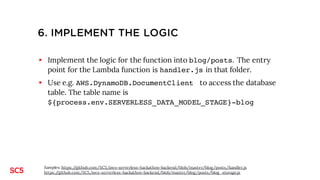
5. IMPLEMENT THE LOGIC
§ Implement the logic for the function into blog/posts. The entry
point for the Lambda function is handler.js in that folder.
§ Copy the files handler.js and blog_storage.js from github
(unless you want to code them yourself)
§ Use e.g. AWS.DynamoDB.DocumentClient to access the database
table. The table name is ${process.env.SERVERLESS_STAGE}-
${process.env.SERVERLESS_PROJECT}-blog
Samples: https://github.com/SC5/aws-serverless-hackathon-backend/blob/master/blog/posts/handler.js
https://github.com/SC5/aws-serverless-hackathon-backend/blob/master/blog/posts/blog_storage.js
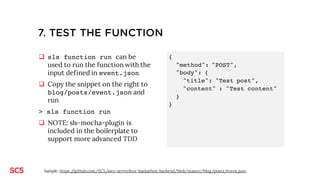
6. TEST THE FUNCTION
q sls function run can be
used to run the function with the
input defined in event.json
q Copy the snippet on the right to
blog/posts/event.json and
run
> sls function run
q NOTE: sls-mocha-plugin is
included in the boilerplate to
support more advanced TDD
{
"method": "POST",
"body": {
"title": "Test post",
"content" : "Test content"
}
}
Sample: https://github.com/SC5/aws-serverless-hackathon-backend/blob/master/blog/posts/event.json
7. DEPLOY FUNCTIONS & ENDPOINTS
> sls function deploy posts
> sls endpoint deploy --all
This deploys the functions and endpoinst (including CORS headers).
sls dash deploy does not (currently) deploy the CORS headers.
You will get the URLs for the endpoints as response to endpoint
deploy
8. SET UP ENDPOINTS IN THE SAMPLE APP
q Launch the blog application at
http://hackathon-blog.serverless.fi
q Enter the endpoint URL (https://…/dev/posts) to the form and
save
q Try writing, editing, deleting posts
9. YOU DID IT! CONGRATS!
Next:
1. If you want to work more on serverless, check opportunities at
https://sc5.io/careers
2. If you are in the Helsinki Area and interested in serverless, join the
”Helsinki Serverless” meetup at
http://www.meetup.com/Helsinki-Serverless/
THANK YOU!
mikael.puittinen@sc5.io
@mpuittinen

AWS Serverless Workshop

  • 1.
    WELCOME TO THE AWS/ SERVERLESS WORKSHOP Mikael Puittinen, CTO mikael.puittinen@sc5.io @mpuittinen 1 22.6.2016
  • 2.
  • 3.
  • 4.
    WHY SERVERLESS? ” Oneof the biggest revolutions we have seen in the technology world in the last few years is the rise of serverless computing. This has been largely triggered by the launch of AWS Lambda that no longer requires a server(physical or virtual) to run application code. This tremendously simplifies application development as architects only need to think about business logic and no longer need to worry about managing fleets of servers to run their software. This makes it easier to achieve the security and reliability to protect their business and their customers. After all, no server is easier to manage than no server.” Werner Wogels, CTO / VP at Amazon.com (https://www.linkedin.com/pulse/simplification-technology-trend-2016-werner-vogels) A short business case
  • 5.
    SC5 & SERVERLESS- BACKGROUND AWS Lambda released AWS API Gateway released First SC5 API Gateway + Lambda project (HappyOrNot webshop) started 4 days after API Gateway release JAWS Framework 0.0.1 released First SC5 Jaws / Serverless project (Gasum Industryhack) JAWS becomes Serverless Framework 5 customer projects going on, 5 delivered based on AWS Lambda (9 of which on Serverless) A bit of history Nov 2014 July 2015 Sep 2015 Oct 2015 Dec 2015 Today
  • 6.
  • 7.
    AWS SERVERLESS COMPONENTSFOR WORKSHOP API Gateway (API Management) AWS Lambda (Compute) Dynamo (Database)
  • 8.
    AWS LAMBDA § Computeservice for running code (functions) in AWS § Provision resources required by single function run § Automatically spawns additional ”instances” if required § Invoiced based on actual compute time used (100 ms) § Input and output JSON Serverless Compute
  • 9.
    LAMBDA EXAMPLE: CALCULATOR §Open AWS Console / Lambda § Create new function § Name: ”Calculator” § Copy code from the right § Role: Create new role ”Basic execution role” § Once created, test with e.g. sample test from the right § Logs available in Cloudwatch exports.handler = function(event, context) { console.log('a =', event.a); console.log('b =', event.b); context.succeed({ sum: event.a + event.b }); }; TEST: { ”a”: 10, ”b”: 20 }
  • 10.
    API GATEWAY § AWSService to implement REST (and other) APIs § Security via API Keys, customer authorizers § Connect to e.g. Lambda to publish your functions as REST interfaces § Input / Output mapping (e.g. URL parameters -> JSON) § No need for provisioning § Invoicing based on # of requests + data transfer + cache size Serverless REST API
  • 11.
    API GATEWAY EXAMPLE §Launch API Gateway from AWS Console § Create API ”Calculator” § Create resourse ”calculator” (from Actions) § Create ”POST” method for calculator resource § Integration type: Lambda Function § Deploy API to stage ”v1” § Copy URL displayed for resource § Test API with e.g. Postman
  • 12.
    DYNAMODB § noSQL databaseprovided by AWS § No server instances to manage § Provision data read / write Serverless Database
  • 13.
    SERVERLESS FRAMEWORK ” Serverlessis the application framework for building web, mobile and IoT applications exclusively on Amazon Web Services' Lambda and API Gateway. It's a command line interface that helps you build and maintain serverless apps across teams of any size. It's also completely extensible via Plugins. We believe AWS Lambda will be the focal point of the AWS cloud, and the Serverless Framework interprets AWS from Lambda's perspective.” https://github.com/serverless/serverless
  • 14.
  • 15.
    CHALLENGES 1. Guided challenge: Blog backend on serverless 2. Slackbot on serverless 3. Generic HTML form handler on serverless 4. Self-picked challenge Pick your’s
  • 16.
    CHALLENGE: BLOG BACKEND Createa backend for the blog application running at http://hackathon-blog.serverless.fi/ (sources at https://github.com/SC5/aws-serverless-hackathon) Backend must have a REST API with methods 1. POST /dev/posts 2. GET /dev/posts 3. PUT /dev/posts/{postId} - OPTIONAL 4. DELETE /dev/posts/{postId} – OPTIONAL Use e.g. AWS DynamoDB as the database for blog posts. Step-by-step walkthrough available at http://hackathon.serverless.fi/workshop.pdf Guided challenge
  • 17.
    RESOURCES Blog client: https://github.com/SC5/aws-serverless-hackathon Sample blogbackend: https://github.com/SC5/aws-serverless-hackathon-backend This presentation: http://hackathon.serverless.fi/workshop.pdf
  • 18.
    GETTING READY FORTHE WORKSHOP / HACKATHON
  • 19.
    PRE-TAKEOFF CHECKLIST (1/3) qA laptop with Node 4 (recommended), 5 or 6 installed q An AWS account (https://aws.amazon.com/free) A credit card is required although no charges should occur from this workshop q AWS CLI (optional) (http://docs.aws.amazon.com/cli/latest/userguide/installing.html OR ”brew install awscli” for OSX homebrew users) Getting prepared
  • 20.
    PREPARE AWS IAMUSER FOR HACKATHON 1. Log in to AWS 2. Go to Services -> Identity and Access Management 3. Create a new user (take note of the access key + secret). Note: a credit / debit card is required. 4. Click on the new user and select the ”Permissions” tab 5. Attach the ”Administrator access” policy to the user Note: In real life scenarios, you would not assign administrator pirivileges but more finegrain permissions.
  • 21.
    SETTING UP AWSCREDENTIALS ON LAPTOP AWS CLI INSTALLED > aws configure Enter access key / secret provided to IAM user. Default region: eu-central-1 Default output: json AWS CLI NOT INSTALLED Create following files with following info. No Windows filename suffixes! ~/.aws/config [default] region = eu-west-1 output = json ~/.aws/credentials [default] aws_access_key_id = AKIAI*** aws_secret_access_key = ****
  • 22.
    TESTING THE SETUP >mkdir awstest > cd awstest > npm install aws-sdk Create awstest.js based on right frame > node awstest.js You should get your IAM account name as a response if set up correctly. awstest.js: var AWS=require('aws-sdk'); var IAM = new AWS.IAM(); IAM.getUser(function(err, data) { console.log(data.User.UserName) });
  • 23.
    INSTALL SERVERLESS Install theserverless framework globally in order to be able to use the serverless CLI to initiate new projects > npm install -g serverless
  • 24.
  • 25.
    INSTRUCTIONS When copying JSON/ other from presentation, beware of additional whitespaces. Some editors seem to add whitespaces during copy / paste. Use the source files from github in case you run into issues.
  • 26.
    1. CREATE SERVERLESSPROJECT > sls project install –n "serverless-blog" sc5-serverless-boilerplate > cd serverless-blog > npm install This creates a new project serverless-blog based on sc5-serverless- boilerplate and installs the node modules required by the project.
  • 27.
    2. CREATE DYNAMODBTABLE FOR POSTS (USING SERVERLESS) q Serverless uses AWS Cloudformation to deploy resources (deined in s-resources- cf.json) q Add snippet on the right to ”Resources” in s-resources- cf.json q Deploy with > sls resources deploy Permissions to the table are granted by default in the boilerplate template. "BlogTable": { "Type": "AWS::DynamoDB::Table", "DeletionPolicy": "Retain", "Properties": { "AttributeDefinitions": [ { "AttributeName": "id", "AttributeType": "S" } ], "KeySchema": [ { "AttributeName": "id", "KeyType": "HASH" } ], "ProvisionedThroughput": { "ReadCapacityUnits": 1, "WriteCapacityUnits": 1 }, "TableName": "${stage}-${project}-blog" } } Sample: https://github.com/SC5/aws-serverless-hackathon-backend/blob/master/s-resources-cf.json
  • 28.
    3. CREATE FUNCTIONAND SET ENDPOINTS > sls function create blog/posts § Select ”nodejs4.3” as your runtime and ”Create Endpoint” § In blog/posts/s-function.json, you will find an endpoint for GET in ”endpoints” § Create additional endpoints for POST, PUT, DELETE (using the plugin serverless-endpoint-helper) > sls endpoint create posts posts POST > sls endpoint create posts posts/{id} DELETE > sls endpoint create posts posts/{id} PUT § Set ”RequestTemplates” (replace the object by a string) for the endpoints to ”$${restGet}” , ”$${restPost}”, ”$${restPut}” and ”$${restDelete}”. These are mappings defined in s- template.json. § See s-template.json and restPutand restDelete templates to see how the id is retrieved from the path parameter is used. Sample: https://github.com/SC5/aws-serverless-hackathon-backend/blob/master/blog/posts/s-function.json
  • 29.
    4. ENABLE CORSHEADERS FOR ENDPOINTS q CORS headers need to be enabled so that the application can access the endpoints q To add CORS headers, add snippet on the right to ”custom” in blog/posts/s- function.json "cors": { "allowOrigin": "*", "allowHeaders": [ "Content-Type", "X-Amz-Date", "Authorization", "X-Api-Key" ] } Sample: https://github.com/SC5/aws-serverless-hackathon-backend/blob/master/blog/posts/s-function.json
  • 30.
    5. IMPLEMENT THELOGIC § Implement the logic for the function into blog/posts. The entry point for the Lambda function is handler.js in that folder. § Copy the files handler.js and blog_storage.js from github (unless you want to code them yourself) § Use e.g. AWS.DynamoDB.DocumentClient to access the database table. The table name is ${process.env.SERVERLESS_STAGE}- ${process.env.SERVERLESS_PROJECT}-blog Samples: https://github.com/SC5/aws-serverless-hackathon-backend/blob/master/blog/posts/handler.js https://github.com/SC5/aws-serverless-hackathon-backend/blob/master/blog/posts/blog_storage.js
  • 31.
    6. TEST THEFUNCTION q sls function run can be used to run the function with the input defined in event.json q Copy the snippet on the right to blog/posts/event.json and run > sls function run q NOTE: sls-mocha-plugin is included in the boilerplate to support more advanced TDD { "method": "POST", "body": { "title": "Test post", "content" : "Test content" } } Sample: https://github.com/SC5/aws-serverless-hackathon-backend/blob/master/blog/posts/event.json
  • 32.
    7. DEPLOY FUNCTIONS& ENDPOINTS > sls function deploy posts > sls endpoint deploy --all This deploys the functions and endpoinst (including CORS headers). sls dash deploy does not (currently) deploy the CORS headers. You will get the URLs for the endpoints as response to endpoint deploy
  • 33.
    8. SET UPENDPOINTS IN THE SAMPLE APP q Launch the blog application at http://hackathon-blog.serverless.fi q Enter the endpoint URL (https://…/dev/posts) to the form and save q Try writing, editing, deleting posts
  • 34.
    9. YOU DIDIT! CONGRATS! Next: 1. If you want to work more on serverless, check opportunities at https://sc5.io/careers 2. If you are in the Helsinki Area and interested in serverless, join the ”Helsinki Serverless” meetup at http://www.meetup.com/Helsinki-Serverless/
  • 35.