© 2022, Amazon Web Services, Inc. or its affiliates. All rights reserved.
Datavail: Fast Pass for Migrating
SQL Server to AWS
JP Chen
Senior Director of SQL Practice
Datavail
www.datavail.com 2
J
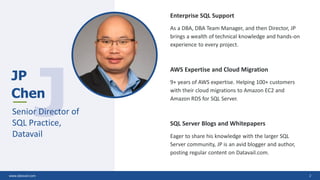
JP
Chen
Senior Director of
SQL Practice,
Datavail
Enterprise SQL Support
As a DBA, DBA Team Manager, and then Director, JP
brings a wealth of technical knowledge and hands-on
experience to every project.
AWS Expertise and Cloud Migration
9+ years of AWS expertise. Helping 100+ customers
with their cloud migrations to Amazon EC2 and
Amazon RDS for SQL Server.
SQL Server Blogs and Whitepapers
Eager to share his knowledge with the larger SQL
Server community, JP is an avid blogger and author,
posting regular content on Datavail.com.
www.datavail.com 2
Agenda
Why Migrate SQL Server to AWS?
Quick Comparison of On-Premises, IaaS, and PaaS
SQL Server Deployment Options in AWS – IaaS vs PaaS
AWS Essential Services for SQL DBAs
Migrating to Amazon RDS for SQL Server (PaaS)
AWS Database Migration Service (AWS DMS)
Migrating to SQL Server on Amazon EC2 (IaaS)
Sample Case Study – HADR, Migration, and Modernization
DBA Responsibilities in the Cloud – HADR, Migration, and Modernization
www.datavail.com 4
Target Audience, Prerequisites,
and Q&A
Level: 100 to 200
Prerequisites: Cloud experience helpful but
not required
Q&A: As we have limited time for this quick
presentation, we will do a Q&A at the end.
www.datavail.com 5
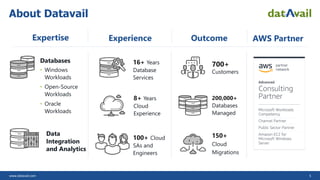
About Datavail
Databases
• Windows
Workloads
• Open-Source
Workloads
• Oracle
Workloads
100+ Cloud
SAs and
Engineers
16+ Years
Database
Services
700+
Customers
8+ Years
Cloud
Experience
200,000+
Databases
Managed
150+
Cloud
Migrations
Expertise Experience Outcome
Data
Integration
and Analytics
AWS Partner
www.datavail.com 6
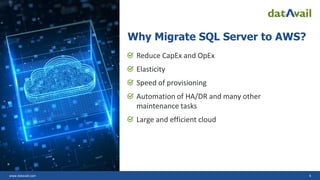
Why Migrate SQL Server to AWS?
Reduce CapEx and OpEx
Elasticity
Speed of provisioning
Automation of HA/DR and many other
maintenance tasks
Large and efficient cloud
www.datavail.com 7
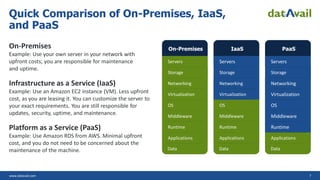
On-Premises
Example: Use your own server in your network with
upfront costs; you are responsible for maintenance
and uptime.
Infrastructure as a Service (IaaS)
Example: Use an Amazon EC2 instance (VM). Less upfront
cost, as you are leasing it. You can customize the server to
your exact requirements. You are still responsible for
updates, security, uptime, and maintenance.
Platform as a Service (PaaS)
Example: Use Amazon RDS from AWS. Minimal upfront
cost, and you do not need to be concerned about the
maintenance of the machine.
Quick Comparison of On-Premises, IaaS,
and PaaS
On-Premises
Servers
Storage
Networking
Virtualization
OS
Middleware
Runtime
Applications
Data
IaaS
Servers
Storage
Networking
Virtualization
OS
Middleware
Runtime
Applications
Data
PaaS
Servers
Storage
Networking
Virtualization
OS
Middleware
Runtime
Applications
Data
www.datavail.com 8
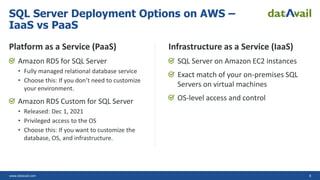
Platform as a Service (PaaS)
Amazon RDS for SQL Server
• Fully managed relational database service
• Choose this: If you don’t need to customize
your environment.
Amazon RDS Custom for SQL Server
• Released: Dec 1, 2021
• Privileged access to the OS
• Choose this: If you want to customize the
database, OS, and infrastructure.
Infrastructure as a Service (IaaS)
SQL Server on Amazon EC2 instances
Exact match of your on-premises SQL
Servers on virtual machines
OS-level access and control
SQL Server Deployment Options on AWS –
IaaS vs PaaS
www.datavail.com 9
AWS
Essential
Services for
SQL DBAs
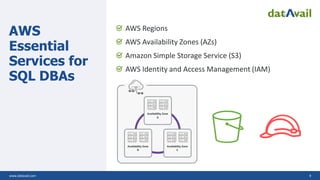
AWS Regions
AWS Availability Zones (AZs)
Amazon Simple Storage Service (S3)
AWS Identity and Access Management (IAM)
Availability Zone
C
Availability Zone
A
Availability Zone
B
www.datavail.com 10
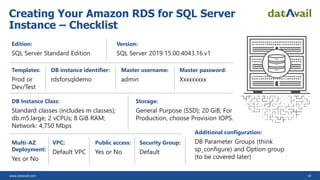
Creating Your Amazon RDS for SQL Server
Instance – Checklist
Edition:
SQL Server Standard Edition
Version:
SQL Server 2019 15.00.4043.16.v1
Templates:
Prod or
Dev/Test
DB instance identifier:
rdsforsqldemo
Master username:
admin
Master password:
Xxxxxxxxx
DB Instance Class:
Standard classes (includes m classes);
db.m5.large; 2 vCPUs; 8 GiB RAM;
Network: 4,750 Mbps
Storage:
General Purpose (SSD); 20 GiB; For
Production, choose Provision IOPS.
Multi-AZ
Deployment:
Yes or No
VPC:
Default VPC
Public access:
Yes or No
Security Group:
Default
Additional configuration:
DB Parameter Groups (think
sp_configure) and Option group
(to be covered later)
www.datavail.com 11
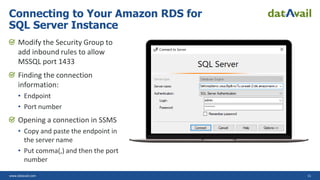
Modify the Security Group to
add inbound rules to allow
MSSQL port 1433
Finding the connection
information:
• Endpoint
• Port number
Opening a connection in SSMS
• Copy and paste the endpoint in
the server name
• Put comma(,) and then the port
number
Connecting to Your Amazon RDS for
SQL Server Instance
www.datavail.com 12
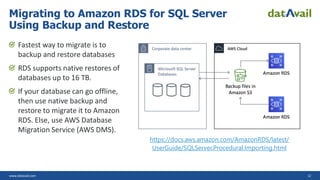
Fastest way to migrate is to
backup and restore databases
RDS supports native restores of
databases up to 16 TB.
If your database can go offline,
then use native backup and
restore to migrate it to Amazon
RDS. Else, use AWS Database
Migration Service (AWS DMS).
Migrating to Amazon RDS for SQL Server
Using Backup and Restore
https://docs.aws.amazon.com/AmazonRDS/latest/
UserGuide/SQLServer.Procedural.Importing.html
www.datavail.com 13
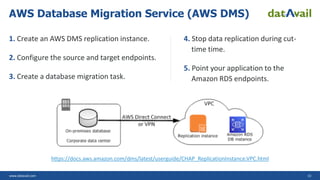
1. Create an AWS DMS replication instance.
2. Configure the source and target endpoints.
3. Create a database migration task.
4. Stop data replication during cut-
time time.
5. Point your application to the
Amazon RDS endpoints.
AWS Database Migration Service (AWS DMS)
https://docs.aws.amazon.com/dms/latest/userguide/CHAP_ReplicationInstance.VPC.html
www.datavail.com 14
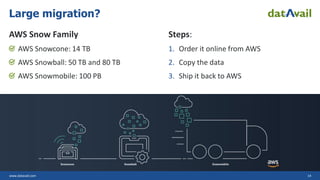
AWS Snow Family
AWS Snowcone: 14 TB
AWS Snowball: 50 TB and 80 TB
AWS Snowmobile: 100 PB
Steps:
1. Order it online from AWS
2. Copy the data
3. Ship it back to AWS
Large migration?
www.datavail.com 15
Considerations
Need full control, backups, replication, clustering,
and options not available in Amazon RDS.
Run SQL Server on Amazon EC2 instances (VMs)
Planning
Take a performance baseline of your
on-premises instance
Identify hardware, capacity, storage, and
network requirements
Determine the backup strategy and
availability requirements
Agree with your teams on the application
migration and cutover strategy.
Post-Migration Activities
Run index and statistics maintenance jobs
Enable database monitoring and alerting
Perform query tuning, wait stats analysis, and
tempdb optimization
Capture performance baseline on a continual
basis for benchmarking
Migrating to SQL Server on Amazon EC2
(IaaS)
www.datavail.com 16
Sample Case Study – HADR,
Migration, and Modernization
Situation: On-premises environment and challenges
Tasks: Enable HADR, increase performance, and move
out of the old data center
Action: Setup SQL Server Always-On Availability Group
(AOAG)
Result: HADR, performance, environments
resemblance, and AWS Cloud environment
www.datavail.com 17
On-Premises Environment
and Challenges
Active/pass clustered SQL instances
Real-time reporting for BI and analytics
Production and non-production
environments disparity
Infrastructure modernization
Data center lease is up at end of year
www.datavail.com 18
Enable HADR, Increase
Performance, and Move Out of
the Old Data Center
Enable HADR
Replace replication
Increase performance
Reduce environments disparity
Migrate to the AWS Cloud
www.datavail.com 19
Baselining the On-premises Environment:
• Run PerfMon to capture the performance for a typical workload: memory, disk, CPU, and SQL
• Save the results for benchmarking purposes
Planning for the migration:
• Instance type: vCPU, memory (GiB), instance storage (GiB), networking performance (Gbps),
and Amazon EBS bandwidth (Mbps)
• AWS Region and AZs: Oregon Region with 3 AZs
• AWS Pricing Calculator: https://calculator.aws/#/
Team Sport:
• DBA, systems, network, dev, and PMO
• Luckily, we always have amazing teams to collaborate with us
Set up and Migrate to SQL Server Always-On
Availability Group (AOAG) on AWS
www.datavail.com 20
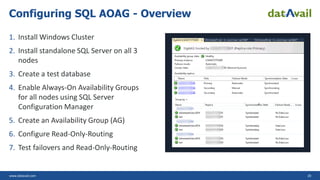
1. Install Windows Cluster
2. Install standalone SQL Server on all 3
nodes
3. Create a test database
4. Enable Always-On Availability Groups
for all nodes using SQL Server
Configuration Manager
5. Create an Availability Group (AG)
6. Configure Read-Only-Routing
7. Test failovers and Read-Only-Routing
Configuring SQL AOAG - Overview
www.datavail.com 21
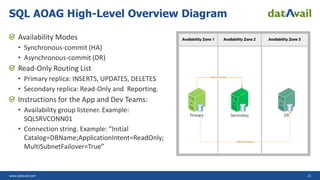
Availability Modes
• Synchronous-commit (HA)
• Asynchronous-commit (DR)
Read-Only Routing List
• Primary replica: INSERTS, UPDATES, DELETES
• Secondary replica: Read-Only and Reporting.
Instructions for the App and Dev Teams:
• Availability group listener. Example:
SQLSRVCONN01
• Connection string. Example: “Initial
Catalog=DBName;ApplicationIntent=ReadOnly;
MultiSubnetFailover=True”
SQL AOAG High-Level Overview Diagram
www.datavail.com 22
HADR, Performance,
Environments Resemblance, and
AWS Cloud Environment
HA
DR
Performance gain through Read-Only Routing
Non-production environments provision through AMI
AWS Cloud environment
www.datavail.com 23
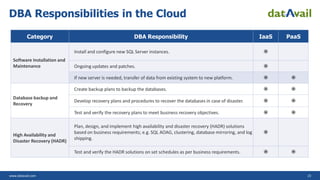
DBA Responsibilities in the Cloud
Category DBA Responsibility IaaS PaaS
Software Installation and
Maintenance
Install and configure new SQL Server instances. 
Ongoing updates and patches. 
If new server is needed, transfer of data from existing system to new platform.  
Database backup and
Recovery
Create backup plans to backup the databases.  
Develop recovery plans and procedures to recover the databases in case of disaster.  
Test and verify the recovery plans to meet business recovery objectives.  
High Availability and
Disaster Recovery (HADR)
Plan, design, and implement high availability and disaster recovery (HADR) solutions
based on business requirements; e.g. SQL AOAG, clustering, database mirroring, and log
shipping.

Test and verify the HADR solutions on set schedules as per business requirements.  
www.datavail.com 24
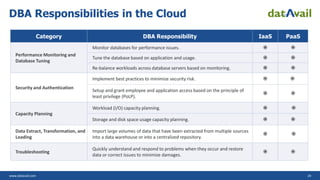
DBA Responsibilities in the Cloud
Category DBA Responsibility IaaS PaaS
Performance Monitoring and
Database Tuning
Monitor databases for performance issues.  
Tune the database based on application and usage.  
Re-balance workloads across database servers based on monitoring.  
Security and Authentication
Implement best practices to minimize security risk.  
Setup and grant employee and application access based on the principle of
least privilege (PoLP).
 
Capacity Planning
Workload (I/O) capacity planning.  
Storage and disk space usage capacity planning.  
Data Extract, Transformation, and
Loading
Import large volumes of data that have been extracted from multiple sources
into a data warehouse or into a centralized repository.
 
Troubleshooting
Quickly understand and respond to problems when they occur and restore
data or correct issues to minimize damages.
 
© 2022, Amazon Web Services, Inc. or its affiliates. All rights reserved.
Thank you!
JP Chen
jing.chen@datavail.com

Fast Pass for Migrating SQL Server to AWS

  • 1.
    © 2022, AmazonWeb Services, Inc. or its affiliates. All rights reserved. Datavail: Fast Pass for Migrating SQL Server to AWS JP Chen Senior Director of SQL Practice Datavail
  • 2.
    www.datavail.com 2 J JP Chen Senior Directorof SQL Practice, Datavail Enterprise SQL Support As a DBA, DBA Team Manager, and then Director, JP brings a wealth of technical knowledge and hands-on experience to every project. AWS Expertise and Cloud Migration 9+ years of AWS expertise. Helping 100+ customers with their cloud migrations to Amazon EC2 and Amazon RDS for SQL Server. SQL Server Blogs and Whitepapers Eager to share his knowledge with the larger SQL Server community, JP is an avid blogger and author, posting regular content on Datavail.com. www.datavail.com 2
  • 3.
    Agenda Why Migrate SQLServer to AWS? Quick Comparison of On-Premises, IaaS, and PaaS SQL Server Deployment Options in AWS – IaaS vs PaaS AWS Essential Services for SQL DBAs Migrating to Amazon RDS for SQL Server (PaaS) AWS Database Migration Service (AWS DMS) Migrating to SQL Server on Amazon EC2 (IaaS) Sample Case Study – HADR, Migration, and Modernization DBA Responsibilities in the Cloud – HADR, Migration, and Modernization
  • 4.
    www.datavail.com 4 Target Audience,Prerequisites, and Q&A Level: 100 to 200 Prerequisites: Cloud experience helpful but not required Q&A: As we have limited time for this quick presentation, we will do a Q&A at the end.
  • 5.
    www.datavail.com 5 About Datavail Databases •Windows Workloads • Open-Source Workloads • Oracle Workloads 100+ Cloud SAs and Engineers 16+ Years Database Services 700+ Customers 8+ Years Cloud Experience 200,000+ Databases Managed 150+ Cloud Migrations Expertise Experience Outcome Data Integration and Analytics AWS Partner
  • 6.
    www.datavail.com 6 Why MigrateSQL Server to AWS? Reduce CapEx and OpEx Elasticity Speed of provisioning Automation of HA/DR and many other maintenance tasks Large and efficient cloud
  • 7.
    www.datavail.com 7 On-Premises Example: Useyour own server in your network with upfront costs; you are responsible for maintenance and uptime. Infrastructure as a Service (IaaS) Example: Use an Amazon EC2 instance (VM). Less upfront cost, as you are leasing it. You can customize the server to your exact requirements. You are still responsible for updates, security, uptime, and maintenance. Platform as a Service (PaaS) Example: Use Amazon RDS from AWS. Minimal upfront cost, and you do not need to be concerned about the maintenance of the machine. Quick Comparison of On-Premises, IaaS, and PaaS On-Premises Servers Storage Networking Virtualization OS Middleware Runtime Applications Data IaaS Servers Storage Networking Virtualization OS Middleware Runtime Applications Data PaaS Servers Storage Networking Virtualization OS Middleware Runtime Applications Data
  • 8.
    www.datavail.com 8 Platform asa Service (PaaS) Amazon RDS for SQL Server • Fully managed relational database service • Choose this: If you don’t need to customize your environment. Amazon RDS Custom for SQL Server • Released: Dec 1, 2021 • Privileged access to the OS • Choose this: If you want to customize the database, OS, and infrastructure. Infrastructure as a Service (IaaS) SQL Server on Amazon EC2 instances Exact match of your on-premises SQL Servers on virtual machines OS-level access and control SQL Server Deployment Options on AWS – IaaS vs PaaS
  • 9.
    www.datavail.com 9 AWS Essential Services for SQLDBAs AWS Regions AWS Availability Zones (AZs) Amazon Simple Storage Service (S3) AWS Identity and Access Management (IAM) Availability Zone C Availability Zone A Availability Zone B
  • 10.
    www.datavail.com 10 Creating YourAmazon RDS for SQL Server Instance – Checklist Edition: SQL Server Standard Edition Version: SQL Server 2019 15.00.4043.16.v1 Templates: Prod or Dev/Test DB instance identifier: rdsforsqldemo Master username: admin Master password: Xxxxxxxxx DB Instance Class: Standard classes (includes m classes); db.m5.large; 2 vCPUs; 8 GiB RAM; Network: 4,750 Mbps Storage: General Purpose (SSD); 20 GiB; For Production, choose Provision IOPS. Multi-AZ Deployment: Yes or No VPC: Default VPC Public access: Yes or No Security Group: Default Additional configuration: DB Parameter Groups (think sp_configure) and Option group (to be covered later)
  • 11.
    www.datavail.com 11 Modify theSecurity Group to add inbound rules to allow MSSQL port 1433 Finding the connection information: • Endpoint • Port number Opening a connection in SSMS • Copy and paste the endpoint in the server name • Put comma(,) and then the port number Connecting to Your Amazon RDS for SQL Server Instance
  • 12.
    www.datavail.com 12 Fastest wayto migrate is to backup and restore databases RDS supports native restores of databases up to 16 TB. If your database can go offline, then use native backup and restore to migrate it to Amazon RDS. Else, use AWS Database Migration Service (AWS DMS). Migrating to Amazon RDS for SQL Server Using Backup and Restore https://docs.aws.amazon.com/AmazonRDS/latest/ UserGuide/SQLServer.Procedural.Importing.html
  • 13.
    www.datavail.com 13 1. Createan AWS DMS replication instance. 2. Configure the source and target endpoints. 3. Create a database migration task. 4. Stop data replication during cut- time time. 5. Point your application to the Amazon RDS endpoints. AWS Database Migration Service (AWS DMS) https://docs.aws.amazon.com/dms/latest/userguide/CHAP_ReplicationInstance.VPC.html
  • 14.
    www.datavail.com 14 AWS SnowFamily AWS Snowcone: 14 TB AWS Snowball: 50 TB and 80 TB AWS Snowmobile: 100 PB Steps: 1. Order it online from AWS 2. Copy the data 3. Ship it back to AWS Large migration?
  • 15.
    www.datavail.com 15 Considerations Need fullcontrol, backups, replication, clustering, and options not available in Amazon RDS. Run SQL Server on Amazon EC2 instances (VMs) Planning Take a performance baseline of your on-premises instance Identify hardware, capacity, storage, and network requirements Determine the backup strategy and availability requirements Agree with your teams on the application migration and cutover strategy. Post-Migration Activities Run index and statistics maintenance jobs Enable database monitoring and alerting Perform query tuning, wait stats analysis, and tempdb optimization Capture performance baseline on a continual basis for benchmarking Migrating to SQL Server on Amazon EC2 (IaaS)
  • 16.
    www.datavail.com 16 Sample CaseStudy – HADR, Migration, and Modernization Situation: On-premises environment and challenges Tasks: Enable HADR, increase performance, and move out of the old data center Action: Setup SQL Server Always-On Availability Group (AOAG) Result: HADR, performance, environments resemblance, and AWS Cloud environment
  • 17.
    www.datavail.com 17 On-Premises Environment andChallenges Active/pass clustered SQL instances Real-time reporting for BI and analytics Production and non-production environments disparity Infrastructure modernization Data center lease is up at end of year
  • 18.
    www.datavail.com 18 Enable HADR,Increase Performance, and Move Out of the Old Data Center Enable HADR Replace replication Increase performance Reduce environments disparity Migrate to the AWS Cloud
  • 19.
    www.datavail.com 19 Baselining theOn-premises Environment: • Run PerfMon to capture the performance for a typical workload: memory, disk, CPU, and SQL • Save the results for benchmarking purposes Planning for the migration: • Instance type: vCPU, memory (GiB), instance storage (GiB), networking performance (Gbps), and Amazon EBS bandwidth (Mbps) • AWS Region and AZs: Oregon Region with 3 AZs • AWS Pricing Calculator: https://calculator.aws/#/ Team Sport: • DBA, systems, network, dev, and PMO • Luckily, we always have amazing teams to collaborate with us Set up and Migrate to SQL Server Always-On Availability Group (AOAG) on AWS
  • 20.
    www.datavail.com 20 1. InstallWindows Cluster 2. Install standalone SQL Server on all 3 nodes 3. Create a test database 4. Enable Always-On Availability Groups for all nodes using SQL Server Configuration Manager 5. Create an Availability Group (AG) 6. Configure Read-Only-Routing 7. Test failovers and Read-Only-Routing Configuring SQL AOAG - Overview
  • 21.
    www.datavail.com 21 Availability Modes •Synchronous-commit (HA) • Asynchronous-commit (DR) Read-Only Routing List • Primary replica: INSERTS, UPDATES, DELETES • Secondary replica: Read-Only and Reporting. Instructions for the App and Dev Teams: • Availability group listener. Example: SQLSRVCONN01 • Connection string. Example: “Initial Catalog=DBName;ApplicationIntent=ReadOnly; MultiSubnetFailover=True” SQL AOAG High-Level Overview Diagram
  • 22.
    www.datavail.com 22 HADR, Performance, EnvironmentsResemblance, and AWS Cloud Environment HA DR Performance gain through Read-Only Routing Non-production environments provision through AMI AWS Cloud environment
  • 23.
    www.datavail.com 23 DBA Responsibilitiesin the Cloud Category DBA Responsibility IaaS PaaS Software Installation and Maintenance Install and configure new SQL Server instances.  Ongoing updates and patches.  If new server is needed, transfer of data from existing system to new platform.   Database backup and Recovery Create backup plans to backup the databases.   Develop recovery plans and procedures to recover the databases in case of disaster.   Test and verify the recovery plans to meet business recovery objectives.   High Availability and Disaster Recovery (HADR) Plan, design, and implement high availability and disaster recovery (HADR) solutions based on business requirements; e.g. SQL AOAG, clustering, database mirroring, and log shipping.  Test and verify the HADR solutions on set schedules as per business requirements.  
  • 24.
    www.datavail.com 24 DBA Responsibilitiesin the Cloud Category DBA Responsibility IaaS PaaS Performance Monitoring and Database Tuning Monitor databases for performance issues.   Tune the database based on application and usage.   Re-balance workloads across database servers based on monitoring.   Security and Authentication Implement best practices to minimize security risk.   Setup and grant employee and application access based on the principle of least privilege (PoLP).   Capacity Planning Workload (I/O) capacity planning.   Storage and disk space usage capacity planning.   Data Extract, Transformation, and Loading Import large volumes of data that have been extracted from multiple sources into a data warehouse or into a centralized repository.   Troubleshooting Quickly understand and respond to problems when they occur and restore data or correct issues to minimize damages.  
  • 25.
    © 2022, AmazonWeb Services, Inc. or its affiliates. All rights reserved. Thank you! JP Chen jing.chen@datavail.com