Cloud Tutorial: AWS IoT
CSE 521S Fall
Sep. 17, 2020
Ruixuan (Corey) Dai
XaaS: Basics in Cloud Computing
Cloud Computing
9/17/20 3
Ø Cloud computing provides shared pool of configurable
computing resource to end users on demand
Ø Three service models
q IaaS (Infrastructure as a Service): virtual machines, storage,
network …
q PaaS (Platform as a Service): execution runtime, middleware,
web server, database, development tool …
q SaaS (Software as a Service): email, virtual desktop, games …
Cloud Services: On-premise Software
Ø Traditional
Ø installed and runs on
personal computer
Ø You Manage and Deploy
q Hardware
q OS
q Software
Ø Example
q This presentation
9/17/20 4
APP
Data
Runtime
Middleware
OS
Virtualization
Server
Storage
Network
You
Manage
Infrastructure as a Service (IaaS)
Ø IaaS
q "physical server box”
q Virtual Machine
• Memory
• Storage
• CPU
• Network
Ø Example
q AWS EC2
q AWS EFS
Ø Use case
q Build up youVM cluster
9/17/20 5
You
Manage
APP
Data
Runtime
Middleware
OS
Virtualization
Server
Storage
Network
Service
Provider
Manages
Web
Service
Platform as a Service (PaaS)
Ø PaaS
q You get a framework
q Host Application
q Tools
Ø Example
q AWS IoT
Ø Use case
q Build up you’re smart A/C
controller
9/17/20 6
You
Manage
Service
Provider
Manages
APP
Data
Runtime
Middleware
OS
Virtualization
Server
Storage
Network
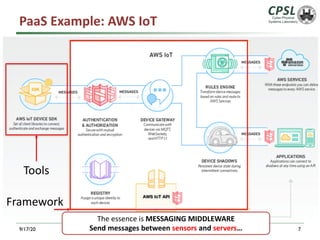
PaaS Example: AWS IoT
9/17/20 7
Tools
Framework
The essence is MESSAGING MIDDLEWARE
Send messages between sensors and servers…
Software as a Service (SaaS)
Ø SaaS
q You get a whole solution
Ø Example
q Gmail
q Dropbox
q Office365
9/17/20 8
Service
Provider
Manages
APP
Data
Runtime
Middleware
OS
Virtualization
Server
Storage
Network
XaaS: A Recap
9/17/20 9
APP
Data
Runtime
Middleware
OS
Virtualization
Server
Storage
Network
You
Manage
You
Manage
APP
Data
Runtime
Middleware
OS
Virtualization
Server
Storage
Network
Service
Provider
Manages
You
Manage
Service
Provider
Manages
APP
Data
Runtime
Middleware
OS
Virtualization
Server
Storage
Network
Service
Provider
Manages
APP
Data
Runtime
Middleware
OS
Virtualization
Server
Storage
Network
On-Premise IaaS PaaS SaaS
Tutorial: Hello! AWS IoT!!
Internet-of-Things
9/17/20 11
Ø Internet-of-Things
q Devices
• DifferentTypes
§ Sensors, actuators
q Data and Command
• Sensing the world
• Give Response
q Challenge
• United: Connected + Communication
• Smart: Data Analytics + Strategy
Source: https://aws.amazon.com/iot-platform/
http://www.brain-smart.net/smart-brain-health-blog/page/2/#axzz4W4oSp8a6
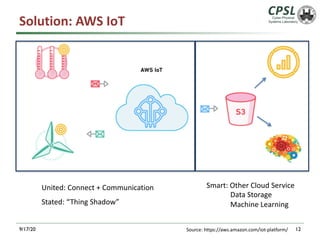
Solution: AWS IoT
9/17/20 12
United: Connect + Communication Smart: Other Cloud Service
Data Storage
Machine Learning
Source: https://aws.amazon.com/iot-platform/
Stated: “Thing Shadow”
Tutorial: Hello AWS IoT!
9/17/20 13
Source: https://aws.amazon.com/iot-platform/
Publish to a topic
Amazon SNS
Forward
Subscribe to a topic
Temperature sensor
Period: 5s (0.2Hz)
Message middleware
Ø Key concepts:
q Publisher (e.g. Sensor), Subscriber (e.g. Server), Topic
• Topic is used to identify the message.
Ø Not a traditional “peer-to-peer” communication.
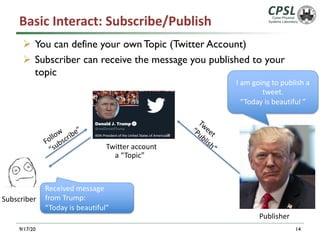
Basic Interact: Subscribe/Publish
9/17/20 14
Ø You can define your own Topic (Twitter Account)
Ø Subscriber can receive the message you published to your
topic
Follow
“subscribe”
a “Topic”
I am going to publish a
tweet.
“Today is beautiful ”
Twitter account
Tweet
“Publish”
Received message
from Trump:
“Today is beautiful”
Subscriber
Publisher
Resources
Ø Amazon IoT
q http://docs.aws.amazon.com/iot/latest/developerguide/what-is-
aws-iot.html
Ø Raspberry Pi
q https://www.raspberrypi.org/
Ø Resource list for course projects
q http://cps.cse.wustl.edu/index.php/List_of_Projects
Ø Apply for $40 credits for Amazon AWS
q https://aws.amazon.com/education/awseducate/apply/
15
Get into AWS Manage Console
Ø Create your own AWS account
Ø Sign In IoT Manage Console
q https://aws.amazon.com/iot/
9/17/20 16
Step 1: Create a Virtual "Thing”
9/17/20 17
AWS IoT
Virtual “Thing”
/ Shadow
Ø Virtual “Thing”: a virtual copy of your thing
q A Thing in AWS IoT has a “shadow”
• a JSON document that is used to store and retrieve current
state information for a device.
§ E.g. Battery level, Connectivity, data
q Shadow is a special topic in AWS IoT
Ø Certificates and policy
q Authentication, Security
q Permission and roles
A “Dashboard” to show some info
Certificates -> your ID
Policy -> your permission book
Create a thing
Ø 1.AWS IoT Menu
• Things è Create
Ø 2. Give a name
9/17/20 18
19
20
21
The keys and cert will be used
later
Create Policy
Ø A policy is attached to a key/cert
q It tells what this key/cert can do
22
23
Here, we grant it all permissions for demo!
24
This is the policy you created
Attach Policy
Ø Attach Policy to the key/cert
q A policy tells what this key/cert can do
25
Click the cert you
just created
26
27
28
Now, you have a virtual thing on AWS!
AWS Things Summary
29
q Certificate: authenticate the device
q Policy: define the roles/permissions of the
certificate
q Virtual copy of the thing (Shadow): Store/retrieve
some information
Let’s test it online!
Basic Interact: Publish to the “Shadow”
Ø Get your “Shadow”
q In your Thing Page
9/17/20 31
Shadow Topic
Shadow is a special topic
Find your “Shadow” Topic
Ø Topic: can be seen as the “address”
9/17/20 32
https://docs.aws.amazon.com/iot/latest/developerguide/device-shadow-mqtt.html?icmpid=docs_iot_console
Shadow Topic:
$aws/things/cse521/shadow/update
Ø Using Embedded Test Client to Test
q In AWS IoT Page
9/17/20 33
Your Shadow Topic
Topic Message
Shadow Message
{ "state": {
"reported":{
"welcome": "CSE521s",
"time":"13:45",
"temperature":"25"}
},
"message": "Hello from CSE521s console"}
34
A Shadow Message is a JSON object.
Shadow message has strict formats.
Please see
https://docs.aws.amazon.com/iot/latest/developerguide/device-
shadow-document-syntax.html
Update Shadow
Ø In your “Thing” Page
35
Basic Interact: Subscribe/Publish
9/17/20 36
Ø You can define your own Topic
Ø Once you have a subscriber that is subscribed to the topic,
the subscriber can receive the message
Temperature sensor
Period: 5s (0.2Hz)
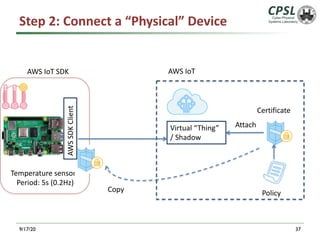
Step 2: Connect a “Physical” Device
9/17/20 37
AWS IoT
Virtual “Thing”
/ Shadow
Attach
Certificate
Policy
Copy
AWS
SDK
Client
AWS IoT SDK
Connect your Device
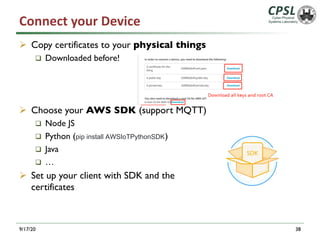
Ø Copy certificates to your physical things
q Downloaded before!
Ø Choose your AWS SDK (support MQTT)
q Node JS
q Python (pip install AWSIoTPythonSDK)
q Java
q …
Ø Set up your client with SDK and the
certificates
9/17/20 38
Some Notes
Ø 1. Copy the certificates/keys to your real thing
Ø 2.You will need the endpoint and port (8883)
Ø 3. Set up your configuration of the code with SDK
9/17/20 39
Host(Endpoint)
Change your code
accordingly!
SDK and Demo Codes
Ø https://github.com/aws/aws-iot-device-sdk-python
Ø https://github.com/aws/aws-iot-device-sdk-
python/blob/master/samples/basicPubSub/basicPubSub.py
40
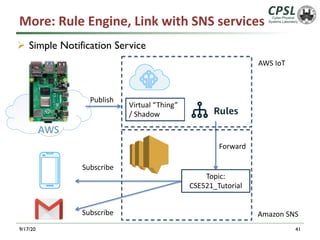
More: Rule Engine, Link with SNS services
Ø Simple Notification Service
9/17/20 41
Publish
Amazon SNS
AWS IoT
Virtual “Thing”
/ Shadow
Forward
Topic:
CSE521_Tutorial
Subscribe
Subscribe
AWS
EC2 t2.micro
Create a Rule in Amazon IoT
Ø Add a query to filter your interesting topic (event)
Ø Add an Action:
q Forward this message to SNS
q Specify Dest ARN
q Enable Rule
9/17/20 42
Notification on SMS & Email
9/17/20 43
One More Thing: Account Security
Ø DON’T UPLOADYOUR KEY PUBLICLY!!!
9/17/20 44
Time to Open Source!
Source: WeChat Subscriptions: 西乔《神秘的程序员们 39》 Geek Life Chpt 39.
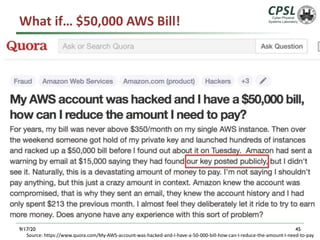
What if… $50,000 AWS Bill!
9/17/20 45
Source: https://www.quora.com/My-AWS-account-was-hacked-and-I-have-a-50-000-bill-how-can-I-reduce-the-amount-I-need-to-pay
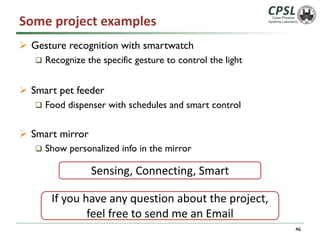
Some project examples
Ø Gesture recognition with smartwatch
q Recognize the specific gesture to control the light
Ø Smart pet feeder
q Food dispenser with schedules and smart control
Ø Smart mirror
q Show personalized info in the mirror
46
Sensing, Connecting, Smart
If you have any question about the project,
feel free to send me an Email
Thanks!
Ruixuan Dai

Aws iot

  • 1.
    Cloud Tutorial: AWSIoT CSE 521S Fall Sep. 17, 2020 Ruixuan (Corey) Dai
  • 2.
    XaaS: Basics inCloud Computing
  • 3.
    Cloud Computing 9/17/20 3 ØCloud computing provides shared pool of configurable computing resource to end users on demand Ø Three service models q IaaS (Infrastructure as a Service): virtual machines, storage, network … q PaaS (Platform as a Service): execution runtime, middleware, web server, database, development tool … q SaaS (Software as a Service): email, virtual desktop, games …
  • 4.
    Cloud Services: On-premiseSoftware Ø Traditional Ø installed and runs on personal computer Ø You Manage and Deploy q Hardware q OS q Software Ø Example q This presentation 9/17/20 4 APP Data Runtime Middleware OS Virtualization Server Storage Network You Manage
  • 5.
    Infrastructure as aService (IaaS) Ø IaaS q "physical server box” q Virtual Machine • Memory • Storage • CPU • Network Ø Example q AWS EC2 q AWS EFS Ø Use case q Build up youVM cluster 9/17/20 5 You Manage APP Data Runtime Middleware OS Virtualization Server Storage Network Service Provider Manages Web Service
  • 6.
    Platform as aService (PaaS) Ø PaaS q You get a framework q Host Application q Tools Ø Example q AWS IoT Ø Use case q Build up you’re smart A/C controller 9/17/20 6 You Manage Service Provider Manages APP Data Runtime Middleware OS Virtualization Server Storage Network
  • 7.
    PaaS Example: AWSIoT 9/17/20 7 Tools Framework The essence is MESSAGING MIDDLEWARE Send messages between sensors and servers…
  • 8.
    Software as aService (SaaS) Ø SaaS q You get a whole solution Ø Example q Gmail q Dropbox q Office365 9/17/20 8 Service Provider Manages APP Data Runtime Middleware OS Virtualization Server Storage Network
  • 9.
    XaaS: A Recap 9/17/209 APP Data Runtime Middleware OS Virtualization Server Storage Network You Manage You Manage APP Data Runtime Middleware OS Virtualization Server Storage Network Service Provider Manages You Manage Service Provider Manages APP Data Runtime Middleware OS Virtualization Server Storage Network Service Provider Manages APP Data Runtime Middleware OS Virtualization Server Storage Network On-Premise IaaS PaaS SaaS
  • 10.
  • 11.
    Internet-of-Things 9/17/20 11 Ø Internet-of-Things qDevices • DifferentTypes § Sensors, actuators q Data and Command • Sensing the world • Give Response q Challenge • United: Connected + Communication • Smart: Data Analytics + Strategy Source: https://aws.amazon.com/iot-platform/ http://www.brain-smart.net/smart-brain-health-blog/page/2/#axzz4W4oSp8a6
  • 12.
    Solution: AWS IoT 9/17/2012 United: Connect + Communication Smart: Other Cloud Service Data Storage Machine Learning Source: https://aws.amazon.com/iot-platform/ Stated: “Thing Shadow”
  • 13.
    Tutorial: Hello AWSIoT! 9/17/20 13 Source: https://aws.amazon.com/iot-platform/ Publish to a topic Amazon SNS Forward Subscribe to a topic Temperature sensor Period: 5s (0.2Hz) Message middleware Ø Key concepts: q Publisher (e.g. Sensor), Subscriber (e.g. Server), Topic • Topic is used to identify the message. Ø Not a traditional “peer-to-peer” communication.
  • 14.
    Basic Interact: Subscribe/Publish 9/17/2014 Ø You can define your own Topic (Twitter Account) Ø Subscriber can receive the message you published to your topic Follow “subscribe” a “Topic” I am going to publish a tweet. “Today is beautiful ” Twitter account Tweet “Publish” Received message from Trump: “Today is beautiful” Subscriber Publisher
  • 15.
    Resources Ø Amazon IoT qhttp://docs.aws.amazon.com/iot/latest/developerguide/what-is- aws-iot.html Ø Raspberry Pi q https://www.raspberrypi.org/ Ø Resource list for course projects q http://cps.cse.wustl.edu/index.php/List_of_Projects Ø Apply for $40 credits for Amazon AWS q https://aws.amazon.com/education/awseducate/apply/ 15
  • 16.
    Get into AWSManage Console Ø Create your own AWS account Ø Sign In IoT Manage Console q https://aws.amazon.com/iot/ 9/17/20 16
  • 17.
    Step 1: Createa Virtual "Thing” 9/17/20 17 AWS IoT Virtual “Thing” / Shadow Ø Virtual “Thing”: a virtual copy of your thing q A Thing in AWS IoT has a “shadow” • a JSON document that is used to store and retrieve current state information for a device. § E.g. Battery level, Connectivity, data q Shadow is a special topic in AWS IoT Ø Certificates and policy q Authentication, Security q Permission and roles A “Dashboard” to show some info Certificates -> your ID Policy -> your permission book
  • 18.
    Create a thing Ø1.AWS IoT Menu • Things è Create Ø 2. Give a name 9/17/20 18
  • 19.
  • 20.
  • 21.
    21 The keys andcert will be used later
  • 22.
    Create Policy Ø Apolicy is attached to a key/cert q It tells what this key/cert can do 22
  • 23.
    23 Here, we grantit all permissions for demo!
  • 24.
    24 This is thepolicy you created
  • 25.
    Attach Policy Ø AttachPolicy to the key/cert q A policy tells what this key/cert can do 25 Click the cert you just created
  • 26.
  • 27.
  • 28.
    28 Now, you havea virtual thing on AWS!
  • 29.
    AWS Things Summary 29 qCertificate: authenticate the device q Policy: define the roles/permissions of the certificate q Virtual copy of the thing (Shadow): Store/retrieve some information
  • 30.
  • 31.
    Basic Interact: Publishto the “Shadow” Ø Get your “Shadow” q In your Thing Page 9/17/20 31 Shadow Topic Shadow is a special topic
  • 32.
    Find your “Shadow”Topic Ø Topic: can be seen as the “address” 9/17/20 32 https://docs.aws.amazon.com/iot/latest/developerguide/device-shadow-mqtt.html?icmpid=docs_iot_console Shadow Topic: $aws/things/cse521/shadow/update
  • 33.
    Ø Using EmbeddedTest Client to Test q In AWS IoT Page 9/17/20 33 Your Shadow Topic Topic Message
  • 34.
    Shadow Message { "state":{ "reported":{ "welcome": "CSE521s", "time":"13:45", "temperature":"25"} }, "message": "Hello from CSE521s console"} 34 A Shadow Message is a JSON object. Shadow message has strict formats. Please see https://docs.aws.amazon.com/iot/latest/developerguide/device- shadow-document-syntax.html
  • 35.
    Update Shadow Ø Inyour “Thing” Page 35
  • 36.
    Basic Interact: Subscribe/Publish 9/17/2036 Ø You can define your own Topic Ø Once you have a subscriber that is subscribed to the topic, the subscriber can receive the message
  • 37.
    Temperature sensor Period: 5s(0.2Hz) Step 2: Connect a “Physical” Device 9/17/20 37 AWS IoT Virtual “Thing” / Shadow Attach Certificate Policy Copy AWS SDK Client AWS IoT SDK
  • 38.
    Connect your Device ØCopy certificates to your physical things q Downloaded before! Ø Choose your AWS SDK (support MQTT) q Node JS q Python (pip install AWSIoTPythonSDK) q Java q … Ø Set up your client with SDK and the certificates 9/17/20 38
  • 39.
    Some Notes Ø 1.Copy the certificates/keys to your real thing Ø 2.You will need the endpoint and port (8883) Ø 3. Set up your configuration of the code with SDK 9/17/20 39 Host(Endpoint) Change your code accordingly!
  • 40.
    SDK and DemoCodes Ø https://github.com/aws/aws-iot-device-sdk-python Ø https://github.com/aws/aws-iot-device-sdk- python/blob/master/samples/basicPubSub/basicPubSub.py 40
  • 41.
    More: Rule Engine,Link with SNS services Ø Simple Notification Service 9/17/20 41 Publish Amazon SNS AWS IoT Virtual “Thing” / Shadow Forward Topic: CSE521_Tutorial Subscribe Subscribe AWS EC2 t2.micro
  • 42.
    Create a Rulein Amazon IoT Ø Add a query to filter your interesting topic (event) Ø Add an Action: q Forward this message to SNS q Specify Dest ARN q Enable Rule 9/17/20 42
  • 43.
    Notification on SMS& Email 9/17/20 43
  • 44.
    One More Thing:Account Security Ø DON’T UPLOADYOUR KEY PUBLICLY!!! 9/17/20 44 Time to Open Source! Source: WeChat Subscriptions: 西乔《神秘的程序员们 39》 Geek Life Chpt 39.
  • 45.
    What if… $50,000AWS Bill! 9/17/20 45 Source: https://www.quora.com/My-AWS-account-was-hacked-and-I-have-a-50-000-bill-how-can-I-reduce-the-amount-I-need-to-pay
  • 46.
    Some project examples ØGesture recognition with smartwatch q Recognize the specific gesture to control the light Ø Smart pet feeder q Food dispenser with schedules and smart control Ø Smart mirror q Show personalized info in the mirror 46 Sensing, Connecting, Smart If you have any question about the project, feel free to send me an Email
  • 47.