AWS CloudFormation
template with single &
redundant system
3/1/2014
Naoya Hashimoto
Table of Contents
•
•
•
•
•
•
•
•
•

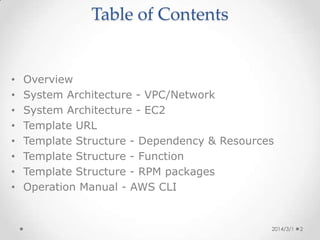
Overview
System Architecture - Network
System Architecture - EC2
Template Structure - Dependency & Resources
Template Structure - Function
Template Structure - RPM packages
Operation Manual - AWS CLI (1)
Operation Manual - AWS CLI (2)
Operation Manual - AWS CLI (3)
Overview
•
•
•
•
•

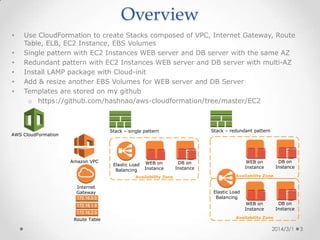
Use CloudFormation to create Stacks composed of VPC, Internet Gateway, Route
Table, ELB, EC2 Instance, EBS Volumes
Single pattern with EC2 Instances WEB server and DB server with the same AZ
Redundant pattern with EC2 Instances WEB server and DB server with multi-AZ
Install LAMP package with Cloud-init
Add & resize another EBS Volumes for WEB server and DB Server

Stack – redundant pattern

Stack – single pattern

AWS CloudFormation

Amazon VPC

Elastic Load
Balancing

WEB on
Instance

Availability Zone

Internet
Gateway

DB on
Instance

WEB on
Instance

DB on
Instance

Availability Zone

Elastic Load
Balancing
DB on
Instance

WEB on
Instance
Route Table

Availability Zone

2014/3/1

3
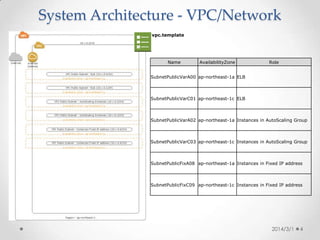
System Architecture - Network
vpc.template

Name

AvailabilityZone

Role

SubnetPublicVarA00 ap-northeast-1a ELB

SubnetPublicVarC01 ap-northeast-1c ELB

SubnetPublicVarA02 ap-northeast-1a Instances in AutoScaling Group

SubnetPublicVarC03 ap-northeast-1c Instances in AutoScaling Group

SubnetPublicFixA08 ap-northeast-1a Instances in Fixed IP address

SubnetPublicFixC09 ap-northeast-1c Instances in Fixed IP address

2014/3/1

4
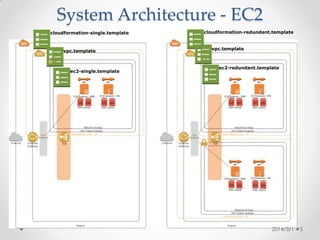
System Architecture - EC2
cloudformation-single.template

vpc.template

ec2-single.template

cloudformation-redundant.template

vpc.template

ec2-redundant.template

2014/3/1

5
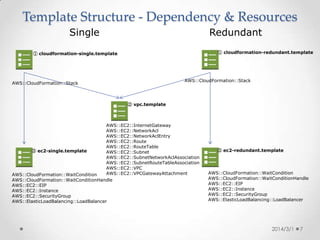
Template Structure - Dependency & Resources
Single

Redundant
① cloudformation-redundant.template

① cloudformation-single.template

AWS::CloudFormation::Stack

AWS::CloudFormation::Stack

② vpc.template

AWS::EC2::InternetGateway
AWS::EC2::NetworkAcl
AWS::EC2::NetworkAclEntry
AWS::EC2::Route
AWS::EC2::RouteTable
③ ec2-single.template
AWS::EC2::Subnet
AWS::EC2::SubnetNetworkAclAssociation
AWS::EC2::SubnetRouteTableAssociation
AWS::EC2::VPC
AWS::EC2::VPCGatewayAttachment
AWS::CloudFormation::WaitCondition
AWS::CloudFormation::WaitConditionHandle
AWS::EC2::EIP
AWS::EC2::Instance
AWS::EC2::SecurityGroup
AWS::ElasticLoadBalancing::LoadBalancer

③ ec2-redundant.template

AWS::CloudFormation::WaitCondition
AWS::CloudFormation::WaitConditionHandle
AWS::EC2::EIP
AWS::EC2::Instance
AWS::EC2::SecurityGroup
AWS::ElasticLoadBalancing::LoadBalancer

2014/3/1

6
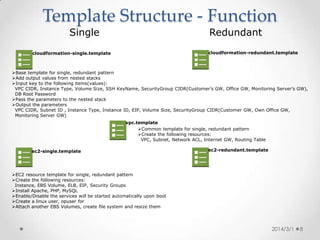
Template Structure - Function overview
Single

Redundant
cloudformation-redundant.template

cloudformation-single.template

Base template for single, redundant pattern
Add output values from nested stacks
Input key to the following items(values):
VPC CIDR, Instance Type, Volume Size, SSH KeyName, SecurityGroup CIDR(Customer’s GW, Office GW, Monitoring Server’s GW),
DB Root Password
Pass the parameters to the nested stack
Output the parameters
VPC CIDR, Subnet ID , Instance Type, Instance ID, EIP, Volume Size, SecurityGroup CIDR(Customer GW, Own Office GW,
Monitoring Server GW)
vpc.template
Common template for single, redundant pattern
Create the following resources:
VPC, Subnet, Network ACL, Internet GW, Routing Table
ec2-single.template

ec2-redundant.template

EC2 resource template for single, redundant pattern
Create the following resources:
Instance, EBS Volume, ELB, EIP, Security Groups
Install Apache, PHP, MySQL
Enable/Disable the services will be started automatically upon boot
Create a linux user, opuser for
Attach another EBS Volumes, create file system and resize them

2014/3/1

7
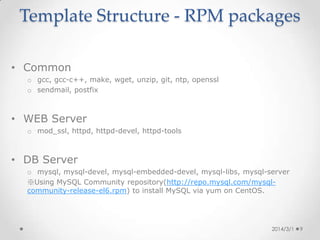
Template Structure - RPM packages
• Common
o gcc, gcc-c++, make, wget, unzip, git, ntp, openssl
o sendmail, postfix

• WEB Server
o mod_ssl, httpd, httpd-devel, httpd-tools

• DB Server
o mysql, mysql-devel, mysql-embedded-devel, mysql-libs, mysql-server
※Using MySQL Community repository(http://repo.mysql.com/mysql-communityrelease-el6.rpm) to install MySQL via yum on CentOS.

2014/3/1

8
Operation Manual - AWS CLI (1)

Precondition
• Login to Amazon Linux AMI to deploy stack.
• Grant IAM Role with administrator privilege on the
instance.

2014/3/1

9
Operation Manual - AWS CLI (2)
•
Template PATH on github
https://github.com/hashnao/aws-cloudformation/tree/master/EC2
•
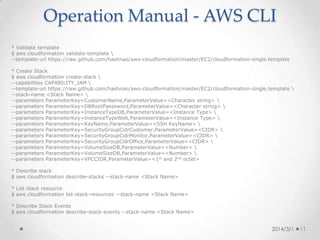
Validate template
$ git clone https://github.com/hashnao/aws-cloudformation
$ cd aws-cloudformation-master/EC2/
$ aws cloudformation validate-template 
--template-body file://$PWD/cloudformation-single.template
•
Create Stack
$ aws cloudformation create-stack 
--capabilities CAPABILITY_IAM 
--template-body file://$PWD/cloudformation-single.template 
--stack-name <Stack Name> 
--parameters ParameterKey=CustomerName,ParameterValue=<Character string> 
--parameters ParameterKey=DBRootPasssword,ParameterValue=<Character string> 
--parameters ParameterKey=InstanceTypeDB,ParameterValue=<Instance Type> 
--parameters ParameterKey=InstanceTypeWeb,ParameterValue=<Instance Type> 
--parameters ParameterKey=KeyName,ParameterValue=<SSH KeyName> 
--parameters ParameterKey=SecurityGroupCidrCustomer,ParameterValue=<CIDR> 
--parameters ParameterKey=SecurityGroupCidrMonitor,ParameterValue=<CIDR> 
--parameters ParameterKey=SecurityGroupCidrOffice,ParameterValue=<CIDR> 
--parameters ParameterKey=VolumeSizeDB,ParameterValue=<Number> 
--parameters ParameterKey=VPCCIDR,ParameterValue=<1st and 2nd octet>
•
Describe stack
$ aws cloudformation describe-stacks --stack-name <Stack Name>
•
List stack resource
$ aws cloudformation list-stack-resources --stack-name <Stack Name>
•
Describe Stack Events
$ aws cloudformation describe-stack-events --stack-name <Stack Name>

2014/3/1

10
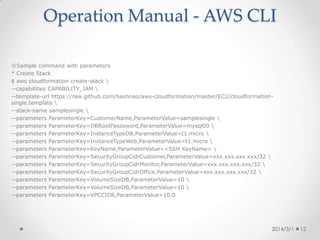
Operation Manual - AWS CLI (3)
※Sample command with parameters
•
Create Stack
$ aws cloudformation create-stack 
--capabilities CAPABILITY_IAM 
--template-body file://$PWD/cloudformation-single.template 
--stack-name samplesingle 
--parameters ParameterKey=CustomerName,ParameterValue=samplesingle 
--parameters ParameterKey=DBRootPasssword,ParameterValue=mysql00 
--parameters ParameterKey=InstanceTypeDB,ParameterValue=t1.micro 
--parameters ParameterKey=InstanceTypeWeb,ParameterValue=t1.micro 
--parameters ParameterKey=KeyName,ParameterValue=default 
--parameters ParameterKey=SecurityGroupCidrCustomer,ParameterValue=0.0.0.0/0 
--parameters ParameterKey=SecurityGroupCidrMonitor,ParameterValue=0.0.0.0/0 
--parameters ParameterKey=SecurityGroupCidrOffice,ParameterValue=0.0.0.0/0 
--parameters ParameterKey=VolumeSizeDB,ParameterValue=10 
--parameters ParameterKey=VPCCIDR,ParameterValue=10.0

2014/3/1

11
Now, OpsWorks is waiting!

2014/3/1

12

AWS CloudFormation template with single & redundant system

  • 1.
    AWS CloudFormation template withsingle & redundant system 3/1/2014 Naoya Hashimoto
  • 2.
    Table of Contents • • • • • • • • • Overview SystemArchitecture - Network System Architecture - EC2 Template Structure - Dependency & Resources Template Structure - Function Template Structure - RPM packages Operation Manual - AWS CLI (1) Operation Manual - AWS CLI (2) Operation Manual - AWS CLI (3)
  • 3.
    Overview • • • • • Use CloudFormation tocreate Stacks composed of VPC, Internet Gateway, Route Table, ELB, EC2 Instance, EBS Volumes Single pattern with EC2 Instances WEB server and DB server with the same AZ Redundant pattern with EC2 Instances WEB server and DB server with multi-AZ Install LAMP package with Cloud-init Add & resize another EBS Volumes for WEB server and DB Server Stack – redundant pattern Stack – single pattern AWS CloudFormation Amazon VPC Elastic Load Balancing WEB on Instance Availability Zone Internet Gateway DB on Instance WEB on Instance DB on Instance Availability Zone Elastic Load Balancing DB on Instance WEB on Instance Route Table Availability Zone 2014/3/1 3
  • 4.
    System Architecture -Network vpc.template Name AvailabilityZone Role SubnetPublicVarA00 ap-northeast-1a ELB SubnetPublicVarC01 ap-northeast-1c ELB SubnetPublicVarA02 ap-northeast-1a Instances in AutoScaling Group SubnetPublicVarC03 ap-northeast-1c Instances in AutoScaling Group SubnetPublicFixA08 ap-northeast-1a Instances in Fixed IP address SubnetPublicFixC09 ap-northeast-1c Instances in Fixed IP address 2014/3/1 4
  • 5.
    System Architecture -EC2 cloudformation-single.template vpc.template ec2-single.template cloudformation-redundant.template vpc.template ec2-redundant.template 2014/3/1 5
  • 6.
    Template Structure -Dependency & Resources Single Redundant ① cloudformation-redundant.template ① cloudformation-single.template AWS::CloudFormation::Stack AWS::CloudFormation::Stack ② vpc.template AWS::EC2::InternetGateway AWS::EC2::NetworkAcl AWS::EC2::NetworkAclEntry AWS::EC2::Route AWS::EC2::RouteTable ③ ec2-single.template AWS::EC2::Subnet AWS::EC2::SubnetNetworkAclAssociation AWS::EC2::SubnetRouteTableAssociation AWS::EC2::VPC AWS::EC2::VPCGatewayAttachment AWS::CloudFormation::WaitCondition AWS::CloudFormation::WaitConditionHandle AWS::EC2::EIP AWS::EC2::Instance AWS::EC2::SecurityGroup AWS::ElasticLoadBalancing::LoadBalancer ③ ec2-redundant.template AWS::CloudFormation::WaitCondition AWS::CloudFormation::WaitConditionHandle AWS::EC2::EIP AWS::EC2::Instance AWS::EC2::SecurityGroup AWS::ElasticLoadBalancing::LoadBalancer 2014/3/1 6
  • 7.
    Template Structure -Function overview Single Redundant cloudformation-redundant.template cloudformation-single.template Base template for single, redundant pattern Add output values from nested stacks Input key to the following items(values): VPC CIDR, Instance Type, Volume Size, SSH KeyName, SecurityGroup CIDR(Customer’s GW, Office GW, Monitoring Server’s GW), DB Root Password Pass the parameters to the nested stack Output the parameters VPC CIDR, Subnet ID , Instance Type, Instance ID, EIP, Volume Size, SecurityGroup CIDR(Customer GW, Own Office GW, Monitoring Server GW) vpc.template Common template for single, redundant pattern Create the following resources: VPC, Subnet, Network ACL, Internet GW, Routing Table ec2-single.template ec2-redundant.template EC2 resource template for single, redundant pattern Create the following resources: Instance, EBS Volume, ELB, EIP, Security Groups Install Apache, PHP, MySQL Enable/Disable the services will be started automatically upon boot Create a linux user, opuser for Attach another EBS Volumes, create file system and resize them 2014/3/1 7
  • 8.
    Template Structure -RPM packages • Common o gcc, gcc-c++, make, wget, unzip, git, ntp, openssl o sendmail, postfix • WEB Server o mod_ssl, httpd, httpd-devel, httpd-tools • DB Server o mysql, mysql-devel, mysql-embedded-devel, mysql-libs, mysql-server ※Using MySQL Community repository(http://repo.mysql.com/mysql-communityrelease-el6.rpm) to install MySQL via yum on CentOS. 2014/3/1 8
  • 9.
    Operation Manual -AWS CLI (1) Precondition • Login to Amazon Linux AMI to deploy stack. • Grant IAM Role with administrator privilege on the instance. 2014/3/1 9
  • 10.
    Operation Manual -AWS CLI (2) • Template PATH on github https://github.com/hashnao/aws-cloudformation/tree/master/EC2 • Validate template $ git clone https://github.com/hashnao/aws-cloudformation $ cd aws-cloudformation-master/EC2/ $ aws cloudformation validate-template --template-body file://$PWD/cloudformation-single.template • Create Stack $ aws cloudformation create-stack --capabilities CAPABILITY_IAM --template-body file://$PWD/cloudformation-single.template --stack-name <Stack Name> --parameters ParameterKey=CustomerName,ParameterValue=<Character string> --parameters ParameterKey=DBRootPasssword,ParameterValue=<Character string> --parameters ParameterKey=InstanceTypeDB,ParameterValue=<Instance Type> --parameters ParameterKey=InstanceTypeWeb,ParameterValue=<Instance Type> --parameters ParameterKey=KeyName,ParameterValue=<SSH KeyName> --parameters ParameterKey=SecurityGroupCidrCustomer,ParameterValue=<CIDR> --parameters ParameterKey=SecurityGroupCidrMonitor,ParameterValue=<CIDR> --parameters ParameterKey=SecurityGroupCidrOffice,ParameterValue=<CIDR> --parameters ParameterKey=VolumeSizeDB,ParameterValue=<Number> --parameters ParameterKey=VolumeSizeDB,ParameterValue=<Number> --parameters ParameterKey=VPCCIDR,ParameterValue=<1st and 2nd octet> • Describe stack $ aws cloudformation describe-stacks --stack-name <Stack Name> • List stack resource $ aws cloudformation list-stack-resources --stack-name <Stack Name> • Describe Stack Events $ aws cloudformation describe-stack-events --stack-name <Stack Name> 2014/3/1 10
  • 11.
    Operation Manual -AWS CLI (3) ※Sample command with parameters • Create Stack $ aws cloudformation create-stack --capabilities CAPABILITY_IAM --template-body file://$PWD/cloudformation-single.template --stack-name samplesingle --parameters ParameterKey=CustomerName,ParameterValue=samplesingle --parameters ParameterKey=DBRootPasssword,ParameterValue=mysql00 --parameters ParameterKey=InstanceTypeDB,ParameterValue=t1.micro --parameters ParameterKey=InstanceTypeWeb,ParameterValue=t1.micro --parameters ParameterKey=KeyName,ParameterValue=default --parameters ParameterKey=SecurityGroupCidrCustomer,ParameterValue=0.0.0.0/0 --parameters ParameterKey=SecurityGroupCidrMonitor,ParameterValue=0.0.0.0/0 --parameters ParameterKey=SecurityGroupCidrOffice,ParameterValue=0.0.0.0/0 --parameters ParameterKey=VolumeSizeDB,ParameterValue=10 --parameters ParameterKey=VolumeSizeDB,ParameterValue=10 --parameters ParameterKey=VPCCIDR,ParameterValue=10.0 2014/3/1 11
  • 12.
    Now, OpsWorks iswaiting! 2014/3/1 12