Test Automation
Puzzlers
WAT?
Ciklum
https://www.facebook.com/yaroslav.pernerovsky
Sergey
Pirogov
Yaroslav
Pernerovsky
https://www.facebook.com/spirogov
GlobalLogic
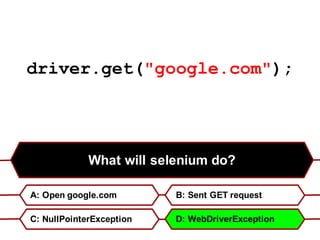
driver.get("google.com");
What will selenium do?
A: Open google.com B: Sent GET request
C: NullPointerException D: WebDriverException
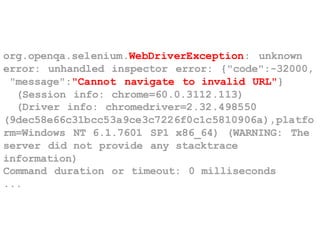
org.openqa.selenium.WebDriverException: unknown
error: unhandled inspector error: {"code":-32000,
"message":"Cannot navigate to invalid URL"}
(Session info: chrome=60.0.3112.113)
(Driver info: chromedriver=2.32.498550
(9dec58e66c31bcc53a9ce3c7226f0c1c5810906a),platfo
rm=Windows NT 6.1.7601 SP1 x86_64) (WARNING: The
server did not provide any stacktrace
information)
Command duration or timeout: 0 milliseconds
...
People says that Selenide is better
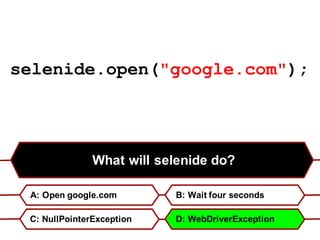
What will selenide do?
A: Open google.com B: Wait four seconds
C: NullPointerException D: WebDriverException
selenide.open("google.com");
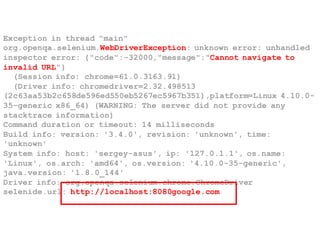
Exception in thread "main"
org.openqa.selenium.WebDriverException: unknown error: unhandled
inspector error: {"code":-32000,"message":"Cannot navigate to
invalid URL"}
(Session info: chrome=61.0.3163.91)
(Driver info: chromedriver=2.32.498513
(2c63aa53b2c658de596ed550eb5267ec5967b351),platform=Linux 4.10.0-
35-generic x86_64) (WARNING: The server did not provide any
stacktrace information)
Command duration or timeout: 14 milliseconds
Build info: version: '3.4.0', revision: 'unknown', time:
'unknown'
System info: host: 'sergey-asus', ip: '127.0.1.1', os.name:
'Linux', os.arch: 'amd64', os.version: '4.10.0-35-generic',
java.version: '1.8.0_144'
Driver info: org.openqa.selenium.chrome.ChromeDriver
selenide.url: http://localhost:8080google.com
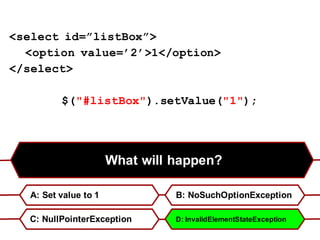
What will happen?
A: Set value to 1 B: NoSuchOptionException
C: NullPointerException D: InvalidElementStateException
<select id=”listBox”>
<option value=’2’>1</option>
</select>
$("#listBox").setValue("1");
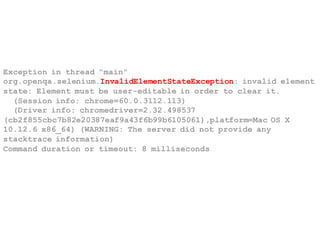
Exception in thread "main"
org.openqa.selenium.InvalidElementStateException: invalid element
state: Element must be user-editable in order to clear it.
(Session info: chrome=60.0.3112.113)
(Driver info: chromedriver=2.32.498537
(cb2f855cbc7b82e20387eaf9a43f6b99b6105061),platform=Mac OS X
10.12.6 x86_64) (WARNING: The server did not provide any
stacktrace information)
Command duration or timeout: 8 milliseconds
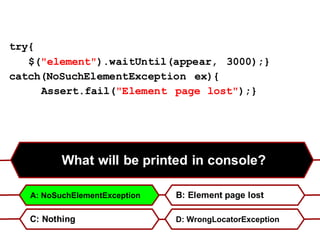
What will be printed in console?
B: Element page lost
C: Nothing D: WrongLocatorException
try{
$("element").waitUntil(appear, 3000);}
catch(NoSuchElementException ex){
Assert.fail("Element page lost");}
A: NoSuchElementException
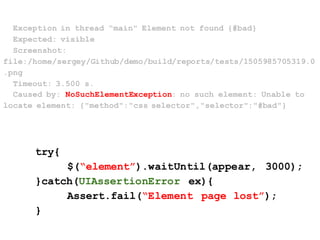
Exception in thread "main" Element not found {#bad}
Expected: visible
Screenshot:
file:/home/sergey/Github/demo/build/reports/tests/1505985705319.0
.png
Timeout: 3.500 s.
Caused by: NoSuchElementException: no such element: Unable to
locate element: {"method":"css selector","selector":"#bad"}
try{
$(“element”).waitUntil(appear, 3000);
}catch(UIAssertionError ex){
Assert.fail(“Element page lost”);
}
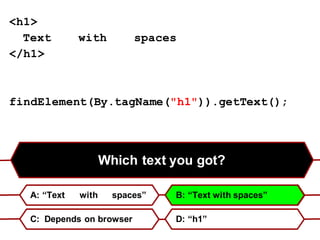
Which text you got?
A: “Text with spaces” B: “Text with spaces”
C: Depends on browser D: “h1”
<h1>
Text with spaces
</h1>
findElement(By.tagName("h1")).getText();
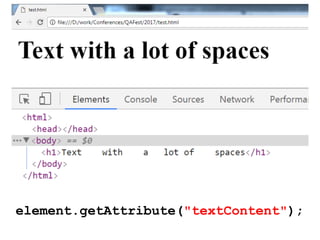
element.getAttribute("textContent");
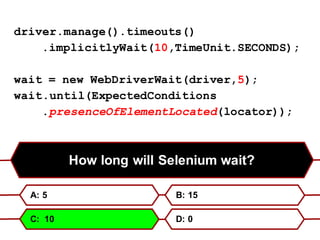
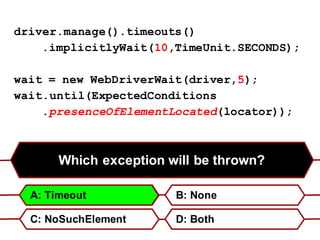
driver.manage().timeouts()
.implicitlyWait(10,TimeUnit.SECONDS);
wait = new WebDriverWait(driver,5);
wait.until(ExpectedConditions
.presenceOfElementLocated(locator));
How long will Selenium wait?
A: 5 B: 15
C: 10 D: 0
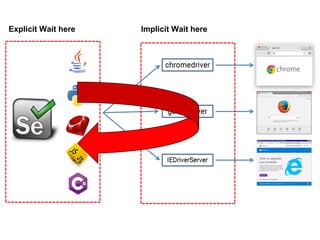
Implicit Wait hereExplicit Wait here
Which exception will be thrown?
B: None
C: NoSuchElement D: Both
A: Timeout
driver.manage().timeouts()
.implicitlyWait(10,TimeUnit.SECONDS);
wait = new WebDriverWait(driver,5);
wait.until(ExpectedConditions
.presenceOfElementLocated(locator));
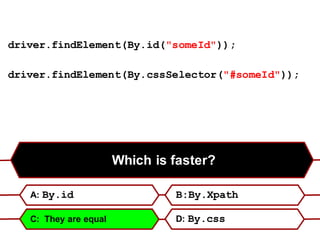
Which is faster?
A: By.id B:By.Xpath
C: They are equal D: By.css
driver.findElement(By.id("someId"));
driver.findElement(By.cssSelector("#someId"));
static id(id) {
return By.css('*[id="'+ escapeCss(id) +'"]');
}
public WebElement findElement(SearchContext context) {
if (context instanceof FindsById)
return ((FindsById) context).findElementById(id);
return ((FindsByXPath)context)
.findElementByXPath(".//*[@id = '" + id + "']");
}
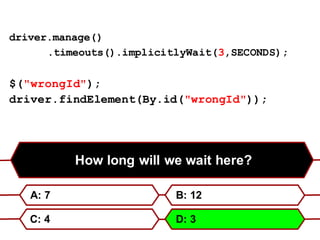
How long will we wait here?
A: 7 B: 12
C: 4 D: 3
driver.manage()
.timeouts().implicitlyWait(3,SECONDS);
$("wrongId");
driver.findElement(By.id("wrongId"));
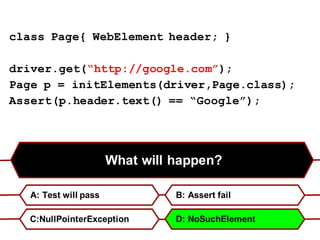
What will happen?
A: Test will pass B: Assert fail
C:NullPointerException D: NoSuchElement
class Page{ WebElement header; }
driver.get(“http://google.com”);
Page p = initElements(driver,Page.class);
Assert(p.header.text() == “Google”);
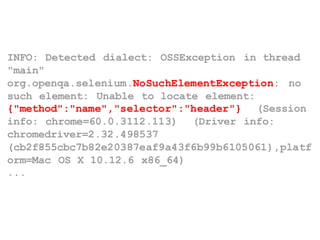
INFO: Detected dialect: OSSException in thread
"main"
org.openqa.selenium.NoSuchElementException: no
such element: Unable to locate element:
{"method":"name","selector":"header"} (Session
info: chrome=60.0.3112.113) (Driver info:
chromedriver=2.32.498537
(cb2f855cbc7b82e20387eaf9a43f6b99b6105061),platf
orm=Mac OS X 10.12.6 x86_64)
...
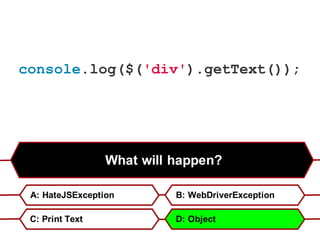
What will happen?
A: HateJSException B: WebDriverException
C: Print Text D: Object
console.log($('div').getText());
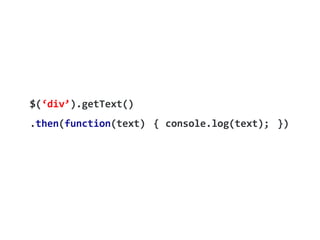
$(‘div’).getText()
.then(function(text) { console.log(text); })
Thank you!
https://www.facebook.com/yaroslav.pernerovskyhttps://www.facebook.com/spirogov

Automation puzzlers

  • 1.
  • 2.
  • 3.
  • 4.
    driver.get("google.com"); What will seleniumdo? A: Open google.com B: Sent GET request C: NullPointerException D: WebDriverException
  • 5.
    org.openqa.selenium.WebDriverException: unknown error: unhandledinspector error: {"code":-32000, "message":"Cannot navigate to invalid URL"} (Session info: chrome=60.0.3112.113) (Driver info: chromedriver=2.32.498550 (9dec58e66c31bcc53a9ce3c7226f0c1c5810906a),platfo rm=Windows NT 6.1.7601 SP1 x86_64) (WARNING: The server did not provide any stacktrace information) Command duration or timeout: 0 milliseconds ...
  • 6.
    People says thatSelenide is better
  • 7.
    What will selenidedo? A: Open google.com B: Wait four seconds C: NullPointerException D: WebDriverException selenide.open("google.com");
  • 8.
    Exception in thread"main" org.openqa.selenium.WebDriverException: unknown error: unhandled inspector error: {"code":-32000,"message":"Cannot navigate to invalid URL"} (Session info: chrome=61.0.3163.91) (Driver info: chromedriver=2.32.498513 (2c63aa53b2c658de596ed550eb5267ec5967b351),platform=Linux 4.10.0- 35-generic x86_64) (WARNING: The server did not provide any stacktrace information) Command duration or timeout: 14 milliseconds Build info: version: '3.4.0', revision: 'unknown', time: 'unknown' System info: host: 'sergey-asus', ip: '127.0.1.1', os.name: 'Linux', os.arch: 'amd64', os.version: '4.10.0-35-generic', java.version: '1.8.0_144' Driver info: org.openqa.selenium.chrome.ChromeDriver selenide.url: http://localhost:8080google.com
  • 9.
    What will happen? A:Set value to 1 B: NoSuchOptionException C: NullPointerException D: InvalidElementStateException <select id=”listBox”> <option value=’2’>1</option> </select> $("#listBox").setValue("1");
  • 10.
    Exception in thread"main" org.openqa.selenium.InvalidElementStateException: invalid element state: Element must be user-editable in order to clear it. (Session info: chrome=60.0.3112.113) (Driver info: chromedriver=2.32.498537 (cb2f855cbc7b82e20387eaf9a43f6b99b6105061),platform=Mac OS X 10.12.6 x86_64) (WARNING: The server did not provide any stacktrace information) Command duration or timeout: 8 milliseconds
  • 11.
    What will beprinted in console? B: Element page lost C: Nothing D: WrongLocatorException try{ $("element").waitUntil(appear, 3000);} catch(NoSuchElementException ex){ Assert.fail("Element page lost");} A: NoSuchElementException
  • 12.
    Exception in thread"main" Element not found {#bad} Expected: visible Screenshot: file:/home/sergey/Github/demo/build/reports/tests/1505985705319.0 .png Timeout: 3.500 s. Caused by: NoSuchElementException: no such element: Unable to locate element: {"method":"css selector","selector":"#bad"} try{ $(“element”).waitUntil(appear, 3000); }catch(UIAssertionError ex){ Assert.fail(“Element page lost”); }
  • 15.
    Which text yougot? A: “Text with spaces” B: “Text with spaces” C: Depends on browser D: “h1” <h1> Text with spaces </h1> findElement(By.tagName("h1")).getText();
  • 16.
  • 17.
    driver.manage().timeouts() .implicitlyWait(10,TimeUnit.SECONDS); wait = newWebDriverWait(driver,5); wait.until(ExpectedConditions .presenceOfElementLocated(locator)); How long will Selenium wait? A: 5 B: 15 C: 10 D: 0
  • 18.
  • 19.
    Which exception willbe thrown? B: None C: NoSuchElement D: Both A: Timeout driver.manage().timeouts() .implicitlyWait(10,TimeUnit.SECONDS); wait = new WebDriverWait(driver,5); wait.until(ExpectedConditions .presenceOfElementLocated(locator));
  • 21.
    Which is faster? A:By.id B:By.Xpath C: They are equal D: By.css driver.findElement(By.id("someId")); driver.findElement(By.cssSelector("#someId"));
  • 22.
    static id(id) { returnBy.css('*[id="'+ escapeCss(id) +'"]'); } public WebElement findElement(SearchContext context) { if (context instanceof FindsById) return ((FindsById) context).findElementById(id); return ((FindsByXPath)context) .findElementByXPath(".//*[@id = '" + id + "']"); }
  • 23.
    How long willwe wait here? A: 7 B: 12 C: 4 D: 3 driver.manage() .timeouts().implicitlyWait(3,SECONDS); $("wrongId"); driver.findElement(By.id("wrongId"));
  • 24.
    What will happen? A:Test will pass B: Assert fail C:NullPointerException D: NoSuchElement class Page{ WebElement header; } driver.get(“http://google.com”); Page p = initElements(driver,Page.class); Assert(p.header.text() == “Google”);
  • 25.
    INFO: Detected dialect:OSSException in thread "main" org.openqa.selenium.NoSuchElementException: no such element: Unable to locate element: {"method":"name","selector":"header"} (Session info: chrome=60.0.3112.113) (Driver info: chromedriver=2.32.498537 (cb2f855cbc7b82e20387eaf9a43f6b99b6105061),platf orm=Mac OS X 10.12.6 x86_64) ...
  • 26.
    What will happen? A:HateJSException B: WebDriverException C: Print Text D: Object console.log($('div').getText());
  • 27.
  • 28.