Reaktor
Mannerheimintie 2
00100, Helsinki Finland
tel: +358 9 4152 0200
www.reaktor.com
info@reaktor.com
Confidential
©2015 Reaktor
All rights reserved
10 javascript conceptsFor advanced (web) analytics implementation
Simo Ahava
Senior Data Advocate
Simo Ahava
Senior Data Advocate, Reaktor
Google Developer Expert, Google Analytics
Blogger, developer, www.simoahava.com
Twitter-er, @SimoAhava
Google+:er, +SimoAhava
@SimoAhava from @ReaktorNow | #MeasureCamp | 10 Sep 2016
Get the basics right
@SimoAhava from @ReaktorNow | #MeasureCamp | 10 Sep 2016
Get the basics right
Great JavaScript learning resources
http://www.codecademy.com/
@SimoAhava from @ReaktorNow | #MeasureCamp | 10 Sep 2016
1. Functions
@SimoAhava from @ReaktorNow | #MeasureCamp | 10 Sep 2016
1. Functions
…multi-purpose, multi-use…
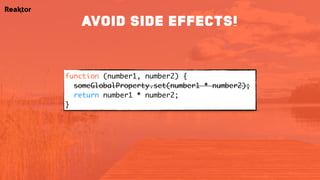
function (number1, number2) {
someGlobalProperty.set(number1 * number2);
return number1 * number2;
}
AVOID SIDE EFFECTS!
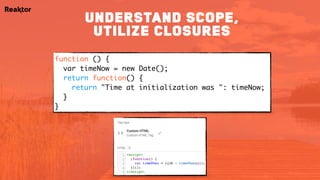
function () {
var timeNow = new Date();
return function() {
return "Time at initialization was ": timeNow;
}
}
understand scope,
utilize closures
function() {
var jsonLd = document.querySelector('script[type*="ld+json"]');
return jsonLd ? JSON.parse(jsonLd.innerHTML) : {};
}
function() {
return {{JSON-LD}}.author.name || undefined;
}
Leverage return values
for max flexibility!
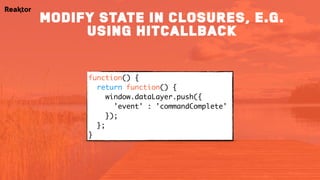
function() {
return function() {
window.dataLayer.push({

'event' : 'commandComplete'
});

};
}
Modify state in closures, e.g.
using hitCallback
http://www.w3schools.com/js/js_function_closures.asp
https://developer.mozilla.org/en-US/docs/Web/JavaScript/Closures
http://www.simoahava.com/analytics/variable-guide-google-tag-manager/#6
further reading
@SimoAhava from @ReaktorNow | #MeasureCamp | 10 Sep 2016
2. Data types
@SimoAhava from @ReaktorNow | #MeasureCamp | 10 Sep 2016
2. Data types
…stay loose…
Number: 5
String: "five"
Boolean: true
Array: [1, 2, 3]
Object: {name: "Simo"}
Misc: undefined, null…
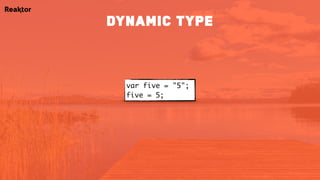
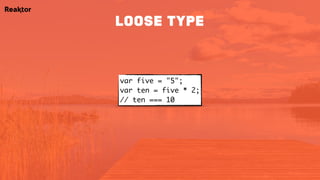
var five = "5";
five = 5;
dynamic type
var five = "5";
var ten = five * 2;

// ten === 10
loose type
typeof [1,2,3]; // "object"
Array.isArray([1,2,3]); // true
typeof undefined; // "undefined"
typeof null; // "object"

undefined === null; // false
undefined == null; // true
typeof NaN; // "number"
isNaN(NaN); // true
isNaN(null); // false
NaN === NaN; // false
weird stuff…
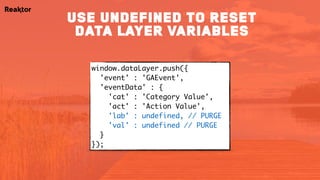
window.dataLayer.push({

'event' : 'GAEvent',
'eventData' : {

'cat' : 'Category Value',
'act' : 'Action Value',
'lab' : undefined, // PURGE
'val' : undefined // PURGE
}

});
use undefined to reset
data layer variables
http://www.w3schools.com/js/js_datatypes.asp
https://developer.mozilla.org/en-US/docs/Web/JavaScript/Data_structures
http://www.simoahava.com/gtm-tips/undefined-dimensions-wont-get-sent/
further reading
@SimoAhava from @ReaktorNow | #MeasureCamp | 10 Sep 2016
3. HTTP requests
@SimoAhava from @ReaktorNow | #MeasureCamp | 10 Sep 2016
3. HTTP requests
…loading resources without blocking the browser…
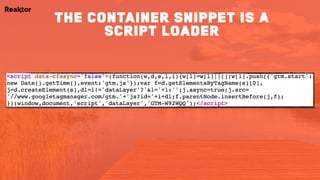
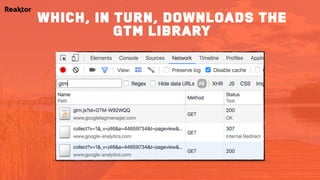
the container snippet is a
script loader
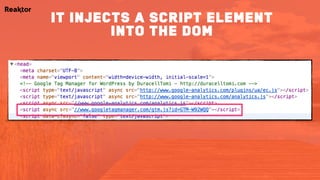
it injects a script element
into the dom
which, in turn, downloads the
gtm library
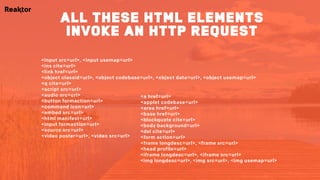
<a href=url>
<applet codebase=url>
<area href=url>
<base href=url>
<blockquote cite=url>
<body background=url>
<del cite=url>
<form action=url>
<frame longdesc=url>, <frame src=url>
<head profile=url>
<iframe longdesc=url>, <iframe src=url>
<img longdesc=url>, <img src=url>, <img usemap=url>
all these html elements
invoke an http request
<input src=url>, <input usemap=url>
<ins cite=url>
<link href=url>
<object classid=url>, <object codebase=url>, <object data=url>, <object usemap=url>
<q cite=url>
<script src=url>
<audio src=url>
<button formaction=url>
<command icon=url>
<embed src=url>
<html manifest=url>
<input formaction=url>
<source src=url>
<video poster=url>, <video src=url>
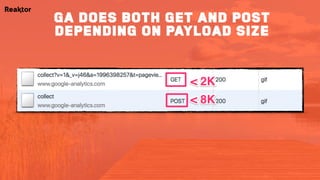
GA does both get and post
depending on payload size
http://www.w3schools.com/ajax/ajax_xmlhttprequest_create.asp
http://www.w3schools.com/tags/ref_httpmethods.asp
https://developers.google.com/analytics/devguides/collection/protocol/v1/reference#transport
further reading
@SimoAhava from @ReaktorNow | #MeasureCamp | 10 Sep 2016
4. Race conditions
@SimoAhava from @ReaktorNow | #MeasureCamp | 10 Sep 2016
4. Race conditions
…last one over the finish line is a failed request…
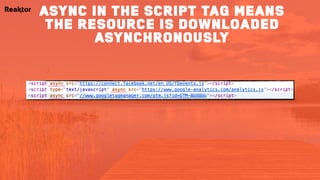
async in the script tag means
the resource is downloaded
asynchronously
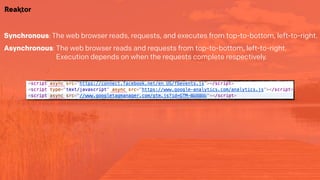
Synchronous: The web browser reads, requests, and executes from top-to-bottom, left-to-right.
Asynchronous: The web browser reads and requests from top-to-bottom, left-to-right. 

Execution depends on when the requests complete respectively.
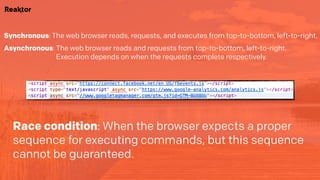
Synchronous: The web browser reads, requests, and executes from top-to-bottom, left-to-right.
Asynchronous: The web browser reads and requests from top-to-bottom, left-to-right. 

Execution depends on when the requests complete respectively.
Race condition: When the browser expects a proper
sequence for executing commands, but this sequence
cannot be guaranteed.
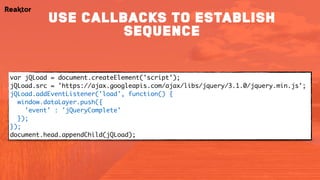
var jQLoad = document.createElement('script');

jQLoad.src = 'https://ajax.googleapis.com/ajax/libs/jquery/3.1.0/jquery.min.js';

jQLoad.addEventListener('load', function() {

window.dataLayer.push({

'event' : 'jQueryComplete'
});
});
document.head.appendChild(jQLoad);
use callbacks to establish
sequence
<script>
(function() {
var el = document.createElement('script');
el.src = 'https://ajax.googleapis.com/ajax/libs/jquery/3.1.0/jquery.min.js';
el.addEventListener('load', function() {
google_tag_manager[{{Container ID}}].onHtmlSuccess({{HTML ID}});
});
document.head.appendChild(el);
})();
</script>
tag sequencing can be used
but it’s tricky
http://callbackhell.com/
https://developer.mozilla.org/en-US/docs/Web/JavaScript/Reference/Global_Objects/Promise
http://www.simoahava.com/analytics/understanding-tag-sequencing-in-google-tag-manager/
further reading
@SimoAhava from @ReaktorNow | #MeasureCamp | 10 Sep 2016
5. History manipulation
@SimoAhava from @ReaktorNow | #MeasureCamp | 10 Sep 2016
5. History manipulation
…avoiding the dreaded page refresh…
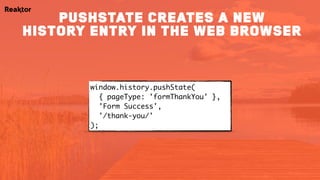
window.history.pushState(

{ pageType: 'formThankYou' },
'Form Success',
'/thank-you/'
);
pushstate creates a new
history entry in the web browser
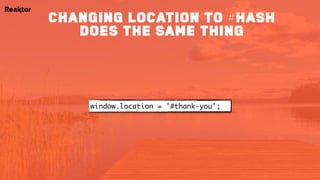
window.location = '#thank-you';
changing location to #hash
does the same thing
window.history.replaceState(

{ pageType: 'formThankYou' },
'Form Success',
'/thank-you/'
);
replacestate replaces the
current history state
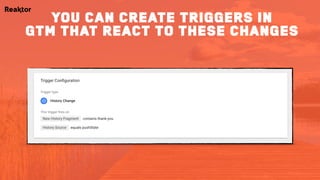
you can create triggers in
gtm that react to these changes
https://developer.mozilla.org/en-US/docs/Web/API/History_API
http://www.w3schools.com/js/js_window_history.asp
http://www.simoahava.com/analytics/google-tag-manager-history-listener/
further reading
@SimoAhava from @ReaktorNow | #MeasureCamp | 10 Sep 2016
6. Browser storage
@SimoAhava from @ReaktorNow | #MeasureCamp | 10 Sep 2016
6. Browser storage
…introducing state to a stateless environment…
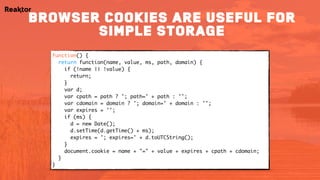
function() {
return function(name, value, ms, path, domain) {
if (!name || !value) {
return;
}
var d;
var cpath = path ? '; path=' + path : '';
var cdomain = domain ? '; domain=' + domain : '';
var expires = '';
if (ms) {
d = new Date();
d.setTime(d.getTime() + ms);
expires = '; expires=' + d.toUTCString();
}
document.cookie = name + "=" + value + expires + cpath + cdomain;
}
}
browser cookies are useful for
simple storage
{{Simo Cookie Solution}}('subscribe', 'true', 1800000, '/', 'simoahava.com');
browser cookies are useful for
simple storage
if (window['Storage']) {
localStorage.setItem('subscribe', 'true');
sessionStorage.setItem('subscribe', 'true');
} else {
{{JS - setCookie}}('subscribe', 'true');
}
// TO FETCH
localStorage.getItem('subscribe');
sessionStorage.getItem('subscribe');
HTML5 STORAGE IS MORE flexible
BUT CAN BE DIFFICULT TO MANAGE
http://www.w3schools.com/js/js_cookies.asp
https://developer.mozilla.org/en-US/docs/Web/API/Web_Storage_API
http://www.simoahava.com/analytics/two-ways-to-persist-data-via-google-tag-manager/
further reading
@SimoAhava from @ReaktorNow | #MeasureCamp | 10 Sep 2016
7. DOM traversal
@SimoAhava from @ReaktorNow | #MeasureCamp | 10 Sep 2016
7. DOM traversal
…needles in haystacks…
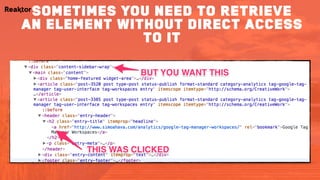
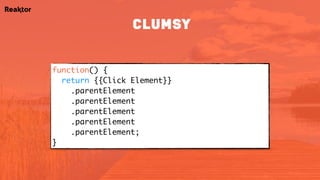
sometimes you need to retrieve
an element without direct access
to it
function() {

return {{Click Element}}

.parentElement

.parentElement

.parentElement

.parentElement

.parentElement;

}
clumsy
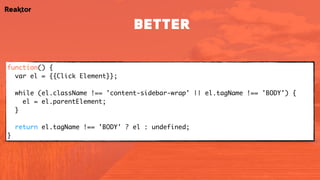
function() {

var el = {{Click Element}};


while (el.className !== 'content-sidebar-wrap' && el.tagName !== 'BODY') {

el = el.parentElement;
}


return el.tagName !== 'BODY' ? el : undefined;

}
better
http://www.w3schools.com/js/js_htmldom_navigation.asp
http://domenlightenment.com/
http://www.simoahava.com/analytics/node-relationships-gtm/
further reading
@SimoAhava from @ReaktorNow | #MeasureCamp | 10 Sep 2016
8. CSS selectors
@SimoAhava from @ReaktorNow | #MeasureCamp | 10 Sep 2016
8. CSS selectors
…magnet for the needles…
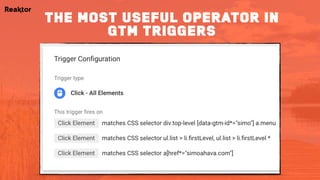
the most useful operator in
gtm triggers
css selectors let you identify
elements on the page based on their
unique position in the dom
http://www.w3schools.com/cssref/css_selectors.asp
http://www.simoahava.com/analytics/matches-css-selector-operator-in-gtm-triggers/
further reading
@SimoAhava from @ReaktorNow | #MeasureCamp | 10 Sep 2016
9. jQuery
@SimoAhava from @ReaktorNow | #MeasureCamp | 10 Sep 2016
9. jQuery
…machine which sorts the magnets…
function() {

var el = {{Click Element}};


while (el.className !== 'content-sidebar-wrap' && el.tagName !== 'BODY') {

el = el.parentElement;


return el.tagName !== 'BODY' ? el : undefined;

}
jQuery is excellent for
abstracting many difficult issues
with working js in the browser
function() {

return jQuery({{Click Element}}).closest('.content-sidebar-wrap');
}
jQuery is excellent for
abstracting many difficult issues
with working js in the browser
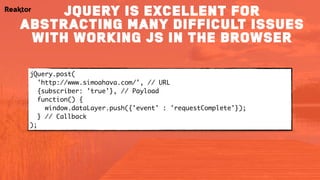
jQuery.post(

'http://www.simoahava.com/', // URL
{subscriber: 'true'}, // Payload
function() { 

window.dataLayer.push({'event' : 'requestComplete'});

} // Callback

);
jQuery is excellent for
abstracting many difficult issues
with working js in the browser
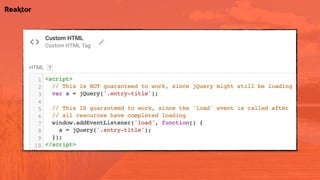
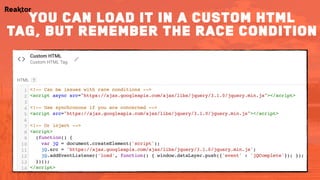
you can load it in a custom html
tag, but remember the race condition
https://api.jquery.com/category/traversing/
http://api.jquery.com/
further reading
@SimoAhava from @ReaktorNow | #MeasureCamp | 10 Sep 2016
10. dataLayer
@SimoAhava from @ReaktorNow | #MeasureCamp | 10 Sep 2016
10. dataLayer
…repository of semantic information - NOT just for GTM…
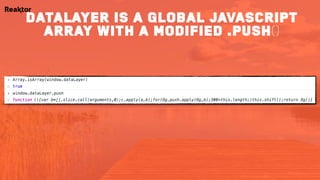
datalayer is a global javascript
array with a modified .push()
Since it’s global, it’s easy to destroy
it’s a message bus, and gtm
processes the messages as they come,
and in sequence
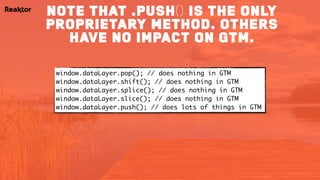
note that .push() is the only
proprietary method. others
have no impact on gtm.
window.dataLayer.pop(); // does nothing in GTM
window.dataLayer.shift(); // does nothing in GTM
window.dataLayer.splice(); // does nothing in GTM
window.dataLayer.slice(); // does nothing in GTM
window.dataLayer.push(); // does lots of things in GTM
https://github.com/google/data-layer-helper
http://www.simoahava.com/analytics/data-layer/
further reading
simo.ahava@reaktor.com
www.simoahava.com
Twitter: @SimoAhava
Google+: +SimoAhava

MeasureCamp IX (London) - 10 JavaScript Concepts for web analysts