What you will learn here
1) Introduction to Auto Cad.
2) Cad Display Interface .
3) Discussion on Auto Cad Commands.
4)Drafting of floor Plan In Auto Cad.
5)How to install Auto Cad Software.
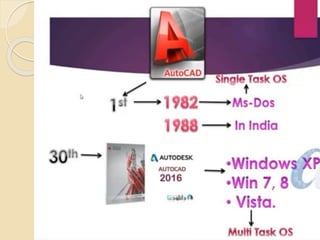
AUTO CAD DEVELOPED BY AUTODESK COMPANY IN 1982
FOUNDER – JOHN WALKER
AUTO CAD USER INTERFACE
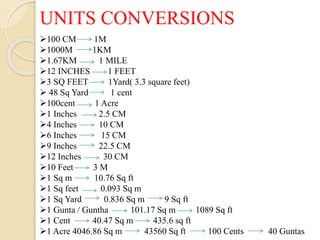
UNITS CONVERSIONS
100 CM 1M
1000M 1KM
1.67KM 1 MILE
12 INCHES 1 FEET
3 SQ FEET 1Yard( 3.3 square feet)
 48 Sq Yard 1 cent
100cent 1 Acre
1 Inches 2.5 CM
4 Inches 10 CM
6 Inches 15 CM
9 Inches 22.5 CM
12 Inches 30 CM
10 Feet 3 M
1 Sq m 10.76 Sq ft
1 Sq feet 0.093 Sq m
1 Sq Yard 0.836 Sq m 9 Sq ft
1 Gunta / Guntha 101.17 Sq m 1089 Sq ft
1 Cent 40.47 Sq m 435.6 sq ft
1 Acre 4046.86 Sq m 43560 Sq ft 100 Cents 40 Guntas
EXAMPLE :- 1
EXAMPLE :- 2
Project 2D
1) Construction line / infinity line / xline
Short cut -XL
XL ENTER
Horizontal H Enter (Specify location )
Vertical V Enter
Angle A Enter ( specify angle)
Bisect B Enter
Select base point select first reference line specify second reference
line
Offset O Enter
Specify offset distance select line
2) Circle and Circle s method
 center, radius
Center , diameter
2 point method
3 point method
TTR (tangent, tangent, radius)
TTT (tangent, tangent, tangent)
Project 2D
Circle C Enter
Radius C Enter
Specify radius of circle
Diameter:-
Circle C Enter
Select centre point
Diameter D Enter
Specify diameter of circle
2 Point Method:-
C Enter
2 po Enter
Select first end point of circle diameter
3 point method:-
C Enter 3p enter
Select first end point
Select second end point
Select third end point

AUTO CAD PPT.pptx

  • 1.
    What you willlearn here 1) Introduction to Auto Cad. 2) Cad Display Interface . 3) Discussion on Auto Cad Commands. 4)Drafting of floor Plan In Auto Cad. 5)How to install Auto Cad Software.
  • 2.
    AUTO CAD DEVELOPEDBY AUTODESK COMPANY IN 1982 FOUNDER – JOHN WALKER
  • 13.
    AUTO CAD USERINTERFACE
  • 14.
    UNITS CONVERSIONS 100 CM1M 1000M 1KM 1.67KM 1 MILE 12 INCHES 1 FEET 3 SQ FEET 1Yard( 3.3 square feet)  48 Sq Yard 1 cent 100cent 1 Acre 1 Inches 2.5 CM 4 Inches 10 CM 6 Inches 15 CM 9 Inches 22.5 CM 12 Inches 30 CM 10 Feet 3 M 1 Sq m 10.76 Sq ft 1 Sq feet 0.093 Sq m 1 Sq Yard 0.836 Sq m 9 Sq ft 1 Gunta / Guntha 101.17 Sq m 1089 Sq ft 1 Cent 40.47 Sq m 435.6 sq ft 1 Acre 4046.86 Sq m 43560 Sq ft 100 Cents 40 Guntas
  • 15.
  • 16.
  • 17.
    Project 2D 1) Constructionline / infinity line / xline Short cut -XL XL ENTER Horizontal H Enter (Specify location ) Vertical V Enter Angle A Enter ( specify angle) Bisect B Enter Select base point select first reference line specify second reference line Offset O Enter Specify offset distance select line 2) Circle and Circle s method  center, radius Center , diameter 2 point method 3 point method TTR (tangent, tangent, radius) TTT (tangent, tangent, tangent)
  • 18.
    Project 2D Circle CEnter Radius C Enter Specify radius of circle Diameter:- Circle C Enter Select centre point Diameter D Enter Specify diameter of circle 2 Point Method:- C Enter 2 po Enter Select first end point of circle diameter 3 point method:- C Enter 3p enter Select first end point Select second end point Select third end point