Augmented Reality
David Johnson
What Is Augmented Reality (AR)?
• A combination of
– a real scene viewed by
a user and
– a virtual scene
generated by a
computer that
augments the scene
with additional
information.
– ARToolkit demo movie
– T-immersion 2004
video
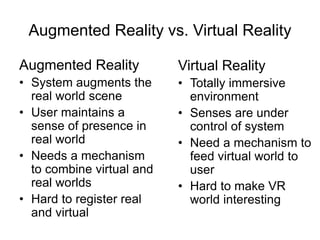
Augmented Reality vs. Virtual Reality
Augmented Reality
• System augments the
real world scene
• User maintains a
sense of presence in
real world
• Needs a mechanism
to combine virtual and
real worlds
• Hard to register real
and virtual
Virtual Reality
• Totally immersive
environment
• Senses are under
control of system
• Need a mechanism to
feed virtual world to
user
• Hard to make VR
world interesting
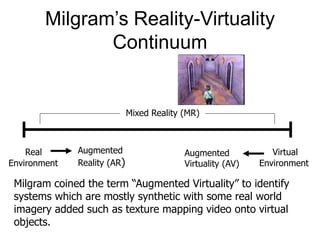
Milgram’s Reality-Virtuality
Continuum
Mixed Reality (MR)
Real
Environment
Virtual
Environment
Augmented
Reality (AR)
Augmented
Virtuality (AV)
Milgram coined the term “Augmented Virtuality” to identify
systems which are mostly synthetic with some real world
imagery added such as texture mapping video onto virtual
objects.
Combining the Real and Virtual
Worlds
We need:
• Precise models
• Locations and optical properties of the
viewer (or camera) and the display
• Calibration of all devices
• To combine all local coordinate systems
centered on the devices and the objects in
the scene in a global coordinate system
Combining the Real and Virtual
Worlds (cont)
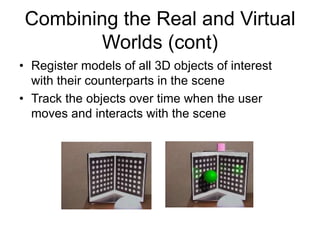
• Register models of all 3D objects of interest
with their counterparts in the scene
• Track the objects over time when the user
moves and interacts with the scene
Realistic Merging
Requires:
• Objects to behave in physically plausible
manners when manipulated
• Occlusion
• Collision detection
• Shadows
Research Activities
• Develop methods to register the two
distinct sets (real, virtual) of images and
keep them registered in real-time
– This often reduces to finding the position of a
camera relative to some fiducial markers
• Develop new display technologies for
merging the two images
Performance Issues
Two performance criteria are placed on the
system:
• Update rate for generating the augmenting
image
• Accuracy of the registration of the real and
virtual image
– Update rate can limit registration accuracy as well
– Brooks paper – “1 ms = 1mm error”
Failures in Registration
Failures in registration due to:
– Noise
• Position and pose of camera with respect to the
real scene
– Image distortions
– Time delays
• In calculating the camera position
Display Technologies
• Monitor Based
– Laptops
– Cell phones
– Projectors (more Ubiquitous Computing)
• Head Mounted Displays:
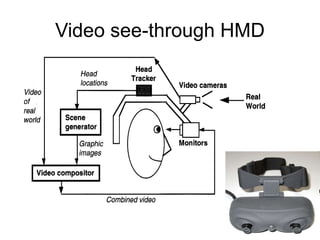
– Video see-through
– Optical see-through
Monitor Based Augmented
Reality
• Simplest available
• Treat laptop/PDA/cell phone as a window
through which you can see AR world.
• Sunglasses demo
Monitor Based AR
• Successful commercialization
– Yellow line in football broadcasts
– Glowing hockey puck
– Replace times square billboards with own
commercials during New Year’s Eve
broadcasts
– Baseball cards
– Ad campaigns
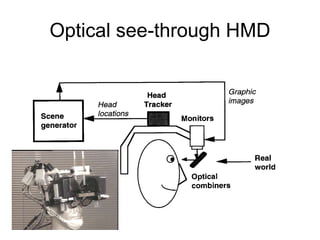
Optical see-through HMD
Video see-through HMD
Advantages of
Video see-through HMD
• Flexibility in composition strategies
• Real and virtual view delays can be
matched
Advantages of
Optical see-through HMD
• Simplicity
• Resolution
• No eye offset
Advantage of Monitor Displays
• Consumer-level equipment
• Most practical
• A lot of current research aimed here
• Other current active area is a flip-down
optical display.
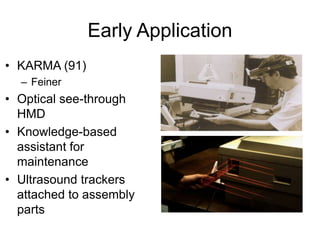
Early Application
• KARMA (91)
– Feiner
• Optical see-through
HMD
• Knowledge-based
assistant for
maintenance
• Ultrasound trackers
attached to assembly
parts
Early Application
• Later – “architectural
anatomy” - movie
• Tourguide - movie
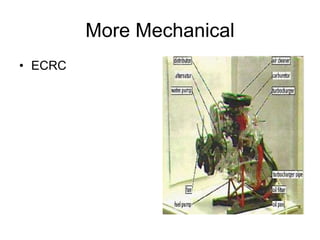
More Mechanical
• ECRC
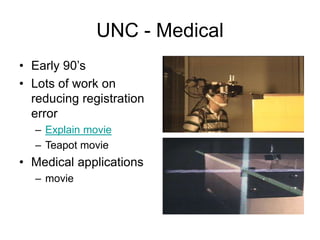
UNC - Medical
• Early 90’s
• Lots of work on
reducing registration
error
– Explain movie
– Teapot movie
• Medical applications
– movie
MIT Medical
• Laser-scanned
patient
• LCD screen above
patient
AR Instructional
• Reality provides a natural interface
– MagicBook movie
AR Games
• ARQuake
AR
• Lots of new applications
• Will discuss some tracking systems next
class

Augmented Reality.ppt

  • 1.
  • 2.
    What Is AugmentedReality (AR)? • A combination of – a real scene viewed by a user and – a virtual scene generated by a computer that augments the scene with additional information. – ARToolkit demo movie – T-immersion 2004 video
  • 3.
    Augmented Reality vs.Virtual Reality Augmented Reality • System augments the real world scene • User maintains a sense of presence in real world • Needs a mechanism to combine virtual and real worlds • Hard to register real and virtual Virtual Reality • Totally immersive environment • Senses are under control of system • Need a mechanism to feed virtual world to user • Hard to make VR world interesting
  • 4.
    Milgram’s Reality-Virtuality Continuum Mixed Reality(MR) Real Environment Virtual Environment Augmented Reality (AR) Augmented Virtuality (AV) Milgram coined the term “Augmented Virtuality” to identify systems which are mostly synthetic with some real world imagery added such as texture mapping video onto virtual objects.
  • 5.
    Combining the Realand Virtual Worlds We need: • Precise models • Locations and optical properties of the viewer (or camera) and the display • Calibration of all devices • To combine all local coordinate systems centered on the devices and the objects in the scene in a global coordinate system
  • 6.
    Combining the Realand Virtual Worlds (cont) • Register models of all 3D objects of interest with their counterparts in the scene • Track the objects over time when the user moves and interacts with the scene
  • 7.
    Realistic Merging Requires: • Objectsto behave in physically plausible manners when manipulated • Occlusion • Collision detection • Shadows
  • 8.
    Research Activities • Developmethods to register the two distinct sets (real, virtual) of images and keep them registered in real-time – This often reduces to finding the position of a camera relative to some fiducial markers • Develop new display technologies for merging the two images
  • 9.
    Performance Issues Two performancecriteria are placed on the system: • Update rate for generating the augmenting image • Accuracy of the registration of the real and virtual image – Update rate can limit registration accuracy as well – Brooks paper – “1 ms = 1mm error”
  • 10.
    Failures in Registration Failuresin registration due to: – Noise • Position and pose of camera with respect to the real scene – Image distortions – Time delays • In calculating the camera position
  • 11.
    Display Technologies • MonitorBased – Laptops – Cell phones – Projectors (more Ubiquitous Computing) • Head Mounted Displays: – Video see-through – Optical see-through
  • 12.
    Monitor Based Augmented Reality •Simplest available • Treat laptop/PDA/cell phone as a window through which you can see AR world. • Sunglasses demo
  • 13.
    Monitor Based AR •Successful commercialization – Yellow line in football broadcasts – Glowing hockey puck – Replace times square billboards with own commercials during New Year’s Eve broadcasts – Baseball cards – Ad campaigns
  • 14.
  • 15.
  • 16.
    Advantages of Video see-throughHMD • Flexibility in composition strategies • Real and virtual view delays can be matched
  • 17.
    Advantages of Optical see-throughHMD • Simplicity • Resolution • No eye offset
  • 18.
    Advantage of MonitorDisplays • Consumer-level equipment • Most practical • A lot of current research aimed here • Other current active area is a flip-down optical display.
  • 19.
    Early Application • KARMA(91) – Feiner • Optical see-through HMD • Knowledge-based assistant for maintenance • Ultrasound trackers attached to assembly parts
  • 20.
    Early Application • Later– “architectural anatomy” - movie • Tourguide - movie
  • 21.
  • 22.
    UNC - Medical •Early 90’s • Lots of work on reducing registration error – Explain movie – Teapot movie • Medical applications – movie
  • 23.
  • 24.
    AR Instructional • Realityprovides a natural interface – MagicBook movie
  • 25.
  • 26.
    AR • Lots ofnew applications • Will discuss some tracking systems next class