1
Hans Kr. Høidalen, NTNU-Norway
Introduction to ATPDraw
version 5
• Introduction to ATPDraw
• Layout and dialogs
• Transformer modeling
• Lines&Cables modeling
• Machine modeling
• Multi-phase circuits
• Vector graphics
• Grouping
• Models
2
Hans Kr. Høidalen, NTNU-Norway
Introduction
• ATPDraw is a graphical, mouse-driven, dynamic
preprocessor to ATP on the Windows platform
• Handles node names and creates the ATP input file
based on ”what you see is what you get”
• Freeware
• Supports
– All types of editing operations
– ~100 standard components
– ~40 TACS components
– MODELS
– $INCLUDE and User Specified Components
3
Hans Kr. Høidalen, NTNU-Norway
Introduction- ATPDraw history
• Simple DOS version
– Leuven EMTP Centre, fall meeting 1991, 1992
• Extended DOS versions, 1994-95
• Windows version 1.0, July 1997
– Line/Cable modelling program ATP_LCC
– User Manual
• Windows version 2.0, Sept. 1999
– MODELS, more components (UM, SatTrafo ++)
– Integrated line/cable support (Line Constants + Cable
Parameters)
BPA
Sponsored
4
Hans Kr. Høidalen, NTNU-Norway
Introduction- ATPDraw history
• Windows version 3, Dec. 2001
– Grouping/Compress
– Data Variables, $Parameter + PCVP
– LCC Verify + Cable Constants
– BCTRAN
– User Manual @ version 3.5
• Windows version 4, July 2004
– Line Check
– Hybrid Transformer model
– Zigzag Saturable transformer
• Windows version 5, Sept. 2006
– Vector graphics, multi-phase cirucits, new file handling
5
Hans Kr. Høidalen, NTNU-Norway
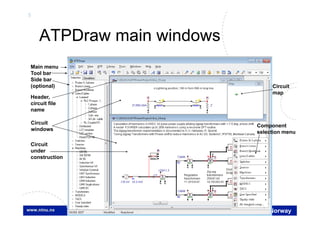
ATPDraw main windows
Circuit
map
Circuit
windows
Header,
circuit file
name
Main menu
Tool bar
Side bar
(optional)
Component
selection menu
Circuit
under
construction
6
Hans Kr. Høidalen, NTNU-Norway
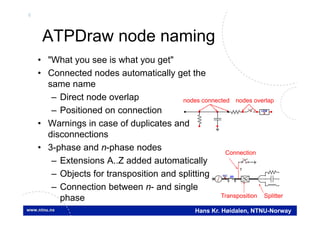
ATPDraw node naming
• "What you see is what you get"
• Connected nodes automatically get the
same name
– Direct node overlap
– Positioned on connection
• Warnings in case of duplicates and
disconnections
• 3-phase and n-phase nodes
– Extensions A..Z added automatically
– Objects for transposition and splitting
– Connection between n- and single
phase
nodes connected nodes overlap
SplitterTransposition
Connection
ABC
1
7
Hans Kr. Høidalen, NTNU-Norway
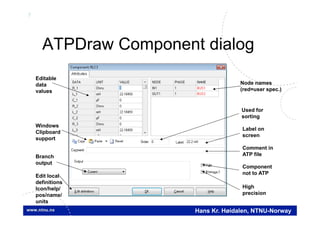
ATPDraw Component dialog
Editable
data
values
Windows
Clipboard
support
Branch
output
Edit local
definitions
Icon/help/
pos/name/
units
Node names
(red=user spec.)
Used for
sorting
Label on
screen
Comment in
ATP file
Component
not to ATP
High
precision
8
Hans Kr. Høidalen, NTNU-Norway
ATPDraw capability
• 30.000 nodes
• 10.000 components
• 10.000 connections
• 1.000 text strings
• Up to 64 data and 32 nodes per component
• Up to 26 phases per node (A..Z extension)
• 24 phases in LCC module
• Circuit world is 10.000x10.000 pixels
• 100 UnDo/ReDo steps
9
Hans Kr. Høidalen, NTNU-Norway
Files in ATPDraw
• Project file (acp): Contains all circuit data.
• Support file (sup): Component definitions. Used only
when a component is added to the project.
– Standard components: ATPDraw.scl
– User defined components: Optionally in global library
• Data file (alc/bct/xfm): Contain special data
– Stored internally in data structure
– Optionally in global library
• Help file (sup/txt): User specified help text
– Global help stored in sup-file or /HLP directory (txt file)
– Local help created under Edit definitions
+
10
Hans Kr. Høidalen, NTNU-Norway
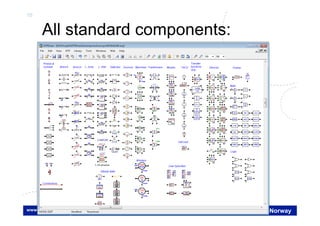
All standard components:
11
Hans Kr. Høidalen, NTNU-Norway
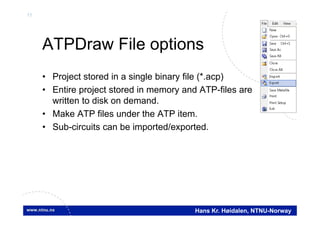
ATPDraw File options
• Project stored in a single binary file (*.acp)
• Entire project stored in memory and ATP-files are
written to disk on demand.
• Make ATP files under the ATP item.
• Sub-circuits can be imported/exported.
12
Hans Kr. Høidalen, NTNU-Norway
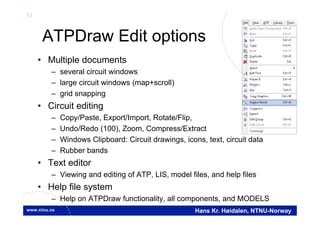
ATPDraw Edit options
• Multiple documents
– several circuit windows
– large circuit windows (map+scroll)
– grid snapping
• Circuit editing
– Copy/Paste, Export/Import, Rotate/Flip,
– Undo/Redo (100), Zoom, Compress/Extract
– Windows Clipboard: Circuit drawings, icons, text, circuit data
– Rubber bands
• Text editor
– Viewing and editing of ATP, LIS, model files, and help files
• Help file system
– Help on ATPDraw functionality, all components, and MODELS
13
Hans Kr. Høidalen, NTNU-Norway
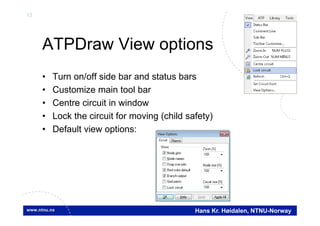
ATPDraw View options
• Turn on/off side bar and status bars
• Customize main tool bar
• Centre circuit in window
• Lock the circuit for moving (child safety)
• Default view options:
14
Hans Kr. Høidalen, NTNU-Norway
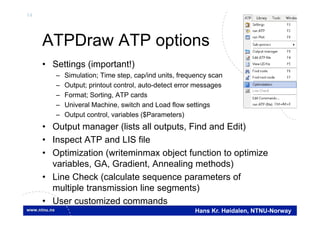
ATPDraw ATP options
• Settings (important!)
– Simulation; Time step, cap/ind units, frequency scan
– Output; printout control, auto-detect error messages
– Format; Sorting, ATP cards
– Univeral Machine, switch and Load flow settings
– Output control, variables ($Parameters)
• Output manager (lists all outputs, Find and Edit)
• Inspect ATP and LIS file
• Optimization (writeminmax object function to optimize
variables, GA, Gradient, Annealing methods)
• Line Check (calculate sequence parameters of
multiple transmission line segments)
• User customized commands
15
Hans Kr. Høidalen, NTNU-Norway
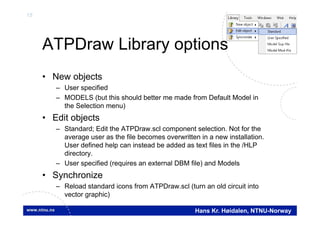
ATPDraw Library options
• New objects
– User specified
– MODELS (but this should better me made from Default Model in
the Selection menu)
• Edit objects
– Standard; Edit the ATPDraw.scl component selection. Not for the
average user as the file becomes overwritten in a new installation.
User defined help can instead be added as text files in the /HLP
directory.
– User specified (requires an external DBM file) and Models
• Synchronize
– Reload standard icons from ATPDraw.scl (turn an old circuit into
vector graphic)
16
Hans Kr. Høidalen, NTNU-Norway
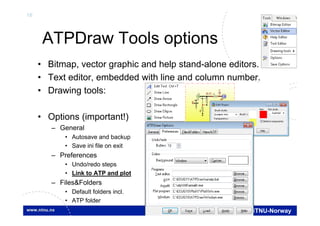
ATPDraw Tools options
• Bitmap, vector graphic and help stand-alone editors.
• Text editor, embedded with line and column number.
• Drawing tools:
• Options (important!)
– General
• Autosave and backup
• Save ini file on exit
– Preferences
• Undo/redo steps
• Link to ATP and plot
– Files&Folders
• Default folders incl.
• ATP folder
17
Hans Kr. Høidalen, NTNU-Norway
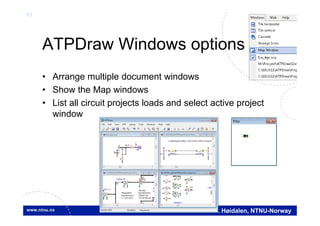
ATPDraw Windows options
• Arrange multiple document windows
• Show the Map windows
• List all circuit projects loads and select active project
window
18
Hans Kr. Høidalen, NTNU-Norway
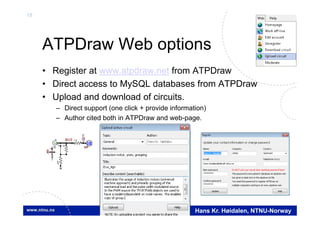
ATPDraw Web options
• Register at www.atpdraw.net from ATPDraw
• Direct access to MySQL databases from ATPDraw
• Upload and download of circuits.
– Direct support (one click + provide information)
– Author cited both in ATPDraw and web-page.
U
BUS
V
I
IM

V
19
Hans Kr. Høidalen, NTNU-Norway
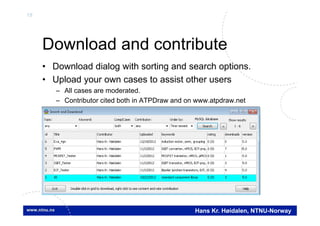
Download and contribute
• Download dialog with sorting and search options.
• Upload your own cases to assist other users
– All cases are moderated.
– Contributor cited both in ATPDraw and on www.atpdraw.net
20
Hans Kr. Høidalen, NTNU-Norway
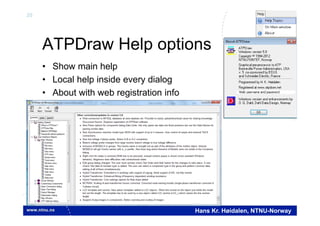
ATPDraw Help options
• Show main help
• Local help inside every dialog
• About with web registration info
21
Hans Kr. Høidalen, NTNU-Norway
User’s manual
• Documents version 3.5 of ATPDraw (246 pages), pdf
• Written by Laszlo Prikler and H. K. Høidalen
• Content
– Intro: To ATP and ATPDraw + Installation
– Introductory manual: Mouse+Edit, MyFirstCircuit
– Reference manual: All menus and components
– Advanced manual: Grouping/LCC/Models/BCTRAN + create
new components
– Application manual: 9 real examples
22
Hans Kr. Høidalen, NTNU-Norway
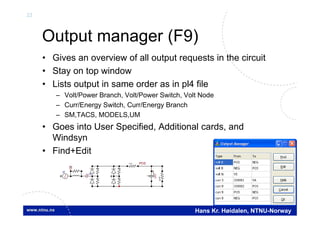
Output manager (F9)
• Gives an overview of all output requests in the circuit
• Stay on top window
• Lists output in same order as in pl4 file
– Volt/Power Branch, Volt/Power Switch, Volt Node
– Curr/Energy Switch, Curr/Energy Branch
– SM,TACS, MODELS,UM
• Goes into User Specified, Additional cards, and
Windsyn
• Find+Edit
POSI
U(0)
+
UI
UI
U
I
V
23
Hans Kr. Høidalen, NTNU-Norway
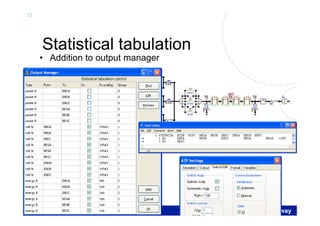
Statistical tabulation
• Addition to output manager
U
U
U
MOV
PE
U
STAT
MOV
PE
LCC
MID
LCC LCC LCC
STAT
STAT
V
SV
S V
S
24
Hans Kr. Høidalen, NTNU-Norway
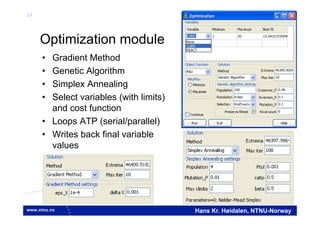
Optimization module
• Gradient Method
• Genetic Algorithm
• Simplex Annealing
• Select variables (with limits)
and cost function
• Loops ATP (serial/parallel)
• Writes back final variable
values
25
Hans Kr. Høidalen, NTNU-Norway
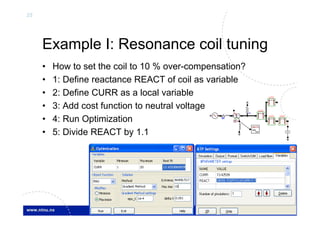
Example I: Resonance coil tuning
• How to set the coil to 10 % over-compensation?
• 1: Define reactance REACT of coil as variable
• 2: Define CURR as a local variable
• 3: Add cost function to neutral voltage
• 4: Run Optimization
• 5: Divide REACT by 1.1
V
SAT
Y
LCC
WRITE
max
min
LCC
LCC LCC
26
Hans Kr. Høidalen, NTNU-Norway
Latest news version 5.8
• Hybrid transformer further developed (4 windings,
zigzag, enhanced core settings, new R(f) options)
• New synchronous machine 58/59 with multi-masses
and output control.
• LCC template. Cross section in a template object,
length in a new LCC section object referencing the
template. Optional single phase view of LCC section.
• BCTRAN corrections.
• Grouping of MODELS. UseAs surfaced.
• Enhanced votlage probes.
• Web and MySQL connection. Upload/download, forum.
• Support of png images. Far better zooming of images.
27
Hans Kr. Høidalen, NTNU-Norway
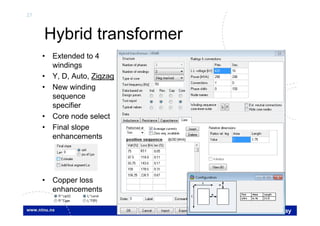
Hybrid transformer
• Extended to 4
windings
• Y, D, Auto, Zigzag
• New winding
sequence
specifier
• Core node select
• Final slope
enhancements
• Copper loss
enhancements
28
Hans Kr. Høidalen, NTNU-Norway
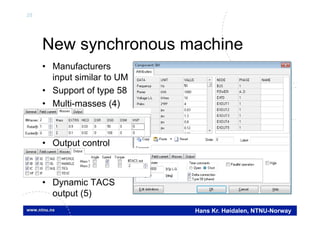
New synchronous machine
• Manufacturers
input similar to UM
• Support of type 58
• Multi-masses (4)
• Output control
• Dynamic TACS
output (5)
29
Hans Kr. Høidalen, NTNU-Norway
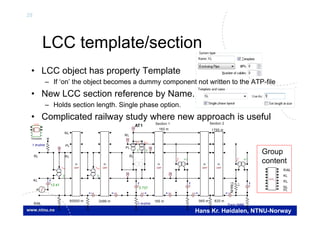
LCC template/section
• LCC object has property Template
– If ‘on’ the object becomes a dummy component not written to the ATP-file
• New LCC section reference by Name.
– Holds section length. Single phase option.
• Complicated railway study where new approach is useful
BCT
AA
GRP
KL
GRP
KL
GRP
KL
GRP
KL
GRP
KL
BCT
Y Y
BCT
Y Y
V
LCC
Template
BCT
Y Y
1 mohm Train 5MW
TRAIN
I
BCT
AA
I II I
VV
I
V
V
I
I2.737
I
1 mohm
12.41
I
BCT
YY
V
1 mohm
BCT
YY
I
NL
PL
RL
Section 2Section 1
160 m 965 m 825 m
1790 m160 m
AT1
RL
NL
RAIL
KL
PL
RL
60000 m 2496 m
LCC_
RAIL
KL
RL
NL
PL
Group
content
30
Hans Kr. Høidalen, NTNU-Norway
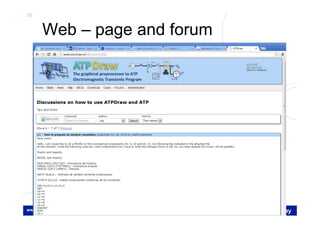
Web – page and forum
31
Hans Kr. Høidalen, NTNU-Norway
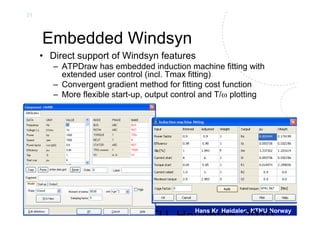
Embedded Windsyn
• Direct support of Windsyn features
– ATPDraw has embedded induction machine fitting with
extended user control (incl. Tmax fitting)
– Convergent gradient method for fitting cost function
– More flexible start-up, output control and T/ plotting
MTU Houghton 2010
32
Hans Kr. Høidalen, NTNU-Norway
Improvements in ATPDraw
• Windsyn relaxes the fitting of the slip while ATPDraw
now offers this as a part of the cost function
• Windsyn does the fitting iteratively without adjusting the
stator resistance when slip, efficiency or power factor
becomes different
• Bug fixes (hp conversion, round-off error, mechanical
vs. electrical power, motor vs. generator efficiency)
• The TACS section made smoother with less variables
(kVAR, kWAT, PUVT, PUTM, Slip)
• Only relevant nodes presented in the icon (no field
voltage node, only rotor winding node for wound rotor)
• No need to rerun the fitting when the type of
initialization or compensation/prediction change
33
Hans Kr. Høidalen, NTNU-Norway
Example
• Create double-cage IM model
• Tuning of weight factors required to get rated current.
Torque
IM
WI
0.0 0.5 1.0 1.5 2.0
Omega [pu]
-3.0
-2.0
-1.0
0.0
1.0
2.0
3.0 Torque [pu]
34
Hans Kr. Høidalen, NTNU-Norway
Machines
• The following types are supported
– Universal machine
– Type 59/58 synchronous machine
– Type 56 induction machine
• Embedded, adapted Windsyn support
– Manufacturer data input
– Start-up facilities
– Embedded controls (exciter, governor)
IM

SM
IM
T
35
Hans Kr. Høidalen, NTNU-Norway
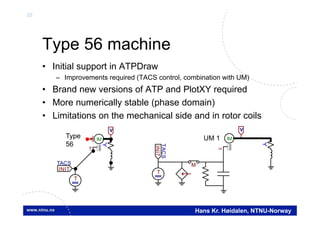
Type 56 machine
• Initial support in ATPDraw
– Improvements required (TACS control, combination with UM)
• Brand new versions of ATP and PlotXY required
• More numerically stable (phase domain)
• Limitations on the mechanical side and in rotor coils
IM
T
T
INIT
TACS
V
IM

M
V
T
INIT
TACS
Type
56
UM 1
36
Hans Kr. Høidalen, NTNU-Norway
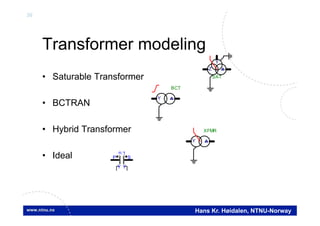
Transformer modeling
• Saturable Transformer
• BCTRAN
• Hybrid Transformer
• Ideal
SAT
Y
Z
BCT
Y
XFMR
Y
P S
:n 1
Y Y
37
Hans Kr. Høidalen, NTNU-Norway
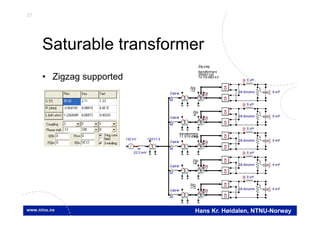
Saturable transformer
• Zigzag supported
SAT
Y
Z
132 kV
SAT
Y Y
VCable
132/11.3
SAT
Y Y
SAT
Y
Z
SAT
Y Y
5 uH
26.5mohm
UI
5 mF
U(0)
+
22.2 mH
VCable
SAT
Y
Z
SAT
Y Y
VCable
SAT
Y
Z
SAT
Y Y
VCable
SAT
Y
Y
SAT
Y Y
VCable
V
5 uH
26.5mohm
UI
5 mF
U(0)
+
V
5 uH
26.5mohm
UI
5 mF
U(0)
+
V
5 uH
26.5mohm
UI
5 mF
U(0)
+
V
5 uH
26.5mohm
UI
5 mF
U(0)
+
V
Zdy
Zdy
Zdy
Zdy
Zig-zag
transformers
ZN0d11y0
10.7/0.693 kV
-12
-6
+6
+12
11.3/10.6 kV
transformers
Ydy
38
Hans Kr. Høidalen, NTNU-Norway
BCTRAN
• Automatic inclusion of external magnetization characteristic
BCT
Y
16 kV
I
VVXFMR
Y
I
V
V
V
XFMR
BCTRAN
(f ile Exa_16.pl4; x-v ar t) c:X0004A-LV_XA c:X0004A-LV_BA
0.00 0.02 0.04 0.06 0.08 0.10[s]
-70
-40
-10
20
50
80
[A]
39
Hans Kr. Høidalen, NTNU-Norway
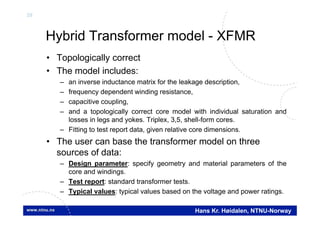
Hybrid Transformer model - XFMR
• Topologically correct
• The model includes:
– an inverse inductance matrix for the leakage description,
– frequency dependent winding resistance,
– capacitive coupling,
– and a topologically correct core model with individual saturation and
losses in legs and yokes. Triplex, 3,5, shell-form cores.
– Fitting to test report data, given relative core dimensions.
• The user can base the transformer model on three
sources of data:
– Design parameter: specify geometry and material parameters of the
core and windings.
– Test report: standard transformer tests.
– Typical values: typical values based on the voltage and power ratings.
40
Hans Kr. Høidalen, NTNU-Norway
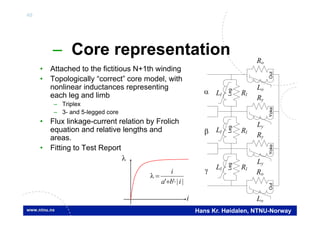
– Core representation
• Attached to the fictitious N+1th winding
• Topologically “correct” core model, with
nonlinear inductances representing
each leg and limb
– Triplex
– 3- and 5-legged core
• Flux linkage-current relation by Frolich
equation and relative lengths and
areas.
• Fitting to Test Report
||'' iba
i



i
Ll Rl
Ll
Ll Rl
Ly
Ry
Ly
Ry
Lo
Ro
Lo
Ro
LegLegLeg
Rl
YokeYokeOutOut
41
Hans Kr. Høidalen, NTNU-Norway
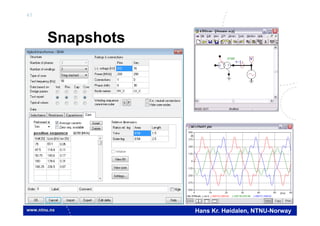
Snapshots
42
Hans Kr. Høidalen, NTNU-Norway
Latest news, Version 5.0 available from October 2006
Sponsored by BPA & EEUG
• Vector graphics
– Improved zoom
– Larger, dynamic icon; RLC, transformer,
switch…
– Individual selection area
• Multi-phase nodes
– 1..26 phases, A..Z extension
– MODELS input/output X[1..26]
– Connection between n-phase and single phase
– 21 phases in LCC components
• New file management
– Project file follows the PKZIP 2 format.
Improved compression. acp-extension.
– Sup-file only used when a component is
created.
– External data moved from files to memory.
– Individual, editable help strings for all
components.
LCC LCC LCC LCC
1
132 kV
132/11.3
SAT
Y
22.2 mH
MODEL
fourier
M
I
1
AC
POS
NEG
PULSE 1 4 3 6 5 2
6-phase
43
Hans Kr. Høidalen, NTNU-Norway
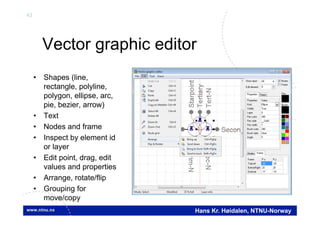
Vector graphic editor
• Shapes (line,
rectangle, polyline,
polygon, ellipse, arc,
pie, bezier, arrow)
• Text
• Nodes and frame
• Inspect by element id
or layer
• Edit point, drag, edit
values and properties
• Arrange, rotate/flip
• Grouping for
move/copy
44
Hans Kr. Høidalen, NTNU-Norway
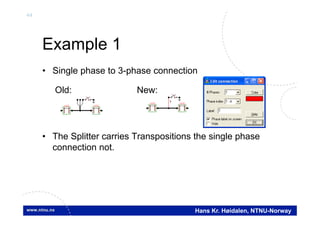
Example 1
• Single phase to 3-phase connection
• The Splitter carries Transpositions the single phase
connection not.
LCC LCC
Old:
LCC LCC
1
New:
45
Hans Kr. Høidalen, NTNU-Norway
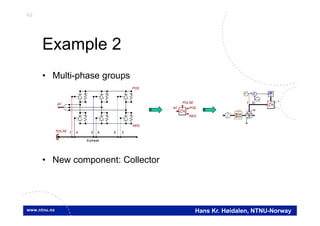
Example 2
• Multi-phase groups
• New component: Collector
AC
POS
NEG
PULSE 1 4 3 6 5 2
6-phase
AC POS
NEG
PULSE +
-
SAT
Y
Y
+
-
T
T
LCC
31
46
Hans Kr. Høidalen, NTNU-Norway
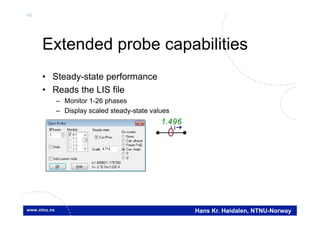
Extended probe capabilities
• Steady-state performance
• Reads the LIS file
– Monitor 1-26 phases
– Display scaled steady-state values
1.496
I
47
Hans Kr. Høidalen, NTNU-Norway
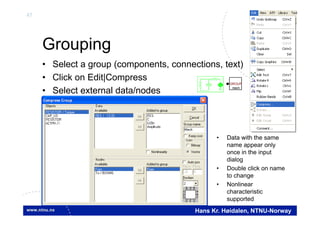
Grouping
• Select a group (components, connections, text)
• Click on Edit|Compress
• Select external data/nodes
GROUP
mech
• Data with the same
name appear only
once in the input
dialog
• Double click on name
to change
• Nonlinear
characteristic
supported
48
Hans Kr. Høidalen, NTNU-Norway
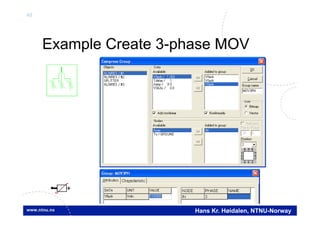
Example Create 3-phase MOV
49
Hans Kr. Høidalen, NTNU-Norway
U
BUS
V
I
IM

V
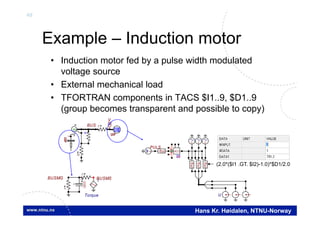
Example – Induction motor
• Induction motor fed by a pulse width modulated
voltage source
• External mechanical load
• TFORTRAN components in TACS $I1..9, $D1..9
(group becomes transparent and possible to copy)
Torque
BUSMG
I
U(0)
+
UI
I
IBUSMS
U
PULST
f(u)
f(u)
f(u)
T T T
65
ACCf(u)
(2.0*($I1 .GT. $I2)-1.0)*$D1/2.0
50
Hans Kr. Høidalen, NTNU-Norway
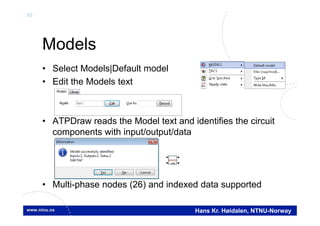
Models
• Select Models|Default model
• Edit the Models text
• ATPDraw reads the Model text and identifies the circuit
components with input/output/data
• Multi-phase nodes (26) and indexed data supported
MODEL
max
51
Hans Kr. Høidalen, NTNU-Norway
Example
• Multi-phase Models
• New Model probe
SAT
Y
Z
132 kV
SAT
Y Y
5 uH
VCable
132/11.3
SAT
Y Y
SAT
Y
Z
SAT
Y Y
HVBUS
I
5 uH
0.0265
UI
5 mF
U(0)
+
22.2 mH
VCable 0.0265
UI
5 mF
U(0)
+
MODEL
fourier
M
1
Regulation
11.3/10.6 kV
transformers
Diode
bridgesZig-zag
transformers
ZN0d11y0
10.7/0.693 kV
MODEL FOURIER
INPUT X --input signal to be transformed
DATA FREQ {DFLT:50} --power frequency
n {DFLT:26} --number of harmonics to calculate
OUTPUT absF[1..26], angF[1..26],F0 --DFT signals
VAR absF[1..26], angF[1..26],F0,reF[1..26], imF[1..26],
i,NSAMPL,OMEGA,D,F1,F2,F3,F4
(f ile Exa_14.pl4; x-v ar t) m:X0027E m:X0027G m:X0027V m:X0027Y
0.02 0.03 0.04 0.05 0.06 0.07 0.08 0.09 0.10[s]
0
4
8
12
16
20
52
Hans Kr. Høidalen, NTNU-Norway
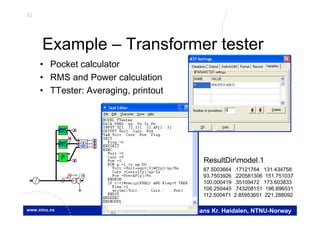
Example – Transformer tester
• Pocket calculator
• RMS and Power calculation
• TTester: Averaging, printout
VV
I
MMM
MM
M
XFMR
Y
87.5003664 .17121764 131.434758
93.7503926 .220581306 151.751037
100.000419 .35109472 173.603833
106.250445 .743208151 196.896531
112.500471 2.85953651 221.288092
ResultDirmodel.1
53
Hans Kr. Høidalen, NTNU-Norway
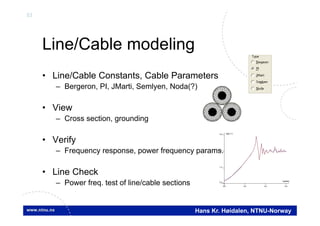
Line/Cable modeling
• Line/Cable Constants, Cable Parameters
– Bergeron, PI, JMarti, Semlyen, Noda(?)
• View
– Cross section, grounding
• Verify
– Frequency response, power frequency params.
• Line Check
– Power freq. test of line/cable sections 0.0 2.0 4.0 6.0
log(freq)
0.4
1.5
2.7
3.9 log(| Z |)
54
Hans Kr. Høidalen, NTNU-Norway
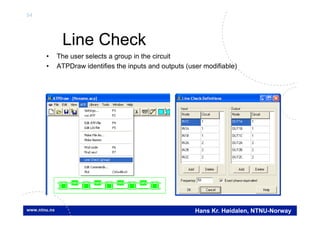
Line Check
• The user selects a group in the circuit
• ATPDraw identifies the inputs and outputs (user modifiable)
55
Hans Kr. Høidalen, NTNU-Norway
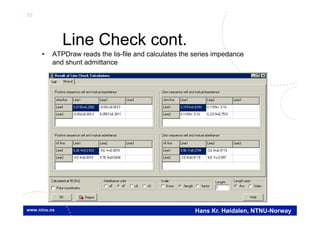
Line Check cont.
• ATPDraw reads the lis-file and calculates the series impedance
and shunt admittance

Atp draw-tutorial

  • 1.
    1 Hans Kr. Høidalen,NTNU-Norway Introduction to ATPDraw version 5 • Introduction to ATPDraw • Layout and dialogs • Transformer modeling • Lines&Cables modeling • Machine modeling • Multi-phase circuits • Vector graphics • Grouping • Models
  • 2.
    2 Hans Kr. Høidalen,NTNU-Norway Introduction • ATPDraw is a graphical, mouse-driven, dynamic preprocessor to ATP on the Windows platform • Handles node names and creates the ATP input file based on ”what you see is what you get” • Freeware • Supports – All types of editing operations – ~100 standard components – ~40 TACS components – MODELS – $INCLUDE and User Specified Components
  • 3.
    3 Hans Kr. Høidalen,NTNU-Norway Introduction- ATPDraw history • Simple DOS version – Leuven EMTP Centre, fall meeting 1991, 1992 • Extended DOS versions, 1994-95 • Windows version 1.0, July 1997 – Line/Cable modelling program ATP_LCC – User Manual • Windows version 2.0, Sept. 1999 – MODELS, more components (UM, SatTrafo ++) – Integrated line/cable support (Line Constants + Cable Parameters) BPA Sponsored
  • 4.
    4 Hans Kr. Høidalen,NTNU-Norway Introduction- ATPDraw history • Windows version 3, Dec. 2001 – Grouping/Compress – Data Variables, $Parameter + PCVP – LCC Verify + Cable Constants – BCTRAN – User Manual @ version 3.5 • Windows version 4, July 2004 – Line Check – Hybrid Transformer model – Zigzag Saturable transformer • Windows version 5, Sept. 2006 – Vector graphics, multi-phase cirucits, new file handling
  • 5.
    5 Hans Kr. Høidalen,NTNU-Norway ATPDraw main windows Circuit map Circuit windows Header, circuit file name Main menu Tool bar Side bar (optional) Component selection menu Circuit under construction
  • 6.
    6 Hans Kr. Høidalen,NTNU-Norway ATPDraw node naming • "What you see is what you get" • Connected nodes automatically get the same name – Direct node overlap – Positioned on connection • Warnings in case of duplicates and disconnections • 3-phase and n-phase nodes – Extensions A..Z added automatically – Objects for transposition and splitting – Connection between n- and single phase nodes connected nodes overlap SplitterTransposition Connection ABC 1
  • 7.
    7 Hans Kr. Høidalen,NTNU-Norway ATPDraw Component dialog Editable data values Windows Clipboard support Branch output Edit local definitions Icon/help/ pos/name/ units Node names (red=user spec.) Used for sorting Label on screen Comment in ATP file Component not to ATP High precision
  • 8.
    8 Hans Kr. Høidalen,NTNU-Norway ATPDraw capability • 30.000 nodes • 10.000 components • 10.000 connections • 1.000 text strings • Up to 64 data and 32 nodes per component • Up to 26 phases per node (A..Z extension) • 24 phases in LCC module • Circuit world is 10.000x10.000 pixels • 100 UnDo/ReDo steps
  • 9.
    9 Hans Kr. Høidalen,NTNU-Norway Files in ATPDraw • Project file (acp): Contains all circuit data. • Support file (sup): Component definitions. Used only when a component is added to the project. – Standard components: ATPDraw.scl – User defined components: Optionally in global library • Data file (alc/bct/xfm): Contain special data – Stored internally in data structure – Optionally in global library • Help file (sup/txt): User specified help text – Global help stored in sup-file or /HLP directory (txt file) – Local help created under Edit definitions +
  • 10.
    10 Hans Kr. Høidalen,NTNU-Norway All standard components:
  • 11.
    11 Hans Kr. Høidalen,NTNU-Norway ATPDraw File options • Project stored in a single binary file (*.acp) • Entire project stored in memory and ATP-files are written to disk on demand. • Make ATP files under the ATP item. • Sub-circuits can be imported/exported.
  • 12.
    12 Hans Kr. Høidalen,NTNU-Norway ATPDraw Edit options • Multiple documents – several circuit windows – large circuit windows (map+scroll) – grid snapping • Circuit editing – Copy/Paste, Export/Import, Rotate/Flip, – Undo/Redo (100), Zoom, Compress/Extract – Windows Clipboard: Circuit drawings, icons, text, circuit data – Rubber bands • Text editor – Viewing and editing of ATP, LIS, model files, and help files • Help file system – Help on ATPDraw functionality, all components, and MODELS
  • 13.
    13 Hans Kr. Høidalen,NTNU-Norway ATPDraw View options • Turn on/off side bar and status bars • Customize main tool bar • Centre circuit in window • Lock the circuit for moving (child safety) • Default view options:
  • 14.
    14 Hans Kr. Høidalen,NTNU-Norway ATPDraw ATP options • Settings (important!) – Simulation; Time step, cap/ind units, frequency scan – Output; printout control, auto-detect error messages – Format; Sorting, ATP cards – Univeral Machine, switch and Load flow settings – Output control, variables ($Parameters) • Output manager (lists all outputs, Find and Edit) • Inspect ATP and LIS file • Optimization (writeminmax object function to optimize variables, GA, Gradient, Annealing methods) • Line Check (calculate sequence parameters of multiple transmission line segments) • User customized commands
  • 15.
    15 Hans Kr. Høidalen,NTNU-Norway ATPDraw Library options • New objects – User specified – MODELS (but this should better me made from Default Model in the Selection menu) • Edit objects – Standard; Edit the ATPDraw.scl component selection. Not for the average user as the file becomes overwritten in a new installation. User defined help can instead be added as text files in the /HLP directory. – User specified (requires an external DBM file) and Models • Synchronize – Reload standard icons from ATPDraw.scl (turn an old circuit into vector graphic)
  • 16.
    16 Hans Kr. Høidalen,NTNU-Norway ATPDraw Tools options • Bitmap, vector graphic and help stand-alone editors. • Text editor, embedded with line and column number. • Drawing tools: • Options (important!) – General • Autosave and backup • Save ini file on exit – Preferences • Undo/redo steps • Link to ATP and plot – Files&Folders • Default folders incl. • ATP folder
  • 17.
    17 Hans Kr. Høidalen,NTNU-Norway ATPDraw Windows options • Arrange multiple document windows • Show the Map windows • List all circuit projects loads and select active project window
  • 18.
    18 Hans Kr. Høidalen,NTNU-Norway ATPDraw Web options • Register at www.atpdraw.net from ATPDraw • Direct access to MySQL databases from ATPDraw • Upload and download of circuits. – Direct support (one click + provide information) – Author cited both in ATPDraw and web-page. U BUS V I IM  V
  • 19.
    19 Hans Kr. Høidalen,NTNU-Norway Download and contribute • Download dialog with sorting and search options. • Upload your own cases to assist other users – All cases are moderated. – Contributor cited both in ATPDraw and on www.atpdraw.net
  • 20.
    20 Hans Kr. Høidalen,NTNU-Norway ATPDraw Help options • Show main help • Local help inside every dialog • About with web registration info
  • 21.
    21 Hans Kr. Høidalen,NTNU-Norway User’s manual • Documents version 3.5 of ATPDraw (246 pages), pdf • Written by Laszlo Prikler and H. K. Høidalen • Content – Intro: To ATP and ATPDraw + Installation – Introductory manual: Mouse+Edit, MyFirstCircuit – Reference manual: All menus and components – Advanced manual: Grouping/LCC/Models/BCTRAN + create new components – Application manual: 9 real examples
  • 22.
    22 Hans Kr. Høidalen,NTNU-Norway Output manager (F9) • Gives an overview of all output requests in the circuit • Stay on top window • Lists output in same order as in pl4 file – Volt/Power Branch, Volt/Power Switch, Volt Node – Curr/Energy Switch, Curr/Energy Branch – SM,TACS, MODELS,UM • Goes into User Specified, Additional cards, and Windsyn • Find+Edit POSI U(0) + UI UI U I V
  • 23.
    23 Hans Kr. Høidalen,NTNU-Norway Statistical tabulation • Addition to output manager U U U MOV PE U STAT MOV PE LCC MID LCC LCC LCC STAT STAT V SV S V S
  • 24.
    24 Hans Kr. Høidalen,NTNU-Norway Optimization module • Gradient Method • Genetic Algorithm • Simplex Annealing • Select variables (with limits) and cost function • Loops ATP (serial/parallel) • Writes back final variable values
  • 25.
    25 Hans Kr. Høidalen,NTNU-Norway Example I: Resonance coil tuning • How to set the coil to 10 % over-compensation? • 1: Define reactance REACT of coil as variable • 2: Define CURR as a local variable • 3: Add cost function to neutral voltage • 4: Run Optimization • 5: Divide REACT by 1.1 V SAT Y LCC WRITE max min LCC LCC LCC
  • 26.
    26 Hans Kr. Høidalen,NTNU-Norway Latest news version 5.8 • Hybrid transformer further developed (4 windings, zigzag, enhanced core settings, new R(f) options) • New synchronous machine 58/59 with multi-masses and output control. • LCC template. Cross section in a template object, length in a new LCC section object referencing the template. Optional single phase view of LCC section. • BCTRAN corrections. • Grouping of MODELS. UseAs surfaced. • Enhanced votlage probes. • Web and MySQL connection. Upload/download, forum. • Support of png images. Far better zooming of images.
  • 27.
    27 Hans Kr. Høidalen,NTNU-Norway Hybrid transformer • Extended to 4 windings • Y, D, Auto, Zigzag • New winding sequence specifier • Core node select • Final slope enhancements • Copper loss enhancements
  • 28.
    28 Hans Kr. Høidalen,NTNU-Norway New synchronous machine • Manufacturers input similar to UM • Support of type 58 • Multi-masses (4) • Output control • Dynamic TACS output (5)
  • 29.
    29 Hans Kr. Høidalen,NTNU-Norway LCC template/section • LCC object has property Template – If ‘on’ the object becomes a dummy component not written to the ATP-file • New LCC section reference by Name. – Holds section length. Single phase option. • Complicated railway study where new approach is useful BCT AA GRP KL GRP KL GRP KL GRP KL GRP KL BCT Y Y BCT Y Y V LCC Template BCT Y Y 1 mohm Train 5MW TRAIN I BCT AA I II I VV I V V I I2.737 I 1 mohm 12.41 I BCT YY V 1 mohm BCT YY I NL PL RL Section 2Section 1 160 m 965 m 825 m 1790 m160 m AT1 RL NL RAIL KL PL RL 60000 m 2496 m LCC_ RAIL KL RL NL PL Group content
  • 30.
    30 Hans Kr. Høidalen,NTNU-Norway Web – page and forum
  • 31.
    31 Hans Kr. Høidalen,NTNU-Norway Embedded Windsyn • Direct support of Windsyn features – ATPDraw has embedded induction machine fitting with extended user control (incl. Tmax fitting) – Convergent gradient method for fitting cost function – More flexible start-up, output control and T/ plotting MTU Houghton 2010
  • 32.
    32 Hans Kr. Høidalen,NTNU-Norway Improvements in ATPDraw • Windsyn relaxes the fitting of the slip while ATPDraw now offers this as a part of the cost function • Windsyn does the fitting iteratively without adjusting the stator resistance when slip, efficiency or power factor becomes different • Bug fixes (hp conversion, round-off error, mechanical vs. electrical power, motor vs. generator efficiency) • The TACS section made smoother with less variables (kVAR, kWAT, PUVT, PUTM, Slip) • Only relevant nodes presented in the icon (no field voltage node, only rotor winding node for wound rotor) • No need to rerun the fitting when the type of initialization or compensation/prediction change
  • 33.
    33 Hans Kr. Høidalen,NTNU-Norway Example • Create double-cage IM model • Tuning of weight factors required to get rated current. Torque IM WI 0.0 0.5 1.0 1.5 2.0 Omega [pu] -3.0 -2.0 -1.0 0.0 1.0 2.0 3.0 Torque [pu]
  • 34.
    34 Hans Kr. Høidalen,NTNU-Norway Machines • The following types are supported – Universal machine – Type 59/58 synchronous machine – Type 56 induction machine • Embedded, adapted Windsyn support – Manufacturer data input – Start-up facilities – Embedded controls (exciter, governor) IM  SM IM T
  • 35.
    35 Hans Kr. Høidalen,NTNU-Norway Type 56 machine • Initial support in ATPDraw – Improvements required (TACS control, combination with UM) • Brand new versions of ATP and PlotXY required • More numerically stable (phase domain) • Limitations on the mechanical side and in rotor coils IM T T INIT TACS V IM  M V T INIT TACS Type 56 UM 1
  • 36.
    36 Hans Kr. Høidalen,NTNU-Norway Transformer modeling • Saturable Transformer • BCTRAN • Hybrid Transformer • Ideal SAT Y Z BCT Y XFMR Y P S :n 1 Y Y
  • 37.
    37 Hans Kr. Høidalen,NTNU-Norway Saturable transformer • Zigzag supported SAT Y Z 132 kV SAT Y Y VCable 132/11.3 SAT Y Y SAT Y Z SAT Y Y 5 uH 26.5mohm UI 5 mF U(0) + 22.2 mH VCable SAT Y Z SAT Y Y VCable SAT Y Z SAT Y Y VCable SAT Y Y SAT Y Y VCable V 5 uH 26.5mohm UI 5 mF U(0) + V 5 uH 26.5mohm UI 5 mF U(0) + V 5 uH 26.5mohm UI 5 mF U(0) + V 5 uH 26.5mohm UI 5 mF U(0) + V Zdy Zdy Zdy Zdy Zig-zag transformers ZN0d11y0 10.7/0.693 kV -12 -6 +6 +12 11.3/10.6 kV transformers Ydy
  • 38.
    38 Hans Kr. Høidalen,NTNU-Norway BCTRAN • Automatic inclusion of external magnetization characteristic BCT Y 16 kV I VVXFMR Y I V V V XFMR BCTRAN (f ile Exa_16.pl4; x-v ar t) c:X0004A-LV_XA c:X0004A-LV_BA 0.00 0.02 0.04 0.06 0.08 0.10[s] -70 -40 -10 20 50 80 [A]
  • 39.
    39 Hans Kr. Høidalen,NTNU-Norway Hybrid Transformer model - XFMR • Topologically correct • The model includes: – an inverse inductance matrix for the leakage description, – frequency dependent winding resistance, – capacitive coupling, – and a topologically correct core model with individual saturation and losses in legs and yokes. Triplex, 3,5, shell-form cores. – Fitting to test report data, given relative core dimensions. • The user can base the transformer model on three sources of data: – Design parameter: specify geometry and material parameters of the core and windings. – Test report: standard transformer tests. – Typical values: typical values based on the voltage and power ratings.
  • 40.
    40 Hans Kr. Høidalen,NTNU-Norway – Core representation • Attached to the fictitious N+1th winding • Topologically “correct” core model, with nonlinear inductances representing each leg and limb – Triplex – 3- and 5-legged core • Flux linkage-current relation by Frolich equation and relative lengths and areas. • Fitting to Test Report ||'' iba i    i Ll Rl Ll Ll Rl Ly Ry Ly Ry Lo Ro Lo Ro LegLegLeg Rl YokeYokeOutOut
  • 41.
    41 Hans Kr. Høidalen,NTNU-Norway Snapshots
  • 42.
    42 Hans Kr. Høidalen,NTNU-Norway Latest news, Version 5.0 available from October 2006 Sponsored by BPA & EEUG • Vector graphics – Improved zoom – Larger, dynamic icon; RLC, transformer, switch… – Individual selection area • Multi-phase nodes – 1..26 phases, A..Z extension – MODELS input/output X[1..26] – Connection between n-phase and single phase – 21 phases in LCC components • New file management – Project file follows the PKZIP 2 format. Improved compression. acp-extension. – Sup-file only used when a component is created. – External data moved from files to memory. – Individual, editable help strings for all components. LCC LCC LCC LCC 1 132 kV 132/11.3 SAT Y 22.2 mH MODEL fourier M I 1 AC POS NEG PULSE 1 4 3 6 5 2 6-phase
  • 43.
    43 Hans Kr. Høidalen,NTNU-Norway Vector graphic editor • Shapes (line, rectangle, polyline, polygon, ellipse, arc, pie, bezier, arrow) • Text • Nodes and frame • Inspect by element id or layer • Edit point, drag, edit values and properties • Arrange, rotate/flip • Grouping for move/copy
  • 44.
    44 Hans Kr. Høidalen,NTNU-Norway Example 1 • Single phase to 3-phase connection • The Splitter carries Transpositions the single phase connection not. LCC LCC Old: LCC LCC 1 New:
  • 45.
    45 Hans Kr. Høidalen,NTNU-Norway Example 2 • Multi-phase groups • New component: Collector AC POS NEG PULSE 1 4 3 6 5 2 6-phase AC POS NEG PULSE + - SAT Y Y + - T T LCC 31
  • 46.
    46 Hans Kr. Høidalen,NTNU-Norway Extended probe capabilities • Steady-state performance • Reads the LIS file – Monitor 1-26 phases – Display scaled steady-state values 1.496 I
  • 47.
    47 Hans Kr. Høidalen,NTNU-Norway Grouping • Select a group (components, connections, text) • Click on Edit|Compress • Select external data/nodes GROUP mech • Data with the same name appear only once in the input dialog • Double click on name to change • Nonlinear characteristic supported
  • 48.
    48 Hans Kr. Høidalen,NTNU-Norway Example Create 3-phase MOV
  • 49.
    49 Hans Kr. Høidalen,NTNU-Norway U BUS V I IM  V Example – Induction motor • Induction motor fed by a pulse width modulated voltage source • External mechanical load • TFORTRAN components in TACS $I1..9, $D1..9 (group becomes transparent and possible to copy) Torque BUSMG I U(0) + UI I IBUSMS U PULST f(u) f(u) f(u) T T T 65 ACCf(u) (2.0*($I1 .GT. $I2)-1.0)*$D1/2.0
  • 50.
    50 Hans Kr. Høidalen,NTNU-Norway Models • Select Models|Default model • Edit the Models text • ATPDraw reads the Model text and identifies the circuit components with input/output/data • Multi-phase nodes (26) and indexed data supported MODEL max
  • 51.
    51 Hans Kr. Høidalen,NTNU-Norway Example • Multi-phase Models • New Model probe SAT Y Z 132 kV SAT Y Y 5 uH VCable 132/11.3 SAT Y Y SAT Y Z SAT Y Y HVBUS I 5 uH 0.0265 UI 5 mF U(0) + 22.2 mH VCable 0.0265 UI 5 mF U(0) + MODEL fourier M 1 Regulation 11.3/10.6 kV transformers Diode bridgesZig-zag transformers ZN0d11y0 10.7/0.693 kV MODEL FOURIER INPUT X --input signal to be transformed DATA FREQ {DFLT:50} --power frequency n {DFLT:26} --number of harmonics to calculate OUTPUT absF[1..26], angF[1..26],F0 --DFT signals VAR absF[1..26], angF[1..26],F0,reF[1..26], imF[1..26], i,NSAMPL,OMEGA,D,F1,F2,F3,F4 (f ile Exa_14.pl4; x-v ar t) m:X0027E m:X0027G m:X0027V m:X0027Y 0.02 0.03 0.04 0.05 0.06 0.07 0.08 0.09 0.10[s] 0 4 8 12 16 20
  • 52.
    52 Hans Kr. Høidalen,NTNU-Norway Example – Transformer tester • Pocket calculator • RMS and Power calculation • TTester: Averaging, printout VV I MMM MM M XFMR Y 87.5003664 .17121764 131.434758 93.7503926 .220581306 151.751037 100.000419 .35109472 173.603833 106.250445 .743208151 196.896531 112.500471 2.85953651 221.288092 ResultDirmodel.1
  • 53.
    53 Hans Kr. Høidalen,NTNU-Norway Line/Cable modeling • Line/Cable Constants, Cable Parameters – Bergeron, PI, JMarti, Semlyen, Noda(?) • View – Cross section, grounding • Verify – Frequency response, power frequency params. • Line Check – Power freq. test of line/cable sections 0.0 2.0 4.0 6.0 log(freq) 0.4 1.5 2.7 3.9 log(| Z |)
  • 54.
    54 Hans Kr. Høidalen,NTNU-Norway Line Check • The user selects a group in the circuit • ATPDraw identifies the inputs and outputs (user modifiable)
  • 55.
    55 Hans Kr. Høidalen,NTNU-Norway Line Check cont. • ATPDraw reads the lis-file and calculates the series impedance and shunt admittance