Tips and Tricks for Sage 300 
Keith Greeno – Asyma Solutions
Agenda 
•Continuous Improvement - enhancements 
•The Cloud 
•Training and getting help 
•Ease of use 
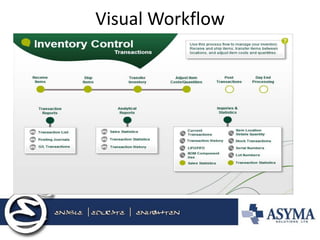
•Visual workflows 
•Sage Intelligence Reporting 
•How do we do it? 
•Questions?
Continuous Business Improvements 
•Business must continually review and improve processes. 
–Management practices change 
–Technology Improvements 
•Awareness 
•Interest 
•Trial 
•adoption 
• Sage software enhancements 
–Why stay current? What’s in it for me? 
–Reduce the total cost of ownership
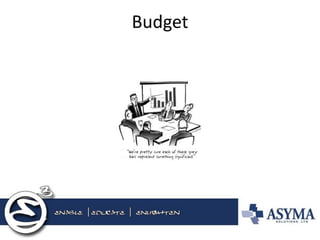
Budget
Sage payments
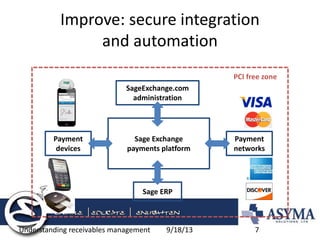
Improve: secure integration and automation 
9/18/13 
Understanding receivables management 
7 
Sage Exchange 
payments platform 
SageExchange.com administration 
Sage ERP 
Payment devices 
Payment networks 
PCI free zone
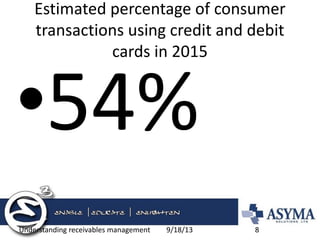
Estimated percentage of consumer transactions using credit and debit cards in 2015 
•54% 
9/18/13 
Understanding receivables management 
8
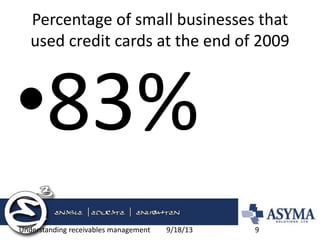
Percentage of small businesses that used credit cards at the end of 2009 
•83% 
9/18/13 
Understanding receivables management 
9
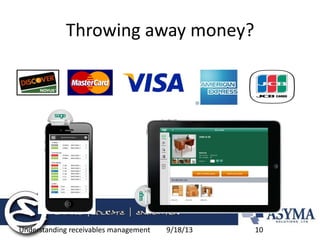
Throwing away money? 
9/18/13 
Understanding receivables management 
10
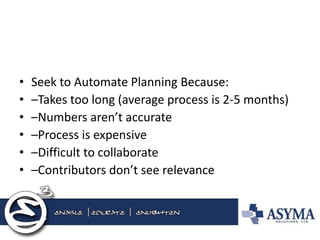
•Seek to Automate Planning Because: 
•–Takes too long (average process is 2-5 months) 
•–Numbers aren’t accurate 
•–Process is expensive 
•–Difficult to collaborate 
•–Contributors don’t see relevance
Training and getting help 
•Management consulting coaching 
–Flipping the norm 90:10 to 10:90 
–Understanding current processes 
•Asyma 
–Support (Knowledge transfer agreements) 
•Sage - support 
–Sage support access/anytime training
Ease of Use 
•Business process can be defined by role Sage Visual process flows 
•Software is 50% of the solution effective business processes are the other 
•All processes can be improved 
–How do we do things 
–How can we use changes to make things easier
Visual Workflow
Sage Intelligence Reporting 
•Specific reporting by company/individuals 
•Flexible versions (IFRS, Internal, External) 
•Excel functionality (Graphics, Formatting) 
•Drill down to detail (Forest to trees) 
•Push reporting (Dashboards, Scheduled)
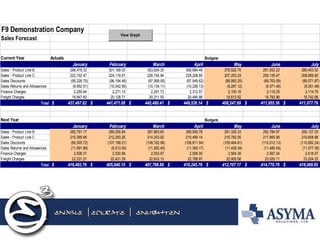
F9 Demonstration CompanySales ForecastCurrent YearActualsBudgetsJanuaryFebruaryMarchAprilMayJuneJulySales - Product Line B298,478.32 301,189.03 303,924.35 306,684.49 278,522.75 281,052.23 280,453.52 Sales - Product Line C222,102.47 224,119.57 226,154.94 228,208.85 207,253.23 209,135.47 208,689.92 Sales Discounts(95,328.70) (96,194.46) (97,068.05) (97,949.62) (88,955.25) (89,763.09) (89,571.87) Sales Returns and Allowances(9,952.51) (10,042.90) (10,134.11) (10,226.13) (9,287.12) (9,371.46) (9,351.49) Finance Charges2,250.64 2,271.13 2,291.73 2,312.57 2,100.16 2,119.25 2,114.75 Freight Charges19,947.60 20,128.71 20,311.55 20,495.98 18,613.92 18,782.96 18,742.96 Total437,497.82$ 441,471.08$ 445,480.41$ 449,526.14$ 408,247.69$ 411,955.36$ 411,077.79$ Next YearBudgetsJanuaryFebruaryMarchAprilMayJuneJulySales - Product Line B282,751.17 285,295.94 287,863.60 289,590.78 291,328.33 292,784.97 295,127.25 Sales - Product Line C210,399.68 212,293.25 214,203.92 215,489.14 216,782.05 217,865.98 219,608.88 Sales Discounts(90,305.72) (107,198.21) (108,162.98) (108,811.94) (109,464.81) (110,012.13) (110,892.24) Sales Returns and Allowances(11,091.89) (9,513.00) (11,292.45) (11,360.17) (11,428.34) (11,485.49) (11,577.36) Finance Charges2,508.31 2,530.88 2,553.67 2,569.00 2,584.38 2,597.34 2,618.07 Freight Charges22,231.21 22,431.29 22,633.13 22,768.97 22,905.56 23,020.11 23,204.25 Total416,492.76$ 405,840.15$ 407,798.89$ 410,245.79$ 412,707.17$ 414,770.79$ 418,088.85$ View Graph
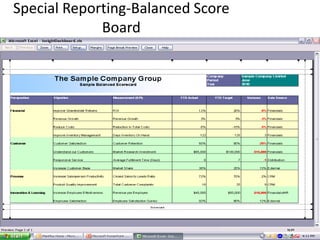
Special Reporting-Balanced Score Board
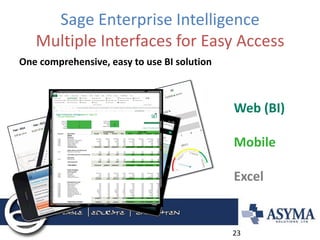
Sage Enterprise Intelligence Multiple Interfaces for Easy Access 
Web (BI) Mobile Excel 
One comprehensive, easy to use BI solution 
23
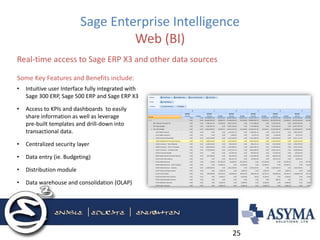
Sage Enterprise Intelligence Web (BI) 
•Intuitive user Interface fully integrated with Sage 300 ERP, Sage 500 ERP and Sage ERP X3 
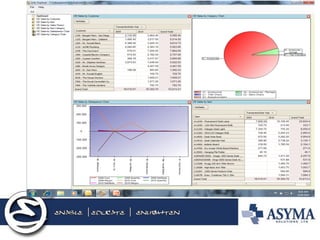
•Access to KPIs and dashboards to easily share information as well as leverage pre-built templates and drill-down into transactional data. 
•Centralized security layer 
•Data entry (ie. Budgeting) 
•Distribution module 
•Data warehouse and consolidation (OLAP) 
Real-time access to Sage ERP X3 and other data sources 
25 
Some Key Features and Benefits include:
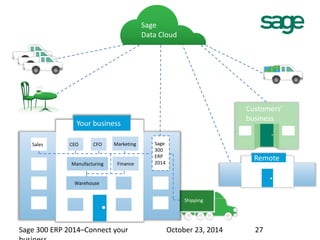
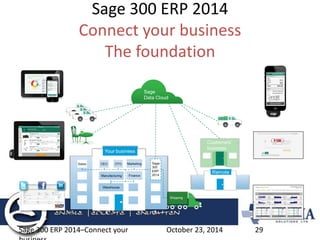
Shipping 
Your business 
Warehouse 
Manufacturing 
Sales CEO CFO Marketing 
Finance 
27 
Remote 
Sage 
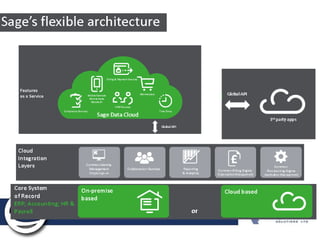
Data Cloud 
Customers’ 
business 
Sage 
300 
ERP 
2014 
Sage 300 ERP 2014–Connect your October 23, 2014 
business
Sage 300 ERP 2014 Connect your business 
October 23, 2014 
Sage 300 ERP 2014–Connect your business 
28
Sage 300 ERP 2014 Connect your business The foundation 
October 23, 2014 
Sage 300 ERP 2014–Connect your business 
29
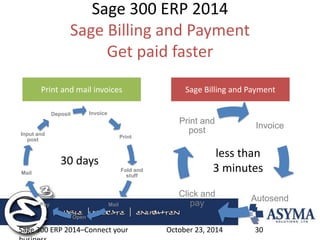
Sage 300 ERP 2014 Sage Billing and Payment Get paid faster 
October 23, 2014 
Sage 300 ERP 2014–Connect your business 
30 
Invoice 
Print 
Fold and stuff 
Mail 
Open 
Pay 
Mail 
Input and post 
Deposit 
Invoice 
Autosend 
Click and pay 
Print and post 
Print and mail invoices 
Sage Billing and Payment 
30 days 
less than 
3 minutes
Transaction Inquiry 
•Transaction drill down 
–All entry screens 
–All integrated modules 
•Customer inquiry 
•Finder (Smart lists)
Financial Reporter 
•Flexible versions (IFRS, Internal, External) 
•Excel functionality (Graphics, Formatting) 
•Drill down to detail (Forest to trees)
How do we improve? 
•Project Management 
–Knowing what needs to be done 
–Knowing when it needs doing 
–Knowing who has to do it 
•Planning versus Just Doing It
Agenda 
•Sage Accpac continuous enhancements 
•Training and getting support 
•Effective user of Finder 
•Cash Management/Bank reconciliations 
•Transaction inquiry 
•Financial Reporter/drill down 
•Effective data entry shortcuts 
•Other 
•Questions?
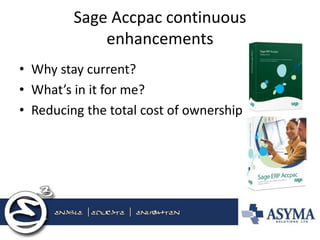
Sage Accpac continuous enhancements 
•Why stay current? 
•What’s in it for me? 
•Reducing the total cost of ownership
Training and getting support 
•Sage Support agreements 
–Sage support access 
–Anytime training 
–Knowledge base 
•Asyma support agreements (Knowledge agreements) 
•Asyma web site training videos 
•Sage University
Effective use of Sage Accpac - Finder 
•Setting based in individual preferences 
•Key field selection 
•Find by selections (Criteria settings) 
–Smart list generation 
•Select columns 
•Reorder columns
Cash Management/Bank Reconciliations 
•Bank balance review 
•Cash requirements report (Accounts Payable) 
•Enhanced cash management/forecasting 
•Automated bank reconciliation with OFX 
•Automated bank reconciliation with third party
Transaction Inquiry 
•Transaction drill down 
–All entry screens 
–All integrated modules 
•Customer inquiry 
•Finder (Smart lists)
Financial Reporter 
•Flexible versions (IFRS, Internal, External) 
•Excel functionality (Graphics, Formatting) 
•Drill down to detail (Forest to trees)
Effective Data Entry - Short Cuts 
•Use of templates (OE, PO) 
•Default fields (Customers, Vendors) 
•Alt Key (Keyboard shortcuts) 
•Zoom function (F9, Details) 
•Customize entry screen (UI and Columns) 
•Fast entry (AR, AP, GL) 
•Grouping menus by individual/task
Other 
•Import/Export functions 
•Macros 
•Optional fields 
•Recurring entries 
•Master file changers

Asyma E3 2014 Tips & Tricks for Sage 300 ERP

  • 1.
    Tips and Tricksfor Sage 300 Keith Greeno – Asyma Solutions
  • 2.
    Agenda •Continuous Improvement- enhancements •The Cloud •Training and getting help •Ease of use •Visual workflows •Sage Intelligence Reporting •How do we do it? •Questions?
  • 3.
    Continuous Business Improvements •Business must continually review and improve processes. –Management practices change –Technology Improvements •Awareness •Interest •Trial •adoption • Sage software enhancements –Why stay current? What’s in it for me? –Reduce the total cost of ownership
  • 5.
  • 6.
  • 7.
    Improve: secure integrationand automation 9/18/13 Understanding receivables management 7 Sage Exchange payments platform SageExchange.com administration Sage ERP Payment devices Payment networks PCI free zone
  • 8.
    Estimated percentage ofconsumer transactions using credit and debit cards in 2015 •54% 9/18/13 Understanding receivables management 8
  • 9.
    Percentage of smallbusinesses that used credit cards at the end of 2009 •83% 9/18/13 Understanding receivables management 9
  • 10.
    Throwing away money? 9/18/13 Understanding receivables management 10
  • 13.
    •Seek to AutomatePlanning Because: •–Takes too long (average process is 2-5 months) •–Numbers aren’t accurate •–Process is expensive •–Difficult to collaborate •–Contributors don’t see relevance
  • 15.
    Training and gettinghelp •Management consulting coaching –Flipping the norm 90:10 to 10:90 –Understanding current processes •Asyma –Support (Knowledge transfer agreements) •Sage - support –Sage support access/anytime training
  • 16.
    Ease of Use •Business process can be defined by role Sage Visual process flows •Software is 50% of the solution effective business processes are the other •All processes can be improved –How do we do things –How can we use changes to make things easier
  • 17.
  • 18.
    Sage Intelligence Reporting •Specific reporting by company/individuals •Flexible versions (IFRS, Internal, External) •Excel functionality (Graphics, Formatting) •Drill down to detail (Forest to trees) •Push reporting (Dashboards, Scheduled)
  • 20.
    F9 Demonstration CompanySalesForecastCurrent YearActualsBudgetsJanuaryFebruaryMarchAprilMayJuneJulySales - Product Line B298,478.32 301,189.03 303,924.35 306,684.49 278,522.75 281,052.23 280,453.52 Sales - Product Line C222,102.47 224,119.57 226,154.94 228,208.85 207,253.23 209,135.47 208,689.92 Sales Discounts(95,328.70) (96,194.46) (97,068.05) (97,949.62) (88,955.25) (89,763.09) (89,571.87) Sales Returns and Allowances(9,952.51) (10,042.90) (10,134.11) (10,226.13) (9,287.12) (9,371.46) (9,351.49) Finance Charges2,250.64 2,271.13 2,291.73 2,312.57 2,100.16 2,119.25 2,114.75 Freight Charges19,947.60 20,128.71 20,311.55 20,495.98 18,613.92 18,782.96 18,742.96 Total437,497.82$ 441,471.08$ 445,480.41$ 449,526.14$ 408,247.69$ 411,955.36$ 411,077.79$ Next YearBudgetsJanuaryFebruaryMarchAprilMayJuneJulySales - Product Line B282,751.17 285,295.94 287,863.60 289,590.78 291,328.33 292,784.97 295,127.25 Sales - Product Line C210,399.68 212,293.25 214,203.92 215,489.14 216,782.05 217,865.98 219,608.88 Sales Discounts(90,305.72) (107,198.21) (108,162.98) (108,811.94) (109,464.81) (110,012.13) (110,892.24) Sales Returns and Allowances(11,091.89) (9,513.00) (11,292.45) (11,360.17) (11,428.34) (11,485.49) (11,577.36) Finance Charges2,508.31 2,530.88 2,553.67 2,569.00 2,584.38 2,597.34 2,618.07 Freight Charges22,231.21 22,431.29 22,633.13 22,768.97 22,905.56 23,020.11 23,204.25 Total416,492.76$ 405,840.15$ 407,798.89$ 410,245.79$ 412,707.17$ 414,770.79$ 418,088.85$ View Graph
  • 21.
  • 23.
    Sage Enterprise IntelligenceMultiple Interfaces for Easy Access Web (BI) Mobile Excel One comprehensive, easy to use BI solution 23
  • 25.
    Sage Enterprise IntelligenceWeb (BI) •Intuitive user Interface fully integrated with Sage 300 ERP, Sage 500 ERP and Sage ERP X3 •Access to KPIs and dashboards to easily share information as well as leverage pre-built templates and drill-down into transactional data. •Centralized security layer •Data entry (ie. Budgeting) •Distribution module •Data warehouse and consolidation (OLAP) Real-time access to Sage ERP X3 and other data sources 25 Some Key Features and Benefits include:
  • 27.
    Shipping Your business Warehouse Manufacturing Sales CEO CFO Marketing Finance 27 Remote Sage Data Cloud Customers’ business Sage 300 ERP 2014 Sage 300 ERP 2014–Connect your October 23, 2014 business
  • 28.
    Sage 300 ERP2014 Connect your business October 23, 2014 Sage 300 ERP 2014–Connect your business 28
  • 29.
    Sage 300 ERP2014 Connect your business The foundation October 23, 2014 Sage 300 ERP 2014–Connect your business 29
  • 30.
    Sage 300 ERP2014 Sage Billing and Payment Get paid faster October 23, 2014 Sage 300 ERP 2014–Connect your business 30 Invoice Print Fold and stuff Mail Open Pay Mail Input and post Deposit Invoice Autosend Click and pay Print and post Print and mail invoices Sage Billing and Payment 30 days less than 3 minutes
  • 31.
    Transaction Inquiry •Transactiondrill down –All entry screens –All integrated modules •Customer inquiry •Finder (Smart lists)
  • 32.
    Financial Reporter •Flexibleversions (IFRS, Internal, External) •Excel functionality (Graphics, Formatting) •Drill down to detail (Forest to trees)
  • 33.
    How do weimprove? •Project Management –Knowing what needs to be done –Knowing when it needs doing –Knowing who has to do it •Planning versus Just Doing It
  • 34.
    Agenda •Sage Accpaccontinuous enhancements •Training and getting support •Effective user of Finder •Cash Management/Bank reconciliations •Transaction inquiry •Financial Reporter/drill down •Effective data entry shortcuts •Other •Questions?
  • 35.
    Sage Accpac continuousenhancements •Why stay current? •What’s in it for me? •Reducing the total cost of ownership
  • 36.
    Training and gettingsupport •Sage Support agreements –Sage support access –Anytime training –Knowledge base •Asyma support agreements (Knowledge agreements) •Asyma web site training videos •Sage University
  • 38.
    Effective use ofSage Accpac - Finder •Setting based in individual preferences •Key field selection •Find by selections (Criteria settings) –Smart list generation •Select columns •Reorder columns
  • 39.
    Cash Management/Bank Reconciliations •Bank balance review •Cash requirements report (Accounts Payable) •Enhanced cash management/forecasting •Automated bank reconciliation with OFX •Automated bank reconciliation with third party
  • 40.
    Transaction Inquiry •Transactiondrill down –All entry screens –All integrated modules •Customer inquiry •Finder (Smart lists)
  • 41.
    Financial Reporter •Flexibleversions (IFRS, Internal, External) •Excel functionality (Graphics, Formatting) •Drill down to detail (Forest to trees)
  • 42.
    Effective Data Entry- Short Cuts •Use of templates (OE, PO) •Default fields (Customers, Vendors) •Alt Key (Keyboard shortcuts) •Zoom function (F9, Details) •Customize entry screen (UI and Columns) •Fast entry (AR, AP, GL) •Grouping menus by individual/task
  • 43.
    Other •Import/Export functions •Macros •Optional fields •Recurring entries •Master file changers