SLIDESHARE VS . Assignment 5
The following slides will answer these questions: What is traditional blogging? What is Twitter and how is it different from blogging? Were Twitter and Slideshare difficult to use? What aspects of “community” were evident in both Twitter and Slideshare? How did I utilize the community aspect of each?
What is “blogging”? Blog- a portmanteau (big word!) of “web-blog” , can be informal or professional Blog (v)- to edit, or maintain content on a blog  With blogs you can discuss an idea till your heart’s content  Allows the user to post videos, pictures, hyperlinks, and mess around with the html to suit their wants and needs in a blog  
What is “blogging” (cont…) Blogs inspire communities of interest: art (such as  deviantART  (<--my best friend's site) photography, sketches, music , audio, and even politics. Blogs are used by individuals and corporations. Basically a blog is an online diary/journal where people can share information and express ideas with whomever they allow to access their blog.
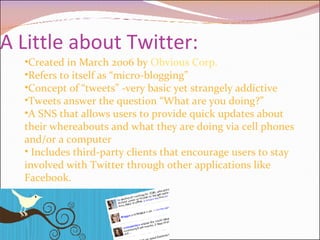
A Little about Twitter: Created in March 2006 by  Obvious Corp. Refers to itself as “micro-blogging” Concept of “tweets” -very basic yet strangely addictive Tweets answer the question “What are you doing?” A SNS that allows users to provide quick updates about their whereabouts and what they are doing via cell phones and/or a computer Includes third-party clients that encourage users to stay involved with Twitter through other applications like Facebook.
My initial thoughts about Twitter: Reminds me of Facebook’s “status” feature Similar to Facebook because it has apps., and can be accessed by newer cell phones,  has an IM feature Real-time description of what a person is doing at the moment.  People are curious and have the desire to know what is going on in other people’s lives all of the time. We also enjoy comparing ourselves to others, and Twitter allows us to do so.    It is free!
My thoughts (cont…) What I found most interesting about Twitter since our study of communities is that it has a very  obvious community with sub-communities. Users  must learn to express themselves in a “tweet” which is 140 character description of your thoughts at the time---which is great for people who don’t know when to cut it.  “  A little bit goes a long way…”
Twitter VS. the Traditional Blog: With Twitter you only have 140 characters to express yourself in. Blogs don’t have a limit (although blogging etiquette may encourage a certain length to keep readers interested) Twitter gives the user the freedom to update as much or little as they desire. Blogs require consistent/periodic updates to remain legitimate because they are often a discussion of a particular topic . I think Twitter is actually the new generation of blogging.  People are constantly on the go and this allows them to keep others updated with out wasting time writing an actual blog entry.
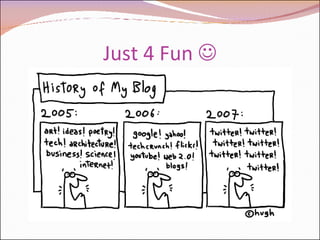
Just 4 Fun  
Twitter vs. Blogging (Cont…) Tweets are attached to the person-the action the user is performing or thought they are thinking Blogs are a discussion –not always about the self, can be informational but followers must be able to discern the information as either fact or opinion As far as I’m aware, tweets are permanent as long as the user is a member  Blogs, rather, may be edited if mistakes are made Those who follow blogs care if the blogger doesn’t update, but  Twitterers  don’t care as much, I think.
A Snippet about Slide Share “ SlideShare is the world's largest community for sharing presentations on the web.” Their designers are based in Mountain View, CA and New Delhi, India.  Upload PowerPoint, OpenOffice, Keynote or PDF files, and tag them or embed them to your own sites. Like a blog, you can comment on other users’ presentations. It is a completely FREE service.
Challenges of Both Services? I actually haven’t encountered any real problems with either service.  Some users have had issues with Slide Share with the size of their presentation.  Slide Share presentations should be no larger than 30MB and if they are, the user will need to troubleshoot on their own to make it work. One suggestion presented by Slide Share’s  FAQ  is to break the presentation down and have maybe 2 or 3 shows instead of one long show. I found Twitter to be even more simple because all I have really used it for is to tweet and follow others.
Challenges (Cont…) Twitter  can pose problems for users who don’t understand SN sites.  If the server is down, no one can really access their Twitter account.  When I posted my first tweet, it didn’t show up for several minutes, and that defeats the purpose of real-time. The most issues probably stem from tweeting via phone, however my phone is not advanced enough to do so.  Twitter Support  can help users solve their problems!
Other Twitter Concerns?
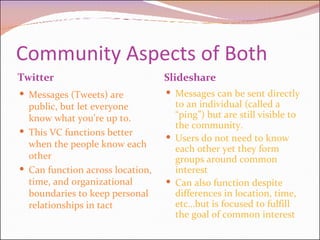
Community Aspects of Both Twitter Slideshare Messages (Tweets) are public, but let everyone know what you’re up to.  This VC functions better when the people know each other Can function across location, time, and organizational boundaries to keep personal relationships in tact Messages can be sent directly to an individual (called a “ping”) but are still visible to the community. Users do not need to know each other yet they form groups around common interest Can also function despite differences in location, time, etc…but is focused to fulfill the goal of common interest
More about Twitter as Community: Twitter is a social community that keeps people in constant contact with each other who mostly likely have a relationship in the real world. Tweets are meaningful to the people in your community.  Twitter Blocks- model the “friend of a friend” idea. (People are more likely to have things in common with a FOAF rather than one 3 times removed). Twitter blocks also present the idea that we’re all connected virtually and can see what everyone in our SN is up to.
More about Slide Share as  Community: Groups can be formed similar to Facebook except they are mostly based on similarity of presentations, and not so much the interest of the individual. Users can contribute feedback to others’ shows. “ Zings” are used to give recognition from others and to create a reputation for a user based on the quality of their presentations.  Each person has the ability to participate as much or little in the VC as they wish. You can also invite friends to join!
How did I use the community aspects of both? With Slide Share I joined the HC 205 group! I explored other  Slide Share communities out of curiosity Twitter- I made sure to keep up with my postings and also enjoyed reading other student’s updates. I also made sure to follow everyone from our class and allow others to be my friend on Twitter (that I know in person). With Twitter I feel more comfortable adding individuals  based on who they are,;whereas with Slide Share I would prefer to join a group based on the interest.  I don’t care as much to know the other Slide Share users as long as they are providing helpful information that I can use!
References Slide Share. 2007 SlideShare, Inc. [http://www.slideshare.net/about]. Twitter. 2007.Twitter,Inc. [www.twitter.com]. Wikipedia. 2007. [http://en.wikipedia.org/wiki/Virtual_community].

Assignment 5oldskool

  • 1.
    SLIDESHARE VS .Assignment 5
  • 2.
    The following slideswill answer these questions: What is traditional blogging? What is Twitter and how is it different from blogging? Were Twitter and Slideshare difficult to use? What aspects of “community” were evident in both Twitter and Slideshare? How did I utilize the community aspect of each?
  • 3.
    What is “blogging”?Blog- a portmanteau (big word!) of “web-blog” , can be informal or professional Blog (v)- to edit, or maintain content on a blog With blogs you can discuss an idea till your heart’s content Allows the user to post videos, pictures, hyperlinks, and mess around with the html to suit their wants and needs in a blog  
  • 4.
    What is “blogging”(cont…) Blogs inspire communities of interest: art (such as deviantART (<--my best friend's site) photography, sketches, music , audio, and even politics. Blogs are used by individuals and corporations. Basically a blog is an online diary/journal where people can share information and express ideas with whomever they allow to access their blog.
  • 5.
    A Little aboutTwitter: Created in March 2006 by Obvious Corp. Refers to itself as “micro-blogging” Concept of “tweets” -very basic yet strangely addictive Tweets answer the question “What are you doing?” A SNS that allows users to provide quick updates about their whereabouts and what they are doing via cell phones and/or a computer Includes third-party clients that encourage users to stay involved with Twitter through other applications like Facebook.
  • 6.
    My initial thoughtsabout Twitter: Reminds me of Facebook’s “status” feature Similar to Facebook because it has apps., and can be accessed by newer cell phones,  has an IM feature Real-time description of what a person is doing at the moment. People are curious and have the desire to know what is going on in other people’s lives all of the time. We also enjoy comparing ourselves to others, and Twitter allows us to do so.   It is free!
  • 7.
    My thoughts (cont…)What I found most interesting about Twitter since our study of communities is that it has a very obvious community with sub-communities. Users must learn to express themselves in a “tweet” which is 140 character description of your thoughts at the time---which is great for people who don’t know when to cut it. “ A little bit goes a long way…”
  • 8.
    Twitter VS. theTraditional Blog: With Twitter you only have 140 characters to express yourself in. Blogs don’t have a limit (although blogging etiquette may encourage a certain length to keep readers interested) Twitter gives the user the freedom to update as much or little as they desire. Blogs require consistent/periodic updates to remain legitimate because they are often a discussion of a particular topic . I think Twitter is actually the new generation of blogging. People are constantly on the go and this allows them to keep others updated with out wasting time writing an actual blog entry.
  • 9.
  • 10.
    Twitter vs. Blogging(Cont…) Tweets are attached to the person-the action the user is performing or thought they are thinking Blogs are a discussion –not always about the self, can be informational but followers must be able to discern the information as either fact or opinion As far as I’m aware, tweets are permanent as long as the user is a member Blogs, rather, may be edited if mistakes are made Those who follow blogs care if the blogger doesn’t update, but Twitterers don’t care as much, I think.
  • 11.
    A Snippet aboutSlide Share “ SlideShare is the world's largest community for sharing presentations on the web.” Their designers are based in Mountain View, CA and New Delhi, India. Upload PowerPoint, OpenOffice, Keynote or PDF files, and tag them or embed them to your own sites. Like a blog, you can comment on other users’ presentations. It is a completely FREE service.
  • 12.
    Challenges of BothServices? I actually haven’t encountered any real problems with either service. Some users have had issues with Slide Share with the size of their presentation. Slide Share presentations should be no larger than 30MB and if they are, the user will need to troubleshoot on their own to make it work. One suggestion presented by Slide Share’s FAQ is to break the presentation down and have maybe 2 or 3 shows instead of one long show. I found Twitter to be even more simple because all I have really used it for is to tweet and follow others.
  • 13.
    Challenges (Cont…) Twitter can pose problems for users who don’t understand SN sites. If the server is down, no one can really access their Twitter account. When I posted my first tweet, it didn’t show up for several minutes, and that defeats the purpose of real-time. The most issues probably stem from tweeting via phone, however my phone is not advanced enough to do so. Twitter Support can help users solve their problems!
  • 14.
  • 15.
    Community Aspects ofBoth Twitter Slideshare Messages (Tweets) are public, but let everyone know what you’re up to. This VC functions better when the people know each other Can function across location, time, and organizational boundaries to keep personal relationships in tact Messages can be sent directly to an individual (called a “ping”) but are still visible to the community. Users do not need to know each other yet they form groups around common interest Can also function despite differences in location, time, etc…but is focused to fulfill the goal of common interest
  • 16.
    More about Twitteras Community: Twitter is a social community that keeps people in constant contact with each other who mostly likely have a relationship in the real world. Tweets are meaningful to the people in your community. Twitter Blocks- model the “friend of a friend” idea. (People are more likely to have things in common with a FOAF rather than one 3 times removed). Twitter blocks also present the idea that we’re all connected virtually and can see what everyone in our SN is up to.
  • 17.
    More about SlideShare as Community: Groups can be formed similar to Facebook except they are mostly based on similarity of presentations, and not so much the interest of the individual. Users can contribute feedback to others’ shows. “ Zings” are used to give recognition from others and to create a reputation for a user based on the quality of their presentations. Each person has the ability to participate as much or little in the VC as they wish. You can also invite friends to join!
  • 18.
    How did Iuse the community aspects of both? With Slide Share I joined the HC 205 group! I explored other Slide Share communities out of curiosity Twitter- I made sure to keep up with my postings and also enjoyed reading other student’s updates. I also made sure to follow everyone from our class and allow others to be my friend on Twitter (that I know in person). With Twitter I feel more comfortable adding individuals based on who they are,;whereas with Slide Share I would prefer to join a group based on the interest. I don’t care as much to know the other Slide Share users as long as they are providing helpful information that I can use!
  • 19.
    References Slide Share.2007 SlideShare, Inc. [http://www.slideshare.net/about]. Twitter. 2007.Twitter,Inc. [www.twitter.com]. Wikipedia. 2007. [http://en.wikipedia.org/wiki/Virtual_community].