Smart Slides GPT Plugin
Smart Slides
Make Slides in a flash
How to use Smart Slides
Smart Slides GPT Plugin
Artificial Intelligence Tools and Techniques
Explore the tools and techniques that shape AI advancements across
industries.
Understand how machine learning, deep learning, and more drive
innovation.
Smart Slides GPT Plugin
• Machine Learning Frameworks:
TensorFlow, PyTorch, Scikit-learn.
• Natural Language Processing: GPT,
spaCy, Hugging Face.
• Computer Vision: OpenCV, YOLO,
DALL-E.
• Reinforcement Learning: OpenAI
Gym, RLLib.
• AI Platforms: IBM Watson, Microsoft
Azure AI, Google AI.
AI Tools
Photo: red and black cordless power drill beside black and red cordless power drill
Photo by Sam Clarke
Powered by Unsplash
Smart Slides GPT Plugin
• Machine Learning: Supervised,
Unsupervised, Semi-Supervised
Learning.
• Deep Learning: CNNs, RNNs,
Transformers.
• Natural Language Processing:
Tokenization, Sentiment Analysis,
Machine Translation.
• Reinforcement Learning: Q-Learning,
DQN.
• Generative Models: GANs, VAEs.
•
AI Techniques
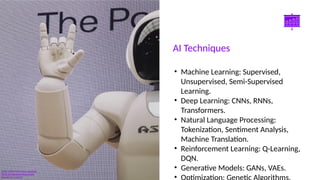
Photo: Asimo robot doing handsign
Photo by Possessed Photography
Powered by Unsplash
Smart Slides GPT Plugin
• Automation of
repetitive tasks.
• Improved decision-
making through data-
driven insights.
• Enhanced customer
experiences with
chatbots and
personalization.
• Advancements in
Key Benefits of AI
Photo: black flat screen computer monitor
Photo by ThisisEngineering
Powered by Unsplash
Smart Slides GPT Plugin
• Learn more about how to use this plugin by visiting
https://smartslides.crisp.help/en/article/how-to-use-smart-slides-
1w14fiw/
• Example Prompts:
• Make me a 5 slide presentation about the history of the united states
and include charts with images of mountains and rivers
• Make me a 5 slide tourist presentation about Norway and lofoten
islands with varied layouts and images of the northern lights using
• Create a presentation with 5 slides about Sydney with images of Bondi
Beach and the Opera House use font size 46 for headings and 36 for
content. Use this color #FF5A5F (red) and inlude lots of image slides
Thanks for using Smart Slides

artificial intelligence tools and techniques

  • 1.
    Smart Slides GPTPlugin Smart Slides Make Slides in a flash How to use Smart Slides
  • 2.
    Smart Slides GPTPlugin Artificial Intelligence Tools and Techniques Explore the tools and techniques that shape AI advancements across industries. Understand how machine learning, deep learning, and more drive innovation.
  • 3.
    Smart Slides GPTPlugin • Machine Learning Frameworks: TensorFlow, PyTorch, Scikit-learn. • Natural Language Processing: GPT, spaCy, Hugging Face. • Computer Vision: OpenCV, YOLO, DALL-E. • Reinforcement Learning: OpenAI Gym, RLLib. • AI Platforms: IBM Watson, Microsoft Azure AI, Google AI. AI Tools Photo: red and black cordless power drill beside black and red cordless power drill Photo by Sam Clarke Powered by Unsplash
  • 4.
    Smart Slides GPTPlugin • Machine Learning: Supervised, Unsupervised, Semi-Supervised Learning. • Deep Learning: CNNs, RNNs, Transformers. • Natural Language Processing: Tokenization, Sentiment Analysis, Machine Translation. • Reinforcement Learning: Q-Learning, DQN. • Generative Models: GANs, VAEs. • AI Techniques Photo: Asimo robot doing handsign Photo by Possessed Photography Powered by Unsplash
  • 5.
    Smart Slides GPTPlugin • Automation of repetitive tasks. • Improved decision- making through data- driven insights. • Enhanced customer experiences with chatbots and personalization. • Advancements in Key Benefits of AI Photo: black flat screen computer monitor Photo by ThisisEngineering Powered by Unsplash
  • 6.
    Smart Slides GPTPlugin • Learn more about how to use this plugin by visiting https://smartslides.crisp.help/en/article/how-to-use-smart-slides- 1w14fiw/ • Example Prompts: • Make me a 5 slide presentation about the history of the united states and include charts with images of mountains and rivers • Make me a 5 slide tourist presentation about Norway and lofoten islands with varied layouts and images of the northern lights using • Create a presentation with 5 slides about Sydney with images of Bondi Beach and the Opera House use font size 46 for headings and 36 for content. Use this color #FF5A5F (red) and inlude lots of image slides Thanks for using Smart Slides