A Standard for
Augmented Reality
Learning Experience Models
(AR-LEM)
Fridolin Wild1), Christine Perey2), Kaj Helin3), Jaakko Karjalainen3),
Paul Lefrere4)
1) The Open University, UK
2) Perey Research and Consulting, CH
2) VTT, Finland
4) CCA, UK
World Knowledge
2
Activity Knowledge
http://bit.ly/arlem-input
Embedding knowledge into experience
3
augmentation
The Activity Model
4
“find the spray
gun nozzle size
13”
Messaging in the
real-time
presence
channel and
tracking to xAPI
onEnter/onExit
chaining of
actions and
other
activations/deact
ivations
Styling
(cascading) of
viewports and
UI elements
Constraint modeling:
specify validation
conditions and model
workflow branching
e.g. smart player;
e.g. search widget
http://bit.ly/arlem-input
The Workplace Model
5
The ‘tangibles’:
Specific persons,
places, things
The ‘configurables’:
devices (styling),
apps+widgets
The ‘triggers’:
Markers trigger
Overlays; Overlays
trigger human action
Overlay ‘Primitives’:
enable re-use of e.g.
graphical overlays
http://bit.ly/arlem-input
Action steps
<action
id=‘start’
viewport=‘actions’
type=‘actions’
>
</action>
Instructions for action
<instruction><![CDATA[
<h1>Assembly of a simple cabinet</h1>
<p>Point to the cabinet to start…</p>
]]></instruction>
Defining flow: Entry, Exit, Trigger
<enter removeSelf="false">
</enter>
<exit>
<activate type="actions" viewport="actions"
id="step2"/>
<deactivate type="actions" viewport="actions"
id="start"/>
</exit>
<triggers>
<trigger type="click" viewport="actions" id="start"/>
</triggers>
Nothing (for
now)
On exit:
launch step2
On exit: remove
dialogue box ‘start’
This action step
shall be exited by
‘clicking’ on the
dialogue box
Sample script
<activity id="assembly" name="Assembly of cabinet" language="english"
workplace="http://crunch.kmi.open.ac.uk/people/~jmartin/data/workplace-AIDIMA.xml"
start="start">
<action id=‘start’ viewport=‘actions’ type=‘actions’>
<enter removeSelf="false">
</enter>
<exit>
<activate type="actions" viewport="actions" id="step2"/>
<deactivate type="actions" viewport="actions" id="start"/>
</exit>
<triggers>
<trigger type="click" viewport="actions" id="start"/>
</triggers>
<instruction><![CDATA[<h1>Assembly of a simple cabinet</h1><p>Point to the cabinet
to start ... </p>]]></instruction>
</action>
<action id="step2" viewport="actions” type=“actions”>
<enter></enter>
<exit removeSelf="true”></exit>
<triggers>
<trigger type="click" viewport="actions" id="step1"/>
</triggers>
<instruction><![CDATA[<h1>step2</h1><p>do this and that.</p>]]></instruction>
</action>
</activity>
Working with ‘tangibles’
 Utilise computer vision engine to
detect things/places/people
(=tangibles)
 Define tangibles in the
workplace model
 Then activate (or deactivate) what
shall be visible and relevant in each
action step
Points of interest on <thing>s
11
· Default POI (0, 0, 0)
· Handle (0, -5, 0)
· Tip (-3, 5, 0)
· Default POI (0, 0, 0)
· Pick
· Handle (0, -5, 0)
· Tip (-3, 5, 0)
1. Configure routines for
detection by providing
either (pre-packaged)
fiducial markers or loading
image targets from a URL
provided
2. Bind the tangibles of choice
(things, persons, places) to
the instantiated markers
3. Add points-of-interest
(POIs) configuration, set
offsets, set scale
4. Configure and attach event
handlers for additional
functionality (such as
internet-of-things data
handling) to specified
tangibles
5. Flag to a workflow
controller component that
the experience is
configured and can now be
executed
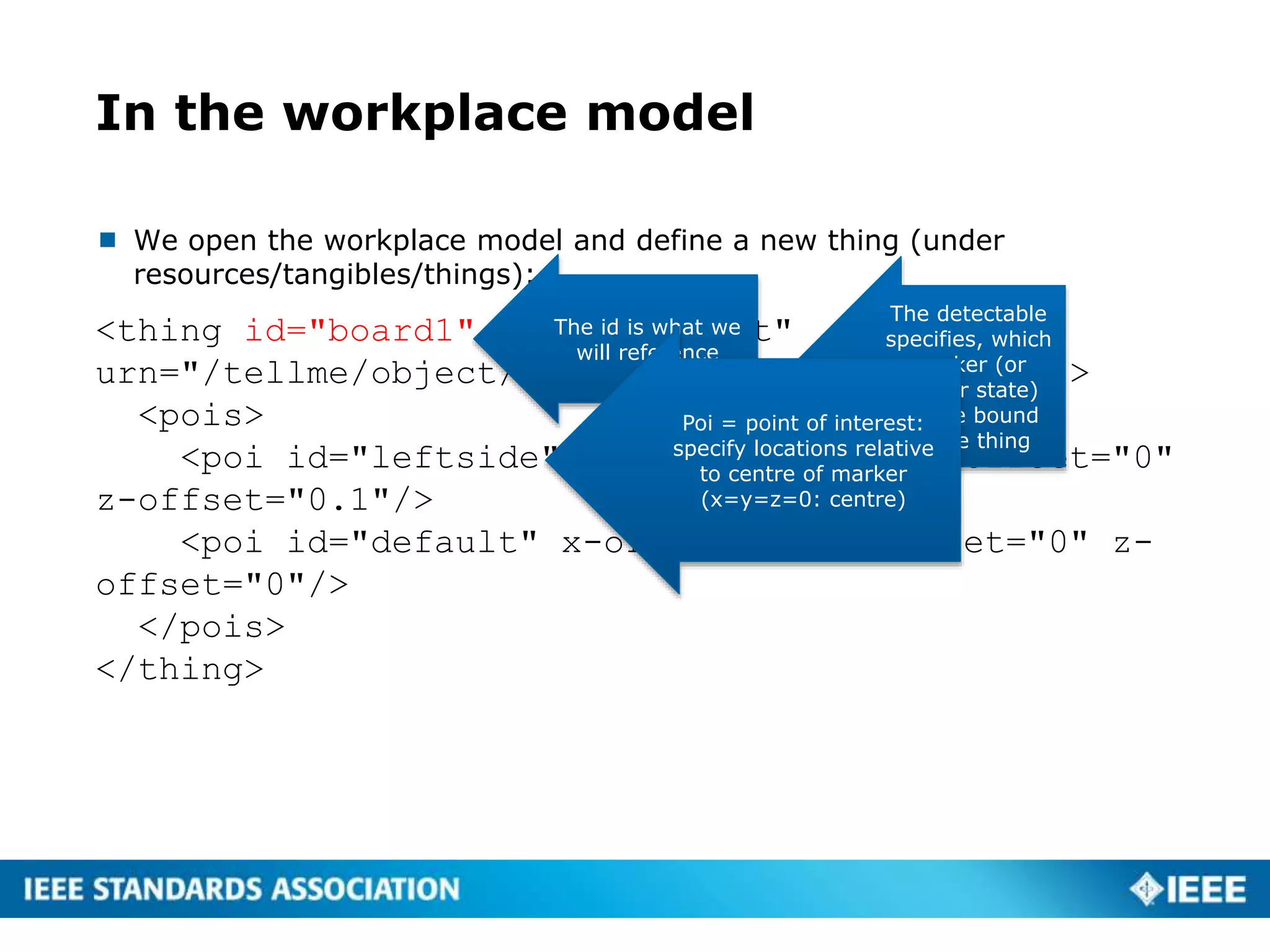
In the workplace model
 We open the workplace model and define a new thing (under
resources/tangibles/things):
<thing id="board1" name="Cabinet"
urn="/tellme/object/cabinet1" detectable="001">
<pois>
<poi id="leftside" x-offset="-0.5" y-offset="0"
z-offset="0.1"/>
<poi id="default" x-offset="0" y-offset="0" z-
offset="0"/>
</pois>
</thing>
The id is what we
will reference
The detectable
specifies, which
marker (or
sensor state)
will be bound
to the thing
Poi = point of interest:
specify locations relative
to centre of marker
(x=y=z=0: centre)
Triggers and tangibles
 If you add a tangible trigger (for ‘stareGaze navigation’), an target icon
will be overlaid, rotating in yellow, turning green when the stare
duration (3 secs) has been reached
<trigger type="detect" id="board1" duration=”3"/>
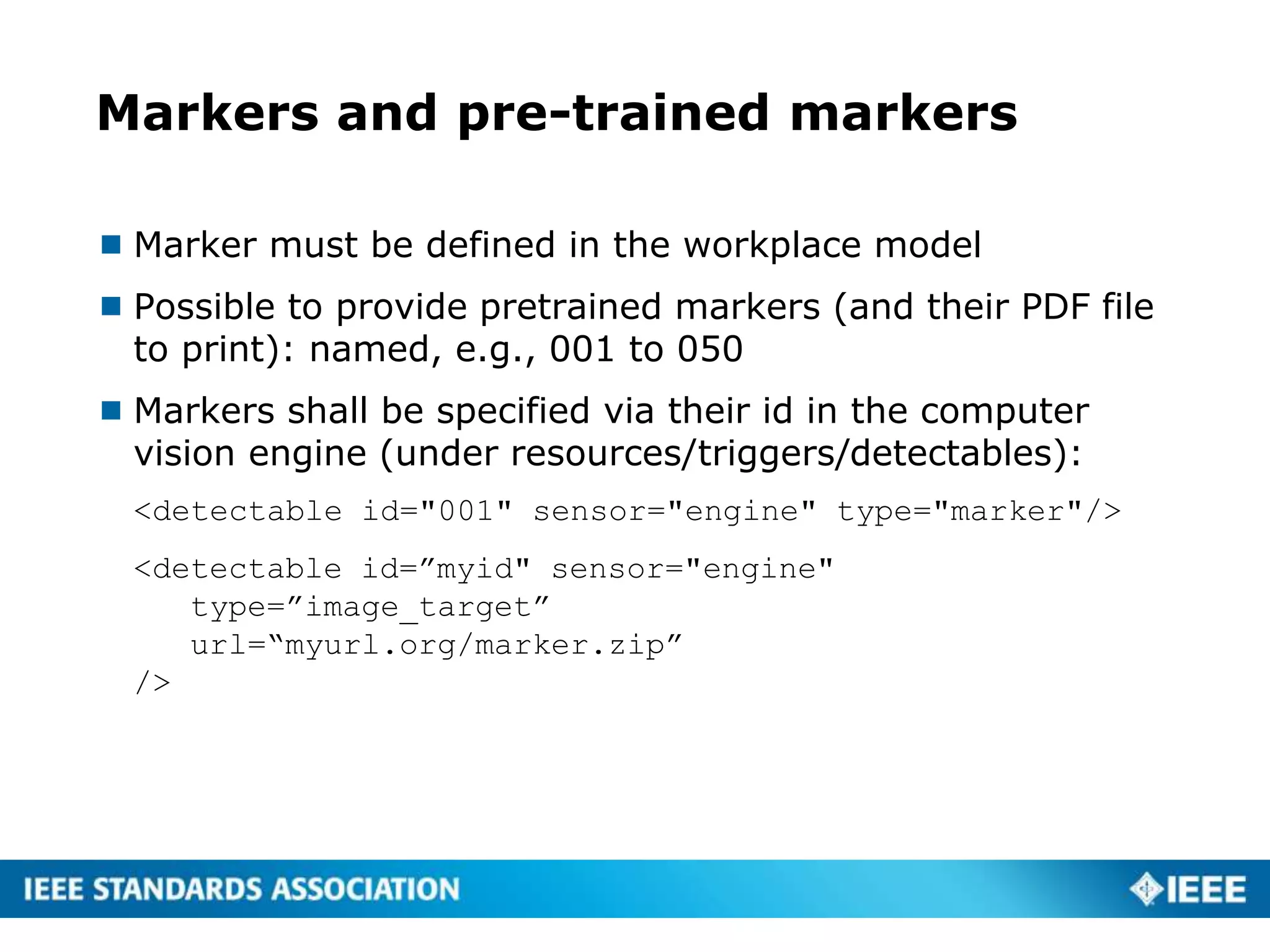
Markers and pre-trained markers
 Marker must be defined in the workplace model
 Possible to provide pretrained markers (and their PDF file
to print): named, e.g., 001 to 050
 Markers shall be specified via their id in the computer
vision engine (under resources/triggers/detectables):
<detectable id="001" sensor="engine" type="marker"/>
<detectable id=”myid" sensor="engine"
type=”image_target”
url=“myurl.org/marker.zip”
/>
Activates and deactivates
 Now we have defined a thing called ‘board1’ and we have tied it to the
marker 001
 We can start referring to it now from the activity script: we can, e.g.,
activate pictogram overlays for the verbs of handling and motion
<activate
tangible="board1"
predicate="point"
poi="leftside"
option="down”
/>
<activity id="assembly" name="Assembly of cabinet" language="english"
workplace="http://crunch.kmi.open.ac.uk/people/~jmartin/data/workplace-AIDIMA.xml"
start="start">
<action id=‘start’ viewport=‘actions’ type=‘actions’>
<enter removeSelf="false”>
<activate tangible="board1" predicate="point" poi="leftside" option="down"/>
<activate tangible="board1" predicate="addlabel" poi="default"
option="touchme"/>
</enter>
<exit>
<deactivate tangible="board1" predicate="point" poi="leftside"/>
<deactivate tangible="board1" predicate="addlabel" poi="default"/>
<activate type="actions" viewport="actions" id="step2"/>
<deactivate type="actions" viewport="actions" id="start"/>
</exit>
<triggers>
<trigger type="click" viewport="actions" id="start"/>
</triggers>
<instruction><![CDATA[<h1>Assembly of a simple cabinet</h1><p>Point to the cabinet
to start ... </p>]]></instruction>
</action>
<action id="step2" viewport="actions” type=“actions”>
<enter></enter>
<exit removeSelf="true”></exit>
<triggers>
<trigger type="click" viewport="actions" id="step1"/>
</triggers>
<instruction><![CDATA[<h1>step2</h1><p>do this and that.</p>]]></instruction>
</action>
</activity>
Display an
arrow pointing
downwards on
the point of
interest ‘leftside’
Display a label
‘touchme’ at the
centre of the
marker
Remove both
visual overlays
when this action
step is exited
Non-normed overlays
<activate tangible=”board1"
predicate="add3dmodel"
poi="leftside"
option=”augmentation"/>
<augmentations>
<augmentation id="cube" scale="1" y_angle="180.0"
url="http://myurl.org/cube.unity3d"
/>
</augmentations>
<activate tangible=”board1”
predicate=”addvideo”
option=“http://myurl.org/myvideo.mp4"
/>
<activate tangible=”board1"
predicate=”addimage”
option=“http://myurl.org/myvideo.png"
/>
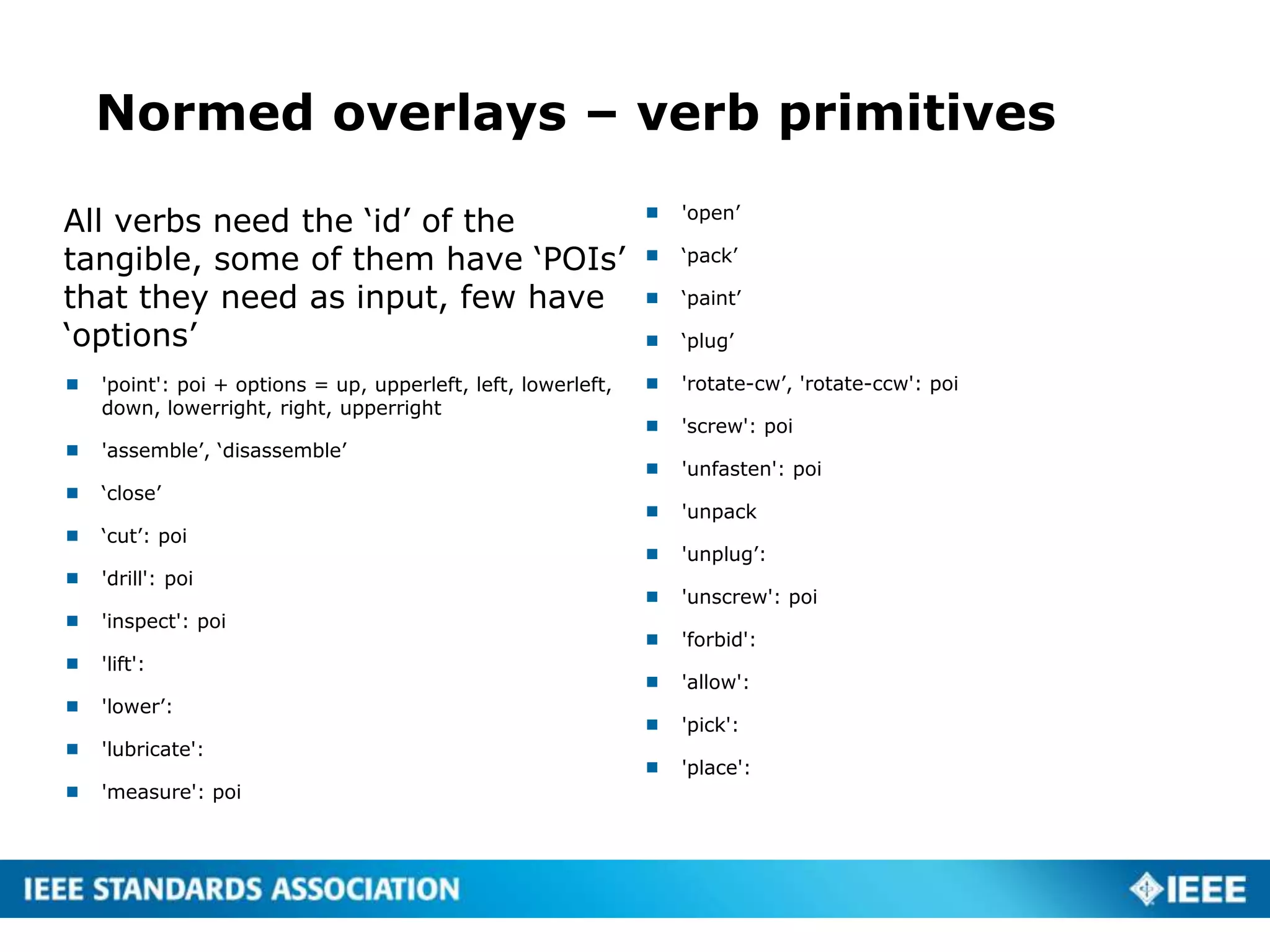
Normed overlays – verb primitives
All verbs need the ‘id’ of the
tangible, some of them have ‘POIs’
that they need as input, few have
‘options’
 'point': poi + options = up, upperleft, left, lowerleft,
down, lowerright, right, upperright
 'assemble’, ‘disassemble’
 ‘close’
 ‘cut’: poi
 'drill': poi
 'inspect': poi
 'lift':
 'lower’:
 'lubricate':
 'measure': poi
 'open’
 ‘pack’
 ‘paint’
 ‘plug’
 'rotate-cw’, 'rotate-ccw': poi
 'screw': poi
 'unfasten': poi
 'unpack
 'unplug’:
 'unscrew': poi
 'forbid':
 'allow':
 'pick':
 'place':
19
Viitaniemi et al. (2014):
Deliverable d4.2,
TELLME consortium
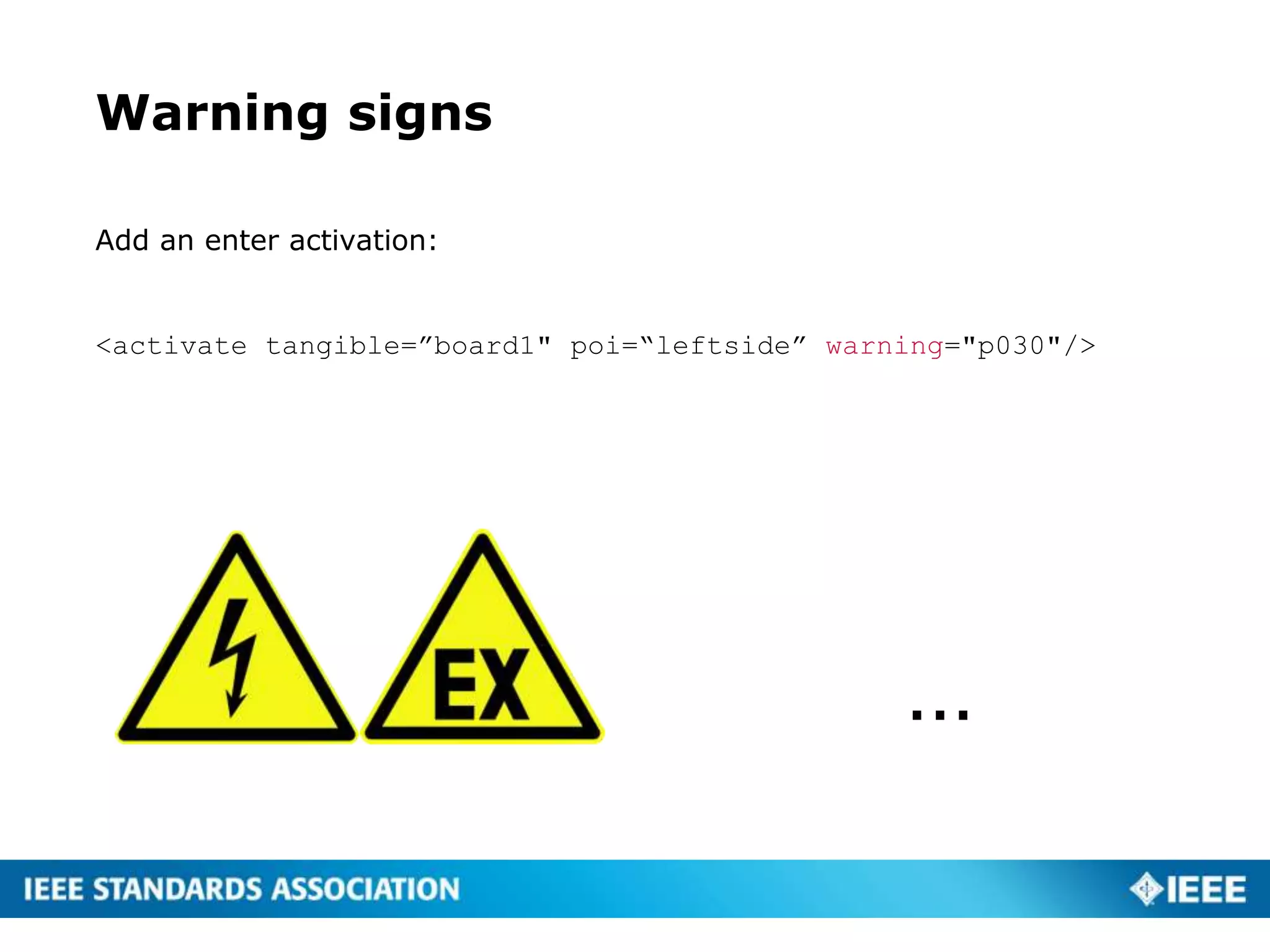
Warning signs
Add an enter activation:
<activate tangible=”board1" poi=“leftside” warning="p030"/>
…
Internet of things (workplace model)
21
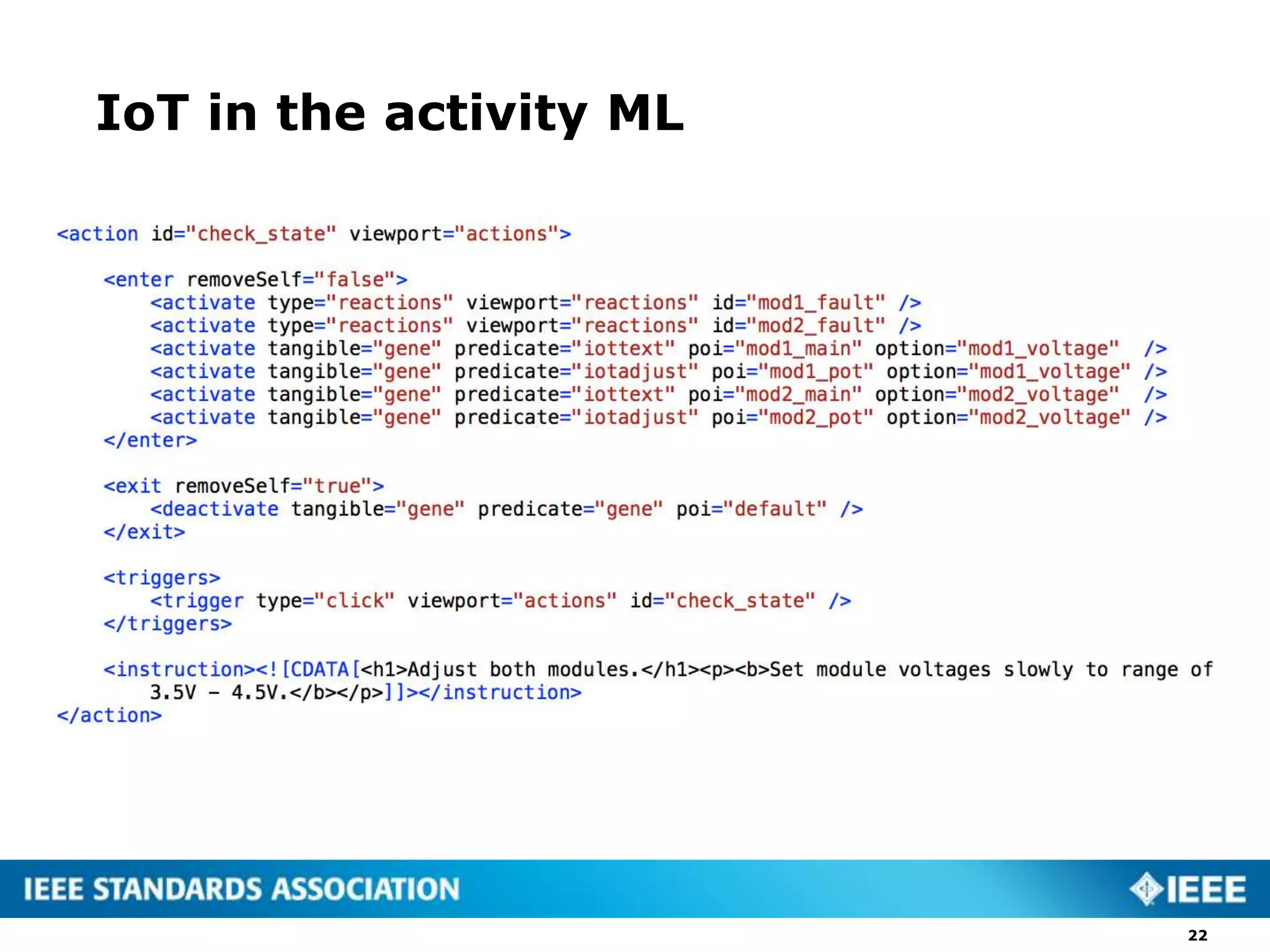
IoT in the activity ML
22
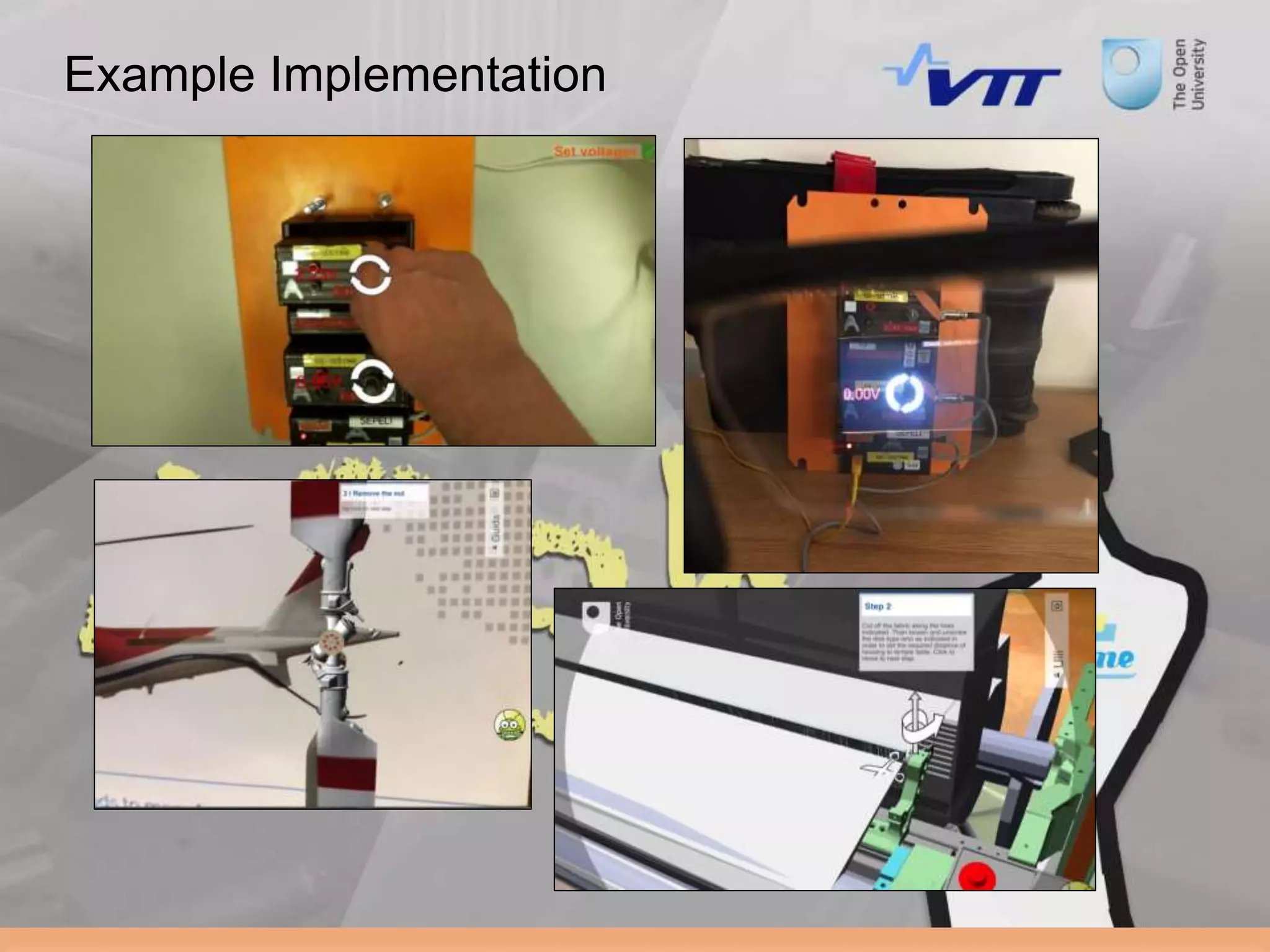
Example Implementation
Towards a Component Reference
Architecture
24
Enquire
Repository
Mix
WorkplaceModel
ActivityModel
ExperienceSpeechOutput
Component
FlowControl
Component(andtextual
Instruction)
Augmentation
Component
Match
Tracking
Component
ConstraintTesting
Optimise
Analytics
The END

ARLEM draft spec - overview

  • 1.
    A Standard for AugmentedReality Learning Experience Models (AR-LEM) Fridolin Wild1), Christine Perey2), Kaj Helin3), Jaakko Karjalainen3), Paul Lefrere4) 1) The Open University, UK 2) Perey Research and Consulting, CH 2) VTT, Finland 4) CCA, UK
  • 2.
  • 3.
    Embedding knowledge intoexperience 3 augmentation
  • 4.
    The Activity Model 4 “findthe spray gun nozzle size 13” Messaging in the real-time presence channel and tracking to xAPI onEnter/onExit chaining of actions and other activations/deact ivations Styling (cascading) of viewports and UI elements Constraint modeling: specify validation conditions and model workflow branching e.g. smart player; e.g. search widget http://bit.ly/arlem-input
  • 5.
    The Workplace Model 5 The‘tangibles’: Specific persons, places, things The ‘configurables’: devices (styling), apps+widgets The ‘triggers’: Markers trigger Overlays; Overlays trigger human action Overlay ‘Primitives’: enable re-use of e.g. graphical overlays http://bit.ly/arlem-input
  • 6.
  • 7.
    Instructions for action <instruction><![CDATA[ <h1>Assemblyof a simple cabinet</h1> <p>Point to the cabinet to start…</p> ]]></instruction>
  • 8.
    Defining flow: Entry,Exit, Trigger <enter removeSelf="false"> </enter> <exit> <activate type="actions" viewport="actions" id="step2"/> <deactivate type="actions" viewport="actions" id="start"/> </exit> <triggers> <trigger type="click" viewport="actions" id="start"/> </triggers> Nothing (for now) On exit: launch step2 On exit: remove dialogue box ‘start’ This action step shall be exited by ‘clicking’ on the dialogue box
  • 9.
    Sample script <activity id="assembly"name="Assembly of cabinet" language="english" workplace="http://crunch.kmi.open.ac.uk/people/~jmartin/data/workplace-AIDIMA.xml" start="start"> <action id=‘start’ viewport=‘actions’ type=‘actions’> <enter removeSelf="false"> </enter> <exit> <activate type="actions" viewport="actions" id="step2"/> <deactivate type="actions" viewport="actions" id="start"/> </exit> <triggers> <trigger type="click" viewport="actions" id="start"/> </triggers> <instruction><![CDATA[<h1>Assembly of a simple cabinet</h1><p>Point to the cabinet to start ... </p>]]></instruction> </action> <action id="step2" viewport="actions” type=“actions”> <enter></enter> <exit removeSelf="true”></exit> <triggers> <trigger type="click" viewport="actions" id="step1"/> </triggers> <instruction><![CDATA[<h1>step2</h1><p>do this and that.</p>]]></instruction> </action> </activity>
  • 10.
    Working with ‘tangibles’ Utilise computer vision engine to detect things/places/people (=tangibles)  Define tangibles in the workplace model  Then activate (or deactivate) what shall be visible and relevant in each action step
  • 11.
    Points of intereston <thing>s 11 · Default POI (0, 0, 0) · Handle (0, -5, 0) · Tip (-3, 5, 0) · Default POI (0, 0, 0) · Pick · Handle (0, -5, 0) · Tip (-3, 5, 0) 1. Configure routines for detection by providing either (pre-packaged) fiducial markers or loading image targets from a URL provided 2. Bind the tangibles of choice (things, persons, places) to the instantiated markers 3. Add points-of-interest (POIs) configuration, set offsets, set scale 4. Configure and attach event handlers for additional functionality (such as internet-of-things data handling) to specified tangibles 5. Flag to a workflow controller component that the experience is configured and can now be executed
  • 12.
    In the workplacemodel  We open the workplace model and define a new thing (under resources/tangibles/things): <thing id="board1" name="Cabinet" urn="/tellme/object/cabinet1" detectable="001"> <pois> <poi id="leftside" x-offset="-0.5" y-offset="0" z-offset="0.1"/> <poi id="default" x-offset="0" y-offset="0" z- offset="0"/> </pois> </thing> The id is what we will reference The detectable specifies, which marker (or sensor state) will be bound to the thing Poi = point of interest: specify locations relative to centre of marker (x=y=z=0: centre)
  • 13.
    Triggers and tangibles If you add a tangible trigger (for ‘stareGaze navigation’), an target icon will be overlaid, rotating in yellow, turning green when the stare duration (3 secs) has been reached <trigger type="detect" id="board1" duration=”3"/>
  • 14.
    Markers and pre-trainedmarkers  Marker must be defined in the workplace model  Possible to provide pretrained markers (and their PDF file to print): named, e.g., 001 to 050  Markers shall be specified via their id in the computer vision engine (under resources/triggers/detectables): <detectable id="001" sensor="engine" type="marker"/> <detectable id=”myid" sensor="engine" type=”image_target” url=“myurl.org/marker.zip” />
  • 15.
    Activates and deactivates Now we have defined a thing called ‘board1’ and we have tied it to the marker 001  We can start referring to it now from the activity script: we can, e.g., activate pictogram overlays for the verbs of handling and motion <activate tangible="board1" predicate="point" poi="leftside" option="down” />
  • 16.
    <activity id="assembly" name="Assemblyof cabinet" language="english" workplace="http://crunch.kmi.open.ac.uk/people/~jmartin/data/workplace-AIDIMA.xml" start="start"> <action id=‘start’ viewport=‘actions’ type=‘actions’> <enter removeSelf="false”> <activate tangible="board1" predicate="point" poi="leftside" option="down"/> <activate tangible="board1" predicate="addlabel" poi="default" option="touchme"/> </enter> <exit> <deactivate tangible="board1" predicate="point" poi="leftside"/> <deactivate tangible="board1" predicate="addlabel" poi="default"/> <activate type="actions" viewport="actions" id="step2"/> <deactivate type="actions" viewport="actions" id="start"/> </exit> <triggers> <trigger type="click" viewport="actions" id="start"/> </triggers> <instruction><![CDATA[<h1>Assembly of a simple cabinet</h1><p>Point to the cabinet to start ... </p>]]></instruction> </action> <action id="step2" viewport="actions” type=“actions”> <enter></enter> <exit removeSelf="true”></exit> <triggers> <trigger type="click" viewport="actions" id="step1"/> </triggers> <instruction><![CDATA[<h1>step2</h1><p>do this and that.</p>]]></instruction> </action> </activity> Display an arrow pointing downwards on the point of interest ‘leftside’ Display a label ‘touchme’ at the centre of the marker Remove both visual overlays when this action step is exited
  • 17.
    Non-normed overlays <activate tangible=”board1" predicate="add3dmodel" poi="leftside" option=”augmentation"/> <augmentations> <augmentationid="cube" scale="1" y_angle="180.0" url="http://myurl.org/cube.unity3d" /> </augmentations> <activate tangible=”board1” predicate=”addvideo” option=“http://myurl.org/myvideo.mp4" /> <activate tangible=”board1" predicate=”addimage” option=“http://myurl.org/myvideo.png" />
  • 18.
    Normed overlays –verb primitives All verbs need the ‘id’ of the tangible, some of them have ‘POIs’ that they need as input, few have ‘options’  'point': poi + options = up, upperleft, left, lowerleft, down, lowerright, right, upperright  'assemble’, ‘disassemble’  ‘close’  ‘cut’: poi  'drill': poi  'inspect': poi  'lift':  'lower’:  'lubricate':  'measure': poi  'open’  ‘pack’  ‘paint’  ‘plug’  'rotate-cw’, 'rotate-ccw': poi  'screw': poi  'unfasten': poi  'unpack  'unplug’:  'unscrew': poi  'forbid':  'allow':  'pick':  'place':
  • 19.
    19 Viitaniemi et al.(2014): Deliverable d4.2, TELLME consortium
  • 20.
    Warning signs Add anenter activation: <activate tangible=”board1" poi=“leftside” warning="p030"/> …
  • 21.
    Internet of things(workplace model) 21
  • 22.
    IoT in theactivity ML 22
  • 23.
  • 24.
    Towards a ComponentReference Architecture 24 Enquire Repository Mix WorkplaceModel ActivityModel ExperienceSpeechOutput Component FlowControl Component(andtextual Instruction) Augmentation Component Match Tracking Component ConstraintTesting Optimise Analytics
  • 25.