Increase Productivity
with ArcGIS 10
Passionate About Helping You Succeed
Copyright © 2010 Esri. All rights reserved.
Plenty of time for discussions and questions during breaks and wrap-up
Agenda and Logistics
• ArcGIS 10 – Part 1
• Break – 10:30 a.m. - 11:00 a.m.
• ArcGIS 10 – Part 2
• Lunch – 12 noon - 1:00 p.m.
• ArcGIS 10 – Part 3
• Wrap-up By 3:00 p.m.
Copyright © 2010 Esri. All rights reserved.
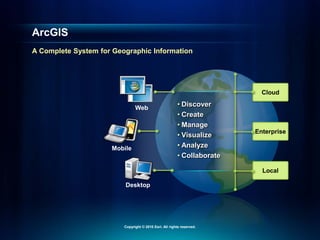
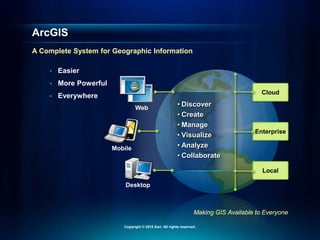
Cloud
Enterprise
Local
• Discover
• Create
• Manage
• Visualize
• Analyze
• Collaborate
Web
Mobile
Desktop
ArcGIS
A Complete System for Geographic Information
Copyright © 2010 Esri. All rights reserved.
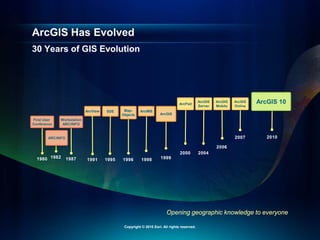
30 Years of GIS Evolution
ArcGIS Has Evolved
Opening geographic knowledge to everyone
ArcView SDE
ARC/INFO
1987 1991 1995 1996 1999
1998
2004
ArcGIS
Server
ArcGIS
Mobile
ArcGIS
Online
2006
2007 2010
Workstation
ARC/INFO
Map-
Objects
ArcIMS
ArcGIS
1982
1980
First User
Conference
2000
ArcPad ArcGIS 10
Copyright © 2010 Esri. All rights reserved.
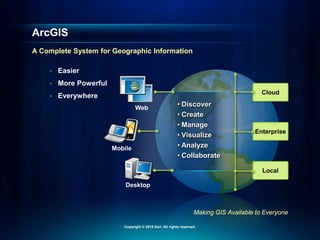
• Easier
• More Powerful
• Everywhere
ArcGIS
A Complete System for Geographic Information
Copyright © 2010 Esri. All rights reserved.
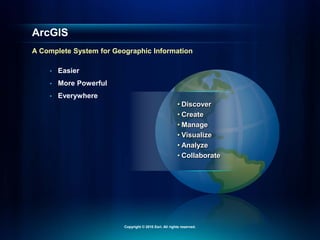
• Easier
• More Powerful
• Everywhere
• Discover
• Create
• Manage
• Visualize
• Analyze
• Collaborate
ArcGIS
A Complete System for Geographic Information
Copyright © 2010 Esri. All rights reserved.
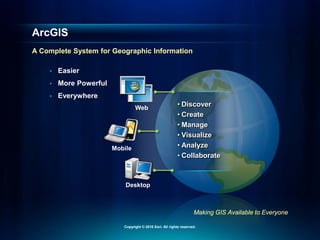
• Easier
• More Powerful
• Everywhere
• Discover
• Create
• Manage
• Visualize
• Analyze
• Collaborate
Web
Mobile
Desktop
Making GIS Available to Everyone
ArcGIS
A Complete System for Geographic Information
Copyright © 2010 Esri. All rights reserved.
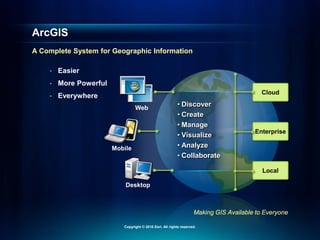
• Easier
• More Powerful
• Everywhere Cloud
Enterprise
Local
• Discover
• Create
• Manage
• Visualize
• Analyze
• Collaborate
Web
Mobile
Desktop
Making GIS Available to Everyone
ArcGIS
A Complete System for Geographic Information
Copyright © 2010 Esri. All rights reserved.
ArcGIS: A Complete System
Demonstration
Copyright © 2010 Esri. All rights reserved.
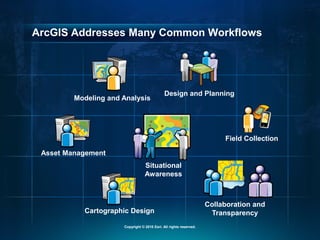
ArcGIS Addresses Many Common Workflows
Design and Planning
Situational
Awareness
Modeling and Analysis
Cartographic Design
Collaboration and
Transparency
Asset Management
Field Collection
Copyright © 2010 Esri. All rights reserved.
• Easier
• More Powerful
• Everywhere Cloud
Enterprise
Local
• Discover
• Create
• Manage
• Visualize
• Analyze
• Collaborate
Web
Mobile
Desktop
Making GIS Available to Everyone
ArcGIS
A Complete System for Geographic Information
Copyright © 2010 Esri. All rights reserved.
ArcGIS Is Now Online
Copyright © 2010 Esri. All rights reserved.
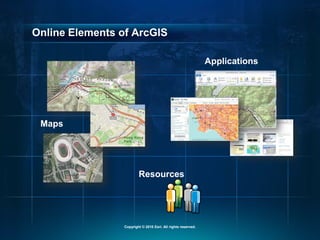
Online Elements of ArcGIS
Maps
Applications
Resources
Copyright © 2010 Esri. All rights reserved.
Basemaps Are an Important Starting Point
Fundamental Part of ArcGIS
Topographic
Streets
Socioeconomic
Imagery
Copyright © 2010 Esri. All rights reserved.
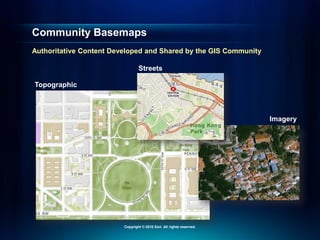
Imagery
Streets
Community Basemaps
Authoritative Content Developed and Shared by the GIS Community
Topographic
Copyright © 2010 Esri. All rights reserved.
Basemaps
Demonstration
Copyright © 2010 Esri. All rights reserved.
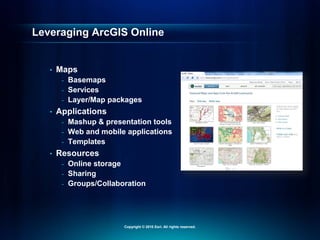
Leveraging ArcGIS Online
• Maps
- Basemaps
- Services
- Layer/Map packages
• Applications
- Mashup & presentation tools
- Web and mobile applications
- Templates
• Resources
- Online storage
- Sharing
- Groups/Collaboration
Copyright © 2010 Esri. All rights reserved.
ArcGIS Is Now Online
Demonstration
Copyright © 2010 Esri. All rights reserved.
Opens GIS to Everyone
ArcGIS is Online
• Free & ready to use
• Extends your Desktop with content and tools
• A new way to share your maps and knowledge
• Enables participation in an online GIS community
• ArcGIS.com provides access
Copyright © 2010 Esri. All rights reserved.
ArcGIS
Is Easier to Use
Copyright © 2010 Esri. All rights reserved.
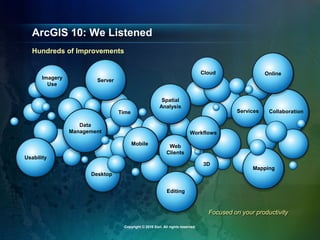
Focused on your productivity
ArcGIS 10: We Listened
Hundreds of Improvements
Web
Clients
Time
Data
Management
Imagery
Use
Usability
Desktop
Mobile
Server
Online
Collaboration
Services
Editing
Mapping
3D
Spatial
Analysis
Workflows
Cloud
Copyright © 2010 Esri. All rights reserved.
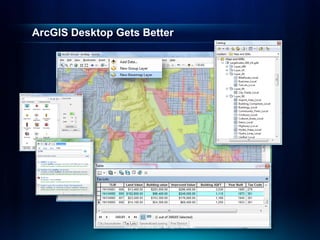
ArcGIS Desktop Gets Better
Copyright © 2010 Esri. All rights reserved.
Easier to Use Desktop
Demonstration
Copyright © 2010 Esri. All rights reserved.
New Tools to Maintain
Spatial Data
Copyright © 2010 Esri. All rights reserved.
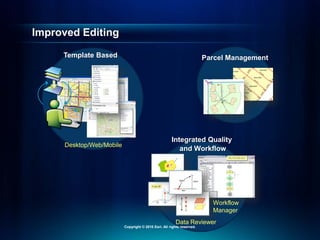
Improved Editing
Parcel Management
Template Based
Desktop/Web/Mobile
Data Reviewer
Workflow
Manager
Integrated Quality
and Workflow
Copyright © 2010 Esri. All rights reserved.
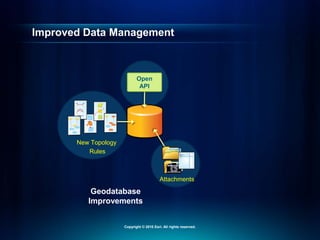
Improved Data Management
Attachments
New Topology
Rules
Open
API
Geodatabase
Improvements
Copyright © 2010 Esri. All rights reserved.
Improved Editing
Demonstration
Copyright © 2010 Esri. All rights reserved.
Better Map Production
Copyright © 2010 Esri. All rights reserved.
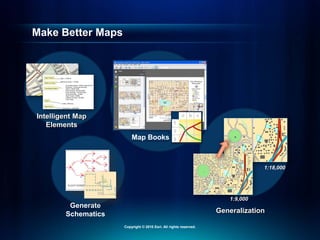
Make Better Maps
Generalization
Intelligent Map
Elements
1:9,000
1:18,000
Generate
Schematics
Map Books
Copyright © 2010 Esri. All rights reserved.
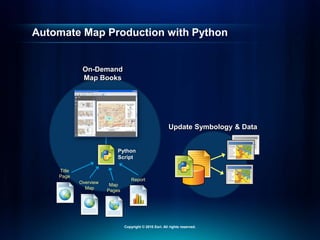
Automate Map Production with Python
Update Symbology & Data
On-Demand
Map Books
Overview
Map
Report
Title
Page
Map
Pages
Python
Script
Copyright © 2010 Esri. All rights reserved.
Better Map Production
Demonstration
Copyright © 2010 Esri. All rights reserved.
Getting Information to the
Web
Copyright © 2010 Esri. All rights reserved.
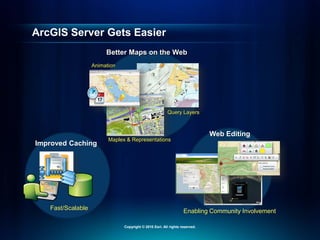
ArcGIS Server Gets Easier
Better Maps on the Web
Query Layers
Maplex & Representations
Animation
Improved Caching
Fast/Scalable
Web Editing
Enabling Community Involvement
Copyright © 2010 Esri. All rights reserved.
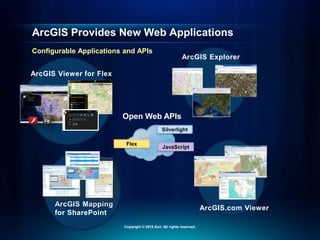
ArcGIS Provides New Web Applications
Configurable Applications and APIs
Flex
Silverlight
Open Web APIs
JavaScript
ArcGIS Mapping
for SharePoint
ArcGIS Viewer for Flex
ArcGIS.com Viewer
ArcGIS Explorer
Copyright © 2010 Esri. All rights reserved.
Getting Information Into and
Out of the Field
Copyright © 2010 Esri. All rights reserved.
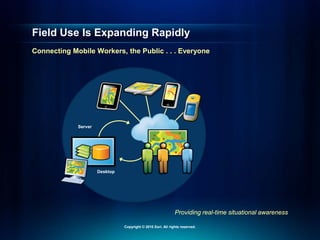
Providing real-time situational awareness
Field Use Is Expanding Rapidly
Connecting Mobile Workers, the Public . . . Everyone
Desktop
Server
Copyright © 2010 Esri. All rights reserved.
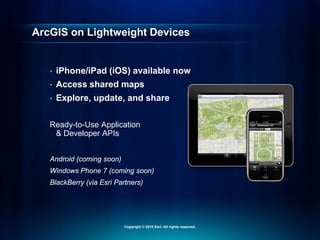
ArcGIS on Lightweight Devices
• iPhone/iPad (iOS) available now
• Access shared maps
• Explore, update, and share
Ready-to-Use Application
& Developer APIs
Android (coming soon)
Windows Phone 7 (coming soon)
BlackBerry (via Esri Partners)
Copyright © 2010 Esri. All rights reserved.
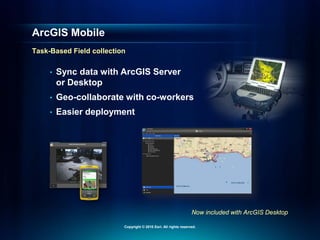
Now included with ArcGIS Desktop
ArcGIS Mobile
Task-Based Field collection
• Sync data with ArcGIS Server
or Desktop
• Geo-collaborate with co-workers
• Easier deployment
Copyright © 2010 Esri. All rights reserved.
ArcGIS Mobile
Demonstration
Copyright © 2010 Esri. All rights reserved.
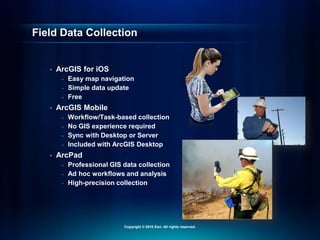
Field Data Collection
• ArcGIS for iOS
- Easy map navigation
- Simple data update
- Free
• ArcGIS Mobile
- Workflow/Task-based collection
- No GIS experience required
- Sync with Desktop or Server
- Included with ArcGIS Desktop
• ArcPad
- Professional GIS data collection
- Ad hoc workflows and analysis
- High-precision collection
Copyright © 2010 Esri. All rights reserved.
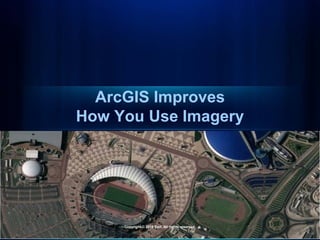
ArcGIS Improves
How You Use Imagery
Copyright © 2010 Esri. All rights reserved.
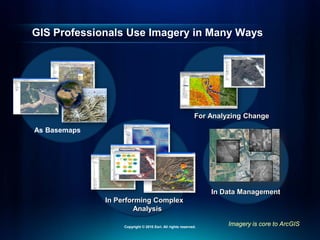
In Performing Complex
Analysis
Imagery is core to ArcGIS
GIS Professionals Use Imagery in Many Ways
For Analyzing Change
In Data Management
As Basemaps
Copyright © 2010 Esri. All rights reserved.
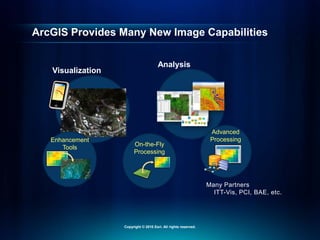
ArcGIS Provides Many New Image Capabilities
Visualization
Fast Display
Analysis
Many Partners
ITT-Vis, PCI, BAE, etc.
Enhancement
Tools
On-the-Fly
Processing
Advanced
Processing
Copyright © 2010 Esri. All rights reserved.
Improving How You Use Imagery
Demonstration
Copyright © 2010 Esri. All rights reserved.
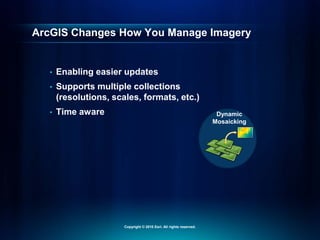
ArcGIS Changes How You Manage Imagery
• Enabling easier updates
• Supports multiple collections
(resolutions, scales, formats, etc.)
• Time aware Dynamic
Mosaicking
Copyright © 2010 Esri. All rights reserved.
Improving How You Manage Imagery
Demonstration
Copyright © 2010 Esri. All rights reserved.
What You’ve Seen So Far
• ArcGIS is a complete system
• New online capabilities
• Many improvements for your day-to-day tasks
• Mobile use of GIS is expanding
• Imagery is used in many ways in ArcGIS
Copyright © 2010 Esri. All rights reserved.
Ending about 3:00 p.m.
What’s Next…
• Lunch till 1:00 p.m.
• Analysis
• 3D
• Cloud
• Deployment
• Resources
• Wrap-up
Copyright © 2010 Esri. All rights reserved.
ArcGIS Advances Spatial
Analysis
Copyright © 2010 Esri. All rights reserved.
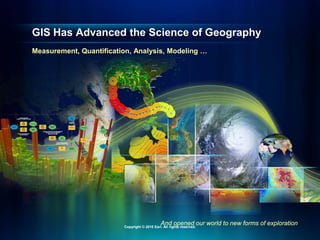
GIS Has Advanced the Science of Geography
And opened our world to new forms of exploration
Measurement, Quantification, Analysis, Modeling …
Copyright © 2010 Esri. All rights reserved.
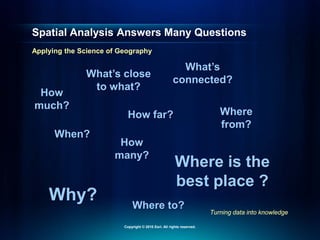
How
much?
How
many?
When?
Where
from?
Where to?
Why?
How far?
What’s close
to what?
Where is the
best place ?
What’s
connected?
Spatial Analysis Answers Many Questions
Turning data into knowledge
Applying the Science of Geography
Copyright © 2010 Esri. All rights reserved.
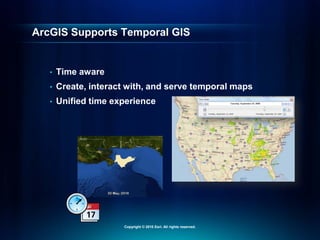
ArcGIS Supports Temporal GIS
• Time aware
• Create, interact with, and serve temporal maps
• Unified time experience
Copyright © 2010 Esri. All rights reserved.
Time-Based Analysis
Demonstration
Copyright © 2010 Esri. All rights reserved.
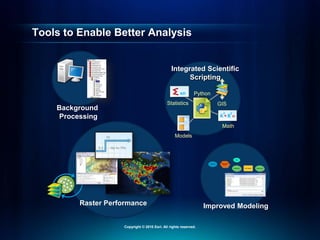
Tools to Enable Better Analysis
Integrated Scientific
Scripting
Python
Math
GIS
Statistics
Models
Background
Processing
Raster Performance Improved Modeling
Copyright © 2010 Esri. All rights reserved.
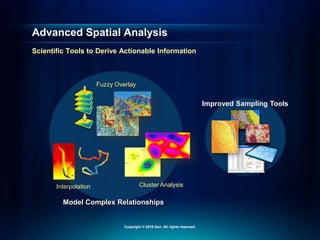
Advanced Spatial Analysis
Scientific Tools to Derive Actionable Information
Improved Sampling Tools
Model Complex Relationships
Fuzzy Overlay
Cluster Analysis
Interpolation
Copyright © 2010 Esri. All rights reserved.
Fuzzy Overlay
Demonstration
Copyright © 2010 Esri. All rights reserved.
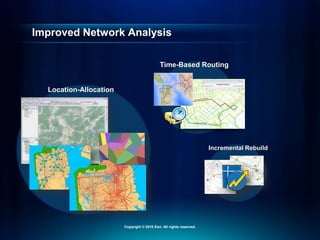
Improved Network Analysis
Location-Allocation
Time-Based Routing
Incremental Rebuild
Copyright © 2010 Esri. All rights reserved.
Location-Allocation
Demonstration
Copyright © 2010 Esri. All rights reserved.
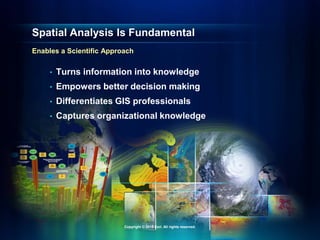
Spatial Analysis Is Fundamental
Enables a Scientific Approach
• Turns information into knowledge
• Empowers better decision making
• Differentiates GIS professionals
• Captures organizational knowledge
Copyright © 2010 Esri. All rights reserved.
ArcGIS Provides a 3D GIS
Copyright © 2010 Esri. All rights reserved.
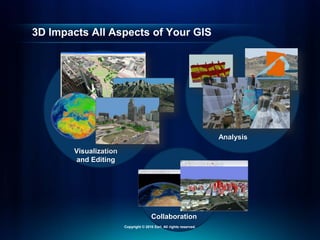
3D Impacts All Aspects of Your GIS
Visualization
and Editing
Analysis
Collaboration
Copyright © 2010 Esri. All rights reserved.
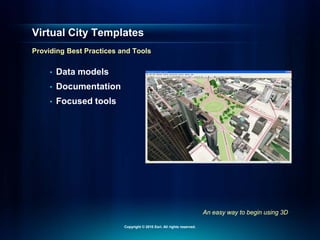
An easy way to begin using 3D
Virtual City Templates
Providing Best Practices and Tools
• Data models
• Documentation
• Focused tools
Copyright © 2010 Esri. All rights reserved.
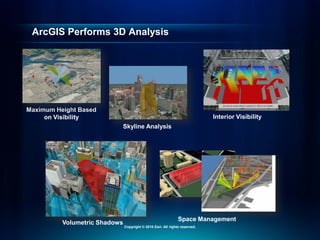
ArcGIS Performs 3D Analysis
Maximum Height Based
on Visibility
Volumetric Shadows
Skyline Analysis
Space Management
Interior Visibility
Copyright © 2010 Esri. All rights reserved.
3D GIS
Demonstration
Copyright © 2010 Esri. All rights reserved.
ArcGIS in the Cloud
Copyright © 2010 Esri. All rights reserved.
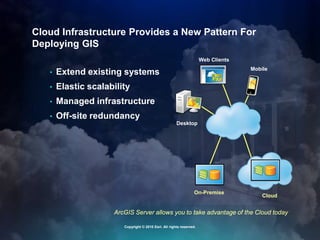
ArcGIS Server allows you to take advantage of the Cloud today
Cloud Infrastructure Provides a New Pattern For
Deploying GIS
• Extend existing systems
• Elastic scalability
• Managed infrastructure
• Off-site redundancy
On-Premise
Web Clients
Mobile
Desktop
Cloud
Copyright © 2010 Esri. All rights reserved.
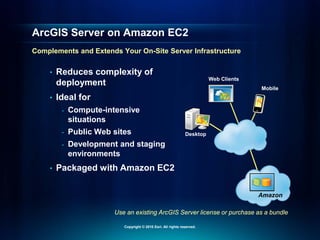
ArcGIS Server on Amazon EC2
Demonstration
Copyright © 2010 Esri. All rights reserved.
Web Clients
Mobile
Desktop
Use an existing ArcGIS Server license or purchase as a bundle
ArcGIS Server on Amazon EC2
Complements and Extends Your On-Site Server Infrastructure
• Reduces complexity of
deployment
• Ideal for
- Compute-intensive
situations
- Public Web sites
- Development and staging
environments
• Packaged with Amazon EC2
Amazon
Copyright © 2010 Esri. All rights reserved.
ArcGIS Is Easier to Deploy
Copyright © 2010 Esri. All rights reserved.
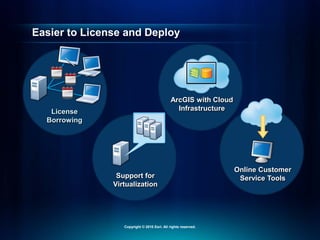
Easier to License and Deploy
License
Borrowing
Support for
Virtualization
Online Customer
Service Tools
ArcGIS with Cloud
Infrastructure
Copyright © 2010 Esri. All rights reserved.
Many Resources to Help You Be Successful
• Resource Center
- Online help/Samples/Templates
• Training
- Instructor-led/Virtual Classrooms/Web classes
• Professional Services
- Jump-start services/Architecture review
- Migration planning/System implementations
• Partners
- Applications/Consulting
Copyright © 2010 Esri. All rights reserved.
Wrap-Up
Copyright © 2010 Esri. All rights reserved.
• Easier
• More Powerful
• Everywhere Cloud
Enterprise
Local
• Discover
• Create
• Manage
• Visualize
• Analyze
• Collaborate
Web
Mobile
Desktop
Making GIS Available to Everyone
ArcGIS
A Complete System for Geographic Information
Copyright © 2010 Esri. All rights reserved.
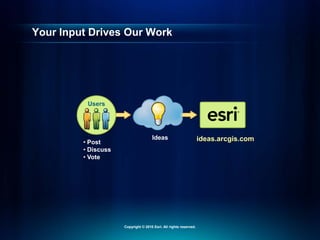
Your Input Drives Our Work
Users
Ideas ideas.arcgis.com
• Post
• Discuss
• Vote
Copyright © 2010 Esri. All rights reserved.
Take the Next Step
• Create a login for www.arcgis.com and start using it
• Review the ArcGIS 10 resources
• Take advantage of the training resources available
• Start using ArcGIS 10
Copyright © 2010 Esri. All rights reserved.

arcgis10powerpoint.pdf

  • 1.
  • 2.
    Passionate About HelpingYou Succeed Copyright © 2010 Esri. All rights reserved.
  • 3.
    Plenty of timefor discussions and questions during breaks and wrap-up Agenda and Logistics • ArcGIS 10 – Part 1 • Break – 10:30 a.m. - 11:00 a.m. • ArcGIS 10 – Part 2 • Lunch – 12 noon - 1:00 p.m. • ArcGIS 10 – Part 3 • Wrap-up By 3:00 p.m. Copyright © 2010 Esri. All rights reserved.
  • 4.
    Cloud Enterprise Local • Discover • Create •Manage • Visualize • Analyze • Collaborate Web Mobile Desktop ArcGIS A Complete System for Geographic Information Copyright © 2010 Esri. All rights reserved.
  • 5.
    30 Years ofGIS Evolution ArcGIS Has Evolved Opening geographic knowledge to everyone ArcView SDE ARC/INFO 1987 1991 1995 1996 1999 1998 2004 ArcGIS Server ArcGIS Mobile ArcGIS Online 2006 2007 2010 Workstation ARC/INFO Map- Objects ArcIMS ArcGIS 1982 1980 First User Conference 2000 ArcPad ArcGIS 10 Copyright © 2010 Esri. All rights reserved.
  • 6.
    • Easier • MorePowerful • Everywhere ArcGIS A Complete System for Geographic Information Copyright © 2010 Esri. All rights reserved.
  • 7.
    • Easier • MorePowerful • Everywhere • Discover • Create • Manage • Visualize • Analyze • Collaborate ArcGIS A Complete System for Geographic Information Copyright © 2010 Esri. All rights reserved.
  • 8.
    • Easier • MorePowerful • Everywhere • Discover • Create • Manage • Visualize • Analyze • Collaborate Web Mobile Desktop Making GIS Available to Everyone ArcGIS A Complete System for Geographic Information Copyright © 2010 Esri. All rights reserved.
  • 9.
    • Easier • MorePowerful • Everywhere Cloud Enterprise Local • Discover • Create • Manage • Visualize • Analyze • Collaborate Web Mobile Desktop Making GIS Available to Everyone ArcGIS A Complete System for Geographic Information Copyright © 2010 Esri. All rights reserved.
  • 10.
    ArcGIS: A CompleteSystem Demonstration Copyright © 2010 Esri. All rights reserved.
  • 11.
    ArcGIS Addresses ManyCommon Workflows Design and Planning Situational Awareness Modeling and Analysis Cartographic Design Collaboration and Transparency Asset Management Field Collection Copyright © 2010 Esri. All rights reserved.
  • 12.
    • Easier • MorePowerful • Everywhere Cloud Enterprise Local • Discover • Create • Manage • Visualize • Analyze • Collaborate Web Mobile Desktop Making GIS Available to Everyone ArcGIS A Complete System for Geographic Information Copyright © 2010 Esri. All rights reserved.
  • 13.
    ArcGIS Is NowOnline Copyright © 2010 Esri. All rights reserved.
  • 14.
    Online Elements ofArcGIS Maps Applications Resources Copyright © 2010 Esri. All rights reserved.
  • 15.
    Basemaps Are anImportant Starting Point Fundamental Part of ArcGIS Topographic Streets Socioeconomic Imagery Copyright © 2010 Esri. All rights reserved.
  • 16.
    Imagery Streets Community Basemaps Authoritative ContentDeveloped and Shared by the GIS Community Topographic Copyright © 2010 Esri. All rights reserved.
  • 17.
    Basemaps Demonstration Copyright © 2010Esri. All rights reserved.
  • 18.
    Leveraging ArcGIS Online •Maps - Basemaps - Services - Layer/Map packages • Applications - Mashup & presentation tools - Web and mobile applications - Templates • Resources - Online storage - Sharing - Groups/Collaboration Copyright © 2010 Esri. All rights reserved.
  • 19.
    ArcGIS Is NowOnline Demonstration Copyright © 2010 Esri. All rights reserved.
  • 20.
    Opens GIS toEveryone ArcGIS is Online • Free & ready to use • Extends your Desktop with content and tools • A new way to share your maps and knowledge • Enables participation in an online GIS community • ArcGIS.com provides access Copyright © 2010 Esri. All rights reserved.
  • 21.
    ArcGIS Is Easier toUse Copyright © 2010 Esri. All rights reserved.
  • 22.
    Focused on yourproductivity ArcGIS 10: We Listened Hundreds of Improvements Web Clients Time Data Management Imagery Use Usability Desktop Mobile Server Online Collaboration Services Editing Mapping 3D Spatial Analysis Workflows Cloud Copyright © 2010 Esri. All rights reserved.
  • 23.
    ArcGIS Desktop GetsBetter Copyright © 2010 Esri. All rights reserved.
  • 24.
    Easier to UseDesktop Demonstration Copyright © 2010 Esri. All rights reserved.
  • 25.
    New Tools toMaintain Spatial Data Copyright © 2010 Esri. All rights reserved.
  • 26.
    Improved Editing Parcel Management TemplateBased Desktop/Web/Mobile Data Reviewer Workflow Manager Integrated Quality and Workflow Copyright © 2010 Esri. All rights reserved.
  • 27.
    Improved Data Management Attachments NewTopology Rules Open API Geodatabase Improvements Copyright © 2010 Esri. All rights reserved.
  • 28.
    Improved Editing Demonstration Copyright ©2010 Esri. All rights reserved.
  • 29.
    Better Map Production Copyright© 2010 Esri. All rights reserved.
  • 30.
    Make Better Maps Generalization IntelligentMap Elements 1:9,000 1:18,000 Generate Schematics Map Books Copyright © 2010 Esri. All rights reserved.
  • 31.
    Automate Map Productionwith Python Update Symbology & Data On-Demand Map Books Overview Map Report Title Page Map Pages Python Script Copyright © 2010 Esri. All rights reserved.
  • 32.
    Better Map Production Demonstration Copyright© 2010 Esri. All rights reserved.
  • 33.
    Getting Information tothe Web Copyright © 2010 Esri. All rights reserved.
  • 34.
    ArcGIS Server GetsEasier Better Maps on the Web Query Layers Maplex & Representations Animation Improved Caching Fast/Scalable Web Editing Enabling Community Involvement Copyright © 2010 Esri. All rights reserved.
  • 35.
    ArcGIS Provides NewWeb Applications Configurable Applications and APIs Flex Silverlight Open Web APIs JavaScript ArcGIS Mapping for SharePoint ArcGIS Viewer for Flex ArcGIS.com Viewer ArcGIS Explorer Copyright © 2010 Esri. All rights reserved.
  • 36.
    Getting Information Intoand Out of the Field Copyright © 2010 Esri. All rights reserved.
  • 37.
    Providing real-time situationalawareness Field Use Is Expanding Rapidly Connecting Mobile Workers, the Public . . . Everyone Desktop Server Copyright © 2010 Esri. All rights reserved.
  • 38.
    ArcGIS on LightweightDevices • iPhone/iPad (iOS) available now • Access shared maps • Explore, update, and share Ready-to-Use Application & Developer APIs Android (coming soon) Windows Phone 7 (coming soon) BlackBerry (via Esri Partners) Copyright © 2010 Esri. All rights reserved.
  • 39.
    Now included withArcGIS Desktop ArcGIS Mobile Task-Based Field collection • Sync data with ArcGIS Server or Desktop • Geo-collaborate with co-workers • Easier deployment Copyright © 2010 Esri. All rights reserved.
  • 40.
    ArcGIS Mobile Demonstration Copyright ©2010 Esri. All rights reserved.
  • 41.
    Field Data Collection •ArcGIS for iOS - Easy map navigation - Simple data update - Free • ArcGIS Mobile - Workflow/Task-based collection - No GIS experience required - Sync with Desktop or Server - Included with ArcGIS Desktop • ArcPad - Professional GIS data collection - Ad hoc workflows and analysis - High-precision collection Copyright © 2010 Esri. All rights reserved.
  • 42.
    ArcGIS Improves How YouUse Imagery Copyright © 2010 Esri. All rights reserved.
  • 43.
    In Performing Complex Analysis Imageryis core to ArcGIS GIS Professionals Use Imagery in Many Ways For Analyzing Change In Data Management As Basemaps Copyright © 2010 Esri. All rights reserved.
  • 44.
    ArcGIS Provides ManyNew Image Capabilities Visualization Fast Display Analysis Many Partners ITT-Vis, PCI, BAE, etc. Enhancement Tools On-the-Fly Processing Advanced Processing Copyright © 2010 Esri. All rights reserved.
  • 45.
    Improving How YouUse Imagery Demonstration Copyright © 2010 Esri. All rights reserved.
  • 46.
    ArcGIS Changes HowYou Manage Imagery • Enabling easier updates • Supports multiple collections (resolutions, scales, formats, etc.) • Time aware Dynamic Mosaicking Copyright © 2010 Esri. All rights reserved.
  • 47.
    Improving How YouManage Imagery Demonstration Copyright © 2010 Esri. All rights reserved.
  • 48.
    What You’ve SeenSo Far • ArcGIS is a complete system • New online capabilities • Many improvements for your day-to-day tasks • Mobile use of GIS is expanding • Imagery is used in many ways in ArcGIS Copyright © 2010 Esri. All rights reserved.
  • 49.
    Ending about 3:00p.m. What’s Next… • Lunch till 1:00 p.m. • Analysis • 3D • Cloud • Deployment • Resources • Wrap-up Copyright © 2010 Esri. All rights reserved.
  • 50.
    ArcGIS Advances Spatial Analysis Copyright© 2010 Esri. All rights reserved.
  • 51.
    GIS Has Advancedthe Science of Geography And opened our world to new forms of exploration Measurement, Quantification, Analysis, Modeling … Copyright © 2010 Esri. All rights reserved.
  • 52.
    How much? How many? When? Where from? Where to? Why? How far? What’sclose to what? Where is the best place ? What’s connected? Spatial Analysis Answers Many Questions Turning data into knowledge Applying the Science of Geography Copyright © 2010 Esri. All rights reserved.
  • 53.
    ArcGIS Supports TemporalGIS • Time aware • Create, interact with, and serve temporal maps • Unified time experience Copyright © 2010 Esri. All rights reserved.
  • 54.
    Time-Based Analysis Demonstration Copyright ©2010 Esri. All rights reserved.
  • 55.
    Tools to EnableBetter Analysis Integrated Scientific Scripting Python Math GIS Statistics Models Background Processing Raster Performance Improved Modeling Copyright © 2010 Esri. All rights reserved.
  • 56.
    Advanced Spatial Analysis ScientificTools to Derive Actionable Information Improved Sampling Tools Model Complex Relationships Fuzzy Overlay Cluster Analysis Interpolation Copyright © 2010 Esri. All rights reserved.
  • 57.
    Fuzzy Overlay Demonstration Copyright ©2010 Esri. All rights reserved.
  • 58.
    Improved Network Analysis Location-Allocation Time-BasedRouting Incremental Rebuild Copyright © 2010 Esri. All rights reserved.
  • 59.
  • 60.
    Spatial Analysis IsFundamental Enables a Scientific Approach • Turns information into knowledge • Empowers better decision making • Differentiates GIS professionals • Captures organizational knowledge Copyright © 2010 Esri. All rights reserved.
  • 61.
    ArcGIS Provides a3D GIS Copyright © 2010 Esri. All rights reserved.
  • 62.
    3D Impacts AllAspects of Your GIS Visualization and Editing Analysis Collaboration Copyright © 2010 Esri. All rights reserved.
  • 63.
    An easy wayto begin using 3D Virtual City Templates Providing Best Practices and Tools • Data models • Documentation • Focused tools Copyright © 2010 Esri. All rights reserved.
  • 64.
    ArcGIS Performs 3DAnalysis Maximum Height Based on Visibility Volumetric Shadows Skyline Analysis Space Management Interior Visibility Copyright © 2010 Esri. All rights reserved.
  • 65.
    3D GIS Demonstration Copyright ©2010 Esri. All rights reserved.
  • 66.
    ArcGIS in theCloud Copyright © 2010 Esri. All rights reserved.
  • 67.
    ArcGIS Server allowsyou to take advantage of the Cloud today Cloud Infrastructure Provides a New Pattern For Deploying GIS • Extend existing systems • Elastic scalability • Managed infrastructure • Off-site redundancy On-Premise Web Clients Mobile Desktop Cloud Copyright © 2010 Esri. All rights reserved.
  • 68.
    ArcGIS Server onAmazon EC2 Demonstration Copyright © 2010 Esri. All rights reserved.
  • 69.
    Web Clients Mobile Desktop Use anexisting ArcGIS Server license or purchase as a bundle ArcGIS Server on Amazon EC2 Complements and Extends Your On-Site Server Infrastructure • Reduces complexity of deployment • Ideal for - Compute-intensive situations - Public Web sites - Development and staging environments • Packaged with Amazon EC2 Amazon Copyright © 2010 Esri. All rights reserved.
  • 70.
    ArcGIS Is Easierto Deploy Copyright © 2010 Esri. All rights reserved.
  • 71.
    Easier to Licenseand Deploy License Borrowing Support for Virtualization Online Customer Service Tools ArcGIS with Cloud Infrastructure Copyright © 2010 Esri. All rights reserved.
  • 72.
    Many Resources toHelp You Be Successful • Resource Center - Online help/Samples/Templates • Training - Instructor-led/Virtual Classrooms/Web classes • Professional Services - Jump-start services/Architecture review - Migration planning/System implementations • Partners - Applications/Consulting Copyright © 2010 Esri. All rights reserved.
  • 73.
    Wrap-Up Copyright © 2010Esri. All rights reserved.
  • 74.
    • Easier • MorePowerful • Everywhere Cloud Enterprise Local • Discover • Create • Manage • Visualize • Analyze • Collaborate Web Mobile Desktop Making GIS Available to Everyone ArcGIS A Complete System for Geographic Information Copyright © 2010 Esri. All rights reserved.
  • 75.
    Your Input DrivesOur Work Users Ideas ideas.arcgis.com • Post • Discuss • Vote Copyright © 2010 Esri. All rights reserved.
  • 76.
    Take the NextStep • Create a login for www.arcgis.com and start using it • Review the ArcGIS 10 resources • Take advantage of the training resources available • Start using ArcGIS 10 Copyright © 2010 Esri. All rights reserved.
  • 77.
    Copyright © 2010Esri. All rights reserved.