Download free for 30 days
Sign in
Upload
Language (EN)
Support
Business
Mobile
Social Media
Marketing
Technology
Art & Photos
Career
Design
Education
Presentations & Public Speaking
Government & Nonprofit
Healthcare
Internet
Law
Leadership & Management
Automotive
Engineering
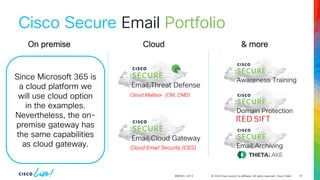
Software
Recruiting & HR
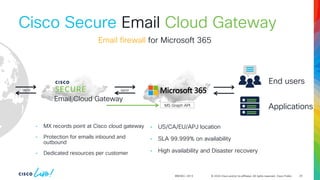
Retail
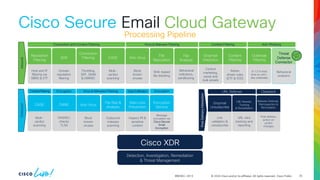
Sales
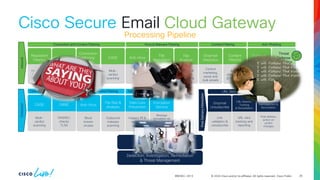
Services
Science
Small Business & Entrepreneurship
Food
Environment
Economy & Finance
Data & Analytics
Investor Relations
Sports
Spiritual
News & Politics
Travel
Self Improvement
Real Estate
Entertainment & Humor
Health & Medicine
Devices & Hardware
Lifestyle
Change Language
Language
English
Español
Português
Français
Deutsche
Cancel
Save
Submit search
EN
Uploaded by
JeanCarlos706416
23 views
Apresentação da Tecnologia Secure E-mail Cisco
Secure E-mail Cisco
Technology
◦
Read more
0
Save
Share
Embed
Embed presentation
Download
Download to read offline
1
/ 141
2
/ 141
3
/ 141
4
/ 141
5
/ 141
6
/ 141
7
/ 141
8
/ 141
9
/ 141
10
/ 141
11
/ 141
12
/ 141
13
/ 141
14
/ 141
15
/ 141
16
/ 141
17
/ 141
18
/ 141
19
/ 141
20
/ 141
21
/ 141
22
/ 141
23
/ 141
24
/ 141
25
/ 141
26
/ 141
27
/ 141
28
/ 141
29
/ 141
30
/ 141
31
/ 141
32
/ 141
33
/ 141
34
/ 141
35
/ 141
36
/ 141
37
/ 141
38
/ 141
39
/ 141
40
/ 141
41
/ 141
42
/ 141
43
/ 141
44
/ 141
45
/ 141
46
/ 141
47
/ 141
48
/ 141
49
/ 141
50
/ 141
51
/ 141
52
/ 141
53
/ 141
54
/ 141
55
/ 141
56
/ 141
57
/ 141
58
/ 141
59
/ 141
60
/ 141
61
/ 141
62
/ 141
63
/ 141
64
/ 141
65
/ 141
66
/ 141
67
/ 141
68
/ 141
69
/ 141
70
/ 141
71
/ 141
72
/ 141
73
/ 141
74
/ 141
75
/ 141
76
/ 141
77
/ 141
78
/ 141
79
/ 141
80
/ 141
81
/ 141
82
/ 141
83
/ 141
84
/ 141
85
/ 141
86
/ 141
87
/ 141
88
/ 141
89
/ 141
90
/ 141
91
/ 141
92
/ 141
93
/ 141
94
/ 141
95
/ 141
96
/ 141
97
/ 141
98
/ 141
99
/ 141
100
/ 141
101
/ 141
102
/ 141
103
/ 141
104
/ 141
105
/ 141
106
/ 141
107
/ 141
108
/ 141
109
/ 141
110
/ 141
111
/ 141
112
/ 141
113
/ 141
114
/ 141
115
/ 141
116
/ 141
117
/ 141
118
/ 141
119
/ 141
120
/ 141
121
/ 141
122
/ 141
123
/ 141
124
/ 141
125
/ 141
126
/ 141
127
/ 141
128
/ 141
129
/ 141
130
/ 141
131
/ 141
132
/ 141
133
/ 141
134
/ 141
135
/ 141
136
/ 141
137
/ 141
138
/ 141
139
/ 141
140
/ 141
141
/ 141
More Related Content
PDF
May 2023 CIAOPS Need to Know Webinar
by
Robert Crane
PDF
July 2021 Microsoft 365 Need to Know Webinar
by
Robert Crane
PPTX
Office 365 Security - Its 2am do you know whos in your office 365
by
Jack Nichelson
PDF
O365 to cisco cloud guide
by
Muthanna Ranganath
PPTX
email-security-bdm.pptx
by
punzango73
PDF
Cloud university intel security
by
Ingram Micro Cloud
PDF
Cisco Secure Email 2024 Cisco Secure Email 2024
by
MichaelLee15927
PPTX
M365 e3 and identity and threat protection and compliance new skus
by
SpencerLuke2
May 2023 CIAOPS Need to Know Webinar
by
Robert Crane
July 2021 Microsoft 365 Need to Know Webinar
by
Robert Crane
Office 365 Security - Its 2am do you know whos in your office 365
by
Jack Nichelson
O365 to cisco cloud guide
by
Muthanna Ranganath
email-security-bdm.pptx
by
punzango73
Cloud university intel security
by
Ingram Micro Cloud
Cisco Secure Email 2024 Cisco Secure Email 2024
by
MichaelLee15927
M365 e3 and identity and threat protection and compliance new skus
by
SpencerLuke2
Similar to Apresentação da Tecnologia Secure E-mail Cisco
PDF
May 2020 Microsoft 365 Need to Know Webinar
by
Robert Crane
PDF
Being more secure using Microsoft 365 Business
by
Robert Crane
PDF
Focusing on security with Microsoft 365 Business
by
Robert Crane
PPTX
BRK3161_Gagnon copilot for m365 microsoft
by
YasmineBoudhina
PDF
Making Office 365 More Secure and Compliant
by
Osterman Research, Inc.
PDF
March 2021 Microsoft 365 Need to Know Webinar
by
Robert Crane
PPTX
Microsoft365-E3-to-E5-upsell-customer-pitch-deck.pptx
by
HoseaPratama1
PPTX
How does Microsoft secure my email with Office 365
by
Loryan Strant
PDF
Is Office 365 Right For You? Aptera Software presentation
by
Aptera Inc
PDF
Email security for office 365 - Yaqeen Hosting Uk Limtied
by
ahmad hanbali
PDF
Softwerx Microsoft 365 Security Webinar Presentation
by
Patrick Leckie
PDF
Mimecast and O365 - Service Selection Brochure
by
Stephen Dorling
PPTX
How to deploy Exchange Online Protection
by
Peter Schmidt
PPTX
Atelier Technique - Symantec - #ACSS2019
by
African Cyber Security Summit
PDF
An introduction to Office 365 Advanced Threat Protection (ATP)
by
Robert Crane
PPTX
Primend praktiline konverents - Office 365 turvalisus
by
Primend
PPTX
Seminar on Phishing Protection
by
Cristian Garcia G.
PPT
Exchange Conference (Philadelphia) - Exchange 2007 Security
by
Harold Wong
PDF
CIAOPS Need to Know Office 365 Webinar - March 2018
by
Robert Crane
PPTX
CoLabora - Exchange Online Protection - June 2015
by
CoLaboraDK
May 2020 Microsoft 365 Need to Know Webinar
by
Robert Crane
Being more secure using Microsoft 365 Business
by
Robert Crane
Focusing on security with Microsoft 365 Business
by
Robert Crane
BRK3161_Gagnon copilot for m365 microsoft
by
YasmineBoudhina
Making Office 365 More Secure and Compliant
by
Osterman Research, Inc.
March 2021 Microsoft 365 Need to Know Webinar
by
Robert Crane
Microsoft365-E3-to-E5-upsell-customer-pitch-deck.pptx
by
HoseaPratama1
How does Microsoft secure my email with Office 365
by
Loryan Strant
Is Office 365 Right For You? Aptera Software presentation
by
Aptera Inc
Email security for office 365 - Yaqeen Hosting Uk Limtied
by
ahmad hanbali
Softwerx Microsoft 365 Security Webinar Presentation
by
Patrick Leckie
Mimecast and O365 - Service Selection Brochure
by
Stephen Dorling
How to deploy Exchange Online Protection
by
Peter Schmidt
Atelier Technique - Symantec - #ACSS2019
by
African Cyber Security Summit
An introduction to Office 365 Advanced Threat Protection (ATP)
by
Robert Crane
Primend praktiline konverents - Office 365 turvalisus
by
Primend
Seminar on Phishing Protection
by
Cristian Garcia G.
Exchange Conference (Philadelphia) - Exchange 2007 Security
by
Harold Wong
CIAOPS Need to Know Office 365 Webinar - March 2018
by
Robert Crane
CoLabora - Exchange Online Protection - June 2015
by
CoLaboraDK
Recently uploaded
PPTX
AI and Digital Transformation Solutions.
by
Buildingblocks
PDF
apidays Australia 2025 | User Brainpower vs. AI Blind Spots in API Docs
by
apidays
PPTX
Strategic Shelf Planning for the New Year Turning Resolutions into Revenue .pptx
by
Anoop Ashok
PDF
Skills to Pass the UiPath Agentic Automation Associate (UiAAA) Certification
by
UiPathCommunity
PDF
Deploying Windows Clients & Managing Identities
by
VICTOR MAESTRE RAMIREZ
PDF
Talaria: A Sound-Driven Music Search Engine for Discovery Beyond Metadata
by
Shuen-Huei Guan
PPTX
Mastering SQL Server Replication: Types, Setup & Troubleshooting
by
GeoPITS Global Pvt Ltd
PDF
Computer Science Conferences 2026 | Research by SAI Conference
by
Health Conference 2026
PPTX
SOFTWARE DEVELOPMENT PROCESS - INTRODUCTION
by
Parithi Thamizh
PPTX
API Gateway Architecture - Technical Report 2026
by
Powersoft2026
PDF
Ethical AI applied to publishing: Presenting wâsikan kisewâtisiwin, an AI too...
by
BookNet Canada
PPTX
6G and Non-Terrestrial Networks (NTN) Testing.pptx
by
XRComm
PPTX
Code Like Bro -A guide for better Coding
by
Madan Panthi
PPT
connectives-linking words in English.ppt
by
AmrMohammed82
PDF
Teaching Robots how to Read 1/2: AI Center & Classic Document Understanding (...
by
anabulhac
PPTX
apidays Australia 2025 | Building AI RAG Applications with No Code.pptx
by
apidays
PPTX
AI Meets DBA Transforming Database Administration with Intelligence
by
GeoPITS Global Pvt Ltd
PDF
Agentic AI Roadmap 2026: Mastering Autonomous AI Workflows and Systems
by
Aeafat Ahmed Mubin
PDF
How the EU Ecolabel's Record Growth Creates ESG Opportunities for CRE
by
Wastify AI
PDF
How PayPal Account Verification Works – Complete Guide for Online Businesses
by
jhdhj3989
AI and Digital Transformation Solutions.
by
Buildingblocks
apidays Australia 2025 | User Brainpower vs. AI Blind Spots in API Docs
by
apidays
Strategic Shelf Planning for the New Year Turning Resolutions into Revenue .pptx
by
Anoop Ashok
Skills to Pass the UiPath Agentic Automation Associate (UiAAA) Certification
by
UiPathCommunity
Deploying Windows Clients & Managing Identities
by
VICTOR MAESTRE RAMIREZ
Talaria: A Sound-Driven Music Search Engine for Discovery Beyond Metadata
by
Shuen-Huei Guan
Mastering SQL Server Replication: Types, Setup & Troubleshooting
by
GeoPITS Global Pvt Ltd
Computer Science Conferences 2026 | Research by SAI Conference
by
Health Conference 2026
SOFTWARE DEVELOPMENT PROCESS - INTRODUCTION
by
Parithi Thamizh
API Gateway Architecture - Technical Report 2026
by
Powersoft2026
Ethical AI applied to publishing: Presenting wâsikan kisewâtisiwin, an AI too...
by
BookNet Canada
6G and Non-Terrestrial Networks (NTN) Testing.pptx
by
XRComm
Code Like Bro -A guide for better Coding
by
Madan Panthi
connectives-linking words in English.ppt
by
AmrMohammed82
Teaching Robots how to Read 1/2: AI Center & Classic Document Understanding (...
by
anabulhac
apidays Australia 2025 | Building AI RAG Applications with No Code.pptx
by
apidays
AI Meets DBA Transforming Database Administration with Intelligence
by
GeoPITS Global Pvt Ltd
Agentic AI Roadmap 2026: Mastering Autonomous AI Workflows and Systems
by
Aeafat Ahmed Mubin
How the EU Ecolabel's Record Growth Creates ESG Opportunities for CRE
by
Wastify AI
How PayPal Account Verification Works – Complete Guide for Online Businesses
by
jhdhj3989
Apresentação da Tecnologia Secure E-mail Cisco
2.
Abdalla Taha, Technical
Solutions Architect – Secure Email If you have Microsoft 365… Why Cisco Secure Email? BRKSEC-2913
3.
How effective is Microsoft
365’s email security?
4.
Enter your personal
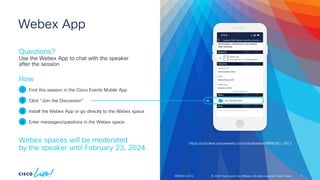
notes here Questions? Use the Webex App to chat with the speaker after the session Find this session in the Cisco Events Mobile App Click “Join the Discussion” Install the Webex App or go directly to the Webex space Enter messages/questions in the Webex space How Webex spaces will be moderated by the speaker until February 23, 2024. 1 2 3 4 © 2024 Cisco and/or its affiliates. All rights reserved. Cisco Public Webex App 4 BRKSEC-2913 https://ciscolive.ciscoevents.com/ciscolivebot/#BRKSEC-2913
5.
Agenda © 2024 Cisco
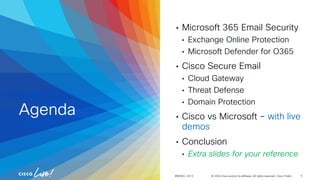
and/or its affiliates. All rights reserved. Cisco Public • Microsoft 365 Email Security • Exchange Online Protection • Microsoft Defender for O365 • Cisco Secure Email • Cloud Gateway • Threat Defense • Domain Protection • Cisco vs Microsoft – with live demos • Conclusion • Extra slides for your reference BRKSEC-2913 5
6.
About Me
7.
© 2024 Cisco
and/or its affiliates. All rights reserved. Cisco Public Abdalla Taha • Palestinian/Morrocan from Finland! • Part of Global Security Sales Organization • Dedicated technical resource for north EMEA • Worldwide lead for Email Technical Advisory Group • 8+ years at Cisco (Email security focus 6 years) • Husband & Father of two • Love outdoor sports & travelling BRKSEC-2913 Technical Solutions Architect 7
8.
Disclaimer
9.
© 2024 Cisco
and/or its affiliates. All rights reserved. Cisco Public Disclaimer • This presentation is created by Abdalla Taha, a Cisco employee specialized in email security • The information presented is based on: • Research • Experience with the products • Customer/Partner/Colleagues feedback • Feel free to approach me with feedback • I welcome feedback (positive + negative) & I welcome challenges (prove me wrong) • Main purpose for this presentation is to show that the combination of Cisco + Microsoft is better than Microsoft on its own. Yes, also in the case of E5! • Please be cautious when using this deck as new features come, licenses change, etc. I will do my best to keep recurring this session for accurate and updated content. BRKSEC-2913 9
11.
© 2024 Cisco
and/or its affiliates. All rights reserved. Cisco Public Microsoft 365 • Formerly Office 365 (name changed 2020) • Provides Microsoft software as SaaS solution • Exchange server → Exchange Online • An opportunity to move the “headache” of keeping Exchange server operation to Microsoft • Admins can focus only on managing policies and configurations • Always up to date • Today more than a million companies use Microsoft 365(1) BRKSEC-2913 (1) https://www.statista.com/statistics/983321/worldwide-office-365-user-numbers-by-country 11
12.
© 2024 Cisco
and/or its affiliates. All rights reserved. Cisco Public What about Email Security on Microsoft 365? • In contrary to Exchange on premise, Exchange online includes Exchange Online Protection (EOP) • Companies migrating to the cloud could replace existing email security vendor with Microsoft's own services • Question arises, why keep or add other vendors? And, how good is Microsoft’s Email Security? BRKSEC-2913 Exchange Online Protection 12
13.
© 2024 Cisco
and/or its affiliates. All rights reserved. Cisco Public Email Security with Microsoft 365 BRKSEC-2913 Microsoft offers email security in 3 levels(1) • Exchange Online Protection • Microsoft Defender for Office 365 Plan 1 (formerly ATP plan1) • Microsoft Defender for Office 365 Plan 2 (formerly ATP plan2) From high level perspective Microsoft has it all! • Most companies don’t even bother to run a Proof-of-Concept as they trust Microsoft’s brand and reputation • Microsoft sales team also encourages to disregard the third-party email security vendor for “simplicity” and maximum performance (1) https://learn.microsoft.com/en-us/microsoft-365/security/office-365-security/mdo-security-comparison Exchange Online Protection 13
14.
© 2024 Cisco
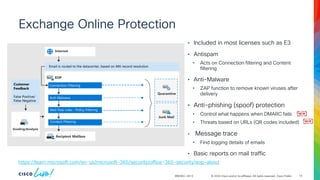
and/or its affiliates. All rights reserved. Cisco Public Exchange Online Protection BRKSEC-2913 • Included in most licenses such as E3 • Antispam • Acts on Connection filtering and Content filtering • Anti-Malware • ZAP function to remove known viruses after delivery • Anti-phishing (spoof) protection • Control what happens when DMARC fails • Threats based on URLs (QR codes included) • Message trace • Find logging details of emails • Basic reports on mail traffic https://learn.microsoft.com/en-us/microsoft-365/security/office-365-security/eop-about 14
15.
© 2024 Cisco
and/or its affiliates. All rights reserved. Cisco Public Microsoft Defender for Office 365 Plan 1 (MDO 1) BRKSEC-2913 • Included in E5 • Safe Attachment • Microsoft’s sandbox to mitigate zero-day malware • Option for dynamic delivery (get email first without attachment and attachment once scan is ready) • Safe Link • Protection from malicious links • Rewriting URLs to be checked again at time-of-click • Better Anti-phishing • Improves EOP antispam to protect also from impersonation attacks • VIP protection & Intelligent Mailbox • More reports • Called Real-time detections • Reports and tools to investigate malware and URL based email attacks • Integration with SIEM API https://learn.microsoft.com/en-us/microsoft-365/security/office-365-security/mdo-about 15
16.
© 2024 Cisco
and/or its affiliates. All rights reserved. Cisco Public Microsoft Defender for Office 365 plan 2 (MDO 2) BRKSEC-2913 • Included in E5 • Includes Microsoft Defender for Office 365 plan 1 • Threat Tracker • More reports and widgets • Threat Explorer • More powerful tool for investigation and threat hunting • Possibility to remediate malicious emails from end user's inbox • Automated investigation and response • Automated actions for faster remediation • Automated actions over SIEM API • Attack simulation training • Sending simulated phishing emails to bring up awareness • Campaign View • Means to identify attack campaigns https://learn.microsoft.com/en-us/microsoft-365/security/office-365-security/why-do-i-need-microsoft-defender-for-office-365 16
17.
© 2024 Cisco
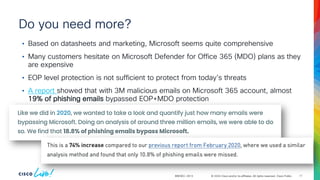
and/or its affiliates. All rights reserved. Cisco Public Do you need more? BRKSEC-2913 • Based on datasheets and marketing, Microsoft seems quite comprehensive • Many customers hesitate on Microsoft Defender for Office 365 (MDO) plans as they are expensive • EOP level protection is not sufficient to protect from today's threats • A report showed that with 3M malicious emails on Microsoft 365 account, almost 19% of phishing emails bypassed EOP+MDO protection 17
18.
© 2024 Cisco
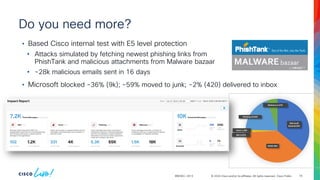
and/or its affiliates. All rights reserved. Cisco Public Do you need more? BRKSEC-2913 • Based Cisco internal test with E5 level protection • Attacks simulated by fetching newest phishing links from PhishTank and malicious attachments from Malware bazaar • ~28k malicious emails sent in 16 days 18 Microsoft blocked 36% SPAM 38% BEC 0.37% Scam 1.19% Phishing 19.32% Malicious 5.27% • Microsoft blocked ~36% (9k); ~59% moved to junk; ~2% (420) delivered to inbox
19.
How effective is Microsoft
365’s email security? Your answers on:
20.
© 2024 Cisco
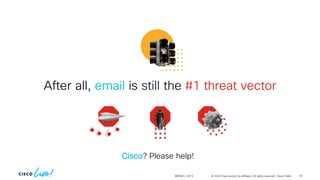
and/or its affiliates. All rights reserved. Cisco Public BRKSEC-2913 After all, email is still the #1 threat vector Cisco? Please help! 20
21.
Cisco Secure Email
22.
© 2024 Cisco
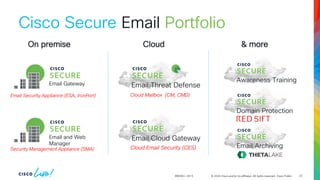
and/or its affiliates. All rights reserved. Cisco Public BRKSEC-2913 22 Cisco Secure Email Portfolio Email Cloud Gateway Cloud Email Security (CES) Cloud Mailbox (CM, CMD) Email Threat Defense Email and Web Manager Security Management Appliance (SMA) Awareness Training Domain Protection Email Archiving Email Gateway Email Security Appliance (ESA, IronPort) On premise Cloud & more
23.
© 2024 Cisco
and/or its affiliates. All rights reserved. Cisco Public BRKSEC-2913 23 Cisco Secure Email Portfolio Email Cloud Gateway Cloud Email Security (CES) Cloud Mailbox (CM, CMD) Email Threat Defense Email and Web Manager Security Management Appliance (SMA) Awareness Training Domain Protection Email Archiving Email Gateway Email Security Appliance (ESA, IronPort) On premise Cloud & more Since Microsoft 365 is a cloud platform we will use cloud option in the examples. Nevertheless, the on- premise gateway has the same capabilities as cloud gateway.
24.
© 2024 Cisco
and/or its affiliates. All rights reserved. Cisco Public BRKSEC-2913 Cisco Secure Email Cloud Gateway End users Applications Email firewall for Microsoft 365 SMTP SMTP Email Cloud Gateway MS Graph API • MX records point at Cisco cloud gateway • Protection for emails inbound and outbound • Dedicated resources per customer • US/CA/EU/APJ location • SLA 99.999% on availability • High availability and Disaster recovery 24
25.
© 2024 Cisco
and/or its affiliates. All rights reserved. Cisco Public BRKSEC-2913 Cisco Secure Email Inbound Encryption Service Message encryption via Cisco Secure Email Encryption Data Loss Prevention Inspect PII & sensitive content File Rep & Analysis Outbound malware scanning Anti-Virus Block known viruses DANE DNSSEC checks TLSA CASE Multi- verdict scanning ContentFiltering Virus & Malware Filtering Data Exfiltration Encryption Encryption Outbound SDR Domain reputation filtering Connection Filtering Throttling, SPF, DKIM & DMARC CASE Multi- verdict scanning Anti-Virus Block known viruses File Reputation SHA-based file blocking Graymail Detection Control marketing, social and bulk emails Reputation Filtering Host and IP filtering via SBRS & ETF Content Filtering Admin driven rules (ETF & FED) Outbreak Filtering 9-12 hr lead time on zero- day outbreaks Virus & Malware Filtering Connection and Content Filtering Anti-Phishing Content Filtering File Analysis Behavioral indicators, sandboxing Graymail Unsubscribe Link validation & unsubscribe URL Rewrite, Tracking & Remediation URL click tracking and reporting Malware Defense, Retrospection & Remediation Post delivery action on verdict changes URL Defense Clawback Post Delivery Interaction Detection, Investigation, Remediation & Threat Management Threat Defense Connector Behavioral analytics Processing Pipeline Cloud Gateway Cisco XDR 25
26.
© 2024 Cisco
and/or its affiliates. All rights reserved. Cisco Public BRKSEC-2913 Cisco Secure Email Inbound Encryption Service Message encryption via Cisco Secure Email Encryption Data Loss Prevention Inspect PII & sensitive content File Rep & Analysis Outbound malware scanning Anti-Virus Block known viruses DANE DNSSEC checks TLSA CASE Multi- verdict scanning ContentFiltering Virus & Malware Filtering Data Exfiltration Encryption Encryption Outbound SDR Domain reputation filtering Connection Filtering Throttling, SPF, DKIM & DMARC CASE Multi- verdict scanning Anti-Virus Block known viruses File Reputation SHA-based file blocking Graymail Detection Control marketing, social and bulk emails Reputation Filtering Host and IP filtering via SBRS & ETF Content Filtering Admin driven rules (ETF & FED) Outbreak Filtering 9-12 hr lead time on zero- day outbreaks Virus & Malware Filtering Connection and Content Filtering Anti-Phishing Content Filtering File Analysis Behavioral indicators, sandboxing Graymail Unsubscribe Link validation & unsubscribe URL Rewrite, Tracking & Remediation URL click tracking and reporting Malware Defense, Retrospection & Remediation Post delivery action on verdict changes URL Defense Clawback Post Delivery Interaction Detection, Investigation, Remediation & Threat Management Threat Defense Connector Behavioral analytics Processing Pipeline Cloud Gateway Cisco XDR 26
27.
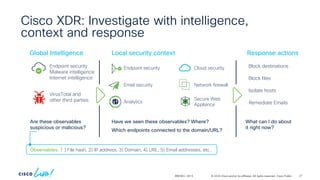
© 2024 Cisco
and/or its affiliates. All rights reserved. Cisco Public 27 Cisco XDR: Investigate with intelligence, context and response BRKSEC-2913 Observables: 1 ) File hash, 2) IP address, 3) Domain, 4) URL, 5) Email addresses, etc.. Are these observables suspicious or malicious? What can I do about it right now? Endpoint security Malware intelligence Internet intelligence Global Intelligence Local security context VirusTotal and other third parties Block destinations Response actions Block files Isolate hosts Have we seen these observables? Where? Which endpoints connected to the domain/URL? Endpoint security Email security Analytics Cloud security Network firewall Secure Web Appliance Remediate Emails
28.
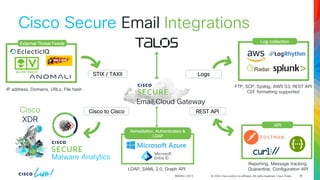
© 2024 Cisco
and/or its affiliates. All rights reserved. Cisco Public BRKSEC-2913 Cisco Secure Email Net STIX / TAXII External Threat Feeds IP address, Domains, URLs, File hash Logs Log collection FTP, SCP, Syslog, AWS S3, REST API CEF formatting supported Email Cloud Gateway Integrations Cisco to Cisco Malware Analytics Cisco XDR REST API API Reporting, Message tracking, Quarantine, Configuration API 28 Remediation, Authentication & LDAP LDAP, SAML 2.0, Graph API
29.
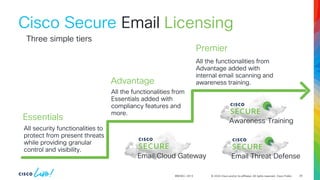
© 2024 Cisco
and/or its affiliates. All rights reserved. Cisco Public BRKSEC-2913 Cisco Secure Email All security functionalities to protect from present threats while providing granular control and visibility. All the functionalities from Essentials added with compliancy features and more. All the functionalities from Advantage added with internal email scanning and awareness training. Three simple tiers Email Cloud Gateway Email Threat Defense Awareness Training Essentials Advantage Premier Licensing 29
30.
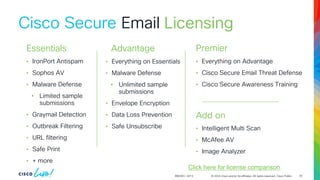
© 2024 Cisco
and/or its affiliates. All rights reserved. Cisco Public BRKSEC-2913 Cisco Secure Email • IronPort Antispam • Sophos AV • Malware Defense • Limited sample submissions • Graymail Detection • Outbreak Filtering • URL filtering • Safe Print • + more • Everything on Essentials • Malware Defense • Unlimited sample submissions • Envelope Encryption • Data Loss Prevention • Safe Unsubscribe • Everything on Advantage • Cisco Secure Email Threat Defense • Cisco Secure Awareness Training Add on • Intelligent Multi Scan • McAfee AV • Image Analyzer Click here for license comparison Essentials Advantage Premier Licensing 30
31.
© 2024 Cisco
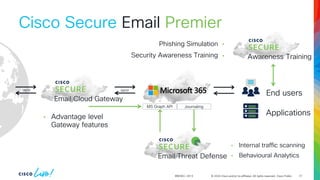
and/or its affiliates. All rights reserved. Cisco Public BRKSEC-2913 SMTP SMTP Email Cloud Gateway MS Graph API Email Threat Defense Journaling Awareness Training • Advantage level Gateway features • Internal traffic scanning • Behavioural Analytics End users Applications Cisco Secure Email Premier Phishing Simulation Security Awareness Training 31
32.
© 2024 Cisco
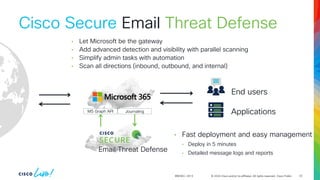
and/or its affiliates. All rights reserved. Cisco Public BRKSEC-2913 Email Threat Defense MS Graph API Journaling • Let Microsoft be the gateway • Add advanced detection and visibility with parallel scanning • Simplify admin tasks with automation • Scan all directions (inbound, outbound, and internal) • Fast deployment and easy management • Deploy in 5 minutes • Detailed message logs and reports End users Applications Cisco Secure Email Threat Defense 32
33.
© 2024 Cisco
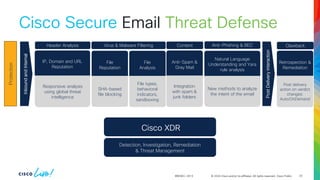
and/or its affiliates. All rights reserved. Cisco Public BRKSEC-2913 Anti-Spam & Gray Mail Integration with spam & junk folders File Reputation SHA-based file blocking File Analysis File types, behavioral indicators, sandboxing IP, Domain and URL Reputation Responsive analysis using global threat intelligence Virus & Malware Filtering Header Analysis Anti-Phishing & BEC Content Natural Language Understanding and Yara rule analysis New methods to analyze the intent of the email Inbound and Internal Protection Detection, Investigation, Remediation & Threat Management Post Delivery interaction Retrospection & Remediation Post delivery action on verdict changes: Auto/OnDemand Clawback Cisco XDR 33 Cisco Secure Email Threat Defense
34.
© 2024 Cisco
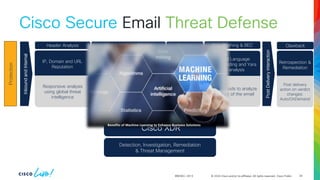
and/or its affiliates. All rights reserved. Cisco Public BRKSEC-2913 Anti-Spam & Gray Mail Integration with spam & junk folders File Reputation SHA-based file blocking File Analysis File types, behavioral indicators, sandboxing IP, Domain and URL Reputation Responsive analysis using global threat intelligence Virus & Malware Filtering Header Analysis Anti-Phishing & BEC Content Natural Language Understanding and Yara rule analysis New methods to analyze the intent of the email Inbound and Internal Protection Detection, Investigation, Remediation & Threat Management Post Delivery interaction Retrospection & Remediation Post delivery action on verdict changes: Auto/OnDemand Clawback Cisco XDR 34 Cisco Secure Email Threat Defense
35.
© 2024 Cisco
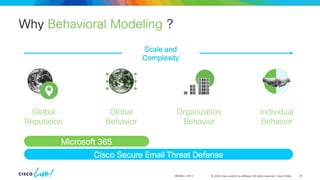
and/or its affiliates. All rights reserved. Cisco Public Why Behavioral Modeling ? BRKSEC-2913 Global Reputation Global Behavior Organization Behavior Individual Behavior Scale and Complexity Microsoft 365 Cisco Secure Email Threat Defense 35
36.
© 2024 Cisco
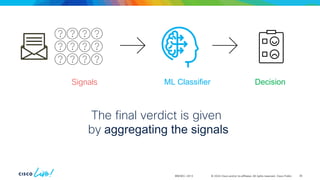
and/or its affiliates. All rights reserved. Cisco Public BRKSEC-2913 The final verdict is given by aggregating the signals Signals ML Classifier Decision 36
37.
© 2024 Cisco
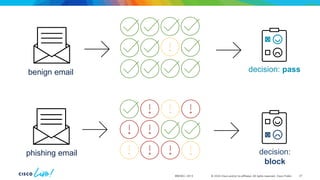
and/or its affiliates. All rights reserved. Cisco Public BRKSEC-2913 benign email phishing email decision: pass decision: block 37
38.
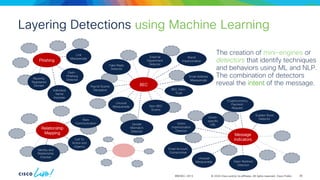
© 2024 Cisco
and/or its affiliates. All rights reserved. Cisco Public Layering Detections using Machine Learning BRKSEC-2913 The creation of mini-engines or detectors that identify techniques and behaviors using ML and NLP. The combination of detectors reveal the intent of the message. Recently Registered Domain Phishing Individual Name Imposter Link Masquerade Dash- Phishing Detector Identity and Relationship Checker Rare Communication Call To Action and Urgency Email Account Compromise Message Indicators Sudden Burst Detector Victim- specific URL Unusual Masquerade Cryptocurrency Payment Request Open Redirect Detector Victim Impersonation Detector BEC Payroll Scams Deception Brand Impersonation Unusual Masquerade External Department Detector Non-BEC Scams Fake Reply Detector Email Address Masquerade BEC Zero- Trust Sender Mismatch Detector Relationship Mapping 38
39.
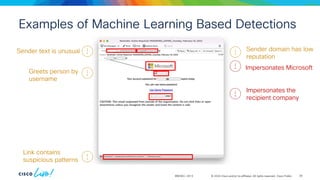
© 2024 Cisco
and/or its affiliates. All rights reserved. Cisco Public Examples of Machine Learning Based Detections BRKSEC-2913 Sender text is unusual Impersonates Microsoft Greets person by username Impersonates the recipient company Link contains suspicious patterns Sender domain has low reputation 39
40.
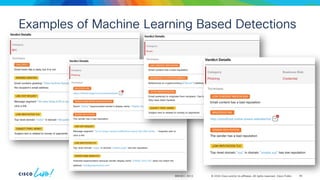
© 2024 Cisco
and/or its affiliates. All rights reserved. Cisco Public Examples of Machine Learning Based Detections BRKSEC-2913 40
41.
© 2024 Cisco
and/or its affiliates. All rights reserved. Cisco Public We live in a day and age where Behavioral Analytics is a must have feature for all security products BRKSEC-2913 41 © 2024 Cisco and/or its affiliates. All rights reserved. Cisco Public
42.
© 2024 Cisco
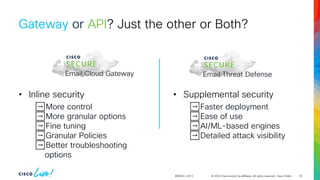
and/or its affiliates. All rights reserved. Cisco Public Gateway or API? Just the other or Both? BRKSEC-2913 Email Cloud Gateway Email Threat Defense • Inline security ➡️More control ➡️More granular options ➡️Fine tuning ➡️Granular Policies ➡️Better troubleshooting options • Supplemental security ➡️Faster deployment ➡️Ease of use ➡️AI/ML-based engines ➡️Detailed attack visibility 42
43.
© 2024 Cisco
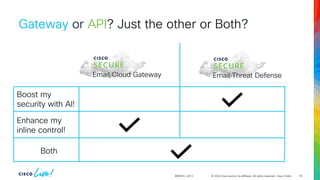
and/or its affiliates. All rights reserved. Cisco Public Gateway or API? Just the other or Both? BRKSEC-2913 Email Cloud Gateway Email Threat Defense Boost my security with AI! Enhance my inline control! Both 43
44.
© 2024 Cisco
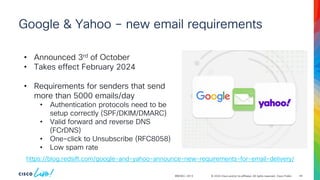
and/or its affiliates. All rights reserved. Cisco Public Google & Yahoo – new email requirements 44 BRKSEC-2913 https://blog.redsift.com/google-and-yahoo-announce-new-requirements-for-email-delivery/ • Announced 3rd of October • Takes effect February 2024 • Requirements for senders that send more than 5000 emails/day • Authentication protocols need to be setup correctly (SPF/DKIM/DMARC) • Valid forward and reverse DNS (FCrDNS) • One-click to Unsubscribe (RFC8058) • Low spam rate
45.
© 2024 Cisco
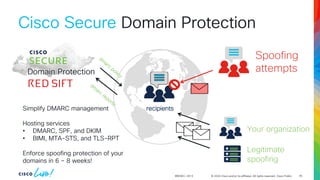
and/or its affiliates. All rights reserved. Cisco Public BRKSEC-2913 Cisco Secure Domain Protection 45 Domain Protection Simplify DMARC management Hosting services • DMARC, SPF, and DKIM • BIMI, MTA-STS, and TLS-RPT Enforce spoofing protection of your domains in 6 – 8 weeks! Your organization Legitimate spoofing Spoofing attempts recipients
46.
© 2024 Cisco
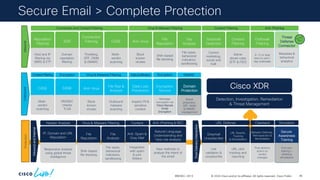
and/or its affiliates. All rights reserved. Cisco Public Inbound Encryption Service Message encryption via Cisco Secure Email Encryption Data Loss Prevention Inspect PII & sensitive content File Rep & Analysis Outbound malware scanning Anti-Virus Block known viruses DANE DNSSEC checks TLSA CASE Multi- verdict scanning Domain Protection Brand protection, SPF, DKIM & DMARC management ContentFiltering Virus & Malware Filtering Data Exfiltration DMARC Encryption Encryption Outbound SDR Domain reputation filtering Connection Filtering Throttling, SPF, DKIM & DMARC CASE Multi- verdict scanning Anti-Virus Block known viruses File Reputation SHA-based file blocking Graymail Detection Control marketing, social and bulk Reputation Filtering Host and IP filtering via SBRS & ETF Content Filtering Admin driven rules (ETF & FED) Outbreak Filtering 9-12 hr lead time on zero- day outbreaks Virus & Malware Filtering Connection and Content Filtering Anti-Phishing Content Filtering File Analysis File types, behavioral indicators, sandboxing Graymail Unsubscribe Link validation & unsubscribe URL Rewrite, Tracking & Remediation URL click tracking and reporting Malware Defense, Retrospection & Remediation Post delivery action on verdict changes End user training + phishing simulations Secure Awareness Training URL Defense Clawback Simulation Anti-Spam & Gray Mail Integration with spam & junk folders File Reputation SHA-based file blocking File Analysis File types, behavioral indicators, sandboxing IP, Domain and URL Reputation Responsive analysis using global threat intelligence Virus & Malware Filtering Header Analysis Anti-Phishing & BEC Content Natural Language Understanding and Yara rule analysis New methods to analyze the intent of the email Inbound and Internal Post Delivery Interaction Protection Detection, Investigation, Remediation & Threat Management Threat Defense Connector Metadata & behavioral analytics Secure Email > Complete Protection BRKSEC-2913 Cisco XDR 46
47.
Cisco vs Microsoft
48.
© 2024 Cisco
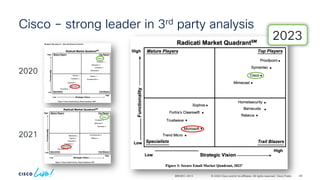
and/or its affiliates. All rights reserved. Cisco Public Cisco – strong leader in 3rd party analysis 2020 2021 2023 BRKSEC-2913 48
49.
© 2024 Cisco
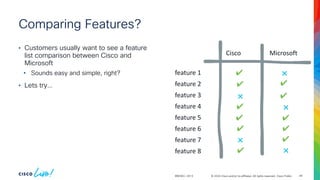
and/or its affiliates. All rights reserved. Cisco Public Comparing Features? BRKSEC-2913 • Customers usually want to see a feature list comparison between Cisco and Microsoft • Sounds easy and simple, right? • Lets try… Cisco Microsoft feature 1 feature 2 feature 3 feature 4 feature 5 feature 6 feature 7 feature 8 ✔ ✔ ✔ ✔ ✔ ✔ ✔ ✔ ✔ ✔ ✔ ❌ ❌ ❌ ❌ ❌ 49
50.
© 2024 Cisco
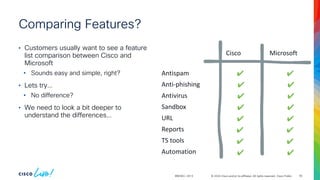
and/or its affiliates. All rights reserved. Cisco Public BRKSEC-2913 Comparing Features? • Customers usually want to see a feature list comparison between Cisco and Microsoft • Sounds easy and simple, right? • Lets try… • No difference? • We need to look a bit deeper to understand the differences… Cisco Microsoft Antispam Anti-phishing Antivirus Sandbox URL Reports TS tools Automation ✔ ✔ ✔ ✔ ✔ ✔ ✔ ✔ ✔ ✔ ✔ ✔ ✔ ✔ ✔ ✔ 50
51.
© 2024 Cisco
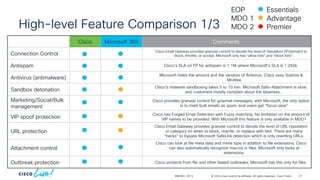
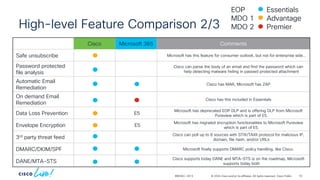
and/or its affiliates. All rights reserved. Cisco Public High-level Feature Comparison 1/3 BRKSEC-2913 Cisco Microsoft 365 Comments Connection Control Cisco Email Gateway provides granular control to decide the level of reputation (IP/domain) to block, throttle, or accept. Microsoft only has “allow lists” and “block lists”. Antispam Cisco’s SLA on FP for antispam is 1:1M where Microsoft’s SLA is 1:250k. Antivirus (antimalware) Microsoft hides the amount and the vendors of Antivirus, Cisco uses Sophos & McAfee Sandbox detonation Cisco’s malware sandboxing takes 5 to 10 min. Microsoft Safe-Attachment is slow, and customers mostly complain about the slowness… Marketing/Social/Bulk management Cisco provides granular control for graymail messages, with Microsoft, the only option is to mark bulk emails as spam, end users get “focus view” VIP spoof protection Cisco has Forged Email Detection with Fuzzy matching. No limitation on the amount of VIP names to be provided. With Microsoft this feature is only available in MDO1 URL protection Cisco Email Gateway provides granular control to decide the level of URL reputation or category on when to block, rewrite, or replace with text. There are many “hacks” to bypass Microsoft SafeLink detection which is only rewriting URLs. Attachment control Cisco can look at file meta data and mime type in addition to file extensions. Cisco can also automatically recognize macros in files. Microsoft only looks at extensions. Outbreak protection Cisco protects from file and other based outbreaks; Microsoft has this only for files. Essentials Advantage Premier EOP MDO 1 MDO 2 51
52.
© 2024 Cisco
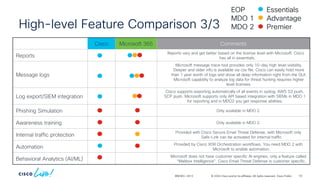
and/or its affiliates. All rights reserved. Cisco Public High-level Feature Comparison 2/3 BRKSEC-2913 Cisco Microsoft 365 Comments Safe unsubscribe Microsoft has this feature for consumer outlook, but not for enterprise side… Password protected file analysis Cisco can parse the body of an email and find the password which can help detecting malware hiding in passwd protected attachment Automatic Email Remediation Cisco has MAR, Microsoft has ZAP On demand Email Remediation Cisco has this included in Essentials Data Loss Prevention E5 Microsoft has deprecated EOP DLP and is offering DLP from Microsoft Pureview which is part of E5. Envelope Encryption E5 Microsoft has migrated encryption functionalities to Microsoft Pureview which is part of E5. 3rd party threat feed Cisco can poll up to 8 sources with STIX/TAXII protocol for malicious IP, domain, file hash, and/or URLs DMARC/DKIM/SPF Microsoft finally supports DMARC policy handling, like Cisco. DANE/MTA-STS Cisco supports today DANE and MTA-STS is on the roadmap, Microsoft supports today both Essentials Advantage Premier EOP MDO 1 MDO 2 52
53.
© 2024 Cisco
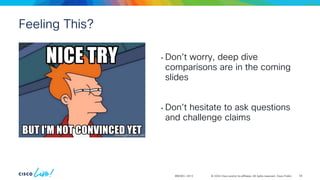
and/or its affiliates. All rights reserved. Cisco Public Cisco Microsoft 365 Comments Reports Reports vary and get better based on the license level with Microsoft. Cisco has all in essentials. Message logs Microsoft message trace tool provides only 10-day high level visibility. Deeper and older info is available via csv file. Cisco can easily hold more than 1 year worth of logs and show all deep information right from the GUI. Microsoft capability to analyze log data for threat hunting requires higher level licenses. Log export/SIEM integration Cisco supports exporting automatically of all events in syslog, AWS S3 push, SCP push. Microsoft supports only API based integration with SIEMs in MDO 1 for reporting and in MDO2 you get response abilities. Phishing Simulation Only available in MDO 2. Awareness training Only available in MDO 2. Internal traffic protection Provided with Cisco Secure Email Threat Defense, with Microsoft only Safe-Link can be activated for internal traffic Automation Provided by Cisco XDR Orchestration workflows. You need MDO 2 with Microsoft to enable automation. Behavioral Analytics (AI/ML) Microsoft does not have customer specific AI engines, only a feature called “Mailbox Intelligence”. Cisco Email Threat Defense is customer specific. High-level Feature Comparison 3/3 BRKSEC-2913 Essentials Advantage Premier EOP MDO 1 MDO 2 53
54.
© 2024 Cisco
and/or its affiliates. All rights reserved. Cisco Public Feeling This? BRKSEC-2913 • Don’t worry, deep dive comparisons are in the coming slides • Don’t hesitate to ask questions and challenge claims 54
55.
Cisco vs Microsoft Live
Demo
56.
Conclusion
57.
© 2024 Cisco
and/or its affiliates. All rights reserved. Cisco Public “The more threat intelligence you have, the better protection you can achieve” -Abdalla Taha ☺ BRKSEC-2913 57
58.
© 2024 Cisco
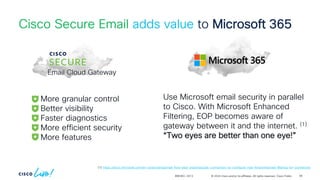
and/or its affiliates. All rights reserved. Cisco Public BRKSEC-2913 Cisco Secure Email adds value to Microsoft 365 Use Microsoft email security in parallel to Cisco. With Microsoft Enhanced Filtering, EOP becomes aware of gateway between it and the internet. (1) “Two eyes are better than one eye!” More granular control Better visibility Faster diagnostics More efficient security More features (1) https://docs.microsoft.com/en-us/exchange/mail-flow-best-practices/use-connectors-to-configure-mail-flow/enhanced-filtering-for-connectors Email Cloud Gateway 58
59.
© 2024 Cisco
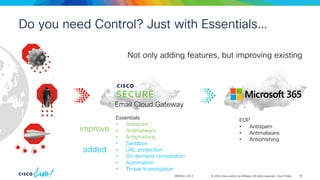
and/or its affiliates. All rights reserved. Cisco Public Do you need Control? Just with Essentials… BRKSEC-2913 EOP • Antispam • Antimalware • Antiphishing Not only adding features, but improving existing Essentials • Antispam • Antimalware • Antiphishing • Sandbox • URL protection • On demand remediation • Automation • Threat Investigation added improve Email Cloud Gateway 59
60.
© 2024 Cisco
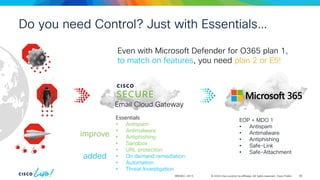
and/or its affiliates. All rights reserved. Cisco Public BRKSEC-2913 EOP + MDO 1 • Antispam • Antimalware • Antiphishing • Safe-Link • Safe-Attachment Email Cloud Gateway Essentials • Antispam • Antimalware • Antiphishing • Sandbox • URL protection • On demand remediation • Automation • Threat Investigation Even with Microsoft Defender for O365 plan 1, to match on features, you need plan 2 or E5! added improve Do you need Control? Just with Essentials… 60
61.
© 2024 Cisco
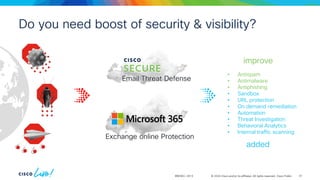
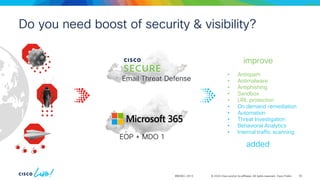
and/or its affiliates. All rights reserved. Cisco Public BRKSEC-2913 • Antispam • Antimalware • Antiphishing • Sandbox • URL protection • On demand remediation • Automation • Threat Investigation • Behavioral Analytics • Internal traffic scanning added improve Do you need boost of security & visibility? Exchange online Protection Email Threat Defense 61
62.
© 2024 Cisco
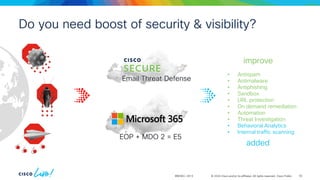
and/or its affiliates. All rights reserved. Cisco Public BRKSEC-2913 • Antispam • Antimalware • Antiphishing • Sandbox • URL protection • On demand remediation • Automation • Threat Investigation • Behavioral Analytics • Internal traffic scanning added improve Do you need boost of security & visibility? EOP + MDO 1 Email Threat Defense 62
63.
© 2024 Cisco
and/or its affiliates. All rights reserved. Cisco Public BRKSEC-2913 • Antispam • Antimalware • Antiphishing • Sandbox • URL protection • On demand remediation • Automation • Threat Investigation • Behavioral Analytics • Internal traffic scanning added improve Do you need boost of security & visibility? EOP + MDO 2 = E5 Email Threat Defense 63
64.
#CiscoLive Can Cisco add
value to Microsoft 365?
65.
© 2024 Cisco
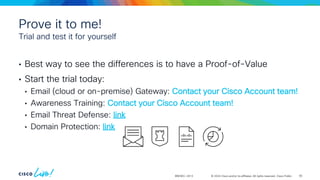
and/or its affiliates. All rights reserved. Cisco Public Prove it to me! • Best way to see the differences is to have a Proof-of-Value • Start the trial today: • Email (cloud or on-premise) Gateway: Contact your Cisco Account team! • Awareness Training: Contact your Cisco Account team! • Email Threat Defense: link • Domain Protection: link Trial and test it for yourself BRKSEC-2913 65
66.
Thank you Thank you
68.
Cisco vs Microsoft extra
slides
69.
© 2024 Cisco
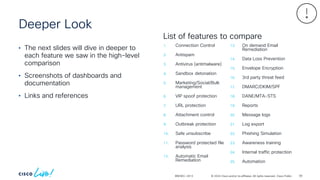
and/or its affiliates. All rights reserved. Cisco Public Deeper Look BRKSEC-2913 • The next slides will dive in deeper to each feature we saw in the high-level comparison • Screenshots of dashboards and documentation • Links and references 1. Connection Control 2. Antispam 3. Antivirus (antimalware) 4. Sandbox detonation 5. Marketing/Social/Bulk management 6. VIP spoof protection 7. URL protection 8. Attachment control 9. Outbreak protection 10. Safe unsubscribe 11. Password protected file analysis 12. Automatic Email Remediation 13. On demand Email Remediation 14. Data Loss Prevention 15. Envelope Encryption 16. 3rd party threat feed 17. DMARC/DKIM/SPF 18. DANE/MTA-STS 19. Reports 20. Message logs 21. Log export 22. Phishing Simulation 23. Awareness training 24. Internal traffic protection 25. Automation List of features to compare 69
70.
© 2024 Cisco
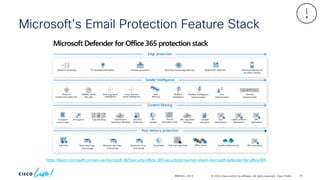
and/or its affiliates. All rights reserved. Cisco Public Microsoft’s Email Protection Feature Stack BRKSEC-2913 https://learn.microsoft.com/en-us/microsoft-365/security/office-365-security/protection-stack-microsoft-defender-for-office365 70
71.
© 2024 Cisco
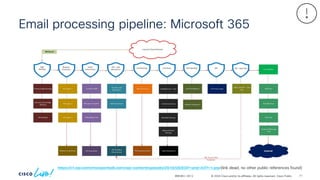
and/or its affiliates. All rights reserved. Cisco Public Email processing pipeline: Microsoft 365 BRKSEC-2913 https://i1.wp.com/msexperttalk.com/wp-content/uploads/2019/08/EOP-and-ATP-1.jpg (link dead, no other public references found) 71
72.
© 2024 Cisco
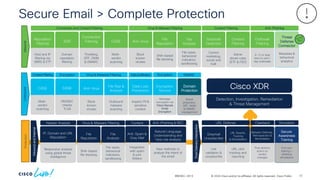
and/or its affiliates. All rights reserved. Cisco Public 72 Secure Email > Complete Protection BRKSEC-2913 Inbound Encryption Service Message encryption via Cisco Secure Email Encryption Data Loss Prevention Inspect PII & sensitive content File Rep & Analysis Outbound malware scanning Anti-Virus Block known viruses DANE DNSSEC checks TLSA CASE Multi- verdict scanning Domain Protection Brand protection, SPF, DKIM & DMARC management ContentFiltering Virus & Malware Filtering Data Exfiltration DMARC Encryption Encryption Outbound SDR Domain reputation filtering Connection Filtering Throttling, SPF, DKIM & DMARC CASE Multi- verdict scanning Anti-Virus Block known viruses File Reputation SHA-based file blocking Graymail Detection Control marketing, social and bulk Reputation Filtering Host and IP filtering via SBRS & ETF Content Filtering Admin driven rules (ETF & FED) Outbreak Filtering 9-12 hr lead time on zero- day outbreaks Virus & Malware Filtering Connection and Content Filtering Anti-Phishing Content Filtering File Analysis File types, behavioral indicators, sandboxing Graymail Unsubscribe Link validation & unsubscribe URL Rewrite, Tracking & Remediation URL click tracking and reporting Malware Defense, Retrospection & Remediation Post delivery action on verdict changes End user training + phishing simulations Secure Awareness Training URL Defense Clawback Simulation Anti-Spam & Gray Mail Integration with spam & junk folders File Reputation SHA-based file blocking File Analysis File types, behavioral indicators, sandboxing IP, Domain and URL Reputation Responsive analysis using global threat intelligence Virus & Malware Filtering Header Analysis Anti-Phishing & BEC Content Natural Language Understanding and Yara rule analysis New methods to analyze the intent of the email Inbound and Internal Post Delivery Interaction Protection Detection, Investigation, Remediation & Threat Management Threat Defense Connector Metadata & behavioral analytics Cisco XDR
73.
© 2024 Cisco
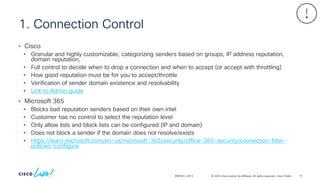
and/or its affiliates. All rights reserved. Cisco Public 1. Connection Control BRKSEC-2913 • Cisco • Granular and highly customizable; categorizing senders based on groups, IP address reputation, domain reputation, • Full control to decide when to drop a connection and when to accept (or accept with throttling) • How good reputation must be for you to accept/throttle • Verification of sender domain existence and resolvability • Link to Admin guide • Microsoft 365 • Blocks bad reputation senders based on their own intel • Customer has no control to select the reputation level • Only allow lists and block lists can be configured (IP and domain) • Does not block a sender if the domain does not resolve/exists • https://learn.microsoft.com/en-us/microsoft-365/security/office-365-security/connection-filter- policies-configure 73
74.
© 2024 Cisco
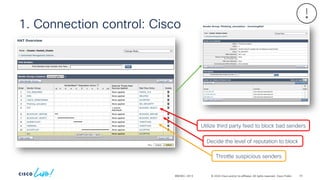
and/or its affiliates. All rights reserved. Cisco Public 1. Connection control: Cisco BRKSEC-2913 Decide the level of reputation to block Throttle suspicious senders Utilize third party feed to block bad senders 74
75.
© 2024 Cisco
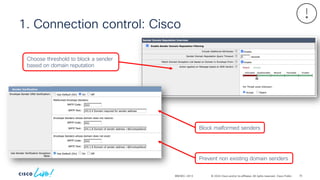
and/or its affiliates. All rights reserved. Cisco Public BRKSEC-2913 1. Connection control: Cisco Prevent non existing domain senders Block malformed senders Choose threshold to block a sender based on domain reputation 75
76.
© 2024 Cisco
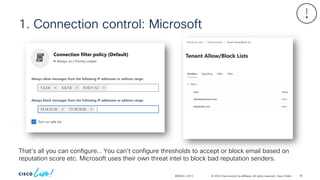
and/or its affiliates. All rights reserved. Cisco Public BRKSEC-2913 1. Connection control: Microsoft That’s all you can configure… You can’t configure thresholds to accept or block email based on reputation score etc. Microsoft uses their own threat intel to block bad reputation senders. 76
77.
© 2024 Cisco
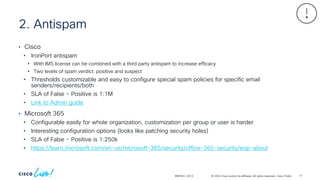
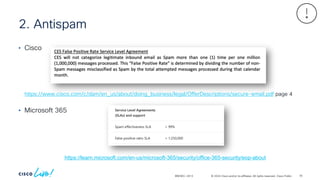
and/or its affiliates. All rights reserved. Cisco Public 2. Antispam BRKSEC-2913 • Cisco • IronPort antispam • With IMS license can be combined with a third party antispam to increase efficacy • Two levels of spam verdict: positive and suspect • Thresholds customizable and easy to configure special spam policies for specific email senders/recipients/both • SLA of False – Positive is 1:1M • Link to Admin guide • Microsoft 365 • Configurable easily for whole organization, customization per group or user is harder • Interesting configuration options (looks like patching security holes) • SLA of False – Positive is 1:250k • https://learn.microsoft.com/en-us/microsoft-365/security/office-365-security/eop-about 77
78.
© 2024 Cisco
and/or its affiliates. All rights reserved. Cisco Public 2. Antispam BRKSEC-2913 • Cisco • Microsoft 365 https://learn.microsoft.com/en-us/microsoft-365/security/office-365-security/eop-about https://www.cisco.com/c/dam/en_us/about/doing_business/legal/OfferDescriptions/secure-email.pdf page 4 78
79.
© 2024 Cisco
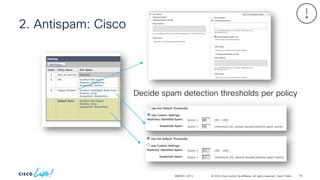
and/or its affiliates. All rights reserved. Cisco Public 2. Antispam: Cisco BRKSEC-2913 Decide spam detection thresholds per policy 79
80.
© 2024 Cisco
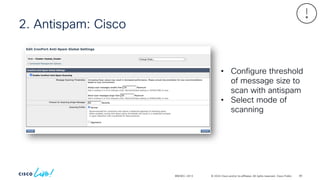
and/or its affiliates. All rights reserved. Cisco Public 2. Antispam: Cisco BRKSEC-2913 • Configure threshold of message size to scan with antispam • Select mode of scanning 80
81.
© 2024 Cisco
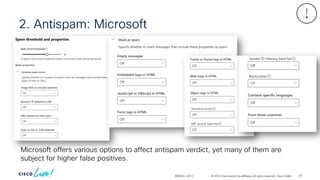
and/or its affiliates. All rights reserved. Cisco Public 2. Antispam: Microsoft BRKSEC-2913 Microsoft offers various options to affect antispam verdict, yet many of them are subject for higher false positives. 81
82.
© 2024 Cisco
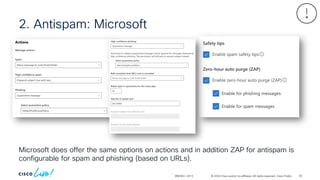
and/or its affiliates. All rights reserved. Cisco Public 2. Antispam: Microsoft BRKSEC-2913 Microsoft does offer the same options on actions and in addition ZAP for antispam is configurable for spam and phishing (based on URLs). 82
83.
© 2024 Cisco
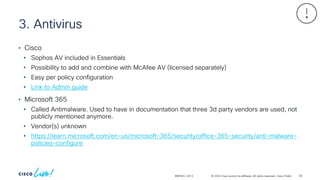
and/or its affiliates. All rights reserved. Cisco Public 3. Antivirus BRKSEC-2913 • Cisco • Sophos AV included in Essentials • Possibility to add and combine with McAfee AV (licensed separately) • Easy per policy configuration • Link to Admin guide • Microsoft 365 • Called Antimalware. Used to have in documentation that three 3d party vendors are used, not publicly mentioned anymore. • Vendor(s) unknown • https://learn.microsoft.com/en-us/microsoft-365/security/office-365-security/anti-malware- policies-configure 83
84.
© 2024 Cisco
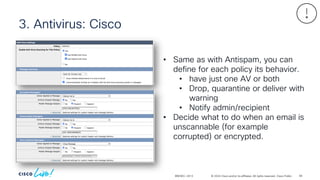
and/or its affiliates. All rights reserved. Cisco Public 3. Antivirus: Cisco BRKSEC-2913 • Same as with Antispam, you can define for each policy its behavior. • have just one AV or both • Drop, quarantine or deliver with warning • Notify admin/recipient • Decide what to do when an email is unscannable (for example corrupted) or encrypted. 84
85.
© 2024 Cisco
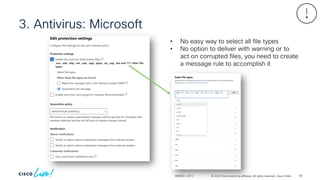
and/or its affiliates. All rights reserved. Cisco Public 3. Antivirus: Microsoft BRKSEC-2913 • No easy way to select all file types • No option to deliver with warning or to act on corrupted files, you need to create a message rule to accomplish it 85
86.
© 2024 Cisco
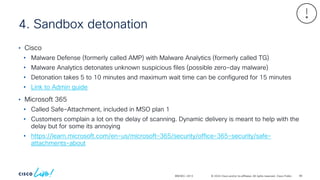
and/or its affiliates. All rights reserved. Cisco Public 4. Sandbox detonation BRKSEC-2913 • Cisco • Malware Defense (formerly called AMP) with Malware Analytics (formerly called TG) • Malware Analytics detonates unknown suspicious files (possible zero-day malware) • Detonation takes 5 to 10 minutes and maximum wait time can be configured for 15 minutes • Link to Admin guide • Microsoft 365 • Called Safe-Attachment, included in MSO plan 1 • Customers complain a lot on the delay of scanning. Dynamic delivery is meant to help with the delay but for some its annoying • https://learn.microsoft.com/en-us/microsoft-365/security/office-365-security/safe- attachments-about 86
87.
© 2024 Cisco
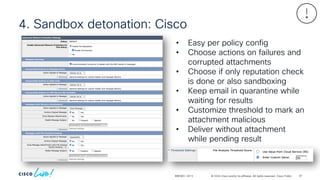
and/or its affiliates. All rights reserved. Cisco Public 4. Sandbox detonation: Cisco BRKSEC-2913 • Easy per policy config • Choose actions on failures and corrupted attachments • Choose if only reputation check is done or also sandboxing • Keep email in quarantine while waiting for results • Customize threshold to mark an attachment malicious • Deliver without attachment while pending result 87
88.
© 2024 Cisco
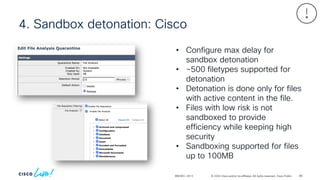
and/or its affiliates. All rights reserved. Cisco Public 4. Sandbox detonation: Cisco BRKSEC-2913 • Configure max delay for sandbox detonation • ~500 filetypes supported for detonation • Detonation is done only for files with active content in the file. • Files with low risk is not sandboxed to provide efficiency while keeping high security • Sandboxing supported for files up to 100MB 88
89.
© 2024 Cisco
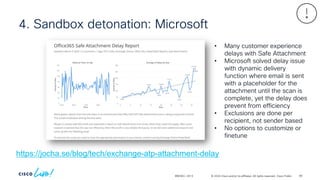
and/or its affiliates. All rights reserved. Cisco Public 4. Sandbox detonation: Microsoft BRKSEC-2913 https://jocha.se/blog/tech/exchange-atp-attachment-delay • Many customer experience delays with Safe Attachment • Microsoft solved delay issue with dynamic delivery function where email is sent with a placeholder for the attachment until the scan is complete, yet the delay does prevent from efficiency • Exclusions are done per recipient, not sender based • No options to customize or finetune 89
90.
© 2024 Cisco
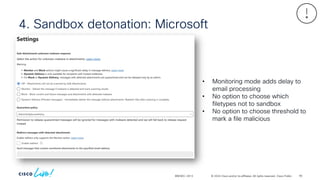
and/or its affiliates. All rights reserved. Cisco Public 4. Sandbox detonation: Microsoft BRKSEC-2913 • Monitoring mode adds delay to email processing • No option to choose which filetypes not to sandbox • No option to choose threshold to mark a file malicious 90
91.
© 2024 Cisco
and/or its affiliates. All rights reserved. Cisco Public 5. Marketing/Social Network/Bulk management BRKSEC-2913 • Cisco • Graymail Detection included in Essentials • Detect automatically marketing, social media, and bulk sources • Emails detected can be “tagged” for “inbox hygiene” • End users can create rules in outlook to keep graymail out of their inbox and directed to dedicated folder • Link to Admin guide • Microsoft 365 • Bulk Emails can be tagged as Spam • https://learn.microsoft.com/en-us/microsoft-365/security/office-365-security/anti-spam-spam-vs-bulk- about • Focus view on outlook tries to separate marketing emails from business critical, yet customers have complained that it does not do good work in separating the two 91
92.
© 2024 Cisco
and/or its affiliates. All rights reserved. Cisco Public 6. VIP protection BRKSEC-2913 • Cisco • Forged Email Detection, uses a dictionary of names to compare friendly from header • Uses fuzzy matching, and similarity score threshold is configurable • Can rewrite the friendly from address with the envelope sender address • Forged Email Detection is included Essentials • Link to Guide • Microsoft 365 • Impersonation protection in anti-phishing is included with MDO plan 1. • Will check similarity of name in friendly from address and act on it • https://learn.microsoft.com/en-us/microsoft-365/security/office-365-security/anti-phishing- policies-mdo-configure 92
93.
© 2024 Cisco
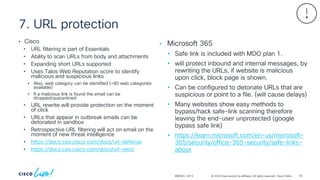
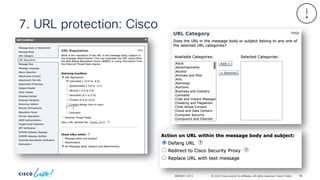
and/or its affiliates. All rights reserved. Cisco Public 7. URL protection BRKSEC-2913 • Cisco • URL filtering is part of Essentials • Ability to scan URLs from body and attachments • Expanding short URLs supported • Uses Talos Web Reputation score to identify malicious and suspicious links • Also, web category can be identified (+80 web categories available) • If a malicious link is found the email can be dropped/quarantined • URL rewrite will provide protection on the moment of click • URLs that appear in outbreak emails can be detonated in sandbox • Retrospective URL filtering will act on email on the moment of new threat intelligence • https://docs.ces.cisco.com/docs/url-defense • https://docs.ces.cisco.com/docs/url-retro • Microsoft 365 • Safe link is included with MDO plan 1. • will protect inbound and internal messages, by rewriting the URLs, if website is malicious upon click, block page is shown. • Can be configured to detonate URLs that are suspicious or point to a file. (will cause delays) • Many websites show easy methods to bypass/hack safe-link scanning therefore leaving the end-user unprotected (google bypass safe link) • https://learn.microsoft.com/en-us/microsoft- 365/security/office-365-security/safe-links- about 93
94.
© 2024 Cisco
and/or its affiliates. All rights reserved. Cisco Public 7. URL protection: Cisco BRKSEC-2913 94
95.
© 2024 Cisco
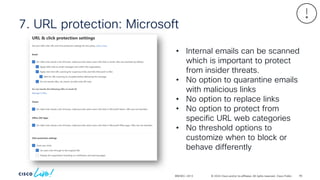
and/or its affiliates. All rights reserved. Cisco Public 7. URL protection: Microsoft BRKSEC-2913 • Internal emails can be scanned which is important to protect from insider threats. • No option to quarantine emails with malicious links • No option to replace links • No option to protect from specific URL web categories • No threshold options to customize when to block or behave differently 95
96.
© 2024 Cisco
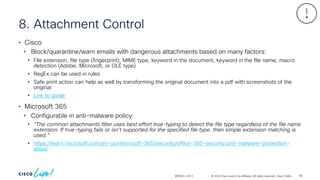
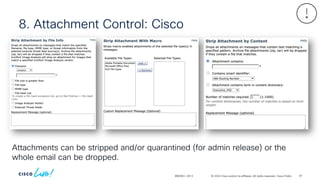
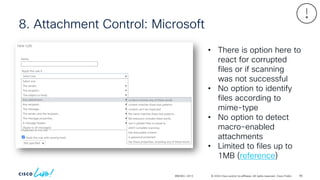
and/or its affiliates. All rights reserved. Cisco Public 8. Attachment Control BRKSEC-2913 • Cisco • Block/quarantine/warn emails with dangerous attachments based on many factors: • File extension, file type (fingerprint), MIME type, keyword in the document, keyword in the file name, macro detection (Adobe, Microsoft, or OLE type) • RegEx can be used in rules • Safe print action can help as well by transforming the original document into a pdf with screenshots of the original • Link to guide • Microsoft 365 • Configurable in anti-malware policy: • “The common attachments filter uses best effort true-typing to detect the file type regardless of the file name extension. If true-typing fails or isn't supported for the specified file type, then simple extension matching is used.” • https://learn.microsoft.com/en-us/microsoft-365/security/office-365-security/anti-malware-protection- about 96
97.
© 2024 Cisco
and/or its affiliates. All rights reserved. Cisco Public 8. Attachment Control: Cisco BRKSEC-2913 Attachments can be stripped and/or quarantined (for admin release) or the whole email can be dropped. 97
98.
© 2024 Cisco
and/or its affiliates. All rights reserved. Cisco Public 8. Attachment Control: Microsoft BRKSEC-2913 • There is option here to react for corrupted files or if scanning was not successful • No option to identify files according to mime-type • No option to detect macro-enabled attachments • Limited to files up to 1MB (reference) 98
99.
© 2024 Cisco
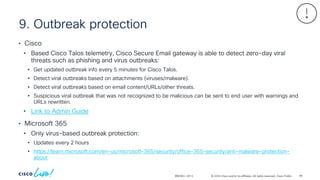
and/or its affiliates. All rights reserved. Cisco Public 9. Outbreak protection BRKSEC-2913 • Cisco • Based Cisco Talos telemetry, Cisco Secure Email gateway is able to detect zero-day viral threats such as phishing and virus outbreaks: • Get updated outbreak info every 5 minutes for Cisco Talos. • Detect viral outbreaks based on attachments (viruses/malware). • Detect viral outbreaks based on email content/URLs/other threats. • Suspicious viral outbreak that was not recognized to be malicious can be sent to end user with warnings and URLs rewritten. • Link to Admin Guide • Microsoft 365 • Only virus-based outbreak protection: • Updates every 2 hours • https://learn.microsoft.com/en-us/microsoft-365/security/office-365-security/anti-malware-protection- about 99
100.
© 2024 Cisco
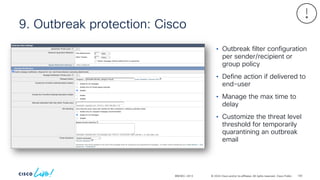
and/or its affiliates. All rights reserved. Cisco Public 9. Outbreak protection: Cisco BRKSEC-2913 • Outbreak filter configuration per sender/recipient or group policy • Define action if delivered to end-user • Manage the max time to delay • Customize the threat level threshold for temporarily quarantining an outbreak email 100
101.
© 2024 Cisco
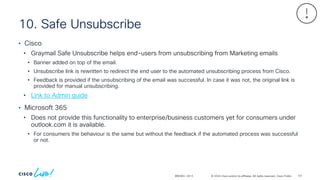
and/or its affiliates. All rights reserved. Cisco Public 10. Safe Unsubscribe BRKSEC-2913 • Cisco • Graymail Safe Unsubscribe helps end-users from unsubscribing from Marketing emails • Banner added on top of the email. • Unsubscribe link is rewritten to redirect the end user to the automated unsubscribing process from Cisco. • Feedback is provided if the unsubscribing of the email was successful. In case it was not, the original link is provided for manual unsubscribing. • Link to Admin guide • Microsoft 365 • Does not provide this functionality to enterprise/business customers yet for consumers under outlook.com it is available. • For consumers the behaviour is the same but without the feedback if the automated process was successful or not. 101
102.
© 2024 Cisco
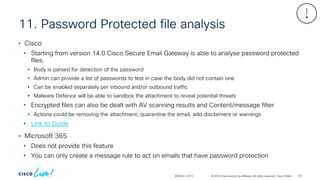
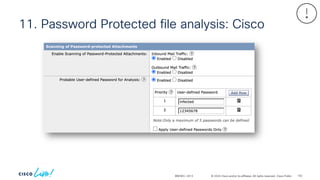
and/or its affiliates. All rights reserved. Cisco Public 11. Password Protected file analysis BRKSEC-2913 • Cisco • Starting from version 14.0 Cisco Secure Email Gateway is able to analyse password protected files. • Body is parsed for detection of the password • Admin can provide a list of passwords to test in case the body did not contain one • Can be enabled separately per inbound and/or outbound traffic • Malware Defence will be able to sandbox the attachment to reveal potential threats • Encrypted files can also be dealt with AV scanning results and Content/message filter • Actions could be removing the attachment, quarantine the email, add disclaimers or warnings • Link to Guide • Microsoft 365 • Does not provide this feature • You can only create a message rule to act on emails that have password protection 102
103.
© 2024 Cisco
and/or its affiliates. All rights reserved. Cisco Public 11. Password Protected file analysis: Cisco BRKSEC-2913 103
104.
© 2024 Cisco
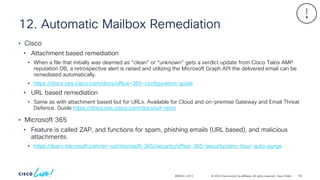
and/or its affiliates. All rights reserved. Cisco Public 12. Automatic Mailbox Remediation BRKSEC-2913 • Cisco • Attachment based remediation • When a file that initially was deemed as “clean” or “unknown” gets a verdict update from Cisco Talos AMP reputation DB, a retrospective alert is raised and utilizing the Microsoft Graph API the delivered email can be remediated automatically. • https://docs.ces.cisco.com/docs/office-365-configuration-guide • URL based remediation • Same as with attachment based but for URLs. Available for Cloud and on-premise Gateway and Email Threat Defence. Guide https://docs.ces.cisco.com/docs/url-retro • Microsoft 365 • Feature is called ZAP, and functions for spam, phishing emails (URL based), and malicious attachments. • https://learn.microsoft.com/en-us/microsoft-365/security/office-365-security/zero-hour-auto-purge 104
105.
© 2024 Cisco
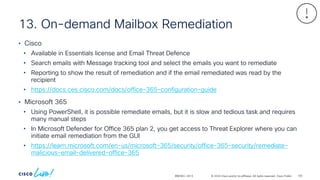
and/or its affiliates. All rights reserved. Cisco Public 13. On-demand Mailbox Remediation BRKSEC-2913 • Cisco • Available in Essentials license and Email Threat Defence • Search emails with Message tracking tool and select the emails you want to remediate • Reporting to show the result of remediation and if the email remediated was read by the recipient • https://docs.ces.cisco.com/docs/office-365-configuration-guide • Microsoft 365 • Using PowerShell, it is possible remediate emails, but it is slow and tedious task and requires many manual steps • In Microsoft Defender for Office 365 plan 2, you get access to Threat Explorer where you can initiate email remediation from the GUI • https://learn.microsoft.com/en-us/microsoft-365/security/office-365-security/remediate- malicious-email-delivered-office-365 105
106.
© 2024 Cisco
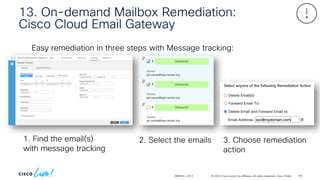
and/or its affiliates. All rights reserved. Cisco Public 13. On-demand Mailbox Remediation: Cisco Cloud Email Gateway BRKSEC-2913 Easy remediation in three steps with Message tracking: 1. Find the email(s) with message tracking 2. Select the emails 3. Choose remediation action 106
107.
© 2024 Cisco
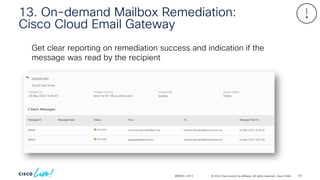
and/or its affiliates. All rights reserved. Cisco Public BRKSEC-2913 Get clear reporting on remediation success and indication if the message was read by the recipient 13. On-demand Mailbox Remediation: Cisco Cloud Email Gateway 107
108.
© 2024 Cisco
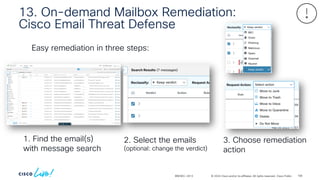
and/or its affiliates. All rights reserved. Cisco Public 13. On-demand Mailbox Remediation: Cisco Email Threat Defense BRKSEC-2913 Easy remediation in three steps: 1. Find the email(s) with message search 2. Select the emails (optional: change the verdict) 3. Choose remediation action 108
109.
© 2024 Cisco
and/or its affiliates. All rights reserved. Cisco Public 14. Data Loss Prevention BRKSEC-2913 • Cisco • Included in Advantage or can be bought separately • GUI based configuration with templates and customizations • Over 180 DLP templates available and ready to use. All of them are customizable and new templates can be created • Link to Admin Guide • Microsoft 365 • Used to be available in the base EOP license level but now deprecated and migrated to Microsoft Pureview which is included in E5. • https://learn.microsoft.com/en-us/microsoft-365/compliance/dlp-learn-about-dlp 109
110.
© 2024 Cisco
and/or its affiliates. All rights reserved. Cisco Public 15. Envelope Encryption BRKSEC-2913 • Cisco • Included in Advantage or can be bought separately • Cloud based decryption key storage • Very similar to Microsoft’s OME service, where email is encrypted based on conditions and decryption key is sent to cloud storage CRES (Cisco Registered Encryption Service) and recipient receives an email with HTML attachment. The HTML attachment is the encrypted email and can be opened with any modern web browser, decryption key is fetched from cloud (with recipient validation) and encrypted email is shown. • Link to Admin guide • Microsoft 365 • Legacy OME and IRM are available on EOP license if these were activated. Microsoft is likely to deprecate these functions soon and force customers to use Microsoft Pureview. • https://learn.microsoft.com/en-us/microsoft-365/compliance/legacy-information-for- message-encryption • https://learn.microsoft.com/en-us/microsoft-365/compliance/email-encryption 110
111.
© 2024 Cisco
and/or its affiliates. All rights reserved. Cisco Public 16. 3rd party threat feed BRKSEC-2913 • Cisco • Feature in Essentials called External Threat Feeds and DNS lists • External Threat Feeds • Configure up to 8 of IoC threat feed sources based on STIX over TAXII protocol • IoC types supported: IP address, Domain, URLs, and File hash • Link to Admin guide • DNS list • Get blacklisted IP addresses to block from a DNS record • Link to Admin guide • Microsoft 365 • Not a native Exchange Online feature, nor available as security policy. 111
112.
© 2024 Cisco
and/or its affiliates. All rights reserved. Cisco Public 17. DMARC/SPF/DKIM BRKSEC-2913 • Cisco • Configure easily actions based on SPF/DKIM/DMARC authentication results • Sending DMARC aggregate reports to email senders supported • DKIM signing for outbound emails is supported with options to sign with separate keys based on domains, users • Link to Admin guide • Microsoft 365 • Supports authentication of incoming email with DMARC, DKIM, and SPF • Finally, Microsoft supports creating policy for DMARC fail behaviour to honour the policy or to override. Microsoft also supports now sending DMARC aggregate reports • Good thing is that Microsoft does support ARC protocol which improves DMARC authentication validation • https://learn.microsoft.com/en-us/microsoft-365/security/office-365-security/email-authentication-dmarc- configure 112
113.
© 2024 Cisco
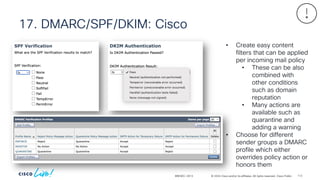
and/or its affiliates. All rights reserved. Cisco Public 17. DMARC/SPF/DKIM: Cisco BRKSEC-2913 • Create easy content filters that can be applied per incoming mail policy • These can be also combined with other conditions such as domain reputation • Many actions are available such as quarantine and adding a warning • Choose for different sender groups a DMARC profile which either overrides policy action or honors them 113
114.
© 2024 Cisco
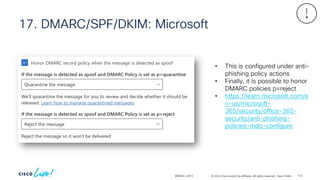
and/or its affiliates. All rights reserved. Cisco Public 17. DMARC/SPF/DKIM: Microsoft BRKSEC-2913 • This is configured under anti- phishing policy actions • Finally, it is possible to honor DMARC policies p=reject • https://learn.microsoft.com/e n-us/microsoft- 365/security/office-365- security/anti-phishing- policies-mdo-configure 114
115.
© 2024 Cisco
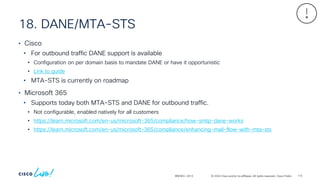
and/or its affiliates. All rights reserved. Cisco Public 18. DANE/MTA-STS BRKSEC-2913 • Cisco • For outbound traffic DANE support is available • Configuration on per domain basis to mandate DANE or have it opportunistic • Link to guide • MTA-STS is currently on roadmap • Microsoft 365 • Supports today both MTA-STS and DANE for outbound traffic. • Not configurable, enabled natively for all customers • https://learn.microsoft.com/en-us/microsoft-365/compliance/how-smtp-dane-works • https://learn.microsoft.com/en-us/microsoft-365/compliance/enhancing-mail-flow-with-mta-sts 115
116.
© 2024 Cisco
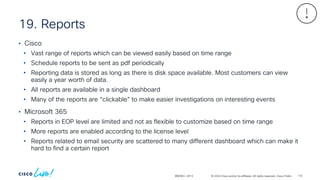
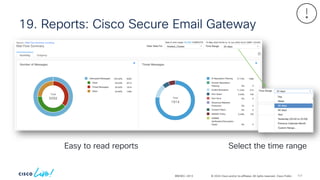
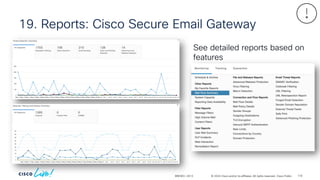
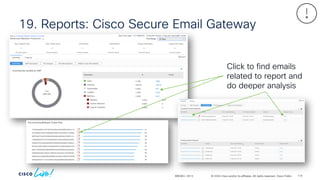
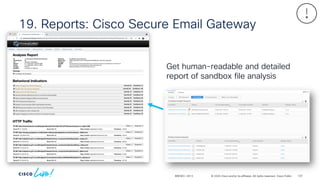
and/or its affiliates. All rights reserved. Cisco Public 19. Reports BRKSEC-2913 • Cisco • Vast range of reports which can be viewed easily based on time range • Schedule reports to be sent as pdf periodically • Reporting data is stored as long as there is disk space available. Most customers can view easily a year worth of data. • All reports are available in a single dashboard • Many of the reports are “clickable” to make easier investigations on interesting events • Microsoft 365 • Reports in EOP level are limited and not as flexible to customize based on time range • More reports are enabled according to the license level • Reports related to email security are scattered to many different dashboard which can make it hard to find a certain report 116
117.
© 2024 Cisco
and/or its affiliates. All rights reserved. Cisco Public 19. Reports: Cisco Secure Email Gateway BRKSEC-2913 Easy to read reports Select the time range 117
118.
© 2024 Cisco
and/or its affiliates. All rights reserved. Cisco Public 19. Reports: Cisco Secure Email Gateway BRKSEC-2913 See detailed reports based on features 118
119.
© 2024 Cisco
and/or its affiliates. All rights reserved. Cisco Public 19. Reports: Cisco Secure Email Gateway BRKSEC-2913 Click to find emails related to report and do deeper analysis 119
120.
© 2024 Cisco
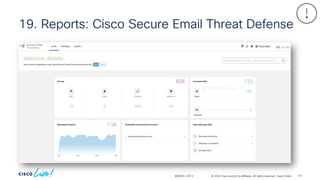
and/or its affiliates. All rights reserved. Cisco Public 19. Reports: Cisco Secure Email Gateway BRKSEC-2913 Get human-readable and detailed report of sandbox file analysis 120
121.
© 2024 Cisco
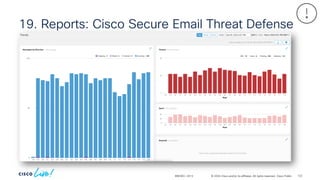
and/or its affiliates. All rights reserved. Cisco Public 19. Reports: Cisco Secure Email Threat Defense BRKSEC-2913 121
122.
© 2024 Cisco
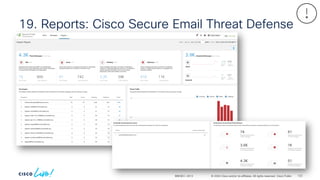
and/or its affiliates. All rights reserved. Cisco Public 19. Reports: Cisco Secure Email Threat Defense BRKSEC-2913 122
123.
© 2024 Cisco
and/or its affiliates. All rights reserved. Cisco Public 19. Reports: Cisco Secure Email Threat Defense BRKSEC-2913 123
124.
© 2024 Cisco
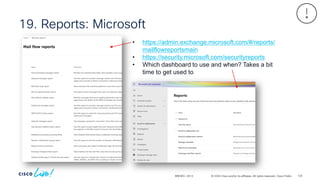
and/or its affiliates. All rights reserved. Cisco Public 19. Reports: Microsoft BRKSEC-2913 • https://admin.exchange.microsoft.com/#/reports/ mailflowreportsmain • https://security.microsoft.com/securityreports • Which dashboard to use and when? Takes a bit time to get used to 124
125.
© 2024 Cisco
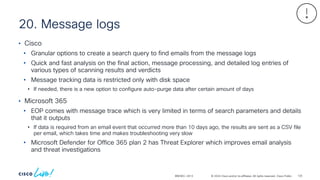
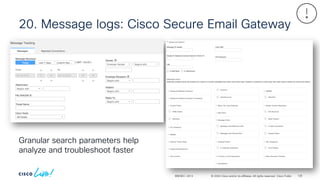
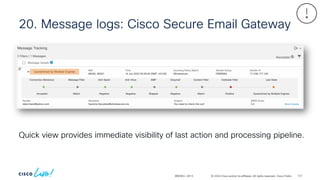
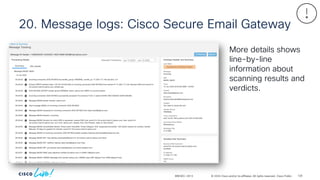
and/or its affiliates. All rights reserved. Cisco Public 20. Message logs BRKSEC-2913 • Cisco • Granular options to create a search query to find emails from the message logs • Quick and fast analysis on the final action, message processing, and detailed log entries of various types of scanning results and verdicts • Message tracking data is restricted only with disk space • If needed, there is a new option to configure auto-purge data after certain amount of days • Microsoft 365 • EOP comes with message trace which is very limited in terms of search parameters and details that it outputs • If data is required from an email event that occurred more than 10 days ago, the results are sent as a CSV file per email, which takes time and makes troubleshooting very slow • Microsoft Defender for Office 365 plan 2 has Threat Explorer which improves email analysis and threat investigations 125
126.
© 2024 Cisco
and/or its affiliates. All rights reserved. Cisco Public 20. Message logs: Cisco Secure Email Gateway BRKSEC-2913 Granular search parameters help analyze and troubleshoot faster 126
127.
© 2024 Cisco
and/or its affiliates. All rights reserved. Cisco Public 20. Message logs: Cisco Secure Email Gateway BRKSEC-2913 Quick view provides immediate visibility of last action and processing pipeline. 127
128.
© 2024 Cisco
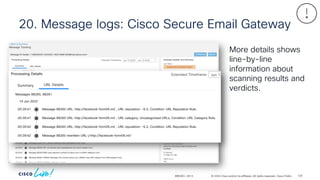
and/or its affiliates. All rights reserved. Cisco Public 20. Message logs: Cisco Secure Email Gateway BRKSEC-2913 More details shows line-by-line information about scanning results and verdicts. 128
129.
© 2024 Cisco
and/or its affiliates. All rights reserved. Cisco Public 20. Message logs: Cisco Secure Email Gateway BRKSEC-2913 More details shows line-by-line information about scanning results and verdicts. 129
130.
© 2024 Cisco
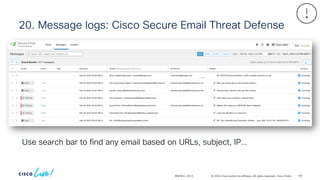
and/or its affiliates. All rights reserved. Cisco Public 20. Message logs: Cisco Secure Email Threat Defense BRKSEC-2913 Use search bar to find any email based on URLs, subject, IP… 130
131.
© 2024 Cisco
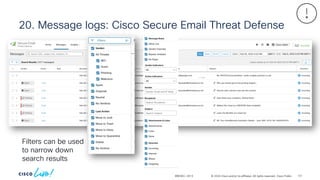
and/or its affiliates. All rights reserved. Cisco Public 20. Message logs: Cisco Secure Email Threat Defense BRKSEC-2913 Filters can be used to narrow down search results 131
132.
© 2024 Cisco
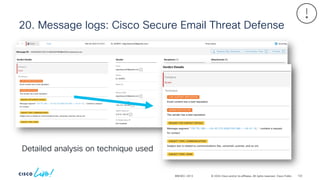
and/or its affiliates. All rights reserved. Cisco Public 20. Message logs: Cisco Secure Email Threat Defense BRKSEC-2913 Detailed analysis on technique used 132
133.
© 2024 Cisco
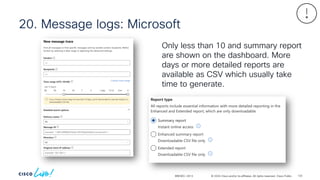
and/or its affiliates. All rights reserved. Cisco Public 20. Message logs: Microsoft BRKSEC-2913 Only less than 10 and summary report are shown on the dashboard. More days or more detailed reports are available as CSV which usually take time to generate. 133
134.
© 2024 Cisco
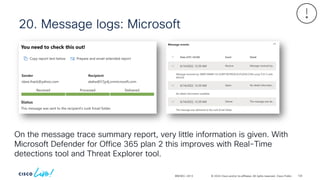
and/or its affiliates. All rights reserved. Cisco Public 20. Message logs: Microsoft BRKSEC-2913 On the message trace summary report, very little information is given. With Microsoft Defender for Office 365 plan 2 this improves with Real-Time detections tool and Threat Explorer tool. 134
135.
© 2024 Cisco
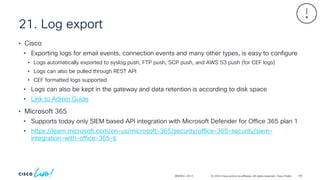
and/or its affiliates. All rights reserved. Cisco Public 21. Log export BRKSEC-2913 • Cisco • Exporting logs for email events, connection events and many other types, is easy to configure • Logs automatically exported to syslog push, FTP push, SCP push, and AWS S3 push (for CEF logs) • Logs can also be pulled through REST API • CEF formatted logs supported • Logs can also be kept in the gateway and data retention is according to disk space • Link to Admin Guide • Microsoft 365 • Supports today only SIEM based API integration with Microsoft Defender for Office 365 plan 1 • https://learn.microsoft.com/en-us/microsoft-365/security/office-365-security/siem- integration-with-office-365-ti 135
136.
© 2024 Cisco
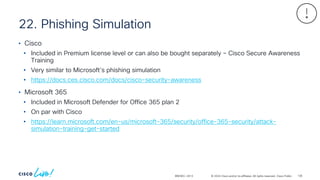
and/or its affiliates. All rights reserved. Cisco Public 22. Phishing Simulation BRKSEC-2913 • Cisco • Included in Premium license level or can also be bought separately – Cisco Secure Awareness Training • Very similar to Microsoft’s phishing simulation • https://docs.ces.cisco.com/docs/cisco-security-awareness • Microsoft 365 • Included in Microsoft Defender for Office 365 plan 2 • On par with Cisco • https://learn.microsoft.com/en-us/microsoft-365/security/office-365-security/attack- simulation-training-get-started 136
137.
© 2024 Cisco
and/or its affiliates. All rights reserved. Cisco Public 23. Awareness Training BRKSEC-2913 • Cisco • Included in Premium license level or can also be bought separately – Cisco Secure Awareness Training • Very similar to Microsoft’s Awareness training • https://docs.ces.cisco.com/docs/cisco-security-awareness • Microsoft 365 • Included in Microsoft Defender for Office 365 plan 2 • On par with Cisco • https://learn.microsoft.com/en-us/microsoft-365/security/office-365-security/attack- simulation-training-get-started 137
138.
© 2024 Cisco
and/or its affiliates. All rights reserved. Cisco Public 24. Internal Traffic Protection BRKSEC-2913 • Cisco • Included in Premium license level or can be bought as standalone Cisco Secure Email Threat Defence • Full scan of emails traversing in the same Microsoft 365 tenant • Spam, Phishing, URLs, Attachment with sandboxing, BEC, etc. • https://docs.ces.cisco.com/docs/email-threat-defense • Microsoft 365 • Only Safe-link and anti-malware can be applied for internal traffic • Safe-link does not prevent traffic, only rewrites URLs • https://learn.microsoft.com/en-us/microsoft-365/security/office-365-security/safe-links- about#safe-links-settings-for-email-messages • https://learn.microsoft.com/en-us/microsoft-365/security/office-365-security/anti-malware- protection-faq#does-the-service-scan-internal-messages-for-malware- 138
139.
© 2024 Cisco
and/or its affiliates. All rights reserved. Cisco Public 25. Automation BRKSEC-2913 • Cisco • Part of Essentials license level – Cisco XDR • Integrate all Cisco and third-party security products into one dashboard to help with threat hunting and automated workflows • https://docs.ces.cisco.com/docs/cisco-secure-email-securex-extending-email-protection-and- integrations-beyond-the-gateway • Microsoft 365 • Automated investigation and response is part of MDO plan 2 • No support for third-party • https://learn.microsoft.com/en-us/microsoft-365/security/office-365-security/air-about 139
140.
© 2024 Cisco
and/or its affiliates. All rights reserved. Cisco Public Licensing BRKSEC-2913 • Cisco • Licensing is based on seats (users) and subscription term. • Trust based license • Possibility to add-on’s only on subset of users • No surprises with billing • Microsoft 365 • License is based on mailboxes and subscription term. • Licenses are enforced • The Defender for O365 licenses can’t be restricted to a subset of users. If the license is bought for a subset of users, and Defender level features is used by the other users, Microsoft will bill the customer of it at the end of the subscription. https://docs.microsoft.com/en-us/office365/servicedescriptions/microsoft-365-service-descriptions/microsoft- 365-tenantlevel-services-licensing-guidance/microsoft-365-security-compliance-licensing-guidance 140
Download