1 | © 2014 Oracle Corporation –
Proprietary and Confidential
Application Development with Oracle NoSQL Database 3.0
Anuj Sahni, Principal Product Manager
2 | © 2014 Oracle Corporation –
Proprietary and Confidential
The following is intended to outline our general product direction.
It is intended for information purposes only, and may not be
incorporated into any contract. It is not a commitment to deliver
any material, code, or functionality, and should not be relied
upon in making purchasing decisions. The development,
release, and timing of any features or functionality described for
Oracle’s products remains at the sole discretion of Oracle.
3 | © 2014 Oracle Corporation –
Proprietary and Confidential
Agenda
• Introduce Table based data modeling feature
 Discuss its benefits
 How to use it (DDL & DML)
• How to approach data modeling (in real world situations)
 Email Client App as driver
 Schema design & deployment
 Queries into Data access methods
• Architecture
• Demo
4 | © 2014 Oracle Corporation –
Proprietary and Confidential
What is Being Proposed?
• Table Based Model
– On top of key/value model
– Allow choice of modeling constructs
– Introduces strongly typed fields
– APIs for table access
– Administrative CLI for table creation
• Secondary Indices
– Indexes rely on table model
– Allows composite index keys
– APIs for value and range access by secondary key
5 | © 2014 Oracle Corporation –
Proprietary and Confidential
Why Table Model ?
• Simplify application data modeling
– Tables and well-defined data types are familiar concepts
– Allows thinking in data types vs raw byte values
– Transparently handles key structure and serialization
– Easily maps to/from JSON
– Data types and some structure are required for secondary indices
6 | © 2014 Oracle Corporation –
Proprietary and Confidential
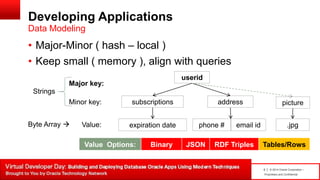
Developing Applications
• Major-Minor ( hash – local )
• Keep small ( memory ), align with queries
Data Modeling
userid
addresssubscriptions
email idphone #expiration date
Major key:
Minor key:
Value:
Strings
Byte Array 
Value Options: Binary JSON RDF Triples Tables/Rows
picture
.jpg
8 | © 2014 Oracle Corporation –
Proprietary and Confidential
Example 1 – Key/Value Paradigm
Simple Data Model
Key Space : /user/userId
Value : {
“name" : “User",
"namespace" : "com.company. avro",
"type" : "record",
"fields": [
{"name": “userId", "type": “Integer", "default": 0},
{"name": “firstName", "type": “String", "default": ""},
{"name": “lastName", "type": “String", "default": ""}
]
}
9 | © 2014 Oracle Corporation –
Proprietary and Confidential
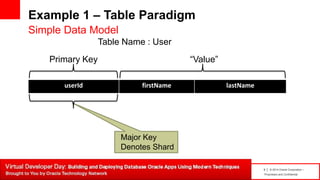
Example 1 – Table Paradigm
userId firstName lastName
Simple Data Model
Table Name : User
Major Key
Denotes Shard
Primary Key “Value”
10 | © 2014 Oracle Corporation –
Proprietary and Confidential
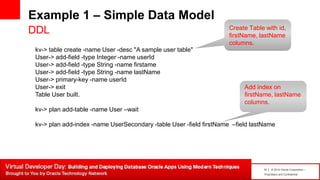
Example 1 – Simple Data Model
DDL
kv-> table create -name User -desc "A sample user table"
User-> add-field -type Integer -name userId
User-> add-field -type String -name firstame
User-> add-field -type String -name lastName
User-> primary-key -name userId
User-> exit
Table User built.
kv-> plan add-table -name User –wait
kv-> plan add-index -name UserSecondary -table User -field firstName –field lastName
Create Table with id,
firstName, lastName
columns.
Add index on
firstName, lastName
columns.
11 | © 2014 Oracle Corporation –
Proprietary and Confidential
How to Describe It ?
DDL
kv-> show tables -name User
{ "type" : "table",
“name" : "User", "id" : "r",
"description" : “A sample user table”,
"shardKey" : [ "userId" ],
"primaryKey" : [ "userId" ],
"fields" : [
{ "name" : “userId", "type" : "Integer" },
{ "name" : "firstName", "type" : "String" },
{ "name" : "lastName", "type" : "String" }
] }
12 | © 2014 Oracle Corporation –
Proprietary and Confidential
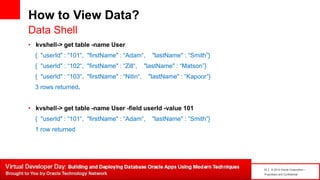
How to View Data?
• kvshell-> get table -name User
{ "userId" : “101“, "firstName" : “Adam“, "lastName" : “Smith”}
{ "userId" : “102“, "firstName" : “Zill“, "lastName" : “Matson”}
{ "userId" : “103“, "firstName" : “Nitin“, "lastName" : “Kapoor”}
3 rows returned.
• kvshell-> get table -name User -field userId -value 101
{ "userId" : “101“, "firstName" : “Adam“, "lastName" : “Smith”}
1 row returned
Data Shell
13 | © 2014 Oracle Corporation –
Proprietary and Confidential
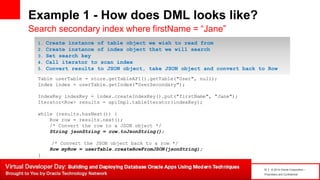
Example 1 - How does DML looks like?
Search secondary index where firstName = “Jane”
Table userTable = store.getTableAPI().getTable("User", null);
Index index = userTable.getIndex("UserSecondary");
IndexKey indexKey = index.createIndexKey().put("firstName", "Jane");
Iterator<Row> results = apiImpl.tableIterator(indexKey);
while (results.hasNext()) {
Row row = results.next();
/* Convert the row to a JSON object */
String jsonString = row.toJsonString();
/* Convert the JSON object back to a row */
Row myRow = userTable.createRowFromJSON(jsonString);
}
1. Create instance of table object we wish to read from
2. Create instance of index object that we will search
3. Set search key
4. Call iterator to scan index
5. Convert results to JSON object, take JSON object and convert back to Row
14 | © 2014 Oracle Corporation –
Proprietary and Confidential
Example 2 – Major/Minor KV Paradigm
User mailbox data
Key Space : /user/id/-/folder/inbox/arrival date
/user/id/-/folder/deleted/arrival date
Value : {
“name" : "Email",
"namespace" : "com.companyX.email.avro",
"type" : "record",
"fields": [
{"name": "from", "type": "string", "default": ""},
{"name": "to", "type": "string", "default": ""},
{"name": "sender", "type": "string", "default": ""},
{"name": "cc", "type": "string", "default": ""},
{"name": "subject", "type": "string", "default": ""},
{“name”: “msgBody”, “type”: “string”, “default”: “”} ] }
15 | © 2014 Oracle Corporation –
Proprietary and Confidential
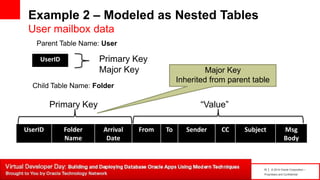
Example 2 – Modeled as Nested Tables
User mailbox data
UserID Folder
Name
Arrival
Date
From To Sender CC Subject Msg
Body
Parent Table Name: User
Major Key
Inherited from parent table
Primary Key “Value”
UserID Primary Key
Major Key
Child Table Name: Folder
16 | © 2014 Oracle Corporation –
Proprietary and Confidential
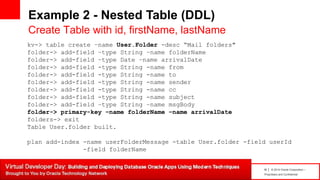
Example 2 - Nested Table (DDL)
Create Table with id, firstName, lastName
kv-> table create –name User.Folder -desc “Mail folders"
folder-> add-field –type String –name folderName
folder-> add-field –type Date –name arrivalDate
folder-> add-field -type String -name from
folder-> add-field -type String -name to
folder-> add-field -type String -name sender
folder-> add-field -type String -name cc
folder-> add-field -type String -name subject
folder-> add-field –type String –name msgBody
folder-> primary-key –name folderName –name arrivalDate
folders-> exit
Table User.folder built.
plan add-index -name userFolderMessage -table User.folder -field userId
-field folderName
17 | © 2014 Oracle Corporation –
Proprietary and Confidential
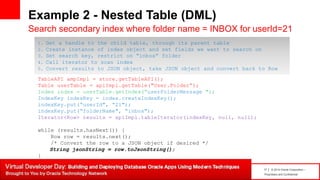
Example 2 - Nested Table (DML)
Search secondary index where folder name = INBOX for userId=21
TableAPI ampImpl = store.getTableAPI();
Table userTable = apiImpl.getTable("User.Folder“);
Index index = userTable.getIndex(“userFolderMessage ");
IndexKey indexKey = index.createIndexKey();
indexKey.put(“userId", “21");
indexKey.put(“folderName", “inbox");
Iterator<Row> results = apiImpl.tableIterator(indexKey, null, null);
while (results.hasNext()) {
Row row = results.next();
/* Convert the row to a JSON object if desired */
String jsonString = row.toJsonString();
}
1. Get a handle to the child table, through its parent table
2. Create instance of index object and set fields we want to search on
3. Set search key, restrict on “inbox” folder
4. Call iterator to scan index
5. Convert results to JSON object, take JSON object and convert back to Row
18 | © 2014 Oracle Corporation –
Proprietary and Confidential
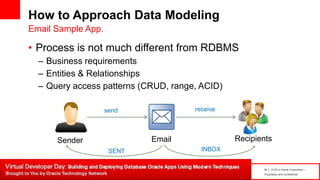
How to Approach Data Modeling
• Process is not much different from RDBMS
– Business requirements
– Entities & Relationships
– Query access patterns (CRUD, range, ACID)
Email Sample App.
Sender Email Recipients
SENT INBOX
send receive
19 | © 2014 Oracle Corporation –
Proprietary and Confidential
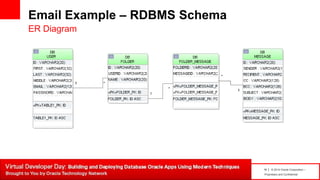
Email Example – RDBMS Schema
ER Diagram
20 | © 2014 Oracle Corporation –
Proprietary and Confidential
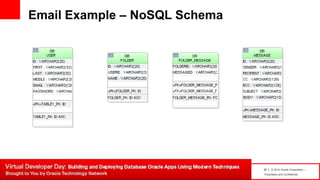
Email Example – NoSQL Schema
21 | © 2014 Oracle Corporation –
Proprietary and Confidential
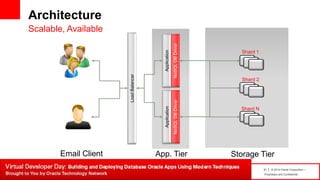
Architecture
Scalable, Available
NoSQLDBDriver
Application
Shard 2
Shard N
Shard 1
NoSQLDBDriver
Application
LoadBalancer
App. Tier Storage TierEmail Client
22 | © 2014 Oracle Corporation –
Proprietary and Confidential
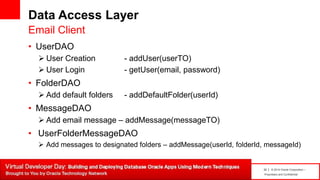
Data Access Layer
• UserDAO
 User Creation - addUser(userTO)
 User Login - getUser(email, password)
• FolderDAO
 Add default folders - addDefaultFolder(userId)
• MessageDAO
 Add email message – addMessage(messageTO)
• UserFolderMessageDAO
 Add messages to designated folders – addMessage(userId, folderId, messageId)
Email Client
23 | © 2014 Oracle Corporation –
Proprietary and Confidential
Join NoSQL Database Community
Twitter
https://twitter.com/#!/OracleNoSQL
LinkedIn
http://www.linkedin.com/groups?gid=4147754
Oracle’s NoSQL DB blog
https://blogs.oracle.com/nosql
Oracle Technology Network
http://bit.ly/1f0d8wU
Developer Webcast Series
http://bit.ly/1doV2jl
Oracle.com/BigData
24 | © 2014 Oracle Corporation –
Proprietary and Confidential

Application development with Oracle NoSQL Database 3.0

  • 1.
    1 | ©2014 Oracle Corporation – Proprietary and Confidential Application Development with Oracle NoSQL Database 3.0 Anuj Sahni, Principal Product Manager
  • 2.
    2 | ©2014 Oracle Corporation – Proprietary and Confidential The following is intended to outline our general product direction. It is intended for information purposes only, and may not be incorporated into any contract. It is not a commitment to deliver any material, code, or functionality, and should not be relied upon in making purchasing decisions. The development, release, and timing of any features or functionality described for Oracle’s products remains at the sole discretion of Oracle.
  • 3.
    3 | ©2014 Oracle Corporation – Proprietary and Confidential Agenda • Introduce Table based data modeling feature  Discuss its benefits  How to use it (DDL & DML) • How to approach data modeling (in real world situations)  Email Client App as driver  Schema design & deployment  Queries into Data access methods • Architecture • Demo
  • 4.
    4 | ©2014 Oracle Corporation – Proprietary and Confidential What is Being Proposed? • Table Based Model – On top of key/value model – Allow choice of modeling constructs – Introduces strongly typed fields – APIs for table access – Administrative CLI for table creation • Secondary Indices – Indexes rely on table model – Allows composite index keys – APIs for value and range access by secondary key
  • 5.
    5 | ©2014 Oracle Corporation – Proprietary and Confidential Why Table Model ? • Simplify application data modeling – Tables and well-defined data types are familiar concepts – Allows thinking in data types vs raw byte values – Transparently handles key structure and serialization – Easily maps to/from JSON – Data types and some structure are required for secondary indices
  • 6.
    6 | ©2014 Oracle Corporation – Proprietary and Confidential Developing Applications • Major-Minor ( hash – local ) • Keep small ( memory ), align with queries Data Modeling userid addresssubscriptions email idphone #expiration date Major key: Minor key: Value: Strings Byte Array  Value Options: Binary JSON RDF Triples Tables/Rows picture .jpg
  • 7.
    8 | ©2014 Oracle Corporation – Proprietary and Confidential Example 1 – Key/Value Paradigm Simple Data Model Key Space : /user/userId Value : { “name" : “User", "namespace" : "com.company. avro", "type" : "record", "fields": [ {"name": “userId", "type": “Integer", "default": 0}, {"name": “firstName", "type": “String", "default": ""}, {"name": “lastName", "type": “String", "default": ""} ] }
  • 8.
    9 | ©2014 Oracle Corporation – Proprietary and Confidential Example 1 – Table Paradigm userId firstName lastName Simple Data Model Table Name : User Major Key Denotes Shard Primary Key “Value”
  • 9.
    10 | ©2014 Oracle Corporation – Proprietary and Confidential Example 1 – Simple Data Model DDL kv-> table create -name User -desc "A sample user table" User-> add-field -type Integer -name userId User-> add-field -type String -name firstame User-> add-field -type String -name lastName User-> primary-key -name userId User-> exit Table User built. kv-> plan add-table -name User –wait kv-> plan add-index -name UserSecondary -table User -field firstName –field lastName Create Table with id, firstName, lastName columns. Add index on firstName, lastName columns.
  • 10.
    11 | ©2014 Oracle Corporation – Proprietary and Confidential How to Describe It ? DDL kv-> show tables -name User { "type" : "table", “name" : "User", "id" : "r", "description" : “A sample user table”, "shardKey" : [ "userId" ], "primaryKey" : [ "userId" ], "fields" : [ { "name" : “userId", "type" : "Integer" }, { "name" : "firstName", "type" : "String" }, { "name" : "lastName", "type" : "String" } ] }
  • 11.
    12 | ©2014 Oracle Corporation – Proprietary and Confidential How to View Data? • kvshell-> get table -name User { "userId" : “101“, "firstName" : “Adam“, "lastName" : “Smith”} { "userId" : “102“, "firstName" : “Zill“, "lastName" : “Matson”} { "userId" : “103“, "firstName" : “Nitin“, "lastName" : “Kapoor”} 3 rows returned. • kvshell-> get table -name User -field userId -value 101 { "userId" : “101“, "firstName" : “Adam“, "lastName" : “Smith”} 1 row returned Data Shell
  • 12.
    13 | ©2014 Oracle Corporation – Proprietary and Confidential Example 1 - How does DML looks like? Search secondary index where firstName = “Jane” Table userTable = store.getTableAPI().getTable("User", null); Index index = userTable.getIndex("UserSecondary"); IndexKey indexKey = index.createIndexKey().put("firstName", "Jane"); Iterator<Row> results = apiImpl.tableIterator(indexKey); while (results.hasNext()) { Row row = results.next(); /* Convert the row to a JSON object */ String jsonString = row.toJsonString(); /* Convert the JSON object back to a row */ Row myRow = userTable.createRowFromJSON(jsonString); } 1. Create instance of table object we wish to read from 2. Create instance of index object that we will search 3. Set search key 4. Call iterator to scan index 5. Convert results to JSON object, take JSON object and convert back to Row
  • 13.
    14 | ©2014 Oracle Corporation – Proprietary and Confidential Example 2 – Major/Minor KV Paradigm User mailbox data Key Space : /user/id/-/folder/inbox/arrival date /user/id/-/folder/deleted/arrival date Value : { “name" : "Email", "namespace" : "com.companyX.email.avro", "type" : "record", "fields": [ {"name": "from", "type": "string", "default": ""}, {"name": "to", "type": "string", "default": ""}, {"name": "sender", "type": "string", "default": ""}, {"name": "cc", "type": "string", "default": ""}, {"name": "subject", "type": "string", "default": ""}, {“name”: “msgBody”, “type”: “string”, “default”: “”} ] }
  • 14.
    15 | ©2014 Oracle Corporation – Proprietary and Confidential Example 2 – Modeled as Nested Tables User mailbox data UserID Folder Name Arrival Date From To Sender CC Subject Msg Body Parent Table Name: User Major Key Inherited from parent table Primary Key “Value” UserID Primary Key Major Key Child Table Name: Folder
  • 15.
    16 | ©2014 Oracle Corporation – Proprietary and Confidential Example 2 - Nested Table (DDL) Create Table with id, firstName, lastName kv-> table create –name User.Folder -desc “Mail folders" folder-> add-field –type String –name folderName folder-> add-field –type Date –name arrivalDate folder-> add-field -type String -name from folder-> add-field -type String -name to folder-> add-field -type String -name sender folder-> add-field -type String -name cc folder-> add-field -type String -name subject folder-> add-field –type String –name msgBody folder-> primary-key –name folderName –name arrivalDate folders-> exit Table User.folder built. plan add-index -name userFolderMessage -table User.folder -field userId -field folderName
  • 16.
    17 | ©2014 Oracle Corporation – Proprietary and Confidential Example 2 - Nested Table (DML) Search secondary index where folder name = INBOX for userId=21 TableAPI ampImpl = store.getTableAPI(); Table userTable = apiImpl.getTable("User.Folder“); Index index = userTable.getIndex(“userFolderMessage "); IndexKey indexKey = index.createIndexKey(); indexKey.put(“userId", “21"); indexKey.put(“folderName", “inbox"); Iterator<Row> results = apiImpl.tableIterator(indexKey, null, null); while (results.hasNext()) { Row row = results.next(); /* Convert the row to a JSON object if desired */ String jsonString = row.toJsonString(); } 1. Get a handle to the child table, through its parent table 2. Create instance of index object and set fields we want to search on 3. Set search key, restrict on “inbox” folder 4. Call iterator to scan index 5. Convert results to JSON object, take JSON object and convert back to Row
  • 17.
    18 | ©2014 Oracle Corporation – Proprietary and Confidential How to Approach Data Modeling • Process is not much different from RDBMS – Business requirements – Entities & Relationships – Query access patterns (CRUD, range, ACID) Email Sample App. Sender Email Recipients SENT INBOX send receive
  • 18.
    19 | ©2014 Oracle Corporation – Proprietary and Confidential Email Example – RDBMS Schema ER Diagram
  • 19.
    20 | ©2014 Oracle Corporation – Proprietary and Confidential Email Example – NoSQL Schema
  • 20.
    21 | ©2014 Oracle Corporation – Proprietary and Confidential Architecture Scalable, Available NoSQLDBDriver Application Shard 2 Shard N Shard 1 NoSQLDBDriver Application LoadBalancer App. Tier Storage TierEmail Client
  • 21.
    22 | ©2014 Oracle Corporation – Proprietary and Confidential Data Access Layer • UserDAO  User Creation - addUser(userTO)  User Login - getUser(email, password) • FolderDAO  Add default folders - addDefaultFolder(userId) • MessageDAO  Add email message – addMessage(messageTO) • UserFolderMessageDAO  Add messages to designated folders – addMessage(userId, folderId, messageId) Email Client
  • 22.
    23 | ©2014 Oracle Corporation – Proprietary and Confidential Join NoSQL Database Community Twitter https://twitter.com/#!/OracleNoSQL LinkedIn http://www.linkedin.com/groups?gid=4147754 Oracle’s NoSQL DB blog https://blogs.oracle.com/nosql Oracle Technology Network http://bit.ly/1f0d8wU Developer Webcast Series http://bit.ly/1doV2jl Oracle.com/BigData
  • 23.
    24 | ©2014 Oracle Corporation – Proprietary and Confidential