Structured Query
Language (SQL)
Basic SQL Concepts
Private and Confidential 2
Agenda
In this session, you will learn about:
• Introduction to SQL
• Data Definition Language Statements
• Data Manipulation Language Statements
• Data Query Language Statements
• Aggregate Functions
Private and Confidential 3
Introduction to Structured
Query Language
Private and Confidential 4
• Era of relational
databases begins.
• IBM launches its first
commercial relational-
database management
system named SQL/DS
1981
1974
• System R with SEQUEL
(later called SQL) was
launched as the first
prototype of a Relational
Database
1979
• Systematic tests were
performed in real test
scenarios by IBM for a
Relational Database
1969
• Relational
database
concept was first
published by E.F
Codd
1968
• The simplest
form of database
“Flat Files” were
used
• Processing
characteristics
were determined
by using
magnetic tape
medium
History of RDBMS
Private and Confidential 5
Phase I
Included the file
systems and
development of
DBMS known as
hierarchical,
network and
object-oriented
database
management
systems. This
phase was between
1960 to 1999.
Phase III
Online analytical
processing (OLAP)
was introduced.
Phase II
Described as
relational, saw the
introduction of
SQL & SQL
products.
Phase IV
Introduced NoSQL
supporting the use
of Big Data.
Evolution of Database in Phases
Private and Confidential 6
Commercial SQL Products
• Widely used amongst Windows users
• Runs Microsoft Windows OS
• Over 20% market share
• Widely used in Enterprise Wide
Database
• Fully complaint with SQL Language
• Over 45% market share
Private and Confidential 7
SQL was previously known as SEQUEL that stands for Structured English Query
Language. Later it was changed as SQL because SEQUEL was a trademark of the UK
based aircraft company.
Private and Confidential 8
• Open Source RDBMS
• Maintained by Postgre Development
Group (Volunteers)
• Runs on Windows, Linux & Mac
• Open Source RDBMS
• Full featured DBMS maintained by
Swedish Company MySQL
• Runs on Windows, Linux & Mac
Open-Source SQL Products
Private and Confidential 9
• Data Model is a logical structure that helps to organize elements of data
and systematically define how they are related to each other according to
the business process.
#1
• It conceptually describes the design of a database in a detailed manner.
#2
Data Models
Private and Confidential 10
Data Models
Record-Based Object-Based
Entity-Relationship
Models
Object-Oriented
Models
Network Data
Models
Relational Data
Model
Hierarchical Data
Models
Data Models
Private and Confidential 11
• In Record-based models, the database is organized in fixed format records
of several types.
#1
• A fixed number of fields or attributes are defined in each record
type, and each field is usually of a fixed length.
#2
Record-Based Data Models
Network Data
Models
Relational
Data Model
Hierarchical
Data Models
Three most popular record-based data models
Private and Confidential 12
• The relational data model uses tables to represent data and the
relationships among these data.
• Each table has multiple columns and each column is identified by a
unique name. It is a low-level model.
• The relational data model makes it easy to design, implement,
maintain, uses the database.
• The main reason for the popularity of relational model is the presence
of powerful query capability.
Record-Based Data Models
Relational Data Model
Private and Confidential 13
• In this model, the data is organized into a tree-like structure.
• It uses parent-child like relationship.
• Data is stored as records and records are connected to one another
through links.
Record-Based Data Models
Hierarchical Data Model
Private and Confidential 14
• Network database model uses many-
to-many relationship approach.
• This modeling technique provides
an efficient way to retrieve
information and organize the data
such that it can be looked at
multiple ways.
Record-Based Data Models
Network Data Model
Private and Confidential 15
Object-Based Data Models
In object-based data model, the database is organized in real-world objects
of several types.
#1
Each entity has some defining attributes.
#2
These entities are connected through relationships.
#3
Private and Confidential 16
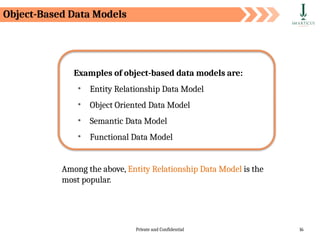
Examples of object-based data models are:
• Entity Relationship Data Model
• Object Oriented Data Model
• Semantic Data Model
• Functional Data Model
Among the above, Entity Relationship Data Model is the
most popular.
Object-Based Data Models
Private and Confidential 17
• The object-oriented model is based on collection of objects.
• An object contains values stored in instances variable within the
object .
• Object-oriented database systems are not suited for all applications.
• It is difficult to maintain when organizational information changes.
Object-Oriented Data Model
Object-Based Data Models
Private and Confidential 18
Object-Based Data Models
Entity-Relationship Data Model
ER Data Model is based on the notion of real-world entities and relationships
between them.
An entity is an easily recognizable living
or non-living real-world object.
Example: Student, Customer, Product
It is considered a best practice to design an ER diagram before implementing
your database.
A relationship is an association between
two entities.
Example: A customer buys a product
Private and Confidential 19
Entity Relationship(ER) Diagram
An ER diagram displays the relationships between entities stored in a database.
In technical language, we can say an ER diagrams shows the logical
structure of a database.
Private and Confidential 20
Why use ER diagram?
ER diagram helps you to:
• define the entities & their relationships
• define the attributes of each entity
• provide a complete preview of the logical structure of your
database
• gain a better understanding of the information contained in a
database
Private and Confidential 21
Table in Database
• There can be one or more tables in a database
• It is where all the data is stored
• It consists of rows & columns
• Columns represents attributes of the entity
Private and Confidential 22
Table Records
• Each row in a table is a record
• Each record represents information of each object, say a
person or a product
Private and Confidential 23
Table Columns
• Each column in a table is an attribute
• This gives one piece of information about the entity. For
example, last name of a customer
Private and Confidential 24
Physical Schema
Logical Schema
A database schema is a skeleton structure that represents the logical view of the
database.
It defines its entities and the relationships between them.
A database schema is categorized into:
Schemas
Pertains to the actual storage of the data
Pertains to the logical constraints that
need to be applied to the data stored
It may define integrity constraints,
views & tables
Private and Confidential 25
Logical vs Physical Schemas
Logical Schema
Physical Schema
• Physical schema represents
the actual connection to the
data source or data target.
• A physical model is what is
actually implemented in
your DBMS.
• Logical schema represents
the logical name associated
to that source or target.
• It is a model that exists on a
white board or in a
diagraming tool.
Private and Confidential 26
A key is a data item (a column or a set of columns) to uniquely identify a record in a
table.
It is used to fetch a single or set of records from a table.
A database supports various
types of keys. Some of them
are:
• Candidate key
• Primary key
• Foreign key
• Unique key
• Alternate key
Keys
Private and Confidential 27
Candidate key
An attribute (column) or a set of attributes that uniquely
identifies a record.
Example: Customer ID + Store ID + Location ID in a customer transaction
table
Example: Customer ID identifying a customer uniquely in a customer table
Primary key
Identifies each record in a table and must never be the same
for two records in a table.
Keys
Private and Confidential 28
Alternate key
An alternate key is a candidate key that is not considered as a
primary key.
Example: Store Name + Store Location in a store information table
Example: Store Name in a store information table
Unique key
An attribute or a set of attributes to uniquely identify a record
in a table. This is similar to a primary key but can contain a
null value.
Keys
Private and Confidential 29
Data Definition Language (DDL)
Data Manipulation Language(DML)
Data Query Language (DQL)
Data Control Language (DCL)
Transactional Control Language (TCL)
SQL is used to communicate with a database. According to ANSI (American National
Standards Institute), it is the standard language for relational database management
systems.
SQL Introduction
The commands available in SQL
can be broadly categorized as:
Private and Confidential 30
Types of SQL Commands
Data Definition
Language
Data Query Language
DROP
CREATE
Data Manipulation
Language
RENAME
ALTER
TRUNCATE
UPDATE
INSERT
DELETE
SELECT
Types of SQL Commands
Private and Confidential 31
Data Definition Language
(DDL)
Private and Confidential 32
A database is a collection of
many tables and a database
server can hold many of these
databases.
What is a Database?
Database Server —> Databases —> Tables (defined by columns) —> Rows
Databases and tables are referred to as database objects. Any operation, such as
creating, modifying, or deleting database objects, is called Data Definition
Language (DDL).
Server
DB
DB
Data Definition Language (DDL)
Private and Confidential 33
DDL commands are used to create a new schema as well as to modify an existing
schema.
Data Definition Language (DDL)
The typical commands available in DDL are:
• CREATE
• ALTER
• DROP
• TRUNCATE
• RENAME
Private and Confidential 34
Creating Database
The CREATE DATABASE statement is used to create a new SQL database.
The semicolon character (;) is a SQL statement terminator
Syntax
CREATE DATABASE databasename;
Private and Confidential 35
Creating Database
We will create a database called customer_info.
Use SHOW DATABASES to check if the database customer_info has been
CREATED.
The database customer_info is now created
Default system databases
Syntax
CREATE DATABASE customer_info;
Private and Confidential 36
Creating Database
Once you create the database use the following command to leverage that database:
For example, we have created the database ‘customer_info’. To utilize the
database we run the following query:
Syntax
USE DATABASE_NAME
Syntax
USE customer_info
Private and Confidential 37
While creating a table, you
should mention:
• Column Name
• Datatype (integer, floating
point, string, etc. ),
• Constraints (), and
• default value (if any)
We will now create tables
We can create one or more tables inside a database
Creating Tables
Private and Confidential 38
Data Types
Numeric: TINYINT, SMALLINT, MEDIUMINT, INT,
BIGINT, and BIT
Floating numbers: DECIMAL, FLOAT, and DOUBLE
Strings: CHAR, VARCHAR, BINARY, VARBINARY, BLOB,
TEXT, ENUM, and SET
Date and Time: DATE, TIME, DATETIME, TIMESTAMP,
and YEAR
What are the
different data
types used in
SQL?
01
02
03
04
Private and Confidential 39
Datatype Minimum size limit Maximum size limit
Bit 0 1
Tinyint 0 255
Smallint -32.768 32.767
mediumint -8388608 8388607
int -2,147,483,648 2,147,483,647
bigint -9,223,372,036,854,775,808 9,223,372,036,854,775,807
Numeric Data Types
Private and Confidential 40
Floating Numbers Data Types
Datatype From To
Decimal -10^38 +1 10^38 -1
Float -1.79E + 308 1.79E + 308
Private and Confidential 41
String Data Types
Fixed length with maximum length of 8,000 characters
Fixed length with maximum length of 8,000 bytes
Variable length storage with maximum length of 8,000 bytes
Variable length storage with maximum size of 1GB data
For binary large objects
CHAR
VARCHAR
BINARY
VARBINARY
TEXT
BLOB
Data Type Description
Private and Confidential 42
Every relational database has its own maximum and minimum size limit for
different data types, you don’t need to remember the limit. Idea is to have the
knowledge of what data type to be used in a specific scenario
Private and Confidential 43
Date and Time Data Types
Stores date in the format YYYY-MM-DD
Stores time in the format HH:MI:SS
Stores date and time information in the format YYYY-MM-DD
HH:MI:SS
Stores number of seconds passed since the Unix epoch (‘1970-01-
01 00:00:00’ UTC)
Stores year in 2 digit or 4 digit format. Range 1901 to 2155 in 4-
digit format. Range 70 to 69, representing 1970 to 2069
DATE
TIME
DATETIME
TIMESTAMP
YEAR
Data Type Description
Private and Confidential 44
MySQL supports various data types. Refer to the MySQL documentation for more details
(https://dev.mysql.com/doc/refman/8.0/en/data-types.html)
Private and Confidential 45
SQL constraint is a restriction placed on one or more columns of a table to
limit the type of values that can be stored in that column.
Constraints are to be specified when the table is created with the CREATE
TABLE statement or after the table is created with the ALTER TABLE
statement.
SQL Constraints
#1
#2
Private and Confidential 46
The following constraints are commonly used in SQL:
• NOT NULL
• UNIQUE
• PRIMARY KEY
• FOREIGN KEY
• CHECK
• DEFAULT
• INDEX
SQL Constraints
Private and Confidential 47
Let us now look at the syntax for creating a table and understand its constraints.
Syntax
CREATE TABLE table_name (
column_name1 datatype1 constraint1,
column_name2 datatype2 constraint2,
column_name3 datatype3 constraint3,
....
);
SQL Constraints
Private and Confidential 48
We will create a customer table, which will hold the
following customer information:
• Cust_ID
• Name
• Country
• City
SQL Constraints
Private and Confidential 49
The Cust_ID column is of type int and will hold an integer.
The Name, Country, and City columns are of type varchar and will hold
characters, and the length for these fields is 20 characters.
To check the definition of the table we use: describe information.
SQL Constraints
Private and Confidential 50
By default, a column can hold NULL values.
The NOT NULL constraint enforces a column to NOT accept NULL values.
This enforces a field to always contain a value, which means that you
cannot insert a new record, or update a record without adding a value to
this field.
NOT Null Constraints
Private and Confidential 51
The following SQL statement ensures that the "Cust_Id", "Name", and "Country"
columns will NOT accept NULL values when the "customer_info" table is created.
Syntax
CREATE TABLE information(Cust_Id int Not Null,
Name varchar(20) Not Null,
Country varchar(20) Not Null,
City varchar(20));
NOT Null Constraints
Private and Confidential 52
• The UNIQUE constraint ensures that all values in a column are
different.
• Both the UNIQUE and PRIMARY KEY constraints provide a
guarantee for uniqueness for a column or set of columns.
• A PRIMARY KEY constraint automatically has a UNIQUE
constraint.
• However, you can have many UNIQUE constraints per table, but
only one PRIMARY KEY constraint per table.
UNIQUE Constraint
Private and Confidential 53
The following SQL statement creates a UNIQUE constraint on the "Cust_id" column
when the "customer_info" table is created.
Syntax
CREATE TABLE information (Cust_id int Not Null UNIQUE,
Name varchar(20) Not Null,
Country varchar(20) Not Null,
City varchar(20));
UNIQUE Constraint
Private and Confidential 54
The PRIMARY KEY constraint uniquely identifies each record in a table.
Primary keys must contain UNIQUE values, and cannot contain NULL
values.
A table can have only ONE primary key; and in the table, this primary key
can consist of single or multiple columns (fields).
PRIMARY KEY Constraints
Private and Confidential 55
The following SQL statement creates a UNIQUE constraint on the "Cust_id" column
when the "customer_info" table is created.
Syntax
CREATE TABLE personal_info (Cust_id int Not Null,
Name varchar(20) Not Null,
Country varchar(20) Not Null,
City varchar(20),
PRIMARY KEY (Cust_id));
PRIMARY KEY Constraints
Private and Confidential 56
A FOREIGN KEY is a key used to link two tables together.
A FOREIGN KEY is a field (or collection of fields) in one table that refers
to the PRIMARY KEY in another table.
The table containing the foreign key is called the child table, and the
table containing the candidate key is called the referenced or parent
table.
FOREIGN KEY Constraints
Private and Confidential 57
Foreign Key Constraint
Cust_id Name Country City
101 Allex USA New York
102 Mia Australia Sydney
103 Joy India Delhi
personal_info table
Order_id Order_num Cust_id
201 76675 103
202 54498 103
203 45467 102
204 82986 101
order_info table
Private and Confidential 58
• Notice that the "Cust_id" column in the "Order_info" table points
to the "Cust_id" column in the "personal_info" table.
• The "Cust_id" column in the "Customer_info" table is the
PRIMARY KEY in the "personal_info" table.
• The "Cust_id" column in the "Order_info" table is a FOREIGN KEY
in the "Orders" table.
• The FOREIGN KEY constraint is used to prevent actions that
would destroy links between tables.
• The FOREIGN KEY constraint also prevents invalid data from
being inserted into the foreign key column, because it has to be
one of the values contained in the table it points to.
Foreign Key Constraint
Private and Confidential 59
The following SQL creates a FOREIGN KEY on the "Cust_id" column when the
"Order_id" table is created.
Syntax
CREATE TABLE order_info (Order_id int NOT NULL,
Order_num int NOT NULL,
Cust_id int,
PRIMARY KEY (Order_id),
FOREIGN KEY (Cust_id)
REFERENCES personal_info(Cust_id) );
Foreign Key Constraint
Private and Confidential 60
Dropping Database
The DROP DATABASE statement is used to drop an existing SQL database.
Syntax
DROP DATABASE databasename;
Private and Confidential 61
Dropping Database
The following SQL statement drops the existing database "customer_info":
Use SHOW DATABASES to check if the database customer_info has been
DROPPED.
Syntax
DROP DATABASE customer_info;
We see the database customer_info does
not exist
Private and Confidential 62
Dropping Table
The DROP TABLE statement is used to drop an existing table in a database
The following SQL statement drops the existing table "information":
Syntax
DROP TABLE table_name;
Syntax
DROP TABLE information;
Private and Confidential 63
Be careful before dropping a table. Deleting a table will result in loss of complete
information stored in the table!
Private and Confidential 64
Deleting Data from table
The TRUNCATE TABLE statement is used to delete the data inside a table, but not the
table itself.
Syntax
TRUNCATE TABLE table_name;
Private and Confidential 65
Sometimes we need to incorporate changes to an already existing table.
For example, renaming a field, changing the data-type, etc.
The alter command is used to make modification in an existing
database/table that demands a change during its lifecycle.
Altering Table
Alter command is generally used with clauses such as:
• Change
• Modify
• Add
• Drop
Private and Confidential 66
To make changes in the column’s definition we use the Change clause.
Alter Command - Change Clause
The change clause allows you to:
• Change the name of the column
• Change the column data type
• Change column constraints
Syntax
ALTER TABLE table_name CHANGE old_column_name new_column_name
data type;
Private and Confidential 67
Changing Column Definition
Alter Command - Change Clause
• We specify that we want a change in the structure of the table using the
ALTER TABLE command, followed by a command that tells the MySql
server that we want to change the column name.
#1
• The CHANGE clause is followed by an existing column name that needs to
be changed then we mention the new definition (new name, new data
type, new constraint (optional)).
#2
Private and Confidential 68
Example: Consider a table personal_info with below fields
Here, we need to rename ‘Name’ as ‘Full_Name’ with an increase in the
number of characters
Alter Command - Change Clause
Private and Confidential 69
Use below alter query to change the name of the field ‘Name’ to ‘Full_Name’
Use describe personal_info to check if the column name has changed to
the desired column name
Syntax
ALTER TABLE personal_info CHANGE Name Full_Name varchar(20);
Alter Command - Change Clause
Private and Confidential 70
Here: ALTER TABLE personal_info will tell MySql server to make modifications to the
table personal_info.
CHANGE Name Full Name varchar(30) is the command that tells the MySql
server to change the existing column name Name to Full_Name with an increase
in the number of characters that can be allocated
Alter Command - Change Clause
How does the process work in the background?
Output
personal_info
Request
MySQL Server
Private and Confidential 71
Alter Command - Modify Clause
The Modify clause allows you to:
• Modify Column Data Type
• Modify Column Constraints
Syntax
ALTER TABLE table_name MODIFY current_column_name data type
constraint;
Private and Confidential 72
Modifying Column Definition
Alter Command - Modify Clause
• We specify that we want a change in the structure of the table using the
ALTER TABLE command, followed by a command that tells the MySql
server that we want to change the column name.
#1
• Suppose we are only interested in changing the data type and constraints
on the field without affecting the field name, we can use the MODIFY
keyword to accomplish that.
#2
Private and Confidential 73
Example: Consider a table personal_info with below fields.
Here, we need to increase the width of ‘Full_Name’ field from 20 to 35.
Alter Command - Modify Clause
Private and Confidential 74
Use below alter query to change the width of ‘Full_Name’ to varchar(35) with a NOT
NULL constraint.
Use describe personal_info to check if the column name has changed to
the desired column name.
Syntax
ALTER TABLE personal_info MODIFY Full_Name varchar(35) NOT NULL;
Alter Command - Modify Clause
Private and Confidential 75
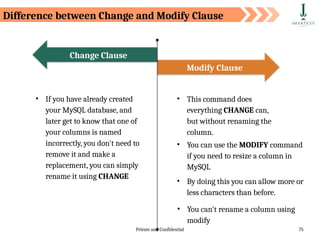
• If you have already created
your MySQL database, and
later get to know that one of
your columns is named
incorrectly, you don't need to
remove it and make a
replacement, you can simply
rename it using CHANGE
Modify Clause
Change Clause
• This command does
everything CHANGE can,
but without renaming the
column.
• You can use the MODIFY command
if you need to resize a column in
MySQL
• By doing this you can allow more or
less characters than before.
• You can't rename a column using
modify
Difference between Change and Modify Clause
Private and Confidential 76
Modify clause CANNOT be used to rename a column
Private and Confidential 77
Alter Command - Add Clause
The Add clause allows you to:
• Add a new column to an existing table
• Add primary key constraint to an existing column
Private and Confidential 78
Adding a new column to a table
Alter Command - Add Clause
To add a new column to an existing table, we use the ADD COLUMN clause with the
ALTER command in the following way:
Syntax
ALTER TABLE table_name ADD COLUMN column_name;
Private and Confidential 79
Example: Consider the previously created table personal_info:
Here, we add a new column ‘Income’ to this table
Alter Command - Add Clause
Private and Confidential 80
Use below alter query with the add clause.
Use describe personal_info to check if a new column has been added to
the table.
Syntax
ALTER TABLE personal_info ADD COLUMN Income int;
Alter Command - Add Clause
Private and Confidential 81
By default, the ADD clause adds a column at the end of the table. Use the AFTER
keyword to add a column at a particular position in a table
Private and Confidential 82
Alter Command – Add-after Clause
Let’s say you want to add a ‘Gender’ column after ‘Full_Name’ column in the table
personal_info, we use the following query to achieve this:
Syntax
ALTER TABLE personal_info ADD Gender varchar(5) AFTER Full_Name;
Private and Confidential 83
Use describe personal_info to check if a new column has been added at the desired
position.
Alter Command – Add-after Clause
Private and Confidential 84
Alter Command – Add Clause
Assigning Primary Key Constraint to an Existing Field
To create a PRIMARY KEY constraint on, say, ‘emp_id’ column when the table is
already created, we use the ADD clause with the ALTER command.
Syntax
ALTER TABLE table_name ADD PRIMARY KEY(column_name);
Private and Confidential 85
Example: Consider the previously created table personal_info:
Here, we need to declare “Cust_id” as primary key.
Alter Command - Add Clause
Private and Confidential 86
Use below alter query to add primary key to an existing field ‘Cust_id’:
Use describe personal_info to check if the primary key has been
assigned to the field.
Syntax
ALTER TABLE personal_info ADD PRIMARY KEY(Cust_id);
Alter Command - Add Clause
Private and Confidential 87
Alter Command - Drop Clause
The Drop clause with the alter command allows you to:
• Delete a column from the table
• Remove a constraint from a column
Private and Confidential 88
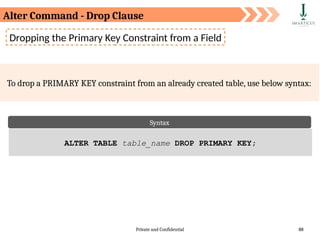
Dropping the Primary Key Constraint from a Field
To drop a PRIMARY KEY constraint from an already created table, use below syntax:
Syntax
ALTER TABLE table_name DROP PRIMARY KEY;
Alter Command - Drop Clause
Private and Confidential 89
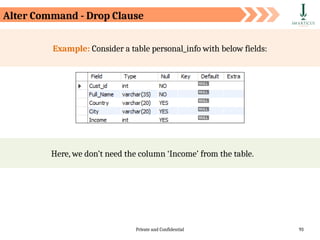
Example: Consider a table personal_info with below fields:
It would be not be a good practise to declare ‘Full_Name’ as Primary Key.
Alter Command - Drop Clause
Syntax
ALTER TABLE personal_info ADD PRIMARY KEY(Full_Name);
Private and Confidential 90
Use below alter query to drop primary key from an already defined primary key field
‘First_name’:
Use describe personal_info to check if the primary key has been
dropped from the field.
Syntax
ALTER TABLE personal_info DROP PRIMARY KEY;
Alter Command - Drop Clause
Private and Confidential 91
There is only one Primary Key in a table. Hence, we don’t need to specify the name of
the column while dropping the Primary Key using the ALTER command
Private and Confidential 92
Dropping a column from the table
Alter Command - Drop Clause
• Suppose you no longer need a column from a table for your analysis.
#1
• In this scenario we use the ALTER command with the DROP clause to
remove a column from the table.
#2
Syntax
ALTER TABLE table_name DROP COLUMN column_name;
Private and Confidential 93
Example: Consider a table personal_info with below fields:
Here, we don’t need the column ‘Income’ from the table.
Alter Command - Drop Clause
Private and Confidential 94
Use below alter query to drop the ‘Income’ column from the table personal_info:
Use describe personal_info to check if the column has been drop from
the table.
Syntax
ALTER TABLE personal_info DROP COLUMN Income;
Alter Command - Drop Clause
Private and Confidential 95
Rename Command
• The rename command is used to change the name of an existing database
table to a new name.
#1
• Renaming a table does not make it to lose any data is contained within it.
#2
Syntax
RENAME TABLE current_table_name TO new_table_name
Private and Confidential 96
Example: Let us rename the current personal_info table to information
You can use show tables command to retrieve the name of all the tables
present in a database. ‘customer_info’ is the name of the database
Rename Command
Private and Confidential 97
We use the below command to change the name of the table
The name of the table personal_info is now changed to information:
Syntax
RENAME TABLE personal_info TO information;
Rename Command
Private and Confidential 98
Data Manipulation
Language (DML)
Private and Confidential 99
Data Manipulation Language (DML)
As a data analyst, the
majority of your work will
focus on insight
generation, and you will be
working with DML
commands.
The typical commands available in DML are:
• INSERT
• UPDATE
• DELETE
Private and Confidential 100
The INSERT INTO statement is used to insert new records
in a table.
It is possible to write the INSERT INTO statement in two ways.
The first way specifies both the column names and the values to
be inserted.
Inserting Records in Table
Syntax
INSERT INTO table_name (column1, column2, column3, ...)
VALUES (value1, value2, value3, ...);
Private and Confidential 101
If you are adding values for all the columns of the table, you do
not need to specify the column names in the SQL query.
Make sure the order of the values is in the same order as the
columns in the table.
Inserting Records in Table
Syntax
INSERT INTO table_name
VALUES (value1, value2, value3, ...);
Private and Confidential 102
We have created an empty customers table, now we will insert values into it,
using the INSERT statement
The INSERT statement is used to create new records in a table.
Inserting Records in Table
Syntax
INSERT INTO personal_info (Cust_id, Name, Country, City)
VALUES (101, 'Allex', 'USA', 'New York’),
(102, 'Mia', 'Australia', 'Sydney’),
(103, 'Joy', 'India', 'Delhi');
Private and Confidential 103
Cust_id Name Country City
101 Allex USA New York
102 Mia Australia Sydney
103 Joy India Delhi
The "personal_info" table will now look like this:
Inserting Records in Table
Private and Confidential 104
The UPDATE statement is used to modify the existing records in a table.
Updating Existing Records
Syntax
UPDATE table_name SET column1 = value1, column2 = value2,...
WHERE condition;
Private and Confidential 105
Be careful when updating records in a table! Notice the WHERE clause in the UPDATE
statement. The WHERE clause specifies which record(s) that should be updated. If you
omit the WHERE clause, all records in the table will be updated!
Private and Confidential 106
Updating Existing Records
We are updating name as John where country is
USA.
Syntax
UPDATE personal_info SET Name = 'John’ WHERE 'country' = 'USA';
Private and Confidential 107
The "personal_info" table will now look like this:
Updating Existing Records
Cust_id Name Country City
101 John USA New York
102 Mia Australia Sydney
103 Joy India Delhi
Updated Record
Private and Confidential 108
Deleting Records
Syntax
DELETE FROM table_name WHERE condition;
The DELETE statement is used to delete existing records in a table.
Private and Confidential 109
Be careful when deleting records in a table! Notice the WHERE clause in the DELETE
statement. The WHERE clause specifies which record(s) should be deleted. If you omit
the WHERE clause, all records in the table will be deleted!
Private and Confidential 110
Updating Existing Records
We are deleting the first row where name is Joy.
The "personal_info" table will now look like this:
Cust_id Name Country City
101 Allex USA New York
102 Mia Australia Sydney
Syntax
DELETE FROM personal_info WHERE Name='Joy';
Private and Confidential 111
Data Query Language
(DQL)
Private and Confidential 112
• The SELECT statement is used to retrieve data from a table.
#1
The data returned is stored in a result table, called the result-set.
#2
The Select Query
Syntax
SELECT column1, column2, ...FROM table_name;
Here, column1, column2, ... are the field names of the table you want to select
data from. If you want to select all the fields available in the table, use the
following syntax:
Syntax
SELECT * FROM table_name;
Private and Confidential 113
Consider the below "personal_info" table in the “customer_info” database:
Cust_id Name Country City
101 Allex USA New York
102 Mia Australia Sydney
103 Joy India Delhi
104 Sara India Mumbai
The Select Query
Private and Confidential 114
Name City
Allex New York
Mia Sydney
Joy Delhi
Sara Mumbai
The Select Query
The following SQL statement selects the "Name"and “City”columns from the
"personal_info" table:
Syntax
SELECT Name, City FROM personal_info;
Output
Private and Confidential 115
The Select Query
The following SQL statement retrieves all the columns from the "personal_info" table:
Syntax
SELECT * FROM personal_info;
Private and Confidential 116
• The WHERE clause is used to filter records.
#1
• The WHERE clause is used to extract only those records that fulfill a specified condition.
#2
Syntax
SELECT column1, column2, ...FROM table_name WHERE condition;
Filtering Records
Private and Confidential 117
The WHERE clause is not only used in SELECT statement, it is also used in UPDATE,
DELETE statement, etc.!
Private and Confidential 118
Filtering Records
The following SQL statement selects all the customers from the City "New York", in the
"personal_info" table:
Syntax
SELECT * FROM personal_info WHERE City = 'New York';
Output Cust_id Name Country City
101 Allex USA New York
Private and Confidential 119
• A Where clause predicate is an expression which evaluates to a Boolean
value to determine which row or a set of rows are relevant to a particular
query.
#1
• More precisely we can say by using predicates in the where clause we can
filter out records.
#2
Where Clause Predicates
Private and Confidential 120
Where Clause Predicates
The Where Clause supports the following types of predicates:
• Comparison
• = Equal
• <> Not Equal
• < Less Than
• <= Less Than Or Equal
• Pattern Matching
• LIKE ( Used for Wildcard Filtering)
• BETWEEN
• IN
• IS NULL
Private and Confidential 121
Consider the table, product_sales, and let us build some query examples using it.
Where Clause Predicates
Private and Confidential 122
Let’s say you want to retrieve Item_Type, Num_Item and Sales of products where
product’s sales is greater than 1500.
Syntax
SELECT Item_Type, Num_Item, Sales FROM product_sales Where Sales
> 1500;
Output
Where Clause Predicates - Comparison Operator
Private and Confidential 123
We will use the ‘=’ operator to retrieve records of large size store.
Syntax
SELECT * FROM product_sales WHERE Store_Size = 'Large';
Output
Where Clause Predicates - Comparison Operator
Private and Confidential 124
From the previous table let’s say we want to display the items whose sales are in
between 1000 and 1500, we use the following query using BETWEEN predicate.
Syntax
SELECT Sales, Item_Type FROM product_sales WHERE Sales BETWEEN
1000 AND 1500;
Output
BETWEEN predicate is used to select rows within a specified range of values.
Where Clause Predicates - Between Predicate
Private and Confidential 125
From the previous table let’s say we want to display the Item_types whose Num_Item
are 25 and 23, we use the following query using IN predicate.
Syntax
SELECT Num_Item, Item_Type FROM product_sales WHERE Num_Item IN
(25, 23);
Output
Where Clause Predicates - IN Predicate
IN predicate is used to select rows within a set of specified values.
Private and Confidential 126
Syntax
SELECT * FROM product_sales WHERE Item_Type IS NULL;
Output
Where Clause Predicates - IS NULL Predicate
IS NULL predicate with a where clause is used to select rows if a specified
column value contains a null value.
For Example:
There are no missing data in the table
Private and Confidential 127
• The BETWEEN condition, IN condition and NOT with between
condition allows us to test if an expression is within a range of
values
• The values in range test can be text, date, or numbers
• The BETWEEN condition returns the records where expression
is within the range of value1 and value2
Where Clause Predicates - IS NULL Predicate
Private and Confidential 128
Wildcards are
characters that are
used to filter/search
data from the
database on the basis
of certain patterns
They are often used
with the operators like
LIKE and NOT LIKE
in conjunction with
the WHERE clause
We will look at
following Wildcards:
o % (percent
character)
o _ (underscore
character)
Wildcards
Private and Confidential 129
• Using wildcard in MySQL can increase the performance of an
application
• It can reduce the time to filter the record from the database
• Complex SQL queries can be converted into simple one using
wildcards
• Using wildcards we can develop powerful search engines in a
large data-driven application
• Searching in the data-driven application are much more
dependent on the use of wildcards
Wildcards
Private and Confidential 130
Wildcards
Do not know the
name of a song but
you know the lyrics
Wildcard filtering is generally used in cases when you:
Do not know how to
spell someone’s last
name, but you
know what letter it
starts with
Do not know the
name of a song but
you know the lyrics
Private and Confidential 131
To carry out the wildcard filtering exercise we use
movie_metadata dataset
Load the data in a mysql table:
Download the data using the link:
https://www.dropbox.com/s/0hs5x2n1x6cm16b/movie_metada
ta.csv?dl=0
Wildcards
Private and Confidential 132
% wildcard is used in searching or filtering a record by matching any string of zero or
more character.
Syntax
SELECT statement … WHERE column_name LIKE ‘xxx%’;
Wildcard Filtering - ‘%’ Wildcard
Here,
• "SELECT statement..." is the standard SQL SELECT command.
• "WHERE" is the key word used to apply the filter.
• "LIKE" is the comparison operator that is used in conjunction with
wildcards.
• 'xxx' is any specified starting pattern such as a single character or more
and "%" matches any number of characters starting from zero (0).
Private and Confidential 133
Wildcard Filtering - ‘%’ Wildcard
● % can be used either in the first place, in the last or at both side of the
string
● If used in the first place (“%xxx”), all those rows will be extracted from the
database where the column will contain strings ending with ‘xxx’
● If used at both the ends (“%xxx%”), all those rows will be extracted from
the database where the column will contain the string ‘xxx’ anywhere in
the column string
● If used at the last (“xxx%”), all those rows will be extracted from the
database where the column will contain string starting with ‘xxx’
Private and Confidential 134
Wildcard Filtering - ‘%’ Wildcard
Let us understand % wildcard with an example:
• Suppose you forgot the names of all the movies in the ‘Lord
of the rings’ franchise and you only remember that the
movie has “lord of the rings...” in its title
• Searching each and every movie in the database will not be a
good option to recall the name
Private and Confidential 135
Below is the SQL statement that can help you filter records.
Syntax
SELECT movie_title FROM moviesdata WHERE movie_title LIKE '%Lord
of the%';
Output
Wildcard Filtering - ‘%’ Wildcard
You can now easily recall the name of the song by looking at the above
output.
Private and Confidential 136
Wildcard Filtering - ‘%’ Wildcard
The query translates to:
• Select the column ‘movie_title’ from the ‘moviesdata’ table
• Return the movie_title that has the string 'lord of the' in its
title that is followed or preceded by zero or more occurrences
of any character
Private and Confidential 137
The underscore(_) wildcard is used to match exactly one character.
Syntax
SELECT statement … WHERE column_name LIKE ‘xxx_’;
Wildcard Filtering - ‘_’ Wildcard
Here,
• "SELECT statement..." is the standard SQL SELECT command
• "WHERE" is the key word used to apply the filter
• "LIKE" is the comparison operator that is used in conjunction with
wildcards
• 'xxx' is any specified starting pattern such as a single character or more
and _ matches the string with only one characters
Private and Confidential 138
Wildcard Filtering - ‘_’ Wildcard
● _ can be used either in the first place, in the last or at both side of the string
● If used in the first place (“_xxx”), all those rows will be extracted from the
database where the instance of column will contain string that starts with
any single character and ends with ‘xxx’
● If used at both the ends (“_xxx_”), all those rows will be extracted from the
database where the column will contain the string ‘xxx’ that starts and
ends with any single character
● If used at the last (“xxx_”), all those rows will be extracted from the
database where the column will contain string starting with ‘xxx’ followed
by any single character
● You can use n number of underscore character for matching n number of
character
Private and Confidential 139
Example: Let’s say you want to take a look at all the movies that made gross revenue in
400 millions. Use the ‘_’ wildcard 9 times in the select query:
Syntax
SELECT movie_title, gross FROM moviesdata WHERE gross like
'4________';
Output
Wildcard Filtering - ‘_’ Wildcard
Private and Confidential 140
Consider below table as ‘personal_info’ for further operations:
Sorting Records
Private and Confidential 141
Let us write a query which will show the users according to the ascending order of
their Income.
Syntax
SELECT Cust_id, Full_Name, Country, Income FROM personal_info
ORDER BY Income
Output
The order by clause causes the tuples in the result of a query to appear in
sorted order
Sorting Records
By default, the order by clause lists items in ascending order.
Private and Confidential 142
Now let us see an example to show the users according to the descending order of
their income
Syntax
SELECT Cust_id, Full_Name, Country, Income FROM personal_info
ORDER BY Income desc;
Output
To specify the sort order we use: desc for descending order or asc for ascending
order
Sorting Records
Private and Confidential 143
Suppose we wish to order record in descending order of City and then ascending order
of income. Then we express this query in SQL as follows:
Syntax
SELECT Cust_id, Full_Name, Income, City FROM personal_info ORDER
BY City desc, Income asc
Output
Furthermore ordering can be performed on multiple attributes.
Sorting Records
Private and Confidential 144
Write a query to display customers having Income greater than 60000 and whose
name starts with either ‘s’ or ‘A’
Private and Confidential 145
Aggregate Functions
Private and Confidential 146
Aggregate Functions
Aggregate Functions are all about
performing calculations on multiple
rows of a single column of a table
and returning a single value.
The ISO standard defines five (5) aggregate functions namely:
• COUNT
• SUM
• AVG
• MIN
• MAX
• DISTINCT
COUNT
Private and Confidential 147
• Aggregate functions allows us to easily produce summarized data from
our database.
#1
• For instance, from a company database, management may require
following reports:
• Minimum Salary of a particular department
• Highest paid employee details
• Average salary of HR department
#2
We can easily
produce these
reports using
aggregate
functions
Aggregate Functions
Private and Confidential 148
Create the following table for this exercise:
Syntax
CREATE DATABASE store_sales; USE store_sales;
CREATE TABLE my_sales (month varchar(15), prod_name
VARCHAR(15), sales INT );
INSERT INTO my_sales VALUES('Jan', 'Fruits', 45000),
('Jan', 'Vegetables', 67000),
('Jan', 'Dairy', 55000),
('Feb', 'Fruits', 42000),
('Feb', 'Vegetables', 32000),
('Feb', 'Dairy', 52000),
('March', 'Fruits', 61000),
('March', 'Vegetables', 43000),
('March', 'Dairy', 92000);
Create Table
Private and Confidential 149
The my_sales table created looks as follows:
Create Table
Private and Confidential 150
• If you want to count total records matching a condition, then call the
COUNT function to get the number. However, it returns zero when no
matching rows exist in the table.
#1
• The COUNT() function is an aggregate function that returns the
number of rows in a table. The COUNT() function allows you to count all
rows or only rows that match a specified condition.
#2
Syntax
SELECT COUNT([DISTINCT] field_name) FROM target_table[WHERE
test_expr];
COUNT() Function
The COUNT(DISTINCT expression) returns the number of
distinct rows that do not contain NULL values as the result of
the expression.
Private and Confidential 151
If you want to count the total number of observation, you can use the count function
as follows:
Syntax
SELECT COUNT(*) FROM my_sales;
Output
COUNT() Function
The total number of
observation is 9
Private and Confidential 152
If you want to total a set of values, then call the SUM function to get the result.
However, it returns NULL when no matching rows exist in the table.
Syntax
SELECT SUM(field_name) FROM target_table [WHERE test_expr];
Sum() Function
This is the column or
expression that will be
summed
Optional
Private and Confidential 153
Syntax
SELECT AVG(field_name) FROM target_table [WHERE test_expr];
Avg() Function
However, it returns zero when no matching rows exist in the table
• If you want to find the average of a set of values, then call the AVG
function to get the result.
#1
Private and Confidential 154
If you want to find the average sales of the product, you can use the AVG function as
follows:
Syntax
SELECT AVG(sales) FROM my_sales;
Avg() Function
Output
The average salary of all
employees is 50622.3750
Private and Confidential 155
Syntax
SELECT MIN(field_name)FROM target_table [WHERE test_expr];
Min() Function
However, it returns zero when no matching rows exist in the table
• If you want to find the minimum from a set of values, then call the MIN
function to get the number.
#1
Private and Confidential 156
If you want to find the product with the lowest sales, you can use the MIN function as
follows:
Syntax
SELECT MIN(sales) FROM my_sales;
Min() Function
Output
The minimum salary of the
employee is 32000
Private and Confidential 157
Syntax
SELECT MAX(field_name)FROM target_table[WHERE test_expr];
Max() Function
However, it returns zero when no matching rows exist in the table
• If you want to find the maximum from a set of values, then call the MAX
function to get the number.
#1
Private and Confidential 158
If you want to find the product with the highest sales, you can use the MAX function
as follows:
Syntax
SELECT MAX(sales) FROM my_sales;
Max() Function
Output
The maximum sales of the
product is 92000
Private and Confidential 159
Syntax
SELECT statements... GROUP BY column_name1[,column_name2,...]
[HAVING condition];
Group By Clause
• The GROUP BY statement groups rows that have the same values into
summary rows, like the number of patients in each hospital.
#1
Private and Confidential 160
In order to help understand the effect of Group By clause, let's execute a simple query
that returns all the products from the my_sales table.
Syntax
SELECT MAX(sales) FROM my_sales; SELECT prod_name from
my_sales;
Output
The maximum
sales of the
product is 92000
Group By Clause
Private and Confidential 161
Suppose if we want unique values from prod_name, you can use groupby function as
below:
Syntax
SELECT prod_name FROM my_sales GROUP BY prod_name;
Output
There are 3 unique products,
namely Fruits, Vegetables, and
Dairy
Group By Clause
Private and Confidential 162
● The GROUP BY clause is normally used along with five built-in, or
"aggregate" functions
● Often we find it useful to group data by some characteristic of the group,
such as department or division, or benefit level, so that summary statistics
about the group (totals, averages, etc.) can be calculated
● For example, to calculate average departmental salaries, the user could
group the salaries of all employees by department
Summarizing Values
Private and Confidential 163
If you want to find the total sales of each product, you can use the sum function as
follows:
Syntax
SELECT prod_name, SUM(sales) FROM my_sales GROUP BY prod_name;
Output
This gives us the total sales
for each product
Summarizing Values
Private and Confidential 164
If you want to find the month-wise sum of sales you can use the sum function as
follows:
Syntax
SELECT month, SUM(sales) FROM my_sales GROUP BY month;
Output
This gives us the sum of
the salary of employees
month wise
Summarizing Values
Private and Confidential 165
If you want to find the average sales of each product, you can use the AVG function as
follows:
Syntax
SELECT prod_name, AVG(sales) FROM my_sales GROUP BY prod_name;
Output
Gives the average sales
for each product
Summarizing Values
Private and Confidential 166
If you want to find the month-wise average sales, you can use the AVG function as
follows:
Syntax
SELECT month, AVG(sales) FROM my_sales GROUP BY month;
Output
Gives the average sales
for each month
Summarizing Values
Private and Confidential 167
If you want to find the minimum sales for each product, you can use the MIN function
as follows:
Syntax
SELECT prod_name, MIN(sales) FROM my_sales GROUP BY prod_name;
Output
Gives the minimum
sales for each product
Summarizing Values
Private and Confidential 168
If you want to find the month-wise minimum sales, you can use the MIN function as
follows:
Syntax
SELECT month, MIN(sales) FROM my_sales GROUP BY month;
Output
Gives the month-wise
minimum sales
Summarizing Values
Private and Confidential 169
If you want to find the highest sales for each product, you can use the MAX function as
follows:
Syntax
SELECT prod_name, MAX(sales) FROM my_sales GROUP BY prod_name;
Output
The maximum sales
for each product
Summarizing Values
Private and Confidential 170
Group by functions should not be included in the group-by clause
Syntax
Select prod_name, month, sum(sales) From my_sales group by
sum(sales);
Output
Thank you
Mumbai | Bangalore | Pune | Chennai | Jaipur
ACCREDITED TRAINING PARTNER:

Basics171 slides Sql fundamentals slides

  • 1.
  • 2.
    Private and Confidential2 Agenda In this session, you will learn about: • Introduction to SQL • Data Definition Language Statements • Data Manipulation Language Statements • Data Query Language Statements • Aggregate Functions
  • 3.
    Private and Confidential3 Introduction to Structured Query Language
  • 4.
    Private and Confidential4 • Era of relational databases begins. • IBM launches its first commercial relational- database management system named SQL/DS 1981 1974 • System R with SEQUEL (later called SQL) was launched as the first prototype of a Relational Database 1979 • Systematic tests were performed in real test scenarios by IBM for a Relational Database 1969 • Relational database concept was first published by E.F Codd 1968 • The simplest form of database “Flat Files” were used • Processing characteristics were determined by using magnetic tape medium History of RDBMS
  • 5.
    Private and Confidential5 Phase I Included the file systems and development of DBMS known as hierarchical, network and object-oriented database management systems. This phase was between 1960 to 1999. Phase III Online analytical processing (OLAP) was introduced. Phase II Described as relational, saw the introduction of SQL & SQL products. Phase IV Introduced NoSQL supporting the use of Big Data. Evolution of Database in Phases
  • 6.
    Private and Confidential6 Commercial SQL Products • Widely used amongst Windows users • Runs Microsoft Windows OS • Over 20% market share • Widely used in Enterprise Wide Database • Fully complaint with SQL Language • Over 45% market share
  • 7.
    Private and Confidential7 SQL was previously known as SEQUEL that stands for Structured English Query Language. Later it was changed as SQL because SEQUEL was a trademark of the UK based aircraft company.
  • 8.
    Private and Confidential8 • Open Source RDBMS • Maintained by Postgre Development Group (Volunteers) • Runs on Windows, Linux & Mac • Open Source RDBMS • Full featured DBMS maintained by Swedish Company MySQL • Runs on Windows, Linux & Mac Open-Source SQL Products
  • 9.
    Private and Confidential9 • Data Model is a logical structure that helps to organize elements of data and systematically define how they are related to each other according to the business process. #1 • It conceptually describes the design of a database in a detailed manner. #2 Data Models
  • 10.
    Private and Confidential10 Data Models Record-Based Object-Based Entity-Relationship Models Object-Oriented Models Network Data Models Relational Data Model Hierarchical Data Models Data Models
  • 11.
    Private and Confidential11 • In Record-based models, the database is organized in fixed format records of several types. #1 • A fixed number of fields or attributes are defined in each record type, and each field is usually of a fixed length. #2 Record-Based Data Models Network Data Models Relational Data Model Hierarchical Data Models Three most popular record-based data models
  • 12.
    Private and Confidential12 • The relational data model uses tables to represent data and the relationships among these data. • Each table has multiple columns and each column is identified by a unique name. It is a low-level model. • The relational data model makes it easy to design, implement, maintain, uses the database. • The main reason for the popularity of relational model is the presence of powerful query capability. Record-Based Data Models Relational Data Model
  • 13.
    Private and Confidential13 • In this model, the data is organized into a tree-like structure. • It uses parent-child like relationship. • Data is stored as records and records are connected to one another through links. Record-Based Data Models Hierarchical Data Model
  • 14.
    Private and Confidential14 • Network database model uses many- to-many relationship approach. • This modeling technique provides an efficient way to retrieve information and organize the data such that it can be looked at multiple ways. Record-Based Data Models Network Data Model
  • 15.
    Private and Confidential15 Object-Based Data Models In object-based data model, the database is organized in real-world objects of several types. #1 Each entity has some defining attributes. #2 These entities are connected through relationships. #3
  • 16.
    Private and Confidential16 Examples of object-based data models are: • Entity Relationship Data Model • Object Oriented Data Model • Semantic Data Model • Functional Data Model Among the above, Entity Relationship Data Model is the most popular. Object-Based Data Models
  • 17.
    Private and Confidential17 • The object-oriented model is based on collection of objects. • An object contains values stored in instances variable within the object . • Object-oriented database systems are not suited for all applications. • It is difficult to maintain when organizational information changes. Object-Oriented Data Model Object-Based Data Models
  • 18.
    Private and Confidential18 Object-Based Data Models Entity-Relationship Data Model ER Data Model is based on the notion of real-world entities and relationships between them. An entity is an easily recognizable living or non-living real-world object. Example: Student, Customer, Product It is considered a best practice to design an ER diagram before implementing your database. A relationship is an association between two entities. Example: A customer buys a product
  • 19.
    Private and Confidential19 Entity Relationship(ER) Diagram An ER diagram displays the relationships between entities stored in a database. In technical language, we can say an ER diagrams shows the logical structure of a database.
  • 20.
    Private and Confidential20 Why use ER diagram? ER diagram helps you to: • define the entities & their relationships • define the attributes of each entity • provide a complete preview of the logical structure of your database • gain a better understanding of the information contained in a database
  • 21.
    Private and Confidential21 Table in Database • There can be one or more tables in a database • It is where all the data is stored • It consists of rows & columns • Columns represents attributes of the entity
  • 22.
    Private and Confidential22 Table Records • Each row in a table is a record • Each record represents information of each object, say a person or a product
  • 23.
    Private and Confidential23 Table Columns • Each column in a table is an attribute • This gives one piece of information about the entity. For example, last name of a customer
  • 24.
    Private and Confidential24 Physical Schema Logical Schema A database schema is a skeleton structure that represents the logical view of the database. It defines its entities and the relationships between them. A database schema is categorized into: Schemas Pertains to the actual storage of the data Pertains to the logical constraints that need to be applied to the data stored It may define integrity constraints, views & tables
  • 25.
    Private and Confidential25 Logical vs Physical Schemas Logical Schema Physical Schema • Physical schema represents the actual connection to the data source or data target. • A physical model is what is actually implemented in your DBMS. • Logical schema represents the logical name associated to that source or target. • It is a model that exists on a white board or in a diagraming tool.
  • 26.
    Private and Confidential26 A key is a data item (a column or a set of columns) to uniquely identify a record in a table. It is used to fetch a single or set of records from a table. A database supports various types of keys. Some of them are: • Candidate key • Primary key • Foreign key • Unique key • Alternate key Keys
  • 27.
    Private and Confidential27 Candidate key An attribute (column) or a set of attributes that uniquely identifies a record. Example: Customer ID + Store ID + Location ID in a customer transaction table Example: Customer ID identifying a customer uniquely in a customer table Primary key Identifies each record in a table and must never be the same for two records in a table. Keys
  • 28.
    Private and Confidential28 Alternate key An alternate key is a candidate key that is not considered as a primary key. Example: Store Name + Store Location in a store information table Example: Store Name in a store information table Unique key An attribute or a set of attributes to uniquely identify a record in a table. This is similar to a primary key but can contain a null value. Keys
  • 29.
    Private and Confidential29 Data Definition Language (DDL) Data Manipulation Language(DML) Data Query Language (DQL) Data Control Language (DCL) Transactional Control Language (TCL) SQL is used to communicate with a database. According to ANSI (American National Standards Institute), it is the standard language for relational database management systems. SQL Introduction The commands available in SQL can be broadly categorized as:
  • 30.
    Private and Confidential30 Types of SQL Commands Data Definition Language Data Query Language DROP CREATE Data Manipulation Language RENAME ALTER TRUNCATE UPDATE INSERT DELETE SELECT Types of SQL Commands
  • 31.
    Private and Confidential31 Data Definition Language (DDL)
  • 32.
    Private and Confidential32 A database is a collection of many tables and a database server can hold many of these databases. What is a Database? Database Server —> Databases —> Tables (defined by columns) —> Rows Databases and tables are referred to as database objects. Any operation, such as creating, modifying, or deleting database objects, is called Data Definition Language (DDL). Server DB DB Data Definition Language (DDL)
  • 33.
    Private and Confidential33 DDL commands are used to create a new schema as well as to modify an existing schema. Data Definition Language (DDL) The typical commands available in DDL are: • CREATE • ALTER • DROP • TRUNCATE • RENAME
  • 34.
    Private and Confidential34 Creating Database The CREATE DATABASE statement is used to create a new SQL database. The semicolon character (;) is a SQL statement terminator Syntax CREATE DATABASE databasename;
  • 35.
    Private and Confidential35 Creating Database We will create a database called customer_info. Use SHOW DATABASES to check if the database customer_info has been CREATED. The database customer_info is now created Default system databases Syntax CREATE DATABASE customer_info;
  • 36.
    Private and Confidential36 Creating Database Once you create the database use the following command to leverage that database: For example, we have created the database ‘customer_info’. To utilize the database we run the following query: Syntax USE DATABASE_NAME Syntax USE customer_info
  • 37.
    Private and Confidential37 While creating a table, you should mention: • Column Name • Datatype (integer, floating point, string, etc. ), • Constraints (), and • default value (if any) We will now create tables We can create one or more tables inside a database Creating Tables
  • 38.
    Private and Confidential38 Data Types Numeric: TINYINT, SMALLINT, MEDIUMINT, INT, BIGINT, and BIT Floating numbers: DECIMAL, FLOAT, and DOUBLE Strings: CHAR, VARCHAR, BINARY, VARBINARY, BLOB, TEXT, ENUM, and SET Date and Time: DATE, TIME, DATETIME, TIMESTAMP, and YEAR What are the different data types used in SQL? 01 02 03 04
  • 39.
    Private and Confidential39 Datatype Minimum size limit Maximum size limit Bit 0 1 Tinyint 0 255 Smallint -32.768 32.767 mediumint -8388608 8388607 int -2,147,483,648 2,147,483,647 bigint -9,223,372,036,854,775,808 9,223,372,036,854,775,807 Numeric Data Types
  • 40.
    Private and Confidential40 Floating Numbers Data Types Datatype From To Decimal -10^38 +1 10^38 -1 Float -1.79E + 308 1.79E + 308
  • 41.
    Private and Confidential41 String Data Types Fixed length with maximum length of 8,000 characters Fixed length with maximum length of 8,000 characters Fixed length with maximum length of 8,000 bytes Variable length storage with maximum length of 8,000 bytes Variable length storage with maximum size of 1GB data For binary large objects CHAR VARCHAR BINARY VARBINARY TEXT BLOB Data Type Description
  • 42.
    Private and Confidential42 Every relational database has its own maximum and minimum size limit for different data types, you don’t need to remember the limit. Idea is to have the knowledge of what data type to be used in a specific scenario
  • 43.
    Private and Confidential43 Date and Time Data Types Stores date in the format YYYY-MM-DD Stores time in the format HH:MI:SS Stores date and time information in the format YYYY-MM-DD HH:MI:SS Stores number of seconds passed since the Unix epoch (‘1970-01- 01 00:00:00’ UTC) Stores year in 2 digit or 4 digit format. Range 1901 to 2155 in 4- digit format. Range 70 to 69, representing 1970 to 2069 DATE TIME DATETIME TIMESTAMP YEAR Data Type Description
  • 44.
    Private and Confidential44 MySQL supports various data types. Refer to the MySQL documentation for more details (https://dev.mysql.com/doc/refman/8.0/en/data-types.html)
  • 45.
    Private and Confidential45 SQL constraint is a restriction placed on one or more columns of a table to limit the type of values that can be stored in that column. Constraints are to be specified when the table is created with the CREATE TABLE statement or after the table is created with the ALTER TABLE statement. SQL Constraints #1 #2
  • 46.
    Private and Confidential46 The following constraints are commonly used in SQL: • NOT NULL • UNIQUE • PRIMARY KEY • FOREIGN KEY • CHECK • DEFAULT • INDEX SQL Constraints
  • 47.
    Private and Confidential47 Let us now look at the syntax for creating a table and understand its constraints. Syntax CREATE TABLE table_name ( column_name1 datatype1 constraint1, column_name2 datatype2 constraint2, column_name3 datatype3 constraint3, .... ); SQL Constraints
  • 48.
    Private and Confidential48 We will create a customer table, which will hold the following customer information: • Cust_ID • Name • Country • City SQL Constraints
  • 49.
    Private and Confidential49 The Cust_ID column is of type int and will hold an integer. The Name, Country, and City columns are of type varchar and will hold characters, and the length for these fields is 20 characters. To check the definition of the table we use: describe information. SQL Constraints
  • 50.
    Private and Confidential50 By default, a column can hold NULL values. The NOT NULL constraint enforces a column to NOT accept NULL values. This enforces a field to always contain a value, which means that you cannot insert a new record, or update a record without adding a value to this field. NOT Null Constraints
  • 51.
    Private and Confidential51 The following SQL statement ensures that the "Cust_Id", "Name", and "Country" columns will NOT accept NULL values when the "customer_info" table is created. Syntax CREATE TABLE information(Cust_Id int Not Null, Name varchar(20) Not Null, Country varchar(20) Not Null, City varchar(20)); NOT Null Constraints
  • 52.
    Private and Confidential52 • The UNIQUE constraint ensures that all values in a column are different. • Both the UNIQUE and PRIMARY KEY constraints provide a guarantee for uniqueness for a column or set of columns. • A PRIMARY KEY constraint automatically has a UNIQUE constraint. • However, you can have many UNIQUE constraints per table, but only one PRIMARY KEY constraint per table. UNIQUE Constraint
  • 53.
    Private and Confidential53 The following SQL statement creates a UNIQUE constraint on the "Cust_id" column when the "customer_info" table is created. Syntax CREATE TABLE information (Cust_id int Not Null UNIQUE, Name varchar(20) Not Null, Country varchar(20) Not Null, City varchar(20)); UNIQUE Constraint
  • 54.
    Private and Confidential54 The PRIMARY KEY constraint uniquely identifies each record in a table. Primary keys must contain UNIQUE values, and cannot contain NULL values. A table can have only ONE primary key; and in the table, this primary key can consist of single or multiple columns (fields). PRIMARY KEY Constraints
  • 55.
    Private and Confidential55 The following SQL statement creates a UNIQUE constraint on the "Cust_id" column when the "customer_info" table is created. Syntax CREATE TABLE personal_info (Cust_id int Not Null, Name varchar(20) Not Null, Country varchar(20) Not Null, City varchar(20), PRIMARY KEY (Cust_id)); PRIMARY KEY Constraints
  • 56.
    Private and Confidential56 A FOREIGN KEY is a key used to link two tables together. A FOREIGN KEY is a field (or collection of fields) in one table that refers to the PRIMARY KEY in another table. The table containing the foreign key is called the child table, and the table containing the candidate key is called the referenced or parent table. FOREIGN KEY Constraints
  • 57.
    Private and Confidential57 Foreign Key Constraint Cust_id Name Country City 101 Allex USA New York 102 Mia Australia Sydney 103 Joy India Delhi personal_info table Order_id Order_num Cust_id 201 76675 103 202 54498 103 203 45467 102 204 82986 101 order_info table
  • 58.
    Private and Confidential58 • Notice that the "Cust_id" column in the "Order_info" table points to the "Cust_id" column in the "personal_info" table. • The "Cust_id" column in the "Customer_info" table is the PRIMARY KEY in the "personal_info" table. • The "Cust_id" column in the "Order_info" table is a FOREIGN KEY in the "Orders" table. • The FOREIGN KEY constraint is used to prevent actions that would destroy links between tables. • The FOREIGN KEY constraint also prevents invalid data from being inserted into the foreign key column, because it has to be one of the values contained in the table it points to. Foreign Key Constraint
  • 59.
    Private and Confidential59 The following SQL creates a FOREIGN KEY on the "Cust_id" column when the "Order_id" table is created. Syntax CREATE TABLE order_info (Order_id int NOT NULL, Order_num int NOT NULL, Cust_id int, PRIMARY KEY (Order_id), FOREIGN KEY (Cust_id) REFERENCES personal_info(Cust_id) ); Foreign Key Constraint
  • 60.
    Private and Confidential60 Dropping Database The DROP DATABASE statement is used to drop an existing SQL database. Syntax DROP DATABASE databasename;
  • 61.
    Private and Confidential61 Dropping Database The following SQL statement drops the existing database "customer_info": Use SHOW DATABASES to check if the database customer_info has been DROPPED. Syntax DROP DATABASE customer_info; We see the database customer_info does not exist
  • 62.
    Private and Confidential62 Dropping Table The DROP TABLE statement is used to drop an existing table in a database The following SQL statement drops the existing table "information": Syntax DROP TABLE table_name; Syntax DROP TABLE information;
  • 63.
    Private and Confidential63 Be careful before dropping a table. Deleting a table will result in loss of complete information stored in the table!
  • 64.
    Private and Confidential64 Deleting Data from table The TRUNCATE TABLE statement is used to delete the data inside a table, but not the table itself. Syntax TRUNCATE TABLE table_name;
  • 65.
    Private and Confidential65 Sometimes we need to incorporate changes to an already existing table. For example, renaming a field, changing the data-type, etc. The alter command is used to make modification in an existing database/table that demands a change during its lifecycle. Altering Table Alter command is generally used with clauses such as: • Change • Modify • Add • Drop
  • 66.
    Private and Confidential66 To make changes in the column’s definition we use the Change clause. Alter Command - Change Clause The change clause allows you to: • Change the name of the column • Change the column data type • Change column constraints Syntax ALTER TABLE table_name CHANGE old_column_name new_column_name data type;
  • 67.
    Private and Confidential67 Changing Column Definition Alter Command - Change Clause • We specify that we want a change in the structure of the table using the ALTER TABLE command, followed by a command that tells the MySql server that we want to change the column name. #1 • The CHANGE clause is followed by an existing column name that needs to be changed then we mention the new definition (new name, new data type, new constraint (optional)). #2
  • 68.
    Private and Confidential68 Example: Consider a table personal_info with below fields Here, we need to rename ‘Name’ as ‘Full_Name’ with an increase in the number of characters Alter Command - Change Clause
  • 69.
    Private and Confidential69 Use below alter query to change the name of the field ‘Name’ to ‘Full_Name’ Use describe personal_info to check if the column name has changed to the desired column name Syntax ALTER TABLE personal_info CHANGE Name Full_Name varchar(20); Alter Command - Change Clause
  • 70.
    Private and Confidential70 Here: ALTER TABLE personal_info will tell MySql server to make modifications to the table personal_info. CHANGE Name Full Name varchar(30) is the command that tells the MySql server to change the existing column name Name to Full_Name with an increase in the number of characters that can be allocated Alter Command - Change Clause How does the process work in the background? Output personal_info Request MySQL Server
  • 71.
    Private and Confidential71 Alter Command - Modify Clause The Modify clause allows you to: • Modify Column Data Type • Modify Column Constraints Syntax ALTER TABLE table_name MODIFY current_column_name data type constraint;
  • 72.
    Private and Confidential72 Modifying Column Definition Alter Command - Modify Clause • We specify that we want a change in the structure of the table using the ALTER TABLE command, followed by a command that tells the MySql server that we want to change the column name. #1 • Suppose we are only interested in changing the data type and constraints on the field without affecting the field name, we can use the MODIFY keyword to accomplish that. #2
  • 73.
    Private and Confidential73 Example: Consider a table personal_info with below fields. Here, we need to increase the width of ‘Full_Name’ field from 20 to 35. Alter Command - Modify Clause
  • 74.
    Private and Confidential74 Use below alter query to change the width of ‘Full_Name’ to varchar(35) with a NOT NULL constraint. Use describe personal_info to check if the column name has changed to the desired column name. Syntax ALTER TABLE personal_info MODIFY Full_Name varchar(35) NOT NULL; Alter Command - Modify Clause
  • 75.
    Private and Confidential75 • If you have already created your MySQL database, and later get to know that one of your columns is named incorrectly, you don't need to remove it and make a replacement, you can simply rename it using CHANGE Modify Clause Change Clause • This command does everything CHANGE can, but without renaming the column. • You can use the MODIFY command if you need to resize a column in MySQL • By doing this you can allow more or less characters than before. • You can't rename a column using modify Difference between Change and Modify Clause
  • 76.
    Private and Confidential76 Modify clause CANNOT be used to rename a column
  • 77.
    Private and Confidential77 Alter Command - Add Clause The Add clause allows you to: • Add a new column to an existing table • Add primary key constraint to an existing column
  • 78.
    Private and Confidential78 Adding a new column to a table Alter Command - Add Clause To add a new column to an existing table, we use the ADD COLUMN clause with the ALTER command in the following way: Syntax ALTER TABLE table_name ADD COLUMN column_name;
  • 79.
    Private and Confidential79 Example: Consider the previously created table personal_info: Here, we add a new column ‘Income’ to this table Alter Command - Add Clause
  • 80.
    Private and Confidential80 Use below alter query with the add clause. Use describe personal_info to check if a new column has been added to the table. Syntax ALTER TABLE personal_info ADD COLUMN Income int; Alter Command - Add Clause
  • 81.
    Private and Confidential81 By default, the ADD clause adds a column at the end of the table. Use the AFTER keyword to add a column at a particular position in a table
  • 82.
    Private and Confidential82 Alter Command – Add-after Clause Let’s say you want to add a ‘Gender’ column after ‘Full_Name’ column in the table personal_info, we use the following query to achieve this: Syntax ALTER TABLE personal_info ADD Gender varchar(5) AFTER Full_Name;
  • 83.
    Private and Confidential83 Use describe personal_info to check if a new column has been added at the desired position. Alter Command – Add-after Clause
  • 84.
    Private and Confidential84 Alter Command – Add Clause Assigning Primary Key Constraint to an Existing Field To create a PRIMARY KEY constraint on, say, ‘emp_id’ column when the table is already created, we use the ADD clause with the ALTER command. Syntax ALTER TABLE table_name ADD PRIMARY KEY(column_name);
  • 85.
    Private and Confidential85 Example: Consider the previously created table personal_info: Here, we need to declare “Cust_id” as primary key. Alter Command - Add Clause
  • 86.
    Private and Confidential86 Use below alter query to add primary key to an existing field ‘Cust_id’: Use describe personal_info to check if the primary key has been assigned to the field. Syntax ALTER TABLE personal_info ADD PRIMARY KEY(Cust_id); Alter Command - Add Clause
  • 87.
    Private and Confidential87 Alter Command - Drop Clause The Drop clause with the alter command allows you to: • Delete a column from the table • Remove a constraint from a column
  • 88.
    Private and Confidential88 Dropping the Primary Key Constraint from a Field To drop a PRIMARY KEY constraint from an already created table, use below syntax: Syntax ALTER TABLE table_name DROP PRIMARY KEY; Alter Command - Drop Clause
  • 89.
    Private and Confidential89 Example: Consider a table personal_info with below fields: It would be not be a good practise to declare ‘Full_Name’ as Primary Key. Alter Command - Drop Clause Syntax ALTER TABLE personal_info ADD PRIMARY KEY(Full_Name);
  • 90.
    Private and Confidential90 Use below alter query to drop primary key from an already defined primary key field ‘First_name’: Use describe personal_info to check if the primary key has been dropped from the field. Syntax ALTER TABLE personal_info DROP PRIMARY KEY; Alter Command - Drop Clause
  • 91.
    Private and Confidential91 There is only one Primary Key in a table. Hence, we don’t need to specify the name of the column while dropping the Primary Key using the ALTER command
  • 92.
    Private and Confidential92 Dropping a column from the table Alter Command - Drop Clause • Suppose you no longer need a column from a table for your analysis. #1 • In this scenario we use the ALTER command with the DROP clause to remove a column from the table. #2 Syntax ALTER TABLE table_name DROP COLUMN column_name;
  • 93.
    Private and Confidential93 Example: Consider a table personal_info with below fields: Here, we don’t need the column ‘Income’ from the table. Alter Command - Drop Clause
  • 94.
    Private and Confidential94 Use below alter query to drop the ‘Income’ column from the table personal_info: Use describe personal_info to check if the column has been drop from the table. Syntax ALTER TABLE personal_info DROP COLUMN Income; ALTER TABLE personal_info DROP COLUMN Income; Alter Command - Drop Clause
  • 95.
    Private and Confidential95 Rename Command • The rename command is used to change the name of an existing database table to a new name. #1 • Renaming a table does not make it to lose any data is contained within it. #2 Syntax RENAME TABLE current_table_name TO new_table_name
  • 96.
    Private and Confidential96 Example: Let us rename the current personal_info table to information You can use show tables command to retrieve the name of all the tables present in a database. ‘customer_info’ is the name of the database Rename Command
  • 97.
    Private and Confidential97 We use the below command to change the name of the table The name of the table personal_info is now changed to information: Syntax RENAME TABLE personal_info TO information; Rename Command
  • 98.
    Private and Confidential98 Data Manipulation Language (DML)
  • 99.
    Private and Confidential99 Data Manipulation Language (DML) As a data analyst, the majority of your work will focus on insight generation, and you will be working with DML commands. The typical commands available in DML are: • INSERT • UPDATE • DELETE
  • 100.
    Private and Confidential100 The INSERT INTO statement is used to insert new records in a table. It is possible to write the INSERT INTO statement in two ways. The first way specifies both the column names and the values to be inserted. Inserting Records in Table Syntax INSERT INTO table_name (column1, column2, column3, ...) VALUES (value1, value2, value3, ...);
  • 101.
    Private and Confidential101 If you are adding values for all the columns of the table, you do not need to specify the column names in the SQL query. Make sure the order of the values is in the same order as the columns in the table. Inserting Records in Table Syntax INSERT INTO table_name VALUES (value1, value2, value3, ...);
  • 102.
    Private and Confidential102 We have created an empty customers table, now we will insert values into it, using the INSERT statement The INSERT statement is used to create new records in a table. Inserting Records in Table Syntax INSERT INTO personal_info (Cust_id, Name, Country, City) VALUES (101, 'Allex', 'USA', 'New York’), (102, 'Mia', 'Australia', 'Sydney’), (103, 'Joy', 'India', 'Delhi');
  • 103.
    Private and Confidential103 Cust_id Name Country City 101 Allex USA New York 102 Mia Australia Sydney 103 Joy India Delhi The "personal_info" table will now look like this: Inserting Records in Table
  • 104.
    Private and Confidential104 The UPDATE statement is used to modify the existing records in a table. Updating Existing Records Syntax UPDATE table_name SET column1 = value1, column2 = value2,... WHERE condition;
  • 105.
    Private and Confidential105 Be careful when updating records in a table! Notice the WHERE clause in the UPDATE statement. The WHERE clause specifies which record(s) that should be updated. If you omit the WHERE clause, all records in the table will be updated!
  • 106.
    Private and Confidential106 Updating Existing Records We are updating name as John where country is USA. Syntax UPDATE personal_info SET Name = 'John’ WHERE 'country' = 'USA';
  • 107.
    Private and Confidential107 The "personal_info" table will now look like this: Updating Existing Records Cust_id Name Country City 101 John USA New York 102 Mia Australia Sydney 103 Joy India Delhi Updated Record
  • 108.
    Private and Confidential108 Deleting Records Syntax DELETE FROM table_name WHERE condition; The DELETE statement is used to delete existing records in a table.
  • 109.
    Private and Confidential109 Be careful when deleting records in a table! Notice the WHERE clause in the DELETE statement. The WHERE clause specifies which record(s) should be deleted. If you omit the WHERE clause, all records in the table will be deleted!
  • 110.
    Private and Confidential110 Updating Existing Records We are deleting the first row where name is Joy. The "personal_info" table will now look like this: Cust_id Name Country City 101 Allex USA New York 102 Mia Australia Sydney Syntax DELETE FROM personal_info WHERE Name='Joy';
  • 111.
    Private and Confidential111 Data Query Language (DQL)
  • 112.
    Private and Confidential112 • The SELECT statement is used to retrieve data from a table. #1 The data returned is stored in a result table, called the result-set. #2 The Select Query Syntax SELECT column1, column2, ...FROM table_name; Here, column1, column2, ... are the field names of the table you want to select data from. If you want to select all the fields available in the table, use the following syntax: Syntax SELECT * FROM table_name;
  • 113.
    Private and Confidential113 Consider the below "personal_info" table in the “customer_info” database: Cust_id Name Country City 101 Allex USA New York 102 Mia Australia Sydney 103 Joy India Delhi 104 Sara India Mumbai The Select Query
  • 114.
    Private and Confidential114 Name City Allex New York Mia Sydney Joy Delhi Sara Mumbai The Select Query The following SQL statement selects the "Name"and “City”columns from the "personal_info" table: Syntax SELECT Name, City FROM personal_info; Output
  • 115.
    Private and Confidential115 The Select Query The following SQL statement retrieves all the columns from the "personal_info" table: Syntax SELECT * FROM personal_info;
  • 116.
    Private and Confidential116 • The WHERE clause is used to filter records. #1 • The WHERE clause is used to extract only those records that fulfill a specified condition. #2 Syntax SELECT column1, column2, ...FROM table_name WHERE condition; Filtering Records
  • 117.
    Private and Confidential117 The WHERE clause is not only used in SELECT statement, it is also used in UPDATE, DELETE statement, etc.!
  • 118.
    Private and Confidential118 Filtering Records The following SQL statement selects all the customers from the City "New York", in the "personal_info" table: Syntax SELECT * FROM personal_info WHERE City = 'New York'; Output Cust_id Name Country City 101 Allex USA New York
  • 119.
    Private and Confidential119 • A Where clause predicate is an expression which evaluates to a Boolean value to determine which row or a set of rows are relevant to a particular query. #1 • More precisely we can say by using predicates in the where clause we can filter out records. #2 Where Clause Predicates
  • 120.
    Private and Confidential120 Where Clause Predicates The Where Clause supports the following types of predicates: • Comparison • = Equal • <> Not Equal • < Less Than • <= Less Than Or Equal • Pattern Matching • LIKE ( Used for Wildcard Filtering) • BETWEEN • IN • IS NULL
  • 121.
    Private and Confidential121 Consider the table, product_sales, and let us build some query examples using it. Where Clause Predicates
  • 122.
    Private and Confidential122 Let’s say you want to retrieve Item_Type, Num_Item and Sales of products where product’s sales is greater than 1500. Syntax SELECT Item_Type, Num_Item, Sales FROM product_sales Where Sales > 1500; Output Where Clause Predicates - Comparison Operator
  • 123.
    Private and Confidential123 We will use the ‘=’ operator to retrieve records of large size store. Syntax SELECT * FROM product_sales WHERE Store_Size = 'Large'; Output Where Clause Predicates - Comparison Operator
  • 124.
    Private and Confidential124 From the previous table let’s say we want to display the items whose sales are in between 1000 and 1500, we use the following query using BETWEEN predicate. Syntax SELECT Sales, Item_Type FROM product_sales WHERE Sales BETWEEN 1000 AND 1500; Output BETWEEN predicate is used to select rows within a specified range of values. Where Clause Predicates - Between Predicate
  • 125.
    Private and Confidential125 From the previous table let’s say we want to display the Item_types whose Num_Item are 25 and 23, we use the following query using IN predicate. Syntax SELECT Num_Item, Item_Type FROM product_sales WHERE Num_Item IN (25, 23); Output Where Clause Predicates - IN Predicate IN predicate is used to select rows within a set of specified values.
  • 126.
    Private and Confidential126 Syntax SELECT * FROM product_sales WHERE Item_Type IS NULL; Output Where Clause Predicates - IS NULL Predicate IS NULL predicate with a where clause is used to select rows if a specified column value contains a null value. For Example: There are no missing data in the table
  • 127.
    Private and Confidential127 • The BETWEEN condition, IN condition and NOT with between condition allows us to test if an expression is within a range of values • The values in range test can be text, date, or numbers • The BETWEEN condition returns the records where expression is within the range of value1 and value2 Where Clause Predicates - IS NULL Predicate
  • 128.
    Private and Confidential128 Wildcards are characters that are used to filter/search data from the database on the basis of certain patterns They are often used with the operators like LIKE and NOT LIKE in conjunction with the WHERE clause We will look at following Wildcards: o % (percent character) o _ (underscore character) Wildcards
  • 129.
    Private and Confidential129 • Using wildcard in MySQL can increase the performance of an application • It can reduce the time to filter the record from the database • Complex SQL queries can be converted into simple one using wildcards • Using wildcards we can develop powerful search engines in a large data-driven application • Searching in the data-driven application are much more dependent on the use of wildcards Wildcards
  • 130.
    Private and Confidential130 Wildcards Do not know the name of a song but you know the lyrics Wildcard filtering is generally used in cases when you: Do not know how to spell someone’s last name, but you know what letter it starts with Do not know the name of a song but you know the lyrics
  • 131.
    Private and Confidential131 To carry out the wildcard filtering exercise we use movie_metadata dataset Load the data in a mysql table: Download the data using the link: https://www.dropbox.com/s/0hs5x2n1x6cm16b/movie_metada ta.csv?dl=0 Wildcards
  • 132.
    Private and Confidential132 % wildcard is used in searching or filtering a record by matching any string of zero or more character. Syntax SELECT statement … WHERE column_name LIKE ‘xxx%’; Wildcard Filtering - ‘%’ Wildcard Here, • "SELECT statement..." is the standard SQL SELECT command. • "WHERE" is the key word used to apply the filter. • "LIKE" is the comparison operator that is used in conjunction with wildcards. • 'xxx' is any specified starting pattern such as a single character or more and "%" matches any number of characters starting from zero (0).
  • 133.
    Private and Confidential133 Wildcard Filtering - ‘%’ Wildcard ● % can be used either in the first place, in the last or at both side of the string ● If used in the first place (“%xxx”), all those rows will be extracted from the database where the column will contain strings ending with ‘xxx’ ● If used at both the ends (“%xxx%”), all those rows will be extracted from the database where the column will contain the string ‘xxx’ anywhere in the column string ● If used at the last (“xxx%”), all those rows will be extracted from the database where the column will contain string starting with ‘xxx’
  • 134.
    Private and Confidential134 Wildcard Filtering - ‘%’ Wildcard Let us understand % wildcard with an example: • Suppose you forgot the names of all the movies in the ‘Lord of the rings’ franchise and you only remember that the movie has “lord of the rings...” in its title • Searching each and every movie in the database will not be a good option to recall the name
  • 135.
    Private and Confidential135 Below is the SQL statement that can help you filter records. Syntax SELECT movie_title FROM moviesdata WHERE movie_title LIKE '%Lord of the%'; Output Wildcard Filtering - ‘%’ Wildcard You can now easily recall the name of the song by looking at the above output.
  • 136.
    Private and Confidential136 Wildcard Filtering - ‘%’ Wildcard The query translates to: • Select the column ‘movie_title’ from the ‘moviesdata’ table • Return the movie_title that has the string 'lord of the' in its title that is followed or preceded by zero or more occurrences of any character
  • 137.
    Private and Confidential137 The underscore(_) wildcard is used to match exactly one character. Syntax SELECT statement … WHERE column_name LIKE ‘xxx_’; Wildcard Filtering - ‘_’ Wildcard Here, • "SELECT statement..." is the standard SQL SELECT command • "WHERE" is the key word used to apply the filter • "LIKE" is the comparison operator that is used in conjunction with wildcards • 'xxx' is any specified starting pattern such as a single character or more and _ matches the string with only one characters
  • 138.
    Private and Confidential138 Wildcard Filtering - ‘_’ Wildcard ● _ can be used either in the first place, in the last or at both side of the string ● If used in the first place (“_xxx”), all those rows will be extracted from the database where the instance of column will contain string that starts with any single character and ends with ‘xxx’ ● If used at both the ends (“_xxx_”), all those rows will be extracted from the database where the column will contain the string ‘xxx’ that starts and ends with any single character ● If used at the last (“xxx_”), all those rows will be extracted from the database where the column will contain string starting with ‘xxx’ followed by any single character ● You can use n number of underscore character for matching n number of character
  • 139.
    Private and Confidential139 Example: Let’s say you want to take a look at all the movies that made gross revenue in 400 millions. Use the ‘_’ wildcard 9 times in the select query: Syntax SELECT movie_title, gross FROM moviesdata WHERE gross like '4________'; Output Wildcard Filtering - ‘_’ Wildcard
  • 140.
    Private and Confidential140 Consider below table as ‘personal_info’ for further operations: Sorting Records
  • 141.
    Private and Confidential141 Let us write a query which will show the users according to the ascending order of their Income. Syntax SELECT Cust_id, Full_Name, Country, Income FROM personal_info ORDER BY Income Output The order by clause causes the tuples in the result of a query to appear in sorted order Sorting Records By default, the order by clause lists items in ascending order.
  • 142.
    Private and Confidential142 Now let us see an example to show the users according to the descending order of their income Syntax SELECT Cust_id, Full_Name, Country, Income FROM personal_info ORDER BY Income desc; Output To specify the sort order we use: desc for descending order or asc for ascending order Sorting Records
  • 143.
    Private and Confidential143 Suppose we wish to order record in descending order of City and then ascending order of income. Then we express this query in SQL as follows: Syntax SELECT Cust_id, Full_Name, Income, City FROM personal_info ORDER BY City desc, Income asc Output Furthermore ordering can be performed on multiple attributes. Sorting Records
  • 144.
    Private and Confidential144 Write a query to display customers having Income greater than 60000 and whose name starts with either ‘s’ or ‘A’
  • 145.
    Private and Confidential145 Aggregate Functions
  • 146.
    Private and Confidential146 Aggregate Functions Aggregate Functions are all about performing calculations on multiple rows of a single column of a table and returning a single value. The ISO standard defines five (5) aggregate functions namely: • COUNT • SUM • AVG • MIN • MAX • DISTINCT COUNT
  • 147.
    Private and Confidential147 • Aggregate functions allows us to easily produce summarized data from our database. #1 • For instance, from a company database, management may require following reports: • Minimum Salary of a particular department • Highest paid employee details • Average salary of HR department #2 We can easily produce these reports using aggregate functions Aggregate Functions
  • 148.
    Private and Confidential148 Create the following table for this exercise: Syntax CREATE DATABASE store_sales; USE store_sales; CREATE TABLE my_sales (month varchar(15), prod_name VARCHAR(15), sales INT ); INSERT INTO my_sales VALUES('Jan', 'Fruits', 45000), ('Jan', 'Vegetables', 67000), ('Jan', 'Dairy', 55000), ('Feb', 'Fruits', 42000), ('Feb', 'Vegetables', 32000), ('Feb', 'Dairy', 52000), ('March', 'Fruits', 61000), ('March', 'Vegetables', 43000), ('March', 'Dairy', 92000); Create Table
  • 149.
    Private and Confidential149 The my_sales table created looks as follows: Create Table
  • 150.
    Private and Confidential150 • If you want to count total records matching a condition, then call the COUNT function to get the number. However, it returns zero when no matching rows exist in the table. #1 • The COUNT() function is an aggregate function that returns the number of rows in a table. The COUNT() function allows you to count all rows or only rows that match a specified condition. #2 Syntax SELECT COUNT([DISTINCT] field_name) FROM target_table[WHERE test_expr]; COUNT() Function The COUNT(DISTINCT expression) returns the number of distinct rows that do not contain NULL values as the result of the expression.
  • 151.
    Private and Confidential151 If you want to count the total number of observation, you can use the count function as follows: Syntax SELECT COUNT(*) FROM my_sales; Output COUNT() Function The total number of observation is 9
  • 152.
    Private and Confidential152 If you want to total a set of values, then call the SUM function to get the result. However, it returns NULL when no matching rows exist in the table. Syntax SELECT SUM(field_name) FROM target_table [WHERE test_expr]; Sum() Function This is the column or expression that will be summed Optional
  • 153.
    Private and Confidential153 Syntax SELECT AVG(field_name) FROM target_table [WHERE test_expr]; Avg() Function However, it returns zero when no matching rows exist in the table • If you want to find the average of a set of values, then call the AVG function to get the result. #1
  • 154.
    Private and Confidential154 If you want to find the average sales of the product, you can use the AVG function as follows: Syntax SELECT AVG(sales) FROM my_sales; Avg() Function Output The average salary of all employees is 50622.3750
  • 155.
    Private and Confidential155 Syntax SELECT MIN(field_name)FROM target_table [WHERE test_expr]; Min() Function However, it returns zero when no matching rows exist in the table • If you want to find the minimum from a set of values, then call the MIN function to get the number. #1
  • 156.
    Private and Confidential156 If you want to find the product with the lowest sales, you can use the MIN function as follows: Syntax SELECT MIN(sales) FROM my_sales; Min() Function Output The minimum salary of the employee is 32000
  • 157.
    Private and Confidential157 Syntax SELECT MAX(field_name)FROM target_table[WHERE test_expr]; Max() Function However, it returns zero when no matching rows exist in the table • If you want to find the maximum from a set of values, then call the MAX function to get the number. #1
  • 158.
    Private and Confidential158 If you want to find the product with the highest sales, you can use the MAX function as follows: Syntax SELECT MAX(sales) FROM my_sales; Max() Function Output The maximum sales of the product is 92000
  • 159.
    Private and Confidential159 Syntax SELECT statements... GROUP BY column_name1[,column_name2,...] [HAVING condition]; Group By Clause • The GROUP BY statement groups rows that have the same values into summary rows, like the number of patients in each hospital. #1
  • 160.
    Private and Confidential160 In order to help understand the effect of Group By clause, let's execute a simple query that returns all the products from the my_sales table. Syntax SELECT MAX(sales) FROM my_sales; SELECT prod_name from my_sales; Output The maximum sales of the product is 92000 Group By Clause
  • 161.
    Private and Confidential161 Suppose if we want unique values from prod_name, you can use groupby function as below: Syntax SELECT prod_name FROM my_sales GROUP BY prod_name; Output There are 3 unique products, namely Fruits, Vegetables, and Dairy Group By Clause
  • 162.
    Private and Confidential162 ● The GROUP BY clause is normally used along with five built-in, or "aggregate" functions ● Often we find it useful to group data by some characteristic of the group, such as department or division, or benefit level, so that summary statistics about the group (totals, averages, etc.) can be calculated ● For example, to calculate average departmental salaries, the user could group the salaries of all employees by department Summarizing Values
  • 163.
    Private and Confidential163 If you want to find the total sales of each product, you can use the sum function as follows: Syntax SELECT prod_name, SUM(sales) FROM my_sales GROUP BY prod_name; Output This gives us the total sales for each product Summarizing Values
  • 164.
    Private and Confidential164 If you want to find the month-wise sum of sales you can use the sum function as follows: Syntax SELECT month, SUM(sales) FROM my_sales GROUP BY month; Output This gives us the sum of the salary of employees month wise Summarizing Values
  • 165.
    Private and Confidential165 If you want to find the average sales of each product, you can use the AVG function as follows: Syntax SELECT prod_name, AVG(sales) FROM my_sales GROUP BY prod_name; Output Gives the average sales for each product Summarizing Values
  • 166.
    Private and Confidential166 If you want to find the month-wise average sales, you can use the AVG function as follows: Syntax SELECT month, AVG(sales) FROM my_sales GROUP BY month; Output Gives the average sales for each month Summarizing Values
  • 167.
    Private and Confidential167 If you want to find the minimum sales for each product, you can use the MIN function as follows: Syntax SELECT prod_name, MIN(sales) FROM my_sales GROUP BY prod_name; Output Gives the minimum sales for each product Summarizing Values
  • 168.
    Private and Confidential168 If you want to find the month-wise minimum sales, you can use the MIN function as follows: Syntax SELECT month, MIN(sales) FROM my_sales GROUP BY month; Output Gives the month-wise minimum sales Summarizing Values
  • 169.
    Private and Confidential169 If you want to find the highest sales for each product, you can use the MAX function as follows: Syntax SELECT prod_name, MAX(sales) FROM my_sales GROUP BY prod_name; Output The maximum sales for each product Summarizing Values
  • 170.
    Private and Confidential170 Group by functions should not be included in the group-by clause Syntax Select prod_name, month, sum(sales) From my_sales group by sum(sales); Output
  • 171.
    Thank you Mumbai |Bangalore | Pune | Chennai | Jaipur ACCREDITED TRAINING PARTNER: