iOS 9 Preview
iOS 9 Preview
A better experience
with every touch.
iOS 9 is full of enhancements you’ll appreciate every day. Your apps 
become more essential. New multitasking features on iPad make you 
even more productive. Siri can do more than ever, and new 
proactive suggestions help you get things done before you ask. And 
improvements at the foundation of the operating system enhance 
performance, battery life, and security. The more you do with iOS 9, 
the more you’ll wonder how you ever did without it.
iOS 9 Preview
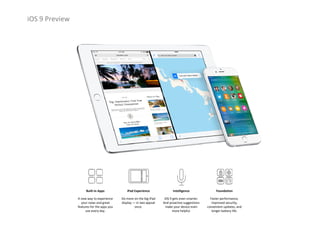
Foundation
Faster performance, 
improved security, 
convenient updates, and 
longer battery life.
Intelligence
iOS 9 gets even smarter. 
And proactive suggestions 
make your device even 
more helpful.
iPad Experience
Do more on the big iPad
display — in two appsat
once.
Built‐in Apps
A new way to experience 
your news and great 
features for the apps you 
use every day.
iOS 9 Preview
Apps that help you do more                  
every day.
The powerful built‐in apps on your iPhone and iPad are designed for the 
essential things you use them for every day — mail, messages, web 
browsing, maps, making notes, and so much more. iOS 9 brings key 
enhancements to several of these apps, and introduces a brand‐new one 
that will change how you experience news.
iOS 9 Preview
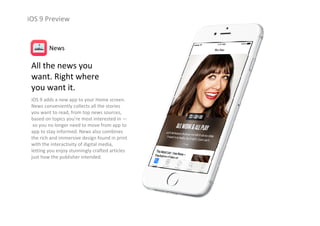
All the news you                      
want. Right where                    
you want it.
iOS 9 adds a new app to your Home screen. 
News conveniently collects all the stories 
you want to read, from top news sources, 
based on topics you’re most interested in —
so you no longer need to move from app to 
app to stay informed. News also combines 
the rich and immersive design found in print 
with the interactivity of digital media, 
letting you enjoy stunningly crafted articles 
just how the publisher intended.
News
iOS 9 Preview
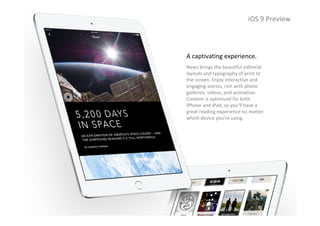
A captivating experience.
News brings the beautiful editorial 
layouts and typography of print to 
the screen. Enjoy interactive and 
engaging stories, rich with photo 
galleries, videos, and animation. 
Content is optimized for both 
iPhone and iPad, so you’ll have a 
great reading experience no matter 
which device you’re using.
iOS 9 Preview
iOS 9 Preview
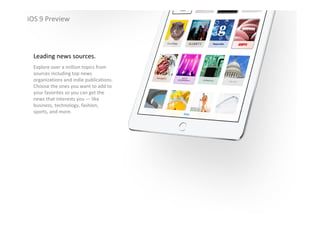
Leading news sources.
Explore over a million topics from 
sources including top news 
organizations and indie publications. 
Choose the ones you want to add to 
your favorites so you can get the 
news that interests you — like 
business, technology, fashion, 
sports, and more.
iOS 9 Preview
iOS 9 Preview
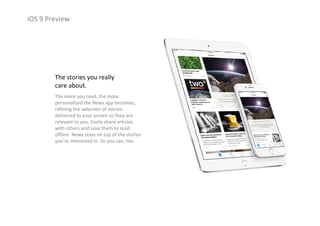
The stories you really 
care about.
The more you read, the more 
personalized the News app becomes, 
refining the selection of stories 
delivered to your screen so they are 
relevant to you. Easily share articles 
with others and save them to read 
offline. News stays on top of the stories 
you’re interested in. So you can, too.
iOS 9 Preview
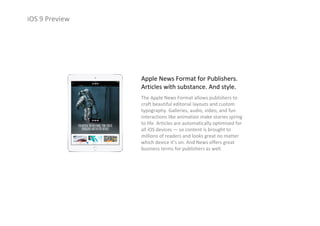
Apple News Format for Publishers.
Articles with substance. And style.
The Apple News Format allows publishers to 
craft beautiful editorial layouts and custom 
typography. Galleries, audio, video, and fun 
interactions like animation make stories spring 
to life. Articles are automatically optimized for 
all iOS devices — so content is brought to 
millions of readers and looks great no matter 
which device it’s on. And News offers great 
business terms for publishers as well.
iOS 9 Preview
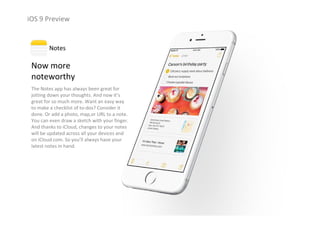
Now more                 
noteworthy
The Notes app has always been great for 
jotting down your thoughts. And now it’s 
great for so much more. Want an easy way 
to make a checklist of to‐dos? Consider it 
done. Or add a photo, map,or URL to a note. 
You can even draw a sketch with your finger. 
And thanks to iCloud, changes to your notes 
will be updated across all your devices and 
on iCloud.com. So you’ll always have your 
latest notes in hand.
Notes
iOS 9 Preview
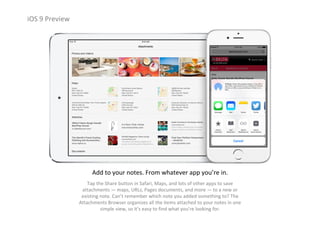
Add to your notes. From whatever app you’re in.
Tap the Share button in Safari, Maps, and lots of other apps to save 
attachments — maps, URLs, Pages documents, and more — to a new or 
existing note. Can’t remember which note you added something to? The 
Attachments Browser organizes all the items attached to your notes in one 
simple view, so it’s easy to find what you’re looking for.
iOS 9 Preview
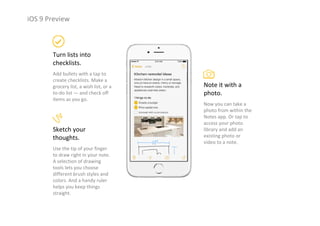
Turn lists into 
checklists.
Add bullets with a tap to 
create checklists. Make a 
grocery list, a wish list, or a 
to‐do list — and check off 
items as you go.
Note it with a 
photo.
Now you can take a 
photo from within the 
Notes app. Or tap to 
access your photo 
library and add an 
existing photo or 
video to a note.
Sketch your 
thoughts.
Use the tip of your finger 
to draw right in your note. 
A selection of drawing 
tools lets you choose 
different brush styles and 
colors. And a handy ruler 
helps you keep things 
straight.
iOS 9 Preview
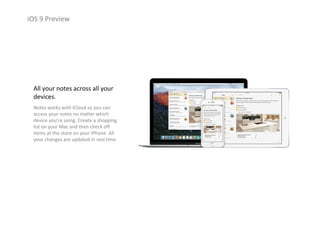
All your notes across all your 
devices.
Notes works with iCloud so you can 
access your notes no matter which 
device you’re using. Create a shopping 
list on your Mac and then check off 
items at the store on your iPhone. All 
your changes are updated in real time.
iOS 9 Preview
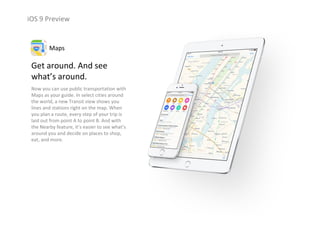
Get around. And see 
what’s around.
Now you can use public transportation with 
Maps as your guide. In select cities around 
the world, a new Transit view shows you 
lines and stations right on the map. When 
you plan a route, every step of your trip is 
laid out from point A to point B. And with 
the Nearby feature, it’s easier to see what’s 
around you and decide on places to shop, 
eat, and more.
Maps
iOS 9 Preview
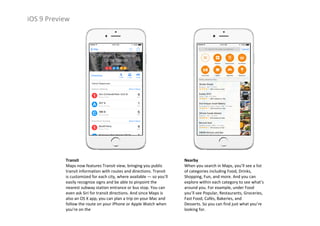
Nearby
When you search in Maps, you’ll see a list 
of categories including Food, Drinks, 
Shopping, Fun, and more. And you can 
explore within each category to see what’s 
around you. For example, under Food 
you’ll see Popular, Restaurants, Groceries, 
Fast Food, Cafés, Bakeries, and 
Desserts. So you can find just what you’re 
looking for.
Transit
Maps now features Transit view, bringing you public 
transit information with routes and directions. Transit 
is customized for each city, where available — so you’ll 
easily recognize signs and be able to pinpoint the 
nearest subway station entrance or bus stop. You can 
even ask Siri for transit directions. And since Maps is 
also an OS X app, you can plan a trip on your Mac and 
follow the route on your iPhone or Apple Watch when 
you’re on the
iOS 9 Preview
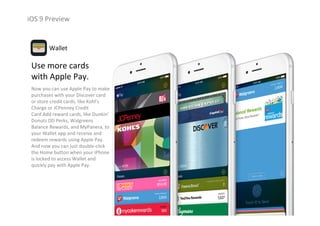
Use more cards 
with Apple Pay.
Now you can use Apple Pay to make 
purchases with your Discover card 
or store credit cards, like Kohl’s 
Charge or JCPenney Credit 
Card.Add reward cards, like Dunkin’
Donuts DD Perks, Walgreens 
Balance Rewards, and MyPanera, to 
your Wallet app and receive and 
redeem rewards using Apple Pay. 
And now you can just double‐click 
the Home button when your iPhone
is locked to access Wallet and 
quickly pay with Apple Pay. 
Wallet
iOS 9 Preview
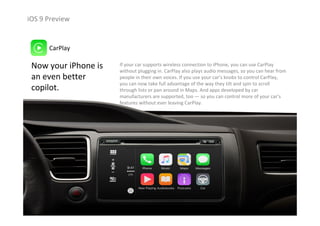
Now your iPhone is 
an even better 
copilot.
CarPlay
If your car supports wireless connection to iPhone, you can use CarPlay
without plugging in. CarPlay also plays audio messages, so you can hear from 
people in their own voices. If you use your car’s knobs to control CarPlay, 
you can now take full advantage of the way they tilt and spin to scroll 
through lists or pan around in Maps. And apps developed by car 
manufacturers are supported, too — so you can control more of your car’s 
features without ever leaving CarPlay.
iOS 9 Preview
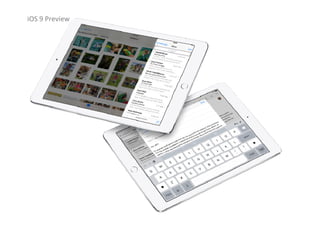
Double up on productivity                       
with iPad.
Slide Over, Split View, and Picture in Picture give you new ways to 
multitask on iPad. New QuickType features make formatting and text 
selection even easier — and put shortcuts right at your fingertips.
iOS 9 Preview
iOS 9 Preview
Do this.                  
While you do that.
Multitasking
Your iPad is great for work. And for play. For 
creating incredible designs or powerful 
presentations. For building fun slideshows or 
video chatting with loved ones. And for tons 
of other stuff. Now you can make even 
better use of its large screen to do two of 
those things — at the same time. 
iOS 9 Preview
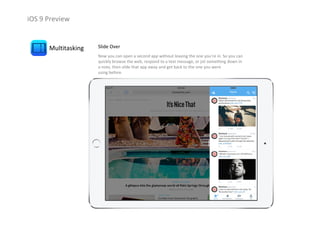
Multitasking Slide Over
Now you can open a second app without leaving the one you’re in. So you can 
quickly browse the web, respond to a text message, or jot something down in 
a note, then slide that app away and get back to the one you were                     
using before.
iOS 9 Preview
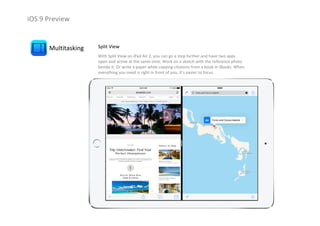
Multitasking Split View
With Split View on iPad Air 2, you can go a step further and have two apps 
open and active at the same time. Work on a sketch with the reference photo 
beside it. Or write a paper while copying citations from a book in iBooks. When 
everything you need is right in front of you, it’s easier to focus.
iOS 9 Preview
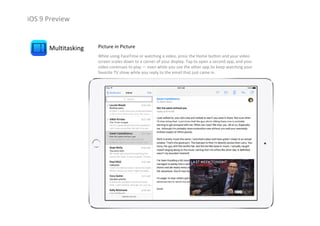
Multitasking Picture in Picture
While using FaceTime or watching a video, press the Home button and your video 
screen scales down to a corner of your display. Tap to open a second app, and your 
video continues to play — even while you use the other app.So keep watching your 
favorite TV show while you reply to the email that just came in.
iOS 9 Preview
Commands at               
your fingertips.
QuickType
Shape up your text in no time with an all‐new 
Shortcut Bar, convenient editing tools, and a 
handy new way to select text with Multi‐Touch 
gestures. And now when you use a wireless 
keyboard with your iPad, you can enjoy even 
more keyboard shortcuts.
iOS 9 Preview
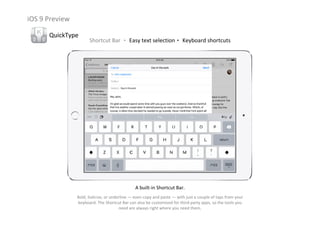
QuickType
Shortcut Bar ‧ Easy text selection‧ Keyboard shortcuts
A built‐in Shortcut Bar.
Bold, italicize, or underline — even copy and paste — with just a couple of taps from your 
keyboard. The Shortcut Bar can also be customized for third‐party apps, so the tools you 
need are always right where you need them.
iOS 9 Preview
QuickType
Shortcut Bar ‧ Easy text selection‧ Keyboard shortcuts
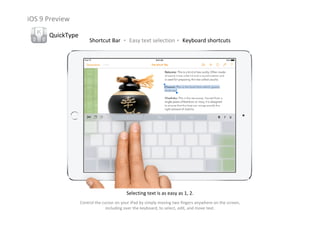
Selecting text is as easy as 1, 2.
Control the cursor on your iPad by simply moving two fingers anywhere on the screen, 
including over the keyboard, to select, edit, and move text.
iOS 9 Preview
QuickType
Shortcut Bar ‧ Easy text selection‧ Keyboard shortcuts
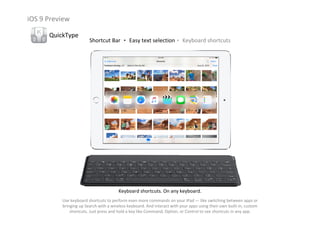
Keyboard shortcuts. On any keyboard.
Use keyboard shortcuts to perform even more commands on your iPad — like switching between apps or 
bringing up Search with a wireless keyboard. And interact with your apps using their own built‐in, custom 
shortcuts. Just press and hold a key like Command, Option, or Control to see shortcuts in any app.
iOS 9 Preview
A smarter way to do just                            
about everything.
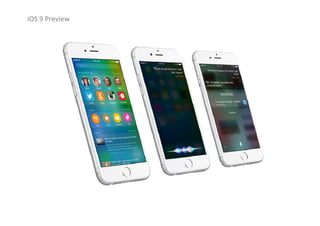
Now Siri can search a wider range of topics for a wider range of answers. It 
understands what you say more accurately and delivers your results faster. 
iOS 9 is smarter in lots of other ways, too — giving you helpful suggestions 
before you even ask.
iOS 9 Preview
iOS 9 Preview
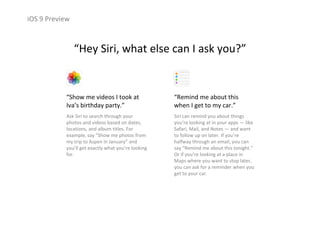
“Show me videos I took at 
Iva’s birthday party.”
Ask Siri to search through your 
photos and videos based on dates, 
locations, and album titles. For 
example, say “Show me photos from 
my trip to Aspen in January” and 
you’ll get exactly what you’re looking 
for.
“Remind me about this 
when I get to my car.”
Siri can remind you about things 
you’re looking at in your apps — like 
Safari, Mail, and Notes — and want 
to follow up on later. If you’re 
halfway through an email, you can 
say “Remind me about this tonight.”
Or if you’re looking at a place in 
Maps where you want to stop later, 
you can ask for a reminder when you 
get to your car.
“Hey Siri, what else can I ask you?”
iOS 9 Preview
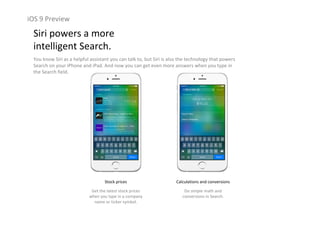
Siri powers a more                                                  
intelligent Search.
You know Siri as a helpful assistant you can talk to, but Siri is also the technology that powers 
Search on your iPhone and iPad. And now you can get even more answers when you type in 
the Search field.
Sports scores and schedules
See how your favorite sports 
team did in its latest game 
and get the current stats.
Weather forecasts
Get up‐to‐date weather 
forecasts for cities around the 
world.
iOS 9 Preview
Siri powers a more                                                  
intelligent Search.
You know Siri as a helpful assistant you can talk to, but Siri is also the technology that powers 
Search on your iPhone and iPad. And now you can get even more answers when you type in 
the Search field.
Stock prices
Get the latest stock prices 
when you type in a company 
name or ticker symbol.
Calculations and conversions
Do simple math and 
conversions in Search.
iOS 9 Preview
Siri powers a more                                                  
intelligent Search.
You know Siri as a helpful assistant you can talk to, but Siri is also the technology that powers 
Search on your iPhone and iPad. And now you can get even more answers when you type in 
the Search field.
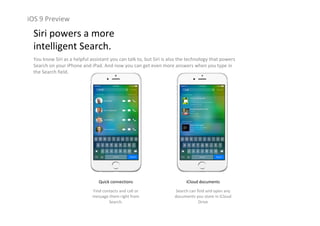
Quick connections
Find contacts and call or 
message them right from 
Search.
iCloud documents
Search can find and open any 
documents you store in iCloud
Drive
iOS 9 Preview
Siri powers a more                                                  
intelligent Search.
You know Siri as a helpful assistant you can talk to, but Siri is also the technology that powers 
Search on your iPhone and iPad. And now you can get even more answers when you type in 
the Search field.
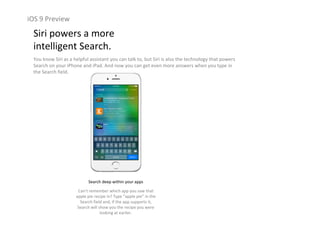
Search deep within your apps
Can’t remember which app you saw that 
apple pie recipe in? Type “apple pie” in the 
Search field and, if the app supports it, 
Search will show you the recipe you were 
looking at earlier.
iOS 9 Preview
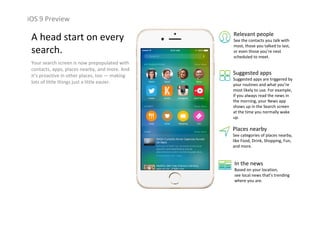
A head start on every 
search.
Your search screen is now prepopulated with 
contacts, apps, places nearby, and more. And 
it’s proactive in other places, too — making 
lots of little things just a little easier.
Relevant people
See the contacts you talk with 
most, those you talked to last, 
or even those you’re next 
scheduled to meet.
Suggested apps
Suggested apps are triggered by 
your routines and what you’re 
most likely to use. For example, 
if you always read the news in 
the morning, your News app 
shows up in the Search screen 
at the time you normally wake 
up.
Places nearby
See categories of places nearby, 
like Food, Drink, Shopping, Fun, 
and more.
In the news
Based on your location, 
see local news that’s trending 
where you are.
iOS 9 Preview
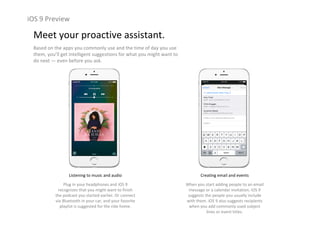
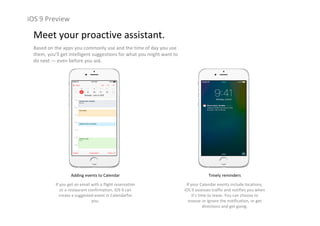
Meet your proactive assistant.
Based on the apps you commonly use and the time of day you use 
them, you’ll get intelligent suggestions for what you might want to 
do next — even before you ask.
Listening to music and audio
Plug in your headphones and iOS 9 
recognizes that you might want to finish 
the podcast you started earlier. Or connect 
via Bluetooth in your car, and your favorite 
playlist is suggested for the ride home.
Creating email and events
When you start adding people to an email 
message or a calendar invitation, iOS 9 
suggests the people you usually include 
with them. iOS 9 also suggests recipients 
when you add commonly used subject 
lines or event titles.
iOS 9 Preview
Meet your proactive assistant.
Based on the apps you commonly use and the time of day you use 
them, you’ll get intelligent suggestions for what you might want to 
do next — even before you ask.
Adding events to Calendar
If you get an email with a flight reservation 
or a restaurant confirmation, iOS 9 can 
create a suggested event in Calendarfor
you.
Timely reminders
If your Calendar events include locations, 
iOS 9 assesses traffic and notifies you when 
it’s time to leave. You can choose to 
snooze or ignore the notification, or get 
directions and get going.
iOS 9 Preview
Meet your proactive assistant.
Based on the apps you commonly use and the time of day you use 
them, you’ll get intelligent suggestions for what you might want to 
do next — even before you ask.
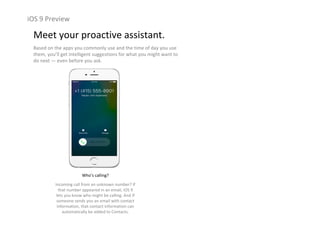
Who’s calling?
Incoming call from an unknown number? If 
that number appeared in an email, iOS 9 
lets you know who might be calling. And if 
someone sends you an email with contact 
information, that contact information can 
automatically be added to Contacts.
iOS 9 Preview
Engineered to perform.                             
At every level.
Under‐the‐hood refinements bring you more responsive performance, 
easier updates, better battery life, and tighter security. So your device 
works that much better — for everything you do with it.
iOS 9 Preview
iOS 9 Preview
Smaller, more convenient 
updates.
iOS 9 does even more to efficiently 
stream new updates to your device 
without having to first download and 
unpack them — which means you don’t 
need as much free space to update. And 
when it’s time for an update, you’ll get 
new notification options that let your 
device update while you sleep or when 
you use it least.
Even longer battery life.
Across the entire operating system, apps 
and key technologies have been made 
more efficient to trim battery usage 
wherever possible — so you get more 
battery life for the things you do every 
day. Thanks to ambient light and 
proximity sensors, your iPhone knows if 
it’s facedown on the table and prevents 
the screen from turning on, even when 
you receive a notification. And the new 
Low Power mode lets you extend your 
battery life even further.
iOS 9 Preview
1hour
OF ADDITIONAL TIME BEFORE CHARGING 
Faster and more responsive.
The apps in iOS 9 now take advantage of Metal, making more efficient use of the CPU and GPU to deliver faster 
scrolling, smoother animation, and better overall performance. Email, messages, web pages, and PDFs render 
faster. And multitasking features on iPad feel fluid and natural.
iOS 9 Preview
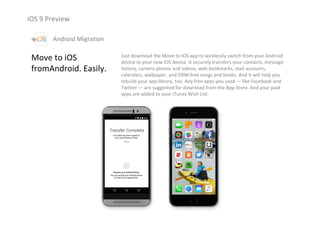
Improved security.
Keeping your devices and Apple ID secure is 
essential to protecting all the personal 
information you store with and access 
through Apple — like your photos, 
documents, messages, email, and so much 
more. iOS 9 advances security by 
strengthening the passcode that protects 
your devices, and by making it harder for 
others to get unauthorized access to your 
Apple ID account. These new security 
features are easy for you to use. But they 
make it much harder for anyone else to 
access your personal information.
Six‐digit passcodes
The default for passcodes on your Touch ID–
enabled iPhone and iPad will now be six digits 
instead of four. If you use Touch ID, it’s a change 
you’ll hardly notice. But with one million possible 
combinations — instead of 10,000 — your 
passcode will be a lot tougher to crack.
Two‐factor authentication
A password alone is not always enough to keep your 
account secure. With two‐factor authentication, when 
you sign in from a new browser or on a new device, 
you’ll be prompted for a verification code. This code is 
automatically displayed on your other Apple devices or 
sent to your phone. Enter the code and you’re quickly 
signed in — and any unauthorized users are kept out.
iOS 9 Preview
Move to iOS
fromAndroid. Easily.
Just download the Move to iOS app to wirelessly switch from your Android 
device to your new iOS device. It securely transfers your contacts, message 
history, camera photos and videos, web bookmarks, mail accounts,
calendars, wallpaper, and DRM‐free songs and books. And it will help you 
rebuild your app library, too. Any free apps you used — like Facebook and 
Twitter — are suggested for download from the App Store. And your paid 
apps are added to your iTunes Wish List. 
Android Migration
iOS 9 Preview
Help make iOS 9 even better.
The Apple Beta Software Program gives 
you a sneakpeek at iOS 9 before it 
launches. By participating in the program, 
you’ll be able to try out prerelease 
versions of iOS 9 and let us know what 
you think.
More power for developers.
iOS 9 gives developers APIs and services that 
enable new categories of apps and features. 
Multitasking and gaming APIs help enhance app 
functionality and create immersive games. 
Expanded search capabilities, wireless CarPlay, and 
new support for HomeKit and HealthKit extend iOS
to more places than ever before. Swift 2 brings 
improvements to compile speed and execution 
performance, which means smoother animation 
and faster response times. And later this year, 
Swift will be available as open source.
iOS 9 Preview
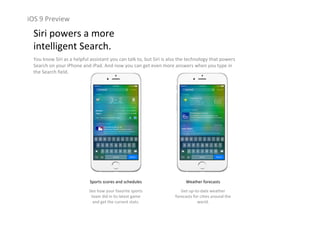
iOS 9 is compatible with these devices.
iPhone iPad iPod
iPhone 4s iPhone 5 iPhone 5c
iPhone 5s iPhone 6 iPhone 6 Plus iPad 2 iPad 3rd 
Generation
iPad 4th 
Generation
iPad Air 2iPad Air
iPad mini 2iPad mini iPad mini 3
iPod touch    
5th Generation
Apple iOS9 Preview

Apple iOS9 Preview