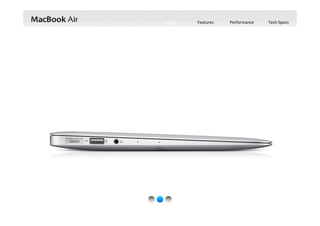
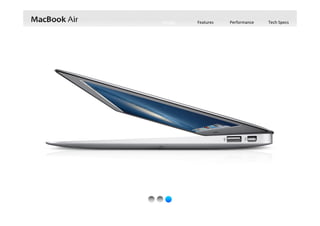
It’s just 0.68 inch thin and weighs as little as 2.38 pounds. 
But a sturdy aluminum unibody design makes MacBook Air 
tough and durable, too.
MacBook Air now features all‐day battery life, fourth‐generation Intel Core processors
with faster graphics, faster flash storage, and new 802.11ac Wi‐Fi.
It’s loaded with great built‐in apps. And you’ll find 
thousands more at the Mac App Store.
Intuitive, powerful, easy to 
use. It’s the world’s most 
advanced operating system.
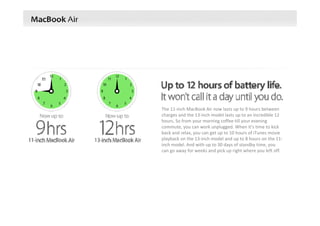
The 11‐inch MacBook Air now lasts up to 9 hours between 
charges and the 13‐inch model lasts up to an incredible 12 
hours. So from your morning coffee till your evening 
commute, you can work unplugged. When it’s time to kick 
back and relax, you can get up to 10 hours of iTunes movie 
playback on the 13‐inch model and up to 8 hours on the 11‐
inch model. And with up to 30 days of standby time, you 
can go away for weeks and pick up right where you left off.
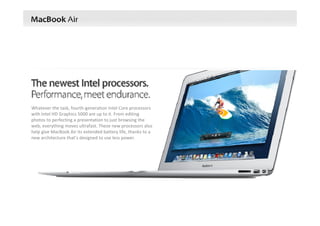
Whatever the task, fourth‐generation Intel Core processors 
with Intel HD Graphics 5000 are up to it. From editing 
photos to perfecting a presentation to just browsing the 
web, everything moves ultrafast. These new processors also 
help give MacBook Air its extended battery life, thanks to a 
new architecture that’s designed to use less power.
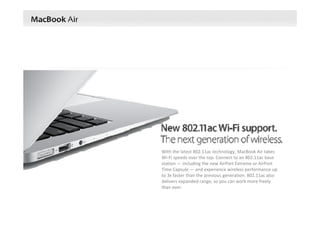
With the latest 802.11ac technology, MacBook Air takes
Wi‐Fi speeds over the top. Connect to an 802.11ac base 
station — including the new AirPort Extreme or AirPort 
Time Capsule — and experience wireless performance up 
to 3x faster than the previous generation. 802.11ac also 
delivers expanded range, so you can work more freely 
than ever.
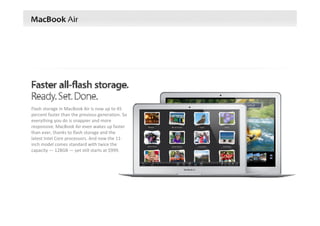
Flash storage in MacBook Air is now up to 45 
percent faster than the previous generation. So 
everything you do is snappier and more 
responsive. MacBook Air even wakes up faster 
than ever, thanks to flash storage and the 
latest Intel Core processors. And now the 11‐
inch model comes standard with twice the 
capacity — 128GB — yet still starts at $999.
Design Features Performance Tech Specs
Sure, MacBook Air is unbelievably thin and light. But we also 
designed it to be powerful, capable, durable, and enjoyable to use, 
with enough battery life to get you through the day. That’s the 
difference between a notebook that’s simply thin and light and one 
that’s so much more.
Design Features Performance Tech Specs
Flash storage helps make MacBook Air incredibly thin and light — under an inch and as little as 2.38 pounds. Flash is 
also solid state, meaning there are no moving parts. Which makes it reliable, durable, and quiet. And it takes up 
much less space than a traditional hard drive — about 90 percent less, in fact. That creates room for other important 
things, like a bigger battery. So you have a notebook that weighs almost nothing and runs all day long. Now that’s 
mobility mastered.
Design Features Performance Tech Specs
Multi‐Touch technology is part of practically every Apple product. It’s the best and most personal way to interact  
with your devices. And the optimal way to experience Multi‐Touch on a notebook is through a trackpad. That’s 
precisely the case with MacBook Air. The trackpad’s spacious, all‐glass surface doesn’t have a button because the 
whole thing is the button. And with Multi‐Touch gestures in OS X, you can interact with MacBook Air in ways that feel 
more intuitive and realistic than ever before.
Design Features Performance Tech Specs
Anyone can try to make a notebook that’s thin and light. Success comes in doing it without cutting corners. That’s 
why MacBook Air features a full‐size keyboard that’s just as comfortable to type on as a desktop keyboard. And the 
keyboard is backlit, so you can type in low‐light conditions with ease. A built‐in sensor detects changes in the 
ambient lighting and adjusts the keyboard and display brightness automatically, giving you the perfect illumination 
in any environment.
Design Features Performance Tech Specs
If you looked inside MacBook Air, you’d see something remarkable: how much space we devoted to 
the battery. That’s thanks to smaller components such as flash storage. And when the goal is to 
design the perfect notebook for everyday use, giving priority to the battery just makes sense. With 
the 11‐inch MacBook Air, you’ll get up to 9 hours of battery life — or up to 8 hours when watching 
iTunes movies. And the 13‐inch model lasts up to a staggering 12 hours — or up to 10 hours of iTunes 
movie playback. Put MacBook Air to sleep for more than 3 hours, and it enters standby mode. That 
means you can come back to MacBook Air up to an entire month later and it wakes in an instant. 
Time is on your side, courtesy of MacBook Air.
Design Features Performance Tech Specs
MacBook Air features a unibody design for both the main enclosure and the display. Unibody
construction means a higher‐precision, less complex design with fewer parts. That translates
to a notebook that’s exceptionally thin and light, yet durable enough to handle the rigors of 
everyday use. In addition, MacBook Air offers innovations you won’t find anywhere else — like 
the MagSafe 2 power connector, which breaks cleanly away from the notebook if you 
accidentally trip over the power cord.
MegSafe 2 Power Connector
The magnetic power connector attaches
securely and detaches cleanly.
Design Features Performance Tech Specs
MacBook Air features a unibody design for both the main enclosure and the display. Unibody
construction means a higher‐precision, less complex design with fewer parts. That translates
to a notebook that’s exceptionally thin and light, yet durable enough to handle the rigors of 
everyday use. In addition, MacBook Air offers innovations you won’t find anywhere else — like 
the MagSafe 2 power connector, which breaks cleanly away from the notebook if you 
accidentally trip over the power cord.
MegSafe 2 Power Connector
The magnetic power connector attaches
securely and detaches cleanly.
Design Features Performance Tech Specs
Fourth‐generation Intel Core processors in MacBook Air give you more time to do more things. 
Add that to an array of other smart and efficient features, and you have an incredible amount of 
power in your hands. While carrying next to nothing. 
Make the most of your day. 
From startup to sundown.
Thunderbolt and 
USB 3
Flash Storage
Multi‐Touch Trackpad Backlit Keyboard
802.11ac WiFi
Display, Camera and 
Mics
All‐Day Battery Processors and 
Graphics
Design Features Performance Tech Specs
Up to 12hours of battery life
Power through your whole day.
Thanks to compact all‐flash storage in MacBook Air, there’s plenty of room for a big battery. 
Working together with the new power‐efficient Intel Core architecture, this battery can post 
some impressive numbers. Now the 13‐inch model gets up to 12 hours of battery life on a 
single charge and the 11‐inch model gets up to 9 hours. That gives you all‐day power for 
word processing, presentations, email, and more. And if you’re watching iTunes movies, you 
get up to 10 hours of playback time on the 13‐inch model and up to 8 hours on the 11‐inch. 
Put MacBook Air to sleep for more than 3 hours, and it enters standby mode to conserve 
battery life for up to 30 days.1 And if you enable Power Nap, you’ll continue to receive new 
email and calendar invitations while your computer is asleep. 
Design Features Performance Tech Specs
Forth‐generation Intel Core processors.
Performance, meet endurance.
MacBook Air is powered by the all‐new fourth‐generation Intel Core i5 and i7 processors. This 
ultra‐efficient architecture was designed to use less power and still deliver high performance. 
Which means not only can you do whatever you want — you can keep doing it for longer than 
before. In addition, the new Intel HD Graphics 5000 offers up to 40 percent faster graphics —
performance you’ll especially notice with games and other graphics‐intensive tasks.
Design Features Performance Tech Specs
Up to 3x faster Wi‐Fi.
802.11ac. The new definition of fast.
MacBook Air now supports ultrafast 802.11ac Wi‐Fi. When connected to an 
802.11ac base station — including the new AirPort Extreme and AirPort Time 
Capsule — wireless performance is up to 3x faster than with the previous 
generation of MacBook Air.3 And your Wi‐Fi range improves as well. With 
Bluetooth technology, you can connect MacBook Air to Bluetooth‐enabled 
devices like speakers and headphones. Even without all the wires, you’re 
totally connected. 
Design Features Performance Tech Specs
Faster all‐flash storage.
Ready. Set. Done.
Part of what makes MacBook Air so responsive is that it’s 
designed entirely around flash storage. Not only does this 
make MacBook Air much lighter and more portable than 
traditional notebooks, it also provides faster access to 
data. Available in capacities up to 512GB, this next‐
generation flash storage is up to 9x faster than a 
traditional 5400‐rpm notebook hard drive.4 And it’s up to 
45 percent faster than the flash storage in the previous‐
generation MacBook Air.5 So when you flip open 
MacBook Air, it’s ready to go right away. Even after a 
month in standby mode, the screen springs to life. As if 
this big bump in performance wasn’t enough, the 11‐inch 
model now comes standard with double the capacity —
128GB. 
Design Features Performance Tech Specs
Thunderbolt and USB 3.
Make some powerful connections.
With the lightning‐fast Thunderbolt port, you can 
connect your MacBook Air to the latest devices 
and displays, like the Apple Thunderbolt Display. 
But that’s not the whole story. MacBook Air also 
comes equipped with two USB 3 ports, so you can 
connect the latest USB 3 devices and all your USB 
2 devices as well. With just a few connections, 
MacBook Air transforms from an ultraportable 
notebook to a complete workstation.
Design Features Performance Tech Specs
Thunderbolt and USB 3.
Make some powerful connections.
Left Side Right Side
MegSafe 2 Dual micsHeadphoneUSB 3
Design Features Performance Tech Specs
Thunderbolt and USB 3.
Make some powerful connections.
Left Side Right Side
ThunderboltUSB 3
SDXC card slot ThunderboltUSB 3
Design Features Performance Tech Specs
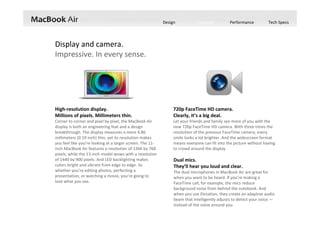
Display and camera.
Impressive. In every sense.
Make FaceTime calls from your MacBook Air to an iPhone 4 or later,
iPod touch, or another Mac running FaceTime for Mac. 
Design Features Performance Tech Specs
High‐resolution display.
Millions of pixels. Millimeters thin.
Corner to corner and pixel by pixel, the MacBook Air 
display is both an engineering feat and a design 
breakthrough. The display measures a mere 4.86 
millimeters (0.19 inch) thin, yet its resolution makes 
you feel like you’re looking at a larger screen. The 11‐
inch MacBook Air features a resolution of 1366 by 768 
pixels, while the 13‐inch model wows with a resolution 
of 1440 by 900 pixels. And LED backlighting makes 
colors bright and vibrant from edge to edge. So 
whether you’re editing photos, perfecting a 
presentation, or watching a movie, you’re going to 
love what you see.
720p FaceTime HD camera.
Clearly, it’s a big deal.
Let your friends and family see more of you with the 
new 720p FaceTime HD camera. With three times the 
resolution of the previous FaceTime camera, every 
smile looks a lot brighter. And the widescreen format 
means everyone can fit into the picture without having 
to crowd around the display.
Display and camera.
Impressive. In every sense.
Dual mics.
They’ll hear you loud and clear.
The dual microphones in MacBook Air are great for 
when you want to be heard. If you’re making a 
FaceTime call, for example, the mics reduce 
background noise from behind the notebook. And 
when you use Dictation, they create an adaptive audio 
beam that intelligently adjusts to detect your voice —
instead of the noise around you.
Design Features Performance Tech Specs
Multi‐Touch Trackpad.
It goes hand in hand with OS X
Click
Press down anywhere 
to click. Or, with Tap 
to Click enabled, tap 
the trackpad.
Double‐click
Press down two times 
anywhere. Or, with 
Tap to Click enabled, 
double‐tap the 
trackpad.
View Mission Control
Swipe up on the 
trackpad to get a 
bird’s‐eye view of 
everything running on 
your Mac.
Swipe to navigate
Flip through web 
pages, documents, 
and more like 
thumbing pages 
in a book.
Two‐finger scroll
Slide two fingers up 
or down the trackpad
to scroll through 
documents, websites, 
and more.
Tap to zoom
Double‐tap the 
trackpad with two 
fingers to magnify a 
web page or PDF.
The Multi‐Touch gestures in OS X make everything you do on 
MacBook Air more intuitive, direct, and fun. And the spacious 
Multi‐Touch trackpad is perfectly designed for them, whether 
it’s a three‐finger swipe to activate Mission Control or a four‐
finger pinch to see all your apps in Launchpad. Gesture 
responses are smooth and realistic. So when you’re scrolling 
up and down a web page or swiping from one full‐screen app 
to another, it’s almost like you’re touching what you’re seeing.
Design Features Performance Tech Specs
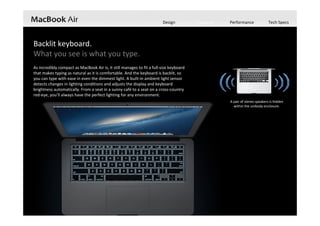
Backlit keyboard.
What you see is what you type.
As incredibly compact as MacBook Air is, it still manages to fit a full‐size keyboard 
that makes typing as natural as it is comfortable. And the keyboard is backlit, so 
you can type with ease in even the dimmest light. A built‐in ambient light sensor 
detects changes in lighting conditions and adjusts the display and keyboard 
brightness automatically. From a seat in a sunny café to a seat on a cross‐country 
red‐eye, you’ll always have the perfect lighting for any environment.
A pair of stereo speakers is hidden 
within the unibody enclosure. 
Design Features Performance Tech Specs
Your content. On all your devices.
iCloud stores your content and lets you access your music, photos, calendars, contacts, documents, and 
more from whatever device you’re on. So if you take a picture with your iPhone or make changes to your 
meeting schedule on your iPad, iCloud makes sure everything appears on your Mac, too. And it works both 
ways — create a to‐do list on your Mac and you can make edits to it on your iPhone.
Design Features Performance Tech Specs
Your documents on all your devices. Your mail on all your devices. Your contacts on all your devices. Your calendars on all your devices. iTunes in the Cloud. Your music on all your devices. Photo Stream. Your photos on all your devices. 
iCloud does more than store your content —
it lets you access your music, photos, 
calendars, contacts, documents, and more, 
from whatever device you’re on. And it’s 
built into every new iOS device and every 
new Mac 
Design Features Performance Tech Specs
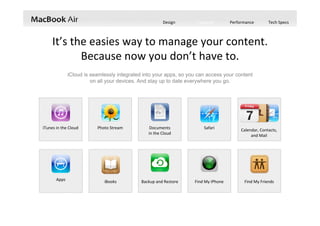
iCloud is seamlessly integrated into your apps, so you can access your content
on all your devices. And stay up to date everywhere you go.
It’s the easies way to manage your content.  
Because now you don’t have to.
iTunes in the Cloud Photo Stream Documents             
in the Cloud
Apps Backup and Restore
Calendar, Contacts, 
and Mail
iBooks Find My iPhone Find My Friends
Safari
Design Features Performance Tech Specs
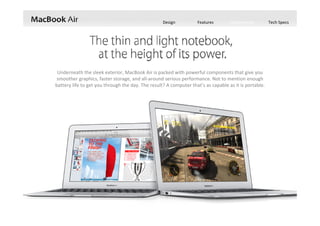
Underneath the sleek exterior, MacBook Air is packed with powerful components that give you 
smoother graphics, faster storage, and all‐around serious performance. Not to mention enough 
battery life to get you through the day. The result? A computer that’s as capable as it is portable.
Design Features Performance Tech Specs
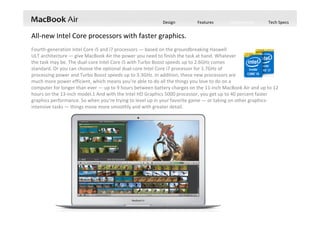
Fourth‐generation Intel Core i5 and i7 processors — based on the groundbreaking Haswell
ULT architecture — give MacBook Air the power you need to finish the task at hand. Whatever    
the task may be. The dual‐core Intel Core i5 with Turbo Boost speeds up to 2.6GHz comes   
standard. Or you can choose the optional dual‐core Intel Core i7 processor for 1.7GHz of                      
processing power and Turbo Boost speeds up to 3.3GHz. In addition, these new processors are                                   
much more power efficient, which means you’re able to do all the things you love to do on a                
computer for longer than ever — up to 9 hours between battery charges on the 11‐inch MacBook Air and up to 12 
hours on the 13‐inch model.1 And with the Intel HD Graphics 5000 processor, you get up to 40 percent faster 
graphics performance. So when you’re trying to level up in your favorite game — or taking on other graphics‐
intensive tasks — things move more smoothly and with greater detail.
All‐new Intel Core processors with faster graphics.
Design Features Performance Tech Specs
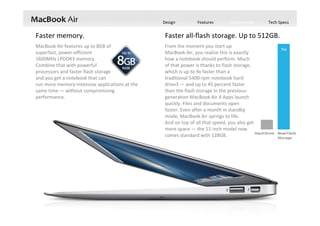
Faster memory. Faster all‐flash storage. Up to 512GB.
MacBook Air features up to 8GB of                  
superfast, power‐efficient                                   
1600MHz LPDDR3 memory.                                   
Combine that with powerful                              
processors and faster flash storage                             
and you get a notebook that can                                 
run more memory‐intensive applications at the 
same time — without compromising 
performance.
From the moment you start up                                   
MacBook Air, you realize this is exactly                             
how a notebook should perform. Much                             
of that power is thanks to flash storage,                     
which is up to 9x faster than a                                 
traditional 5400‐rpm notebook hard                                     
drive3 — and up to 45 percent faster                                
than the flash storage in the previous‐
generation MacBook Air.4 Apps launch                    
quickly. Files and documents open                               
faster. Even after a month in standby                           
mode, MacBook Air springs to life.                                     
And on top of all that speed, you also get                      
more space — the 11‐inch model now                        
comes standard with 128GB. 
Design Features Performance Tech Specs
High‐speed Thunderbolt and USB 3.
A high‐speed Thunderbolt port and two USB 3 ports allow MacBook Air to transfer data at 
lightning‐fast speeds and connect to displays like the Apple Thunderbolt Display. So with a 
few connections, you can turn a highly portable notebook into a highly versatile workstation.
Design Features Performance Tech Specs
13.3‐inch (diagonal) LED‐backlit glossy
widescreen display with support for
millions of colors
Supported resolutions:
1440 by 900 (native), 1280 by 800, 1152
by 720, and 1024 by 640 pixels at 16:10
aspect ratio and 1024 by 768 and 800 by
600 pixels at 4:3 aspect ratio
11.6‐inch (diagonal) LED‐backlit glossy
widescreen display with support for
millions of colors
Supported resolutions:
1366 by 768 (native), 1344 by 756, and
1280 by 720 pixels at 16:9 aspect ratio;
1152 by 720 and 1024 by 640 pixels at
16:10 aspect ratio; 1024 by 768 and 800
by 600 pixels at 4:3 aspect ratio
Display
11‐inch MacBook Air 13‐inch MacBook Air
Size and Weight
Height: 0.11‐0.68 inch (0.3‐1.7 cm) 
Width: 11.8 inches (30 cm) 
Depth: 7.56 inches (19.2 cm) 
Weight: 2.38 pounds (1.08 kg)
Height: 0.11‐0.68 inch (0.3‐1.7 cm) 
Width: 12.8 inches (32.5 cm) 
Depth: 8.94 inches (22.7 cm) 
Weight: 2.96 pounds (1.35 kg)
Design Features Performance Tech Specs
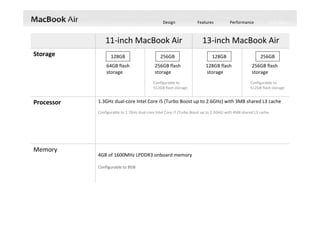
1.3GHz dual‐core Intel Core i5 (Turbo Boost up to 2.6GHz) with 3MB shared L3 cache
Configurable to 1.7GHz dual‐core Intel Core i7 (Turbo Boost up to 3.3GHz) with 4MB shared L3 cache.
Processor
11‐inch MacBook Air 13‐inch MacBook Air
Storage
64GB flash
storage
256GB flash
storage
Configurable to
512GB flash storage
128GB flash
storage
256GB flash
storage
Configurable to
512GB flash storage
Memory
4GB of 1600MHz LPDDR3 onboard memory 
Configurable to 8GB
128GB 256GB 128GB 256GB
Design Features Performance Tech Specs
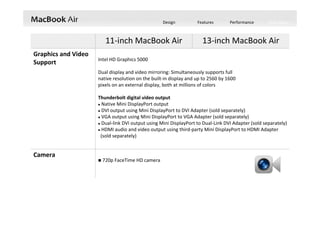
11‐inch MacBook Air 13‐inch MacBook Air
Graphics and Video 
Support Intel HD Graphics 5000 
Dual display and video mirroring: Simultaneously supports full  
native resolution on the built‐in display and up to 2560 by 1600                               
pixels on an external display, both at millions of colors
Thunderbolt digital video output
 Native Mini DisplayPort output
 DVI output using Mini DisplayPort to DVI Adapter (sold separately)
 VGA output using Mini DisplayPort to VGA Adapter (sold separately)
 Dual‐link DVI output using Mini DisplayPort to Dual‐Link DVI Adapter (sold separately)
 HDMI audio and video output using third‐party Mini DisplayPort to HDMI Adapter
(sold separately)
Camera
 720p FaceTime HD camera
Design Features Performance Tech Specs
11‐inch MacBook Air 13‐inch MacBook Air
Connections and 
Expansion
 Two USB 3.0 ports (up to 5 Gbps) 
 Thunderbolt port (up to 10 Gbps)
 MagSafe 2 power port
 Two USB 3.0 ports (up to 5 Gbps) 
 Thunderbolt port (up to 10 Gbps)
 MagSafe 2 power port
 SD card slot
Keyboard and 
Trackpad Full‐size backlit keyboard with 78 (U.S.) or 79 (ISO) keys, including 12 function keys and 
4 arrow keys (inverted “T” arrangement) with ambient light sensor 
Multi‐Touch trackpad for precise cursor control; supports inertial scrolling, pinch,
rotate, swipe, three‐finger swipe, four‐finger swipe, tap, double‐tap, and drag 
capabilities
Design Features Performance Tech Specs
11‐inch MacBook Air 13‐inch MacBook Air
Wireless
Wi‐Fi
802.11ac Wi‐Fi wireless networking; IEEE 802.11a/b/g/n compatible
Bluetooth
Bluetooth 4.0 wireless technology
Audio 
Stereo speakers, 
microphone, and 
headphone. 
 Stereo speakers
 Omnidirectional microphone 
 Headphone port 
 Support for Apple iPhone headset with remote and Microphone
Electrical and 
Operating 
Requirements
 Line voltage: 100‐240V AC 
 Frequency: 50Hz to 60Hz 
 Operating temperature: 50° to 95° F (10° to 35° C) 
 Storage temperature: ‐13° to 113° F (‐24° to 45° C) 
 Relative humidity: 0% to 90% noncondensing
 Maximum operating altitude: 10,000 feet 
 Maximum storage altitude: 15,000 feet 
 Maximum shipping altitude: 35,000 feet
Design Features Performance Tech Specs
11‐inch MacBook Air 13‐inch MacBook Air
Battery and Power
Up to 9 hours wireless web 
Up to 8 hours iTunes
movie playback 
Up to 30 days standby
time
Built‐in 38‐watt‐hour
lithium‐polymer battery 
45W MagSafe 2 Power
Adapter With cable
management;
MagSafe 2 power port
Up to 12 hours wireless web 
Up to 10 hours iTunes
movie playback
Up to 30 days standby
time 
Built‐in 54‐watt‐hour
lithium‐polymer battery 
45W MagSafe 2 Power
Adapter with cable
management;
MagSafe 2 power port 
Design Features Performance Tech Specs
13‐inch MacBook Air 
Design Features Performance Tech Specs
 Intel Haswell‐ULT, MCP package
 Intel Haswell
 Intel Lynx Point‐LP
 Intel DSL3510L, Thunderbolt controller
 Linear Technology LT3957
 Genesys GL3219
 Texas Instruments TPS2557
 Texas Instruments 58873D
13‐inch MacBook Air 
Design Features Performance Tech Specs
 Texas Instruments 51916
 Texas Instruments TPS51980A
 Elpida 8Gb LPDDR3‐1066, 4 chips
 Broadcom BCM15700A2
 SK Hynix 4Gb DDR3L
 MXIC MX25L6406E 
 Texas Instruments Stellaris LM4FS1AH
 NXP CBTL05024BS
 Texas Instruments CD3211
 SMSC EMC1704
 Intersil ISL6259
13‐inch MacBook Air 
Design Features Performance Tech Specs
 SAMSUNG S4LN053X01‐8030 (ARM core) 
PCIe NAND Flash controller
 SAMSUNG K9LDGY8SIC‐XCK0 16 GB 
NAND Flash
 SAMSUNG K4P2G324ED 512 MB memory 
 Broadcom BCM4360 802.11ac WiFi chip
 Skyworks SE5516 dual‐band 802.11 
a/b/g/n/ac WLAN front‐end module  
 Broadcom BCM20702 BT4.0 chip
Flash Storage WiFi/BT Module
13‐inch MacBook Air 
Design Features Performance Tech Specs
13‐inch MacBook Air 
Design Features Performance Tech Specs
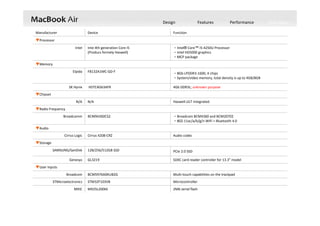
2Mb serial flashMX25L2006EMXIC
MicrocontrollerSTM32F103VB STMicroelectronics
Multi‐touch capabilities on the trackpadBCM5976A0KUB2GBroadcom
▼User Inputs
SDXC card reader controller for 13.3" modelGL3219Genesys
PCIe 2.0 SSD128/256/512GB SSDSAMSUNG/SanDisk
▼Storage
Audio codecCirrus 4208‐CRZCirrus Logic
▼Audio
‧Broadcom BCM4360 and BCM20702
‧802.11ac/a/b/g/n WiFi + Bluetooth 4.0
BCM94360CS2Broadcomm
▼Radio Frequency
Haswell‐ULT integrated.N/AN/A
▼Chipset
4Gb DDR3L; unknown purposeH5TC4G63AFRSK Hynix
‧8Gb LPDDR3‐1600, 4 chips
‧System/video memory, total density is up to 4GB/8GB
F8132A1MC‐GD‐FElpida
▼Memory
‧Intel® Core™ i5‐4250U Processor
‧Intel HD5000 graphics
‧MCP package
Inte 4th generation Core i5
(Producs formely Haswell)
Intel
▼Processor
FunctionDeviceManufacturer
13‐inch MacBook Air 
Design Features Performance Tech Specs
unknownBCM15700A2Broadcom
unknown58873D
unknownCD3211Texas Instruments
Power ICISL6259Intersil
Inverting converterLT3957Linear Technology
64Mb Serial flashMX25L6406EMXIC
Multiplexer/demultiplexer switch chip
‐ A custom multiplexer/demultiplexer switch chip optimized to 
interface
the Thunderbolt/MiniDP connector for Thunderbolt systems. 
‐ Supports 10.3125 Gbit/s Thunderbolt or DisplayPort v1.2 channels.
CBTL05024BS
NXP
Intel Thunderbolt controllerDSL3510LIntel 
Precision Adjustable Current‐Limited Power‐Distribution Switches TPS2557
MicrocontrollerStellaris LM4FS1AH
Power supply for DDR2, DDR3 and DDR3L memory systems TPS51916
Synchronous buck controllerTPS51980A
Texas Instruments 
High‐Side Current‐Sense and Multiple 1°C Temperature Monitor with 
Power Calculation
EMC1704SMSC
▼Others
FunctionDeviceManufacturer
13‐inch MacBook Air 
Design Features Performance Tech Specs
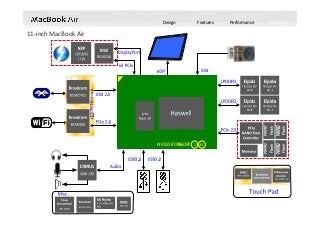
11‐inch MacBook Air 
Design Features Performance Tech Specs
 Intel Haswell‐ULT, MCP package
 Intel Haswell
 Intel Lynx Point‐LP
 Intel DSL3510L, Thunderbolt controller
 Fairchild Semiconductor DD154P 
 Texas Instruments 58873D
11‐inch MacBook Air 
Design Features Performance Tech Specs
 Linear Technology LT3957
 Texas Instruments TPS2557
 NXP CBTL05024BS
 Texas Instruments CD3211
 Texas Instruments TPS51980A
 Texas Instruments Stellaris LM4FS1AH
 Intersil ISL6259
 Texas Instruments 51916
 Micron 25Q064A 13E40; 64Mb serial flash
 Elpida 8Gb LPDDR3‐1066, 4 chips
 Broadcom BCM15700A2
 SK Hynix 4Gb DDR3L
 SMSC EMC1704
11‐inch MacBook Air 
Design Features Performance Tech Specs
11‐inch MacBook Air 
 Broadcom BCM4360 802.11ac WiFi chip
 Skyworks SE5516 dual‐band 802.11 
a/b/g/n/ac WLAN front‐end module  
 Broadcom BCM20702 BT4.0 chip
Flash Storage
 SanDisk 05131 016G 16 GB NAND flash 
(Four chips on each PCB side, total of 8 x 
16 GB = 128 GB) 
 SAMSUNGK4B2G1646E 512 MB memory 
 Marvell 88SS9183 PCIe SSD controller 
WiFi/BT Module
Design Features Performance Tech Specs
11‐inch MacBook Air 
Design Features Performance Tech Specs
11‐inch MacBook Air 
2Mb serial flashMX25L2006EMXIC
MicrocontrollerSTM32F103VB STMicroelectronics
Multi‐touch capabilities on the trackpadBCM5976A0KUB2GBroadcom
▼User Inputs
PCIe 2.0 SSD128/256/512GB SSDSAMSUNG/SanDisk
▼Storage
Audio codecCirrus 4208‐CRZCirrus Logic
▼Audio
‧Broadcom BCM4360 and BCM20702
‧802.11ac/a/b/g/n WiFi + Bluetooth 4.0
BCM94360CS2Broadcomm
▼Radio Frequency
Haswell‐ULT integrated.N/AN/A
▼Chipset
4Gb DDR3L; unknown purposeH5TC4G63AFRSK Hynix
‧8Gb LPDDR3‐1600, 4 chips
‧System/video memory, total density is up to 4GB/8GB
F8132A1MC‐GD‐FElpida
▼Memory
‧Intel® Core™ i5‐4250U Processor
‧Intel HD5000 graphics
‧MCP package
Inte 4th generation Core i5
(Producs formely Haswell)
Intel
▼Processor
FunctionDeviceManufacturer
Design Features Performance Tech Specs
11‐inch MacBook Air 
unknownBCM15700A2Broadcom
unknown58873D
unknownCD3211Texas Instruments
Power ICISL6259Intersil
Inverting converterLT3957Linear Technology
64Mb Serial flash25Q064A 13E40Micron
Multiplexer/demultiplexer switch chip
‐ A custom multiplexer/demultiplexer switch chip optimized to 
interface
the Thunderbolt/MiniDP connector for Thunderbolt systems. 
‐ Supports 10.3125 Gbit/s Thunderbolt or DisplayPort v1.2 channels.
CBTL05024BS
NXP
Intel Thunderbolt controllerDSL3510LIntel 
Precision Adjustable Current‐Limited Power‐Distribution Switches TPS2557
MicrocontrollerStellaris LM4FS1AH
Power supply for DDR2, DDR3 and DDR3L memory systems TPS51916
Synchronous buck controllerTPS51980A
Texas Instruments 
High‐Side Current‐Sense and Multiple 1°C Temperature Monitor with 
Power Calculation
EMC1704SMSC
▼Others
FunctionDeviceManufacturer
Introducing Apple MacBook Air 2013 - 11"&13" Model

Introducing Apple MacBook Air 2013 - 11"&13" Model

  • 4.
  • 5.
  • 6.
  • 7.
  • 8.
  • 9.
  • 10.
    With the latest 802.11ac technology, MacBook Air takes Wi‐Fi speeds over the top. Connect to an 802.11ac base  station — including the new AirPort Extreme or AirPort  Time Capsule —and experience wireless performance up  to 3x faster than the previous generation. 802.11ac also  delivers expanded range, so you can work more freely  than ever.
  • 11.
  • 12.
    Design Features PerformanceTech Specs Sure, MacBook Air is unbelievably thin and light. But we also  designed it to be powerful, capable, durable, and enjoyable to use,  with enough battery life to get you through the day. That’s the  difference between a notebook that’s simply thin and light and one  that’s so much more.
  • 13.
  • 14.
  • 15.
  • 16.
    Design Features PerformanceTech Specs Flash storage helps make MacBook Air incredibly thin and light — under an inch and as little as 2.38 pounds. Flash is  also solid state, meaning there are no moving parts. Which makes it reliable, durable, and quiet. And it takes up  much less space than a traditional hard drive — about 90 percent less, in fact. That creates room for other important  things, like a bigger battery. So you have a notebook that weighs almost nothing and runs all day long. Now that’s  mobility mastered.
  • 17.
    Design Features PerformanceTech Specs Multi‐Touch technology is part of practically every Apple product. It’s the best and most personal way to interact   with your devices. And the optimal way to experience Multi‐Touch on a notebook is through a trackpad. That’s  precisely the case with MacBook Air. The trackpad’s spacious, all‐glass surface doesn’t have a button because the  whole thing is the button. And with Multi‐Touch gestures in OS X, you can interact with MacBook Air in ways that feel  more intuitive and realistic than ever before.
  • 18.
    Design Features PerformanceTech Specs Anyone can try to make a notebook that’s thin and light. Success comes in doing it without cutting corners. That’s  why MacBook Air features a full‐size keyboard that’s just as comfortable to type on as a desktop keyboard. And the  keyboard is backlit, so you can type in low‐light conditions with ease. A built‐in sensor detects changes in the  ambient lighting and adjusts the keyboard and display brightness automatically, giving you the perfect illumination  in any environment.
  • 19.
    Design Features PerformanceTech Specs If you looked inside MacBook Air, you’d see something remarkable: how much space we devoted to  the battery. That’s thanks to smaller components such as flash storage. And when the goal is to  design the perfect notebook for everyday use, giving priority to the battery just makes sense. With  the 11‐inch MacBook Air, you’ll get up to 9 hours of battery life — or up to 8 hours when watching  iTunes movies. And the 13‐inch model lasts up to a staggering 12 hours — or up to 10 hours of iTunes  movie playback. Put MacBook Air to sleep for more than 3 hours, and it enters standby mode. That  means you can come back to MacBook Air up to an entire month later and it wakes in an instant.  Time is on your side, courtesy of MacBook Air.
  • 20.
    Design Features PerformanceTech Specs MacBook Air features a unibody design for both the main enclosure and the display. Unibody construction means a higher‐precision, less complex design with fewer parts. That translates to a notebook that’s exceptionally thin and light, yet durable enough to handle the rigors of  everyday use. In addition, MacBook Air offers innovations you won’t find anywhere else — like  the MagSafe 2 power connector, which breaks cleanly away from the notebook if you  accidentally trip over the power cord. MegSafe 2 Power Connector The magnetic power connector attaches securely and detaches cleanly.
  • 21.
    Design Features PerformanceTech Specs MacBook Air features a unibody design for both the main enclosure and the display. Unibody construction means a higher‐precision, less complex design with fewer parts. That translates to a notebook that’s exceptionally thin and light, yet durable enough to handle the rigors of  everyday use. In addition, MacBook Air offers innovations you won’t find anywhere else — like  the MagSafe 2 power connector, which breaks cleanly away from the notebook if you  accidentally trip over the power cord. MegSafe 2 Power Connector The magnetic power connector attaches securely and detaches cleanly.
  • 22.
    Design Features PerformanceTech Specs Fourth‐generation Intel Core processors in MacBook Air give you more time to do more things.  Add that to an array of other smart and efficient features, and you have an incredible amount of  power in your hands. While carrying next to nothing.  Make the most of your day.  From startup to sundown. Thunderbolt and  USB 3 Flash Storage Multi‐Touch Trackpad Backlit Keyboard 802.11ac WiFi Display, Camera and  Mics All‐Day Battery Processors and  Graphics
  • 23.
    Design Features PerformanceTech Specs Up to 12hours of battery life Power through your whole day. Thanks to compact all‐flash storage in MacBook Air, there’s plenty of room for a big battery.  Working together with the new power‐efficient Intel Core architecture, this battery can post  some impressive numbers. Now the 13‐inch model gets up to 12 hours of battery life on a  single charge and the 11‐inch model gets up to 9 hours. That gives you all‐day power for  word processing, presentations, email, and more. And if you’re watching iTunes movies, you  get up to 10 hours of playback time on the 13‐inch model and up to 8 hours on the 11‐inch.  Put MacBook Air to sleep for more than 3 hours, and it enters standby mode to conserve  battery life for up to 30 days.1 And if you enable Power Nap, you’ll continue to receive new  email and calendar invitations while your computer is asleep. 
  • 24.
    Design Features PerformanceTech Specs Forth‐generation Intel Core processors. Performance, meet endurance. MacBook Air is powered by the all‐new fourth‐generation Intel Core i5 and i7 processors. This  ultra‐efficient architecture was designed to use less power and still deliver high performance.  Which means not only can you do whatever you want — you can keep doing it for longer than  before. In addition, the new Intel HD Graphics 5000 offers up to 40 percent faster graphics — performance you’ll especially notice with games and other graphics‐intensive tasks.
  • 25.
    Design Features PerformanceTech Specs Up to 3x faster Wi‐Fi. 802.11ac. The new definition of fast. MacBook Air now supports ultrafast 802.11ac Wi‐Fi. When connected to an  802.11ac base station — including the new AirPort Extreme and AirPort Time  Capsule — wireless performance is up to 3x faster than with the previous  generation of MacBook Air.3 And your Wi‐Fi range improves as well. With  Bluetooth technology, you can connect MacBook Air to Bluetooth‐enabled  devices like speakers and headphones. Even without all the wires, you’re  totally connected. 
  • 26.
    Design Features PerformanceTech Specs Faster all‐flash storage. Ready. Set. Done. Part of what makes MacBook Air so responsive is that it’s  designed entirely around flash storage. Not only does this  make MacBook Air much lighter and more portable than  traditional notebooks, it also provides faster access to  data. Available in capacities up to 512GB, this next‐ generation flash storage is up to 9x faster than a  traditional 5400‐rpm notebook hard drive.4 And it’s up to  45 percent faster than the flash storage in the previous‐ generation MacBook Air.5 So when you flip open  MacBook Air, it’s ready to go right away. Even after a  month in standby mode, the screen springs to life. As if  this big bump in performance wasn’t enough, the 11‐inch  model now comes standard with double the capacity — 128GB. 
  • 27.
    Design Features PerformanceTech Specs Thunderbolt and USB 3. Make some powerful connections. With the lightning‐fast Thunderbolt port, you can  connect your MacBook Air to the latest devices  and displays, like the Apple Thunderbolt Display.  But that’s not the whole story. MacBook Air also  comes equipped with two USB 3 ports, so you can  connect the latest USB 3 devices and all your USB  2 devices as well. With just a few connections,  MacBook Air transforms from an ultraportable  notebook to a complete workstation.
  • 28.
    Design Features PerformanceTech Specs Thunderbolt and USB 3. Make some powerful connections. Left Side Right Side MegSafe 2 Dual micsHeadphoneUSB 3 MegSafe 2 Dual micsHeadphoneUSB 3
  • 29.
    Design Features PerformanceTech Specs Thunderbolt and USB 3. Make some powerful connections. Left Side Right Side ThunderboltUSB 3 SDXC card slot ThunderboltUSB 3
  • 30.
    Design Features PerformanceTech Specs Display and camera. Impressive. In every sense. Make FaceTime calls from your MacBook Air to an iPhone 4 or later, iPod touch, or another Mac running FaceTime for Mac. 
  • 31.
    Design Features PerformanceTech Specs High‐resolution display. Millions of pixels. Millimeters thin. Corner to corner and pixel by pixel, the MacBook Air  display is both an engineering feat and a design  breakthrough. The display measures a mere 4.86  millimeters (0.19 inch) thin, yet its resolution makes  you feel like you’re looking at a larger screen. The 11‐ inch MacBook Air features a resolution of 1366 by 768  pixels, while the 13‐inch model wows with a resolution  of 1440 by 900 pixels. And LED backlighting makes  colors bright and vibrant from edge to edge. So  whether you’re editing photos, perfecting a  presentation, or watching a movie, you’re going to  love what you see. 720p FaceTime HD camera. Clearly, it’s a big deal. Let your friends and family see more of you with the  new 720p FaceTime HD camera. With three times the  resolution of the previous FaceTime camera, every  smile looks a lot brighter. And the widescreen format  means everyone can fit into the picture without having  to crowd around the display. Display and camera. Impressive. In every sense. Dual mics. They’ll hear you loud and clear. The dual microphones in MacBook Air are great for  when you want to be heard. If you’re making a  FaceTime call, for example, the mics reduce  background noise from behind the notebook. And  when you use Dictation, they create an adaptive audio  beam that intelligently adjusts to detect your voice — instead of the noise around you.
  • 32.
    Design Features PerformanceTech Specs Multi‐Touch Trackpad. It goes hand in hand with OS X Click Press down anywhere  to click. Or, with Tap  to Click enabled, tap  the trackpad. Double‐click Press down two times  anywhere. Or, with  Tap to Click enabled,  double‐tap the  trackpad. View Mission Control Swipe up on the  trackpad to get a  bird’s‐eye view of  everything running on  your Mac. Swipe to navigate Flip through web  pages, documents,  and more like  thumbing pages  in a book. Two‐finger scroll Slide two fingers up  or down the trackpad to scroll through  documents, websites,  and more. Tap to zoom Double‐tap the  trackpad with two  fingers to magnify a  web page or PDF. The Multi‐Touch gestures in OS X make everything you do on  MacBook Air more intuitive, direct, and fun. And the spacious  Multi‐Touch trackpad is perfectly designed for them, whether  it’s a three‐finger swipe to activate Mission Control or a four‐ finger pinch to see all your apps in Launchpad. Gesture  responses are smooth and realistic. So when you’re scrolling  up and down a web page or swiping from one full‐screen app  to another, it’s almost like you’re touching what you’re seeing.
  • 33.
    Design Features PerformanceTech Specs Backlit keyboard. What you see is what you type. As incredibly compact as MacBook Air is, it still manages to fit a full‐size keyboard  that makes typing as natural as it is comfortable. And the keyboard is backlit, so  you can type with ease in even the dimmest light. A built‐in ambient light sensor  detects changes in lighting conditions and adjusts the display and keyboard  brightness automatically. From a seat in a sunny café to a seat on a cross‐country  red‐eye, you’ll always have the perfect lighting for any environment. A pair of stereo speakers is hidden  within the unibody enclosure. 
  • 34.
    Design Features PerformanceTech Specs Your content. On all your devices. iCloud stores your content and lets you access your music, photos, calendars, contacts, documents, and  more from whatever device you’re on. So if you take a picture with your iPhone or make changes to your  meeting schedule on your iPad, iCloud makes sure everything appears on your Mac, too. And it works both  ways — create a to‐do list on your Mac and you can make edits to it on your iPhone.
  • 35.
    Design Features PerformanceTech Specs Your documents on all your devices. Your mail on all your devices. Your contacts on all your devices. Your calendars on all your devices. iTunes in the Cloud. Your music on all your devices. Photo Stream. Your photos on all your devices.  iCloud does more than store your content — it lets you access your music, photos,  calendars, contacts, documents, and more,  from whatever device you’re on. And it’s  built into every new iOS device and every  new Mac 
  • 36.
    Design Features PerformanceTech Specs iCloud is seamlessly integrated into your apps, so you can access your content on all your devices. And stay up to date everywhere you go. It’s the easies way to manage your content.   Because now you don’t have to. iTunes in the Cloud Photo Stream Documents              in the Cloud Apps Backup and Restore Calendar, Contacts,  and Mail iBooks Find My iPhone Find My Friends Safari
  • 37.
    Design Features PerformanceTech Specs Underneath the sleek exterior, MacBook Air is packed with powerful components that give you  smoother graphics, faster storage, and all‐around serious performance. Not to mention enough  battery life to get you through the day. The result? A computer that’s as capable as it is portable.

  • 38.
    Design Features PerformanceTech Specs Fourth‐generation Intel Core i5 and i7 processors — based on the groundbreaking Haswell ULT architecture — give MacBook Air the power you need to finish the task at hand. Whatever     the task may be. The dual‐core Intel Core i5 with Turbo Boost speeds up to 2.6GHz comes    standard. Or you can choose the optional dual‐core Intel Core i7 processor for 1.7GHz of                       processing power and Turbo Boost speeds up to 3.3GHz. In addition, these new processors are                                    much more power efficient, which means you’re able to do all the things you love to do on a                 computer for longer than ever — up to 9 hours between battery charges on the 11‐inch MacBook Air and up to 12  hours on the 13‐inch model.1 And with the Intel HD Graphics 5000 processor, you get up to 40 percent faster  graphics performance. So when you’re trying to level up in your favorite game — or taking on other graphics‐ intensive tasks — things move more smoothly and with greater detail. All‐new Intel Core processors with faster graphics.
  • 39.
    Design Features PerformanceTech Specs Faster memory. Faster all‐flash storage. Up to 512GB. MacBook Air features up to 8GB of                   superfast, power‐efficient                                    1600MHz LPDDR3 memory.                                    Combine that with powerful                               processors and faster flash storage                              and you get a notebook that can                                  run more memory‐intensive applications at the  same time — without compromising  performance. From the moment you start up                                    MacBook Air, you realize this is exactly                              how a notebook should perform. Much                              of that power is thanks to flash storage,                      which is up to 9x faster than a                                  traditional 5400‐rpm notebook hard                                      drive3 — and up to 45 percent faster                                 than the flash storage in the previous‐ generation MacBook Air.4 Apps launch                     quickly. Files and documents open                                faster. Even after a month in standby                            mode, MacBook Air springs to life.                                      And on top of all that speed, you also get                       more space — the 11‐inch model now                         comes standard with 128GB. 
  • 40.
    Design Features PerformanceTech Specs High‐speed Thunderbolt and USB 3. A high‐speed Thunderbolt port and two USB 3 ports allow MacBook Air to transfer data at  lightning‐fast speeds and connect to displays like the Apple Thunderbolt Display. So with a  few connections, you can turn a highly portable notebook into a highly versatile workstation.
  • 41.
    Design Features PerformanceTech Specs 13.3‐inch (diagonal) LED‐backlit glossy widescreen display with support for millions of colors Supported resolutions: 1440 by 900 (native), 1280 by 800, 1152 by 720, and 1024 by 640 pixels at 16:10 aspect ratio and 1024 by 768 and 800 by 600 pixels at 4:3 aspect ratio 11.6‐inch (diagonal) LED‐backlit glossy widescreen display with support for millions of colors Supported resolutions: 1366 by 768 (native), 1344 by 756, and 1280 by 720 pixels at 16:9 aspect ratio; 1152 by 720 and 1024 by 640 pixels at 16:10 aspect ratio; 1024 by 768 and 800 by 600 pixels at 4:3 aspect ratio Display 11‐inch MacBook Air 13‐inch MacBook Air Size and Weight Height: 0.11‐0.68 inch (0.3‐1.7 cm)  Width: 11.8 inches (30 cm)  Depth: 7.56 inches (19.2 cm)  Weight: 2.38 pounds (1.08 kg) Height: 0.11‐0.68 inch (0.3‐1.7 cm)  Width: 12.8 inches (32.5 cm)  Depth: 8.94 inches (22.7 cm)  Weight: 2.96 pounds (1.35 kg)
  • 42.
    Design Features PerformanceTech Specs 1.3GHz dual‐core Intel Core i5 (Turbo Boost up to 2.6GHz) with 3MB shared L3 cache Configurable to 1.7GHz dual‐core Intel Core i7 (Turbo Boost up to 3.3GHz) with 4MB shared L3 cache. Processor 11‐inch MacBook Air 13‐inch MacBook Air Storage 64GB flash storage 256GB flash storage Configurable to 512GB flash storage 128GB flash storage 256GB flash storage Configurable to 512GB flash storage Memory 4GB of 1600MHz LPDDR3 onboard memory  Configurable to 8GB 128GB 256GB 128GB 256GB
  • 43.
    Design Features PerformanceTech Specs 11‐inch MacBook Air 13‐inch MacBook Air Graphics and Video  Support Intel HD Graphics 5000  Dual display and video mirroring: Simultaneously supports full   native resolution on the built‐in display and up to 2560 by 1600                                pixels on an external display, both at millions of colors Thunderbolt digital video output  Native Mini DisplayPort output  DVI output using Mini DisplayPort to DVI Adapter (sold separately)  VGA output using Mini DisplayPort to VGA Adapter (sold separately)  Dual‐link DVI output using Mini DisplayPort to Dual‐Link DVI Adapter (sold separately)  HDMI audio and video output using third‐party Mini DisplayPort to HDMI Adapter (sold separately) Camera  720p FaceTime HD camera
  • 44.
    Design Features PerformanceTech Specs 11‐inch MacBook Air 13‐inch MacBook Air Connections and  Expansion  Two USB 3.0 ports (up to 5 Gbps)   Thunderbolt port (up to 10 Gbps)  MagSafe 2 power port  Two USB 3.0 ports (up to 5 Gbps)   Thunderbolt port (up to 10 Gbps)  MagSafe 2 power port  SD card slot Keyboard and  Trackpad Full‐size backlit keyboard with 78 (U.S.) or 79 (ISO) keys, including 12 function keys and  4 arrow keys (inverted “T” arrangement) with ambient light sensor  Multi‐Touch trackpad for precise cursor control; supports inertial scrolling, pinch, rotate, swipe, three‐finger swipe, four‐finger swipe, tap, double‐tap, and drag  capabilities
  • 45.
    Design Features PerformanceTech Specs 11‐inch MacBook Air 13‐inch MacBook Air Wireless Wi‐Fi 802.11ac Wi‐Fi wireless networking; IEEE 802.11a/b/g/n compatible Bluetooth Bluetooth 4.0 wireless technology Audio  Stereo speakers,  microphone, and  headphone.   Stereo speakers  Omnidirectional microphone   Headphone port   Support for Apple iPhone headset with remote and Microphone Electrical and  Operating  Requirements  Line voltage: 100‐240V AC   Frequency: 50Hz to 60Hz   Operating temperature: 50° to 95° F (10° to 35° C)   Storage temperature: ‐13° to 113° F (‐24° to 45° C)   Relative humidity: 0% to 90% noncondensing  Maximum operating altitude: 10,000 feet   Maximum storage altitude: 15,000 feet   Maximum shipping altitude: 35,000 feet
  • 46.
    Design Features PerformanceTech Specs 11‐inch MacBook Air 13‐inch MacBook Air Battery and Power Up to 9 hours wireless web  Up to 8 hours iTunes movie playback  Up to 30 days standby time Built‐in 38‐watt‐hour lithium‐polymer battery  45W MagSafe 2 Power Adapter With cable management; MagSafe 2 power port Up to 12 hours wireless web  Up to 10 hours iTunes movie playback Up to 30 days standby time  Built‐in 54‐watt‐hour lithium‐polymer battery  45W MagSafe 2 Power Adapter with cable management; MagSafe 2 power port 
  • 47.
    Design Features PerformanceTech Specs 13‐inch MacBook Air 
  • 48.
    Design Features PerformanceTech Specs  Intel Haswell‐ULT, MCP package  Intel Haswell  Intel Lynx Point‐LP  Intel DSL3510L, Thunderbolt controller  Linear Technology LT3957  Genesys GL3219  Texas Instruments TPS2557  Texas Instruments 58873D  Texas Instruments 58873D 13‐inch MacBook Air 
  • 49.
    Design Features PerformanceTech Specs  Texas Instruments 51916  Texas Instruments TPS51980A  Elpida 8Gb LPDDR3‐1066, 4 chips  Broadcom BCM15700A2  SK Hynix 4Gb DDR3L  MXIC MX25L6406E   Texas Instruments Stellaris LM4FS1AH  NXP CBTL05024BS  Texas Instruments CD3211  SMSC EMC1704  Intersil ISL6259 13‐inch MacBook Air 
  • 50.
    Design Features PerformanceTech Specs  SAMSUNG S4LN053X01‐8030 (ARM core)  PCIe NAND Flash controller  SAMSUNG K9LDGY8SIC‐XCK0 16 GB  NAND Flash  SAMSUNG K4P2G324ED 512 MB memory   Broadcom BCM4360 802.11ac WiFi chip  Skyworks SE5516 dual‐band 802.11  a/b/g/n/ac WLAN front‐end module    Broadcom BCM20702 BT4.0 chip Flash Storage WiFi/BT Module 13‐inch MacBook Air 
  • 51.
    Design Features PerformanceTech Specs 13‐inch MacBook Air 
  • 52.
    Design Features PerformanceTech Specs 2Mb serial flashMX25L2006EMXIC MicrocontrollerSTM32F103VB STMicroelectronics Multi‐touch capabilities on the trackpadBCM5976A0KUB2GBroadcom ▼User Inputs SDXC card reader controller for 13.3" modelGL3219Genesys PCIe 2.0 SSD128/256/512GB SSDSAMSUNG/SanDisk ▼Storage Audio codecCirrus 4208‐CRZCirrus Logic ▼Audio ‧Broadcom BCM4360 and BCM20702 ‧802.11ac/a/b/g/n WiFi + Bluetooth 4.0 BCM94360CS2Broadcomm ▼Radio Frequency Haswell‐ULT integrated.N/AN/A ▼Chipset 4Gb DDR3L; unknown purposeH5TC4G63AFRSK Hynix ‧8Gb LPDDR3‐1600, 4 chips ‧System/video memory, total density is up to 4GB/8GB F8132A1MC‐GD‐FElpida ▼Memory ‧Intel® Core™ i5‐4250U Processor ‧Intel HD5000 graphics ‧MCP package Inte 4th generation Core i5 (Producs formely Haswell) Intel ▼Processor FunctionDeviceManufacturer 13‐inch MacBook Air 
  • 53.
    Design Features PerformanceTech Specs unknownBCM15700A2Broadcom unknown58873D unknownCD3211Texas Instruments Power ICISL6259Intersil Inverting converterLT3957Linear Technology 64Mb Serial flashMX25L6406EMXIC Multiplexer/demultiplexer switch chip ‐ A custom multiplexer/demultiplexer switch chip optimized to  interface the Thunderbolt/MiniDP connector for Thunderbolt systems.  ‐ Supports 10.3125 Gbit/s Thunderbolt or DisplayPort v1.2 channels. CBTL05024BS NXP Intel Thunderbolt controllerDSL3510LIntel  Precision Adjustable Current‐Limited Power‐Distribution Switches TPS2557 MicrocontrollerStellaris LM4FS1AH Power supply for DDR2, DDR3 and DDR3L memory systems TPS51916 Synchronous buck controllerTPS51980A Texas Instruments  High‐Side Current‐Sense and Multiple 1°C Temperature Monitor with  Power Calculation EMC1704SMSC ▼Others FunctionDeviceManufacturer 13‐inch MacBook Air 
  • 54.
    Design Features PerformanceTech Specs 11‐inch MacBook Air 
  • 55.
    Design Features PerformanceTech Specs  Intel Haswell‐ULT, MCP package  Intel Haswell  Intel Lynx Point‐LP  Intel DSL3510L, Thunderbolt controller  Fairchild Semiconductor DD154P   Texas Instruments 58873D  Texas Instruments 58873D  Texas Instruments 58873D 11‐inch MacBook Air 
  • 56.
    Design Features PerformanceTech Specs  Linear Technology LT3957  Texas Instruments TPS2557  NXP CBTL05024BS  Texas Instruments CD3211  Texas Instruments TPS51980A  Texas Instruments Stellaris LM4FS1AH  Intersil ISL6259  Texas Instruments 51916  Micron 25Q064A 13E40; 64Mb serial flash  Elpida 8Gb LPDDR3‐1066, 4 chips  Broadcom BCM15700A2  SK Hynix 4Gb DDR3L  SMSC EMC1704 11‐inch MacBook Air 
  • 57.
    Design Features PerformanceTech Specs 11‐inch MacBook Air   Broadcom BCM4360 802.11ac WiFi chip  Skyworks SE5516 dual‐band 802.11  a/b/g/n/ac WLAN front‐end module    Broadcom BCM20702 BT4.0 chip Flash Storage  SanDisk 05131 016G 16 GB NAND flash  (Four chips on each PCB side, total of 8 x  16 GB = 128 GB)   SAMSUNGK4B2G1646E 512 MB memory   Marvell 88SS9183 PCIe SSD controller  WiFi/BT Module
  • 58.
    Design Features PerformanceTech Specs 11‐inch MacBook Air 
  • 59.
    Design Features PerformanceTech Specs 11‐inch MacBook Air  2Mb serial flashMX25L2006EMXIC MicrocontrollerSTM32F103VB STMicroelectronics Multi‐touch capabilities on the trackpadBCM5976A0KUB2GBroadcom ▼User Inputs PCIe 2.0 SSD128/256/512GB SSDSAMSUNG/SanDisk ▼Storage Audio codecCirrus 4208‐CRZCirrus Logic ▼Audio ‧Broadcom BCM4360 and BCM20702 ‧802.11ac/a/b/g/n WiFi + Bluetooth 4.0 BCM94360CS2Broadcomm ▼Radio Frequency Haswell‐ULT integrated.N/AN/A ▼Chipset 4Gb DDR3L; unknown purposeH5TC4G63AFRSK Hynix ‧8Gb LPDDR3‐1600, 4 chips ‧System/video memory, total density is up to 4GB/8GB F8132A1MC‐GD‐FElpida ▼Memory ‧Intel® Core™ i5‐4250U Processor ‧Intel HD5000 graphics ‧MCP package Inte 4th generation Core i5 (Producs formely Haswell) Intel ▼Processor FunctionDeviceManufacturer
  • 60.
    Design Features PerformanceTech Specs 11‐inch MacBook Air  unknownBCM15700A2Broadcom unknown58873D unknownCD3211Texas Instruments Power ICISL6259Intersil Inverting converterLT3957Linear Technology 64Mb Serial flash25Q064A 13E40Micron Multiplexer/demultiplexer switch chip ‐ A custom multiplexer/demultiplexer switch chip optimized to  interface the Thunderbolt/MiniDP connector for Thunderbolt systems.  ‐ Supports 10.3125 Gbit/s Thunderbolt or DisplayPort v1.2 channels. CBTL05024BS NXP Intel Thunderbolt controllerDSL3510LIntel  Precision Adjustable Current‐Limited Power‐Distribution Switches TPS2557 MicrocontrollerStellaris LM4FS1AH Power supply for DDR2, DDR3 and DDR3L memory systems TPS51916 Synchronous buck controllerTPS51980A Texas Instruments  High‐Side Current‐Sense and Multiple 1°C Temperature Monitor with  Power Calculation EMC1704SMSC ▼Others FunctionDeviceManufacturer