Universal Design for Learning By Sadie Rodgers
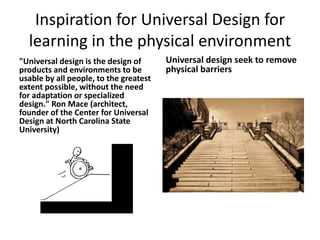
Inspiration for Universal Design for learning in the physical environment"Universal design is the design of products and environments to be usable by all people, to the greatest extent possible, without the need for adaptation or specialized design." Ron Mace (architect, founder of the Center for Universal Design at North Carolina State University)Universal design seek to remove physical barriers
What is Universal Design for Learning?Universal design is a set of principles developed to give all students an equal opportunity to learn.
Three Principles of UDLPrinciple 1: To support recognition learning, provide multiple, flexible methods of presentationPrinciple 2: To support strategic learning, provide multiple, flexible methods of expression and apprenticeship.Principle 3: To support affective learning, provide multiple, flexible options for engagement.
Principle 1Offer many ways of customizing the display of information and offers alternatives for visual and auditory informationClarify vocabulary and syntax, support decoding text, promote understanding across languages and illustrate through multiple mediaActivate/supple background knowledge, highlight patterns, guide information processing, maximize transfers and generalization
Principle 2Vary the methods for response, optimize access to tools and assistive technologiesUse multiple media for communication, build fluencies with gradual levels for practice and performanceAppropriate goal setting, support planning and development, enhance capacity for monitoring progress
Principle 3Optimize individual choice, relevance and authenticity and minimize distractionsVary demands and resources, foster collaboration, increase masteryOptimize motivation, facilitate personal strategies and develop self-assessment and reflection
Recognition NetworksThe “what” of learningAllows us to interpret and analyze patterns
Strategic NetworksAllows us to plan and execute  and is responsible for strategy.Processes actions and plans
Affective NetworksEnable us to engage with learningProcess emotionsEvaluates learning
Role of technology in UDLTo provide a variety of ways to present content to the studentsMotivate and engage studentsAllows flexibility inside the classroom
Role of Technology in UDL Cont.For example: Provide alternatives to writing an essayUsing SmartBoards to solve math problemsCreate digital stories and or podcast
What Brain Research Tells Us About Learning DifferencesFlexibility is the key1. The way that students can most easily take in information2. Offer multiple ways and alternative ways for students to express themselves3. Provide multiple means of engagement for the students
Implications on InstructionHelps support the varies learning stylesProvides multiple representationsOffer multiple means of expression and engagementGives students choiceEncourages students to use their whole brain.
Potential Impact on Student Learning Provides an exciting opportunity to bridge the gap between learners skills and needsAccommodates different learning stylesMakes instruction more engaging and meaningful to the students
UDL Curriculum Self Checkhttp://www.cast.org/learningtools/udl_self_check/index.htmlFree online tool that helps educators reach and engage all of their learners.Provides a UDL curriculum self-check Provides resources for educators
Teaching Every Student Free Websitehttp://www.cast.org/pd/tes/index.htmlProvides model lessons, activities, curriculum resources, tutorials and other educational toolsA UDL training guide is also available for our teachers to use.  This website will help the teachers in our school who are not familiar with UDL and need help developing lessons into their curriculum.
UDL CAST Online Moduleshttp://udlonline.cast.org/homeOnline modules that introduce UDL principles applicationsInteractive online learning environmentModule 1:  Introduction to UDLModule 2: Applying the UDL frame work to lesson development
ResourcesAnonymous. (2011). Central role of technology in udl. Retrieved from https://www.hillsdale.k12.oh.us/hes/teachers/depuy/technologyudl.htm CAST (2011). Universal Design for Learning Guidelines version 2.0. Wakefield, MA: Author.Roekel, D. (2008). Universal design for learning (udl): making learning accessible and engaging for all students. Retrieved from http://www.nea.org/assets/docs/PB_UDL.pdf Laureate Education, Inc. (Producer). (2010). Brain research and universal design for learning. [DVD]. Reaching and engaging all learners through technology. Baltimore, MD: Author.Rose, D., & Meyer, A. (2002). Teaching every student in the digital age: Universal design for learning

App4 rodgerss

  • 1.
    Universal Design forLearning By Sadie Rodgers
  • 2.
    Inspiration for UniversalDesign for learning in the physical environment"Universal design is the design of products and environments to be usable by all people, to the greatest extent possible, without the need for adaptation or specialized design." Ron Mace (architect, founder of the Center for Universal Design at North Carolina State University)Universal design seek to remove physical barriers
  • 3.
    What is UniversalDesign for Learning?Universal design is a set of principles developed to give all students an equal opportunity to learn.
  • 4.
    Three Principles ofUDLPrinciple 1: To support recognition learning, provide multiple, flexible methods of presentationPrinciple 2: To support strategic learning, provide multiple, flexible methods of expression and apprenticeship.Principle 3: To support affective learning, provide multiple, flexible options for engagement.
  • 5.
    Principle 1Offer manyways of customizing the display of information and offers alternatives for visual and auditory informationClarify vocabulary and syntax, support decoding text, promote understanding across languages and illustrate through multiple mediaActivate/supple background knowledge, highlight patterns, guide information processing, maximize transfers and generalization
  • 6.
    Principle 2Vary themethods for response, optimize access to tools and assistive technologiesUse multiple media for communication, build fluencies with gradual levels for practice and performanceAppropriate goal setting, support planning and development, enhance capacity for monitoring progress
  • 7.
    Principle 3Optimize individualchoice, relevance and authenticity and minimize distractionsVary demands and resources, foster collaboration, increase masteryOptimize motivation, facilitate personal strategies and develop self-assessment and reflection
  • 8.
    Recognition NetworksThe “what”of learningAllows us to interpret and analyze patterns
  • 9.
    Strategic NetworksAllows usto plan and execute and is responsible for strategy.Processes actions and plans
  • 10.
    Affective NetworksEnable usto engage with learningProcess emotionsEvaluates learning
  • 11.
    Role of technologyin UDLTo provide a variety of ways to present content to the studentsMotivate and engage studentsAllows flexibility inside the classroom
  • 12.
    Role of Technologyin UDL Cont.For example: Provide alternatives to writing an essayUsing SmartBoards to solve math problemsCreate digital stories and or podcast
  • 13.
    What Brain ResearchTells Us About Learning DifferencesFlexibility is the key1. The way that students can most easily take in information2. Offer multiple ways and alternative ways for students to express themselves3. Provide multiple means of engagement for the students
  • 14.
    Implications on InstructionHelpssupport the varies learning stylesProvides multiple representationsOffer multiple means of expression and engagementGives students choiceEncourages students to use their whole brain.
  • 15.
    Potential Impact onStudent Learning Provides an exciting opportunity to bridge the gap between learners skills and needsAccommodates different learning stylesMakes instruction more engaging and meaningful to the students
  • 16.
    UDL Curriculum SelfCheckhttp://www.cast.org/learningtools/udl_self_check/index.htmlFree online tool that helps educators reach and engage all of their learners.Provides a UDL curriculum self-check Provides resources for educators
  • 17.
    Teaching Every StudentFree Websitehttp://www.cast.org/pd/tes/index.htmlProvides model lessons, activities, curriculum resources, tutorials and other educational toolsA UDL training guide is also available for our teachers to use. This website will help the teachers in our school who are not familiar with UDL and need help developing lessons into their curriculum.
  • 18.
    UDL CAST OnlineModuleshttp://udlonline.cast.org/homeOnline modules that introduce UDL principles applicationsInteractive online learning environmentModule 1: Introduction to UDLModule 2: Applying the UDL frame work to lesson development
  • 19.
    ResourcesAnonymous. (2011). Centralrole of technology in udl. Retrieved from https://www.hillsdale.k12.oh.us/hes/teachers/depuy/technologyudl.htm CAST (2011). Universal Design for Learning Guidelines version 2.0. Wakefield, MA: Author.Roekel, D. (2008). Universal design for learning (udl): making learning accessible and engaging for all students. Retrieved from http://www.nea.org/assets/docs/PB_UDL.pdf Laureate Education, Inc. (Producer). (2010). Brain research and universal design for learning. [DVD]. Reaching and engaging all learners through technology. Baltimore, MD: Author.Rose, D., & Meyer, A. (2002). Teaching every student in the digital age: Universal design for learning