Lightning-fast cluster computing
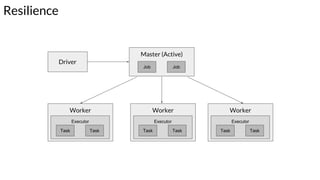
Resilience
Worker
Executor
Task Task
Worker
Executor
Task Task
Worker
Executor
Task Task
Driver
Master (Active)
Job Job
Resilience
Driver
Worker
Executor
Task Task
Worker
Executor
Task Task
Worker
Executor
Task Task
Driver
Master (Active)
Job Job
./spark-submit
--deploy-mode
"cluster" --supervise
Resilience
Driver
Worker
Executor
Task Task
Worker
Executor
Task Task
Worker
Executor
Task Task
Driver
Master (Active)
Job Job
Driver runs
in the worker
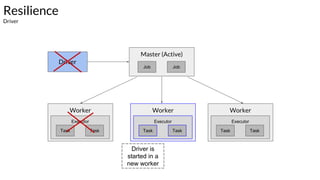
Resilience
Driver
Worker
Executor
Task Task
Worker
Executor
Task Task
Worker
Executor
Task Task
Driver
Master (Active)
Job Job
Driver is
started in a
new worker
Resilience
Master
Master (Active)
Job Job
Zookeeper
Master (Standby)
Job Job
Worker
Executor
Task Task
Worker
Executor
Task Task
Worker
Executor
Task Task
Driver
Master (Active)
Resilience
Master
Zookeeper
Master (Standby)
Job Job Job Job
Driver
Worker
Executor
Task Task
Worker
Executor
Task Task
Worker
Executor
Task Task
Master (Active)
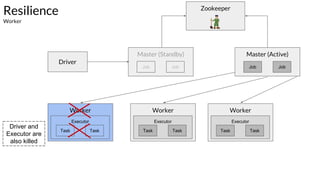
Resilience
Worker
Zookeeper
Master (Standby)
Job Job Job Job
Driver
Driver and
Executor are
also killed
Worker
Executor
Task Task
Worker
Executor
Task Task
Worker
Executor
Task Task
Master (Active)
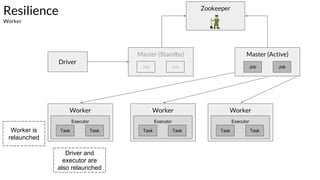
Resilience
Worker
Zookeeper
Master (Standby)
Job Job Job Job
Driver
Worker is
relaunched
Driver and
executor are
also relaunched
Worker
Executor
Task Task
Worker
Executor
Task Task
Worker
Executor
Task Task
Resilience
RDD
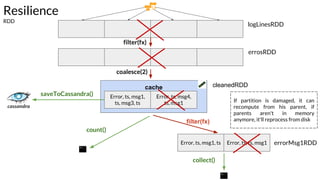
● An RDD is an immutable, deterministically re-computable, distributed dataset.
● Each RDD remembers the lineage of deterministic operations that were used on a
fault-tolerant input dataset to create it.
● If any partition of an RDD is lost due to a worker node failure, then that partition can be
re-computed from the original fault-tolerant dataset using the lineage of operations.
● Assuming that all of the RDD transformations are deterministic, the data in the final
transformed RDD will always be the same irrespective of failures in the Spark cluster.
cache
logLinesRDD
cleanedRDD
collect()
errosRDD
Error, ts, msg1,
ts, msg3, ts
Error, ts, msg4,
ts, msg1
Error, ts, msg1, ts Error, ts, ts, msg1
filter(fx)
errorMsg1RDD
count()
saveToCassandra()
Resilience
RDD
filter(fx)
coalesce(2)
If partition is damaged, it can
recompute from his parent, if
parents aren't in memory
anymore, it'll reprocess from disk
RDD
Shard allocation
RDD - Resilient Distributed Dataset
Error, ts,
msg1, warn, ts,
msg2, Error
info, ts, msg8,
info, ts, msg3,
info
Error, ts,
msg5, ts, info
Error, ts, info,
msg9, ts, info,
Error
File (hdfs,
s3, etc)
partitions
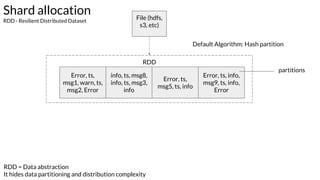
Default Algorithm: Hash partition
RDD = Data abstraction
It hides data partitioning and distribution complexity
Worker
Executor
Task
Worker
Executor
Task
Worker
Executor
TaskTask
RDD
Shard allocation
RDD - Resilient Distributed Dataset
Error, ts,
msg1, warn, ts,
msg2, Error
info, ts, msg8,
info, ts, msg3,
info
Error, ts,
msg5, ts, info
Error, ts, info,
msg9, ts, info,
Error
File (hdfs,
s3, etc)
Default Algorithm: Hash partition
partitions
Shard allocation
Partition configuration - numbers of partition
Specifying number of partition
By default it create one partition for
each processor core
Default settings:
● mapreduce.input.fileinputformat.split.minsize = 1 byte (minSize)
● dfs.block.size = 128 MB (cluster) / fs.local.block.size = 32 MB (local) (blockSize)
Calculating goal size:
e.g.:
● Total size of input files = T = 599 MB
● Desired number of partitions = P = 30 (parametrized)
● Partition Goal size = PGS = T / P = 599 / 30 = 19 MB
Result: Math.max(1, Math.min(19, 32)) == 19 MB
Shard allocation
Partition configuration - defining partition size
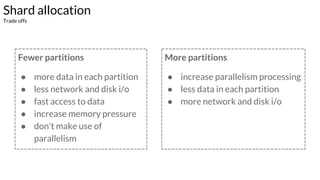
Fewer partitions
● more data in each partition
● less network and disk i/o
● fast access to data
● increase memory pressure
● don't make use of
parallelism
More partitions
● increase parallelism processing
● less data in each partition
● more network and disk i/o
Shard allocation
Trade offs
Shard allocation
Example - Cases - auxiliary function
Shard allocation
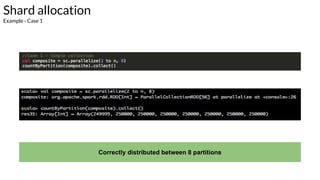
Example - Case 1
Correctly distributed between 8 partitions
Shard allocation
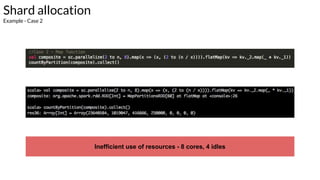
Example - Case 2
Inefficient use of resources - 8 cores, 4 idles
Shard allocation
Example - Case 1 - explanation
val = 2.000.000 / 8 = 250.000
Range partition:
[0] -> 2 - 250.000
[1] -> 250.001 - 500.000
[2] -> 500.001 - 750.000
[3] -> 750.001 - 1.000.000
[4] -> 1.000.001 - 1.025.000
[5] -> 1.025.001 - 1.050,000
[6] -> 1.050.001 - 1.075.000
[7] -> 1.075.001 - 2.000.000
Shard allocation
Example - Case 2 - explanation
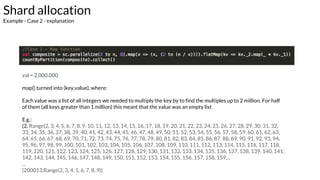
val = 2.000.000
map() turned into (key,value), where:
Each value was a list of all integers we needed to multiply the key by to find the multiples up to 2 million. For half
of them (all keys greater than 1 million) this meant that the value was an empty list
E.g.:
(2, Range(2, 3, 4, 5, 6, 7, 8, 9, 10, 11, 12, 13, 14, 15, 16, 17, 18, 19, 20, 21, 22, 23, 24, 25, 26, 27, 28, 29, 30, 31, 32,
33, 34, 35, 36, 37, 38, 39, 40, 41, 42, 43, 44, 45, 46, 47, 48, 49, 50, 51, 52, 53, 54, 55, 56, 57, 58, 59, 60, 61, 62, 63,
64, 65, 66, 67, 68, 69, 70, 71, 72, 73, 74, 75, 76, 77, 78, 79, 80, 81, 82, 83, 84, 85, 86, 87, 88, 89, 90, 91, 92, 93, 94,
95, 96, 97, 98, 99, 100, 101, 102, 103, 104, 105, 106, 107, 108, 109, 110, 111, 112, 113, 114, 115, 116, 117, 118,
119, 120, 121, 122, 123, 124, 125, 126, 127, 128, 129, 130, 131, 132, 133, 134, 135, 136, 137, 138, 139, 140, 141,
142, 143, 144, 145, 146, 147, 148, 149, 150, 151, 152, 153, 154, 155, 156, 157, 158, 159,...
...
(200013,Range(2, 3, 4, 5, 6, 7, 8, 9))
Shard allocation
Example - Case 3 - fixing it using repartition
Correctly distributed between 8 partitions
Shuffle partitions
References
http://spark.apache.org
https://jaceklaskowski.gitbooks.io/mastering-apache-spark/content/spark-rdd-partitions.html
https://jaceklaskowski.gitbooks.io/mastering-apache-spark/content/spark-rdd.html
http://blog.cloudera.com/blog/2015/05/working-with-apache-spark-or-how-i-learned-to-sto
p-worrying-and-love-the-shuffle/
http://techblog.netflix.com/2015/03/can-spark-streaming-survive-chaos-monkey.html
Thanks!Questions?
jefersonm@gmail.com
@jefersonm
jefersonm
jefersonm
jefmachado

Apache Spark Internals - Part 2