

Apache Phoenix
James Taylor @JamesPlusPlus
Maryann Xue @MaryannXue
Eli Levine @teleturn
We put the SQL back in NoSQL
http://phoenix.incubator.apache.org
About James
Completed
o Engineer at Salesforce.com in BigData group
o Started Phoenix as internal project ~2.5 years ago
o Open-source on Github ~1.5 years ago
o Apache incubator for past 5 months
o Engineer at BEA Systems
o XQuery-based federated query engine
o SQL-based complex event processing engine
Agenda
Completed
o What is Apache Phoenix?
o Why is it so fast?
o How does it help HBase scale?
o Roadmap
o Q&A
What is Apache Phoenix?
Completed
What is Apache Phoenix?
Completed
1. Turns HBase into a SQL database
o Query Engine
o MetaData Repository
o Embedded JDBC driver
o Only for HBase data
What is Apache Phoenix?
Completed
2. Fastest way to access HBase data
o HBase-specific push down
o Compiles queries into native
HBase calls (no map-reduce)
o Executes scans in parallel
Completed
SELECT * FROM t WHERE k IN (?,?,?)
Phoenix Stinger (Hive 0.13)
0.04 sec 280 sec
* 110M row table
7,000x faster
What is Apache Phoenix?
Completed
3. Lightweight
o No additional servers required
o Bundled with Hortonworks 2.1
o 100% Java
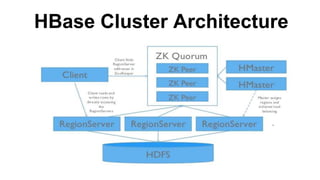
HBase Cluster Architecture
Phoenix
HBase Cluster Architecture
Phoenix
Phoenix
What is Apache Phoenix?
Completed
4. Integration-friendly
o Map to existing HBase table
o Integrate with Apache Pig
o Integrate with Apache Flume
o Integrate with Apache Sqoop (wip)
What is Apache Phoenix?
Completed
1. Turns HBase into a SQL database
2. Fastest way to access HBase data
3. Lightweight
4. Integration-friendly
Why is Phoenix so fast?
Completed
Why is Phoenix so fast?
Completed
1. HBase
o Fast, but “dumb” (on purpose)
2. Data model
o Support for composite primary key
o Binary data sorts naturally
3. Client-side parallelization
4. Push down
o Custom filters and coprocessors
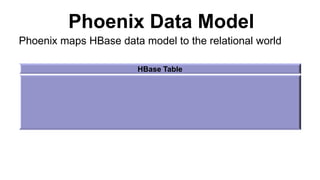
Phoenix Data Model
HBase Table
Phoenix maps HBase data model to the relational world
Phoenix Data Model
HBase Table
Column Family A Column Family B
Phoenix maps HBase data model to the relational world
Phoenix Data Model
HBase Table
Column Family A Column Family B
Qualifier 1 Qualifier 2 Qualifier 3
Phoenix maps HBase data model to the relational world
Phoenix Data Model
HBase Table
Column Family A Column Family B
Qualifier 1 Qualifier 2 Qualifier 3
Row Key 1 KeyValue
Phoenix maps HBase data model to the relational world
Phoenix Data Model
HBase Table
Column Family A Column Family B
Qualifier 1 Qualifier 2 Qualifier 3
Row Key 1 KeyValue
Row Key 2 KeyValue KeyValue
Phoenix maps HBase data model to the relational world
Phoenix Data Model
HBase Table
Column Family A Column Family B
Qualifier 1 Qualifier 2 Qualifier 3
Row Key 1 KeyValue
Row Key 2 KeyValue KeyValue
Row Key 3 KeyValue
Phoenix maps HBase data model to the relational world
HBase Table
Column Family A Column Family B
Qualifier 1 Qualifier 2 Qualifier 3
Row Key 1 Value
Row Key 2 Value Value
Row Key 3 Value
Phoenix Data Model
HBase Table
Column Family A Column Family B
Qualifier 1 Qualifier 2 Qualifier 3
Row Key 1 KeyValue
Row Key 2 KeyValue KeyValue
Row Key 3 KeyValue
Phoenix maps HBase data model to the relational world
HBase Table
Column Family A Column Family B
Qualifier 1 Qualifier 2 Qualifier 3
Row Key 1 Value
Row Key 2 Value Value
Row Key 3 Value
HBase Table
Column Family A Column Family B
Qualifier 1 Qualifier 2 Qualifier 3
Row Key 1 Value
Row Key 2 Value Value
Row Key 3 Value
Phoenix Data Model
HBase Table
Column Family A Column Family B
Qualifier 1 Qualifier 2 Qualifier 3
Row Key 1 KeyValue
Row Key 2 KeyValue KeyValue
Row Key 3 KeyValue
Phoenix maps HBase data model to the relational world
HBase Table
Column Family A Column Family B
Qualifier 1 Qualifier 2 Qualifier 3
Row Key 1 Value
Row Key 2 Value Value
Row Key 3 Value
HBase Table
Column Family A Column Family B
Qualifier 1 Qualifier 2 Qualifier 3
Row Key 1 Value
Row Key 2 Value Value
Row Key 3 Value
Phoenix Data Model
HBase Table
Column Family A Column Family B
Qualifier 1 Qualifier 2 Qualifier 3
Row Key 1 KeyValue
Row Key 2 KeyValue KeyValue
Row Key 3 KeyValue
Phoenix maps HBase data model to the relational world
Multiple Versions
Phoenix Data Model
HBase Table
Column Family A Column Family B
Qualifier 1 Qualifier 2 Qualifier 3
Row Key 1 KeyValue
Row Key 2 KeyValue KeyValue
Row Key 3 KeyValue
Phoenix maps HBase data model to the relational world
Phoenix Table
Phoenix Data Model
HBase Table
Column Family A Column Family B
Qualifier 1 Qualifier 2 Qualifier 3
Row Key 1 KeyValue
Row Key 2 KeyValue KeyValue
Row Key 3 KeyValue
Phoenix maps HBase data model to the relational world
Phoenix Table
Key Value Columns
Phoenix Data Model
HBase Table
Column Family A Column Family B
Qualifier 1 Qualifier 2 Qualifier 3
Row Key 1 KeyValue
Row Key 2 KeyValue KeyValue
Row Key 3 KeyValue
Phoenix maps HBase data model to the relational world
Phoenix Table
Key Value ColumnsPrimary Key Constraint
Example
Row Key
SERVER METRICS
HOST VARCHAR
DATE DATE
RESPONSE_TIME INTEGER
GC_TIME INTEGER
CPU_TIME INTEGER
IO_TIME INTEGER
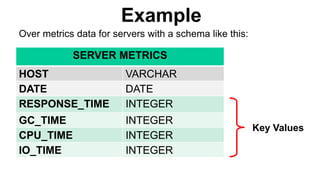
Over metrics data for servers with a schema like this:
Example
Over metrics data for servers with a schema like this:
Key Values
SERVER METRICS
HOST VARCHAR
DATE DATE
RESPONSE_TIME INTEGER
GC_TIME INTEGER
CPU_TIME INTEGER
IO_TIME INTEGER
Example
CREATE TABLE SERVER_METRICS (
HOST VARCHAR,
DATE DATE,
RESPONSE_TIME INTEGER,
GC_TIME INTEGER,
CPU_TIME INTEGER,
IO_TIME INTEGER,
CONSTRAINT pk PRIMARY KEY (HOST, DATE))
DDL command looks like this:
With data that looks like this:
SERVER METRICS
HOST + DATE RESPONSE_TIME GC_TIME
SF1 1396743589 1234
SF1 1396743589 8012
…
SF3 1396002345 2345
SF3 1396002345 2340
SF7 1396552341 5002 1234
…
Example
Row Key
With data that looks like this:
SERVER METRICS
HOST + DATE RESPONSE_TIME GC_TIME
SF1 1396743589 1234
SF1 1396743589 8012
…
SF3 1396002345 2345
SF3 1396002345 2340
SF7 1396552341 5002 1234
…
Example
Key Values
Phoenix Push Down: Example
Completed
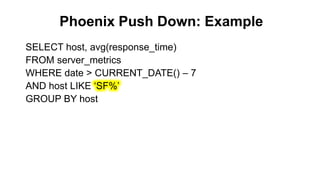
SELECT host, avg(response_time)
FROM server_metrics
WHERE date > CURRENT_DATE() – 7
AND host LIKE „SF%‟
GROUP BY host
Phoenix Push Down: Example
Completed
SELECT host, avg(response_time)
FROM server_metrics
WHERE date > CURRENT_DATE() – 7
AND host LIKE „SF%‟
GROUP BY host
Phoenix Push Down: Example
Completed
SELECT host, avg(response_time)
FROM server_metrics
WHERE date > CURRENT_DATE() – 7
AND host LIKE „SF%‟
GROUP BY host
Phoenix Push Down: Example
Completed
SELECT host, avg(response_time)
FROM server_metrics
WHERE date > CURRENT_DATE() – 7
AND host LIKE „SF%‟
GROUP BY host
Phoenix Push Down: Example
Completed
SELECT host, avg(response_time)
FROM server_metrics
WHERE date > CURRENT_DATE() – 7
AND host LIKE „SF%‟
GROUP BY host
Phoenix Push Down
1. Skip scan filter
2. Aggregation
3. TopN
4. Hash Join
Phoenix Push Down: Skip scan
SELECT host, avg(response_time)
FROM server_metrics
WHERE date > CURRENT_DATE() – 7
AND host LIKE „SF%‟
GROUP BY host
Phoenix Push Down: Skip scan
Completed
R1
R2
R3
R4
Phoenix Push Down: Skip scan
Client-side parallel scans
Completed
R1
R2
R3
R4
scan1
scan3
scan2
Phoenix Push Down: Skip scan
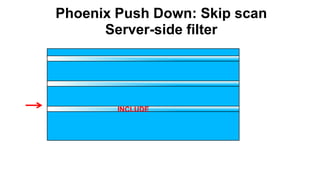
Server-side filter
Completed
SKIP
Phoenix Push Down: Skip scan
Server-side filter
Completed
INCLUDE
Phoenix Push Down: Skip scan
Server-side filter
Completed
SKIP
Phoenix Push Down: Skip scan
Server-side filter
Completed
INCLUDE
Phoenix Push Down: Skip scan
Server-side filter
SKIP
Phoenix Push Down: Skip scan
Server-side filter
INCLUDE
Phoenix Push Down: Skip scan
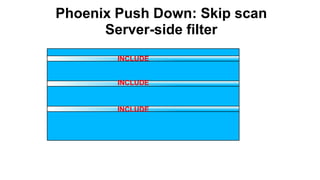
Server-side filter
INCLUDE
INCLUDE
INCLUDE
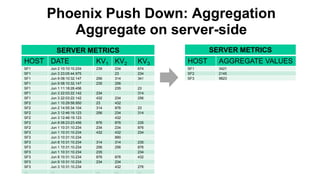
Phoenix Push Down: Aggregation
SELECT host, avg(response_time)
FROM server_metrics
WHERE date > CURRENT_DATE() – 7
AND host LIKE „SF%‟
GROUP BY host
SERVER METRICS
HOST DATE KV1 KV2 KV3
SF1 Jun 2 10:10:10.234 239 234 674
SF1 Jun 3 23:05:44.975 23 234
SF1 Jun 9 08:10:32.147 256 314 341
SF1 Jun 9 08:10:32.147 235 256
SF1 Jun 1 11:18:28.456 235 23
SF1 Jun 3 22:03:22.142 234 314
SF1 Jun 3 22:03:22.142 432 234 256
SF2 Jun 1 10:29:58.950 23 432
SF2 Jun 2 14:55:34.104 314 876 23
SF2 Jun 3 12:46:19.123 256 234 314
SF2 Jun 3 12:46:19.123 432
SF2 Jun 8 08:23:23.456 876 876 235
SF2 Jun 1 10:31:10.234 234 234 876
SF3 Jun 1 10:31:10.234 432 432 234
SF3 Jun 3 10:31:10.234 890
SF3 Jun 8 10:31:10.234 314 314 235
SF3 Jun 1 10:31:10.234 256 256 876
SF3 Jun 1 10:31:10.234 235 234
SF3 Jun 8 10:31:10.234 876 876 432
SF3 Jun 9 10:31:10.234 234 234
SF3 Jun 3 10:31:10.234 432 276
… … … … …
Phoenix Push Down: Aggregation
Aggregate on server-side
SERVER METRICS
HOST AGGREGATE VALUES
SF1 3421
SF2 2145
SF3 9823
Phoenix Push Down: TopN
Completed
SELECT host, date, gc_time
FROM server_metrics
WHERE date > CURRENT_DATE() – 7
AND host LIKE „SF%‟
ORDER BY gc_time DESC
LIMIT 5
Phoenix Push Down: TopN
Client-side parallel scans
Completed
R1
R2
R3
R4
scan1
scan3
scan2
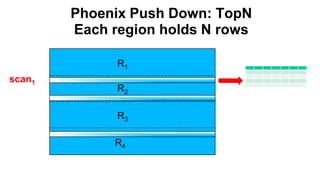
Phoenix Push Down: TopN
Each region holds N rows
Completed
R1
R2
R3
R4
scan1
Phoenix Push Down: TopN
Each region holds N rows
Completed
R1
R2
R3
R4
scan2
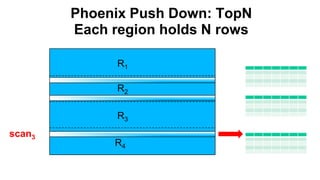
Phoenix Push Down: TopN
Each region holds N rows
Completed
R1
R2
R3
R4
scan3
SERVER METRICS
HOST DATE GC_TIME
SF3 Jun 2 10:10:10.234 22123
SF5 Jun 3 23:05:44.975 19876
SF2 Jun 9 08:10:32.147 11345
SF2 Jun 1 11:18:28.456 10234
SF1 Jun 3 22:03:22.142 10111
Phoenix Push Down: TopN
Client-side final merge sort
Scan1
Scan2
Scan3
Phoenix Push Down: TopN
Secondary Index
Completed
CREATE INDEX gc_time_index
ON server_metrics (gc_time DESC, date DESC)
INCLUDE (response_time)
Row Key
GC_TIME_INDEX
GC_TIME INTEGER
DATE DATE
HOST VARCHAR
RESPONSE_TIME INTEGER
Phoenix Push Down: TopN
Secondary Index
Completed
CREATE INDEX gc_time_index
ON server_metrics (gc_time DESC, date DESC)
INCLUDE (response_time)
Key Value
GC_TIME_INDEX
GC_TIME INTEGER
DATE DATE
HOST VARCHAR
RESPONSE_TIME INTEGER
Phoenix Push Down: TopN
Secondary Index
Completed
o Original query doesn‟t change
o Phoenix rewrites query to use index table
o All referenced columns must exist in index
table for it to be considered
o Local Indexing coming soon!
o Stats coming soon!
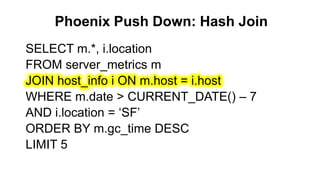
Phoenix Push Down: Hash Join
Completed
SELECT m.*, i.location
FROM server_metrics m
JOIN host_info i ON m.host = i.host
WHERE m.date > CURRENT_DATE() – 7
AND i.location = „SF‟
ORDER BY m.gc_time DESC
LIMIT 5
Phoenix Push Down: Hash Join
Separate LHS and RHS
Completed
SELECT m.*, i.location
FROM server_metrics m
JOIN host_info i ON m.host = i.host
WHERE m.date > CURRENT_DATE() – 7
AND i.location = „SF‟
ORDER BY m.gc_time DESC
LIMIT 5
Phoenix Push Down: Hash Join
Separate LHS and RHS
Completed
SELECT m.*, i.location
FROM server_metrics m
JOIN host_info i ON m.host = i.host
WHERE m.date > CURRENT_DATE() – 7
AND i.location = „SF‟
ORDER BY m.gc_time DESC
LIMIT 5
Phoenix Push Down: Hash Join
Separate LHS and RHS
Completed
LHS
SELECT *
FROM server_metrics
WHERE date >
CURRENT_DATE() – 7
ORDER BY gc_time DESC
LIMIT 5
RHS
SELECT host, location
FROM host_info
WHERE location = „SF‟
Phoenix Push Down: Hash Join
Execute & broadcast RHS to each RS
Completed
RS1
RS2
RHS
Phoenix Push Down: Hash Join
Server-side map lookup during scan
Completed
R1
R2
R3
R4
RHS
RHS
LHS
scan1
scan2
scan3
scan4
Phoenix Push Down: Hash Join
Derived Tables and Filter Rewrite
Completed
SELECT i.host, i.location, m.res, m.gc
FROM host_info i
JOIN (SELECT host, avg(response_time) res,
avg(gc_time) gc FROM server_metrics GROUP
BY host) AS m
ON i.host = m.host
WHERE i.location != „NJ‟
AND (m.res >= 10000 OR m.gc >= 2000)
Phoenix Push Down: Hash Join
Filters Pushed Down and Rewritten for RHS
Completed
RHS
SELECT host, avg(response_time),
avg(gc_time)
FROM server_metrics
GROUP BY host
HAVING
avg(response_time)>=10000
OR avg(gc_time)>=2000
LHS
SELECT host,
location
FROM host_info
WHERE
location != „NJ‟
Phoenix Push Down: Hash Join
Multiple Joins and Sub-joins
Completed
SELECT *
FROM server_metrics m
JOIN (host_info h JOIN location_info l
ON h.location = l.location)
ON m.host = h.host
WHERE m.date > CURRENT_DATE() – 7
AND l.user_count >= 200000
Phoenix Push Down: Hash Join
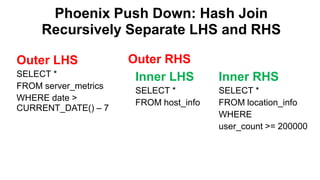
Recursively Separate LHS and RHS
Completed
Outer RHSOuter LHS
SELECT *
FROM server_metrics
WHERE date >
CURRENT_DATE() – 7
Inner LHS
SELECT *
FROM host_info
Inner RHS
SELECT *
FROM location_info
WHERE
user_count >= 200000
Phoenix Push Down: Hash Join
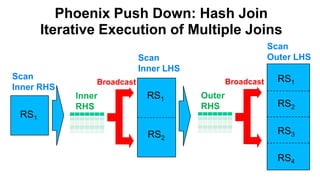
Iterative Execution of Multiple Joins
CompletedRS1
RS2
Inner
RHS
Broadcast
RS1
RS1
RS2
RS3
RS4
Scan
Inner LHS
Outer
RHS
Broadcast
Scan
Outer LHS
Scan
Inner RHS
Phoenix Push Down: Hash Join
Star-join Optimization
Completed
SELECT *
FROM server_metrics m
JOIN host_info h
ON m.host = h.host
JOIN location_info l
ON h.location = l.location
WHERE m.date > CURRENT_DATE() – 7
AND l.user_count >= 200000
Phoenix Push Down: Hash Join
Separate LHS and Multiple Parallel RHS
Completed
LHS
SELECT *
FROM server_metrics
WHERE date >
CURRENT_DATE() – 7
RHS 1
SELECT *
FROM host_info
RHS 2
SELECT *
FROM location_info
WHERE
user_count >= 200000
Phoenix Push Down: Hash Join
Star-join Execution of Multiple Joins
Completed
RS1
RS2
RHS 1
RS1 RS1
RS2
RS3
RS4
Scan RHS 2
Broadcast
Scan LHSScan RHS 1
RHS 2
New in Phoenix 3:
Shared Tables
• HBase wants small # of big tables instead
of large # of small tables
• Two types of shared tables in Phoenix 3:
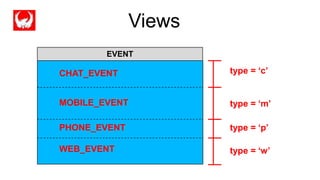
• Views
• Tenant-specific Tables
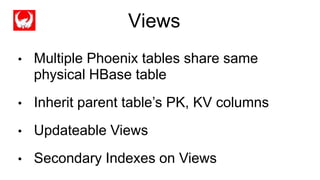
Views
• Multiple Phoenix tables share same
physical HBase table
• Inherit parent table‟s PK, KV columns
• Updateable Views
• Secondary Indexes on Views
Completed
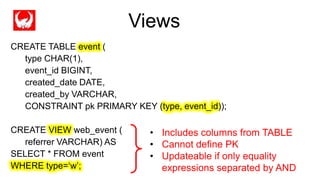
CREATE TABLE event (
type CHAR(1),
event_id BIGINT,
created_date DATE,
created_by VARCHAR,
CONSTRAINT pk PRIMARY KEY (type, event_id));
CREATE VIEW web_event (
referrer VARCHAR) AS
SELECT * FROM event
WHERE type=„w‟;
• Includes columns from TABLE
• Cannot define PK
• Updateable if only equality
expressions separated by AND
Views
Completed
type = ‘c’
type = ‘m’
type = ‘p’
type = ‘w’
EVENT
CHAT_EVENT
MOBILE_EVENT
PHONE_EVENT
WEB_EVENT
Views
Tenant-Specific Tables
• Tenant data isolation and co-location
• Built using Views
• Uses tenant-specific Connections
Completed
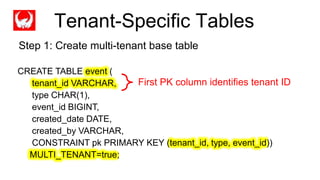
CREATE TABLE event (
tenant_id VARCHAR,
type CHAR(1),
event_id BIGINT,
created_date DATE,
created_by VARCHAR,
CONSTRAINT pk PRIMARY KEY (tenant_id, type, event_id))
MULTI_TENANT=true;
First PK column identifies tenant ID
Tenant-Specific Tables
Step 1: Create multi-tenant base table
Completed
CREATE VIEW web_event (
referrer VARCHAR) AS
SELECT * FROM event
WHERE type=„w‟;
DriverManager.connect(“jdbc:phoenix:localhost;TenantId=me”);
CREATE VIEW my_web_event AS
SELECT * FROM web_event;
Tenant-specific view
Tenant-specific
connection
Tenant-Specific Tables
Step 2: Create tenant-specific tables
tenant_id = ‘me’
…
EVENT
tenant_id = ‘you’
tenant_id = ‘them’
Tenant-Specific Tables
type = ‘c’
type = ‘m’
type = ‘p’
type = ‘w’
EVENT
CHAT_EVENT
MOBILE_EVENT
PHONE_EVENT
WEB_EVENT
PER
tenant_id
Tenant-Specific Tables
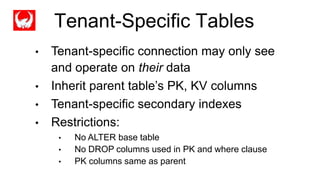
• Tenant-specific connection may only see
and operate on their data
• Inherit parent table‟s PK, KV columns
• Tenant-specific secondary indexes
• Restrictions:
• No ALTER base table
• No DROP columns used in PK and where clause
• PK columns same as parent
Tenant-Specific Tables
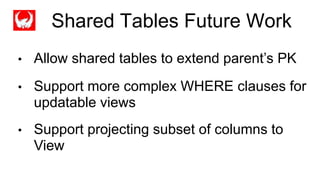
• Allow shared tables to extend parent‟s PK
• Support more complex WHERE clauses for
updatable views
• Support projecting subset of columns to
View
Shared Tables Future Work
Phoenix Roadmap
Completed
o Local Indexes
o Transactions
o More Join strategies
o Cost-based query optimizer
o OLAP extensions
Thank you!
Questions/comments?

Apache Phoenix: We put the SQL back in NoSQL

  • 1.
    Apache Phoenix James Taylor@JamesPlusPlus Maryann Xue @MaryannXue Eli Levine @teleturn We put the SQL back in NoSQL http://phoenix.incubator.apache.org
  • 2.
    About James Completed o Engineerat Salesforce.com in BigData group o Started Phoenix as internal project ~2.5 years ago o Open-source on Github ~1.5 years ago o Apache incubator for past 5 months o Engineer at BEA Systems o XQuery-based federated query engine o SQL-based complex event processing engine
  • 3.
    Agenda Completed o What isApache Phoenix? o Why is it so fast? o How does it help HBase scale? o Roadmap o Q&A
  • 4.
    What is ApachePhoenix? Completed
  • 5.
    What is ApachePhoenix? Completed 1. Turns HBase into a SQL database o Query Engine o MetaData Repository o Embedded JDBC driver o Only for HBase data
  • 6.
    What is ApachePhoenix? Completed 2. Fastest way to access HBase data o HBase-specific push down o Compiles queries into native HBase calls (no map-reduce) o Executes scans in parallel
  • 7.
    Completed SELECT * FROMt WHERE k IN (?,?,?) Phoenix Stinger (Hive 0.13) 0.04 sec 280 sec * 110M row table 7,000x faster
  • 8.
    What is ApachePhoenix? Completed 3. Lightweight o No additional servers required o Bundled with Hortonworks 2.1 o 100% Java
  • 9.
  • 10.
  • 11.
  • 12.
    What is ApachePhoenix? Completed 4. Integration-friendly o Map to existing HBase table o Integrate with Apache Pig o Integrate with Apache Flume o Integrate with Apache Sqoop (wip)
  • 13.
    What is ApachePhoenix? Completed 1. Turns HBase into a SQL database 2. Fastest way to access HBase data 3. Lightweight 4. Integration-friendly
  • 14.
    Why is Phoenixso fast? Completed
  • 15.
    Why is Phoenixso fast? Completed 1. HBase o Fast, but “dumb” (on purpose) 2. Data model o Support for composite primary key o Binary data sorts naturally 3. Client-side parallelization 4. Push down o Custom filters and coprocessors
  • 16.
    Phoenix Data Model HBaseTable Phoenix maps HBase data model to the relational world
  • 17.
    Phoenix Data Model HBaseTable Column Family A Column Family B Phoenix maps HBase data model to the relational world
  • 18.
    Phoenix Data Model HBaseTable Column Family A Column Family B Qualifier 1 Qualifier 2 Qualifier 3 Phoenix maps HBase data model to the relational world
  • 19.
    Phoenix Data Model HBaseTable Column Family A Column Family B Qualifier 1 Qualifier 2 Qualifier 3 Row Key 1 KeyValue Phoenix maps HBase data model to the relational world
  • 20.
    Phoenix Data Model HBaseTable Column Family A Column Family B Qualifier 1 Qualifier 2 Qualifier 3 Row Key 1 KeyValue Row Key 2 KeyValue KeyValue Phoenix maps HBase data model to the relational world
  • 21.
    Phoenix Data Model HBaseTable Column Family A Column Family B Qualifier 1 Qualifier 2 Qualifier 3 Row Key 1 KeyValue Row Key 2 KeyValue KeyValue Row Key 3 KeyValue Phoenix maps HBase data model to the relational world
  • 22.
    HBase Table Column FamilyA Column Family B Qualifier 1 Qualifier 2 Qualifier 3 Row Key 1 Value Row Key 2 Value Value Row Key 3 Value Phoenix Data Model HBase Table Column Family A Column Family B Qualifier 1 Qualifier 2 Qualifier 3 Row Key 1 KeyValue Row Key 2 KeyValue KeyValue Row Key 3 KeyValue Phoenix maps HBase data model to the relational world
  • 23.
    HBase Table Column FamilyA Column Family B Qualifier 1 Qualifier 2 Qualifier 3 Row Key 1 Value Row Key 2 Value Value Row Key 3 Value HBase Table Column Family A Column Family B Qualifier 1 Qualifier 2 Qualifier 3 Row Key 1 Value Row Key 2 Value Value Row Key 3 Value Phoenix Data Model HBase Table Column Family A Column Family B Qualifier 1 Qualifier 2 Qualifier 3 Row Key 1 KeyValue Row Key 2 KeyValue KeyValue Row Key 3 KeyValue Phoenix maps HBase data model to the relational world
  • 24.
    HBase Table Column FamilyA Column Family B Qualifier 1 Qualifier 2 Qualifier 3 Row Key 1 Value Row Key 2 Value Value Row Key 3 Value HBase Table Column Family A Column Family B Qualifier 1 Qualifier 2 Qualifier 3 Row Key 1 Value Row Key 2 Value Value Row Key 3 Value Phoenix Data Model HBase Table Column Family A Column Family B Qualifier 1 Qualifier 2 Qualifier 3 Row Key 1 KeyValue Row Key 2 KeyValue KeyValue Row Key 3 KeyValue Phoenix maps HBase data model to the relational world Multiple Versions
  • 25.
    Phoenix Data Model HBaseTable Column Family A Column Family B Qualifier 1 Qualifier 2 Qualifier 3 Row Key 1 KeyValue Row Key 2 KeyValue KeyValue Row Key 3 KeyValue Phoenix maps HBase data model to the relational world Phoenix Table
  • 26.
    Phoenix Data Model HBaseTable Column Family A Column Family B Qualifier 1 Qualifier 2 Qualifier 3 Row Key 1 KeyValue Row Key 2 KeyValue KeyValue Row Key 3 KeyValue Phoenix maps HBase data model to the relational world Phoenix Table Key Value Columns
  • 27.
    Phoenix Data Model HBaseTable Column Family A Column Family B Qualifier 1 Qualifier 2 Qualifier 3 Row Key 1 KeyValue Row Key 2 KeyValue KeyValue Row Key 3 KeyValue Phoenix maps HBase data model to the relational world Phoenix Table Key Value ColumnsPrimary Key Constraint
  • 28.
    Example Row Key SERVER METRICS HOSTVARCHAR DATE DATE RESPONSE_TIME INTEGER GC_TIME INTEGER CPU_TIME INTEGER IO_TIME INTEGER Over metrics data for servers with a schema like this:
  • 29.
    Example Over metrics datafor servers with a schema like this: Key Values SERVER METRICS HOST VARCHAR DATE DATE RESPONSE_TIME INTEGER GC_TIME INTEGER CPU_TIME INTEGER IO_TIME INTEGER
  • 30.
    Example CREATE TABLE SERVER_METRICS( HOST VARCHAR, DATE DATE, RESPONSE_TIME INTEGER, GC_TIME INTEGER, CPU_TIME INTEGER, IO_TIME INTEGER, CONSTRAINT pk PRIMARY KEY (HOST, DATE)) DDL command looks like this:
  • 31.
    With data thatlooks like this: SERVER METRICS HOST + DATE RESPONSE_TIME GC_TIME SF1 1396743589 1234 SF1 1396743589 8012 … SF3 1396002345 2345 SF3 1396002345 2340 SF7 1396552341 5002 1234 … Example Row Key
  • 32.
    With data thatlooks like this: SERVER METRICS HOST + DATE RESPONSE_TIME GC_TIME SF1 1396743589 1234 SF1 1396743589 8012 … SF3 1396002345 2345 SF3 1396002345 2340 SF7 1396552341 5002 1234 … Example Key Values
  • 33.
    Phoenix Push Down:Example Completed SELECT host, avg(response_time) FROM server_metrics WHERE date > CURRENT_DATE() – 7 AND host LIKE „SF%‟ GROUP BY host
  • 34.
    Phoenix Push Down:Example Completed SELECT host, avg(response_time) FROM server_metrics WHERE date > CURRENT_DATE() – 7 AND host LIKE „SF%‟ GROUP BY host
  • 35.
    Phoenix Push Down:Example Completed SELECT host, avg(response_time) FROM server_metrics WHERE date > CURRENT_DATE() – 7 AND host LIKE „SF%‟ GROUP BY host
  • 36.
    Phoenix Push Down:Example Completed SELECT host, avg(response_time) FROM server_metrics WHERE date > CURRENT_DATE() – 7 AND host LIKE „SF%‟ GROUP BY host
  • 37.
    Phoenix Push Down:Example Completed SELECT host, avg(response_time) FROM server_metrics WHERE date > CURRENT_DATE() – 7 AND host LIKE „SF%‟ GROUP BY host
  • 38.
    Phoenix Push Down 1.Skip scan filter 2. Aggregation 3. TopN 4. Hash Join
  • 39.
    Phoenix Push Down:Skip scan SELECT host, avg(response_time) FROM server_metrics WHERE date > CURRENT_DATE() – 7 AND host LIKE „SF%‟ GROUP BY host
  • 40.
    Phoenix Push Down:Skip scan Completed R1 R2 R3 R4
  • 41.
    Phoenix Push Down:Skip scan Client-side parallel scans Completed R1 R2 R3 R4 scan1 scan3 scan2
  • 42.
    Phoenix Push Down:Skip scan Server-side filter Completed SKIP
  • 43.
    Phoenix Push Down:Skip scan Server-side filter Completed INCLUDE
  • 44.
    Phoenix Push Down:Skip scan Server-side filter Completed SKIP
  • 45.
    Phoenix Push Down:Skip scan Server-side filter Completed INCLUDE
  • 46.
    Phoenix Push Down:Skip scan Server-side filter SKIP
  • 47.
    Phoenix Push Down:Skip scan Server-side filter INCLUDE
  • 48.
    Phoenix Push Down:Skip scan Server-side filter INCLUDE INCLUDE INCLUDE
  • 49.
    Phoenix Push Down:Aggregation SELECT host, avg(response_time) FROM server_metrics WHERE date > CURRENT_DATE() – 7 AND host LIKE „SF%‟ GROUP BY host
  • 50.
    SERVER METRICS HOST DATEKV1 KV2 KV3 SF1 Jun 2 10:10:10.234 239 234 674 SF1 Jun 3 23:05:44.975 23 234 SF1 Jun 9 08:10:32.147 256 314 341 SF1 Jun 9 08:10:32.147 235 256 SF1 Jun 1 11:18:28.456 235 23 SF1 Jun 3 22:03:22.142 234 314 SF1 Jun 3 22:03:22.142 432 234 256 SF2 Jun 1 10:29:58.950 23 432 SF2 Jun 2 14:55:34.104 314 876 23 SF2 Jun 3 12:46:19.123 256 234 314 SF2 Jun 3 12:46:19.123 432 SF2 Jun 8 08:23:23.456 876 876 235 SF2 Jun 1 10:31:10.234 234 234 876 SF3 Jun 1 10:31:10.234 432 432 234 SF3 Jun 3 10:31:10.234 890 SF3 Jun 8 10:31:10.234 314 314 235 SF3 Jun 1 10:31:10.234 256 256 876 SF3 Jun 1 10:31:10.234 235 234 SF3 Jun 8 10:31:10.234 876 876 432 SF3 Jun 9 10:31:10.234 234 234 SF3 Jun 3 10:31:10.234 432 276 … … … … … Phoenix Push Down: Aggregation Aggregate on server-side SERVER METRICS HOST AGGREGATE VALUES SF1 3421 SF2 2145 SF3 9823
  • 51.
    Phoenix Push Down:TopN Completed SELECT host, date, gc_time FROM server_metrics WHERE date > CURRENT_DATE() – 7 AND host LIKE „SF%‟ ORDER BY gc_time DESC LIMIT 5
  • 52.
    Phoenix Push Down:TopN Client-side parallel scans Completed R1 R2 R3 R4 scan1 scan3 scan2
  • 53.
    Phoenix Push Down:TopN Each region holds N rows Completed R1 R2 R3 R4 scan1
  • 54.
    Phoenix Push Down:TopN Each region holds N rows Completed R1 R2 R3 R4 scan2
  • 55.
    Phoenix Push Down:TopN Each region holds N rows Completed R1 R2 R3 R4 scan3
  • 56.
    SERVER METRICS HOST DATEGC_TIME SF3 Jun 2 10:10:10.234 22123 SF5 Jun 3 23:05:44.975 19876 SF2 Jun 9 08:10:32.147 11345 SF2 Jun 1 11:18:28.456 10234 SF1 Jun 3 22:03:22.142 10111 Phoenix Push Down: TopN Client-side final merge sort Scan1 Scan2 Scan3
  • 57.
    Phoenix Push Down:TopN Secondary Index Completed CREATE INDEX gc_time_index ON server_metrics (gc_time DESC, date DESC) INCLUDE (response_time) Row Key GC_TIME_INDEX GC_TIME INTEGER DATE DATE HOST VARCHAR RESPONSE_TIME INTEGER
  • 58.
    Phoenix Push Down:TopN Secondary Index Completed CREATE INDEX gc_time_index ON server_metrics (gc_time DESC, date DESC) INCLUDE (response_time) Key Value GC_TIME_INDEX GC_TIME INTEGER DATE DATE HOST VARCHAR RESPONSE_TIME INTEGER
  • 59.
    Phoenix Push Down:TopN Secondary Index Completed o Original query doesn‟t change o Phoenix rewrites query to use index table o All referenced columns must exist in index table for it to be considered o Local Indexing coming soon! o Stats coming soon!
  • 60.
    Phoenix Push Down:Hash Join Completed SELECT m.*, i.location FROM server_metrics m JOIN host_info i ON m.host = i.host WHERE m.date > CURRENT_DATE() – 7 AND i.location = „SF‟ ORDER BY m.gc_time DESC LIMIT 5
  • 61.
    Phoenix Push Down:Hash Join Separate LHS and RHS Completed SELECT m.*, i.location FROM server_metrics m JOIN host_info i ON m.host = i.host WHERE m.date > CURRENT_DATE() – 7 AND i.location = „SF‟ ORDER BY m.gc_time DESC LIMIT 5
  • 62.
    Phoenix Push Down:Hash Join Separate LHS and RHS Completed SELECT m.*, i.location FROM server_metrics m JOIN host_info i ON m.host = i.host WHERE m.date > CURRENT_DATE() – 7 AND i.location = „SF‟ ORDER BY m.gc_time DESC LIMIT 5
  • 63.
    Phoenix Push Down:Hash Join Separate LHS and RHS Completed LHS SELECT * FROM server_metrics WHERE date > CURRENT_DATE() – 7 ORDER BY gc_time DESC LIMIT 5 RHS SELECT host, location FROM host_info WHERE location = „SF‟
  • 64.
    Phoenix Push Down:Hash Join Execute & broadcast RHS to each RS Completed RS1 RS2 RHS
  • 65.
    Phoenix Push Down:Hash Join Server-side map lookup during scan Completed R1 R2 R3 R4 RHS RHS LHS scan1 scan2 scan3 scan4
  • 66.
    Phoenix Push Down:Hash Join Derived Tables and Filter Rewrite Completed SELECT i.host, i.location, m.res, m.gc FROM host_info i JOIN (SELECT host, avg(response_time) res, avg(gc_time) gc FROM server_metrics GROUP BY host) AS m ON i.host = m.host WHERE i.location != „NJ‟ AND (m.res >= 10000 OR m.gc >= 2000)
  • 67.
    Phoenix Push Down:Hash Join Filters Pushed Down and Rewritten for RHS Completed RHS SELECT host, avg(response_time), avg(gc_time) FROM server_metrics GROUP BY host HAVING avg(response_time)>=10000 OR avg(gc_time)>=2000 LHS SELECT host, location FROM host_info WHERE location != „NJ‟
  • 68.
    Phoenix Push Down:Hash Join Multiple Joins and Sub-joins Completed SELECT * FROM server_metrics m JOIN (host_info h JOIN location_info l ON h.location = l.location) ON m.host = h.host WHERE m.date > CURRENT_DATE() – 7 AND l.user_count >= 200000
  • 69.
    Phoenix Push Down:Hash Join Recursively Separate LHS and RHS Completed Outer RHSOuter LHS SELECT * FROM server_metrics WHERE date > CURRENT_DATE() – 7 Inner LHS SELECT * FROM host_info Inner RHS SELECT * FROM location_info WHERE user_count >= 200000
  • 70.
    Phoenix Push Down:Hash Join Iterative Execution of Multiple Joins CompletedRS1 RS2 Inner RHS Broadcast RS1 RS1 RS2 RS3 RS4 Scan Inner LHS Outer RHS Broadcast Scan Outer LHS Scan Inner RHS
  • 71.
    Phoenix Push Down:Hash Join Star-join Optimization Completed SELECT * FROM server_metrics m JOIN host_info h ON m.host = h.host JOIN location_info l ON h.location = l.location WHERE m.date > CURRENT_DATE() – 7 AND l.user_count >= 200000
  • 72.
    Phoenix Push Down:Hash Join Separate LHS and Multiple Parallel RHS Completed LHS SELECT * FROM server_metrics WHERE date > CURRENT_DATE() – 7 RHS 1 SELECT * FROM host_info RHS 2 SELECT * FROM location_info WHERE user_count >= 200000
  • 73.
    Phoenix Push Down:Hash Join Star-join Execution of Multiple Joins Completed RS1 RS2 RHS 1 RS1 RS1 RS2 RS3 RS4 Scan RHS 2 Broadcast Scan LHSScan RHS 1 RHS 2
  • 74.
    New in Phoenix3: Shared Tables • HBase wants small # of big tables instead of large # of small tables • Two types of shared tables in Phoenix 3: • Views • Tenant-specific Tables
  • 75.
    Views • Multiple Phoenixtables share same physical HBase table • Inherit parent table‟s PK, KV columns • Updateable Views • Secondary Indexes on Views
  • 76.
    Completed CREATE TABLE event( type CHAR(1), event_id BIGINT, created_date DATE, created_by VARCHAR, CONSTRAINT pk PRIMARY KEY (type, event_id)); CREATE VIEW web_event ( referrer VARCHAR) AS SELECT * FROM event WHERE type=„w‟; • Includes columns from TABLE • Cannot define PK • Updateable if only equality expressions separated by AND Views
  • 77.
    Completed type = ‘c’ type= ‘m’ type = ‘p’ type = ‘w’ EVENT CHAT_EVENT MOBILE_EVENT PHONE_EVENT WEB_EVENT Views
  • 78.
    Tenant-Specific Tables • Tenantdata isolation and co-location • Built using Views • Uses tenant-specific Connections
  • 79.
    Completed CREATE TABLE event( tenant_id VARCHAR, type CHAR(1), event_id BIGINT, created_date DATE, created_by VARCHAR, CONSTRAINT pk PRIMARY KEY (tenant_id, type, event_id)) MULTI_TENANT=true; First PK column identifies tenant ID Tenant-Specific Tables Step 1: Create multi-tenant base table
  • 80.
    Completed CREATE VIEW web_event( referrer VARCHAR) AS SELECT * FROM event WHERE type=„w‟; DriverManager.connect(“jdbc:phoenix:localhost;TenantId=me”); CREATE VIEW my_web_event AS SELECT * FROM web_event; Tenant-specific view Tenant-specific connection Tenant-Specific Tables Step 2: Create tenant-specific tables
  • 81.
    tenant_id = ‘me’ … EVENT tenant_id= ‘you’ tenant_id = ‘them’ Tenant-Specific Tables
  • 82.
    type = ‘c’ type= ‘m’ type = ‘p’ type = ‘w’ EVENT CHAT_EVENT MOBILE_EVENT PHONE_EVENT WEB_EVENT PER tenant_id Tenant-Specific Tables
  • 83.
    • Tenant-specific connectionmay only see and operate on their data • Inherit parent table‟s PK, KV columns • Tenant-specific secondary indexes • Restrictions: • No ALTER base table • No DROP columns used in PK and where clause • PK columns same as parent Tenant-Specific Tables
  • 84.
    • Allow sharedtables to extend parent‟s PK • Support more complex WHERE clauses for updatable views • Support projecting subset of columns to View Shared Tables Future Work
  • 85.
    Phoenix Roadmap Completed o LocalIndexes o Transactions o More Join strategies o Cost-based query optimizer o OLAP extensions
  • 86.