AOCR Arabic Optical Character Recognition ABDEL RAHMAN GHAREEB KASEM ADEL SALAH ABU SEREEA MAHMOUD ABDEL MONEIM ABDEL MONEIM MAHMOUD MOHAMMED ABDEL WAHAB
Main contents Introduction to AOCR Feature extraction Preprocessing AOCR system implementation Experimental results Conclusion & future directions Applications
Introduction Why AOCR? What is OCR? What is the problem in AOCR? What is the solution? Pre-Segmentation. Auto-Segmentation.
Main contents Introduction to AOCR Feature extraction Preprocessing AOCR system implementation Experimental results Conclusion & future directions Applications
Preprocessing Image rotation Segmentation. Line segmentation. Word segmentation  Image enhancement
Preprocessing Problem of tilted image 1. Image rotation
Preprocessing 1. Process rotated image
Rotate by -1 degree Preprocessing 1. Process rotated image
Rotate by -2 degree Preprocessing 1. Process rotated image
Rotate by -3 degree Preprocessing 1. Process rotated image
Rotate by -4 degree Preprocessing 1. Process rotated image
Preprocessing 1. Process rotated image Threshold effect Clear zeros Clear zeros Mean value 0.2*Mean value
Preprocessing 1. Process rotated image GRAY Scale Vs. Black/White  in Rotation process Original image Gray scale Black/White
Preprocessing Process rotated image Segmentation. Line segmentation. Word segmentation  Image enhancement
Preprocessing 2.  Segmentation. What is the Segmentation process? Why we need segmentation in Arabic OCR? What is the algorithm used in Segmentation?
2.  Segmentation. Preprocessing Line level segmentation
2.  Segmentation. Preprocessing Word level segmentation
2.  Segmentation. Preprocessing
Preprocessing Process rotated image Segmentation. Line segmentation. Word segmentation  Image enhancement
Preprocessing 3.  Image enhancement
3.  Image enhancement  Preprocessing Noise Reduction  By morphology operations
Very important notation: Apply  Image Enhancement  operations on  small  images not  large  image بسم الله الرحمن الرحيم الله أكبر الله أكبر الله أكبر لا إله الا الله والله أكبر Large Image X Small Images بسم الله الرحمن الرحيم الله أكبر الله أكبر الله أكبر لا إله الا الله والله أكبر
Main contents Introduction to AOCR Feature extraction Preprocessing AOCR system implementation Experimental results Conclusion & future directions Applications
Feature   Extraction   الله   اكبر
Feature Selection Suitable for  HMM  technique ( i.e. window scanning based features). Suitable for  word level  recognition (not character). To retain as much information as possible. Achieve high accuracy with small processing time. we select features such that:
Satisfaction of the previous points Each feature designed such that, it deals with the principle of slice technique n1 n3 n4 n6 n5 n2 n7 Feature vector محمد رسول الله
Features deal with words not single character, where algorithm is based on segmentation free concept.  We avoid dealing with structural features as it requires hard implementation, in addition large processing time.
To achieve high accuracy with lowest processing time, we use simple features & apply overlap between slices to ensure smoothing of extracted data. الصلاة overlap
(1)  Background Count   Calculate vertical distances (in terms of pixels) of background regions, where each background region is bounded by two foreground regions.  background Foreground النجاح
Feature vector Example: d1 d3 d2 d3  d2  d1  Feature vector of the selected slide Two pixels with on overlap
Feature Figure
(2) Baseline Count   calculate number of black pixels above baseline (with [+ve] value) & number of black pixels below baseline (with [-ve] value) in each slide.
Example: Baseline   No. of black pixels above baseline (X1) No. of black pixels below baseline (X2) Two pixels with on overlap   Thinning X2  X1  Feature vector
Feature Figure
(3) Centroid   For each slide we get its Centroid (cx, cy) so the  feature  vector contains sequence of centroids.  Example: Cx  Cy  Feature vector Two pixels with on overlap
(4) Cross Count For each slide we calculate number of crossing from background (white) to foreground (black). Example: 2   Feature vector Two pixels with on overlap
(5) Euclidean distance We get the average  foreground  pixel in region above & below baseline, then  Euclidean distance is measured from baseline to the average points above & below baseline, with +ve value for point above and  – ve value for point below.
Baseline   Euclidean distance above baseline D1 Euclidean distance below baseline D2 Example: Thinning One pixel without overlap   D2  D1  Feature vector
Feature Figure
(6) Horizontal histogram   For each slide we get its horizontal histogram (horizontal summation for rows in the slide). Calculate Histogram Example: Four pixels with one overlap
Feature Figure
(7) Vertical histogram   for each slide we get its vertical histogram (vertical summation for columns). Example: X2   X1  Feature vector Two pixels with one overlap
Feature Figure
( 8) Weighted vertical histogram Exactly as the previous feature but the only difference is that, we multiply each row in the image by a number (weight), where the weight vector which be multiplied by the whole image takes a triangle shape.
Example: weight vector 1 -1 X2   X1  Feature vector Two pixels with one overlap
Feature Figure
Main contents Introduction to AOCR Feature extraction Preprocessing AOCR system implementation Experimental results Conclusion & future directions Applications
Implementation of AOCR Based HMM Using HTK Data preparation  Creating Monophone HMMs   Recognizer Evaluation
Data preparation The Task Grammar The Dictionary   Recording the Data   Creating the Transcription Files   Coding the Data
The Task Grammar Isolated AOCR Grammar  ----->Mini project Connected AOCR Grammar   ---->Final project
Isolated AOCR Grammar $name =a1| a2 | a3 | a4 |    a5|……………|a28|a29;  ( SENT-START  <$name>  SENT-END ) a1----->  ا   a2--->  ب a3--->  ت   a4--->  ث   a29---> space
Connected AOCR Grammar $name =a1| a2 | a3 | a4 |    a5 |……………|a124|a125;  (SENT-START  <$name> SENT-END ) a1----->  ا   a2--->  ـا   a11---> ــبــ  a23--->  ـجـ   a124--->  لله   a125--->   ـــــــ
Why  Grammar? Start a1 a2 a124 a125 a3 End
How is it created? Hparse creates it  Grammar Word Net (  Wdnet ) HParse
The Dictionary Our dictionary is limited ???
The Dictionary
Recording the Data Feature extraction Transformer (Image)  2-D signal 1-D vector .wav
Creating the Transcription Files Word level MLF Phone  level MLF
Word level MLF #! MLF! # &quot;*/1.lab&quot; فصل . &quot;*/2.lab&quot; في الفرق بين الخالق والمخلوق . &quot;*/3.lab&quot; وما ابراهيم وآل ابراهيم الحنفاء والأنبياء فهم . &quot;*/4.lab&quot; يعلمون انه لا بد من الفرق بين الخالق والمخلوق . . . فصل في الفرق بين الخالق والمخلوق وما ابراهيم وآل ابراهيم الحنفاء والأنبياء فهم يعلمون انه لا بد من الفرق بين الخالق والمخلوق
Phone  level MLF #! MLF! # &quot;*/1.lab&quot; a74 a51 a88 . &quot;*/2.lab&quot; a74 a108 a123 a1 a86 a75 a38 a77 a123 #! MLF! # &quot;*/1.lab&quot; فصل . &quot;*/2.lab&quot; في الفرق بين الخالق والمخلوق . &quot;*/3.lab&quot; وما ابراهيم وآل ابراهيم الحنفاء والأنبياء فهم . &quot;*/4.lab&quot; يعلمون انه لا بد من الفرق بين الخالق والمخلوق . .
Coding the Data HCOPY MFCC Files S0001.mfc S0002.mfc S0003.mfc etc.. Wave form files ٍٍ S0001.wav S0002.wav S0003.wav etc.. Configuration File Script File
Creating Monophone HMMs Creating Flat Start Monophones   Re-estimation
Creating Monophone HMMs The first step in HMM training is to define a  prototype model.  The parameters of this model are not important; its purpose is to define the model topology
The Prototype ~o <VecSize>   39   <MFCC_0_D_A> ~h &quot; proto &quot; <BeginHMM> <NumStates> 5 <State>  2 < Mean >  39 0.0  0.0  0.0  . . . . . . .  <Variance> 39 1.0  1.0  1.0 . . . . . . . .  <State>  3 < Mean >  39 0.0  0.0  0.0 . . . . . . . <Variance> 39 1.0  1.0  1.0 . . . . . . .  <State>  4 < Mean >  39 0.0  0.0  0.0 . . . . . . .  <Variance> 39 1.0  1.0  1.0 . . . . . . . < TransP >  5 0.0 1.0  0.0  0.0  0.0 0.0  0.6  0.4  0.0  0.0 0.0  0.0  0.6  0.4  0.0 0.0  0.0  0.0  0.7  0.3 0.0  0.0  0.0  0.0  0.0 <EndHMM>
Initialization Process Proto  Vfloors Proto HCompV hmm0
Initialized prototype ~o <VecSize>   39   <MFCC_0_D_A> ~h &quot; proto &quot; <BeginHMM> <NumStates> 5 <State>  2 < Mean >  39 -5.029420e+000  1.948325e+000  -5.192460e+000  . . . . .  <Variance> 39 1.568812e+001  1.038746e+001  2.110239e+001  . . . . .  <State>  3 < Mean >  39 -5.029420e+000  1.948325e+000  -5.192460e+000 . . . . . . <Variance> 39 1.568812e+001  1.038746e+001  2.110239e+001 . . . . .  <State>  4 < Mean >  39 -5.029420e+000  1.948325e+000  -5.192460e+000  . . . . . . . <Variance> 39 1.568812e+001  1.038746e+001  2.110239e+001 . . . . . . .  < TransP >  5 0.0 1.0  0.0  0.0  0.0 0.0  0.6  0.4  0.0  0.0 0.0  0.0  0.6  0.4  0.0 0.0  0.0  0.0  0.7  0.3 0.0  0.0  0.0  0.0  0.0 <EndHMM>
Vfloors Contents  ~v varFloor1 <Variance> 39 1.568812e-001  1.038746e-001  2.110239e-001  . . . . . .
Creating initialized Models a125 a2 a1 Initialized  model hmmdefs ~o <VecSize> 39 <MFCC_0_D_A> Initialized  proto
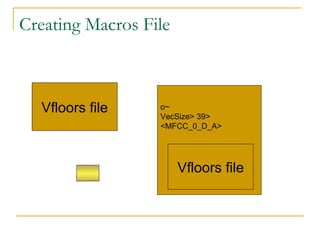
Creating Macros File Vfloors file ~o <VecSize> 39 <MFCC_0_D_A> Vfloors file
Re-estimation Process   Hmmdefs macros HERest Initialized  Proto HCompV Hmmdefs macros Training Files MFc Files Phones level Transcription monophones
Recognition Process  Hvite Trained  Models Test Files Word Network wnet The dictioary dict Reconized words
Recognizer Evaluation HResults Reference Transcription Reconized Transcription Accuracy
Main contents Introduction to AOCR Feature extraction Preprocessing AOCR system implementation Experimental results Conclusion & future directions Applications
Experimental Results
1- Main Problem 1-1  Requirements: Connected Character Recognition. Multi-sizes. Multi-fonts. Hand Written.
1-2  Variables: Tool . Method used to train and test. Model Parameters. Feature Parameters.
Tool:  How it can operate with images? Discrete Input images. (failed) Continuous Input a continuous wave form (Succeeded) DATA Input to HTK
2- Isolated Character Recognition 2-1 Single Size (16)- Single Font (Simplified Arabic Fixed). 2-2 Multi-Sizes Character Recognition. 2-3 Variable Lengths Character Recognition .
2-1  Single Size (16)- Single Font (Simplified Arabic Fixed) Best method. Best number of states. Best Widow size.
Best method: Model for each char. (35 models) Vs Model for each Char. In each position (116 Models) (Vertical histogram-11 states-window=2.5) 116 100% 35 No. of  Models 99.14 % Accuracy
Best number of states: (Vertical histogram-Number of Models=35 -window=2 pixels) 11 99.14% 3 No. of  States 96.55 % Accuracy
Best Widow size: (2-D histogram-Number of Models=124-11 states).
2-2  Multi-Sizes Character Recognition Sizes (12-14-16): (2-D histogram-Number of Models=124-11 states).
2-3  Variable Lengths Character Recognition   Train with different lengths: Vertical histogram gives Accuracy more than 2-D histogram Vertical histogram-Number of Models=35 -window=2 pixels
Make Model for dash : Training:   Train with characters (with out dash) &dash model. Train with different lengths & dash model. Train with different lengths & dash model & if the character has a dash at its end we define it as a character model followed by dash model. (True way).
Make Model for dash : Testing:  Vertical histogram:   failed  to recognize the dash model using all methods (recognize it as a space). 2-D histogram :   for  window size =2.6   Accuracy=100%
3-  Connected Character Recognition   3-1 Single Size (16)- Single Font (Simplified Arabic Fixed). 3-2 Parameter Optimization. 3-3 Multi-Sizes Character Recognition. 3-4 Fusion by feature concatenation.
3-1  Single Size (16)- Single Font (Simplified Arabic Fixed) Best Method:  (on a simple experiment (10 words)) The correct way for the word Recognition is to train the character models by (Words or Lines).   Assumptions: Training data: 25-pages (495 lines). Simplified Arabic fixed (font size = 16). Images: 300dpi-black and white. Testing data: 4-pages (74 lines). Feature properties: window=2*frame.
Vertical histogram:
2-D histogram:
3-2  Parameter Optimization Line Level Vs Word Level. optimum number of mixture. optimum number of States. optimum initial transition probability. optimum window Vs frame ratio.
Line Level Vs Word level Assumptions: Simplified Arabic fixed (font size = 16). Testing data: same training data. Feature type: (vertical histogram, window=2*frame). Images: 300dpi-black and white. Word Level 85.36% Line Level Level 84.99%   Accuracy
Conclusion: We will concentrate on the line segmentation instead of word segmentation because of: The disadvantages of the word segmentation: We have a limitation on the window size because of its small size. Accuracy decreases with increasing the number of mixture. The simplicity of the line segmentation than word segmentation in preprocessing.
optimum number of mixture . One dimension features :   Training data: 495 lines Testing data: same training data. Feature type:  (Vertical histogram, window=2*frame, window size = 6.5 pixels).
Two dimension features :   Training data: 495 lines Testing data: same training data. Feature type:  (2-D histogram, window=2*frame, window size = 5.33 pixels, N= 4)
optimum number of States One dimension features :
Two dimension features :   Assumptions:   as previous Results:   11 95.02% 8 Number of states 92.52% Accuracy =
optimum initial transition probability  Almost Equally likely probabilities. (Failed) Random Probabilities ……..very bad. Each state may still in it self or go to the next state only, probability that state sill in it self higher than probability to go to the next state…………(Succeed).   0  1  0  0  0 0  0.7  0.3  0  0 0 0  0.6  0.4  0 ------------------------------and so on.
optimum window Vs frame ratio Assumptions:   as previous in (2-D feature) Results: 0.5 93.92% 0.4 0.6 Overlapping Ratio = 91.70% 92.52% Accuracy =
Maximum Accuracy for all features: Vertical histogram 96.97% Max. Accuracy Feature Type 95.96% 2-D histogram 87.16% Euclidean distance 91.51% Cross count 95.75% Weighted histogram 89.70% Baseline count 91.61% Background count
3-3  Multi-Sizes Character Recognition Resizing the test data only: Training data:   Simplified Arabic fixed-font size =16. Testing data: Simplified Arabic fixed. Font size = 12-16-18  (After resize). 60 lines. Feature Type: Vertical histogram 16 96.97% 18 14 Font size 76.21% 79.74% Accuracy
Resizing the training and test data: Training data: Simplified Arabic fixed. Font size = 14-16-18  (After resize). (324 * 3) lines. Testing data: (324 * 3) lines. Same  as training. Feature Type: Vertical histogram Accuracy = 92.15%
3-4 F eature concatenation Concatenates vertical histogram and 2-D histogram. No scale 5 84.09% 4 4 Scale vertical histogram)= 4.2 5.57 Window size = 69.02% 77.17% Accuracy =
Main contents Introduction to AOCR Feature extraction Preprocessing AOCR system implementation Experimental results Conclusion & future directions Applications
Future works   Improving printed text system: Data base:   increasing its size to support Multi-sizes and Multi-fonts. Preprocessing improvements: Improving the image enhancement to solve the problem of noisy pages. Develop a robust system to solve the problems that depends on the nature of input pages (delete frames and borders and pictures and tables…..etc). Search for new features and combine between them to improve the accuracy.
Training and testing  improvements: Tying the models. Using Adaptation supported by HTK-tool that may improve the (Multi-size) system (size independent). Using tri-phones technique to solve the problems of overlapping. Improve the time response (implement all pre-processing programs by C++). Increasing the accuracy by feature fusion.
Build the Multi-Language system (Language independent system). Develop the hand written system, especially because HMM can attack this problem efficiently. Develop the ON-Line system.
Main contents Introduction to AOCR Feature extraction Preprocessing AOCR system implementation Experimental results Conclusion & future directions Applications
Automatic Form Recognition Check Bank Reading   بنــك مصــر شيك رقم :  .......................... اسم المصرف اليه : ................. المبلغ بالارقام : ................  المبلغ بالحروف : .................. امضاء ...................
Digital libraries  : Where all books, magazines, newspapers…etc can be stored as a softcopy on PCs & CDs. بسم الله
Transcription of historical archives & &quot;non-death&quot; of   paper Where we can store all archived papers & documents as a softcopy files. بسم الله
 

Aocr Hmm Presentation

  • 1.
    AOCR Arabic OpticalCharacter Recognition ABDEL RAHMAN GHAREEB KASEM ADEL SALAH ABU SEREEA MAHMOUD ABDEL MONEIM ABDEL MONEIM MAHMOUD MOHAMMED ABDEL WAHAB
  • 2.
    Main contents Introductionto AOCR Feature extraction Preprocessing AOCR system implementation Experimental results Conclusion & future directions Applications
  • 3.
    Main contents Introductionto AOCR Feature extraction Preprocessing AOCR system implementation Experimental results Conclusion & future directions Applications
  • 4.
    Introduction Why AOCR?What is OCR? What is the problem in AOCR? What is the solution? Pre-Segmentation. Auto-Segmentation.
  • 5.
    Main contents Introductionto AOCR Feature extraction Preprocessing AOCR system implementation Experimental results Conclusion & future directions Applications
  • 6.
    Preprocessing Image rotationSegmentation. Line segmentation. Word segmentation Image enhancement
  • 7.
    Preprocessing Problem oftilted image 1. Image rotation
  • 8.
  • 9.
    Rotate by -1degree Preprocessing 1. Process rotated image
  • 10.
    Rotate by -2degree Preprocessing 1. Process rotated image
  • 11.
    Rotate by -3degree Preprocessing 1. Process rotated image
  • 12.
    Rotate by -4degree Preprocessing 1. Process rotated image
  • 13.
    Rotate by -4degree Preprocessing 1. Process rotated image
  • 14.
    Preprocessing 1. Processrotated image Threshold effect Clear zeros Clear zeros Mean value 0.2*Mean value
  • 15.
    Preprocessing 1. Processrotated image GRAY Scale Vs. Black/White in Rotation process Original image Gray scale Black/White
  • 16.
    Preprocessing Process rotatedimage Segmentation. Line segmentation. Word segmentation Image enhancement
  • 17.
    Preprocessing 2. Segmentation. What is the Segmentation process? Why we need segmentation in Arabic OCR? What is the algorithm used in Segmentation?
  • 18.
    2. Segmentation.Preprocessing Line level segmentation
  • 19.
    2. Segmentation.Preprocessing Line level segmentation
  • 20.
    2. Segmentation.Preprocessing Word level segmentation
  • 21.
    2. Segmentation.Preprocessing
  • 22.
    Preprocessing Process rotatedimage Segmentation. Line segmentation. Word segmentation Image enhancement
  • 23.
    Preprocessing 3. Image enhancement
  • 24.
    3. Imageenhancement Preprocessing Noise Reduction By morphology operations
  • 25.
    Very important notation:Apply Image Enhancement operations on small images not large image بسم الله الرحمن الرحيم الله أكبر الله أكبر الله أكبر لا إله الا الله والله أكبر Large Image X Small Images بسم الله الرحمن الرحيم الله أكبر الله أكبر الله أكبر لا إله الا الله والله أكبر
  • 26.
    Main contents Introductionto AOCR Feature extraction Preprocessing AOCR system implementation Experimental results Conclusion & future directions Applications
  • 27.
    Feature Extraction الله اكبر
  • 28.
    Feature Selection Suitablefor HMM technique ( i.e. window scanning based features). Suitable for word level recognition (not character). To retain as much information as possible. Achieve high accuracy with small processing time. we select features such that:
  • 29.
    Satisfaction of theprevious points Each feature designed such that, it deals with the principle of slice technique n1 n3 n4 n6 n5 n2 n7 Feature vector محمد رسول الله
  • 30.
    Features deal withwords not single character, where algorithm is based on segmentation free concept. We avoid dealing with structural features as it requires hard implementation, in addition large processing time.
  • 31.
    To achieve highaccuracy with lowest processing time, we use simple features & apply overlap between slices to ensure smoothing of extracted data. الصلاة overlap
  • 32.
    (1) BackgroundCount Calculate vertical distances (in terms of pixels) of background regions, where each background region is bounded by two foreground regions. background Foreground النجاح
  • 33.
    Feature vector Example:d1 d3 d2 d3 d2 d1 Feature vector of the selected slide Two pixels with on overlap
  • 34.
  • 35.
    (2) Baseline Count calculate number of black pixels above baseline (with [+ve] value) & number of black pixels below baseline (with [-ve] value) in each slide.
  • 36.
    Example: Baseline No. of black pixels above baseline (X1) No. of black pixels below baseline (X2) Two pixels with on overlap Thinning X2 X1 Feature vector
  • 37.
  • 38.
    (3) Centroid For each slide we get its Centroid (cx, cy) so the feature vector contains sequence of centroids. Example: Cx Cy Feature vector Two pixels with on overlap
  • 39.
    (4) Cross CountFor each slide we calculate number of crossing from background (white) to foreground (black). Example: 2 Feature vector Two pixels with on overlap
  • 40.
    (5) Euclidean distanceWe get the average foreground pixel in region above & below baseline, then Euclidean distance is measured from baseline to the average points above & below baseline, with +ve value for point above and – ve value for point below.
  • 41.
    Baseline Euclidean distance above baseline D1 Euclidean distance below baseline D2 Example: Thinning One pixel without overlap D2 D1 Feature vector
  • 42.
  • 43.
    (6) Horizontal histogram For each slide we get its horizontal histogram (horizontal summation for rows in the slide). Calculate Histogram Example: Four pixels with one overlap
  • 44.
  • 45.
    (7) Vertical histogram for each slide we get its vertical histogram (vertical summation for columns). Example: X2 X1 Feature vector Two pixels with one overlap
  • 46.
  • 47.
    ( 8) Weightedvertical histogram Exactly as the previous feature but the only difference is that, we multiply each row in the image by a number (weight), where the weight vector which be multiplied by the whole image takes a triangle shape.
  • 48.
    Example: weight vector1 -1 X2 X1 Feature vector Two pixels with one overlap
  • 49.
  • 50.
    Main contents Introductionto AOCR Feature extraction Preprocessing AOCR system implementation Experimental results Conclusion & future directions Applications
  • 51.
    Implementation of AOCRBased HMM Using HTK Data preparation Creating Monophone HMMs Recognizer Evaluation
  • 52.
    Data preparation TheTask Grammar The Dictionary Recording the Data Creating the Transcription Files Coding the Data
  • 53.
    The Task GrammarIsolated AOCR Grammar ----->Mini project Connected AOCR Grammar ---->Final project
  • 54.
    Isolated AOCR Grammar$name =a1| a2 | a3 | a4 | a5|……………|a28|a29; ( SENT-START <$name> SENT-END ) a1-----> ا a2---> ب a3---> ت a4---> ث a29---> space
  • 55.
    Connected AOCR Grammar$name =a1| a2 | a3 | a4 | a5 |……………|a124|a125; (SENT-START <$name> SENT-END ) a1-----> ا a2---> ـا a11---> ــبــ a23---> ـجـ a124---> لله a125---> ـــــــ
  • 56.
    Why Grammar?Start a1 a2 a124 a125 a3 End
  • 57.
    How is itcreated? Hparse creates it Grammar Word Net ( Wdnet ) HParse
  • 58.
    The Dictionary Ourdictionary is limited ???
  • 59.
  • 60.
    Recording the DataFeature extraction Transformer (Image) 2-D signal 1-D vector .wav
  • 61.
    Creating the TranscriptionFiles Word level MLF Phone level MLF
  • 62.
    Word level MLF#! MLF! # &quot;*/1.lab&quot; فصل . &quot;*/2.lab&quot; في الفرق بين الخالق والمخلوق . &quot;*/3.lab&quot; وما ابراهيم وآل ابراهيم الحنفاء والأنبياء فهم . &quot;*/4.lab&quot; يعلمون انه لا بد من الفرق بين الخالق والمخلوق . . . فصل في الفرق بين الخالق والمخلوق وما ابراهيم وآل ابراهيم الحنفاء والأنبياء فهم يعلمون انه لا بد من الفرق بين الخالق والمخلوق
  • 63.
    Phone levelMLF #! MLF! # &quot;*/1.lab&quot; a74 a51 a88 . &quot;*/2.lab&quot; a74 a108 a123 a1 a86 a75 a38 a77 a123 #! MLF! # &quot;*/1.lab&quot; فصل . &quot;*/2.lab&quot; في الفرق بين الخالق والمخلوق . &quot;*/3.lab&quot; وما ابراهيم وآل ابراهيم الحنفاء والأنبياء فهم . &quot;*/4.lab&quot; يعلمون انه لا بد من الفرق بين الخالق والمخلوق . .
  • 64.
    Coding the DataHCOPY MFCC Files S0001.mfc S0002.mfc S0003.mfc etc.. Wave form files ٍٍ S0001.wav S0002.wav S0003.wav etc.. Configuration File Script File
  • 65.
    Creating Monophone HMMsCreating Flat Start Monophones Re-estimation
  • 66.
    Creating Monophone HMMsThe first step in HMM training is to define a prototype model. The parameters of this model are not important; its purpose is to define the model topology
  • 67.
    The Prototype ~o<VecSize> 39 <MFCC_0_D_A> ~h &quot; proto &quot; <BeginHMM> <NumStates> 5 <State> 2 < Mean > 39 0.0 0.0 0.0 . . . . . . . <Variance> 39 1.0 1.0 1.0 . . . . . . . . <State> 3 < Mean > 39 0.0 0.0 0.0 . . . . . . . <Variance> 39 1.0 1.0 1.0 . . . . . . . <State> 4 < Mean > 39 0.0 0.0 0.0 . . . . . . . <Variance> 39 1.0 1.0 1.0 . . . . . . . < TransP > 5 0.0 1.0 0.0 0.0 0.0 0.0 0.6 0.4 0.0 0.0 0.0 0.0 0.6 0.4 0.0 0.0 0.0 0.0 0.7 0.3 0.0 0.0 0.0 0.0 0.0 <EndHMM>
  • 68.
    Initialization Process Proto Vfloors Proto HCompV hmm0
  • 69.
    Initialized prototype ~o<VecSize> 39 <MFCC_0_D_A> ~h &quot; proto &quot; <BeginHMM> <NumStates> 5 <State> 2 < Mean > 39 -5.029420e+000 1.948325e+000 -5.192460e+000 . . . . . <Variance> 39 1.568812e+001 1.038746e+001 2.110239e+001 . . . . . <State> 3 < Mean > 39 -5.029420e+000 1.948325e+000 -5.192460e+000 . . . . . . <Variance> 39 1.568812e+001 1.038746e+001 2.110239e+001 . . . . . <State> 4 < Mean > 39 -5.029420e+000 1.948325e+000 -5.192460e+000 . . . . . . . <Variance> 39 1.568812e+001 1.038746e+001 2.110239e+001 . . . . . . . < TransP > 5 0.0 1.0 0.0 0.0 0.0 0.0 0.6 0.4 0.0 0.0 0.0 0.0 0.6 0.4 0.0 0.0 0.0 0.0 0.7 0.3 0.0 0.0 0.0 0.0 0.0 <EndHMM>
  • 70.
    Vfloors Contents ~v varFloor1 <Variance> 39 1.568812e-001 1.038746e-001 2.110239e-001 . . . . . .
  • 71.
    Creating initialized Modelsa125 a2 a1 Initialized model hmmdefs ~o <VecSize> 39 <MFCC_0_D_A> Initialized proto
  • 72.
    Creating Macros FileVfloors file ~o <VecSize> 39 <MFCC_0_D_A> Vfloors file
  • 73.
    Re-estimation Process Hmmdefs macros HERest Initialized Proto HCompV Hmmdefs macros Training Files MFc Files Phones level Transcription monophones
  • 74.
    Recognition Process Hvite Trained Models Test Files Word Network wnet The dictioary dict Reconized words
  • 75.
    Recognizer Evaluation HResultsReference Transcription Reconized Transcription Accuracy
  • 76.
    Main contents Introductionto AOCR Feature extraction Preprocessing AOCR system implementation Experimental results Conclusion & future directions Applications
  • 77.
  • 78.
    1- Main Problem1-1 Requirements: Connected Character Recognition. Multi-sizes. Multi-fonts. Hand Written.
  • 79.
    1-2 Variables:Tool . Method used to train and test. Model Parameters. Feature Parameters.
  • 80.
    Tool: Howit can operate with images? Discrete Input images. (failed) Continuous Input a continuous wave form (Succeeded) DATA Input to HTK
  • 81.
    2- Isolated CharacterRecognition 2-1 Single Size (16)- Single Font (Simplified Arabic Fixed). 2-2 Multi-Sizes Character Recognition. 2-3 Variable Lengths Character Recognition .
  • 82.
    2-1 SingleSize (16)- Single Font (Simplified Arabic Fixed) Best method. Best number of states. Best Widow size.
  • 83.
    Best method: Modelfor each char. (35 models) Vs Model for each Char. In each position (116 Models) (Vertical histogram-11 states-window=2.5) 116 100% 35 No. of Models 99.14 % Accuracy
  • 84.
    Best number ofstates: (Vertical histogram-Number of Models=35 -window=2 pixels) 11 99.14% 3 No. of States 96.55 % Accuracy
  • 85.
    Best Widow size:(2-D histogram-Number of Models=124-11 states).
  • 86.
    2-2 Multi-SizesCharacter Recognition Sizes (12-14-16): (2-D histogram-Number of Models=124-11 states).
  • 87.
    2-3 VariableLengths Character Recognition Train with different lengths: Vertical histogram gives Accuracy more than 2-D histogram Vertical histogram-Number of Models=35 -window=2 pixels
  • 88.
    Make Model fordash : Training: Train with characters (with out dash) &dash model. Train with different lengths & dash model. Train with different lengths & dash model & if the character has a dash at its end we define it as a character model followed by dash model. (True way).
  • 89.
    Make Model fordash : Testing: Vertical histogram: failed to recognize the dash model using all methods (recognize it as a space). 2-D histogram : for window size =2.6 Accuracy=100%
  • 90.
    3- ConnectedCharacter Recognition 3-1 Single Size (16)- Single Font (Simplified Arabic Fixed). 3-2 Parameter Optimization. 3-3 Multi-Sizes Character Recognition. 3-4 Fusion by feature concatenation.
  • 91.
    3-1 SingleSize (16)- Single Font (Simplified Arabic Fixed) Best Method: (on a simple experiment (10 words)) The correct way for the word Recognition is to train the character models by (Words or Lines). Assumptions: Training data: 25-pages (495 lines). Simplified Arabic fixed (font size = 16). Images: 300dpi-black and white. Testing data: 4-pages (74 lines). Feature properties: window=2*frame.
  • 92.
  • 93.
  • 94.
    3-2 ParameterOptimization Line Level Vs Word Level. optimum number of mixture. optimum number of States. optimum initial transition probability. optimum window Vs frame ratio.
  • 95.
    Line Level VsWord level Assumptions: Simplified Arabic fixed (font size = 16). Testing data: same training data. Feature type: (vertical histogram, window=2*frame). Images: 300dpi-black and white. Word Level 85.36% Line Level Level 84.99% Accuracy
  • 96.
    Conclusion: We willconcentrate on the line segmentation instead of word segmentation because of: The disadvantages of the word segmentation: We have a limitation on the window size because of its small size. Accuracy decreases with increasing the number of mixture. The simplicity of the line segmentation than word segmentation in preprocessing.
  • 97.
    optimum number ofmixture . One dimension features : Training data: 495 lines Testing data: same training data. Feature type: (Vertical histogram, window=2*frame, window size = 6.5 pixels).
  • 98.
    Two dimension features: Training data: 495 lines Testing data: same training data. Feature type: (2-D histogram, window=2*frame, window size = 5.33 pixels, N= 4)
  • 99.
    optimum number ofStates One dimension features :
  • 100.
    Two dimension features: Assumptions: as previous Results: 11 95.02% 8 Number of states 92.52% Accuracy =
  • 101.
    optimum initial transitionprobability Almost Equally likely probabilities. (Failed) Random Probabilities ……..very bad. Each state may still in it self or go to the next state only, probability that state sill in it self higher than probability to go to the next state…………(Succeed). 0 1 0 0 0 0 0.7 0.3 0 0 0 0 0.6 0.4 0 ------------------------------and so on.
  • 102.
    optimum window Vsframe ratio Assumptions: as previous in (2-D feature) Results: 0.5 93.92% 0.4 0.6 Overlapping Ratio = 91.70% 92.52% Accuracy =
  • 103.
    Maximum Accuracy forall features: Vertical histogram 96.97% Max. Accuracy Feature Type 95.96% 2-D histogram 87.16% Euclidean distance 91.51% Cross count 95.75% Weighted histogram 89.70% Baseline count 91.61% Background count
  • 104.
    3-3 Multi-SizesCharacter Recognition Resizing the test data only: Training data: Simplified Arabic fixed-font size =16. Testing data: Simplified Arabic fixed. Font size = 12-16-18 (After resize). 60 lines. Feature Type: Vertical histogram 16 96.97% 18 14 Font size 76.21% 79.74% Accuracy
  • 105.
    Resizing the trainingand test data: Training data: Simplified Arabic fixed. Font size = 14-16-18 (After resize). (324 * 3) lines. Testing data: (324 * 3) lines. Same as training. Feature Type: Vertical histogram Accuracy = 92.15%
  • 106.
    3-4 F eatureconcatenation Concatenates vertical histogram and 2-D histogram. No scale 5 84.09% 4 4 Scale vertical histogram)= 4.2 5.57 Window size = 69.02% 77.17% Accuracy =
  • 107.
    Main contents Introductionto AOCR Feature extraction Preprocessing AOCR system implementation Experimental results Conclusion & future directions Applications
  • 108.
    Future works Improving printed text system: Data base: increasing its size to support Multi-sizes and Multi-fonts. Preprocessing improvements: Improving the image enhancement to solve the problem of noisy pages. Develop a robust system to solve the problems that depends on the nature of input pages (delete frames and borders and pictures and tables…..etc). Search for new features and combine between them to improve the accuracy.
  • 109.
    Training and testing improvements: Tying the models. Using Adaptation supported by HTK-tool that may improve the (Multi-size) system (size independent). Using tri-phones technique to solve the problems of overlapping. Improve the time response (implement all pre-processing programs by C++). Increasing the accuracy by feature fusion.
  • 110.
    Build the Multi-Languagesystem (Language independent system). Develop the hand written system, especially because HMM can attack this problem efficiently. Develop the ON-Line system.
  • 111.
    Main contents Introductionto AOCR Feature extraction Preprocessing AOCR system implementation Experimental results Conclusion & future directions Applications
  • 112.
    Automatic Form RecognitionCheck Bank Reading بنــك مصــر شيك رقم : .......................... اسم المصرف اليه : ................. المبلغ بالارقام : ................ المبلغ بالحروف : .................. امضاء ...................
  • 113.
    Digital libraries : Where all books, magazines, newspapers…etc can be stored as a softcopy on PCs & CDs. بسم الله
  • 114.
    Transcription of historicalarchives & &quot;non-death&quot; of paper Where we can store all archived papers & documents as a softcopy files. بسم الله
  • 115.