Android Studio Software Installation steps in windows.
1.
Android studio Installation
Androidstudio Installation
Steps
Steps
Ms. P. BARKAVI,
Assistant Professor,
Department of Computer Applications,
Ayya Nadar Janaki Ammal College,
Sivakasi.
2.
Steps of installand configure SDK:
Android Studio is the official IDE (Integrated Development Environment) for Android app development and it is based on
JetBrains’ IntelliJ IDEA software. Android Studio provides many excellent features that enhance productivity when building
Android apps, such as:
• A blended environment where one can develop for all Android devices
• Apply Changes to push code and resource changes to the running app without restarting the app
• A flexible Gradle-based build system
• A fast and feature-rich emulator
• GitHub and Code template integration to assist you to develop common app features and import sample code
• Extensive testing tools and frameworks
• C++ and NDK support
• Built-in support for Google Cloud Platform, making it easy to integrate Google Cloud Messaging and App Engine, and many more.
• Provides GUI tools that simplify the less interesting parts of app development.
• Easy integration with real time database ‘firebase’.
System Requirements
• Microsoft Windows 7/8/10 (32-bit or 64-bit)
• 4 GB RAM minimum, 8 GB RAM recommended (plus 1 GB for the Android Emulator)
• 2 GB of available disk space minimum, 4 GB recommended (500 MB for IDE plus 1.5 GB for Android SDK and emulator system
image)
• 1280 x 800 minimum screen resolution
Installation Guide
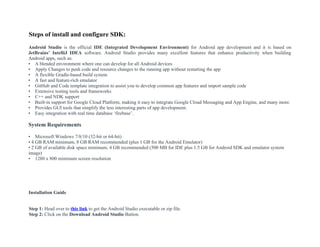
Step 1: Head over to this link to get the Android Studio executable or zip file.
Step 2: Click on the Download Android Studio Button.
3.
Download Android Studio
Beforedownloading, you must agree to the following terms and conditions.
Terms and Conditions
This is the Android Software Development Kit License Agreement
1. Introduction
1.1 The Android Software Development Kit (referred to in the License Agreement as the "SDK' and specifically including the Android system files,
packaged APIs, and Google APIs add-ons) is licensed to you subject to the terms of the License Agreement. The License Agreement forms a legally
binding contract between you and Google in relation to your use of the SDK.
1.2 'Android11
means the Android software stack for devices, as made available under the Android Open Source Project, which is located at the following
URL: http://source.android.com/, as updated from time to time.
1.3 A "compatible implementation" means any Android device that (i) complies with the Android Compatibility Definition document, which can be found
at the Android compatibility website (http://source.android.com/compatibilitv) and which may be updated from time to time: and fii) successfully passes
the Android
< >
□ I have read and agree with the above terms and conditions DOWNLOAD ANDROID STUDIO FOR WINDOWS android-studio-ide-173.4819257-windows.exe
Click on the Save file button in the appeared prompt box and the file will start downloading.
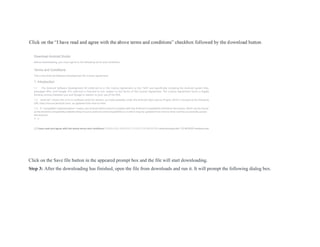
Step 3: After the downloading has finished, open the file from downloads and run it. It will prompt the following dialog box.
4.
w
Androi
d
Studio
Setup writ guideyou through the installation of Android
Studio.
It is recommended that you dose at other applications
before starting Setup. TWs wi make it posable to update
relevant system files without having to reboot your
computer.
Ckk Next to continue.
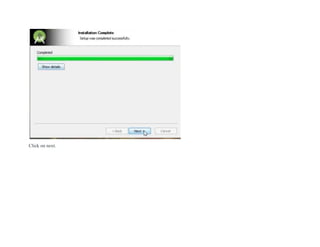
Click on next. In the next prompt, it’ll ask for a path for installation. Choose a path and hit next. Step
4: It will start the installation, and once it is completed, it will be like the image shown below.
Step 5: Once“Finish” is clicked, it will ask whether the previous settings need to be imported [if the android studio had been
installed earlier], or not. It is better to choose the ‘Don’t import Settings option’.
Click the OK button.
7.
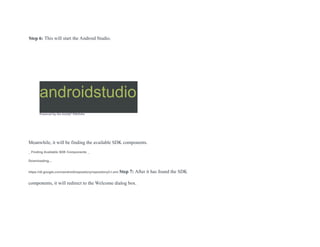
Step 6: Thiswill start the Android Studio.
androidstudio
Powered by the InttAJ* PWtfofm
*
Meanwhile, it will be finding the available SDK components.
_ Finding Available SDK Components _
Downloading...
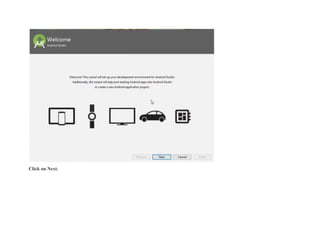
https://dl.google.corn/android/repository/repository2-l.xml Step 7: After it has found the SDK
components, it will redirect to the Welcome dialog box.
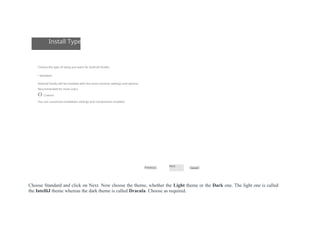
Install Type
Choose thetype of setup you want for Android Studio:
• Standard
Android Studio will be installed with the most common settings and options.
Recommended for most users.
O Custom
You can customize installation settings and components installed.
Previous
Next
Caned
Choose Standard and click on Next. Now choose the theme, whether the Light theme or the Dark one. The light one is called
the IntelliJ theme whereas the dark theme is called Dracula. Choose as required.
10.
Select UI Theme
ODarcula
module CD src C? MdoWorld
c* HeioWorid.java x I
F'l«*>ort ]avax.swing:
L-lmport ]ava. avt. • ;
public class ^lloWcrld {
I ^ public HelloWorldl) {
JFrame frame « new JFrame ( Bello wot JLabel label - new
JLabel<); label .set. Font (new Font. 1 Serif". Font
module Q •
label
frame
frame,
frame,
frame,
frame
PI Breakpoint;
+ - ED * 0
0 0 • Line Breakpoints
—■ |l"| '""I "
.•ax. swing. *:
class HelloKorid {
lie HelloKorid() {
JFrame frame = new JFrame
JLabel label = new JLabel()
label.setFont(new Font!"
fr fr
frame.
jl|| Breakpoint;
ED 0 D
▼ ^ • Lr>e BreakDom
Next Cancel
Click on the Next button.
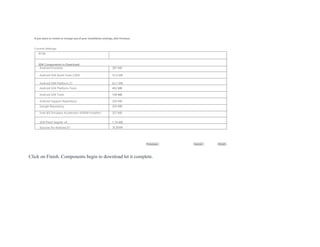
Step 8: Now it is time to download the SDK components.
11.
If you wantto review or change any of your installation settings, dick Previous.
Current Settings:
Ill GB
SDK Components to Download:
Android Emulator 287 MB
Android SDK Build-Tools 27J03 52.6 MB
Android SDK Platform 27 62.7 MB
Android SDK Platform-Tools 452 MB
Android SDK Tools 149 MB
Android Support Repository 339 MB
Google Repository 205 MB
Intel )£6 Emulator Accelerator (HAXM installer) 257 MB
SDK Patch Applier v4 1.74 MB
Sources for Android 27 353 MB
Previous Cancel Finish
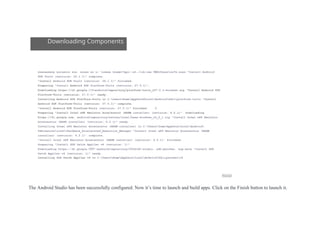
Click on Finish. Components begin to download let it complete.
12.
Downloading Components
xuauaxxxuy xuiuxuiusun. xuuxs xu u: usexa vnume*ppi--at.«iA;cex VMXiUxuxusu*w.uuxs "Install Android
SDK Tools (revision: 26.1.1)" complete.
"Install Android SDK Tools (revision: 26.1.1)" finished.
Preparing "Install Android SDK Platform-Tools (revision: 27.0.1)".
Downloading https://dl.google.COR/android/repository/platform-tools_r27.0.1-windows.zip "Install Android SDK
Platform-Tools (revision: 27.0.1)" ready.
Installing Android SDK Platfora-Tools in C:OsersHomeAppDataVLocalAndroidSdlcplatform-tools "Install
Android SDK Platform-Tools (revision: 27.0.1)" complete.
"Install Android SDK Platform-Tools (revision: 27.0.1)" finished. J
Preparing "Install Intel x8€ Emulator Accelerator (HAXM installer) (revision: 6.2.1)". Downloading
https://dl.google.com, android/repository/extras/intel/haxa-windows_r6_2_1.zip "Install Intel x86 Emulator
Accelerator (HAXH installer) (revision: 6.2.1)" ready.
Installing Intel x86 Emulator Accelerator (HAXM installer) in C:Users3omeAppDataLocalAndroid
Sdkiextrasintel8ardware_Accelerated_Execution_Manager "Install Intel x86 Emulator Accelerator (HAXM
installer) (revision: 6.2.1)' complete.
"Install Intel x86 Emulator Accelerator (HAXM installer) (revision: 6.2.1)’ finished.
Preparing "Install SDK Patch Appller v4 (revision: 1)".
Downloading https://dl.google.0081'androld/repository/3534162-studio. sdk-patcher. zip.bale "Install SDK
Patch Appller v4 (revision: 1)" ready.
Installing SDK Patch Appller v4 in C:0sersHomeAppDatalocalAndroidSd)c>patcherv4
Finish
The Android Studio has been successfully configured. Now it’s time to launch and build apps. Click on the Finish button to launch it.
13.
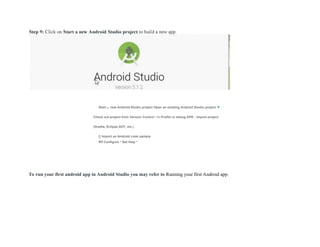
Start a newAndroid Studio project Open an existing Android Studio project ▼
Check out project from Version Control • fe Profile or debug APK • Import project
(Gradle, Eclipse ADT, etc.)
[} Import an Android code sample
ffif Configure * Get Help *
To run your first android app in Android Studio you may refer to Running your first Android app.
![Step 5: Once “Finish” is clicked, it will ask whether the previous settings need to be imported [if the android studio had been
installed earlier], or not. It is better to choose the ‘Don’t import Settings option’.
Click the OK button.](https://image.slidesharecdn.com/install-steps-250621062736-7fe28f43/85/Android-Studio-Software-Installation-steps-in-windows-6-320.jpg)
![Select UI Theme
O Darcula
module CD src C? MdoWorld
c* HeioWorid.java x I
F'l«*>ort ]avax.swing:
L-lmport ]ava. avt. • ;
public class ^lloWcrld {
I ^ public HelloWorldl) {
JFrame frame « new JFrame ( Bello wot JLabel label - new
JLabel<); label .set. Font (new Font. 1 Serif". Font
module Q •
label
frame
frame,
frame,
frame,
frame
PI Breakpoint;
+ - ED * 0
0 0 • Line Breakpoints
—■ |l"| '""I "
.•ax. swing. *:
class HelloKorid {
lie HelloKorid() {
JFrame frame = new JFrame
JLabel label = new JLabel()
label.setFont(new Font!"
fr fr
frame.
jl|| Breakpoint;
ED 0 D
▼ ^ • Lr>e BreakDom
Next Cancel
Click on the Next button.
Step 8: Now it is time to download the SDK components.](https://image.slidesharecdn.com/install-steps-250621062736-7fe28f43/85/Android-Studio-Software-Installation-steps-in-windows-10-320.jpg)