Android Q
(os android version 10)
Presented
by,
G. Nandini
A. Sasthika
E.
Shaarmil
SYNOPSIS
2
1
Introduction
Features of Android Q
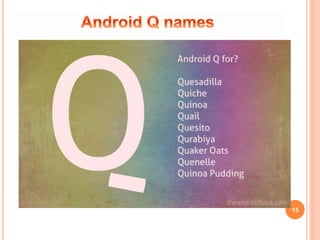
Android Q names
Android Q Release Date
List of features
Conclusion
Reference
3
INTRODUCTION
The next major update to
the Android mobile OS is
beginning to surface, and
according to the leaks, it will
include a system-wide dark mode.
EVOLUTION OF ANDROID
 The Android Operating System is a Linux-
based OS
 Developed by the Open Handset Alliance
(OHA).
4
BASIC FEATURES OF ANDROID
 Integrated browser, based on the open
source WebKit engine
 Optimized 2D and 3D graphics,
multimedia and GSM connectivity
 Bluetooth
 EDGE
 3G
 WiFi
 SQLite
 Camera
 GPS
 Compass
 Accelerometer 5
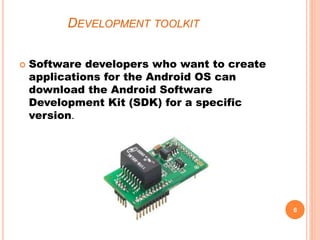
DEVELOPMENT TOOLKIT
 Software developers who want to create
applications for the Android OS can
download the Android Software
Development Kit (SDK) for a specific
version.
6
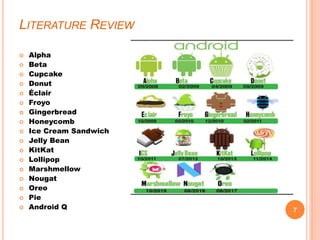
LITERATURE REVIEW
 Alpha
 Beta
 Cupcake
 Donut
 Éclair
 Froyo
 Gingerbread
 Honeycomb
 Ice Cream Sandwich
 Jelly Bean
 KitKat
 Lollipop
 Marshmellow
 Nougat
 Oreo
 Pie
 Android Q 7
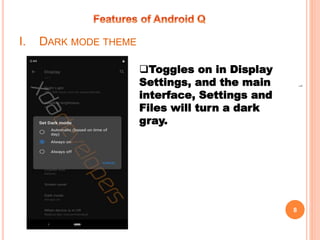
I. DARK MODE THEME
8
1
Toggles on in Display
Settings, and the main
interface, Settings and
Files will turn a dark
gray.
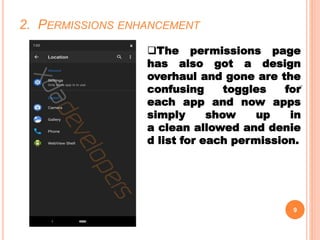
2. PERMISSIONS ENHANCEMENT
9
1
The permissions page
has also got a design
overhaul and gone are the
confusing toggles for
each app and now apps
simply show up in
a clean allowed and denie
d list for each permission.
3. IN BUILT SCREEN RECORDING
10
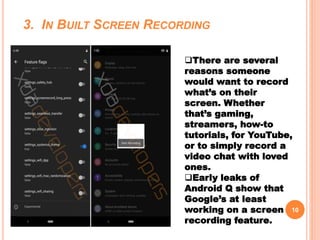
There are several
reasons someone
would want to record
what’s on their
screen. Whether
that’s gaming,
streamers, how-to
tutorials, for YouTube,
or to simply record a
video chat with loved
ones.
Early leaks of
Android Q show that
Google’s at least
working on a screen
recording feature.
4. REVAMPED PACKAGE INSTALLER
11
1
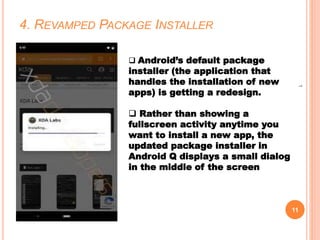
 Android’s default package
installer (the application that
handles the installation of new
apps) is getting a redesign.
 Rather than showing a
fullscreen activity anytime you
want to install a new app, the
updated package installer in
Android Q displays a small dialog
in the middle of the screen
5. “SENSORS OFF” QUICK SETINGS TILE
12
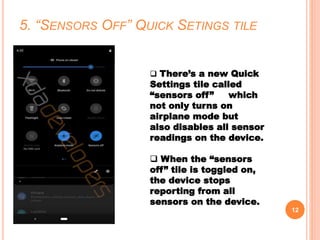
 There’s a new Quick
Settings tile called
“sensors off” which
not only turns on
airplane mode but
also disables all sensor
readings on the device.
 When the “sensors
off” tile is toggled on,
the device stops
reporting from all
sensors on the device.
13
1
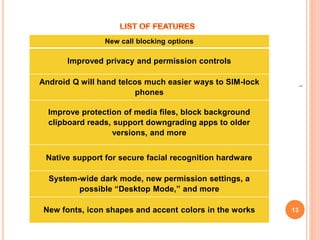
New call blocking options
Improved privacy and permission controls
Android Q will hand telcos much easier ways to SIM-lock
phones
Improve protection of media files, block background
clipboard reads, support downgrading apps to older
versions, and more
Native support for secure facial recognition hardware
System-wide dark mode, new permission settings, a
possible “Desktop Mode,” and more
New fonts, icon shapes and accent colors in the works
14
1
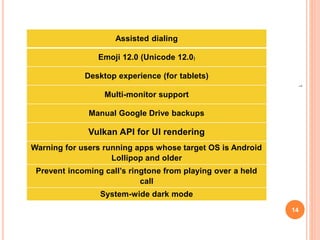
Assisted dialing
Emoji 12.0 (Unicode 12.0)
Desktop experience (for tablets)
Multi-monitor support
Manual Google Drive backups
Vulkan API for UI rendering
Warning for users running apps whose target OS is Android
Lollipop and older
Prevent incoming call’s ringtone from playing over a held
call
System-wide dark mode
15
16
1
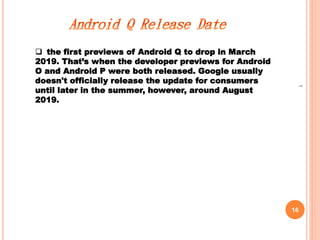
 the first previews of Android Q to drop in March
2019. That’s when the developer previews for Android
O and Android P were both released. Google usually
doesn't officially release the update for consumers
until later in the summer, however, around August
2019.
17
1
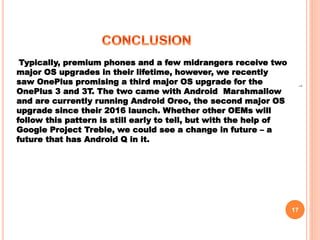
Typically, premium phones and a few midrangers receive two
major OS upgrades in their lifetime, however, we recently
saw OnePlus promising a third major OS upgrade for the
OnePlus 3 and 3T. The two came with Android Marshmallow
and are currently running Android Oreo, the second major OS
upgrade since their 2016 launch. Whether other OEMs will
follow this pattern is still early to tell, but with the help of
Google Project Treble, we could see a change in future – a
future that has Android Q in it.
1
18
1. https://www.theandroidsoul.com
2. https://www.xda-developers.com
3. https://www.techradar.com
4. https://www.pocket-lint.com
Thank you

Android Q (version 10)

  • 1.
    Android Q (os androidversion 10) Presented by, G. Nandini A. Sasthika E. Shaarmil
  • 2.
    SYNOPSIS 2 1 Introduction Features of AndroidQ Android Q names Android Q Release Date List of features Conclusion Reference
  • 3.
    3 INTRODUCTION The next majorupdate to the Android mobile OS is beginning to surface, and according to the leaks, it will include a system-wide dark mode.
  • 4.
    EVOLUTION OF ANDROID The Android Operating System is a Linux- based OS  Developed by the Open Handset Alliance (OHA). 4
  • 5.
    BASIC FEATURES OFANDROID  Integrated browser, based on the open source WebKit engine  Optimized 2D and 3D graphics, multimedia and GSM connectivity  Bluetooth  EDGE  3G  WiFi  SQLite  Camera  GPS  Compass  Accelerometer 5
  • 6.
    DEVELOPMENT TOOLKIT  Softwaredevelopers who want to create applications for the Android OS can download the Android Software Development Kit (SDK) for a specific version. 6
  • 7.
    LITERATURE REVIEW  Alpha Beta  Cupcake  Donut  Éclair  Froyo  Gingerbread  Honeycomb  Ice Cream Sandwich  Jelly Bean  KitKat  Lollipop  Marshmellow  Nougat  Oreo  Pie  Android Q 7
  • 8.
    I. DARK MODETHEME 8 1 Toggles on in Display Settings, and the main interface, Settings and Files will turn a dark gray.
  • 9.
    2. PERMISSIONS ENHANCEMENT 9 1 Thepermissions page has also got a design overhaul and gone are the confusing toggles for each app and now apps simply show up in a clean allowed and denie d list for each permission.
  • 10.
    3. IN BUILTSCREEN RECORDING 10 There are several reasons someone would want to record what’s on their screen. Whether that’s gaming, streamers, how-to tutorials, for YouTube, or to simply record a video chat with loved ones. Early leaks of Android Q show that Google’s at least working on a screen recording feature.
  • 11.
    4. REVAMPED PACKAGEINSTALLER 11 1  Android’s default package installer (the application that handles the installation of new apps) is getting a redesign.  Rather than showing a fullscreen activity anytime you want to install a new app, the updated package installer in Android Q displays a small dialog in the middle of the screen
  • 12.
    5. “SENSORS OFF”QUICK SETINGS TILE 12  There’s a new Quick Settings tile called “sensors off” which not only turns on airplane mode but also disables all sensor readings on the device.  When the “sensors off” tile is toggled on, the device stops reporting from all sensors on the device.
  • 13.
    13 1 New call blockingoptions Improved privacy and permission controls Android Q will hand telcos much easier ways to SIM-lock phones Improve protection of media files, block background clipboard reads, support downgrading apps to older versions, and more Native support for secure facial recognition hardware System-wide dark mode, new permission settings, a possible “Desktop Mode,” and more New fonts, icon shapes and accent colors in the works
  • 14.
    14 1 Assisted dialing Emoji 12.0(Unicode 12.0) Desktop experience (for tablets) Multi-monitor support Manual Google Drive backups Vulkan API for UI rendering Warning for users running apps whose target OS is Android Lollipop and older Prevent incoming call’s ringtone from playing over a held call System-wide dark mode
  • 15.
  • 16.
    16 1  the firstpreviews of Android Q to drop in March 2019. That’s when the developer previews for Android O and Android P were both released. Google usually doesn't officially release the update for consumers until later in the summer, however, around August 2019.
  • 17.
    17 1 Typically, premium phonesand a few midrangers receive two major OS upgrades in their lifetime, however, we recently saw OnePlus promising a third major OS upgrade for the OnePlus 3 and 3T. The two came with Android Marshmallow and are currently running Android Oreo, the second major OS upgrade since their 2016 launch. Whether other OEMs will follow this pattern is still early to tell, but with the help of Google Project Treble, we could see a change in future – a future that has Android Q in it.
  • 18.
    1 18 1. https://www.theandroidsoul.com 2. https://www.xda-developers.com 3.https://www.techradar.com 4. https://www.pocket-lint.com Thank you