Android Manchester
Week 8 - Services & Notifications
Overview
● Retro
○ Lesson 6 Services & Notifications
● Looking Forward
○ The Final Project
● Stickers
● Next retro 31st March (2 weeks!)
● Next Tues 7-8pm SpacePortX
Energizer
Stand up and introduce yourself to
somebody around you, you don’t
know
Prime Directive
‘Regardless of where we are up to, we
understand and truly believe that
everyone did the best job he or she
could, given his or her skills and
abilities, the personal time available,
and the situation at hand.’
Difficulty Check
● Who completed the class?
● How long did it take?
● Hands up 1-10 difficulty of the lesson
● Any specific areas of the lesson that require
particular focus?
Retro lesson 6 services & notifications
What we learnt last week
● Services
● Application priority
● Alarms
● Transferring data efficiently
● SyncAdapters
● Notifications
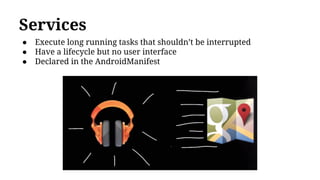
Services
● Execute long running tasks that shouldn’t be interrupted
● Have a lifecycle but no user interface
● Declared in the AndroidManifest
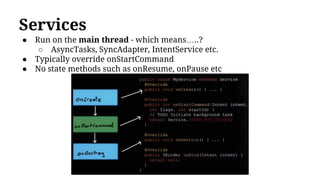
Services
● Run on the main thread - which means…..?
○ AsyncTasks, SyncAdapter, IntentService etc.
● Typically override onStartCommand
● No state methods such as onResume, onPause etc
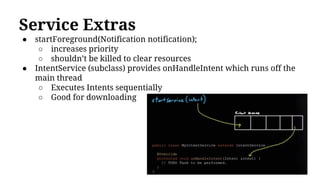
Service Extras
● startForeground(Notification notification);
○ increases priority
○ shouldn’t be killed to clear resources
● IntentService (subclass) provides onHandleIntent which runs off the
main thread
○ Executes Intents sequentially
○ Good for downloading
App Priority
● Apps running in the background have a
responsibility to be good citizens!
● Async Task can be used to download files/play
music but risk being deleted when the app is in
the background
● Services allow us to deal with these use cases
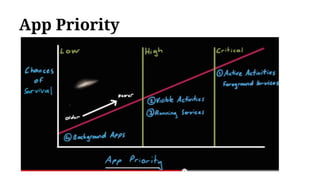
App Priority
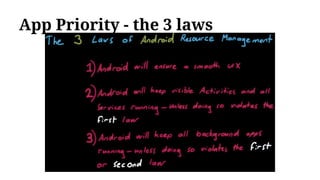
App Priority - the 3 laws
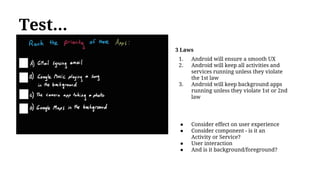
Test...
● Consider effect on user experience
● Consider component - is it an
Activity or Service?
● User interaction
● And is it background/foreground?
3 Laws
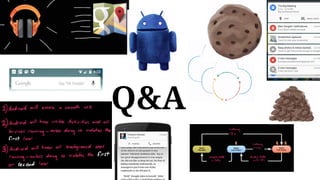
1. Android will ensure a smooth UX
2. Android will keep all activities and
services running unless they violate
the 1st law
3. Android will keep background apps
running unless they violate 1st or 2nd
law
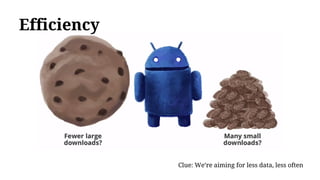
Efficiency
Clue: We’re aiming for less data, less often
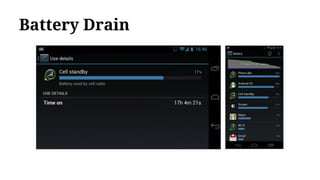
Battery Drain
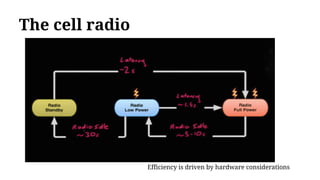
The cell radio
Efficiency is driven by hardware considerations
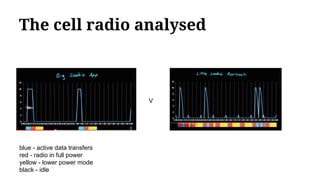
The cell radio analysed
V
blue - active data transfers
red - radio in full power
yellow - lower power mode
black - idle
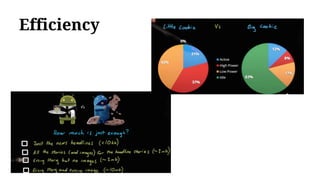
Efficiency
Interlude - making good apps great
Further Watching
Google I/O 2013 - Android Protips 3: Making Apps Work Like Magic
https://www.youtube.com/watch?v=GcNNx2zdXN4
Google I/O 2012 - Android Protips 2:Making Good Apps Great
https://www.youtube.com/watch?v=PwC1OlJo5VM
Google I/O 2011: Android Protips: Advanced Topics for Expert Android App Developers
https://www.youtube.com/watch?v=twmuBbC_oB8
SyncAdapter
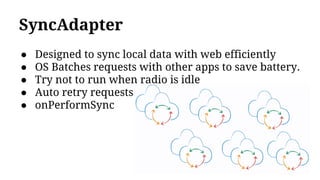
● Designed to sync local data with web efficiently
● OS Batches requests with other apps to save battery.
● Try not to run when radio is idle
● Auto retry requests
● onPerformSync
Notifications
Notifications
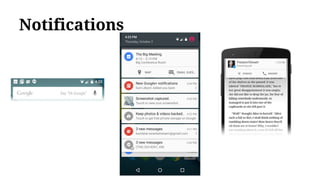
● So far, all solutions of retrieving data/sync go Device ->
Server (Poll)
● Notifications are Server -> Device (Push)-
○ can include payload in json format or request update
■ NB: Requesting too many updates concurrently can
cause server traffic
○ More efficient than polling
What went well
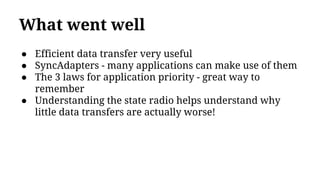
What went well
● Efficient data transfer very useful
● SyncAdapters - many applications can make use of them
● The 3 laws for application priority - great way to
remember
● Understanding the state radio helps understand why
little data transfers are actually worse!
What didn’t go so well
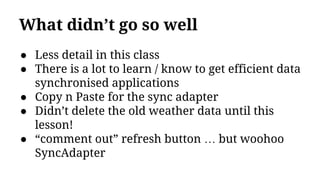
● Less detail in this class
● There is a lot to learn / know to get efficient data
synchronised applications
● Copy n Paste for the sync adapter
● Didn’t delete the old weather data until this
lesson!
● “comment out” refresh button … but woohoo
SyncAdapter
Q&A
Next - Android Jam
Project Retro
Next Lesson - Project
Learning Objectives:
- Final Project
Final Project
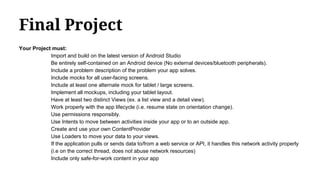
Your Project must:
Import and build on the latest version of Android Studio
Be entirely self-contained on an Android device (No external devices/bluetooth peripherals).
Include a problem description of the problem your app solves.
Include mocks for all user-facing screens.
Include at least one alternate mock for tablet / large screens.
Implement all mockups, including your tablet layout.
Have at least two distinct Views (ex. a list view and a detail view).
Work properly with the app lifecycle (i.e. resume state on orientation change).
Use permissions responsibly.
Use Intents to move between activities inside your app or to an outside app.
Create and use your own ContentProvider
Use Loaders to move your data to your views.
If the application pulls or sends data to/from a web service or API, it handles this network activity properly
(i.e on the correct thread, does not abuse network resources)
Include only safe-for-work content in your app
Final Project Extras
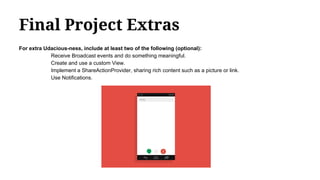
For extra Udacious-ness, include at least two of the following (optional):
Receive Broadcast events and do something meaningful.
Create and use a custom View.
Implement a ShareActionProvider, sharing rich content such as a picture or link.
Use Notifications.
Final Project Ideas
● Food ordering app
● Teleprompter app
● Local news app
● App for your company, university or local club
● Education app
● Public transit schedule
● Reddit Reading List
● Github OSS project tracker
● YouTube API
● Twitter API
● Weather API
● www.programmableweb.com/apis/directory
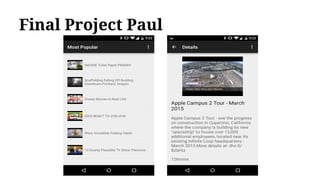
Final Project Paul
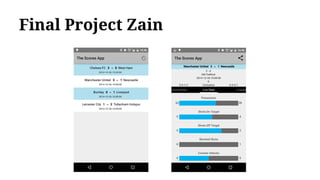
Final Project Zain
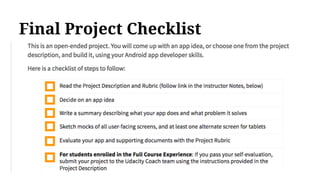
Final Project Checklist
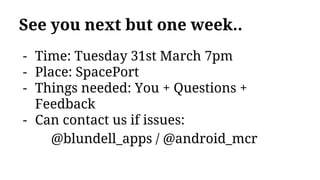
See you next but one week..
- Time: Tuesday 31st March 7pm
- Place: SpacePort
- Things needed: You + Questions +
Feedback
- Can contact us if issues:
@blundell_apps / @android_mcr
Go forth & discuss do

Android Jam - Services & Notifications - Udacity Lesson 6

  • 1.
    Android Manchester Week 8- Services & Notifications
  • 2.
    Overview ● Retro ○ Lesson6 Services & Notifications ● Looking Forward ○ The Final Project ● Stickers ● Next retro 31st March (2 weeks!) ● Next Tues 7-8pm SpacePortX
  • 3.
    Energizer Stand up andintroduce yourself to somebody around you, you don’t know
  • 4.
    Prime Directive ‘Regardless ofwhere we are up to, we understand and truly believe that everyone did the best job he or she could, given his or her skills and abilities, the personal time available, and the situation at hand.’
  • 5.
    Difficulty Check ● Whocompleted the class? ● How long did it take? ● Hands up 1-10 difficulty of the lesson ● Any specific areas of the lesson that require particular focus?
  • 6.
    Retro lesson 6services & notifications What we learnt last week ● Services ● Application priority ● Alarms ● Transferring data efficiently ● SyncAdapters ● Notifications
  • 7.
    Services ● Execute longrunning tasks that shouldn’t be interrupted ● Have a lifecycle but no user interface ● Declared in the AndroidManifest
  • 8.
    Services ● Run onthe main thread - which means…..? ○ AsyncTasks, SyncAdapter, IntentService etc. ● Typically override onStartCommand ● No state methods such as onResume, onPause etc
  • 9.
    Service Extras ● startForeground(Notificationnotification); ○ increases priority ○ shouldn’t be killed to clear resources ● IntentService (subclass) provides onHandleIntent which runs off the main thread ○ Executes Intents sequentially ○ Good for downloading
  • 10.
    App Priority ● Appsrunning in the background have a responsibility to be good citizens! ● Async Task can be used to download files/play music but risk being deleted when the app is in the background ● Services allow us to deal with these use cases
  • 11.
  • 12.
    App Priority -the 3 laws
  • 13.
    Test... ● Consider effecton user experience ● Consider component - is it an Activity or Service? ● User interaction ● And is it background/foreground? 3 Laws 1. Android will ensure a smooth UX 2. Android will keep all activities and services running unless they violate the 1st law 3. Android will keep background apps running unless they violate 1st or 2nd law
  • 14.
    Efficiency Clue: We’re aimingfor less data, less often
  • 15.
  • 16.
    The cell radio Efficiencyis driven by hardware considerations
  • 17.
    The cell radioanalysed V blue - active data transfers red - radio in full power yellow - lower power mode black - idle
  • 18.
  • 19.
    Interlude - makinggood apps great
  • 20.
    Further Watching Google I/O2013 - Android Protips 3: Making Apps Work Like Magic https://www.youtube.com/watch?v=GcNNx2zdXN4 Google I/O 2012 - Android Protips 2:Making Good Apps Great https://www.youtube.com/watch?v=PwC1OlJo5VM Google I/O 2011: Android Protips: Advanced Topics for Expert Android App Developers https://www.youtube.com/watch?v=twmuBbC_oB8
  • 21.
    SyncAdapter ● Designed tosync local data with web efficiently ● OS Batches requests with other apps to save battery. ● Try not to run when radio is idle ● Auto retry requests ● onPerformSync
  • 22.
  • 23.
    Notifications ● So far,all solutions of retrieving data/sync go Device -> Server (Poll) ● Notifications are Server -> Device (Push)- ○ can include payload in json format or request update ■ NB: Requesting too many updates concurrently can cause server traffic ○ More efficient than polling
  • 24.
  • 25.
    What went well ●Efficient data transfer very useful ● SyncAdapters - many applications can make use of them ● The 3 laws for application priority - great way to remember ● Understanding the state radio helps understand why little data transfers are actually worse!
  • 26.
  • 27.
    What didn’t goso well ● Less detail in this class ● There is a lot to learn / know to get efficient data synchronised applications ● Copy n Paste for the sync adapter ● Didn’t delete the old weather data until this lesson! ● “comment out” refresh button … but woohoo SyncAdapter
  • 28.
  • 29.
    Next - AndroidJam Project Retro
  • 30.
    Next Lesson -Project Learning Objectives: - Final Project
  • 31.
    Final Project Your Projectmust: Import and build on the latest version of Android Studio Be entirely self-contained on an Android device (No external devices/bluetooth peripherals). Include a problem description of the problem your app solves. Include mocks for all user-facing screens. Include at least one alternate mock for tablet / large screens. Implement all mockups, including your tablet layout. Have at least two distinct Views (ex. a list view and a detail view). Work properly with the app lifecycle (i.e. resume state on orientation change). Use permissions responsibly. Use Intents to move between activities inside your app or to an outside app. Create and use your own ContentProvider Use Loaders to move your data to your views. If the application pulls or sends data to/from a web service or API, it handles this network activity properly (i.e on the correct thread, does not abuse network resources) Include only safe-for-work content in your app
  • 32.
    Final Project Extras Forextra Udacious-ness, include at least two of the following (optional): Receive Broadcast events and do something meaningful. Create and use a custom View. Implement a ShareActionProvider, sharing rich content such as a picture or link. Use Notifications.
  • 33.
    Final Project Ideas ●Food ordering app ● Teleprompter app ● Local news app ● App for your company, university or local club ● Education app ● Public transit schedule ● Reddit Reading List ● Github OSS project tracker ● YouTube API ● Twitter API ● Weather API ● www.programmableweb.com/apis/directory
  • 34.
  • 35.
  • 36.
  • 37.
    See you nextbut one week.. - Time: Tuesday 31st March 7pm - Place: SpacePort - Things needed: You + Questions + Feedback - Can contact us if issues: @blundell_apps / @android_mcr
  • 38.
    Go forth &discuss do