IT I Android Development
World Friends IT
R E G E N T × U N I S T
Accelerometer
Instructor: Dongmin Kim (rocky112358@unist.ac.kr)
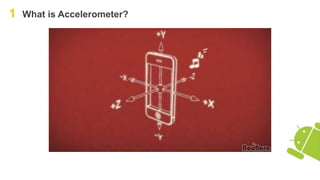
1 What is Accelerometer?
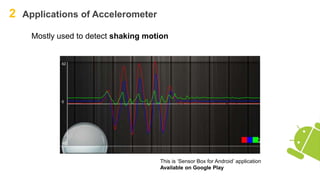
2 Applications of Accelerometer
Mostly used to detect shaking motion
This is ‘Sensor Box for Android’ application
Available on Google Play
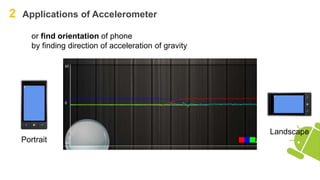
2 Applications of Accelerometer
or find orientation of phone
by finding direction of acceleration of gravity
Portrait
Landscape
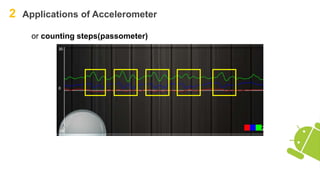
2 Applications of Accelerometer
or counting steps(passometer)
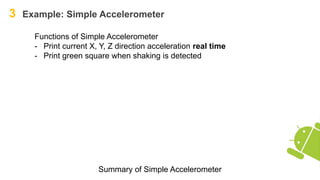
3 Example: Simple Accelerometer
Summary of Simple Accelerometer
Functions of Simple Accelerometer
- Print current X, Y, Z direction acceleration real time
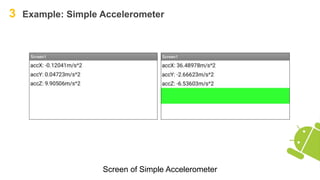
- Print green square when shaking is detected
3 Example: Simple Accelerometer
Screen design of Simple Accelerometer
Width: Fill parent
3 Example: Simple Accelerometer
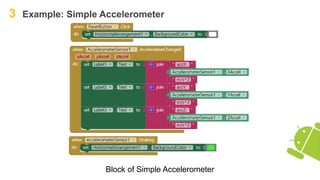
Block of Simple Accelerometer
3 Example: Simple Accelerometer
Screen of Simple Accelerometer
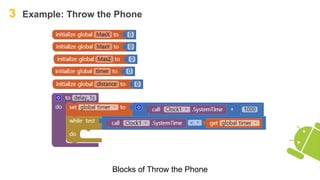
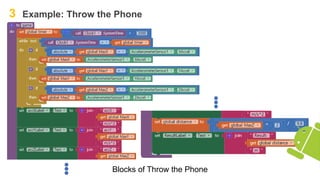
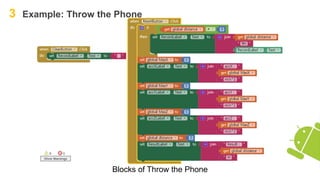
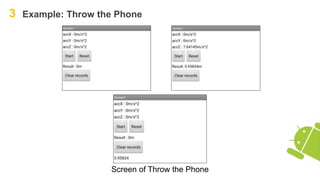
3 Example: Throw the Phone
Functions of Throw the Phone
- When ‘START’ button is tapped, countdown “Three, Two, One”.
- Throw (but don’t throw)
- Calculate the driving distance according to the acceleration sensor
value.
- When ‘RESET’ button is tapped, store current record and reset.
- DO NOT THROW YOUR PHONE IN REALITY
- BE CAREFUL
Summary of Throw the Phone
3 Example: Throw the Phone
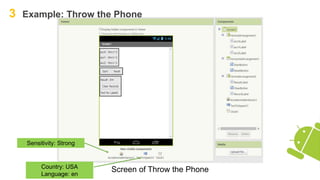
Screen of Throw the Phone
Sensitivity: Strong
Country: USA
Language: en
3 Example: Throw the Phone
Blocks of Throw the Phone
3 Example: Throw the Phone
Blocks of Throw the Phone
3 Example: Throw the Phone
Blocks of Throw the Phone
3 Example: Throw the Phone
Blocks of Throw the Phone
3 Example: Throw the Phone
Screen of Throw the Phone
4 What we learned today
- How to use accelerometer
- How to use TTS (Text To Speech)

Android App Development with MIT App Inventor 2: Accelerometer

  • 1.
    IT I AndroidDevelopment World Friends IT R E G E N T × U N I S T Accelerometer Instructor: Dongmin Kim (rocky112358@unist.ac.kr)
  • 2.
    1 What isAccelerometer?
  • 3.
    2 Applications ofAccelerometer Mostly used to detect shaking motion This is ‘Sensor Box for Android’ application Available on Google Play
  • 4.
    2 Applications ofAccelerometer or find orientation of phone by finding direction of acceleration of gravity Portrait Landscape
  • 5.
    2 Applications ofAccelerometer or counting steps(passometer)
  • 6.
    3 Example: SimpleAccelerometer Summary of Simple Accelerometer Functions of Simple Accelerometer - Print current X, Y, Z direction acceleration real time - Print green square when shaking is detected
  • 7.
    3 Example: SimpleAccelerometer Screen design of Simple Accelerometer Width: Fill parent
  • 8.
    3 Example: SimpleAccelerometer Block of Simple Accelerometer
  • 9.
    3 Example: SimpleAccelerometer Screen of Simple Accelerometer
  • 10.
    3 Example: Throwthe Phone Functions of Throw the Phone - When ‘START’ button is tapped, countdown “Three, Two, One”. - Throw (but don’t throw) - Calculate the driving distance according to the acceleration sensor value. - When ‘RESET’ button is tapped, store current record and reset. - DO NOT THROW YOUR PHONE IN REALITY - BE CAREFUL Summary of Throw the Phone
  • 11.
    3 Example: Throwthe Phone Screen of Throw the Phone Sensitivity: Strong Country: USA Language: en
  • 12.
    3 Example: Throwthe Phone Blocks of Throw the Phone
  • 13.
    3 Example: Throwthe Phone Blocks of Throw the Phone
  • 14.
    3 Example: Throwthe Phone Blocks of Throw the Phone
  • 15.
    3 Example: Throwthe Phone Blocks of Throw the Phone
  • 16.
    3 Example: Throwthe Phone Screen of Throw the Phone
  • 17.
    4 What welearned today - How to use accelerometer - How to use TTS (Text To Speech)