Analytic Data Report
With MongoDB
By Li Jia Li (Pwint Phyu Kyaw)
How would you design the data
schema ?
‣ No need to retain transactional event data in MongoDB.
‣ You require up-to-the minute data, or up-to-the-second if possible.
‣ The queries for ranges of data (by time) must be as fast as possible.
Solution
‣ Use pre-aggregated schema using upserts and increment operations.
‣ This will allow you to
- calculate statistics,
- produce simple range-based queries, and
- generate filters to support time-series charts of aggregated data.
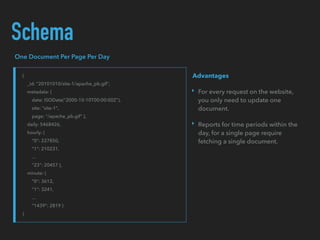
Schema
{
_id: "20101010/site-1/apache_pb.gif",
metadata: {
date: ISODate("2000-10-10T00:00:00Z"),
site: "site-1",
page: "/apache_pb.gif" },
daily: 5468426,
hourly: {
"0": 227850,
"1": 210231,
...
"23": 20457 },
minute: {
"0": 3612,
"1": 3241,
...
"1439": 2819 }
}
One Document Per Page Per Day
‣ For every request on the website,
you only need to update one
document.
‣ Reports for time periods within the
day, for a single page require
fetching a single document.
Advantages
Pre-allocate Documents
‣ initializing all documents with 0 values in all fields. After create, documents will
never grow.
‣ there will be no need to migrate documents within the data store
‣ MongoDB will not add padding to the records, which leads to a more compact
data representation and better memory use of your memory.
Add Intra-Document Hierarchy
MongoDB stores BSON documents as a sequence of fields and values, not as a hash table. As a result,
writing to the field stats.mn.0 is considerably faster than writing to stats.mn.1439.
In order to update the value in minute #1349, MongoDB must skip over all 1349 entries before it.
{
_id: "20101010/site-1/apache_pb.gif",
metadata: {
date: ISODate("2000-10-10T00:00:00Z"),
site: "site-1",
page: "/apache_pb.gif" },
daily: 5468426,
hourly: {
"0": 227850,
"1": 210231,
...
"23": 20457 },
minute: {
"0": {
"0": 3612,
"1": 3241,
...
"59": 2130 },
"1": {
"60": ... ,
},
...
"23": {
...
"1439": 2819 }
}
}
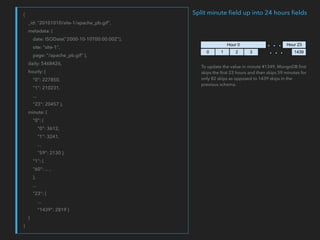
Split minute field up into 24 hours fields
To update the value in minute #1349, MongoDB first
skips the first 23 hours and then skips 59 minutes for
only 82 skips as opposed to 1439 skips in the
previous schema.
Separate Documents by Granularity Level
Daily Statistics
<= Schema in previous slide
Monthly Statistics
{
_id: "201010/site-1/apache_pb.gif",
metadata: {
date: ISODate("2000-10-00T00:00:00Z"),
site: "site-1",
page: "/apache_pb.gif" },
daily: {
"1": 5445326,
"2": 5214121,
... }
}
Retrieving Data for a Real-Time Chart
Retrieve the number of hits to a specific resource (i.e. /index.html) with minute-level granularity
db.stats.daily.findOne(
... {'metadata': {'date':dt, 'site':'site-1', 'page':'/index.html'}},
... { 'minute': 1 })
Retrieve the number of hits to a specific resource with hour-level granularity
db.stats.daily.findOne(
... {'metadata': {'date':dt, 'site':'site-1', 'page':'/index.html'}},
... { 'hourly': 1 })
A few days of hourly data
db.stats.daily.find(
... {
... 'metadata.date': { '$gte': dt1, '$lte': dt2 },
... 'metadata.site': 'site-1',
... 'metadata.page': '/index.html'},
... { 'metadata.date': 1, 'hourly': 1 } },
... sort=[('metadata.date', 1)])
INDEXING
db.stats.daily.ensure_index([
... ('metadata.site', 1),
... ('metadata.page', 1),
... ('metadata.date', 1)])
Get Data for a Historical Chart
Daily data for a single month
db.stats.monthly.findOne(
... {‘metadata': {‘date':dt, 'site': ‘site-1', 'page':'/index.html'}},
... { 'daily': 1 })
Several months of daily data
db.stats.monthly.find(
... {
... 'metadata.date': { '$gte': dt1, '$lte': dt2 },
... 'metadata.site': 'site-1',
... 'metadata.page': '/index.html'},
... { 'metadata.date': 1, 'daily': 1 } },
... sort=[('metadata.date', 1)])
INDEXING
db.stats.monthly.ensure_index([
... ('metadata.site', 1),
... ('metadata.page', 1),
... ('metadata.date', 1)])
https://docs.mongodb.org/ecosystem/use-cases
‣ Storing Log Data
‣ Pre-Aggregated Reports
‣ Hierarchical Aggregation
‣ Product Catalog
‣ Inventory Management
‣ Category Hierarchy
‣ Metadata and Asset Management
‣ Storing Comments

Analytic Data Report with MongoDB

  • 1.
    Analytic Data Report WithMongoDB By Li Jia Li (Pwint Phyu Kyaw)
  • 2.
    How would youdesign the data schema ? ‣ No need to retain transactional event data in MongoDB. ‣ You require up-to-the minute data, or up-to-the-second if possible. ‣ The queries for ranges of data (by time) must be as fast as possible.
  • 3.
    Solution ‣ Use pre-aggregatedschema using upserts and increment operations. ‣ This will allow you to - calculate statistics, - produce simple range-based queries, and - generate filters to support time-series charts of aggregated data.
  • 4.
    Schema { _id: "20101010/site-1/apache_pb.gif", metadata: { date:ISODate("2000-10-10T00:00:00Z"), site: "site-1", page: "/apache_pb.gif" }, daily: 5468426, hourly: { "0": 227850, "1": 210231, ... "23": 20457 }, minute: { "0": 3612, "1": 3241, ... "1439": 2819 } } One Document Per Page Per Day ‣ For every request on the website, you only need to update one document. ‣ Reports for time periods within the day, for a single page require fetching a single document. Advantages
  • 5.
    Pre-allocate Documents ‣ initializingall documents with 0 values in all fields. After create, documents will never grow. ‣ there will be no need to migrate documents within the data store ‣ MongoDB will not add padding to the records, which leads to a more compact data representation and better memory use of your memory.
  • 6.
    Add Intra-Document Hierarchy MongoDBstores BSON documents as a sequence of fields and values, not as a hash table. As a result, writing to the field stats.mn.0 is considerably faster than writing to stats.mn.1439. In order to update the value in minute #1349, MongoDB must skip over all 1349 entries before it.
  • 7.
    { _id: "20101010/site-1/apache_pb.gif", metadata: { date:ISODate("2000-10-10T00:00:00Z"), site: "site-1", page: "/apache_pb.gif" }, daily: 5468426, hourly: { "0": 227850, "1": 210231, ... "23": 20457 }, minute: { "0": { "0": 3612, "1": 3241, ... "59": 2130 }, "1": { "60": ... , }, ... "23": { ... "1439": 2819 } } } Split minute field up into 24 hours fields To update the value in minute #1349, MongoDB first skips the first 23 hours and then skips 59 minutes for only 82 skips as opposed to 1439 skips in the previous schema.
  • 8.
    Separate Documents byGranularity Level Daily Statistics <= Schema in previous slide Monthly Statistics { _id: "201010/site-1/apache_pb.gif", metadata: { date: ISODate("2000-10-00T00:00:00Z"), site: "site-1", page: "/apache_pb.gif" }, daily: { "1": 5445326, "2": 5214121, ... } }
  • 9.
    Retrieving Data fora Real-Time Chart Retrieve the number of hits to a specific resource (i.e. /index.html) with minute-level granularity db.stats.daily.findOne( ... {'metadata': {'date':dt, 'site':'site-1', 'page':'/index.html'}}, ... { 'minute': 1 }) Retrieve the number of hits to a specific resource with hour-level granularity db.stats.daily.findOne( ... {'metadata': {'date':dt, 'site':'site-1', 'page':'/index.html'}}, ... { 'hourly': 1 }) A few days of hourly data db.stats.daily.find( ... { ... 'metadata.date': { '$gte': dt1, '$lte': dt2 }, ... 'metadata.site': 'site-1', ... 'metadata.page': '/index.html'}, ... { 'metadata.date': 1, 'hourly': 1 } }, ... sort=[('metadata.date', 1)]) INDEXING db.stats.daily.ensure_index([ ... ('metadata.site', 1), ... ('metadata.page', 1), ... ('metadata.date', 1)])
  • 10.
    Get Data fora Historical Chart Daily data for a single month db.stats.monthly.findOne( ... {‘metadata': {‘date':dt, 'site': ‘site-1', 'page':'/index.html'}}, ... { 'daily': 1 }) Several months of daily data db.stats.monthly.find( ... { ... 'metadata.date': { '$gte': dt1, '$lte': dt2 }, ... 'metadata.site': 'site-1', ... 'metadata.page': '/index.html'}, ... { 'metadata.date': 1, 'daily': 1 } }, ... sort=[('metadata.date', 1)]) INDEXING db.stats.monthly.ensure_index([ ... ('metadata.site', 1), ... ('metadata.page', 1), ... ('metadata.date', 1)])
  • 11.
    https://docs.mongodb.org/ecosystem/use-cases ‣ Storing LogData ‣ Pre-Aggregated Reports ‣ Hierarchical Aggregation ‣ Product Catalog ‣ Inventory Management ‣ Category Hierarchy ‣ Metadata and Asset Management ‣ Storing Comments