Analysis of IPL Data
Using SQL
 Anishreddy -Sports PerformanceAnalytics
 psomireddy72@gmail.com
Table of Contents:
o Introduction
o Data Import
o DataTables Structure
o Attacking Batsmen Analysis
o Anchor Batsmen Analysis
o Identifying Hard Hitters
o Economy Bowler Insights
o Wicket-Taking Bowler Analysis
o All-Rounder Evaluation
o Wicket Keeper Stats
o Venue Analysis
o Eden Gardens in Focus
o IPL MatchVenues
o DataVisualizationTechniques
o Conclusion and Future Directions
Creating "ipl_ball" Table
CREATETABLE ipl_ball ( match_id INT, inning INT,
over INT, ball INT, batsmanVARCHAR, non_striker
VARCHAR, bowlerVARCHAR, batsman_runs INT,
extra_runs INT, total_runs INT, is_wicket INT,
dismissal_kindVARCHAR, player_dismissed
VARCHAR, fielderVARCHAR, extras_type VARCHAR,
batting_team VARCHAR, bowling_teamVARCHAR););
o Purpose: Creating a table named "ipl_ball" to
store detailed IPL match data.
o Usage: Each row represents one ball bowled,
capturing match details, batting, bowling,
wickets, and more.
o Data Import: Loads data from "IPL_Ball.csv" into
the table.
o Query: Retrieving the data for IPL match analysis
with SELECT * FROM ipl_ball;
Creating and Loading Data into "ipl_matches" Table
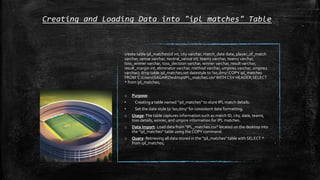
create table ipl_matches(id int, city varchar, match_date date, player_of_match
varchar, venue varchar, neutral_venue int, team1 varchar, team2 varchar,
toss_winner varchar, toss_decision varchar, winner varchar, result varchar,
result_margin int, eliminator varchar, method varchar, umpire1 varchar, umpire2
varchar); drop table ipl_matches;set datestyle to 'iso,dmy';COPY ipl_matches
FROM 'C:UsersSAGARDesktopIPL_matches.csv' WITH CSV HEADER;SELECT
* from ipl_matches;
o Purpose:
• Creating a table named "ipl_matches" to store IPL match details.
• Set the date style to 'iso,dmy' for consistent date formatting.
o Usage:The table captures information such as match ID, city, date, teams,
toss details, winner, and umpire information for IPL matches.
o Data Import: Load data from "IPL_matches.csv" located on the desktop into
the "ipl_matches" table using the COPY command.
o Query: Retrieving all data stored in the "ipl_matches" table with SELECT *
from ipl_matches;
Creating "Attacking_Batsman" Table for
IPL Data Analysis
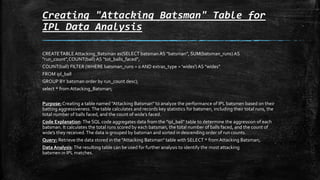
CREATETABLE Attacking_Batsman as(SELECT batsman AS "batsman", SUM(batsman_runs) AS
"run_count",COUNT(ball) AS "tot_balls_faced",
COUNT(ball) FILTER (WHERE batsman_runs = 0 AND extras_type = 'wides') AS "wides"
FROM ipl_ball
GROUP BY batsman order by run_count desc);
select * fromAttacking_Batsman;
Purpose: Creating a table named "Attacking Batsman" to analyze the performance of IPL batsmen based on their
batting aggressiveness. The table calculates and records key statistics for batsmen, including their total runs, the
total number of balls faced, and the count of wide’s faced.
Code Explanation: The SQL code aggregates data from the "ipl_ball" table to determine the aggression of each
batsman. It calculates the total runs scored by each batsman, the total number of balls faced, and the count of
wide’s they received.The data is grouped by batsman and sorted in descending order of run counts.
Query: Retrieve the data stored in the "Attacking Batsman" table with SELECT * fromAttacking Batsman;.
Data Analysis: The resulting table can be used for further analysis to identify the most attacking
batsmen in IPL matches.
Identifying Top Attacking Batsmen in IPL
CREATE TABLE Attacking_Batsman as(SELECT batsman AS "batsman", SUM(batsman_runs) AS
"run_count",COUNT(ball) AS "tot_balls_faced",
COUNT(ball) FILTER (WHERE batsman_runs = 0 AND extras_type = 'wides') AS "wides"
FROM ipl_ball
GROUP BY batsman order by run_count desc);
select * from Attacking_Batsman;
o Purpose: Using the above SQL code to identify and rank the top attacking batsmen in IPL
matches based on their batting performance.
o Usage: The final query calculates the strike rate of batsmen, considering the total runs, total
legal balls faced (excluding wides), and filters for those who faced more than 500 balls.
o Code Explanation: The SQL query selects the batsman's name, total runs scored
("run_count"), total legal balls faced (excluding wides), and calculates the strike rate as (runs
scored / total legal balls faced) * 100.It filters for batsmen who faced more than 500 balls for a
significant sample size.The results are sorted in descending order of strike rate and limited to
the top 10 batsmen.
o Query: Execute the SQL query to retrieve the top 10 attacking batsmen in IPL matches.
o Data Analysis: The query helps identify the most aggressive and impactful batsmen in IPL
history based on their strike rates.
It provides an overview of the final SQL query's purpose, how it calculates the strike rate of
batsmen, and its significance in identifying the top attacking batsmen in IPL matches.
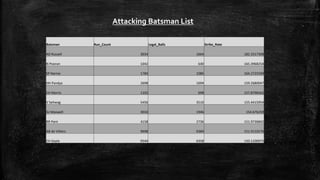
Attacking Batsman List
Batsman Run_Count Legal_Balls Strike_Rate
AD Russell 3034 1664 182.3317308
N Pooran 1042 630 165.3968254
SP Narine 1784 1086 164.2725599
HH Pandya 2698 1694 159.2680047
CH Morris 1102 698 157.8796562
V Sehwag 5456 3510 155.4415954
GJ Maxwell 3010 1946 154.676259
RR Pant 4158 2736 151.9736842
AB de Villiers 9698 6384 151.9110276
CH Gayle 9544 6358 150.1100975
0 1000 2000 3000 4000 5000 6000 7000
AB de Villiers
V Sehwag
GJ Maxwell
AD Russell
CH Morris
Legal_Balls
Batsman
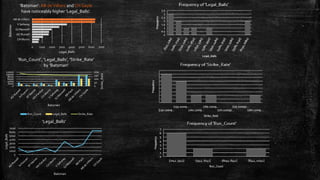
'Batsman':AB deVilliers and CH Gayle
have noticeably higher 'Legal_Balls'.
0
50
100
150
200
0
2000
4000
6000
8000
10000
12000
Strike_Rate
Batsman
'Run_Count', 'Legal_Balls', 'Strike_Rate'
by 'Batsman'
Run_Count Legal_Balls Strike_Rate
0
1000
2000
3000
4000
5000
6000
7000
Legal_Balls
Batsman
'Legal_Balls'
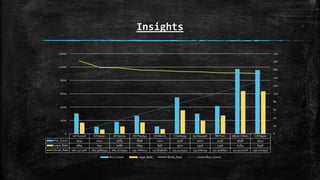
Insights
AD Russell N Pooran SP Narine HH Pandya CH Morris V Sehwag GJ Maxwell RR Pant AB de Villiers CH Gayle
Run_Count 3034 1042 1784 2698 1102 5456 3010 4158 9698 9544
Legal_Balls 1664 630 1086 1694 698 3510 1946 2736 6384 6358
Strike_Rate 182.3317308 165.3968254 164.2725599 159.2680047 157.8796562 155.4415954 154.676259 151.9736842 151.9110276 150.1100975
0
20
40
60
80
100
120
140
160
180
200
0
2000
4000
6000
8000
10000
12000
Run_Count Legal_Balls Strike_Rate Linear (Run_Count)
Analyzing Anchor Batsmen in IPL Matches
create table master as ( select *
from ipl_ball as a
inner join ipl_matches as b--final query to get the Attacking batsman--
select batsman,run_count,tot_balls_faced - wides as Legal_balls,
(run_count/cast(tot_balls_faced - wides as float))*100 as "strike_rate"
FROM Attacking_Batsman where tot_balls_faced > 500 order by strike_rate desc limit 10;
on a.match_id = b.id);
select * from master;
o Purpose: Creating a table named "master" to analyze anchor batsmen in IPL matches. Anchor
batsmen are those who play a stabilizing role in the team's innings.
o Usage: The code combines data from both the "ipl_ball" and "ipl_matches" tables to identify
anchor batsmen.
o Code Explanation: SQL code creates the "master" table by joining data from the "ipl_ball" and
"ipl_matches" tables using the match ID as the common identifier. The intention is to correlate ball-
level data with match-level details for comprehensive analysis.
o Query: Execute the SQL query to retrieve data from the "master" table.
o Data Analysis: The resulting "master" table can be used to identify anchor batsmen in IPL matches
based on their batting performances across different matches.
It provides an overview of the SQL code's purpose, how it creates the "master" table by joining match
and ball data, and its significance in analyzing anchor batsmen in IPL matches.
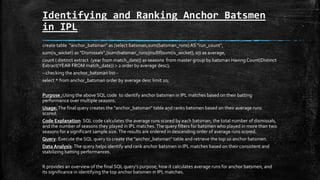
Identifying and Ranking Anchor Batsmen
in IPL
create table "anchor_batsman" as (select batsman,sum(batsman_runs)AS "run_count",
sum(is_wicket) as "Dismissals",(sum(batsman_runs)/nullif(sum(is_wicket), 0)) as average,
count ( distinct extract (year from match_date)) as seasons from master group by batsman Having Count(Distinct
Extract(YEAR FROM match_date)) > 2 order by average desc);
--checking the anchor_batsman list--
select * from anchor_batsman order by average desc limit 10;
Purpose :Using the above SQL code to identify anchor batsmen in IPL matches based on their batting
performance over multiple seasons.
Usage:The final query creates the "anchor_batsman" table and ranks batsmen based on their average runs
scored.
Code Explanation: SQL code calculates the average runs scored by each batsman, the total number of dismissals,
and the number of seasons they played in IPL matches.The query filters for batsmen who played in more than two
seasons for a significant sample size.The results are ordered in descending order of average runs scored.
Query: Execute the SQL query to create the "anchor_batsman" table and retrieve the top 10 anchor batsmen.
Data Analysis: The query helps identify and rank anchor batsmen in IPL matches based on their consistent and
stabilizing batting performances.
It provides an overview of the final SQL query's purpose, how it calculates average runs for anchor batsmen, and
its significance in identifying the top anchor batsmen in IPL matches.
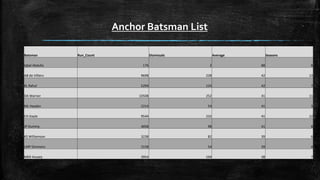
Anchor Batsman List
Batsman Run_Count Dismissals Average Seasons
Iqbal Abdulla 176 2 88 8
AB de Villiers 9698 228 42 13
KL Rahul 5294 124 42 7
DA Warner 10508 252 41 11
ML Hayden 2214 54 41 3
CH Gayle 9544 232 41 12
JP Duminy 4058 98 41 8
KS Williamson 3238 82 39 6
LMP Simmons 2158 54 39 4
MEK Hussey 3954 104 38 7
0
2
4
6
8
10
12
14
0 2 4 6 8 10 12
Seasons
Run_Count
Thousands
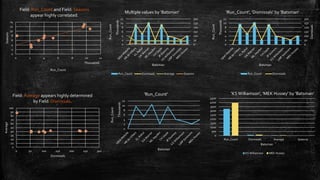
Field: Run_Count and Field: Seasons
appear highly correlated.
0
50
100
150
200
250
300
0
2
4
6
8
10
12
Dismissals
Run_Count
Thousands
Batsman
'Run_Count', 'Dismissals' by 'Batsman'
Run_Count Dismissals
0
10
20
30
40
50
60
70
80
90
100
0 50 100 150 200 250 300
Average
Dismissals
Field: Average appears highly determined
by Field: Dismissals.
0
500
1000
1500
2000
2500
3000
3500
4000
4500
Run_Count Dismissals Average Seasons
Batsman
'KSWilliamson', 'MEK Hussey' by 'Batsman'
KS Williamson MEK Hussey
0
50
100
150
200
250
300
0
2
4
6
8
10
12
Run_Count
Thousands
Batsman
Multiple values by 'Batsman'
Run_Count Dismissals Average Seasons
0
2
4
6
8
10
12
Run_Count
Thousands
Batsman
'Run_Count'
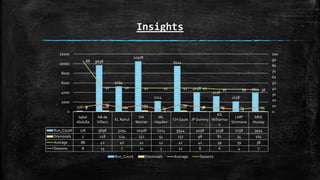
Insights
Iqbal
Abdulla
AB de
Villiers
KL Rahul
DA
Warner
ML
Hayden
CH Gayle JP Duminy
KS
Williamso
n
LMP
Simmons
MEK
Hussey
Run_Count 176 9698 5294 10508 2214 9544 4058 3238 2158 3954
Dismissals 2 228 124 252 54 232 98 82 54 104
Average 88 42 42 41 41 41 41 39 39 38
Seasons 8 13 7 11 3 12 8 6 4 7
176
9698
5294
10508
2214
9544
4058
3238
2158
3954
2 228 124 252 54 232 98 82 54 104
88
42 42 41 41 41 41 39 39 38
8
13
7
11
3
12
8 6 4 7
0
10
20
30
40
50
60
70
80
90
100
0
2000
4000
6000
8000
10000
12000
Run_Count Dismissals Average Seasons
Analyzing Hard-hitting Batsman in IPL
--Hard hitters----Hard hitters STEP-1 --CREATETABLE "sixfours" as (SELECT batsman,COUNT(CASE WHEN batsman_runs >= 6
THEN 1 END) AS six_count,COUNT(CASEWHEN batsman_runs = 4 THEN 1 END) AS four_count,SUM(batsman_runs) as
Totalruns,count ( distinct extract (year from match_date)) as seasons FROM masterGROUP BY batsmanORDER BY totalruns
desc);-- Hard hitters STEP 2--CREATETABLE "boundaries" as (SELECT batsman, COUNT(*) AS boundariesFROM masterWHERE
batsman_runs >= 4GROUP BY batsmanORDER BY boundaries desc);--Hard hitters STEP 3--CREATETABLE "hardhitter" as (SELECT
a.*,b.boundariesFROM sixfours AS aINNER JOIN boundaries AS bON a.batsman = b.batsmangroup by
a.batsman,a.six_count,a.four_count,a.Totalruns,b.boundaries,a.seasonsorder by Totalruns desc);select * from "hardhitter";
o Purpose: Using SQL to identify and analyze hard-hitting batsmen in IPL matches based on their boundary-hitting abilities.
o Usage:The above code involves a three-step process to calculate and rank hard-hitting batsmen.
o Code Explanation:
 Step 1 : ("sixfours"): Counts the number of sixes, fours, and total runs scored by each batsman and considers the number of
seasons played.
 Step 2 : ("boundaries"): Counts the total boundaries (fours and sixes) hit by each batsman.
 Step 3 : ("hardhitter"): Joins the data from "sixfours" and "boundaries" to create a comprehensive table for hard-hitting
batsmen.
o Query: Execute the SQL code to create the "hardhitter" table and retrieve data about hard-hitting batsmen.
o Data Analysis :The resulting "hardhitter" table can be used to identify and rank hard-hitting batsmen in IPL matches based on
their boundary-hitting prowes.
The above information provides an overview of the SQL code's purpose, the three-step process for analyzing hard-hitting batsmen,
and its significance in identifying top boundary-hitters in IPL matches.
Calculating Boundary Percentage for
Hard-Hitting Batsmen
SELECT *, CAST(((six_count * 6) + (four_count * 4)) AS DECIMAL)*100 / totalrunsAS bound_perc
FROM "hardhitter" where seasons >2
order by bound_perc desc limit 10;
o Purpose: Using the above SQL code to calculate the boundary percentage for hard-hitting batsmen in IPL matches,
showing their effectiveness in hitting boundaries.
o Usage:The code calculates the boundary percentage for batsmen with more than two seasons of IPL experience.
o Code Explanation:The SQL query calculates the boundary percentage for each hard-hitting batsman by considering
the number of sixes, fours, and total runs they scored.The percentage is calculated as ((Total sixes * 6) + (Total fours *
4)) /Total runs.The query filters for batsmen who played in more than two seasons.
o Query: Execute the SQL query to retrieve the top 10 hard-hitting batsmen based on their boundary percentages.
o Data Analysis:The query helps identify and rank the most effective boundary-hitting batsmen in IPL matches.
The above information provides an overview of the SQL code's purpose, how it calculates the boundary percentage, and
its significance in identifying the top boundary-hitting batsmen in IPL matches.
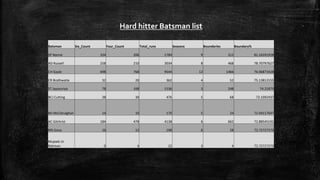
Batsman Six_Count Four_Count Total_runs Seasons Boundaries Boundary%
SP Narine 104 206 1784 9 312 81.16591928
AD Russell 258 210 3034 8 468 78.70797627
CH Gayle 698 768 9544 12 1466 76.06873428
CR Brathwaite 32 20 362 4 52 75.13812155
ST Jayasuriya 78 168 1536 3 248 74.21875
BCJ Cutting 38 30 476 5 68 73.1092437
MJ McClenaghan 14 10 170 5 24 72.94117647
AC Gilchrist 184 478 4138 6 662 72.88545191
MS Gony 16 12 198 6 28 72.72727273
Mujeeb Ur
Rahman 0 4 22 3 4 72.72727273
Hard hitter Batsman list
0 2000 4000 6000 8000 10000 12000
CH Gayle
AC Gilchrist
AD Russell
SP Narine
ST Jayasuriya
BCJ Cutting
CR Brathwaite
MS Gony
MJ McClenaghan
Mujeeb Ur Rahman
Total_runs
Batsman
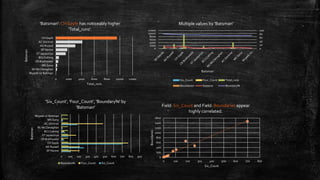
'Batsman': CH Gayle has noticeably higher
'Total_runs'.
0
20
40
60
80
100
0
2000
4000
6000
8000
10000
12000
Batsman
Multiple values by 'Batsman'
Six_Count Four_Count Total_runs
Boundaries Seasons Boundary%
0 100 200 300 400 500 600 700 800 900
SP Narine
AD Russell
CH Gayle
CR Brathwaite
ST Jayasuriya
BCJ Cutting
MJ McClenaghan
AC Gilchrist
MS Gony
Mujeeb Ur Rahman
Batsman
'Six_Count', 'Four_Count', 'Boundary%' by
'Batsman'
Boundary% Four_Count Six_Count
0
200
400
600
800
1000
1200
1400
1600
0 100 200 300 400 500 600 700 800
Boundaries
Six_Count
Field: Six_Count and Field: Boundaries appear
highly correlated.
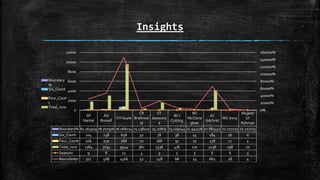
Insights
SP
Narine
AD
Russell
CH Gayle
CR
Brathwai
te
ST
Jayasuriy
a
BCJ
Cutting
MJ
McClena
ghan
AC
Gilchrist
MS Gony
Mujeeb
Ur
Rahman
Boundary% 81.165919 78.707976 76.068734 75.138122 74.21875 73.109244 72.941176 72.885452 72.727273 72.727273
Six_Count 104 258 698 32 78 38 14 184 16 0
Four_Count 206 210 768 20 168 30 10 478 12 4
Total_runs 1784 3034 9544 362 1536 476 170 4138 198 22
Seasons 9 8 12 4 3 5 5 6 6 3
Boundaries 312 468 1466 52 248 68 24 662 28 4
0%
20000%
40000%
60000%
80000%
100000%
120000%
140000%
160000%
0
2000
4000
6000
8000
10000
12000
Boundary
%
Six_Count
Four_Coun
t
Total_runs
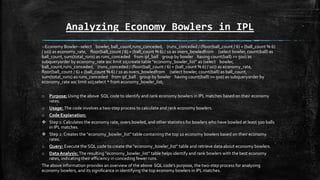
Analyzing Economy Bowlers in IPL
--Economy Bowler--select bowler, ball_count,runs_conceded, (runs_conceded / (floor(ball_count / 6) + (ball_count % 6)
/ 10)) as economy_rate, floor(ball_count / 6) + (ball_count % 6) / 10 as overs_bowledfrom (select bowler, count(ball) as
ball_count, sum(total_runs) as runs_conceded from ipl_ball group by bowler having count(ball) >= 500) as
subqueryorder by economy_rate asc limit 10;create table "economy_bowler_list" as (select bowler,
ball_count,runs_conceded, (runs_conceded / (floor(ball_count / 6) + (ball_count % 6) / 10)) as economy_rate,
floor(ball_count / 6) + (ball_count % 6) / 10 as overs_bowledfrom (select bowler, count(ball) as ball_count,
sum(total_runs) as runs_conceded from ipl_ball group by bowler having count(ball) >= 500) as subqueryorder by
economy_rate asc limit 10);select * from economy_bowler_list;
o Purpose:Using the above SQL code to identify and rank economy bowlers in IPL matches based on their economy
rates.
o Usage: The code involves a two-step process to calculate and rank economy bowlers.
o Code Explanation:
 Step 1: Calculates the economy rate, overs bowled, and other statistics for bowlers who have bowled at least 500 balls
in IPL matches.
 Step 2: Creates the "economy_bowler_list" table containing the top 10 economy bowlers based on their economy
rates.
o Query: Execute the SQL code to create the "economy_bowler_list" table and retrieve data about economy bowlers.
o Data Analysis: The resulting "economy_bowler_list" table helps identify and rank bowlers with the best economy
rates, indicating their efficiency in conceding fewer runs.
The above information provides an overview of the above SQL code's purpose, the two-step process for analyzing
economy bowlers, and its significance in identifying the top economy bowlers in IPL matches.
Analyzing Economy Bowlers in IPL
(Final Output)
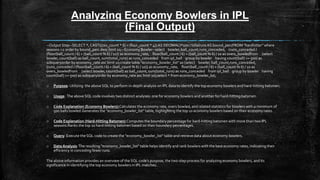
--Output Step--SELECT *, CAST(((six_count * 6) + (four_count * 4)) AS DECIMAL)*100 / totalrunsAS bound_percFROM "hardhitter" where
seasons >2 order by bound_perc desc limit 10;--Economy Bowler--select bowler, ball_count,runs_conceded, (runs_conceded /
(floor(ball_count / 6) + (ball_count % 6) / 10)) as economy_rate, floor(ball_count / 6) + (ball_count % 6) / 10 as overs_bowledfrom (select
bowler, count(ball) as ball_count, sum(total_runs) as runs_conceded from ipl_ball group by bowler having count(ball) >= 500) as
subqueryorder by economy_rate asc limit 10;create table "economy_bowler_list" as (select bowler, ball_count,runs_conceded,
(runs_conceded / (floor(ball_count / 6) + (ball_count % 6) / 10)) as economy_rate, floor(ball_count / 6) + (ball_count % 6) / 10 as
overs_bowledfrom (select bowler, count(ball) as ball_count, sum(total_runs) as runs_conceded from ipl_ball group by bowler having
count(ball) >= 500) as subqueryorder by economy_rate asc limit 10);select * from economy_bowler_list;
o Purpose: Utilizing the above SQL to perform in-depth analysis on IPL data to identify the top economy bowlers and hard-hitting batsmen.
o Usage: The above SQL code involves two distinct analyses: one for economy bowlers and another for hard-hitting batsmen.
o Code Explanation (Economy Bowlers):Calculates the economy rate, overs bowled, and related statistics for bowlers with a minimum of
500 balls bowled.Generates the "economy_bowler_list" table, highlighting the top 10 economy bowlers based on their economy rates.
o Code Explanation (Hard-Hitting Batsmen):Computes the boundary percentage for hard-hitting batsmen with more than two IPL
seasons.Ranks the top 10 hard-hitting batsmen based on their boundary percentages.
o Query: Execute the SQL code to create the "economy_bowler_list" table and retrieve data about economy bowlers.
o Data Analysis:The resulting "economy_bowler_list" table helps identify and rank bowlers with the best economy rates, indicating their
efficiency in conceding fewer runs.
The above information provides an overview of the SQL code's purpose, the two-step process for analyzing economy bowlers, and its
significance in identifying the top economy bowlers in IPL matches.
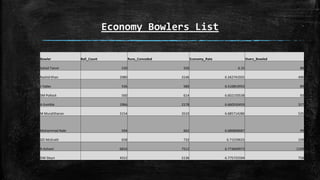
Economy Bowlers List
Bowler Ball_Count Runs_Conceded Economy_Rate Overs_Bowled
Sohail Tanvir 530 550 6.25 88
Rashid Khan 2980 3146 6.342741935 496
J Yadav 536 580 6.516853933 89
SM Pollock 560 614 6.602150538 93
A Kumble 1966 2178 6.660550459 327
M Muralitharan 3154 3510 6.685714286 525
Mohammad Nabi 594 662 6.686868687 99
GD McGrath 658 732 6.71559633 109
R Ashwin 6654 7512 6.773669973 1109
DW Steyn 4552 5136 6.775725594 758
0
1000
2000
3000
4000
5000
6000
7000
Ball_Count
Bowler
'Ball_Count'
0
1000
2000
3000
4000
5000
6000
7000
8000
0 1000 2000 3000 4000 5000 6000 7000
Runs_Conceded
Ball_Count
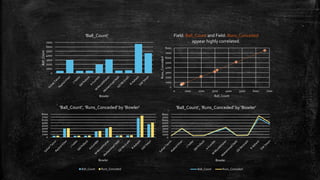
Field: Ball_Count and Field: Runs_Conceded
appear highly correlated.
0
1000
2000
3000
4000
5000
6000
7000
8000
Bowler
'Ball_Count', 'Runs_Conceded' by 'Bowler'
Ball_Count Runs_Conceded
0
1000
2000
3000
4000
5000
6000
7000
8000
Bowler
'Ball_Count', 'Runs_Conceded' by 'Bowler'
Ball_Count Runs_Conceded
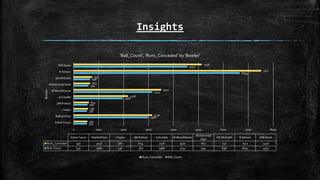
Insights
530
2980
536
560
1966
3154
594
658
6654
4552
550
3146
580
614
2178
3510
662
732
7512
5136
0 1000 2000 3000 4000 5000 6000 7000 8000
Sohail Tanvir
Rashid Khan
J Yadav
SM Pollock
A Kumble
M Muralitharan
Mohammad Nabi
GD McGrath
R Ashwin
DW Steyn
Bowler
Sohail Tanvir Rashid Khan J Yadav SM Pollock A Kumble M Muralitharan
Mohammad
Nabi
GD McGrath R Ashwin DW Steyn
Runs_Conceded 550 3146 580 614 2178 3510 662 732 7512 5136
Ball_Count 530 2980 536 560 1966 3154 594 658 6654 4552
'Ball_Count', 'Runs_Conceded' by 'Bowler'
Runs_Conceded Ball_Count
Analyzing Attacking Bowlers in IPL
--Attacking bowler--create tableAttacking_bowler as (select bowler, sum(case when dismissal_kind = 'lbw' then 1 else 0 end) as lbw_wickets,
sum(case when dismissal_kind = 'caught' then 1 else 0 end) as caught_wickets, sum(case when dismissal_kind = 'bowled' then 1 else 0 end) as
bowled_wickets, sum(case when dismissal_kind = 'stumped' then 1 else 0 end) as stumped_wickets, sum(case when dismissal_kind = 'hit
wicket' then 1 else 0 end) as hit_wicket, sum(case when dismissal_kind = 'caught and bowled' then 1 else 0 end) as caught_and_bowled,
count(ball) as ball_count. from mastergroup by bowlerorder by caught_wickets desc, bowled_wickets desc);select * from
Attacking_bowler;create table attackbowler as (select *,Round(cast(ball_count as decimal(10,2))/ cast(Total_wickets as decimal(5,2)),2) as
strike_ratefrom (select *, (lbw_wickets+caught_wickets+bowled_wickets+stumped_wickets+hit_wicket+caught_and_bowled) as
Total_wicketsfromAttacking_bowler group by
bowler,lbw_wickets,caught_wickets,bowled_wickets,stumped_wickets,ball_count,hit_wicket,caught_and_bowled having ball_count >500
order byTotal_wickets desc) as subqueryorder by strike_rate asclimit 10);select * from attackbowler;
o Purpose: Using the above SQL code to identify and rank attacking bowlers in IPL matches based on their wicket-taking abilities.
o Usage:The code involves a two-step process to calculate and rank attacking bowlers.
o Code Explanation:The first query ("Attacking_bowler") calculates various wicket types taken by bowlers, such as lbw, caught, bowled,
stumped, hit wicket, and caught-and-bowled, along with their total ball count.The second query ("attackbowler") calculates the strike rate
for each attacking bowler, which is the ratio of total wickets taken to the total balls bowled. It ranks bowlers with a minimum of 500 balls
bowled.
o Query: Execute the SQL code to create the "attackbowler" table and retrieve data about the top 10 attacking bowlers.
o Data Analysis:The resulting "attackbowler" table helps identify and rank bowlers with the best strike rates, indicating their effectiveness
in taking wickets.
It provides an overview of the above SQL code's purpose, the two-step process for analyzing attacking bowlers, and its significance in
identifying the top attacking bowlers in IPL matches.
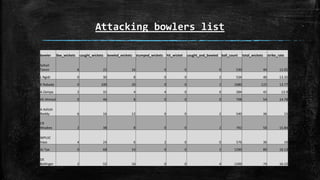
Attacking bowlers list
bowler lbw_wickets caught_wickets bowled_wickets stumped_wickets hit_wicket caught_and_bowled ball_count total_wickets strike_rate
Sohail
Tanvir 6 22 16 0 0 0 530 44 12.05
L Ngidi 0 30 8 0 0 2 534 40 13.35
K Rabada 0 100 20 0 0 2 1680 122 13.77
A Zampa 2 32 4 4 0 0 584 42 13.9
KK Ahmed 0 46 8 0 0 0 798 54 14.78
A Ashish
Reddy 6 16 12 0 0 2 540 36 15
CR
Woakes 2 38 8 0 0 2 792 50 15.84
WPUJC
Vaas 4 24 6 2 0 0 576 36 16
AJ Tye 0 68 10 0 0 2 1290 80 16.13
DE
Bollinger 2 52 16 0 0 4 1200 74 16.22
0
20
40
60
80
100
120
bowler
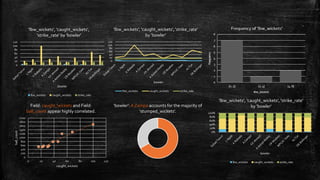
'lbw_wickets', 'caught_wickets',
'strike_rate' by 'bowler'
lbw_wickets caught_wickets strike_rate
0
20
40
60
80
100
120
bowler
'lbw_wickets', 'caught_wickets', 'strike_rate'
by 'bowler'
lbw_wickets caught_wickets strike_rate
0
200
400
600
800
1000
1200
1400
1600
1800
2000
0 20 40 60 80 100 120
ball_count
caught_wickets
Field: caught_wickets and Field:
ball_count appear highly correlated.
'bowler': A Zampa accounts for the majority of
'stumped_wickets'.
0%
20%
40%
60%
80%
100%
bowler
'lbw_wickets', 'caught_wickets', 'strike_rate'
by 'bowler'
lbw_wickets caught_wickets strike_rate
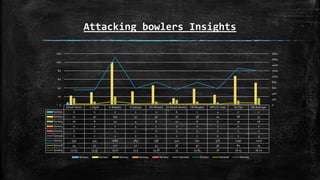
Attacking bowlers Insights
Sohail Tanvir L Ngidi K Rabada A Zampa KK Ahmed A Ashish Reddy CR Woakes WPUJC Vaas AJ Tye DE Bollinger
Series1 6 0 0 2 0 6 2 4 0 2
Series2 22 30 100 32 46 16 38 24 68 52
Series3 16 8 20 4 8 12 8 6 10 16
Series4 0 0 0 4 0 0 0 2 0 0
Series5 0 0 0 0 0 0 0 0 0 0
Series6 0 2 2 0 0 2 2 0 2 4
Series7 530 534 1680 584 798 540 792 576 1290 1200
Series8 44 40 122 42 54 36 50 36 80 74
Series9 12.05 13.35 13.77 13.9 14.78 15 15.84 16 16.13 16.22
0
200
400
600
800
1000
1200
1400
1600
1800
0
20
40
60
80
100
120
Series1 Series2 Series3 Series4 Series5 Series6 Series7 Series8 Series9
Identifying All-Round performers in IPL
--All Rounder--create table wicket_taking_allrounder as (select bowler,total_wickets,Round(cast(ball_count as decimal(10,2))/ cast(Total_wickets as decimal(5,2)),2) as
strike_ratefrom(select *, (lbw_wickets+caught_wickets+bowled_wickets+stumped_wickets+hit_wicket+caught_and_bowled) asTotal_wicketsfromAttacking_bowler
group by bowler,lbw_wickets,caught_wickets,bowled_wickets,stumped_wickets,ball_count,hit_wicket,caught_and_bowled having ball_count >300 order by Total_wickets
desc) as subqueryorder by strike_rate asc);select * from wicket_taking_allrounder;create table Allround_Batsman as(SELECT batsman AS "bat", sum(batsman_runs) AS
"run_count",count(ball) as "balls_faced",sum(is_wicket) as "Total Dismissals", cast(sum (batsman_runs) as float)/cast(count (ball) as float)*100 as
"strike_rate"FROMipl_ballGROUP BY batsmanhaving count(ball) >500order by run_count desc); select * from Allround_Batsman;select
a.bat,a.run_count,a.strike_rate,b.Total_wickets,b.strike_ratefrom Allround_Batsman as ainner join wicket_taking_allrounder as bon a.bat = b.bowlergroup by
a.bat,a.run_count,a.strike_rate,b.Total_wickets,b.strike_rateorder by a.strike_rate desc,b.strike_rate asc;
o Objective: The SQL code aims to identify and analyze all-round performers in the IPL.
o Code Explanation (Wicket-Taking Allrounders): Calculates the strike rate for bowlers with a minimum of 300 balls bowled.The "wicket_taking_allrounder" table is
created, listing all-round bowlers based on their strike rates
o Code Explanation (Allround Batsmen): Computes the run count, dismissal count, and strike rate for batsmen with over 500 balls faced.Generates the
"Allround_Batsman" table, showcasing all-round batsmen based on their run count and strike rate.
o Insights: The "wicket_taking_allrounder" table highlights bowlers with a strong ability to take wickets.The analysis of "Allround_Batsman" helps identify batsmen
who excel in both scoring runs and facing balls.
o Query Execution: Execute the SQL code to identify wicket-taking all-rounders.Execute the SQL code to identify all-round batsmen.
o Integration: The final part of the code combines both sets of data to reveal all-rounders excelling in both batting and bowling.This slide provides a clear overview of
the SQL code's objective, the analysis of wicket-taking all-rounders and all-round batsmen, and the integration of these insights to identify true all-round
performers in IPL matches.
The above information provides a clear overview of the SQL code's objective, the analysis of wicket-taking all-rounders and all-round batsmen, and the integration of these
insights to identify true all-round performers in IPL matches.
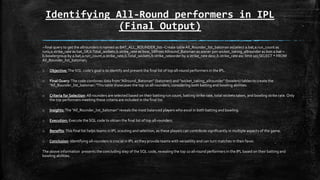
Identifying All-Round performers in IPL
(Final Output)
--final query to get the allrounders is named as BAT_ALL_ROUNDER_list--Create tableAll_Rounder_list_batsman as(select a.bat,a.run_count as
runs,a.strike_rate as bat_SR,b.Total_wickets,b.strike_rate as bow_SRfrom Allround_Batsman as ainner join wicket_taking_allrounder as bon a.bat =
b.bowlergroup by a.bat,a.run_count,a.strike_rate,b.Total_wickets,b.strike_rateorder by a.strike_rate desc,b.strike_rate asc limit 10);SELECT * FROM
All_Rounder_list_batsman;
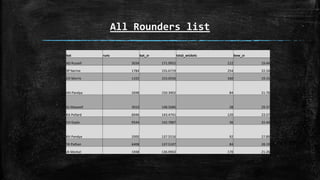
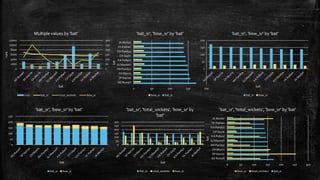
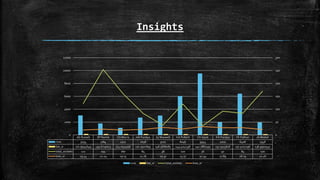
o Objective:The SQL code's goal is to identify and present the final list of top all-round performers in the IPL.
o Final Query:The code combines data from "Allround_Batsman" (batsmen) and "wicket_taking_allrounder" (bowlers) tables to create the
"All_Rounder_list_batsman."This table showcases the top 10 all-rounders, considering both batting and bowling abilities.
o Criteria for Selection:All-rounders are selected based on their batting run count, batting strike rate, total wickets taken, and bowling strike rate. Only
the top performers meeting these criteria are included in the final list.
o Insights:The "All_Rounder_list_batsman" reveals the most balanced players who excel in both batting and bowling.
o Execution: Execute the SQL code to obtain the final list of top all-rounders.
o Benefits:This final list helps teams in IPL scouting and selection, as these players can contribute significantly in multiple aspects of the game.
o Conclusion: Identifying all-rounders is crucial in IPL as they provide teams with versatility and can turn matches in their favor.
The above information presents the concluding step of the SQL code, revealing the top 10 all-round performers in the IPL based on their batting and
bowling abilities.
All Rounders list
bat runs bat_sr total_wickets bow_sr
AD Russell 3034 171.9955 122 19.44
SP Narine 1784 155.6719 254 22.24
CH Morris 1102 153.0556 160 19.15
HH Pandya 2698 150.3902 84 21.76
GJ Maxwell 3010 148.5686 38 29.37
KA Pollard 6046 143.4741 120 23.57
CH Gayle 9544 142.7887 36 32.44
KH Pandya 2000 137.5516 92 27.89
YK Pathan 6408 137.5107 84 28.19
JA Morkel 1948 136.9902 170 21.26
0
50
100
150
200
250
300
0
2000
4000
6000
8000
10000
12000
runs
bat
Multiple values by 'bat'
runs bat_sr total_wickets bow_sr
0 50 100 150 200
AD Russell
SP Narine
CH Morris
HH Pandya
GJ Maxwell
KA Pollard
CH Gayle
KH Pandya
YK Pathan
JA Morkel
bat
'bat_sr', 'bow_sr' by 'bat'
bow_sr bat_sr
0
50
100
150
200
bat
'bat_sr', 'bow_sr' by 'bat'
bat_sr bow_sr
0
50
100
150
200
250
bat
'bat_sr', 'bow_sr' by 'bat'
bat_sr bow_sr
0
50
100
150
200
250
300
bat
'bat_sr', 'total_wickets', 'bow_sr' by
'bat'
bat_sr total_wickets bow_sr
0 50 100 150 200 250 300
AD Russell
SP Narine
CH Morris
HH Pandya
GJ Maxwell
KA Pollard
CH Gayle
KH Pandya
YK Pathan
JA Morkel
bat
'bat_sr', 'total_wickets', 'bow_sr' by 'bat'
bow_sr total_wickets bat_sr
Insights
AD Russell SP Narine CH Morris HH Pandya GJ Maxwell KA Pollard CH Gayle KH Pandya YK Pathan JA Morkel
runs 3034 1784 1102 2698 3010 6046 9544 2000 6408 1948
bat_sr 171.9954649 155.6719023 153.0555556 150.3901895 148.5686081 143.4741338 142.7887493 137.5515818 137.5107296 136.9901547
total_wickets 122 254 160 84 38 120 36 92 84 170
bow_sr 19.44 22.24 19.15 21.76 29.37 23.57 32.44 27.89 28.19 21.26
0
50
100
150
200
250
300
0
2000
4000
6000
8000
10000
12000
runs bat_sr total_wickets bow_sr
Identifying Top Wicketkeepers and
Fielding Performance
/*wicketKeeper -- To identify wicketkeepers in the database, we must filter the "fielders" column based on the conditions of "is_wicket" being equal to 1 and "dismissal_kind"
being equal to 'stumped'. This allows us to distinguish wicketkeepers from other fielders in the database, as wicketkeepersare specifically involved in the stumping process for
dismissing a batter. */ create table wicket_keepers as (select fielder as wicket_keeper, count(dismissal_kind) as stumpingsfrom master where is_wicket>0 and dismissal_kind =
'stumped' group by wicket_keeperorder by stumpings desc);create table wicket_keeper_fielding as (select a.*,b.catchesfrom wicket_keepers as ainner join (select
fielder,count(case when dismissal_kind = 'caught' Then 1 else 0 End) as catches from master group by fielder order by catches desc) as bon a.wicket_keeper = b.fieldergroup by
a.wicket_keeper,a.stumpings,b.fielder,b.catchesorder by a.stumpings desc);select a.*,b.six_count,b.four_count,b.Totalruns,b.seasonsfrom wicket_keeper_fielding as ainner
join(SELECT a.*,b.boundariesFROM sixfours AS aINNER JOIN boundaries AS bON a.batsman = b.batsmangroup by
a.batsman,a.six_count,a.four_count,a.Totalruns,b.boundaries,a.seasonsorder by Totalruns desc) as bon a.wicket_keeper = b.batsmangroup by
a.wicket_keeper,a.stumpings,a.catches,b.totalruns,b.six_count,b.four_count,b.seasonsorder by b.totalruns desc,a.catches desc,a.stumpings desc,b.six_count,b.four_count;
o Objective: The objective of this SQL code is to identify top wicketkeepers in IPL based on their stumping records and assess their fielding performance.
o Identification of Wicketkeepers: To distinguish wicketkeepers from other fielders, we filter the "fielders" based on the conditions:"is wicket" equal to 1"dismissal_kind"
equal to 'stumped’ This identifies wicketkeepers who play a key role in stumping batters.
o Creating "wicket_keepers" Table: We create a table named "wicket keepers" to capture wicketkeepers and count their stumpings. The table includes columns for
"wicket_keeper" (fielder) and "stumpings.
o "Assessing Fielding Performance: We create the "wicket_keeper_fielding" table by joining "wicket_keepers" with fielders' catch counts. This table provides insights into
wicketkeepers' fielding skills and includes columns for "wicket_keeper," "stumpings," and "catches.
o "Combining with Batting Statistics: To evaluate overall performance, we combine fielding data with batting statistics.We join "wicket_keeper_fielding" with statistics on
boundaries (sixes and fours) and total runs for each batsman.This provides a comprehensive view of wicketkeepers' contributions, including their batting performance.
o Final Insights: The result showcases wicketkeepers' fielding and batting prowess, allowing teams to identify multi-talented players.
o Execution: Execute the SQL code to obtain insights into top wicketkeepers and their fielding and batting performances.
The above SQL code helps identify exceptional wicketkeepers and evaluate their fielding and batting abilities, aiding teams in player assessment and selection.
Identifying Top Wicketkeepers
create tableTopnotch_WK_list as (select a.*,b.six_count,b.four_count,b.Totalruns,b.seasonsfrom wicket_keeper_fielding as ainner join(SELECT
a.*,b.boundariesFROM sixfours AS aINNER JOIN boundariesAS bON a.batsman = b.batsmangroup by
a.batsman,a.six_count,a.four_count,a.Totalruns,b.boundaries,a.seasonsorder byTotalruns desc) as bon a.wicket_keeper = b.batsmangroup by
a.wicket_keeper,a.stumpings,a.catches,b.totalruns,b.six_count,b.four_count,b.seasonsorder by b.totalruns desc,a.catches desc,a.stumpings
desc,b.six_count,b.four_count limit 10);select * fromTopnotch_WK_list;
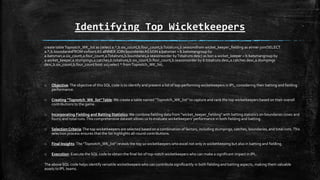
o Objective:The objective of this SQL code is to identify and present a list of top-performing wicketkeepers in IPL, considering their batting and fielding
performance.
o Creating "Topnotch_WK_list"Table:We create a table named "Topnotch_WK_list" to capture and rank the top wicketkeepers based on their overall
contributions to the game.
o Incorporating Fielding and Batting Statistics:We combine fielding data from "wicket_keeper_fielding" with batting statistics on boundaries (sixes and
fours) and total runs.This comprehensive dataset allows us to evaluate wicketkeepers' performance in both fielding and batting.
o Selection Criteria:The top wicketkeepers are selected based on a combination of factors, including stumpings, catches, boundaries, and total runs.This
selection process ensures that the list highlights all-round contributions.
o Final Insights:The "Topnotch_WK_list" reveals the top 10 wicketkeepers who excel not only in wicketkeeping but also in batting and fielding.
o Execution: Execute the SQL code to obtain the final list of top-notch wicketkeepers who can make a significant impact in IPL.
The above SQL code helps identify versatile wicketkeepers who can contribute significantly in both fielding and batting aspects, making them valuable
assets to IPL teams.
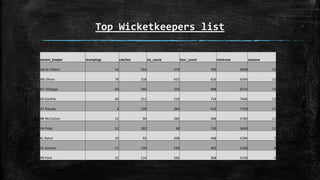
Top Wicketkeepers list
wicket_keeper stumpings catches six_count four_count totalruns seasons
AB de Villiers 16 234 470 780 9698 13
MS Dhoni 78 328 432 626 9264 13
RV Uthappa 64 246 326 908 9214 13
KD Karthik 60 312 210 754 7646 13
AT Rayudu 4 128 264 616 7318 11
BB McCullum 12 90 260 586 5760 11
PA Patel 32 182 98 730 5696 12
KL Rahul 10 92 208 468 5294 7
SV Samson 12 130 230 382 5168 8
RR Pant 22 114 206 368 4158 5
0
200
400
600
800
1000
wicket_keeper
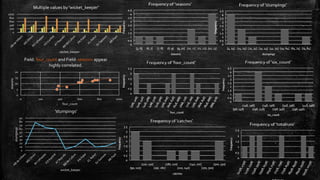
Multiple values by 'wicket_keeper'
0
5
10
15
20
0 200 400 600 800 1000
seasons
four_count
Field: four_count and Field: seasons appear
highly correlated.
0
10
20
30
40
50
60
70
80
90
stumpings
wicket_keeper
'stumpings'
Insights
16
78
64
60
4
12
32
10
12
22
234
328
246
312
128
90
182
92
130
114
470
432
326
210
264
260
98
208
230
206
780
626
908
754
616
586
730
468
382
368
9698
9264
9214
7646
7318
5760
5696
5294
5168
4158
13
13
13
13
11
11
12
7
8
5
0 2000 4000 6000 8000 10000 12000
AB de Villiers
MS Dhoni
RV Uthappa
KD Karthik
AT Rayudu
BB McCullum
PA Patel
KL Rahul
SV Samson
RR Pant
AB de Villiers MS Dhoni RV Uthappa KD Karthik AT Rayudu BB McCullum PA Patel KL Rahul SV Samson RR Pant
stumpings 16 78 64 60 4 12 32 10 12 22
catches 234 328 246 312 128 90 182 92 130 114
six_count 470 432 326 210 264 260 98 208 230 206
four_count 780 626 908 754 616 586 730 468 382 368
totalruns 9698 9264 9214 7646 7318 5760 5696 5294 5168 4158
seasons 13 13 13 13 11 11 12 7 8 5
stumpings catches six_count four_count totalruns seasons
Cricket Match Analysis: Cities,Venues
and Match Counts
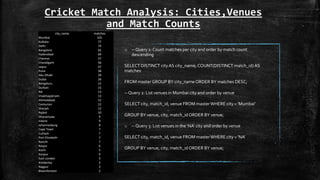
o --Query 1: Count matches per city and order by match count
descending
SELECT DISTINCT cityAS city_name, COUNT(DISTINCT match_id) AS
matches
FROM master GROUP BY city_name ORDER BY matches DESC;
--Query 2: List venues in Mumbai city and order by venue
SELECT city, match_id, venue FROM masterWHERE city = 'Mumbai'
GROUP BY venue, city, match_id ORDER BY venue;
o --Query 3: List venues in the 'NA' city and order by venue
SELECT city, match_id, venue FROM masterWHERE city = 'NA'
GROUP BY venue, city, match_id ORDER BY venue;
city_name matches
Mumbai 101
Kolkata 77
Delhi 74
Bangalore 65
Hyderabad 64
Chennai 57
Chandigarh 56
Jaipur 47
Pune 38
Abu Dhabi 29
Dubai 26
Bengaluru 15
Durban 15
NA 13
Visakhapatnam 13
Ahmedabad 12
Centurion 12
Sharjah 12
Rajkot 10
Dharamsala 9
Indore 9
Johannesburg 8
Cape Town 7
Cuttack 7
Port Elizabeth 7
Ranchi 7
Raipur 6
Kochi 5
Kanpur 4
East London 3
Kimberley 3
Nagpur 3
Bloemfontein 2
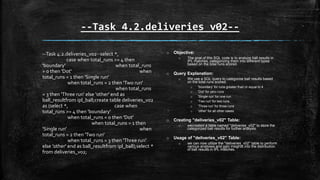
--Task 4.2.deliveries_v02--
--Task 4.2.deliveries_v02--select *,
case when total_runs >= 4 then
'boundary' when total_runs
= 0 then 'Dot' when
total_runs = 1 then 'Single run'
when total_runs = 2 then 'Two run'
when total_runs
= 3 then 'Three run' else 'other' end as
ball_resultfrom ipl_ball;create table deliveries_v02
as (select *, case when
total_runs >= 4 then 'boundary'
when total_runs = 0 then 'Dot'
when total_runs = 1 then
'Single run' when
total_runs = 2 then 'Two run'
when total_runs = 3 then 'Three run'
else 'other' end as ball_resultfrom ipl_ball);select *
from deliveries_v02;
o Objective:
o The goal of this SQL code is to analyze ball results in
IPL matches, categorizing them into different types
based on the total runs scored.
o Query Explanation:
o We use a SQL query to categorize ball results based
on the total runs scored:
o 'boundary' for runs greater than or equal to 4
o 'Dot' for zero runs
o 'Single run' for one run
o 'Two run' for two runs
o 'Three run' for three runs
o 'other' for all other cases
o Creating "deliveries_v02" Table:
o wecreated a table named "deliveries_v02" to store the
categorized ball results for further analysis.
o Usage of "deliveries_v02" Table:
o we can now utilize the "deliveries_v02" table to perform
various analyses and gain insights into the distribution
of ball results in IPL matches.
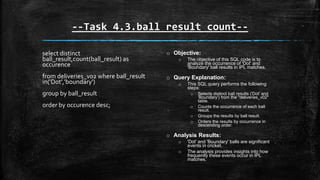
--Task 4.3.ball_result count--
select distinct
ball_result,count(ball_result) as
occurence
from deliveries_v02 where ball_result
in('Dot','boundary')
group by ball_result
order by occurence desc;
o Objective:
o The objective of this SQL code is to
analyze the occurrence of 'Dot' and
'Boundary' ball results in IPL matches.
o Query Explanation:
o This SQL query performs the following
steps:
o Selects distinct ball results ('Dot' and
'Boundary') from the "deliveries_v02"
table.
o Counts the occurrence of each ball
result.
o Groups the results by ball result.
o Orders the results by occurrence in
descending order.
o Analysis Results:
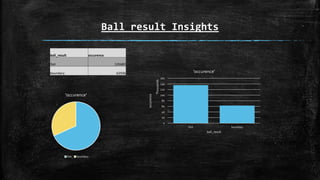
o 'Dot' and 'Boundary' balls are significant
events in cricket.
o The analysis provides insights into how
frequently these events occur in IPL
matches.
Ball result Insights
ball_result occurence
Dot 135682
boundary 62936
0
20
40
60
80
100
120
140
160
Dot boundary
occurence
Thousands
ball_result
'occurence'
'occurence'
Dot boundary
--4.4boundary count by team--
select distinct batting_team as
"Team",count(ball_result) as
"Boundaries"
from deliveries_v02 where
ball_result = 'boundary'
group by batting_team
order by "Boundaries" desc;
o Objective:
o The objective of this SQL code is to count
the number of boundaries scored by each
batting team in IPL matches.
o Query Explanation:
o This SQL query performs the following
steps:
o Selects distinct batting teams and counts
the number of boundaries ('Boundary'
ball results) scored by each team from
the "deliveries_v02" table.
o Groups the results by batting team.
o Orders the results by the count of
boundaries in descending order.
o Analysis Results:
o Boundaries are crucial for a team's success
in cricket.
o This analysis helps in understanding which
teams excel in hitting boundaries during IPL
matches.
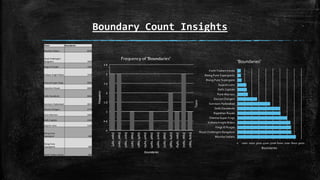
Boundary Count Insights
Team Boundaries
Mumbai Indians 8236
Royal Challengers
Bangalore 7600
Kings XI Punjab 7560
Kolkata Knight Riders 7478
Chennai Super Kings 6992
Rajasthan Royals 6082
Delhi Daredevils 6044
Sunrisers Hyderabad 4612
Deccan Chargers 2774
Pune Warriors 1466
Delhi Capitals 1318
Gujarat Lions 1248
Rising Pune
Supergiant 580
Rising Pune
Supergiants 484
Kochi Tuskers Kerala 462
0 1000 2000 3000 4000 5000 6000 7000 8000 9000
Mumbai Indians
Royal Challengers Bangalore
Kings XI Punjab
Kolkata Knight Riders
Chennai Super Kings
Rajasthan Royals
Delhi Daredevils
Sunrisers Hyderabad
Deccan Chargers
Pune Warriors
Delhi Capitals
Gujarat Lions
Rising Pune Supergiant
Rising Pune Supergiants
Kochi Tuskers Kerala
Boundaries
Team
'Boundaries'
--4.5dot balls bowled--
select distinct bowling_team as
"Team",count(ball_result) as "Dot_Balls"
from deliveries_v02 where ball_result = 'Dot'
group by bowling_team
order by "Dot_Balls" desc;
o Objective:
o The objective of this SQL code is to count
the number of dot balls bowled by each
bowling team in IPL matches.
o Query Explanation:
o This SQL query performs the following
steps:
o Selects distinct bowling teams and
counts the number of dot balls ('Dot' ball
results) bowled by each team from the
"deliveries_v02" table.
o Groups the results by bowling team.
o Orders the results by the count of dot
balls in descending order.
o Analysis Results:
o Bowling dot balls is essential for building
pressure on the batting team and
minimizing their run-scoring opportunities.
o This analysis helps in assessing the
effectiveness of bowling teams in restricting
the opposition.
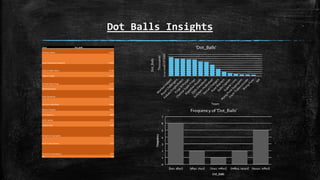
Dot Balls Insights
Team Dot_Balls
Mumbai Indians 17428
Royal Challengers Bangalore 15910
Kolkata Knight Riders 15788
Kings XI Punjab 15358
Chennai Super Kings 15186
Rajasthan Royals 13330
Delhi Daredevils 13040
Sunrisers Hyderabad 10496
Deccan Chargers 6612
Pune Warriors 3800
Delhi Capitals 2676
Gujarat Lions 2190
Rising Pune Supergiant 1396
Kochi Tuskers Kerala 1252
Rising Pune Supergiants 1078
NA 142
0
2
4
6
8
10
12
14
16
18
20
Dot_Balls
Thousands
Team
'Dot_Balls'
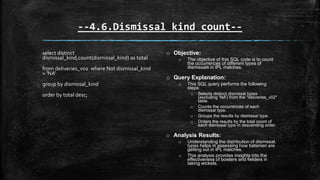
--4.6.Dismissal kind count--
select distinct
dismissal_kind,count(dismissal_kind) as total
from deliveries_v02 where Not dismissal_kind
= 'NA'
group by dismissal_kind
order by total desc;
o Objective:
o The objective of this SQL code is to count
the occurrences of different types of
dismissals in IPL matches.
o Query Explanation:
o This SQL query performs the following
steps:
o Selects distinct dismissal types
(excluding 'NA') from the "deliveries_v02"
table.
o Counts the occurrences of each
dismissal type.
o Groups the results by dismissal type.
o Orders the results by the total count of
each dismissal type in descending order.
o Analysis Results:
o Understanding the distribution of dismissal
types helps in assessing how batsmen are
getting out in IPL matches.
o This analysis provides insights into the
effectiveness of bowlers and fielders in
taking wickets.
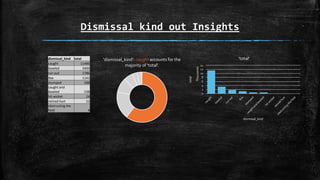
Dismissal kind out Insights
dismissal_kind total
caught 11486
bowled 3400
run out 1786
lbw 1142
stumped 588
caught and
bowled 538
hit wicket 24
retired hurt 22
obstructing the
field 4
'dismissal_kind': caught accounts for the
majority of 'total'.
0
2
4
6
8
10
12
14
total
Thousands
dismissal_kind
'total'
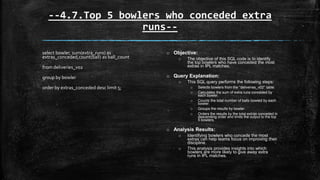
--4.7.Top 5 bowlers who conceded extra
runs--
select bowler, sum(extra_runs) as
extras_conceded,count(ball) as ball_count
from deliveries_v02
group by bowler
order by extras_conceded desc limit 5;
o Objective:
o The objective of this SQL code is to identify
the top bowlers who have conceded the most
extras in IPL matches.
o Query Explanation:
o This SQL query performs the following steps:
o Selects bowlers from the "deliveries_v02" table.
o Calculates the sum of extra runs conceded by
each bowler.
o Counts the total number of balls bowled by each
bowler.
o Groups the results by bowler.
o Orders the results by the total extras conceded in
descending order and limits the output to the top
5 bowlers.
o Analysis Results:
o Identifying bowlers who concede the most
extras can help teams focus on improving their
discipline.
o This analysis provides insights into which
bowlers are more likely to give away extra
runs in IPL matches.
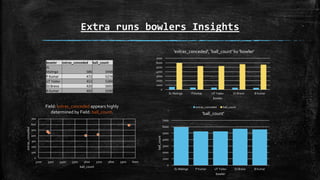
Extra runs bowlers Insights
bowler extras_conceded ball_count
SL
Malinga 586 5948
P Kumar 472 5274
UT Yadav 452 5284
DJ Bravo 420 5692
B Kumar 402 5590
0
100
200
300
400
500
600
700
5200 5300 5400 5500 5600 5700 5800 5900 6000
extras_conceded
ball_count
Field: extras_conceded appears highly
determined by Field: ball_count.
0
1000
2000
3000
4000
5000
6000
7000
SL Malinga P Kumar UT Yadav DJ Bravo B Kumar
bowler
'extras_conceded', 'ball_count' by 'bowler'
extras_conceded ball_count
0
1000
2000
3000
4000
5000
6000
7000
SL Malinga P Kumar UT Yadav DJ Bravo B Kumar
ball_count
bowler
'ball_count'
--4.8.creating another table v03--
select a.*,b.venue as venue_name,b.match_datefrom
deliveries_v02 as ainner join(select
id,venue,match_date from
ipl_matches) as bon a.match_id = b.idorder by
a.match_id;create table deliveries_v03 as(select
a.*,b.venue as venue_name,b.match_datefrom
deliveries_v02 as ainner join(select
id,venue,match_date from
ipl_matches) as bon a.match_id = b.idorder by
a.match_id);select * from deliveries_v03;
o Objective: The objective of this SQL code is to
combine IPL match data with deliveries data to
create a new table called "deliveries_v03.
o "Query Explanation: This SQL query performs the
following steps:Joins data from the
"deliveries_v02" table (containing deliveries data)
with data from the "ipl_matches" table
(containing IPL match details).The join is based on
the "match_id" field.The query selects relevant
fields such as delivery details, venue name, and
match date.The results are ordered by "match_id"
for better organization. Finally, the new combined
dataset is stored in a table called "deliveries_v03.
o "Analysis Results:The resulting "deliveries_v03"
table combines delivery-specific information with
match-related data, providing a comprehensive
dataset for in-depth analysis.This combined
dataset can be used for various analytical
purposes and gaining insights into IPL matches.
--4.9.Total score by venue--
select venue_name as venue,sum(total_runs) as
runs_scored
from deliveries_v03
group by venue_name
order by runs_scored desc;
o Objective:
o The goal of this SQL code is to calculate the
total runs scored at each IPL venue during
matches.
o Query Explanation:
o This SQL query performs the following steps:
o Utilizes the "deliveries_v03" table, which
combines delivery-specific data with IPL match
details, including venue information.
o Groups the data by "venue_name" to aggregate
runs scored at each venue.
o Calculates the sum of "total_runs" to determine
the total runs scored at each venue.
o Orders the results in descending order of runs
scored for better visualization.
o Analysis Results:
o The output provides insights into which IPL
venues have witnessed the highest total runs
scored.
o This information can be valuable for assessing
the venue's batting-friendly nature or for
strategic team decisions.
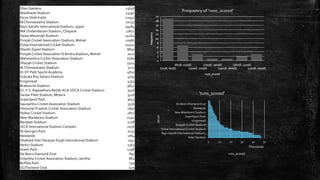
Eden Gardens 23658
Wankhede Stadium 23390
Feroz Shah Kotla 22947
M Chinnaswamy Stadium 20237
Rajiv Gandhi International Stadium, Uppal 19484
MA Chidambaram Stadium, Chepauk 17821
Sawai Mansingh Stadium 14264
Punjab Cricket Association Stadium, Mohali 10987
Dubai International Cricket Stadium 10402
Sheikh Zayed Stadium 8830
Punjab Cricket Association IS Bindra Stadium, Mohali 7021
Maharashtra Cricket Association Stadium 6780
Sharjah Cricket Stadium 5924
M.Chinnaswamy Stadium 5127
Dr DY Patil Sports Academy 4810
Subrata Roy Sahara Stadium 4755
Kingsmead 4353
Brabourne Stadium 3842
Dr. Y.S. Rajasekhara Reddy ACA-VDCA Cricket Stadium 3746
Sardar Patel Stadium, Motera 3746
SuperSport Park 3653
Saurashtra Cricket Association Stadium 3316
Himachal Pradesh Cricket Association Stadium 2897
Holkar Cricket Stadium 2872
New Wanderers Stadium 2292
Barabati Stadium 2278
JSCA International Stadium Complex 2056
St George's Park 2033
Newlands 1764
Shaheed Veer Narayan Singh International Stadium 1741
Nehru Stadium 1363
Green Park 1298
De Beers Diamond Oval 897
Vidarbha Cricket Association Stadium, Jamtha 882
Buffalo Park 799
OUTsurance Oval 529
0 10 20 30 40 50
Eden Gardens
Rajiv Gandhi International Stadium,…
Dubai International Cricket Stadium
Sharjah Cricket Stadium
Kingsmead
SuperSport Park
New Wanderers Stadium
Newlands
De Beers Diamond Oval
runs_scored
Thousands
venue
'runs_scored'
--4.10.Eden gardens Year wise total
runs--
select distinct venue_name from deliveries_v03;
select distinct extract( year from match_date) as
year,venue_name as venue,sum(total_runs) as runs
from deliveries_v03 where venue_name = 'Eden
Gardens'
group by year,venue
order by runs desc;
o Objective:
o The objective of this SQL code is to determine
the total runs scored at the Eden Gardens IPL
venue, organized year-wise.
o Query Explanation:
o This SQL query performs the following actions:
o Filters data from the "deliveries_v03" table to
focus on the "Eden Gardens" venue.
o Groups the data by year and venue to aggregate
the runs scored year-wise.
o Calculates the sum of "total_runs" to identify the
total runs scored in each year.
o Orders the results in descending order of runs
scored for better visualization.
o Analysis Results:
o The output displays a year-wise breakdown of
the total runs scored at the Eden Gardens
venue.
o This information can assist teams in
understanding how pitch conditions at this
venue have evolved over the years.
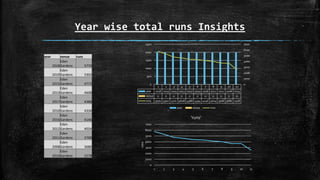
Year wise total runs Insights
year venue runs
2018
Eden
Gardens 5770
2019
Eden
Gardens 5302
2015
Eden
Gardens 4772
2013
Eden
Gardens 4608
2017
Eden
Gardens 4388
2010
Eden
Gardens 4334
2016
Eden
Gardens 4146
2012
Eden
Gardens 4024
2011
Eden
Gardens 3708
2008
Eden
Gardens 3686
2014
Eden
Gardens 2578
0
1000
2000
3000
4000
5000
6000
7000
1 2 3 4 5 6 7 8 9 10 11
runs
'runs'
1 2 3 4 5 6 7 8 9 10 11
year 2018 2019 2015 2013 2017 2010 2016 2012 2011 2008 2014
venue 0 0 0 0 0 0 0 0 0 0 0
runs 5770 5302 4772 4608 4388 4334 4146 4024 3708 3686 2578
0
1000
2000
3000
4000
5000
6000
7000
0
500
1000
1500
2000
2500
year venue runs
Future Techniques
“Exploring new frontiers”
 The unexplored domains of cricket analytics have left me in awe as we wrap up this
endeavor.
 Leveraging machine learning and advanced statistical models to predict match
outcomes has tremendous potential for the future.
 Player performance data and real-time data streams are two key factors that could
be utilized to revolutionize in-game strategies.
 Including information on player injuries and fitness within our dataset could
potentially offer a more comprehensive understanding of player performance.
 Insights into player mechanics and injury prevention could be uncovered with
sporadic collaborations with sports science and biomechanics experts.
 The potential for our work to contribute to the evolving field of data-driven cricket
insights excites me for the future.
Conclusion
 IPL data analytics have taken me on an incredible journey, where i dove deep into
the world of exciting insights. I want to share some of my findings.
 IPL matches embody a contrast that stems from the difference between attacking
batsmen and anchor batsmen, a discovery made through meticulous research.This
revelation has enabled us to recognize the best performers in these two roles.
 Valuable insights for team strategies have been discovered through meticulous
analysis of the most aggressive bowlers and economical bowlers.
 A significant impact in the IPL is made by versatile talents, as shown by the unique
perspective given by the all-rounder analysis.
 This fascinating domain of cricket analytics is providing me with the opportunity to
learn, present findings, and analyze, which I am deeply grateful for.
 In sports, data analytics packs a powerful punch, as I've come to understand better
through my widened knowledge. My insights have revealed just how much data
can do.
Acknowledgement
I would like to express my heartfelt gratitude to the following
individuals and organizations whose support and guidance were
instrumental in the successful completion of this project
InternshalaTrainings: I am deeply thankful to InternshalaTrainings
for providing me with valuable learning opportunities and resources.
The knowledge and skills I gained through your courses were pivotal
in tackling the challenges of this project.
Data Sets and Guidance: I extend my appreciation for providing me
case study generously shared datasets and offered guidance
throughout this project.Your contributions enriched my research and
helped me achieve meaningful insights.
Closing Statement
 Anishreddy -Sports
Performance Analytics
 psomireddy72@gmail.co
m
 In conclusion, this project was a
remarkable learning journey made
possible by the support of Internshala
Trainings, the collaborative spirit of the
case study participants, and the
guidance of mentors and peers.
 It has enriched my skills, expanded my
horizons, and laid the foundation for
future endeavors in the field.
 This marks the close of a fulfilling
chapter, but it also serves as a stepping
stone for exploring new techniques and
achieving greater heights in the future.

Analysis of IPL Data Using SQL@anishreddy.pptx

  • 1.
    Analysis of IPLData Using SQL  Anishreddy -Sports PerformanceAnalytics  psomireddy72@gmail.com
  • 2.
    Table of Contents: oIntroduction o Data Import o DataTables Structure o Attacking Batsmen Analysis o Anchor Batsmen Analysis o Identifying Hard Hitters o Economy Bowler Insights o Wicket-Taking Bowler Analysis o All-Rounder Evaluation o Wicket Keeper Stats o Venue Analysis o Eden Gardens in Focus o IPL MatchVenues o DataVisualizationTechniques o Conclusion and Future Directions
  • 3.
    Creating "ipl_ball" Table CREATETABLEipl_ball ( match_id INT, inning INT, over INT, ball INT, batsmanVARCHAR, non_striker VARCHAR, bowlerVARCHAR, batsman_runs INT, extra_runs INT, total_runs INT, is_wicket INT, dismissal_kindVARCHAR, player_dismissed VARCHAR, fielderVARCHAR, extras_type VARCHAR, batting_team VARCHAR, bowling_teamVARCHAR);); o Purpose: Creating a table named "ipl_ball" to store detailed IPL match data. o Usage: Each row represents one ball bowled, capturing match details, batting, bowling, wickets, and more. o Data Import: Loads data from "IPL_Ball.csv" into the table. o Query: Retrieving the data for IPL match analysis with SELECT * FROM ipl_ball;
  • 4.
    Creating and LoadingData into "ipl_matches" Table create table ipl_matches(id int, city varchar, match_date date, player_of_match varchar, venue varchar, neutral_venue int, team1 varchar, team2 varchar, toss_winner varchar, toss_decision varchar, winner varchar, result varchar, result_margin int, eliminator varchar, method varchar, umpire1 varchar, umpire2 varchar); drop table ipl_matches;set datestyle to 'iso,dmy';COPY ipl_matches FROM 'C:UsersSAGARDesktopIPL_matches.csv' WITH CSV HEADER;SELECT * from ipl_matches; o Purpose: • Creating a table named "ipl_matches" to store IPL match details. • Set the date style to 'iso,dmy' for consistent date formatting. o Usage:The table captures information such as match ID, city, date, teams, toss details, winner, and umpire information for IPL matches. o Data Import: Load data from "IPL_matches.csv" located on the desktop into the "ipl_matches" table using the COPY command. o Query: Retrieving all data stored in the "ipl_matches" table with SELECT * from ipl_matches;
  • 5.
    Creating "Attacking_Batsman" Tablefor IPL Data Analysis CREATETABLE Attacking_Batsman as(SELECT batsman AS "batsman", SUM(batsman_runs) AS "run_count",COUNT(ball) AS "tot_balls_faced", COUNT(ball) FILTER (WHERE batsman_runs = 0 AND extras_type = 'wides') AS "wides" FROM ipl_ball GROUP BY batsman order by run_count desc); select * fromAttacking_Batsman; Purpose: Creating a table named "Attacking Batsman" to analyze the performance of IPL batsmen based on their batting aggressiveness. The table calculates and records key statistics for batsmen, including their total runs, the total number of balls faced, and the count of wide’s faced. Code Explanation: The SQL code aggregates data from the "ipl_ball" table to determine the aggression of each batsman. It calculates the total runs scored by each batsman, the total number of balls faced, and the count of wide’s they received.The data is grouped by batsman and sorted in descending order of run counts. Query: Retrieve the data stored in the "Attacking Batsman" table with SELECT * fromAttacking Batsman;. Data Analysis: The resulting table can be used for further analysis to identify the most attacking batsmen in IPL matches.
  • 6.
    Identifying Top AttackingBatsmen in IPL CREATE TABLE Attacking_Batsman as(SELECT batsman AS "batsman", SUM(batsman_runs) AS "run_count",COUNT(ball) AS "tot_balls_faced", COUNT(ball) FILTER (WHERE batsman_runs = 0 AND extras_type = 'wides') AS "wides" FROM ipl_ball GROUP BY batsman order by run_count desc); select * from Attacking_Batsman; o Purpose: Using the above SQL code to identify and rank the top attacking batsmen in IPL matches based on their batting performance. o Usage: The final query calculates the strike rate of batsmen, considering the total runs, total legal balls faced (excluding wides), and filters for those who faced more than 500 balls. o Code Explanation: The SQL query selects the batsman's name, total runs scored ("run_count"), total legal balls faced (excluding wides), and calculates the strike rate as (runs scored / total legal balls faced) * 100.It filters for batsmen who faced more than 500 balls for a significant sample size.The results are sorted in descending order of strike rate and limited to the top 10 batsmen. o Query: Execute the SQL query to retrieve the top 10 attacking batsmen in IPL matches. o Data Analysis: The query helps identify the most aggressive and impactful batsmen in IPL history based on their strike rates. It provides an overview of the final SQL query's purpose, how it calculates the strike rate of batsmen, and its significance in identifying the top attacking batsmen in IPL matches.
  • 7.
    Attacking Batsman List BatsmanRun_Count Legal_Balls Strike_Rate AD Russell 3034 1664 182.3317308 N Pooran 1042 630 165.3968254 SP Narine 1784 1086 164.2725599 HH Pandya 2698 1694 159.2680047 CH Morris 1102 698 157.8796562 V Sehwag 5456 3510 155.4415954 GJ Maxwell 3010 1946 154.676259 RR Pant 4158 2736 151.9736842 AB de Villiers 9698 6384 151.9110276 CH Gayle 9544 6358 150.1100975
  • 8.
    0 1000 20003000 4000 5000 6000 7000 AB de Villiers V Sehwag GJ Maxwell AD Russell CH Morris Legal_Balls Batsman 'Batsman':AB deVilliers and CH Gayle have noticeably higher 'Legal_Balls'. 0 50 100 150 200 0 2000 4000 6000 8000 10000 12000 Strike_Rate Batsman 'Run_Count', 'Legal_Balls', 'Strike_Rate' by 'Batsman' Run_Count Legal_Balls Strike_Rate 0 1000 2000 3000 4000 5000 6000 7000 Legal_Balls Batsman 'Legal_Balls'
  • 9.
    Insights AD Russell NPooran SP Narine HH Pandya CH Morris V Sehwag GJ Maxwell RR Pant AB de Villiers CH Gayle Run_Count 3034 1042 1784 2698 1102 5456 3010 4158 9698 9544 Legal_Balls 1664 630 1086 1694 698 3510 1946 2736 6384 6358 Strike_Rate 182.3317308 165.3968254 164.2725599 159.2680047 157.8796562 155.4415954 154.676259 151.9736842 151.9110276 150.1100975 0 20 40 60 80 100 120 140 160 180 200 0 2000 4000 6000 8000 10000 12000 Run_Count Legal_Balls Strike_Rate Linear (Run_Count)
  • 10.
    Analyzing Anchor Batsmenin IPL Matches create table master as ( select * from ipl_ball as a inner join ipl_matches as b--final query to get the Attacking batsman-- select batsman,run_count,tot_balls_faced - wides as Legal_balls, (run_count/cast(tot_balls_faced - wides as float))*100 as "strike_rate" FROM Attacking_Batsman where tot_balls_faced > 500 order by strike_rate desc limit 10; on a.match_id = b.id); select * from master; o Purpose: Creating a table named "master" to analyze anchor batsmen in IPL matches. Anchor batsmen are those who play a stabilizing role in the team's innings. o Usage: The code combines data from both the "ipl_ball" and "ipl_matches" tables to identify anchor batsmen. o Code Explanation: SQL code creates the "master" table by joining data from the "ipl_ball" and "ipl_matches" tables using the match ID as the common identifier. The intention is to correlate ball- level data with match-level details for comprehensive analysis. o Query: Execute the SQL query to retrieve data from the "master" table. o Data Analysis: The resulting "master" table can be used to identify anchor batsmen in IPL matches based on their batting performances across different matches. It provides an overview of the SQL code's purpose, how it creates the "master" table by joining match and ball data, and its significance in analyzing anchor batsmen in IPL matches.
  • 11.
    Identifying and RankingAnchor Batsmen in IPL create table "anchor_batsman" as (select batsman,sum(batsman_runs)AS "run_count", sum(is_wicket) as "Dismissals",(sum(batsman_runs)/nullif(sum(is_wicket), 0)) as average, count ( distinct extract (year from match_date)) as seasons from master group by batsman Having Count(Distinct Extract(YEAR FROM match_date)) > 2 order by average desc); --checking the anchor_batsman list-- select * from anchor_batsman order by average desc limit 10; Purpose :Using the above SQL code to identify anchor batsmen in IPL matches based on their batting performance over multiple seasons. Usage:The final query creates the "anchor_batsman" table and ranks batsmen based on their average runs scored. Code Explanation: SQL code calculates the average runs scored by each batsman, the total number of dismissals, and the number of seasons they played in IPL matches.The query filters for batsmen who played in more than two seasons for a significant sample size.The results are ordered in descending order of average runs scored. Query: Execute the SQL query to create the "anchor_batsman" table and retrieve the top 10 anchor batsmen. Data Analysis: The query helps identify and rank anchor batsmen in IPL matches based on their consistent and stabilizing batting performances. It provides an overview of the final SQL query's purpose, how it calculates average runs for anchor batsmen, and its significance in identifying the top anchor batsmen in IPL matches.
  • 12.
    Anchor Batsman List BatsmanRun_Count Dismissals Average Seasons Iqbal Abdulla 176 2 88 8 AB de Villiers 9698 228 42 13 KL Rahul 5294 124 42 7 DA Warner 10508 252 41 11 ML Hayden 2214 54 41 3 CH Gayle 9544 232 41 12 JP Duminy 4058 98 41 8 KS Williamson 3238 82 39 6 LMP Simmons 2158 54 39 4 MEK Hussey 3954 104 38 7
  • 13.
    0 2 4 6 8 10 12 14 0 2 46 8 10 12 Seasons Run_Count Thousands Field: Run_Count and Field: Seasons appear highly correlated. 0 50 100 150 200 250 300 0 2 4 6 8 10 12 Dismissals Run_Count Thousands Batsman 'Run_Count', 'Dismissals' by 'Batsman' Run_Count Dismissals 0 10 20 30 40 50 60 70 80 90 100 0 50 100 150 200 250 300 Average Dismissals Field: Average appears highly determined by Field: Dismissals. 0 500 1000 1500 2000 2500 3000 3500 4000 4500 Run_Count Dismissals Average Seasons Batsman 'KSWilliamson', 'MEK Hussey' by 'Batsman' KS Williamson MEK Hussey 0 50 100 150 200 250 300 0 2 4 6 8 10 12 Run_Count Thousands Batsman Multiple values by 'Batsman' Run_Count Dismissals Average Seasons 0 2 4 6 8 10 12 Run_Count Thousands Batsman 'Run_Count'
  • 14.
    Insights Iqbal Abdulla AB de Villiers KL Rahul DA Warner ML Hayden CHGayle JP Duminy KS Williamso n LMP Simmons MEK Hussey Run_Count 176 9698 5294 10508 2214 9544 4058 3238 2158 3954 Dismissals 2 228 124 252 54 232 98 82 54 104 Average 88 42 42 41 41 41 41 39 39 38 Seasons 8 13 7 11 3 12 8 6 4 7 176 9698 5294 10508 2214 9544 4058 3238 2158 3954 2 228 124 252 54 232 98 82 54 104 88 42 42 41 41 41 41 39 39 38 8 13 7 11 3 12 8 6 4 7 0 10 20 30 40 50 60 70 80 90 100 0 2000 4000 6000 8000 10000 12000 Run_Count Dismissals Average Seasons
  • 15.
    Analyzing Hard-hitting Batsmanin IPL --Hard hitters----Hard hitters STEP-1 --CREATETABLE "sixfours" as (SELECT batsman,COUNT(CASE WHEN batsman_runs >= 6 THEN 1 END) AS six_count,COUNT(CASEWHEN batsman_runs = 4 THEN 1 END) AS four_count,SUM(batsman_runs) as Totalruns,count ( distinct extract (year from match_date)) as seasons FROM masterGROUP BY batsmanORDER BY totalruns desc);-- Hard hitters STEP 2--CREATETABLE "boundaries" as (SELECT batsman, COUNT(*) AS boundariesFROM masterWHERE batsman_runs >= 4GROUP BY batsmanORDER BY boundaries desc);--Hard hitters STEP 3--CREATETABLE "hardhitter" as (SELECT a.*,b.boundariesFROM sixfours AS aINNER JOIN boundaries AS bON a.batsman = b.batsmangroup by a.batsman,a.six_count,a.four_count,a.Totalruns,b.boundaries,a.seasonsorder by Totalruns desc);select * from "hardhitter"; o Purpose: Using SQL to identify and analyze hard-hitting batsmen in IPL matches based on their boundary-hitting abilities. o Usage:The above code involves a three-step process to calculate and rank hard-hitting batsmen. o Code Explanation:  Step 1 : ("sixfours"): Counts the number of sixes, fours, and total runs scored by each batsman and considers the number of seasons played.  Step 2 : ("boundaries"): Counts the total boundaries (fours and sixes) hit by each batsman.  Step 3 : ("hardhitter"): Joins the data from "sixfours" and "boundaries" to create a comprehensive table for hard-hitting batsmen. o Query: Execute the SQL code to create the "hardhitter" table and retrieve data about hard-hitting batsmen. o Data Analysis :The resulting "hardhitter" table can be used to identify and rank hard-hitting batsmen in IPL matches based on their boundary-hitting prowes. The above information provides an overview of the SQL code's purpose, the three-step process for analyzing hard-hitting batsmen, and its significance in identifying top boundary-hitters in IPL matches.
  • 16.
    Calculating Boundary Percentagefor Hard-Hitting Batsmen SELECT *, CAST(((six_count * 6) + (four_count * 4)) AS DECIMAL)*100 / totalrunsAS bound_perc FROM "hardhitter" where seasons >2 order by bound_perc desc limit 10; o Purpose: Using the above SQL code to calculate the boundary percentage for hard-hitting batsmen in IPL matches, showing their effectiveness in hitting boundaries. o Usage:The code calculates the boundary percentage for batsmen with more than two seasons of IPL experience. o Code Explanation:The SQL query calculates the boundary percentage for each hard-hitting batsman by considering the number of sixes, fours, and total runs they scored.The percentage is calculated as ((Total sixes * 6) + (Total fours * 4)) /Total runs.The query filters for batsmen who played in more than two seasons. o Query: Execute the SQL query to retrieve the top 10 hard-hitting batsmen based on their boundary percentages. o Data Analysis:The query helps identify and rank the most effective boundary-hitting batsmen in IPL matches. The above information provides an overview of the SQL code's purpose, how it calculates the boundary percentage, and its significance in identifying the top boundary-hitting batsmen in IPL matches.
  • 17.
    Batsman Six_Count Four_CountTotal_runs Seasons Boundaries Boundary% SP Narine 104 206 1784 9 312 81.16591928 AD Russell 258 210 3034 8 468 78.70797627 CH Gayle 698 768 9544 12 1466 76.06873428 CR Brathwaite 32 20 362 4 52 75.13812155 ST Jayasuriya 78 168 1536 3 248 74.21875 BCJ Cutting 38 30 476 5 68 73.1092437 MJ McClenaghan 14 10 170 5 24 72.94117647 AC Gilchrist 184 478 4138 6 662 72.88545191 MS Gony 16 12 198 6 28 72.72727273 Mujeeb Ur Rahman 0 4 22 3 4 72.72727273 Hard hitter Batsman list
  • 18.
    0 2000 40006000 8000 10000 12000 CH Gayle AC Gilchrist AD Russell SP Narine ST Jayasuriya BCJ Cutting CR Brathwaite MS Gony MJ McClenaghan Mujeeb Ur Rahman Total_runs Batsman 'Batsman': CH Gayle has noticeably higher 'Total_runs'. 0 20 40 60 80 100 0 2000 4000 6000 8000 10000 12000 Batsman Multiple values by 'Batsman' Six_Count Four_Count Total_runs Boundaries Seasons Boundary% 0 100 200 300 400 500 600 700 800 900 SP Narine AD Russell CH Gayle CR Brathwaite ST Jayasuriya BCJ Cutting MJ McClenaghan AC Gilchrist MS Gony Mujeeb Ur Rahman Batsman 'Six_Count', 'Four_Count', 'Boundary%' by 'Batsman' Boundary% Four_Count Six_Count 0 200 400 600 800 1000 1200 1400 1600 0 100 200 300 400 500 600 700 800 Boundaries Six_Count Field: Six_Count and Field: Boundaries appear highly correlated.
  • 19.
    Insights SP Narine AD Russell CH Gayle CR Brathwai te ST Jayasuriy a BCJ Cutting MJ McClena ghan AC Gilchrist MS Gony Mujeeb Ur Rahman Boundary%81.165919 78.707976 76.068734 75.138122 74.21875 73.109244 72.941176 72.885452 72.727273 72.727273 Six_Count 104 258 698 32 78 38 14 184 16 0 Four_Count 206 210 768 20 168 30 10 478 12 4 Total_runs 1784 3034 9544 362 1536 476 170 4138 198 22 Seasons 9 8 12 4 3 5 5 6 6 3 Boundaries 312 468 1466 52 248 68 24 662 28 4 0% 20000% 40000% 60000% 80000% 100000% 120000% 140000% 160000% 0 2000 4000 6000 8000 10000 12000 Boundary % Six_Count Four_Coun t Total_runs
  • 20.
    Analyzing Economy Bowlersin IPL --Economy Bowler--select bowler, ball_count,runs_conceded, (runs_conceded / (floor(ball_count / 6) + (ball_count % 6) / 10)) as economy_rate, floor(ball_count / 6) + (ball_count % 6) / 10 as overs_bowledfrom (select bowler, count(ball) as ball_count, sum(total_runs) as runs_conceded from ipl_ball group by bowler having count(ball) >= 500) as subqueryorder by economy_rate asc limit 10;create table "economy_bowler_list" as (select bowler, ball_count,runs_conceded, (runs_conceded / (floor(ball_count / 6) + (ball_count % 6) / 10)) as economy_rate, floor(ball_count / 6) + (ball_count % 6) / 10 as overs_bowledfrom (select bowler, count(ball) as ball_count, sum(total_runs) as runs_conceded from ipl_ball group by bowler having count(ball) >= 500) as subqueryorder by economy_rate asc limit 10);select * from economy_bowler_list; o Purpose:Using the above SQL code to identify and rank economy bowlers in IPL matches based on their economy rates. o Usage: The code involves a two-step process to calculate and rank economy bowlers. o Code Explanation:  Step 1: Calculates the economy rate, overs bowled, and other statistics for bowlers who have bowled at least 500 balls in IPL matches.  Step 2: Creates the "economy_bowler_list" table containing the top 10 economy bowlers based on their economy rates. o Query: Execute the SQL code to create the "economy_bowler_list" table and retrieve data about economy bowlers. o Data Analysis: The resulting "economy_bowler_list" table helps identify and rank bowlers with the best economy rates, indicating their efficiency in conceding fewer runs. The above information provides an overview of the above SQL code's purpose, the two-step process for analyzing economy bowlers, and its significance in identifying the top economy bowlers in IPL matches.
  • 21.
    Analyzing Economy Bowlersin IPL (Final Output) --Output Step--SELECT *, CAST(((six_count * 6) + (four_count * 4)) AS DECIMAL)*100 / totalrunsAS bound_percFROM "hardhitter" where seasons >2 order by bound_perc desc limit 10;--Economy Bowler--select bowler, ball_count,runs_conceded, (runs_conceded / (floor(ball_count / 6) + (ball_count % 6) / 10)) as economy_rate, floor(ball_count / 6) + (ball_count % 6) / 10 as overs_bowledfrom (select bowler, count(ball) as ball_count, sum(total_runs) as runs_conceded from ipl_ball group by bowler having count(ball) >= 500) as subqueryorder by economy_rate asc limit 10;create table "economy_bowler_list" as (select bowler, ball_count,runs_conceded, (runs_conceded / (floor(ball_count / 6) + (ball_count % 6) / 10)) as economy_rate, floor(ball_count / 6) + (ball_count % 6) / 10 as overs_bowledfrom (select bowler, count(ball) as ball_count, sum(total_runs) as runs_conceded from ipl_ball group by bowler having count(ball) >= 500) as subqueryorder by economy_rate asc limit 10);select * from economy_bowler_list; o Purpose: Utilizing the above SQL to perform in-depth analysis on IPL data to identify the top economy bowlers and hard-hitting batsmen. o Usage: The above SQL code involves two distinct analyses: one for economy bowlers and another for hard-hitting batsmen. o Code Explanation (Economy Bowlers):Calculates the economy rate, overs bowled, and related statistics for bowlers with a minimum of 500 balls bowled.Generates the "economy_bowler_list" table, highlighting the top 10 economy bowlers based on their economy rates. o Code Explanation (Hard-Hitting Batsmen):Computes the boundary percentage for hard-hitting batsmen with more than two IPL seasons.Ranks the top 10 hard-hitting batsmen based on their boundary percentages. o Query: Execute the SQL code to create the "economy_bowler_list" table and retrieve data about economy bowlers. o Data Analysis:The resulting "economy_bowler_list" table helps identify and rank bowlers with the best economy rates, indicating their efficiency in conceding fewer runs. The above information provides an overview of the SQL code's purpose, the two-step process for analyzing economy bowlers, and its significance in identifying the top economy bowlers in IPL matches.
  • 22.
    Economy Bowlers List BowlerBall_Count Runs_Conceded Economy_Rate Overs_Bowled Sohail Tanvir 530 550 6.25 88 Rashid Khan 2980 3146 6.342741935 496 J Yadav 536 580 6.516853933 89 SM Pollock 560 614 6.602150538 93 A Kumble 1966 2178 6.660550459 327 M Muralitharan 3154 3510 6.685714286 525 Mohammad Nabi 594 662 6.686868687 99 GD McGrath 658 732 6.71559633 109 R Ashwin 6654 7512 6.773669973 1109 DW Steyn 4552 5136 6.775725594 758
  • 23.
    0 1000 2000 3000 4000 5000 6000 7000 Ball_Count Bowler 'Ball_Count' 0 1000 2000 3000 4000 5000 6000 7000 8000 0 1000 20003000 4000 5000 6000 7000 Runs_Conceded Ball_Count Field: Ball_Count and Field: Runs_Conceded appear highly correlated. 0 1000 2000 3000 4000 5000 6000 7000 8000 Bowler 'Ball_Count', 'Runs_Conceded' by 'Bowler' Ball_Count Runs_Conceded 0 1000 2000 3000 4000 5000 6000 7000 8000 Bowler 'Ball_Count', 'Runs_Conceded' by 'Bowler' Ball_Count Runs_Conceded
  • 24.
    Insights 530 2980 536 560 1966 3154 594 658 6654 4552 550 3146 580 614 2178 3510 662 732 7512 5136 0 1000 20003000 4000 5000 6000 7000 8000 Sohail Tanvir Rashid Khan J Yadav SM Pollock A Kumble M Muralitharan Mohammad Nabi GD McGrath R Ashwin DW Steyn Bowler Sohail Tanvir Rashid Khan J Yadav SM Pollock A Kumble M Muralitharan Mohammad Nabi GD McGrath R Ashwin DW Steyn Runs_Conceded 550 3146 580 614 2178 3510 662 732 7512 5136 Ball_Count 530 2980 536 560 1966 3154 594 658 6654 4552 'Ball_Count', 'Runs_Conceded' by 'Bowler' Runs_Conceded Ball_Count
  • 25.
    Analyzing Attacking Bowlersin IPL --Attacking bowler--create tableAttacking_bowler as (select bowler, sum(case when dismissal_kind = 'lbw' then 1 else 0 end) as lbw_wickets, sum(case when dismissal_kind = 'caught' then 1 else 0 end) as caught_wickets, sum(case when dismissal_kind = 'bowled' then 1 else 0 end) as bowled_wickets, sum(case when dismissal_kind = 'stumped' then 1 else 0 end) as stumped_wickets, sum(case when dismissal_kind = 'hit wicket' then 1 else 0 end) as hit_wicket, sum(case when dismissal_kind = 'caught and bowled' then 1 else 0 end) as caught_and_bowled, count(ball) as ball_count. from mastergroup by bowlerorder by caught_wickets desc, bowled_wickets desc);select * from Attacking_bowler;create table attackbowler as (select *,Round(cast(ball_count as decimal(10,2))/ cast(Total_wickets as decimal(5,2)),2) as strike_ratefrom (select *, (lbw_wickets+caught_wickets+bowled_wickets+stumped_wickets+hit_wicket+caught_and_bowled) as Total_wicketsfromAttacking_bowler group by bowler,lbw_wickets,caught_wickets,bowled_wickets,stumped_wickets,ball_count,hit_wicket,caught_and_bowled having ball_count >500 order byTotal_wickets desc) as subqueryorder by strike_rate asclimit 10);select * from attackbowler; o Purpose: Using the above SQL code to identify and rank attacking bowlers in IPL matches based on their wicket-taking abilities. o Usage:The code involves a two-step process to calculate and rank attacking bowlers. o Code Explanation:The first query ("Attacking_bowler") calculates various wicket types taken by bowlers, such as lbw, caught, bowled, stumped, hit wicket, and caught-and-bowled, along with their total ball count.The second query ("attackbowler") calculates the strike rate for each attacking bowler, which is the ratio of total wickets taken to the total balls bowled. It ranks bowlers with a minimum of 500 balls bowled. o Query: Execute the SQL code to create the "attackbowler" table and retrieve data about the top 10 attacking bowlers. o Data Analysis:The resulting "attackbowler" table helps identify and rank bowlers with the best strike rates, indicating their effectiveness in taking wickets. It provides an overview of the above SQL code's purpose, the two-step process for analyzing attacking bowlers, and its significance in identifying the top attacking bowlers in IPL matches.
  • 26.
    Attacking bowlers list bowlerlbw_wickets caught_wickets bowled_wickets stumped_wickets hit_wicket caught_and_bowled ball_count total_wickets strike_rate Sohail Tanvir 6 22 16 0 0 0 530 44 12.05 L Ngidi 0 30 8 0 0 2 534 40 13.35 K Rabada 0 100 20 0 0 2 1680 122 13.77 A Zampa 2 32 4 4 0 0 584 42 13.9 KK Ahmed 0 46 8 0 0 0 798 54 14.78 A Ashish Reddy 6 16 12 0 0 2 540 36 15 CR Woakes 2 38 8 0 0 2 792 50 15.84 WPUJC Vaas 4 24 6 2 0 0 576 36 16 AJ Tye 0 68 10 0 0 2 1290 80 16.13 DE Bollinger 2 52 16 0 0 4 1200 74 16.22
  • 27.
    0 20 40 60 80 100 120 bowler 'lbw_wickets', 'caught_wickets', 'strike_rate' by'bowler' lbw_wickets caught_wickets strike_rate 0 20 40 60 80 100 120 bowler 'lbw_wickets', 'caught_wickets', 'strike_rate' by 'bowler' lbw_wickets caught_wickets strike_rate 0 200 400 600 800 1000 1200 1400 1600 1800 2000 0 20 40 60 80 100 120 ball_count caught_wickets Field: caught_wickets and Field: ball_count appear highly correlated. 'bowler': A Zampa accounts for the majority of 'stumped_wickets'. 0% 20% 40% 60% 80% 100% bowler 'lbw_wickets', 'caught_wickets', 'strike_rate' by 'bowler' lbw_wickets caught_wickets strike_rate
  • 28.
    Attacking bowlers Insights SohailTanvir L Ngidi K Rabada A Zampa KK Ahmed A Ashish Reddy CR Woakes WPUJC Vaas AJ Tye DE Bollinger Series1 6 0 0 2 0 6 2 4 0 2 Series2 22 30 100 32 46 16 38 24 68 52 Series3 16 8 20 4 8 12 8 6 10 16 Series4 0 0 0 4 0 0 0 2 0 0 Series5 0 0 0 0 0 0 0 0 0 0 Series6 0 2 2 0 0 2 2 0 2 4 Series7 530 534 1680 584 798 540 792 576 1290 1200 Series8 44 40 122 42 54 36 50 36 80 74 Series9 12.05 13.35 13.77 13.9 14.78 15 15.84 16 16.13 16.22 0 200 400 600 800 1000 1200 1400 1600 1800 0 20 40 60 80 100 120 Series1 Series2 Series3 Series4 Series5 Series6 Series7 Series8 Series9
  • 29.
    Identifying All-Round performersin IPL --All Rounder--create table wicket_taking_allrounder as (select bowler,total_wickets,Round(cast(ball_count as decimal(10,2))/ cast(Total_wickets as decimal(5,2)),2) as strike_ratefrom(select *, (lbw_wickets+caught_wickets+bowled_wickets+stumped_wickets+hit_wicket+caught_and_bowled) asTotal_wicketsfromAttacking_bowler group by bowler,lbw_wickets,caught_wickets,bowled_wickets,stumped_wickets,ball_count,hit_wicket,caught_and_bowled having ball_count >300 order by Total_wickets desc) as subqueryorder by strike_rate asc);select * from wicket_taking_allrounder;create table Allround_Batsman as(SELECT batsman AS "bat", sum(batsman_runs) AS "run_count",count(ball) as "balls_faced",sum(is_wicket) as "Total Dismissals", cast(sum (batsman_runs) as float)/cast(count (ball) as float)*100 as "strike_rate"FROMipl_ballGROUP BY batsmanhaving count(ball) >500order by run_count desc); select * from Allround_Batsman;select a.bat,a.run_count,a.strike_rate,b.Total_wickets,b.strike_ratefrom Allround_Batsman as ainner join wicket_taking_allrounder as bon a.bat = b.bowlergroup by a.bat,a.run_count,a.strike_rate,b.Total_wickets,b.strike_rateorder by a.strike_rate desc,b.strike_rate asc; o Objective: The SQL code aims to identify and analyze all-round performers in the IPL. o Code Explanation (Wicket-Taking Allrounders): Calculates the strike rate for bowlers with a minimum of 300 balls bowled.The "wicket_taking_allrounder" table is created, listing all-round bowlers based on their strike rates o Code Explanation (Allround Batsmen): Computes the run count, dismissal count, and strike rate for batsmen with over 500 balls faced.Generates the "Allround_Batsman" table, showcasing all-round batsmen based on their run count and strike rate. o Insights: The "wicket_taking_allrounder" table highlights bowlers with a strong ability to take wickets.The analysis of "Allround_Batsman" helps identify batsmen who excel in both scoring runs and facing balls. o Query Execution: Execute the SQL code to identify wicket-taking all-rounders.Execute the SQL code to identify all-round batsmen. o Integration: The final part of the code combines both sets of data to reveal all-rounders excelling in both batting and bowling.This slide provides a clear overview of the SQL code's objective, the analysis of wicket-taking all-rounders and all-round batsmen, and the integration of these insights to identify true all-round performers in IPL matches. The above information provides a clear overview of the SQL code's objective, the analysis of wicket-taking all-rounders and all-round batsmen, and the integration of these insights to identify true all-round performers in IPL matches.
  • 30.
    Identifying All-Round performersin IPL (Final Output) --final query to get the allrounders is named as BAT_ALL_ROUNDER_list--Create tableAll_Rounder_list_batsman as(select a.bat,a.run_count as runs,a.strike_rate as bat_SR,b.Total_wickets,b.strike_rate as bow_SRfrom Allround_Batsman as ainner join wicket_taking_allrounder as bon a.bat = b.bowlergroup by a.bat,a.run_count,a.strike_rate,b.Total_wickets,b.strike_rateorder by a.strike_rate desc,b.strike_rate asc limit 10);SELECT * FROM All_Rounder_list_batsman; o Objective:The SQL code's goal is to identify and present the final list of top all-round performers in the IPL. o Final Query:The code combines data from "Allround_Batsman" (batsmen) and "wicket_taking_allrounder" (bowlers) tables to create the "All_Rounder_list_batsman."This table showcases the top 10 all-rounders, considering both batting and bowling abilities. o Criteria for Selection:All-rounders are selected based on their batting run count, batting strike rate, total wickets taken, and bowling strike rate. Only the top performers meeting these criteria are included in the final list. o Insights:The "All_Rounder_list_batsman" reveals the most balanced players who excel in both batting and bowling. o Execution: Execute the SQL code to obtain the final list of top all-rounders. o Benefits:This final list helps teams in IPL scouting and selection, as these players can contribute significantly in multiple aspects of the game. o Conclusion: Identifying all-rounders is crucial in IPL as they provide teams with versatility and can turn matches in their favor. The above information presents the concluding step of the SQL code, revealing the top 10 all-round performers in the IPL based on their batting and bowling abilities.
  • 31.
    All Rounders list batruns bat_sr total_wickets bow_sr AD Russell 3034 171.9955 122 19.44 SP Narine 1784 155.6719 254 22.24 CH Morris 1102 153.0556 160 19.15 HH Pandya 2698 150.3902 84 21.76 GJ Maxwell 3010 148.5686 38 29.37 KA Pollard 6046 143.4741 120 23.57 CH Gayle 9544 142.7887 36 32.44 KH Pandya 2000 137.5516 92 27.89 YK Pathan 6408 137.5107 84 28.19 JA Morkel 1948 136.9902 170 21.26
  • 32.
    0 50 100 150 200 250 300 0 2000 4000 6000 8000 10000 12000 runs bat Multiple values by'bat' runs bat_sr total_wickets bow_sr 0 50 100 150 200 AD Russell SP Narine CH Morris HH Pandya GJ Maxwell KA Pollard CH Gayle KH Pandya YK Pathan JA Morkel bat 'bat_sr', 'bow_sr' by 'bat' bow_sr bat_sr 0 50 100 150 200 bat 'bat_sr', 'bow_sr' by 'bat' bat_sr bow_sr 0 50 100 150 200 250 bat 'bat_sr', 'bow_sr' by 'bat' bat_sr bow_sr 0 50 100 150 200 250 300 bat 'bat_sr', 'total_wickets', 'bow_sr' by 'bat' bat_sr total_wickets bow_sr 0 50 100 150 200 250 300 AD Russell SP Narine CH Morris HH Pandya GJ Maxwell KA Pollard CH Gayle KH Pandya YK Pathan JA Morkel bat 'bat_sr', 'total_wickets', 'bow_sr' by 'bat' bow_sr total_wickets bat_sr
  • 33.
    Insights AD Russell SPNarine CH Morris HH Pandya GJ Maxwell KA Pollard CH Gayle KH Pandya YK Pathan JA Morkel runs 3034 1784 1102 2698 3010 6046 9544 2000 6408 1948 bat_sr 171.9954649 155.6719023 153.0555556 150.3901895 148.5686081 143.4741338 142.7887493 137.5515818 137.5107296 136.9901547 total_wickets 122 254 160 84 38 120 36 92 84 170 bow_sr 19.44 22.24 19.15 21.76 29.37 23.57 32.44 27.89 28.19 21.26 0 50 100 150 200 250 300 0 2000 4000 6000 8000 10000 12000 runs bat_sr total_wickets bow_sr
  • 34.
    Identifying Top Wicketkeepersand Fielding Performance /*wicketKeeper -- To identify wicketkeepers in the database, we must filter the "fielders" column based on the conditions of "is_wicket" being equal to 1 and "dismissal_kind" being equal to 'stumped'. This allows us to distinguish wicketkeepers from other fielders in the database, as wicketkeepersare specifically involved in the stumping process for dismissing a batter. */ create table wicket_keepers as (select fielder as wicket_keeper, count(dismissal_kind) as stumpingsfrom master where is_wicket>0 and dismissal_kind = 'stumped' group by wicket_keeperorder by stumpings desc);create table wicket_keeper_fielding as (select a.*,b.catchesfrom wicket_keepers as ainner join (select fielder,count(case when dismissal_kind = 'caught' Then 1 else 0 End) as catches from master group by fielder order by catches desc) as bon a.wicket_keeper = b.fieldergroup by a.wicket_keeper,a.stumpings,b.fielder,b.catchesorder by a.stumpings desc);select a.*,b.six_count,b.four_count,b.Totalruns,b.seasonsfrom wicket_keeper_fielding as ainner join(SELECT a.*,b.boundariesFROM sixfours AS aINNER JOIN boundaries AS bON a.batsman = b.batsmangroup by a.batsman,a.six_count,a.four_count,a.Totalruns,b.boundaries,a.seasonsorder by Totalruns desc) as bon a.wicket_keeper = b.batsmangroup by a.wicket_keeper,a.stumpings,a.catches,b.totalruns,b.six_count,b.four_count,b.seasonsorder by b.totalruns desc,a.catches desc,a.stumpings desc,b.six_count,b.four_count; o Objective: The objective of this SQL code is to identify top wicketkeepers in IPL based on their stumping records and assess their fielding performance. o Identification of Wicketkeepers: To distinguish wicketkeepers from other fielders, we filter the "fielders" based on the conditions:"is wicket" equal to 1"dismissal_kind" equal to 'stumped’ This identifies wicketkeepers who play a key role in stumping batters. o Creating "wicket_keepers" Table: We create a table named "wicket keepers" to capture wicketkeepers and count their stumpings. The table includes columns for "wicket_keeper" (fielder) and "stumpings. o "Assessing Fielding Performance: We create the "wicket_keeper_fielding" table by joining "wicket_keepers" with fielders' catch counts. This table provides insights into wicketkeepers' fielding skills and includes columns for "wicket_keeper," "stumpings," and "catches. o "Combining with Batting Statistics: To evaluate overall performance, we combine fielding data with batting statistics.We join "wicket_keeper_fielding" with statistics on boundaries (sixes and fours) and total runs for each batsman.This provides a comprehensive view of wicketkeepers' contributions, including their batting performance. o Final Insights: The result showcases wicketkeepers' fielding and batting prowess, allowing teams to identify multi-talented players. o Execution: Execute the SQL code to obtain insights into top wicketkeepers and their fielding and batting performances. The above SQL code helps identify exceptional wicketkeepers and evaluate their fielding and batting abilities, aiding teams in player assessment and selection.
  • 35.
    Identifying Top Wicketkeepers createtableTopnotch_WK_list as (select a.*,b.six_count,b.four_count,b.Totalruns,b.seasonsfrom wicket_keeper_fielding as ainner join(SELECT a.*,b.boundariesFROM sixfours AS aINNER JOIN boundariesAS bON a.batsman = b.batsmangroup by a.batsman,a.six_count,a.four_count,a.Totalruns,b.boundaries,a.seasonsorder byTotalruns desc) as bon a.wicket_keeper = b.batsmangroup by a.wicket_keeper,a.stumpings,a.catches,b.totalruns,b.six_count,b.four_count,b.seasonsorder by b.totalruns desc,a.catches desc,a.stumpings desc,b.six_count,b.four_count limit 10);select * fromTopnotch_WK_list; o Objective:The objective of this SQL code is to identify and present a list of top-performing wicketkeepers in IPL, considering their batting and fielding performance. o Creating "Topnotch_WK_list"Table:We create a table named "Topnotch_WK_list" to capture and rank the top wicketkeepers based on their overall contributions to the game. o Incorporating Fielding and Batting Statistics:We combine fielding data from "wicket_keeper_fielding" with batting statistics on boundaries (sixes and fours) and total runs.This comprehensive dataset allows us to evaluate wicketkeepers' performance in both fielding and batting. o Selection Criteria:The top wicketkeepers are selected based on a combination of factors, including stumpings, catches, boundaries, and total runs.This selection process ensures that the list highlights all-round contributions. o Final Insights:The "Topnotch_WK_list" reveals the top 10 wicketkeepers who excel not only in wicketkeeping but also in batting and fielding. o Execution: Execute the SQL code to obtain the final list of top-notch wicketkeepers who can make a significant impact in IPL. The above SQL code helps identify versatile wicketkeepers who can contribute significantly in both fielding and batting aspects, making them valuable assets to IPL teams.
  • 36.
    Top Wicketkeepers list wicket_keeperstumpings catches six_count four_count totalruns seasons AB de Villiers 16 234 470 780 9698 13 MS Dhoni 78 328 432 626 9264 13 RV Uthappa 64 246 326 908 9214 13 KD Karthik 60 312 210 754 7646 13 AT Rayudu 4 128 264 616 7318 11 BB McCullum 12 90 260 586 5760 11 PA Patel 32 182 98 730 5696 12 KL Rahul 10 92 208 468 5294 7 SV Samson 12 130 230 382 5168 8 RR Pant 22 114 206 368 4158 5
  • 37.
    0 200 400 600 800 1000 wicket_keeper Multiple values by'wicket_keeper' 0 5 10 15 20 0 200 400 600 800 1000 seasons four_count Field: four_count and Field: seasons appear highly correlated. 0 10 20 30 40 50 60 70 80 90 stumpings wicket_keeper 'stumpings'
  • 38.
    Insights 16 78 64 60 4 12 32 10 12 22 234 328 246 312 128 90 182 92 130 114 470 432 326 210 264 260 98 208 230 206 780 626 908 754 616 586 730 468 382 368 9698 9264 9214 7646 7318 5760 5696 5294 5168 4158 13 13 13 13 11 11 12 7 8 5 0 2000 40006000 8000 10000 12000 AB de Villiers MS Dhoni RV Uthappa KD Karthik AT Rayudu BB McCullum PA Patel KL Rahul SV Samson RR Pant AB de Villiers MS Dhoni RV Uthappa KD Karthik AT Rayudu BB McCullum PA Patel KL Rahul SV Samson RR Pant stumpings 16 78 64 60 4 12 32 10 12 22 catches 234 328 246 312 128 90 182 92 130 114 six_count 470 432 326 210 264 260 98 208 230 206 four_count 780 626 908 754 616 586 730 468 382 368 totalruns 9698 9264 9214 7646 7318 5760 5696 5294 5168 4158 seasons 13 13 13 13 11 11 12 7 8 5 stumpings catches six_count four_count totalruns seasons
  • 39.
    Cricket Match Analysis:Cities,Venues and Match Counts o --Query 1: Count matches per city and order by match count descending SELECT DISTINCT cityAS city_name, COUNT(DISTINCT match_id) AS matches FROM master GROUP BY city_name ORDER BY matches DESC; --Query 2: List venues in Mumbai city and order by venue SELECT city, match_id, venue FROM masterWHERE city = 'Mumbai' GROUP BY venue, city, match_id ORDER BY venue; o --Query 3: List venues in the 'NA' city and order by venue SELECT city, match_id, venue FROM masterWHERE city = 'NA' GROUP BY venue, city, match_id ORDER BY venue; city_name matches Mumbai 101 Kolkata 77 Delhi 74 Bangalore 65 Hyderabad 64 Chennai 57 Chandigarh 56 Jaipur 47 Pune 38 Abu Dhabi 29 Dubai 26 Bengaluru 15 Durban 15 NA 13 Visakhapatnam 13 Ahmedabad 12 Centurion 12 Sharjah 12 Rajkot 10 Dharamsala 9 Indore 9 Johannesburg 8 Cape Town 7 Cuttack 7 Port Elizabeth 7 Ranchi 7 Raipur 6 Kochi 5 Kanpur 4 East London 3 Kimberley 3 Nagpur 3 Bloemfontein 2
  • 40.
    --Task 4.2.deliveries_v02-- --Task 4.2.deliveries_v02--select*, case when total_runs >= 4 then 'boundary' when total_runs = 0 then 'Dot' when total_runs = 1 then 'Single run' when total_runs = 2 then 'Two run' when total_runs = 3 then 'Three run' else 'other' end as ball_resultfrom ipl_ball;create table deliveries_v02 as (select *, case when total_runs >= 4 then 'boundary' when total_runs = 0 then 'Dot' when total_runs = 1 then 'Single run' when total_runs = 2 then 'Two run' when total_runs = 3 then 'Three run' else 'other' end as ball_resultfrom ipl_ball);select * from deliveries_v02; o Objective: o The goal of this SQL code is to analyze ball results in IPL matches, categorizing them into different types based on the total runs scored. o Query Explanation: o We use a SQL query to categorize ball results based on the total runs scored: o 'boundary' for runs greater than or equal to 4 o 'Dot' for zero runs o 'Single run' for one run o 'Two run' for two runs o 'Three run' for three runs o 'other' for all other cases o Creating "deliveries_v02" Table: o wecreated a table named "deliveries_v02" to store the categorized ball results for further analysis. o Usage of "deliveries_v02" Table: o we can now utilize the "deliveries_v02" table to perform various analyses and gain insights into the distribution of ball results in IPL matches.
  • 41.
    --Task 4.3.ball_result count-- selectdistinct ball_result,count(ball_result) as occurence from deliveries_v02 where ball_result in('Dot','boundary') group by ball_result order by occurence desc; o Objective: o The objective of this SQL code is to analyze the occurrence of 'Dot' and 'Boundary' ball results in IPL matches. o Query Explanation: o This SQL query performs the following steps: o Selects distinct ball results ('Dot' and 'Boundary') from the "deliveries_v02" table. o Counts the occurrence of each ball result. o Groups the results by ball result. o Orders the results by occurrence in descending order. o Analysis Results: o 'Dot' and 'Boundary' balls are significant events in cricket. o The analysis provides insights into how frequently these events occur in IPL matches.
  • 42.
    Ball result Insights ball_resultoccurence Dot 135682 boundary 62936 0 20 40 60 80 100 120 140 160 Dot boundary occurence Thousands ball_result 'occurence' 'occurence' Dot boundary
  • 43.
    --4.4boundary count byteam-- select distinct batting_team as "Team",count(ball_result) as "Boundaries" from deliveries_v02 where ball_result = 'boundary' group by batting_team order by "Boundaries" desc; o Objective: o The objective of this SQL code is to count the number of boundaries scored by each batting team in IPL matches. o Query Explanation: o This SQL query performs the following steps: o Selects distinct batting teams and counts the number of boundaries ('Boundary' ball results) scored by each team from the "deliveries_v02" table. o Groups the results by batting team. o Orders the results by the count of boundaries in descending order. o Analysis Results: o Boundaries are crucial for a team's success in cricket. o This analysis helps in understanding which teams excel in hitting boundaries during IPL matches.
  • 44.
    Boundary Count Insights TeamBoundaries Mumbai Indians 8236 Royal Challengers Bangalore 7600 Kings XI Punjab 7560 Kolkata Knight Riders 7478 Chennai Super Kings 6992 Rajasthan Royals 6082 Delhi Daredevils 6044 Sunrisers Hyderabad 4612 Deccan Chargers 2774 Pune Warriors 1466 Delhi Capitals 1318 Gujarat Lions 1248 Rising Pune Supergiant 580 Rising Pune Supergiants 484 Kochi Tuskers Kerala 462 0 1000 2000 3000 4000 5000 6000 7000 8000 9000 Mumbai Indians Royal Challengers Bangalore Kings XI Punjab Kolkata Knight Riders Chennai Super Kings Rajasthan Royals Delhi Daredevils Sunrisers Hyderabad Deccan Chargers Pune Warriors Delhi Capitals Gujarat Lions Rising Pune Supergiant Rising Pune Supergiants Kochi Tuskers Kerala Boundaries Team 'Boundaries'
  • 45.
    --4.5dot balls bowled-- selectdistinct bowling_team as "Team",count(ball_result) as "Dot_Balls" from deliveries_v02 where ball_result = 'Dot' group by bowling_team order by "Dot_Balls" desc; o Objective: o The objective of this SQL code is to count the number of dot balls bowled by each bowling team in IPL matches. o Query Explanation: o This SQL query performs the following steps: o Selects distinct bowling teams and counts the number of dot balls ('Dot' ball results) bowled by each team from the "deliveries_v02" table. o Groups the results by bowling team. o Orders the results by the count of dot balls in descending order. o Analysis Results: o Bowling dot balls is essential for building pressure on the batting team and minimizing their run-scoring opportunities. o This analysis helps in assessing the effectiveness of bowling teams in restricting the opposition.
  • 46.
    Dot Balls Insights TeamDot_Balls Mumbai Indians 17428 Royal Challengers Bangalore 15910 Kolkata Knight Riders 15788 Kings XI Punjab 15358 Chennai Super Kings 15186 Rajasthan Royals 13330 Delhi Daredevils 13040 Sunrisers Hyderabad 10496 Deccan Chargers 6612 Pune Warriors 3800 Delhi Capitals 2676 Gujarat Lions 2190 Rising Pune Supergiant 1396 Kochi Tuskers Kerala 1252 Rising Pune Supergiants 1078 NA 142 0 2 4 6 8 10 12 14 16 18 20 Dot_Balls Thousands Team 'Dot_Balls'
  • 47.
    --4.6.Dismissal kind count-- selectdistinct dismissal_kind,count(dismissal_kind) as total from deliveries_v02 where Not dismissal_kind = 'NA' group by dismissal_kind order by total desc; o Objective: o The objective of this SQL code is to count the occurrences of different types of dismissals in IPL matches. o Query Explanation: o This SQL query performs the following steps: o Selects distinct dismissal types (excluding 'NA') from the "deliveries_v02" table. o Counts the occurrences of each dismissal type. o Groups the results by dismissal type. o Orders the results by the total count of each dismissal type in descending order. o Analysis Results: o Understanding the distribution of dismissal types helps in assessing how batsmen are getting out in IPL matches. o This analysis provides insights into the effectiveness of bowlers and fielders in taking wickets.
  • 48.
    Dismissal kind outInsights dismissal_kind total caught 11486 bowled 3400 run out 1786 lbw 1142 stumped 588 caught and bowled 538 hit wicket 24 retired hurt 22 obstructing the field 4 'dismissal_kind': caught accounts for the majority of 'total'. 0 2 4 6 8 10 12 14 total Thousands dismissal_kind 'total'
  • 49.
    --4.7.Top 5 bowlerswho conceded extra runs-- select bowler, sum(extra_runs) as extras_conceded,count(ball) as ball_count from deliveries_v02 group by bowler order by extras_conceded desc limit 5; o Objective: o The objective of this SQL code is to identify the top bowlers who have conceded the most extras in IPL matches. o Query Explanation: o This SQL query performs the following steps: o Selects bowlers from the "deliveries_v02" table. o Calculates the sum of extra runs conceded by each bowler. o Counts the total number of balls bowled by each bowler. o Groups the results by bowler. o Orders the results by the total extras conceded in descending order and limits the output to the top 5 bowlers. o Analysis Results: o Identifying bowlers who concede the most extras can help teams focus on improving their discipline. o This analysis provides insights into which bowlers are more likely to give away extra runs in IPL matches.
  • 50.
    Extra runs bowlersInsights bowler extras_conceded ball_count SL Malinga 586 5948 P Kumar 472 5274 UT Yadav 452 5284 DJ Bravo 420 5692 B Kumar 402 5590 0 100 200 300 400 500 600 700 5200 5300 5400 5500 5600 5700 5800 5900 6000 extras_conceded ball_count Field: extras_conceded appears highly determined by Field: ball_count. 0 1000 2000 3000 4000 5000 6000 7000 SL Malinga P Kumar UT Yadav DJ Bravo B Kumar bowler 'extras_conceded', 'ball_count' by 'bowler' extras_conceded ball_count 0 1000 2000 3000 4000 5000 6000 7000 SL Malinga P Kumar UT Yadav DJ Bravo B Kumar ball_count bowler 'ball_count'
  • 51.
    --4.8.creating another tablev03-- select a.*,b.venue as venue_name,b.match_datefrom deliveries_v02 as ainner join(select id,venue,match_date from ipl_matches) as bon a.match_id = b.idorder by a.match_id;create table deliveries_v03 as(select a.*,b.venue as venue_name,b.match_datefrom deliveries_v02 as ainner join(select id,venue,match_date from ipl_matches) as bon a.match_id = b.idorder by a.match_id);select * from deliveries_v03; o Objective: The objective of this SQL code is to combine IPL match data with deliveries data to create a new table called "deliveries_v03. o "Query Explanation: This SQL query performs the following steps:Joins data from the "deliveries_v02" table (containing deliveries data) with data from the "ipl_matches" table (containing IPL match details).The join is based on the "match_id" field.The query selects relevant fields such as delivery details, venue name, and match date.The results are ordered by "match_id" for better organization. Finally, the new combined dataset is stored in a table called "deliveries_v03. o "Analysis Results:The resulting "deliveries_v03" table combines delivery-specific information with match-related data, providing a comprehensive dataset for in-depth analysis.This combined dataset can be used for various analytical purposes and gaining insights into IPL matches.
  • 52.
    --4.9.Total score byvenue-- select venue_name as venue,sum(total_runs) as runs_scored from deliveries_v03 group by venue_name order by runs_scored desc; o Objective: o The goal of this SQL code is to calculate the total runs scored at each IPL venue during matches. o Query Explanation: o This SQL query performs the following steps: o Utilizes the "deliveries_v03" table, which combines delivery-specific data with IPL match details, including venue information. o Groups the data by "venue_name" to aggregate runs scored at each venue. o Calculates the sum of "total_runs" to determine the total runs scored at each venue. o Orders the results in descending order of runs scored for better visualization. o Analysis Results: o The output provides insights into which IPL venues have witnessed the highest total runs scored. o This information can be valuable for assessing the venue's batting-friendly nature or for strategic team decisions.
  • 53.
    Eden Gardens 23658 WankhedeStadium 23390 Feroz Shah Kotla 22947 M Chinnaswamy Stadium 20237 Rajiv Gandhi International Stadium, Uppal 19484 MA Chidambaram Stadium, Chepauk 17821 Sawai Mansingh Stadium 14264 Punjab Cricket Association Stadium, Mohali 10987 Dubai International Cricket Stadium 10402 Sheikh Zayed Stadium 8830 Punjab Cricket Association IS Bindra Stadium, Mohali 7021 Maharashtra Cricket Association Stadium 6780 Sharjah Cricket Stadium 5924 M.Chinnaswamy Stadium 5127 Dr DY Patil Sports Academy 4810 Subrata Roy Sahara Stadium 4755 Kingsmead 4353 Brabourne Stadium 3842 Dr. Y.S. Rajasekhara Reddy ACA-VDCA Cricket Stadium 3746 Sardar Patel Stadium, Motera 3746 SuperSport Park 3653 Saurashtra Cricket Association Stadium 3316 Himachal Pradesh Cricket Association Stadium 2897 Holkar Cricket Stadium 2872 New Wanderers Stadium 2292 Barabati Stadium 2278 JSCA International Stadium Complex 2056 St George's Park 2033 Newlands 1764 Shaheed Veer Narayan Singh International Stadium 1741 Nehru Stadium 1363 Green Park 1298 De Beers Diamond Oval 897 Vidarbha Cricket Association Stadium, Jamtha 882 Buffalo Park 799 OUTsurance Oval 529 0 10 20 30 40 50 Eden Gardens Rajiv Gandhi International Stadium,… Dubai International Cricket Stadium Sharjah Cricket Stadium Kingsmead SuperSport Park New Wanderers Stadium Newlands De Beers Diamond Oval runs_scored Thousands venue 'runs_scored'
  • 54.
    --4.10.Eden gardens Yearwise total runs-- select distinct venue_name from deliveries_v03; select distinct extract( year from match_date) as year,venue_name as venue,sum(total_runs) as runs from deliveries_v03 where venue_name = 'Eden Gardens' group by year,venue order by runs desc; o Objective: o The objective of this SQL code is to determine the total runs scored at the Eden Gardens IPL venue, organized year-wise. o Query Explanation: o This SQL query performs the following actions: o Filters data from the "deliveries_v03" table to focus on the "Eden Gardens" venue. o Groups the data by year and venue to aggregate the runs scored year-wise. o Calculates the sum of "total_runs" to identify the total runs scored in each year. o Orders the results in descending order of runs scored for better visualization. o Analysis Results: o The output displays a year-wise breakdown of the total runs scored at the Eden Gardens venue. o This information can assist teams in understanding how pitch conditions at this venue have evolved over the years.
  • 55.
    Year wise totalruns Insights year venue runs 2018 Eden Gardens 5770 2019 Eden Gardens 5302 2015 Eden Gardens 4772 2013 Eden Gardens 4608 2017 Eden Gardens 4388 2010 Eden Gardens 4334 2016 Eden Gardens 4146 2012 Eden Gardens 4024 2011 Eden Gardens 3708 2008 Eden Gardens 3686 2014 Eden Gardens 2578 0 1000 2000 3000 4000 5000 6000 7000 1 2 3 4 5 6 7 8 9 10 11 runs 'runs' 1 2 3 4 5 6 7 8 9 10 11 year 2018 2019 2015 2013 2017 2010 2016 2012 2011 2008 2014 venue 0 0 0 0 0 0 0 0 0 0 0 runs 5770 5302 4772 4608 4388 4334 4146 4024 3708 3686 2578 0 1000 2000 3000 4000 5000 6000 7000 0 500 1000 1500 2000 2500 year venue runs
  • 56.
    Future Techniques “Exploring newfrontiers”  The unexplored domains of cricket analytics have left me in awe as we wrap up this endeavor.  Leveraging machine learning and advanced statistical models to predict match outcomes has tremendous potential for the future.  Player performance data and real-time data streams are two key factors that could be utilized to revolutionize in-game strategies.  Including information on player injuries and fitness within our dataset could potentially offer a more comprehensive understanding of player performance.  Insights into player mechanics and injury prevention could be uncovered with sporadic collaborations with sports science and biomechanics experts.  The potential for our work to contribute to the evolving field of data-driven cricket insights excites me for the future.
  • 57.
    Conclusion  IPL dataanalytics have taken me on an incredible journey, where i dove deep into the world of exciting insights. I want to share some of my findings.  IPL matches embody a contrast that stems from the difference between attacking batsmen and anchor batsmen, a discovery made through meticulous research.This revelation has enabled us to recognize the best performers in these two roles.  Valuable insights for team strategies have been discovered through meticulous analysis of the most aggressive bowlers and economical bowlers.  A significant impact in the IPL is made by versatile talents, as shown by the unique perspective given by the all-rounder analysis.  This fascinating domain of cricket analytics is providing me with the opportunity to learn, present findings, and analyze, which I am deeply grateful for.  In sports, data analytics packs a powerful punch, as I've come to understand better through my widened knowledge. My insights have revealed just how much data can do.
  • 58.
    Acknowledgement I would liketo express my heartfelt gratitude to the following individuals and organizations whose support and guidance were instrumental in the successful completion of this project InternshalaTrainings: I am deeply thankful to InternshalaTrainings for providing me with valuable learning opportunities and resources. The knowledge and skills I gained through your courses were pivotal in tackling the challenges of this project. Data Sets and Guidance: I extend my appreciation for providing me case study generously shared datasets and offered guidance throughout this project.Your contributions enriched my research and helped me achieve meaningful insights.
  • 59.
    Closing Statement  Anishreddy-Sports Performance Analytics  psomireddy72@gmail.co m  In conclusion, this project was a remarkable learning journey made possible by the support of Internshala Trainings, the collaborative spirit of the case study participants, and the guidance of mentors and peers.  It has enriched my skills, expanded my horizons, and laid the foundation for future endeavors in the field.  This marks the close of a fulfilling chapter, but it also serves as a stepping stone for exploring new techniques and achieving greater heights in the future.