Matatag ALS Accreditation and Equivalency (A&E) Curriculum Guide
(Junior High School Level)
Learning Strand 6 Digital Citizenship
Learning Strand
LEARNING STRAND 6- DIGITAL CITIZENSHIP
Key Stage Standard
By the end of Accreditation and Equivalency (A&E) Elementary Level, learners can manipulate and utilize different
ICT tools and equipment. It is also expected that by the end of this level, the learners can navigate different
applications and software necessary in preparation and publication of multimodal outputs.
Learning Strand
Standard
The learners demonstrate skill in the responsible and ethical utilization of technological and ICT tools, equipment
and software. The learners manifest understanding of computers, hardware and software operations, productivity
software, digital network, digital health and online safety, algorithm and basic coding.
Domain Content Standard Performance
Standard
Learning Competencies
Learning
Competency
Code(s)
1. Introduction
to Computer
The learners perceive
the use of computers
and its peripherals
and how various
microcomputers
function and are
being utilized.
The learners
demonstrate the
use of computers,
peripherals and
microcomputers.
1. Recognize the use of computer and other
computing devices
2. Determine the major and other parts and
peripherals of the computer system
3. Demonstrate basic computer operations
4. Determine different types of
microcomputers and their use and
functions
 Desktop computer
 Sound &navigation of a car
 Netbook
 Laptop/notebook
 Tablet PCs
 Mobile tablets
 smartphones
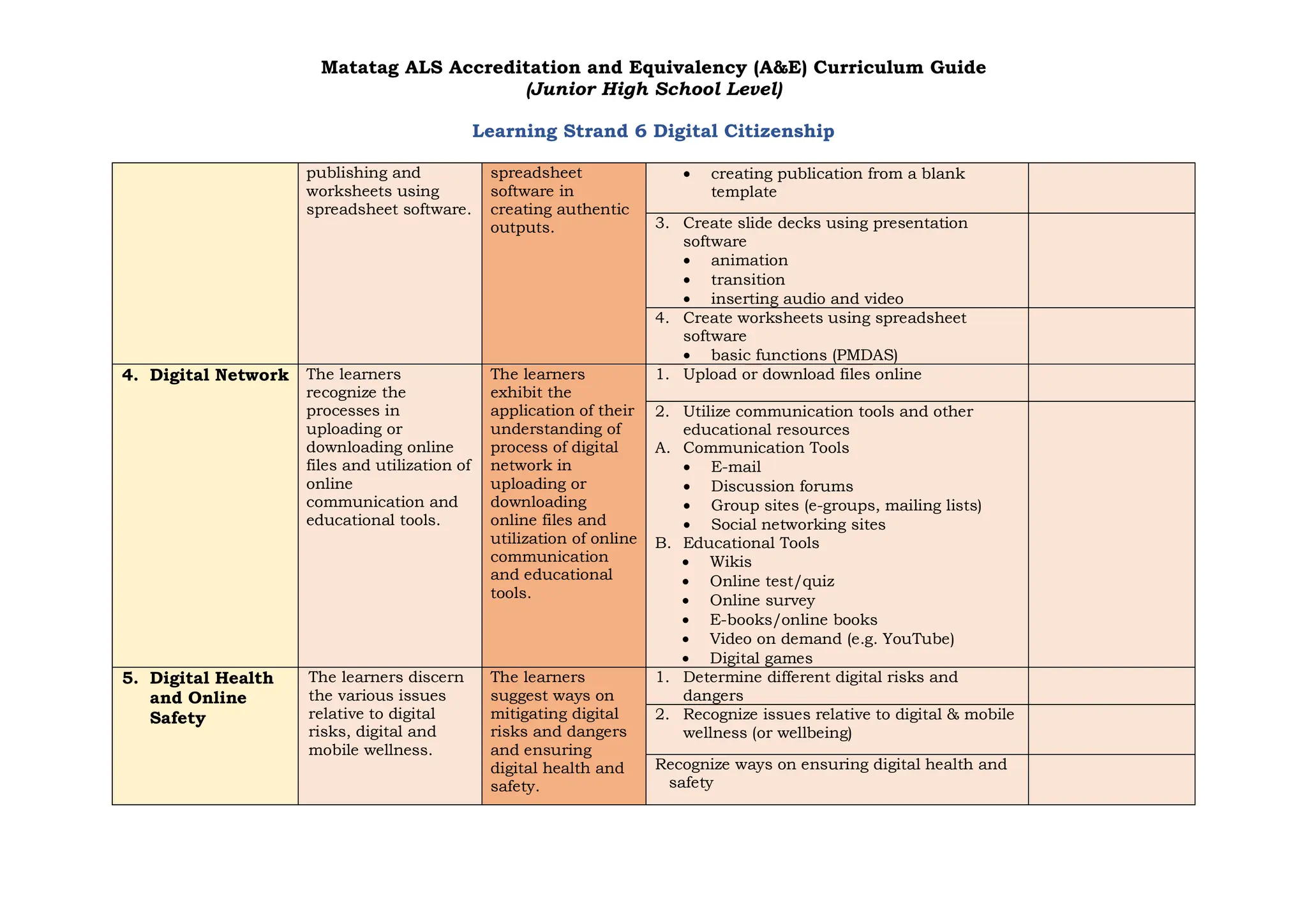
Matatag ALS Accreditation and Equivalency (A&E) Curriculum Guide
(Junior High School Level)
Learning Strand 6 Digital Citizenship
2. Basic
Computer
Hardware &
Software
Operations
The learners
recognize the
processes of
managing files, and
operating computer
peripherals.
The learners
demonstrate the
use of computers
in managing files
and operating
computer
peripherals.
1. Manage files on a computer
 open/close a file
 edit a file
 save a file
 delete a file
 locate a file
 search a file
 sort files
 create a folder
 rename a folder
 delete a folder
 organize folders
 management and directory paths and
network
 share folders
 back-up files
2. Operate different computer peripherals
 photocopier
 web camera
 USB/ flash drive
 External hard drive
 Multimedia projector
 Earphone/headset
 Microphone/speaker
3. Productivity
Software
The learners manifest
cognizance of the
processes on creating
documents using
word processing
software, slide decks
using presentation
software, documents
using desktop
The learners
demonstrate
utilization of word
processing
software,
publishing
software,
presentation
software and
1. Create documents using word processing
software
 Creating
 Formatting/editing
 Saving
 printing
2. Create documents using desktop publishing
software
 creating a publication from template
Matatag ALS Accreditation and Equivalency (A&E) Curriculum Guide
(Junior High School Level)
Learning Strand 6 Digital Citizenship
publishing and
worksheets using
spreadsheet software.
spreadsheet
software in
creating authentic
outputs.
 creating publication from a blank
template
3. Create slide decks using presentation
software
 animation
 transition
 inserting audio and video
4. Create worksheets using spreadsheet
software
 basic functions (PMDAS)
4. Digital Network The learners
recognize the
processes in
uploading or
downloading online
files and utilization of
online
communication and
educational tools.
The learners
exhibit the
application of their
understanding of
process of digital
network in
uploading or
downloading
online files and
utilization of online
communication
and educational
tools.
1. Upload or download files online
2. Utilize communication tools and other
educational resources
A. Communication Tools
 E-mail
 Discussion forums
 Group sites (e-groups, mailing lists)
 Social networking sites
B. Educational Tools
 Wikis
 Online test/quiz
 Online survey
 E-books/online books
 Video on demand (e.g. YouTube)
 Digital games
5. Digital Health
and Online
Safety
The learners discern
the various issues
relative to digital
risks, digital and
mobile wellness.
The learners
suggest ways on
mitigating digital
risks and dangers
and ensuring
digital health and
safety.
1. Determine different digital risks and
dangers
2. Recognize issues relative to digital & mobile
wellness (or wellbeing)
Recognize ways on ensuring digital health and
safety
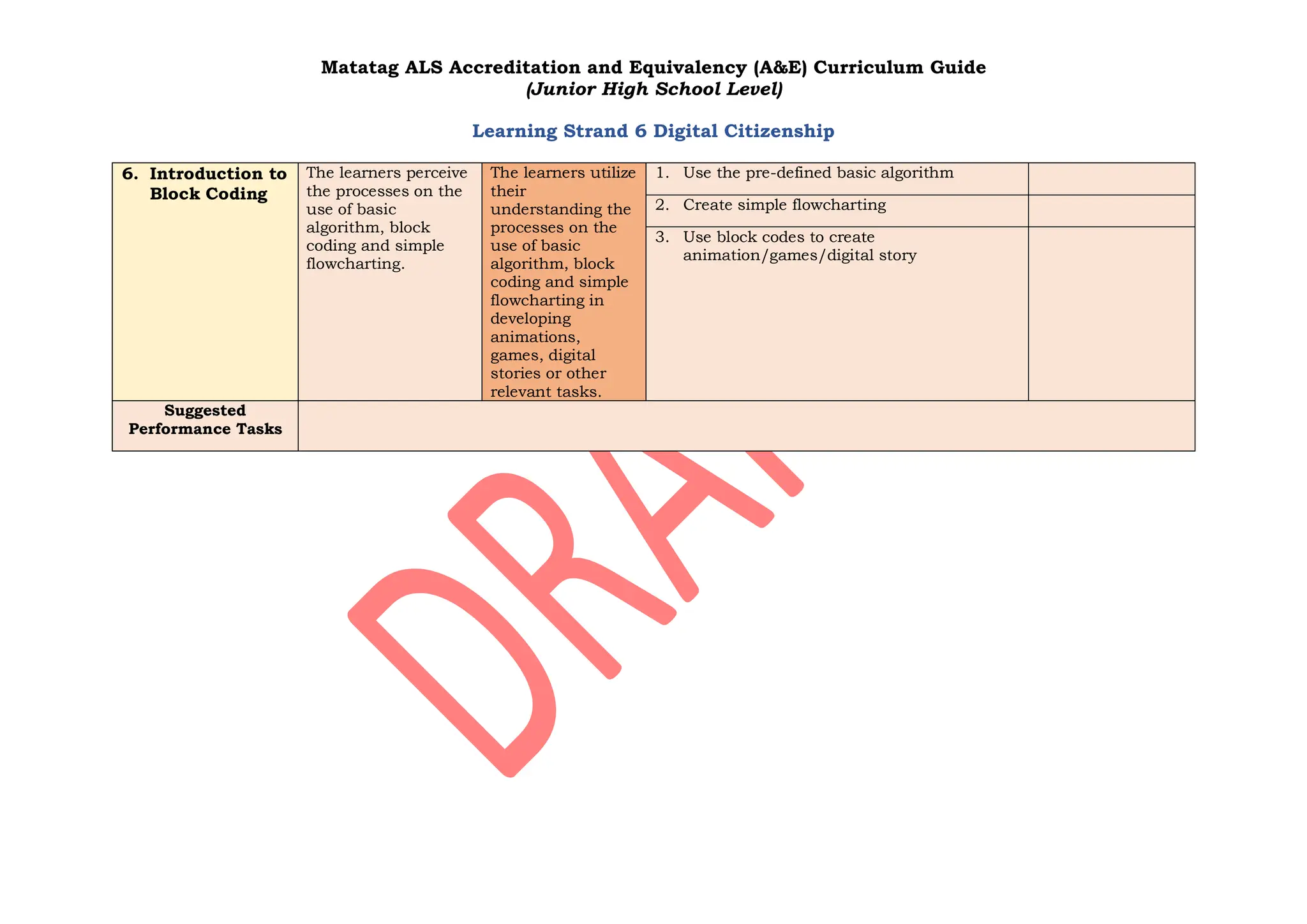
Matatag ALS Accreditation and Equivalency (A&E) Curriculum Guide
(Junior High School Level)
Learning Strand 6 Digital Citizenship
6. Introduction to
Block Coding
The learners perceive
the processes on the
use of basic
algorithm, block
coding and simple
flowcharting.
The learners utilize
their
understanding the
processes on the
use of basic
algorithm, block
coding and simple
flowcharting in
developing
animations,
games, digital
stories or other
relevant tasks.
1. Use the pre-defined basic algorithm
2. Create simple flowcharting
3. Use block codes to create
animation/games/digital story
Suggested
Performance Tasks

ALS Matatag EL Curriculum Guide- LS6v2.pdf

  • 1.
    Matatag ALS Accreditationand Equivalency (A&E) Curriculum Guide (Junior High School Level) Learning Strand 6 Digital Citizenship Learning Strand LEARNING STRAND 6- DIGITAL CITIZENSHIP Key Stage Standard By the end of Accreditation and Equivalency (A&E) Elementary Level, learners can manipulate and utilize different ICT tools and equipment. It is also expected that by the end of this level, the learners can navigate different applications and software necessary in preparation and publication of multimodal outputs. Learning Strand Standard The learners demonstrate skill in the responsible and ethical utilization of technological and ICT tools, equipment and software. The learners manifest understanding of computers, hardware and software operations, productivity software, digital network, digital health and online safety, algorithm and basic coding. Domain Content Standard Performance Standard Learning Competencies Learning Competency Code(s) 1. Introduction to Computer The learners perceive the use of computers and its peripherals and how various microcomputers function and are being utilized. The learners demonstrate the use of computers, peripherals and microcomputers. 1. Recognize the use of computer and other computing devices 2. Determine the major and other parts and peripherals of the computer system 3. Demonstrate basic computer operations 4. Determine different types of microcomputers and their use and functions  Desktop computer  Sound &navigation of a car  Netbook  Laptop/notebook  Tablet PCs  Mobile tablets  smartphones
  • 2.
    Matatag ALS Accreditationand Equivalency (A&E) Curriculum Guide (Junior High School Level) Learning Strand 6 Digital Citizenship 2. Basic Computer Hardware & Software Operations The learners recognize the processes of managing files, and operating computer peripherals. The learners demonstrate the use of computers in managing files and operating computer peripherals. 1. Manage files on a computer  open/close a file  edit a file  save a file  delete a file  locate a file  search a file  sort files  create a folder  rename a folder  delete a folder  organize folders  management and directory paths and network  share folders  back-up files 2. Operate different computer peripherals  photocopier  web camera  USB/ flash drive  External hard drive  Multimedia projector  Earphone/headset  Microphone/speaker 3. Productivity Software The learners manifest cognizance of the processes on creating documents using word processing software, slide decks using presentation software, documents using desktop The learners demonstrate utilization of word processing software, publishing software, presentation software and 1. Create documents using word processing software  Creating  Formatting/editing  Saving  printing 2. Create documents using desktop publishing software  creating a publication from template
  • 3.
    Matatag ALS Accreditationand Equivalency (A&E) Curriculum Guide (Junior High School Level) Learning Strand 6 Digital Citizenship publishing and worksheets using spreadsheet software. spreadsheet software in creating authentic outputs.  creating publication from a blank template 3. Create slide decks using presentation software  animation  transition  inserting audio and video 4. Create worksheets using spreadsheet software  basic functions (PMDAS) 4. Digital Network The learners recognize the processes in uploading or downloading online files and utilization of online communication and educational tools. The learners exhibit the application of their understanding of process of digital network in uploading or downloading online files and utilization of online communication and educational tools. 1. Upload or download files online 2. Utilize communication tools and other educational resources A. Communication Tools  E-mail  Discussion forums  Group sites (e-groups, mailing lists)  Social networking sites B. Educational Tools  Wikis  Online test/quiz  Online survey  E-books/online books  Video on demand (e.g. YouTube)  Digital games 5. Digital Health and Online Safety The learners discern the various issues relative to digital risks, digital and mobile wellness. The learners suggest ways on mitigating digital risks and dangers and ensuring digital health and safety. 1. Determine different digital risks and dangers 2. Recognize issues relative to digital & mobile wellness (or wellbeing) Recognize ways on ensuring digital health and safety
  • 4.
    Matatag ALS Accreditationand Equivalency (A&E) Curriculum Guide (Junior High School Level) Learning Strand 6 Digital Citizenship 6. Introduction to Block Coding The learners perceive the processes on the use of basic algorithm, block coding and simple flowcharting. The learners utilize their understanding the processes on the use of basic algorithm, block coding and simple flowcharting in developing animations, games, digital stories or other relevant tasks. 1. Use the pre-defined basic algorithm 2. Create simple flowcharting 3. Use block codes to create animation/games/digital story Suggested Performance Tasks