Alphabet Of Lines
Unit 2
Introduction to the Alphabet
of Lines
• In order to understand what the drafter is
trying to get across, you must be able to
understand the symbols and lines he uses.
• Each line has a definite form and line weight.
• The standard thick line weight varies from
.030 to .038 of an inch.
• The standard thin line weight varies from
.015 to .022 of an inch.
11 Main Line Types
• Visible
• Hidden
• Center
• Dimension
• Extension
• Leader
• Section
• Cutting Plane
• Phantom
• Viewing Plane
• Break
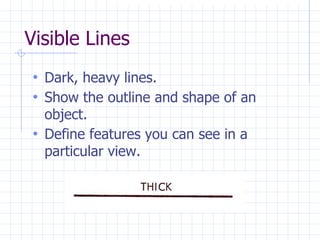
Visible Lines
• Dark, heavy lines.
• Show the outline and shape of an
object.
• Define features you can see in a
particular view.
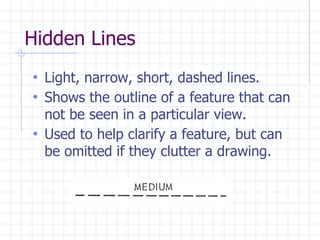
Hidden Lines
• Light, narrow, short, dashed lines.
• Shows the outline of a feature that can
not be seen in a particular view.
• Used to help clarify a feature, but can
be omitted if they clutter a drawing.
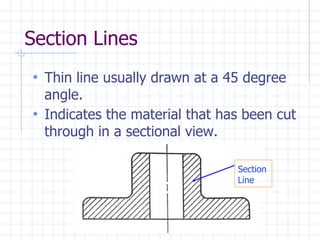
Section Lines
• Thin line usually drawn at a 45 degree
angle.
• Indicates the material that has been cut
through in a sectional view.
Section
Line
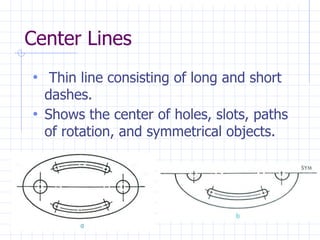
Center Lines
• Thin line consisting of long and short
dashes.
• Shows the center of holes, slots, paths
of rotation, and symmetrical objects.
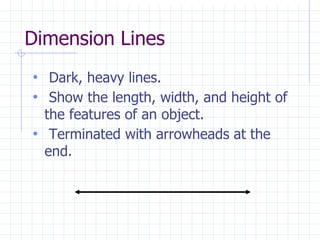
Dimension Lines
• Dark, heavy lines.
• Show the length, width, and height of
the features of an object.
• Terminated with arrowheads at the
end.
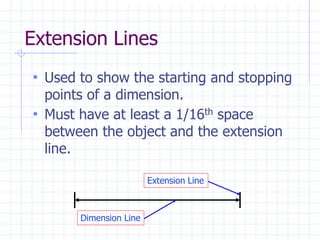
Extension Lines
• Used to show the starting and stopping
points of a dimension.
• Must have at least a 1/16th space
between the object and the extension
line.
Extension Line
Dimension Line
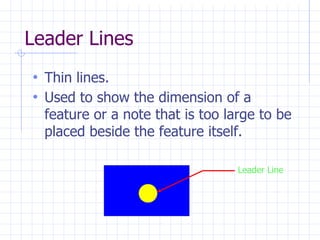
Leader Lines
• Thin lines.
• Used to show the dimension of a
feature or a note that is too large to be
placed beside the feature itself.
Leader Line
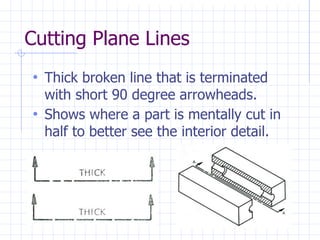
Cutting Plane Lines
• Thick broken line that is terminated
with short 90 degree arrowheads.
• Shows where a part is mentally cut in
half to better see the interior detail.
Break Lines
• Used to break out sections for clarity or
for shortening a part.
• Three types of break lines with different
line weights.
• Short Breaks.
• Long Breaks.
• Cylindrical Breaks.
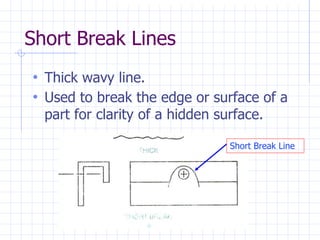
Short Break Lines
• Thick wavy line.
• Used to break the edge or surface of a
part for clarity of a hidden surface.
Short Break Line
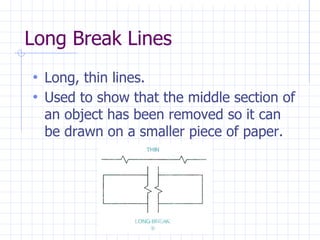
Long Break Lines
• Long, thin lines.
• Used to show that the middle section of
an object has been removed so it can
be drawn on a smaller piece of paper.
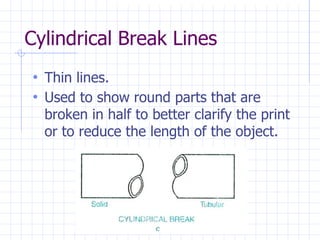
Cylindrical Break Lines
• Thin lines.
• Used to show round parts that are
broken in half to better clarify the print
or to reduce the length of the object.
Phantom Lines
• Thin lines made up of long dashes alternating
with pairs of short dashes.
• Three purposes in drawings.
1. To show the alternate position of
moving parts.
2. To show the relationship of parts
that fit together.
3. To show repeated detail.
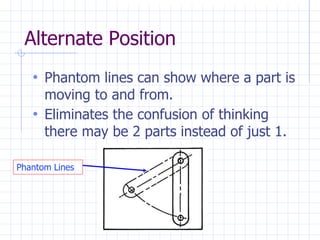
Alternate Position
• Phantom lines can show where a part is
moving to and from.
• Eliminates the confusion of thinking
there may be 2 parts instead of just 1.
Phantom Lines
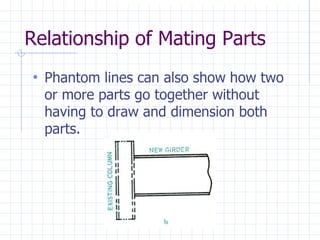
Relationship of Mating Parts
• Phantom lines can also show how two
or more parts go together without
having to draw and dimension both
parts.
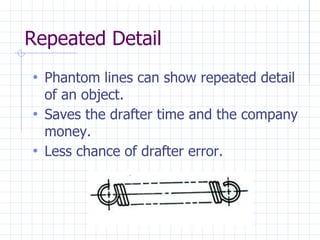
Repeated Detail
• Phantom lines can show repeated detail
of an object.
• Saves the drafter time and the company
money.
• Less chance of drafter error.
Summary
• Now that we have discussed the 11
main line types, you should be able to
do the following:
1. Identify the alphabet of lines.
2. Identify where the line types are
used.
3. Produce the lines with various
line weights.

Alphabet-of-Lines ppt.ppt.pptx

  • 1.
  • 2.
    Introduction to theAlphabet of Lines • In order to understand what the drafter is trying to get across, you must be able to understand the symbols and lines he uses. • Each line has a definite form and line weight. • The standard thick line weight varies from .030 to .038 of an inch. • The standard thin line weight varies from .015 to .022 of an inch.
  • 3.
    11 Main LineTypes • Visible • Hidden • Center • Dimension • Extension • Leader • Section • Cutting Plane • Phantom • Viewing Plane • Break
  • 4.
    Visible Lines • Dark,heavy lines. • Show the outline and shape of an object. • Define features you can see in a particular view.
  • 5.
    Hidden Lines • Light,narrow, short, dashed lines. • Shows the outline of a feature that can not be seen in a particular view. • Used to help clarify a feature, but can be omitted if they clutter a drawing.
  • 6.
    Section Lines • Thinline usually drawn at a 45 degree angle. • Indicates the material that has been cut through in a sectional view. Section Line
  • 7.
    Center Lines • Thinline consisting of long and short dashes. • Shows the center of holes, slots, paths of rotation, and symmetrical objects.
  • 8.
    Dimension Lines • Dark,heavy lines. • Show the length, width, and height of the features of an object. • Terminated with arrowheads at the end.
  • 9.
    Extension Lines • Usedto show the starting and stopping points of a dimension. • Must have at least a 1/16th space between the object and the extension line. Extension Line Dimension Line
  • 10.
    Leader Lines • Thinlines. • Used to show the dimension of a feature or a note that is too large to be placed beside the feature itself. Leader Line
  • 11.
    Cutting Plane Lines •Thick broken line that is terminated with short 90 degree arrowheads. • Shows where a part is mentally cut in half to better see the interior detail.
  • 12.
    Break Lines • Usedto break out sections for clarity or for shortening a part. • Three types of break lines with different line weights. • Short Breaks. • Long Breaks. • Cylindrical Breaks.
  • 13.
    Short Break Lines •Thick wavy line. • Used to break the edge or surface of a part for clarity of a hidden surface. Short Break Line
  • 14.
    Long Break Lines •Long, thin lines. • Used to show that the middle section of an object has been removed so it can be drawn on a smaller piece of paper.
  • 15.
    Cylindrical Break Lines •Thin lines. • Used to show round parts that are broken in half to better clarify the print or to reduce the length of the object.
  • 16.
    Phantom Lines • Thinlines made up of long dashes alternating with pairs of short dashes. • Three purposes in drawings. 1. To show the alternate position of moving parts. 2. To show the relationship of parts that fit together. 3. To show repeated detail.
  • 17.
    Alternate Position • Phantomlines can show where a part is moving to and from. • Eliminates the confusion of thinking there may be 2 parts instead of just 1. Phantom Lines
  • 18.
    Relationship of MatingParts • Phantom lines can also show how two or more parts go together without having to draw and dimension both parts.
  • 19.
    Repeated Detail • Phantomlines can show repeated detail of an object. • Saves the drafter time and the company money. • Less chance of drafter error.
  • 20.
    Summary • Now thatwe have discussed the 11 main line types, you should be able to do the following: 1. Identify the alphabet of lines. 2. Identify where the line types are used. 3. Produce the lines with various line weights.