WEB DEVELOPMENT
Arnel I. Robles
arnelirobles.blogspot.com
The “Right Choice”
The Simpler The Better

  Less complex sites are
  easier to optimise and
 generally perform better.
Types of Websites
STATIC WEBSITES
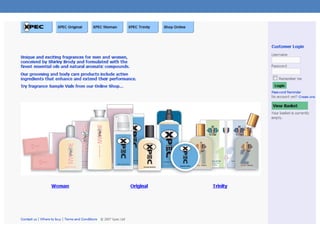
A static website is the simplest form of website.

Site’s content is delivered without the use of server side
processing.

Static websites are used principally for brochure sites.
Types of Websites
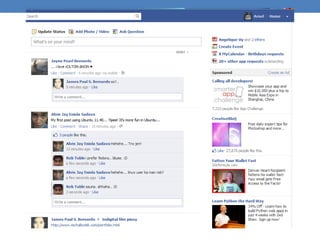
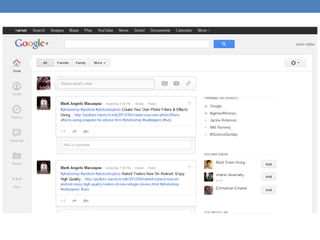
DYNAMIC WEBSITES
Dynamic websites rely on server side scripting to
provide advanced interactivity;

Usually use a database to deliver the content for
individual pages

Appropriate for developing large websites with content
which is formulaic.
Types of Websites
Content Managed Websites
Refinement of the database driven dynamic site.

CMS provides a password protected interface
through which users can add, edit and remove
content from the site.

CMS is particularly useful in the case of large sites
which have numerous contributors.
Types of Website
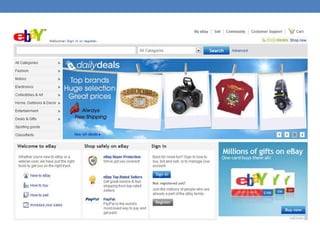
E-Commerce Websites

dynamic website which has the functionality to process
financial transactions

built to mimic a bricks and mortar store and use the
model of stock pages, shopping basket system and
checkout, using a
secure online payment system.
Types of Websites
Flash Websites
Flash is proprietary software developed by
Macromedia.
Flash websites can be visually stunning and provide
otherwise
unachievable levels of user interactivity.

However, it is almost impossible to carry out any
meaningful form of SEO on a Flash site and so it should,
generally, be avoided.
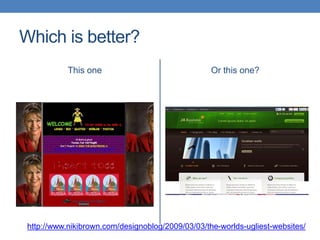
Which is better?
            This one                               Or this one?


 http://www.nikibrown.com/designoblog/2009/03/03/the-worlds-ugliest-websites/
About WCMS
Software system that provides:
1. website authoring
2. Collaboration
3. Administration tools


  Designed to allow users with little knowledge of web
programming languages or markup languages to create
    and manage website content with relative ease.

              Also allows multiple authors
Features of WCMS
Automated templates

Access Control

Scalable expansion

Easily editable content

Scalable feature sets

Web standards upgrades
Collaboration

Delegation

Workflow management

Document management

Content virtualization

Content syndication

Multi Language Support

Versioning
Advanatges
Low Cost

Easy Customization

Ease of use

Workflow Management
Disadvantages
Cost of implementation

Cost of Maintenance

Latency Issues

Tool Mixing

Introduction

  • 1.
    WEB DEVELOPMENT Arnel I.Robles arnelirobles.blogspot.com
  • 2.
  • 3.
  • 4.
    The Simpler TheBetter Less complex sites are easier to optimise and generally perform better.
  • 5.
    Types of Websites STATICWEBSITES A static website is the simplest form of website. Site’s content is delivered without the use of server side processing. Static websites are used principally for brochure sites.
  • 8.
    Types of Websites DYNAMICWEBSITES Dynamic websites rely on server side scripting to provide advanced interactivity; Usually use a database to deliver the content for individual pages Appropriate for developing large websites with content which is formulaic.
  • 11.
    Types of Websites ContentManaged Websites Refinement of the database driven dynamic site. CMS provides a password protected interface through which users can add, edit and remove content from the site. CMS is particularly useful in the case of large sites which have numerous contributors.
  • 12.
    Types of Website E-CommerceWebsites dynamic website which has the functionality to process financial transactions built to mimic a bricks and mortar store and use the model of stock pages, shopping basket system and checkout, using a secure online payment system.
  • 14.
    Types of Websites FlashWebsites Flash is proprietary software developed by Macromedia. Flash websites can be visually stunning and provide otherwise unachievable levels of user interactivity. However, it is almost impossible to carry out any meaningful form of SEO on a Flash site and so it should, generally, be avoided.
  • 16.
    Which is better? This one Or this one? http://www.nikibrown.com/designoblog/2009/03/03/the-worlds-ugliest-websites/
  • 17.
    About WCMS Software systemthat provides: 1. website authoring 2. Collaboration 3. Administration tools Designed to allow users with little knowledge of web programming languages or markup languages to create and manage website content with relative ease. Also allows multiple authors
  • 18.
    Features of WCMS Automatedtemplates Access Control Scalable expansion Easily editable content Scalable feature sets Web standards upgrades
  • 19.
    Collaboration Delegation Workflow management Document management Contentvirtualization Content syndication Multi Language Support Versioning
  • 20.
  • 21.
    Disadvantages Cost of implementation Costof Maintenance Latency Issues Tool Mixing