All Access Wifi
Around CEAT
Outlines
• Introduction
• What is Wi-Fi?
• Wi-Fi Standards?
• Hotspots
• How a Wi-Fi Network works
• Survey
• Factors To Consider When Choosing An Internet Service Provider
• Wi-Fi Providers
• Limitations of Wi-Fi
• Security
• Maintenance
• Estimated cost
• Location
• ICTC Requirements
• Conclusion
Introduction
 Imagine working on your laptop or checking
e-mailfrom anywhere in the department.
 Now , imagine
doing all thesethings
easily and quickly,
withoutworrying
about finding a wired
network connection.
That is Wi-Fi !
What is Wi-Fi?
 Wi-Fi (Wireless Fidelity) is a generic term that refers to the
IEEE 802.11 communications standard for Wireless Local Area
Networks (WLANs).
 Wireless Technology is an alternative to Wired Technology,
which is commonly used, for connecting devices in wireless
using radio waves.
 Allows you to access the Internet while on the move ; you can
remain online while moving from one area to another,
without a disconnection or loss in coverage
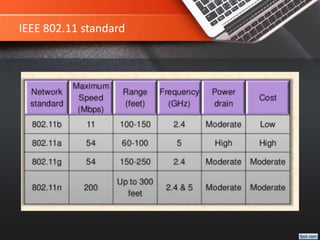
IEEE 802.11 Standard
 In 1997, the Institute of Electrical and Electronic
Engineers (IEEE) drafted the 802.11 standard for
wireless local area networking.
In 1999, networking hardware companies accepted the
standard and began manufacturing products using the
802.11b protocol which operated in the 2.4 GHz range
and was capable of transmitting at speeds of 11 Mbps.
The 802.11a protocol was also released in 1999,
operating at 5 GHz with transmissions speeds of 54
Mbps, but its cost was high.
IEEE 802.11 standard
Hotspot
What is a Hotspot ?
 A Hotspot is any location where Wi-Fi network access is made
publicly available.
 Hotspots are equipped with a Broadband Internet connection,
and one or more Access Points that allow users to access the
Internet wirelessly.
 Hotspots can be setup in any public location that can support an
Internet connection.
How a Wi-Fi network works?
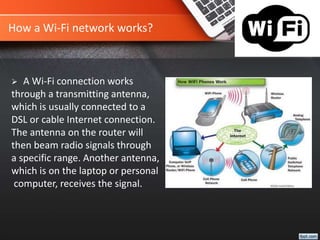
 A Wi-Fi connection works
through a transmitting antenna,
which is usually connected to a
DSL or cable Internet connection.
The antenna on the router will
then beam radio signals through
a specific range. Another antenna,
which is on the laptop or personal
computer, receives the signal.
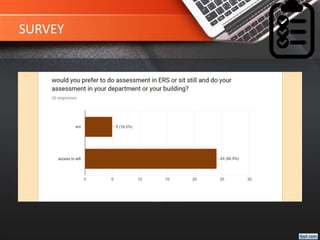
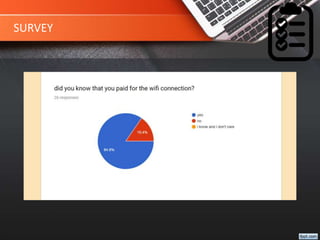
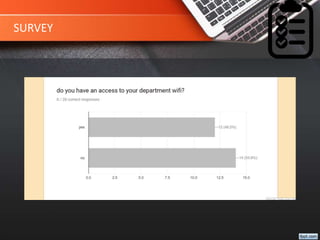
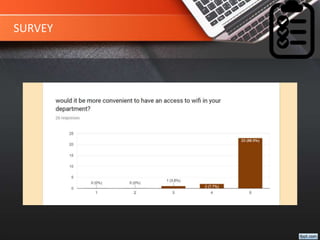
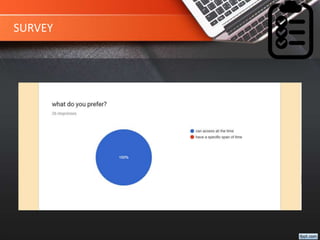
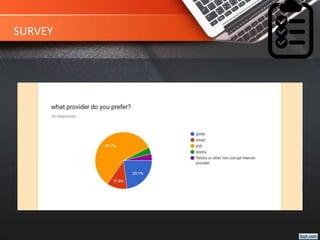
SURVEY
SURVEY
SURVEY
SURVEY
SURVEY
SURVEY
Factors To Consider When Choosing An
Internet Service Provider
 How Do You Use The Internet?
The first step in choosing from a wide selection of ISPs is
to understand how you use the Internet. For instance, if
you like to play online games and stream video you will
need a much faster connection than someone who does
casual browsing. In most instances, 8Mbps is usually
satisfactory for the casual Internet user; however, anything
less than 8Mbps will result in slow load time, and
sometimes outages. If you use the Internet for online
gaming or streaming video, you may need to consider
purchasing a broadband Internet package 20 Mbps or
greater for optimal results, though you can get by just
fine with anything over 8 Mbps. Now that you have
determined how you will use the Internet, it’s the best
time for you to start comparing Internet providers in Philippines.
Factors To Consider When Choosing An
Internet Service Provider
 Who Has The Best Price?
One of the first things you should do is to determine how much you can afford. If you are a budget-
shopper, price may be the deciding factor. If low price and good service is what you are after, Sky
broadband is the perfect option for you. Sky offers a ton of affordable options to help you connect to
the Internet at an affordable price.
Sky offers One Sky Lite plans that start at ₱699. With the basic Sky Lite plan, you get speeds up to 4
Mbps, 20 GB of data allowance monthly, access to many prime channels, and free Sky On Demand.
There is a one-time installation fee of ₱1,799, but you get a free WiFi modem and HD digibox. This
package does require a 2-year lock-in, but at that price point, you really can’t complain.
Probably the best offering at Sky is the next step up from the ₱699 Sky Lite Plan. This plan costs ₱999 a
month, but provides you with speeds up to 8 Mbps. In addition, you get 40 GB of data each month,
free Sky On Demand, and the same access to great channels. The main difference between this
package and the base package is the browsing speed. The 8 Mbps will provide you with enough speed
to stream most video, and conduct every-day browsing activities. This speed is more than fast enough
for the every-day Internet user. The same one-time installation fee of ₱1,788 applies, and you are still
provided with a free WiFi modem and HD digibox.
Factors To Consider When Choosing An Internet
Service Provider
 Who Has The Best Coverage?
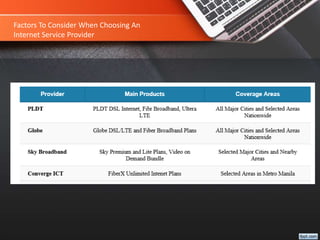
The broadband service provider that has the best overall coverage is PLDT. At the moment, PLDT is still
the leading telecommunications service provider in the country with over 70 percent market share. Over
1.3 million residents subscribe to PLDT’s services, and this number is expected to increase as time goes
on. Ariel Fermin, EVP of PLDT Home states, “We are proud to announce that PLDT HOME continues to
dominate the broadband arena with its top-class communication solutions that deliver the best, reliable
service. The numbers prove that PLDT HOME is the broadband consumers choose and trust.”
In addition to its popular PLDT HOME product, PLDT has the largest and most extensive fiber optic
network, which reaches over 2.5 million homes across the nation. This extensive fiber optic network can
provide you with lag-free Internet service. PLDT has invested over ₱300 billion to create this extended
network, and shows no signs of slowing down. Ask around, and you will probably hear reference of
PLDT’s dependable coverage, and fast browsing speeds.
Below is a brief comparison of the major providers and their current reach in terms of service coverage in
the Philippines:
Factors To Consider When Choosing An
Internet Service Provider
Wi-Fi Provider
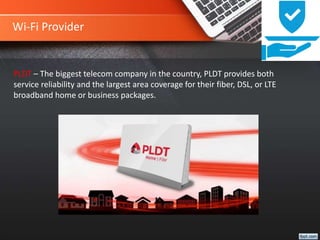
PLDT – The biggest telecom company in the country, PLDT provides both
service reliability and the largest area coverage for their fiber, DSL, or LTE
broadband home or business packages.
Estimated Cost
PLDT/Smart/Sun Cellular. The biggest player in the group is the combined force of PLDT
with Smart and Sun Cellular under its hood. The latest subscriber count is close to 4 million
broadband users. PLDT DSL Plan starts at Php999 for 1Mbps.
Whenever you can save money you should take the opportunity. Many Internet service
providers in the Philippines offer special promotions from time to time, you will just need
to keep your eyes peeled for the deals and pay attention to advertisements. Right now, the
broadband provider who is offering the best introductory offer is PLDT. PLDT is offering 50
percent off various plans for those who switch to PLDT Home DSL. That means you could
pay as little as ₱495 per month for one year!
In addition to saving 50 percent on your broadband bill for the first year, you will also
receive free installation which saves you ₱1,100, a free WiFi modem, saving you ₱1,200,
and free activation that will save you another ₱1,500! Although you are required to sign a
36-month contract, but at a 50 percent discount who would complain? There are a variety
of PLDT broadband internet options that are eligible for this special promotion. Add PLDT to
the top of your consideration list.
Limitations of Wi-Fi
Limited range
Data security risks :a huge challenge for Wi-Fi networks.
Interference from other devices : such as telephones.
High power consumption :making battery life and heat a concern .
Security
This may be an unfortunate reality, but your Wi-Fi router is not secure, never has been,
and probably never will be. There are tools that can hack past just about any security
measures you take to safeguard your Wi-Fi access. A skilled and determined hacker can
breach your Wi-Fi and there is little you can do about it.
The good news is that there are very few skilled and determined hackers and even fewer
skilled and determined to crack into the Wi-Fi connection. This means that whatever
security measures you take are designed to thwart the causal hacker trying to steal your
bandwidth to avoid paying for it.
To this end, make sure you are using the strongest encryption protocol your router
supports and that the passphrase you use is not something guessable like your street
address or zip code. It is also advisable that you set the router to not broadcast your
routers existence to the neighborhood.
Maintenance
 Update Your Equipment. The typical Wi-Fi wireless router is likely to be the
most neglected appliance in the entire area. And that’s a shame, because a
well-maintained router can reduce frustration when internet access
suddenly disappears for seemingly no reason.
 Keep your router’s firmware and software up to date by periodically
asking the manufacturer for updates. You were aware that your router has
updatable firmware and software, weren’t you? And that the router can
“phone home” for updates if you ask it to do so?
Location
 Determine your coverage area
You know you want the faculty, and every CEAT rooms covered. After that, you’ll need
to look at the needs of the remaining areas of the building. Do you want particular
classrooms covered? What about the teachers’ lounge? Once you’ve nailed down the
areas in which you want to provide connectivity, you can move on to the next step.
 Lock it down
Every router on the market has a security feature. Even the most basic prompt you to
select the level of security and create a password. We suggest selecting the highest
level of security and creating a password that teachers will remember. Once you’ve got
the network created and protected, you will have the tedious task of connecting all of
the Internet devices to the network. Thankfully, this is a one-time job, since devices
will remember the network even after being shut down or restarted.
 Access Points
The general rule of thumb is that you need an access point for every classroom, although this may
vary depending on local layout and usage.
 Antennas
Depending on what your classroom walls are made of, and how large your campus is, you may have
a need for special powered or directional antennas. These can be used to "punch through" thick
concrete walls, or for broadcasting WiFi signals between distant buildings on a large plot of land.
 Locate the wireless router itself
In general, you want to place your router in a central location, preferably as high as possible in the
structure. An attic is a good spot, although that can make the router difficult to get to when you
need physical access. On top of a bookshelf located near the center of the building may be a better
spot.If your router has more than one antenna, you should configure one antenna vertically and
one antenna horizontally at a perpendicular angle. This will help broaden the signal for the entire
household. Read the manual of your particular router for more instructions on antenna
configuration.
Location
Location
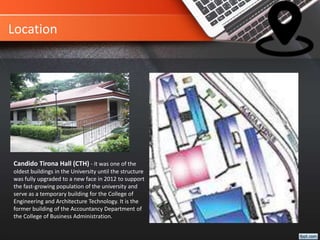
Candido Tirona Hall (CTH) - it was one of the
oldest buildings in the University until the structure
was fully upgraded to a new face in 2012 to support
the fast-growing population of the university and
serve as a temporary building for the College of
Engineering and Architecture Technology. It is the
former building of the Accountancy Department of
the College of Business Administration.
ICTC Requirements
The Information and Communications Technology Center (ICTC)
handles the technical and systems development of university
processes involving the areas information systems. network,
technical services, and web development.
 Provide Wi-Fi routers
 Letter
Conclusion
 Wi-Fi is a simple, cost-effective way to connect to the Internet,
without the need to physically connecting wires.
 In 1997 IEEE drafted the 802.11 standard for wireless local area
networking.
 Hotspot is a geographic area setup in any public location, and
has a readily accessible wireless network.
 Security is a huge challenge for Wi-Fi Networks, many Security
Techniques are used to improve it.
 Wi-Fi Networks have a several limitations that should be
concerned.
Questions? Any?
Presentation Prepared By:
John Emannuel Orcullo
Louie Dalumpines
Shayne Chinnyreth Galo
Jheane Claire Arevalo
Patricia Andrea Palacol
Submitted To:
Ma’am Ched T. Manguerra
END

All access Wi-Fi around CEAT

  • 1.
  • 2.
    Outlines • Introduction • Whatis Wi-Fi? • Wi-Fi Standards? • Hotspots • How a Wi-Fi Network works • Survey • Factors To Consider When Choosing An Internet Service Provider • Wi-Fi Providers • Limitations of Wi-Fi • Security • Maintenance • Estimated cost • Location • ICTC Requirements • Conclusion
  • 3.
    Introduction  Imagine workingon your laptop or checking e-mailfrom anywhere in the department.  Now , imagine doing all thesethings easily and quickly, withoutworrying about finding a wired network connection. That is Wi-Fi !
  • 4.
    What is Wi-Fi? Wi-Fi (Wireless Fidelity) is a generic term that refers to the IEEE 802.11 communications standard for Wireless Local Area Networks (WLANs).  Wireless Technology is an alternative to Wired Technology, which is commonly used, for connecting devices in wireless using radio waves.  Allows you to access the Internet while on the move ; you can remain online while moving from one area to another, without a disconnection or loss in coverage
  • 5.
    IEEE 802.11 Standard In 1997, the Institute of Electrical and Electronic Engineers (IEEE) drafted the 802.11 standard for wireless local area networking. In 1999, networking hardware companies accepted the standard and began manufacturing products using the 802.11b protocol which operated in the 2.4 GHz range and was capable of transmitting at speeds of 11 Mbps. The 802.11a protocol was also released in 1999, operating at 5 GHz with transmissions speeds of 54 Mbps, but its cost was high.
  • 6.
  • 7.
    Hotspot What is aHotspot ?  A Hotspot is any location where Wi-Fi network access is made publicly available.  Hotspots are equipped with a Broadband Internet connection, and one or more Access Points that allow users to access the Internet wirelessly.  Hotspots can be setup in any public location that can support an Internet connection.
  • 8.
    How a Wi-Finetwork works?  A Wi-Fi connection works through a transmitting antenna, which is usually connected to a DSL or cable Internet connection. The antenna on the router will then beam radio signals through a specific range. Another antenna, which is on the laptop or personal computer, receives the signal.
  • 9.
  • 10.
  • 11.
  • 12.
  • 13.
  • 14.
  • 15.
    Factors To ConsiderWhen Choosing An Internet Service Provider  How Do You Use The Internet? The first step in choosing from a wide selection of ISPs is to understand how you use the Internet. For instance, if you like to play online games and stream video you will need a much faster connection than someone who does casual browsing. In most instances, 8Mbps is usually satisfactory for the casual Internet user; however, anything less than 8Mbps will result in slow load time, and sometimes outages. If you use the Internet for online gaming or streaming video, you may need to consider purchasing a broadband Internet package 20 Mbps or greater for optimal results, though you can get by just fine with anything over 8 Mbps. Now that you have determined how you will use the Internet, it’s the best time for you to start comparing Internet providers in Philippines.
  • 16.
    Factors To ConsiderWhen Choosing An Internet Service Provider  Who Has The Best Price? One of the first things you should do is to determine how much you can afford. If you are a budget- shopper, price may be the deciding factor. If low price and good service is what you are after, Sky broadband is the perfect option for you. Sky offers a ton of affordable options to help you connect to the Internet at an affordable price. Sky offers One Sky Lite plans that start at ₱699. With the basic Sky Lite plan, you get speeds up to 4 Mbps, 20 GB of data allowance monthly, access to many prime channels, and free Sky On Demand. There is a one-time installation fee of ₱1,799, but you get a free WiFi modem and HD digibox. This package does require a 2-year lock-in, but at that price point, you really can’t complain. Probably the best offering at Sky is the next step up from the ₱699 Sky Lite Plan. This plan costs ₱999 a month, but provides you with speeds up to 8 Mbps. In addition, you get 40 GB of data each month, free Sky On Demand, and the same access to great channels. The main difference between this package and the base package is the browsing speed. The 8 Mbps will provide you with enough speed to stream most video, and conduct every-day browsing activities. This speed is more than fast enough for the every-day Internet user. The same one-time installation fee of ₱1,788 applies, and you are still provided with a free WiFi modem and HD digibox.
  • 17.
    Factors To ConsiderWhen Choosing An Internet Service Provider  Who Has The Best Coverage? The broadband service provider that has the best overall coverage is PLDT. At the moment, PLDT is still the leading telecommunications service provider in the country with over 70 percent market share. Over 1.3 million residents subscribe to PLDT’s services, and this number is expected to increase as time goes on. Ariel Fermin, EVP of PLDT Home states, “We are proud to announce that PLDT HOME continues to dominate the broadband arena with its top-class communication solutions that deliver the best, reliable service. The numbers prove that PLDT HOME is the broadband consumers choose and trust.” In addition to its popular PLDT HOME product, PLDT has the largest and most extensive fiber optic network, which reaches over 2.5 million homes across the nation. This extensive fiber optic network can provide you with lag-free Internet service. PLDT has invested over ₱300 billion to create this extended network, and shows no signs of slowing down. Ask around, and you will probably hear reference of PLDT’s dependable coverage, and fast browsing speeds. Below is a brief comparison of the major providers and their current reach in terms of service coverage in the Philippines:
  • 18.
    Factors To ConsiderWhen Choosing An Internet Service Provider
  • 19.
    Wi-Fi Provider PLDT –The biggest telecom company in the country, PLDT provides both service reliability and the largest area coverage for their fiber, DSL, or LTE broadband home or business packages.
  • 20.
    Estimated Cost PLDT/Smart/Sun Cellular.The biggest player in the group is the combined force of PLDT with Smart and Sun Cellular under its hood. The latest subscriber count is close to 4 million broadband users. PLDT DSL Plan starts at Php999 for 1Mbps. Whenever you can save money you should take the opportunity. Many Internet service providers in the Philippines offer special promotions from time to time, you will just need to keep your eyes peeled for the deals and pay attention to advertisements. Right now, the broadband provider who is offering the best introductory offer is PLDT. PLDT is offering 50 percent off various plans for those who switch to PLDT Home DSL. That means you could pay as little as ₱495 per month for one year! In addition to saving 50 percent on your broadband bill for the first year, you will also receive free installation which saves you ₱1,100, a free WiFi modem, saving you ₱1,200, and free activation that will save you another ₱1,500! Although you are required to sign a 36-month contract, but at a 50 percent discount who would complain? There are a variety of PLDT broadband internet options that are eligible for this special promotion. Add PLDT to the top of your consideration list.
  • 21.
    Limitations of Wi-Fi Limitedrange Data security risks :a huge challenge for Wi-Fi networks. Interference from other devices : such as telephones. High power consumption :making battery life and heat a concern .
  • 22.
    Security This may bean unfortunate reality, but your Wi-Fi router is not secure, never has been, and probably never will be. There are tools that can hack past just about any security measures you take to safeguard your Wi-Fi access. A skilled and determined hacker can breach your Wi-Fi and there is little you can do about it. The good news is that there are very few skilled and determined hackers and even fewer skilled and determined to crack into the Wi-Fi connection. This means that whatever security measures you take are designed to thwart the causal hacker trying to steal your bandwidth to avoid paying for it. To this end, make sure you are using the strongest encryption protocol your router supports and that the passphrase you use is not something guessable like your street address or zip code. It is also advisable that you set the router to not broadcast your routers existence to the neighborhood.
  • 23.
    Maintenance  Update YourEquipment. The typical Wi-Fi wireless router is likely to be the most neglected appliance in the entire area. And that’s a shame, because a well-maintained router can reduce frustration when internet access suddenly disappears for seemingly no reason.  Keep your router’s firmware and software up to date by periodically asking the manufacturer for updates. You were aware that your router has updatable firmware and software, weren’t you? And that the router can “phone home” for updates if you ask it to do so?
  • 24.
    Location  Determine yourcoverage area You know you want the faculty, and every CEAT rooms covered. After that, you’ll need to look at the needs of the remaining areas of the building. Do you want particular classrooms covered? What about the teachers’ lounge? Once you’ve nailed down the areas in which you want to provide connectivity, you can move on to the next step.  Lock it down Every router on the market has a security feature. Even the most basic prompt you to select the level of security and create a password. We suggest selecting the highest level of security and creating a password that teachers will remember. Once you’ve got the network created and protected, you will have the tedious task of connecting all of the Internet devices to the network. Thankfully, this is a one-time job, since devices will remember the network even after being shut down or restarted.
  • 25.
     Access Points Thegeneral rule of thumb is that you need an access point for every classroom, although this may vary depending on local layout and usage.  Antennas Depending on what your classroom walls are made of, and how large your campus is, you may have a need for special powered or directional antennas. These can be used to "punch through" thick concrete walls, or for broadcasting WiFi signals between distant buildings on a large plot of land.  Locate the wireless router itself In general, you want to place your router in a central location, preferably as high as possible in the structure. An attic is a good spot, although that can make the router difficult to get to when you need physical access. On top of a bookshelf located near the center of the building may be a better spot.If your router has more than one antenna, you should configure one antenna vertically and one antenna horizontally at a perpendicular angle. This will help broaden the signal for the entire household. Read the manual of your particular router for more instructions on antenna configuration. Location
  • 26.
    Location Candido Tirona Hall(CTH) - it was one of the oldest buildings in the University until the structure was fully upgraded to a new face in 2012 to support the fast-growing population of the university and serve as a temporary building for the College of Engineering and Architecture Technology. It is the former building of the Accountancy Department of the College of Business Administration.
  • 27.
    ICTC Requirements The Informationand Communications Technology Center (ICTC) handles the technical and systems development of university processes involving the areas information systems. network, technical services, and web development.  Provide Wi-Fi routers  Letter
  • 28.
    Conclusion  Wi-Fi isa simple, cost-effective way to connect to the Internet, without the need to physically connecting wires.  In 1997 IEEE drafted the 802.11 standard for wireless local area networking.  Hotspot is a geographic area setup in any public location, and has a readily accessible wireless network.  Security is a huge challenge for Wi-Fi Networks, many Security Techniques are used to improve it.  Wi-Fi Networks have a several limitations that should be concerned.
  • 29.
    Questions? Any? Presentation PreparedBy: John Emannuel Orcullo Louie Dalumpines Shayne Chinnyreth Galo Jheane Claire Arevalo Patricia Andrea Palacol Submitted To: Ma’am Ched T. Manguerra END