Chapter One
12/17/2022 BY TADU.D 1
Introduction to programming
 Computer ?
 an electronic device that accepts data, performs computations,
and makes logical decisions according to instructions that have
been given to it,
 then produces meaningful information in a form that is useful to
the user.
 Computers do exactly what they are told to do.
 Computer programs ?
 Sets of instructions that control a computer’s processing of data
 the instructions that tells the computer what to do
 Computer programming ?
 is the process of writing, testing, debugging / troubleshooting,
and maintaining the source code of computer programs
12/17/2022 BY TADU.D 2
Introduction to programming
 Computer programs (also known as source code) is often
written by professionals known as Computer Programmers
 A computer program usually consists of two elements:
 Data – characteristics
 Code – action
 Source code is written in one of programming languages
12/17/2022 BY TADU.D 3
What is Programming Language?
 Is an artificial language that can be used to control the behavior
of a computer
 defined by
 Syntactic - describes the possible combinations of symbols
that form a syntactically correct program
 Semantic - The meaning given to a combination of symbols
 Programming languages can be divided in to two major categories:
low-level
high-level languages
Introduction to programming
12/17/2022 BY TADU.D 4
 Machine language
 machine is short for computing machine (i.e., computer)
 computer’s native language, sequence of zeroes and ones (binary)
 different computers understand different sequences
 hard for humans to understand: 01010001…
 low level: language
 mnemonics for machine language
 each instruction is minimal
 still hard for humans to understand: ADD d0,d2
High-level languages
 FORTRAN, Pascal, BASIC, C, C++, Java, COBOL, etc.
 high level: each instruction composed of many low-level
instructions
 closer to English easier to read and understand:
Introduction to programming
12/17/2022 BY TADU.D 5
Interpreting Vs Compiling Program
 Each type of computer only “understands” its own machine
language (zeroes and ones)
 Thus we must translate from High-level language to machine
language
◦ a team of experts programs a translator, called a “compiler” which
translates entirety of a High-level language program to an
executable file in computer’s native machine language.
 Running :
◦ compilation: Your program  executable
◦ execution: run executable
 machine executes your program by “running” each machine
language instruction in the executable file
12/17/2022 BY TADU.D 6
Interpreting Vs Compiling Program
 An alternative to compiling your program is to interpret your
program
◦ each line of your program is translated into machine language
and immediately executed
 Like translating between natural languages
◦ Compiler: human translator translates book in its entirety and
then translated book is printed and read
◦ Interpreter: human interpreter translates each spoken statement
in sequence as speaker is speaking
12/17/2022 BY TADU.D 7
Programming paradigm
 A programming paradigm is a fundamental style of
programming
 Unstructured Programming
 Procedural programming .
 Structured Programming
 Object Oriented Programming
12/17/2022 BY TADU.D 8
Unstructured Programming
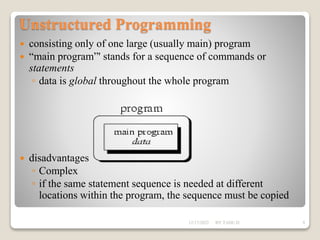
 consisting only of one large (usually main) program
 “main program”' stands for a sequence of commands or
statements
◦ data is global throughout the whole program
 disadvantages
◦ Complex
◦ if the same statement sequence is needed at different
locations within the program, the sequence must be copied
12/17/2022 BY TADU.D 9
Procedural programming
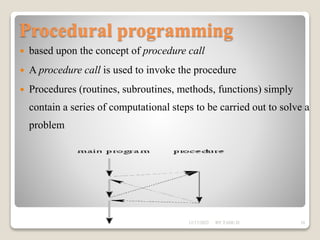
 based upon the concept of procedure call
 A procedure call is used to invoke the procedure
 Procedures (routines, subroutines, methods, functions) simply
contain a series of computational steps to be carried out to solve a
problem
12/17/2022 BY TADU.D 10
Procedural programming
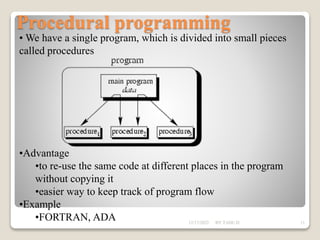
• We have a single program, which is divided into small pieces
called procedures
•Advantage
•to re-use the same code at different places in the program
without copying it
•easier way to keep track of program flow
•Example
•FORTRAN, ADA 12/17/2022 BY TADU.D 11
Structured Programming
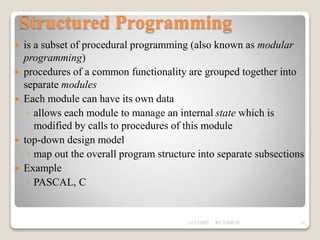
 is a subset of procedural programming (also known as modular
programming)
 procedures of a common functionality are grouped together into
separate modules
 Each module can have its own data
◦ allows each module to manage an internal state which is
modified by calls to procedures of this module
 top-down design model
◦ map out the overall program structure into separate subsections
 Example
◦ PASCAL, C
12/17/2022 BY TADU.D 12
Structured Programming
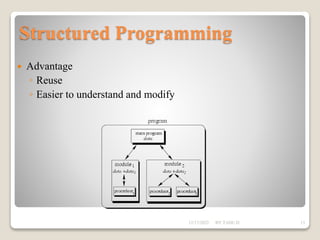
 Advantage
◦ Reuse
◦ Easier to understand and modify
12/17/2022 BY TADU.D 13
Object Oriented Programming
 Is a method of implementation in which programs are organized
as cooperative collections of objects
 Data and operations are grouped together
 Each object is capable of receiving messages, processing data,
and sending messages to other objects
 Modeling of the domain as objects so that the implementation
naturally reflects the problem at hand.
12/17/2022 BY TADU.D 14
Problem solving Techniques
 Computer solves varieties of problems that can be expressed in
a finite number of steps
 In computer programming two facts :
 Defining the problem and logical procedures to follow in
solving it.
Introducing the means by which programmers
communicate those procedures to the computer system so
that it can be executed.
12/17/2022 BY TADU.D 15
Problem solving Techniques
 There are system analysis and design tools, particularly
flowchart and structure chart, that can be used to define the
problem in terms of the steps to its solution.
 The programmer uses programming language to
communicate the logic of the solution to the computer.
 An algorithm is defined as a step-by-step sequence of
instructions that must terminate and describe how the data is
to be processed to produce the desired outputs.
 Simply, algorithm is a sequence of instructions
12/17/2022 BY TADU.D 16
 programs could be written in terms of 3 structures:
◦ Sequence – which instruction should be done next?
◦ Selection – select between options
◦ Repetition – repeat an action while a given condition stays
true
 An algorithm can be represented as
◦ Flowchart
◦ Pseudo code
◦ Structured chart
Problem solving Techniques
12/17/2022 BY TADU.D 17
 is an artificial and informal language that helps programmers
develop algorithms
 a shorthand notation for programming which uses a combination
of informal programming structures and verbal descriptions of
code.
 In general, pseudocode is used to outline a program before
translating it into proper syntax.
Pseudo code
12/17/2022 BY TADU.D 18
Example-1:
◦ Write a program that prints “passed” when the student
grade is greater than 60 and “failed” otherwise.
Solution:-
 If student's grade is greater than or equal to 60
◦ Print "passed"
 else
◦ Print "failed“
Pseudo code
12/17/2022 BY TADU.D 19
Example-2:
◦Pseudo-code the task of computing the final price of an item after
figuring in sales tax. Note the three types of instructions: input (get),
process/calculate (=) and output (display)
1. get price of item
2. get sales tax rate
3. sales tax = price of item times sales tax rate
4. final prince = price of item plus sales tax
5. display final price
6. stop
Pseudo code
12/17/2022 BY TADU.D 20
Example-3:
 Write a program that obtains two integer numbers from the user.
It will print out the sum of those numbers.
1. Prompt the user to enter the first integer
2.Prompt the user to enter a second integer
3.Compute the sum of the two user inputs
4.Display an output prompt that explains the answer as the
sum
5.Display the result
Pseudo code
12/17/2022 BY TADU.D 21
Flow Chart
 A graphic representation of an algorithm,
 often used in the design phase of programming to work out the
logical flow of a program
12/17/2022 BY TADU.D 22
Flow Chart
Flowchart Symbol
12/17/2022 BY TADU.D 23
Example 1:
• Draw flow chart of an algorithm to add two numbers and
display their result.
 Algorithm description
1. Read the two numbers (A and B)
2. Add A and B
3. Assign the sum of A and B to C
4. Display the result ( c)
Flow Chart
12/17/2022 BY TADU.D 24
Flow Chart
Start
End
Read A, B
C= A+B
Print C
Flow Char is :
12/17/2022 BY TADU.D 25
Example 2:
 Write an algorithm description and draw a flow chart to check
a number is negative or not.
 Algorithm description
1. Read a number x
2. If x is less than zero write a message negative else write a
message not negative
Flow Chart
12/17/2022 BY TADU.D 26
Flow Chart
Flow Char is :
12/17/2022 BY TADU.D 27
 Some times there are conditions in which it is necessary to
execute a group of statements repeatedly. Until some
condition is satisfied. This condition is called a loop.
 Loop is a sequence of instructions, which is repeated until
some specific condition occurs.
 A loop normally consists of four parts.
Flow Chart
12/17/2022 BY TADU.D 28
 A loop normally consists of four parts. These are:
◦ Initialization: - Setting of variables of the computation to
their initial values and setting the counter for determining to
exit from the loop.
◦ Computation: - Processing
◦ Test: - Every loop must have some way of exiting from it or
else the program would endlessly remain in a loop.
◦ Increment: - Re-initialization of the loop for the next loop.
Flow Chart
12/17/2022 BY TADU.D 29
Example -3:
 Write the algorithmic description and draw a flow chart to
find the following sum.
Sum = 1+2+3+…. + 50
 Algorithm description
1. Initialize sum to 0 and counter to 1
1.1. If the counter is less than or equal to 50
• Add counter to sum
• Increase counter by 1
 Repeat step 1.1
1.2. Else
• Exit
2. Write sum
Flow Chart
12/17/2022 BY TADU.D 30
Flow Chart
Flow Char is :
12/17/2022 BY TADU.D 31
 depicts the logical functions to the solution of the problem
using a chart.
 It provides an overview that confirms the solution to the
problem without excessive consideration to detail.
 It is high-level in nature.
Structure Chart
12/17/2022 BY TADU.D 32
Structure Chart
Example-1:
 Write a program that asks the user to enter a temperature
reading in centigrade and then prints the equivalent
Fahrenheit value.
Input Process Output
Centigrade  Prompt for centigrade value
 Read centigrade value
 Compute Fahrenheit value
 Display Fahrenheit value
Fahrenheit
12/17/2022 BY TADU.D 33
System Development Life
Cycle(SDLC)
 is a conceptual model used in project management that
describes the stages involved in a computer system
development project from an initial feasibility study through
maintenance of the completed application.
12/17/2022 BY TADU.D 34
System Development Life
Cycle(SDLC)
 The phases of SDLC are :
 Feasibility study :
 Requirements analysis
 Designing solution
 Testing designed solution
 Testing
 Implementation
12/17/2022 BY TADU.D 35
System Development Life Cycle
 Feasibility study : The first step is to identify a need for the
new system.
a. Organizational Feasibility
 How well the proposed system supports the strategic
objectives of the organization.
b. Economic Feasibility
 Cost savings
 Increased revenue
 Decreased investment
 Increased profits 12/17/2022 BY TADU.D 36
System Development Life Cycle
c. Technical Feasibility
 Hardware, software, and network capability, reliability,
and availability
d. Operational Feasibility
 End user acceptance
 Management support
 Customer, supplier, and government requirements
12/17/2022 BY TADU.D 37
System Development Life Cycle
Requirements analysis : is the process of analyzing the
information needs of the end users, the organizational
environment, and any system presently being used, developing
the functional requirements of a system that can meet the
needs of the users.
12/17/2022 BY TADU.D 38
System Development Life Cycle
Designing solution:
 After the requirements have been determined, the necessary
specifications for the hardware, software, people, and data
resources, and the information products that will satisfy the
functional requirements of the proposed system can be
determined.
 The design will serve as a blueprint for the system and helps
detect problems before these errors or problems are built into
the final system.
12/17/2022 BY TADU.D 39
System Development Life Cycle
Implementation
 The real code is written here. Systems implementation is the
construction of the new system and its delivery into
production or day-to-day operation.
12/17/2022 BY TADU.D 40
System Development Life Cycle
Testing
◦ Unit Testing
◦ Integrating Testing
◦ System Testing
Maintenance
 What happens during the rest of the software's life: changes,
correction, additions, and moves to a different computing
platform and more.
 This, the least exciting and perhaps most important step of all,
goes on seemingly forever.
12/17/2022 BY TADU.D 41
Chapter Two
C u nxt Class!!!
12/17/2022 BY TADU.D 42

Chapter 1.ppt

  • 1.
  • 2.
    Introduction to programming Computer ?  an electronic device that accepts data, performs computations, and makes logical decisions according to instructions that have been given to it,  then produces meaningful information in a form that is useful to the user.  Computers do exactly what they are told to do.  Computer programs ?  Sets of instructions that control a computer’s processing of data  the instructions that tells the computer what to do  Computer programming ?  is the process of writing, testing, debugging / troubleshooting, and maintaining the source code of computer programs 12/17/2022 BY TADU.D 2
  • 3.
    Introduction to programming Computer programs (also known as source code) is often written by professionals known as Computer Programmers  A computer program usually consists of two elements:  Data – characteristics  Code – action  Source code is written in one of programming languages 12/17/2022 BY TADU.D 3
  • 4.
    What is ProgrammingLanguage?  Is an artificial language that can be used to control the behavior of a computer  defined by  Syntactic - describes the possible combinations of symbols that form a syntactically correct program  Semantic - The meaning given to a combination of symbols  Programming languages can be divided in to two major categories: low-level high-level languages Introduction to programming 12/17/2022 BY TADU.D 4
  • 5.
     Machine language machine is short for computing machine (i.e., computer)  computer’s native language, sequence of zeroes and ones (binary)  different computers understand different sequences  hard for humans to understand: 01010001…  low level: language  mnemonics for machine language  each instruction is minimal  still hard for humans to understand: ADD d0,d2 High-level languages  FORTRAN, Pascal, BASIC, C, C++, Java, COBOL, etc.  high level: each instruction composed of many low-level instructions  closer to English easier to read and understand: Introduction to programming 12/17/2022 BY TADU.D 5
  • 6.
    Interpreting Vs CompilingProgram  Each type of computer only “understands” its own machine language (zeroes and ones)  Thus we must translate from High-level language to machine language ◦ a team of experts programs a translator, called a “compiler” which translates entirety of a High-level language program to an executable file in computer’s native machine language.  Running : ◦ compilation: Your program  executable ◦ execution: run executable  machine executes your program by “running” each machine language instruction in the executable file 12/17/2022 BY TADU.D 6
  • 7.
    Interpreting Vs CompilingProgram  An alternative to compiling your program is to interpret your program ◦ each line of your program is translated into machine language and immediately executed  Like translating between natural languages ◦ Compiler: human translator translates book in its entirety and then translated book is printed and read ◦ Interpreter: human interpreter translates each spoken statement in sequence as speaker is speaking 12/17/2022 BY TADU.D 7
  • 8.
    Programming paradigm  Aprogramming paradigm is a fundamental style of programming  Unstructured Programming  Procedural programming .  Structured Programming  Object Oriented Programming 12/17/2022 BY TADU.D 8
  • 9.
    Unstructured Programming  consistingonly of one large (usually main) program  “main program”' stands for a sequence of commands or statements ◦ data is global throughout the whole program  disadvantages ◦ Complex ◦ if the same statement sequence is needed at different locations within the program, the sequence must be copied 12/17/2022 BY TADU.D 9
  • 10.
    Procedural programming  basedupon the concept of procedure call  A procedure call is used to invoke the procedure  Procedures (routines, subroutines, methods, functions) simply contain a series of computational steps to be carried out to solve a problem 12/17/2022 BY TADU.D 10
  • 11.
    Procedural programming • Wehave a single program, which is divided into small pieces called procedures •Advantage •to re-use the same code at different places in the program without copying it •easier way to keep track of program flow •Example •FORTRAN, ADA 12/17/2022 BY TADU.D 11
  • 12.
    Structured Programming  isa subset of procedural programming (also known as modular programming)  procedures of a common functionality are grouped together into separate modules  Each module can have its own data ◦ allows each module to manage an internal state which is modified by calls to procedures of this module  top-down design model ◦ map out the overall program structure into separate subsections  Example ◦ PASCAL, C 12/17/2022 BY TADU.D 12
  • 13.
    Structured Programming  Advantage ◦Reuse ◦ Easier to understand and modify 12/17/2022 BY TADU.D 13
  • 14.
    Object Oriented Programming Is a method of implementation in which programs are organized as cooperative collections of objects  Data and operations are grouped together  Each object is capable of receiving messages, processing data, and sending messages to other objects  Modeling of the domain as objects so that the implementation naturally reflects the problem at hand. 12/17/2022 BY TADU.D 14
  • 15.
    Problem solving Techniques Computer solves varieties of problems that can be expressed in a finite number of steps  In computer programming two facts :  Defining the problem and logical procedures to follow in solving it. Introducing the means by which programmers communicate those procedures to the computer system so that it can be executed. 12/17/2022 BY TADU.D 15
  • 16.
    Problem solving Techniques There are system analysis and design tools, particularly flowchart and structure chart, that can be used to define the problem in terms of the steps to its solution.  The programmer uses programming language to communicate the logic of the solution to the computer.  An algorithm is defined as a step-by-step sequence of instructions that must terminate and describe how the data is to be processed to produce the desired outputs.  Simply, algorithm is a sequence of instructions 12/17/2022 BY TADU.D 16
  • 17.
     programs couldbe written in terms of 3 structures: ◦ Sequence – which instruction should be done next? ◦ Selection – select between options ◦ Repetition – repeat an action while a given condition stays true  An algorithm can be represented as ◦ Flowchart ◦ Pseudo code ◦ Structured chart Problem solving Techniques 12/17/2022 BY TADU.D 17
  • 18.
     is anartificial and informal language that helps programmers develop algorithms  a shorthand notation for programming which uses a combination of informal programming structures and verbal descriptions of code.  In general, pseudocode is used to outline a program before translating it into proper syntax. Pseudo code 12/17/2022 BY TADU.D 18
  • 19.
    Example-1: ◦ Write aprogram that prints “passed” when the student grade is greater than 60 and “failed” otherwise. Solution:-  If student's grade is greater than or equal to 60 ◦ Print "passed"  else ◦ Print "failed“ Pseudo code 12/17/2022 BY TADU.D 19
  • 20.
    Example-2: ◦Pseudo-code the taskof computing the final price of an item after figuring in sales tax. Note the three types of instructions: input (get), process/calculate (=) and output (display) 1. get price of item 2. get sales tax rate 3. sales tax = price of item times sales tax rate 4. final prince = price of item plus sales tax 5. display final price 6. stop Pseudo code 12/17/2022 BY TADU.D 20
  • 21.
    Example-3:  Write aprogram that obtains two integer numbers from the user. It will print out the sum of those numbers. 1. Prompt the user to enter the first integer 2.Prompt the user to enter a second integer 3.Compute the sum of the two user inputs 4.Display an output prompt that explains the answer as the sum 5.Display the result Pseudo code 12/17/2022 BY TADU.D 21
  • 22.
    Flow Chart  Agraphic representation of an algorithm,  often used in the design phase of programming to work out the logical flow of a program 12/17/2022 BY TADU.D 22
  • 23.
  • 24.
    Example 1: • Drawflow chart of an algorithm to add two numbers and display their result.  Algorithm description 1. Read the two numbers (A and B) 2. Add A and B 3. Assign the sum of A and B to C 4. Display the result ( c) Flow Chart 12/17/2022 BY TADU.D 24
  • 25.
    Flow Chart Start End Read A,B C= A+B Print C Flow Char is : 12/17/2022 BY TADU.D 25
  • 26.
    Example 2:  Writean algorithm description and draw a flow chart to check a number is negative or not.  Algorithm description 1. Read a number x 2. If x is less than zero write a message negative else write a message not negative Flow Chart 12/17/2022 BY TADU.D 26
  • 27.
    Flow Chart Flow Charis : 12/17/2022 BY TADU.D 27
  • 28.
     Some timesthere are conditions in which it is necessary to execute a group of statements repeatedly. Until some condition is satisfied. This condition is called a loop.  Loop is a sequence of instructions, which is repeated until some specific condition occurs.  A loop normally consists of four parts. Flow Chart 12/17/2022 BY TADU.D 28
  • 29.
     A loopnormally consists of four parts. These are: ◦ Initialization: - Setting of variables of the computation to their initial values and setting the counter for determining to exit from the loop. ◦ Computation: - Processing ◦ Test: - Every loop must have some way of exiting from it or else the program would endlessly remain in a loop. ◦ Increment: - Re-initialization of the loop for the next loop. Flow Chart 12/17/2022 BY TADU.D 29
  • 30.
    Example -3:  Writethe algorithmic description and draw a flow chart to find the following sum. Sum = 1+2+3+…. + 50  Algorithm description 1. Initialize sum to 0 and counter to 1 1.1. If the counter is less than or equal to 50 • Add counter to sum • Increase counter by 1  Repeat step 1.1 1.2. Else • Exit 2. Write sum Flow Chart 12/17/2022 BY TADU.D 30
  • 31.
    Flow Chart Flow Charis : 12/17/2022 BY TADU.D 31
  • 32.
     depicts thelogical functions to the solution of the problem using a chart.  It provides an overview that confirms the solution to the problem without excessive consideration to detail.  It is high-level in nature. Structure Chart 12/17/2022 BY TADU.D 32
  • 33.
    Structure Chart Example-1:  Writea program that asks the user to enter a temperature reading in centigrade and then prints the equivalent Fahrenheit value. Input Process Output Centigrade  Prompt for centigrade value  Read centigrade value  Compute Fahrenheit value  Display Fahrenheit value Fahrenheit 12/17/2022 BY TADU.D 33
  • 34.
    System Development Life Cycle(SDLC) is a conceptual model used in project management that describes the stages involved in a computer system development project from an initial feasibility study through maintenance of the completed application. 12/17/2022 BY TADU.D 34
  • 35.
    System Development Life Cycle(SDLC) The phases of SDLC are :  Feasibility study :  Requirements analysis  Designing solution  Testing designed solution  Testing  Implementation 12/17/2022 BY TADU.D 35
  • 36.
    System Development LifeCycle  Feasibility study : The first step is to identify a need for the new system. a. Organizational Feasibility  How well the proposed system supports the strategic objectives of the organization. b. Economic Feasibility  Cost savings  Increased revenue  Decreased investment  Increased profits 12/17/2022 BY TADU.D 36
  • 37.
    System Development LifeCycle c. Technical Feasibility  Hardware, software, and network capability, reliability, and availability d. Operational Feasibility  End user acceptance  Management support  Customer, supplier, and government requirements 12/17/2022 BY TADU.D 37
  • 38.
    System Development LifeCycle Requirements analysis : is the process of analyzing the information needs of the end users, the organizational environment, and any system presently being used, developing the functional requirements of a system that can meet the needs of the users. 12/17/2022 BY TADU.D 38
  • 39.
    System Development LifeCycle Designing solution:  After the requirements have been determined, the necessary specifications for the hardware, software, people, and data resources, and the information products that will satisfy the functional requirements of the proposed system can be determined.  The design will serve as a blueprint for the system and helps detect problems before these errors or problems are built into the final system. 12/17/2022 BY TADU.D 39
  • 40.
    System Development LifeCycle Implementation  The real code is written here. Systems implementation is the construction of the new system and its delivery into production or day-to-day operation. 12/17/2022 BY TADU.D 40
  • 41.
    System Development LifeCycle Testing ◦ Unit Testing ◦ Integrating Testing ◦ System Testing Maintenance  What happens during the rest of the software's life: changes, correction, additions, and moves to a different computing platform and more.  This, the least exciting and perhaps most important step of all, goes on seemingly forever. 12/17/2022 BY TADU.D 41
  • 42.
    Chapter Two C unxt Class!!! 12/17/2022 BY TADU.D 42