History
 1990 – Applets
 1999 – ActiveX Control in IE5
 2004 – Ajax (gMail & gMaps)
 2006 - W3C Spec
When Ajax Needed
 Real-time form data validation
 Autocompletion
 Load on demand
 Sophisticated user interface controls and effects
 Refreshing data and server push
 Partial submit
 Page as an application
Technologies
 HTML and CSS for presentation
 The Document Object Model (DOM) for dynamic display
  of and interaction with data
 XML for the interchange of data
 The XMLHttpRequest object for asynchronous
  communication
 JavaScript to bring these technologies together
How Ajax Works
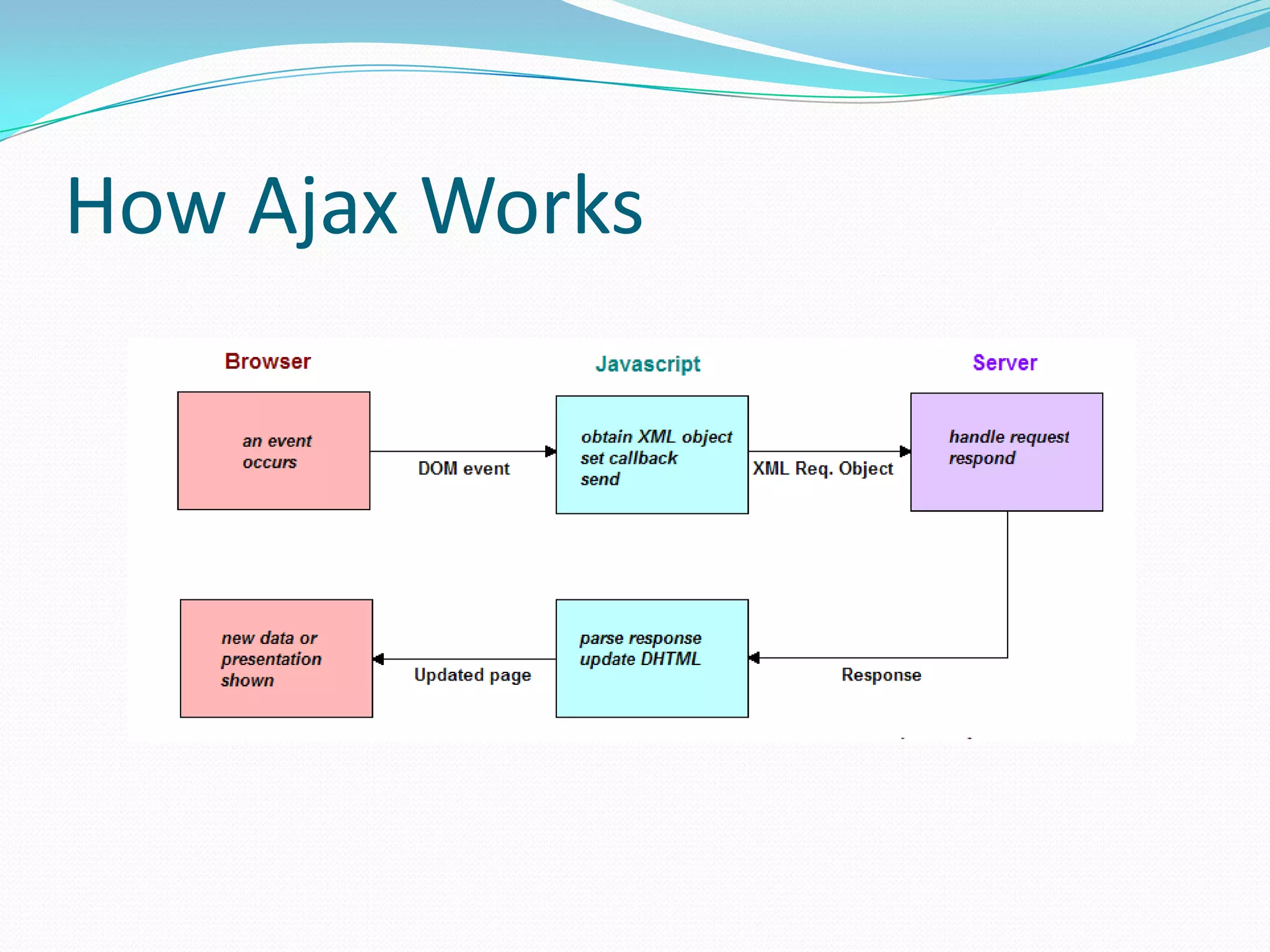
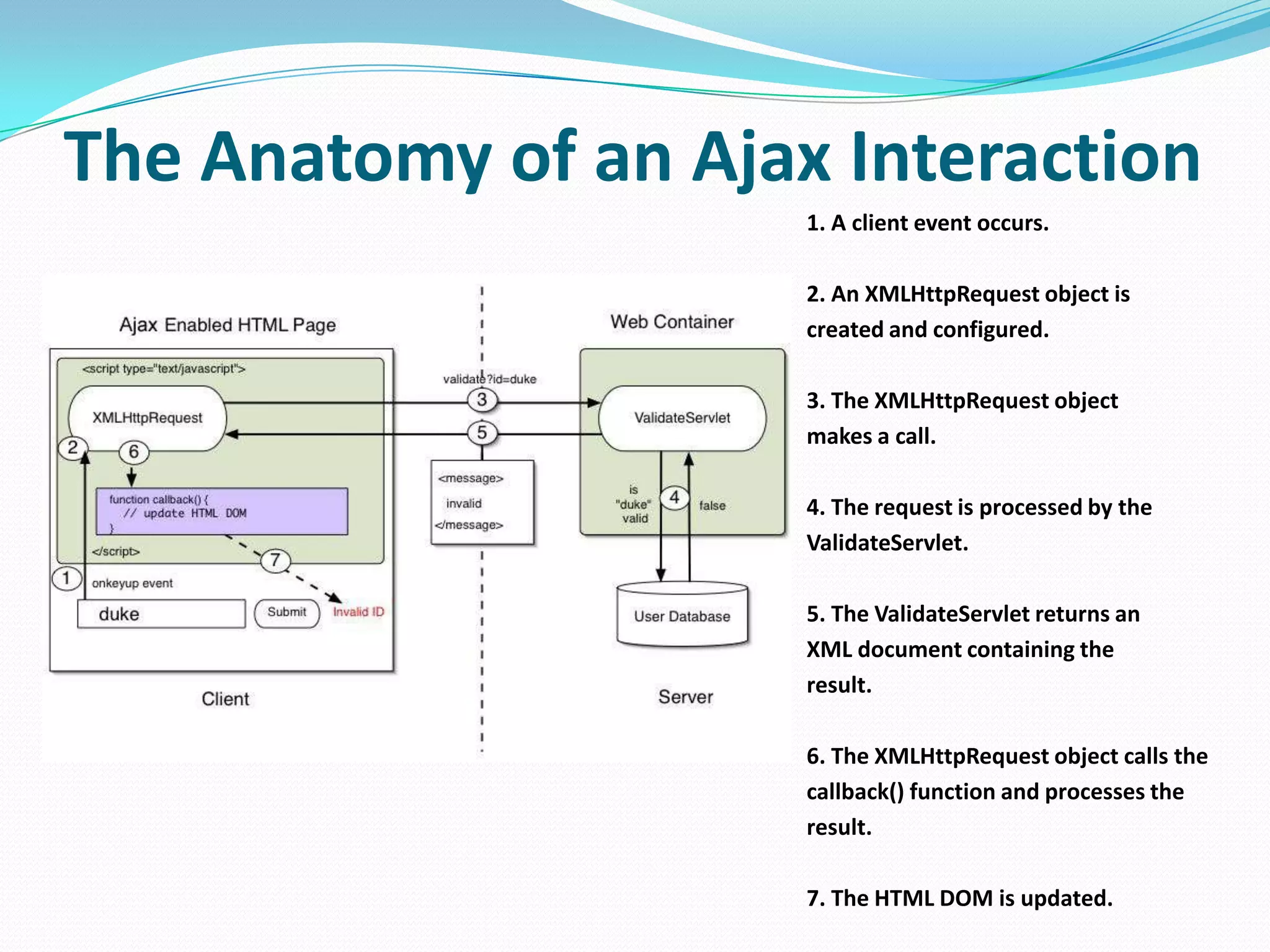
The Anatomy of an Ajax Interaction
                      1. A client event occurs.

                      2. An XMLHttpRequest object is
                      created and configured.

                      3. The XMLHttpRequest object
                      makes a call.

                      4. The request is processed by the
                      ValidateServlet.

                      5. The ValidateServlet returns an
                      XML document containing the
                      result.

                      6. The XMLHttpRequest object calls the
                      callback() function and processes the
                      result.

                      7. The HTML DOM is updated.
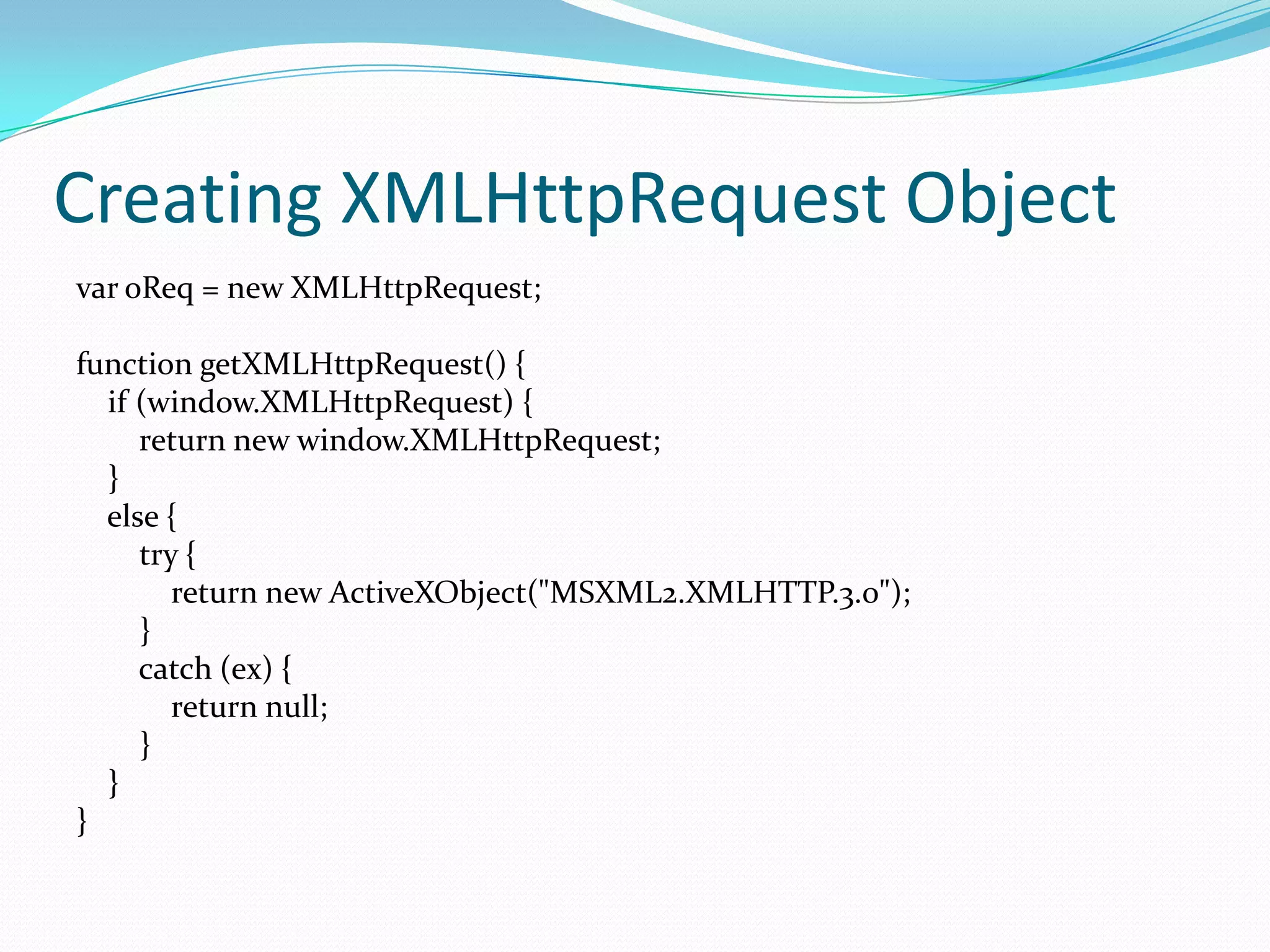
Creating XMLHttpRequest Object
var oReq = new XMLHttpRequest;

function getXMLHttpRequest() {
  if (window.XMLHttpRequest) {
     return new window.XMLHttpRequest;
  }
  else {
     try {
        return new ActiveXObject("MSXML2.XMLHTTP.3.0");
     }
     catch (ex) {
        return null;
     }
  }
}
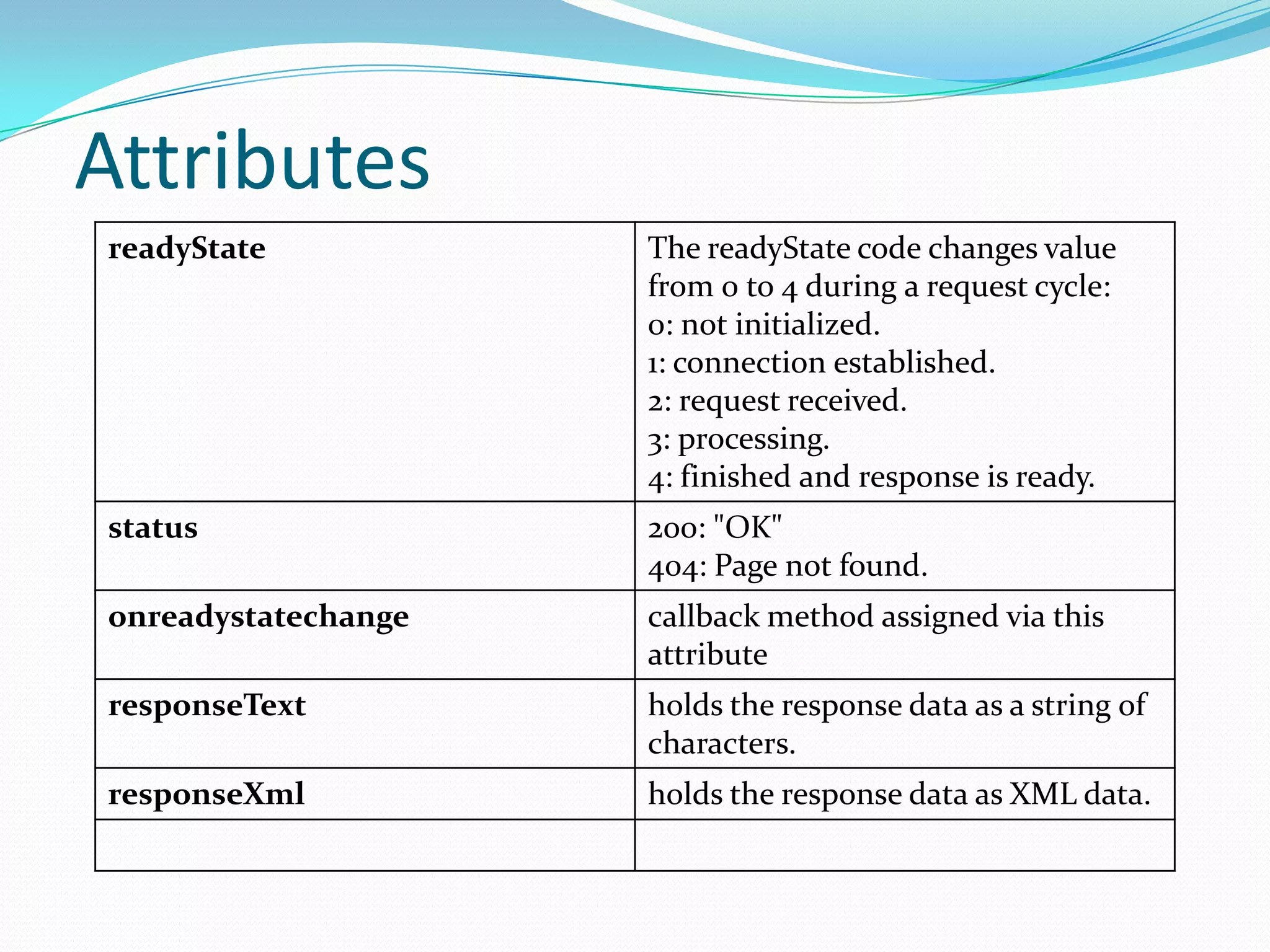
Attributes
readyState           The readyState code changes value
                     from 0 to 4 during a request cycle:
                     0: not initialized.
                     1: connection established.
                     2: request received.
                     3: processing.
                     4: finished and response is ready.
status               200: "OK"
                     404: Page not found.
onreadystatechange   callback method assigned via this
                     attribute
responseText         holds the response data as a string of
                     characters.
responseXml          holds the response data as XML data.
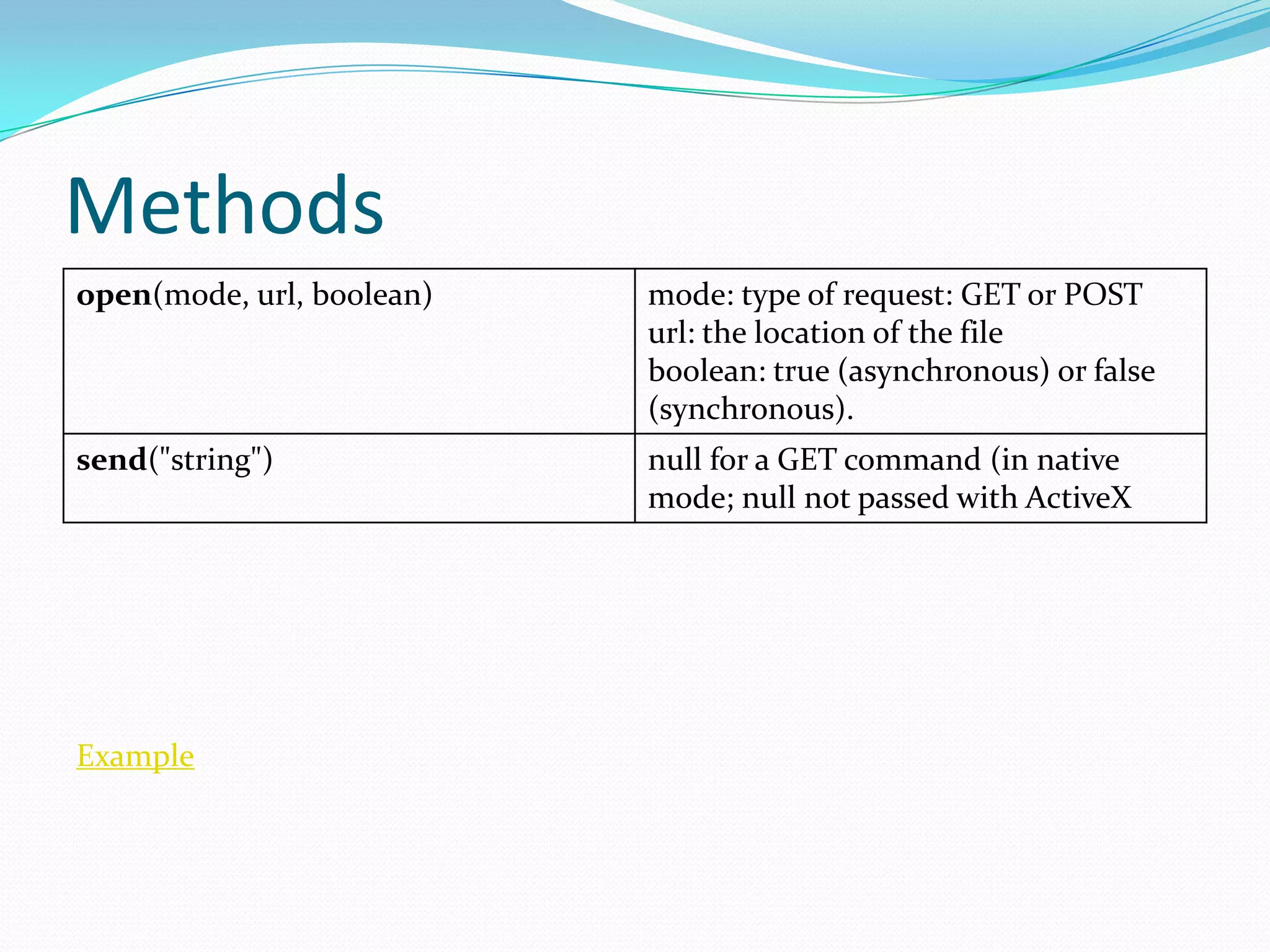
Methods
open(mode, url, boolean)   mode: type of request: GET or POST
                           url: the location of the file
                           boolean: true (asynchronous) or false
                           (synchronous).
send("string")             null for a GET command (in native
                           mode; null not passed with ActiveX


Example
Drawbacks
 Cannot use back button on browser
                Example

 Dynamic web page updates also make it difficult
  to bookmark and return to a particular state of the
  application.
 The asynchronous callback-style of programming
  required can lead to complex code that is hard to
  maintain, debug and test

Ajax

  • 2.
    History  1990 –Applets  1999 – ActiveX Control in IE5  2004 – Ajax (gMail & gMaps)  2006 - W3C Spec
  • 3.
    When Ajax Needed Real-time form data validation  Autocompletion  Load on demand  Sophisticated user interface controls and effects  Refreshing data and server push  Partial submit  Page as an application
  • 4.
    Technologies  HTML andCSS for presentation  The Document Object Model (DOM) for dynamic display of and interaction with data  XML for the interchange of data  The XMLHttpRequest object for asynchronous communication  JavaScript to bring these technologies together
  • 5.
  • 6.
    The Anatomy ofan Ajax Interaction 1. A client event occurs. 2. An XMLHttpRequest object is created and configured. 3. The XMLHttpRequest object makes a call. 4. The request is processed by the ValidateServlet. 5. The ValidateServlet returns an XML document containing the result. 6. The XMLHttpRequest object calls the callback() function and processes the result. 7. The HTML DOM is updated.
  • 7.
    Creating XMLHttpRequest Object varoReq = new XMLHttpRequest; function getXMLHttpRequest() { if (window.XMLHttpRequest) { return new window.XMLHttpRequest; } else { try { return new ActiveXObject("MSXML2.XMLHTTP.3.0"); } catch (ex) { return null; } } }
  • 8.
    Attributes readyState The readyState code changes value from 0 to 4 during a request cycle: 0: not initialized. 1: connection established. 2: request received. 3: processing. 4: finished and response is ready. status 200: "OK" 404: Page not found. onreadystatechange callback method assigned via this attribute responseText holds the response data as a string of characters. responseXml holds the response data as XML data.
  • 9.
    Methods open(mode, url, boolean) mode: type of request: GET or POST url: the location of the file boolean: true (asynchronous) or false (synchronous). send("string") null for a GET command (in native mode; null not passed with ActiveX Example
  • 10.
    Drawbacks  Cannot useback button on browser Example  Dynamic web page updates also make it difficult to bookmark and return to a particular state of the application.  The asynchronous callback-style of programming required can lead to complex code that is hard to maintain, debug and test