Project Title
 AIRPORT FLIGHT SCHEDULE SYSTEM
Presented To
 Mam Sadaf Anwar
Group Members
 RAJA HAMZA TARIQ (143)
 BILAL ABBAS (142)
 MOHAMMAD SIRAJ (126)
CONTENTS
 Introduction
 Functional Requirements
 Non Functional Requirements
 Language and tools
 Use case diagram
Introduction
This is the flight schedule software for airport. This is for the accuracy
of work. Time efficiency is created. This software handle air traffic of
airport. Maintain record of flights, passengers and fuel etc.
Administrator easily handle all the records. Privacy is maintained in
AFSS, data is secured. Information of passengers not accessible to
anyone without administrator. Only next 24 hour status of flights are
accessible to website administrator.
Functional Requirements
 Store takeoff and landing flights data with date and time.
 Store data related to flights e.g. passengers traveled in a flight, flight registration
number etc.
 Store route of flights and destination.
 Automatically warning is issued when weather is not suitable.
 Automatic message is created if route and time is same for two flights.
 Fuel consumption for every flight is stored.
 Data stored separately for international and domestic flights and passengers.
Non Functional Requirements
 Privacy requirement
 Availability requirement
 Capacity requirement
 Backup and recovery requirement
 Performance requirement
 Security requirement
 Reliability requirement
 Maintainability
Language and Tools
 Java language is used for coding.
 Used tool net beans in java for fulfilling the requirements.
 SQL database system is used for storing all the data.
UML diagrams
 UML stands for Unified Modeling Language which is used in object oriented
software engineering. Although typically used in software engineering it is a rich
language that can be used to model an application structures and behaviour.
 There are basically two types of UML diagrams
1. Structural diagrams
2. Functional diagrams
Structural diagrams
Structural diagrams are those diagrams which basically show structure of a system or
software. It basically show the things in the system being modeled. Some structural
diagram of AFSS are:-
1. Class Diagram
2. Component Diagram
3. Deployment diagram
Class Diagram
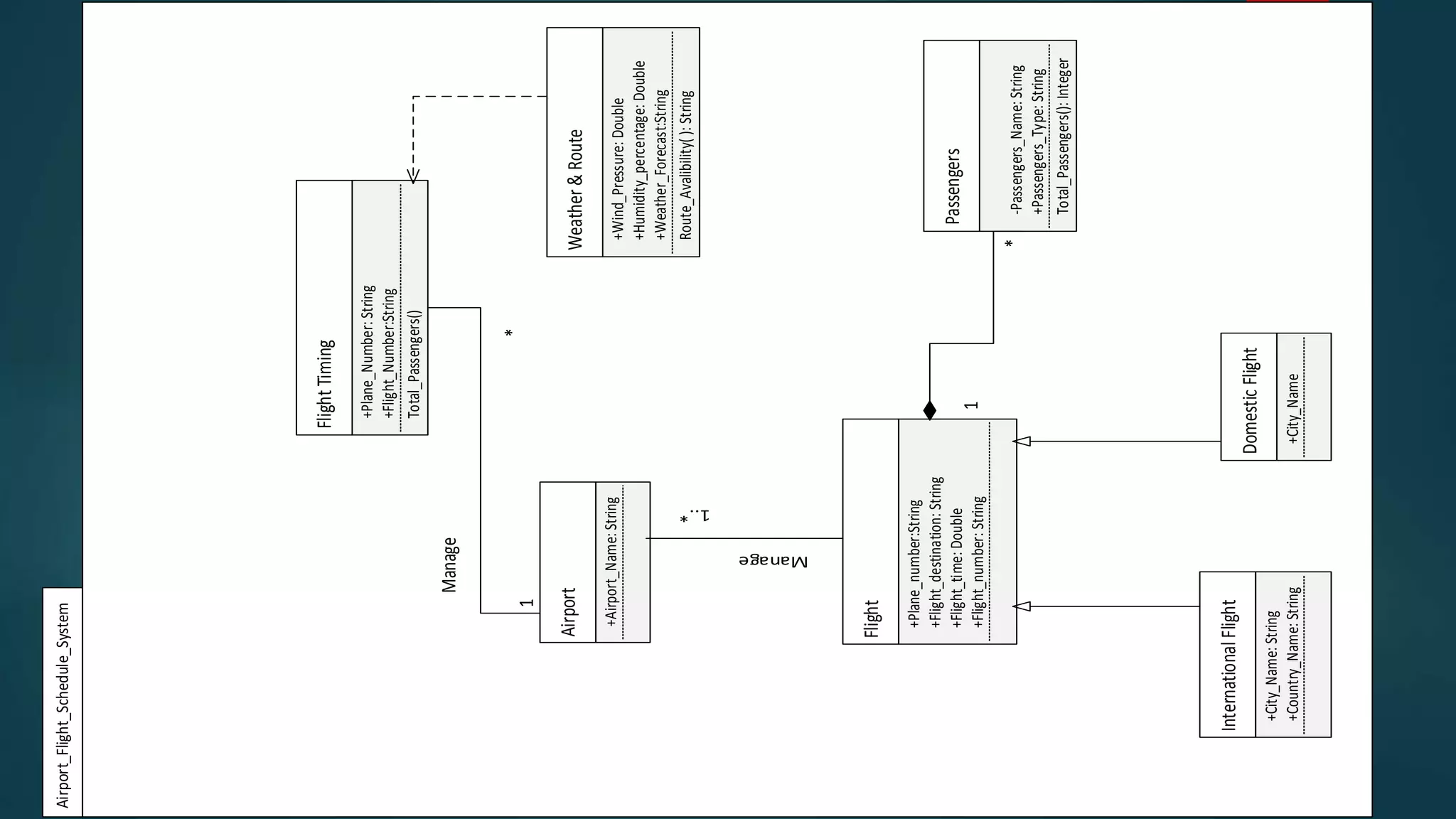
Class Diagram
Airport
+Airport_Name:String
Flight
+Flight_number:String
+Flight_destination:String
+Flight_time:Double
+Plane_number:String
1..*
Manage
InternationalFlight
+Country_Name:String
+City_Name:String
DomesticFlight
+City_Name
Passengers
-Passengers_Name:String
+Passengers_Type:String
Total_Passengers():Integer
FlightTiming
+Flight_Number:String
Total_Passengers()
Weather&Route
+Wind_Pressure:Double
+Humidity_percentage:Double
+Plane_Number:String
+Weather_Forecast:String
Route_Avalibility():String
Manage
*
1
*
1
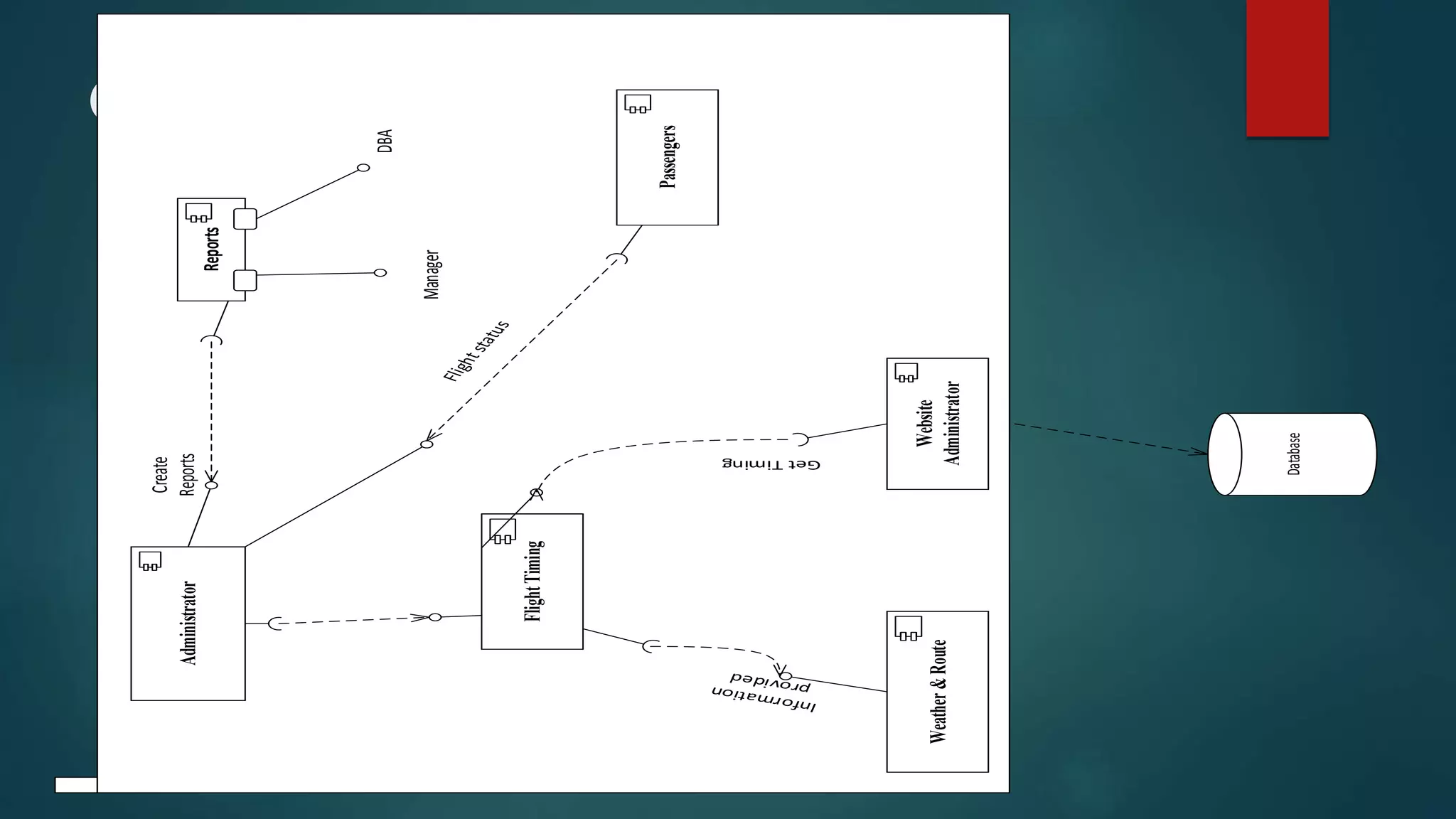
Component Diagram
Component Diagram
Administrator
Reports
FlightTiming
Passengers
Weather&Route
Website
Administrator
Manager
DBA
Create
Reports
GetTiming
Database
Advantages / Disadvantages and Uses
of Component Diagram
 Component Diagram is useful when we have to make design of some device,
which has input output socket e.g. Camera, Mobile phones.
 It is not useful for designing of some software like web page, application etc.
 In our system AFSS, component diagram is not useful for better understanding
because AFSS is a software in which only data is needed.
 It represent the implementation of system.
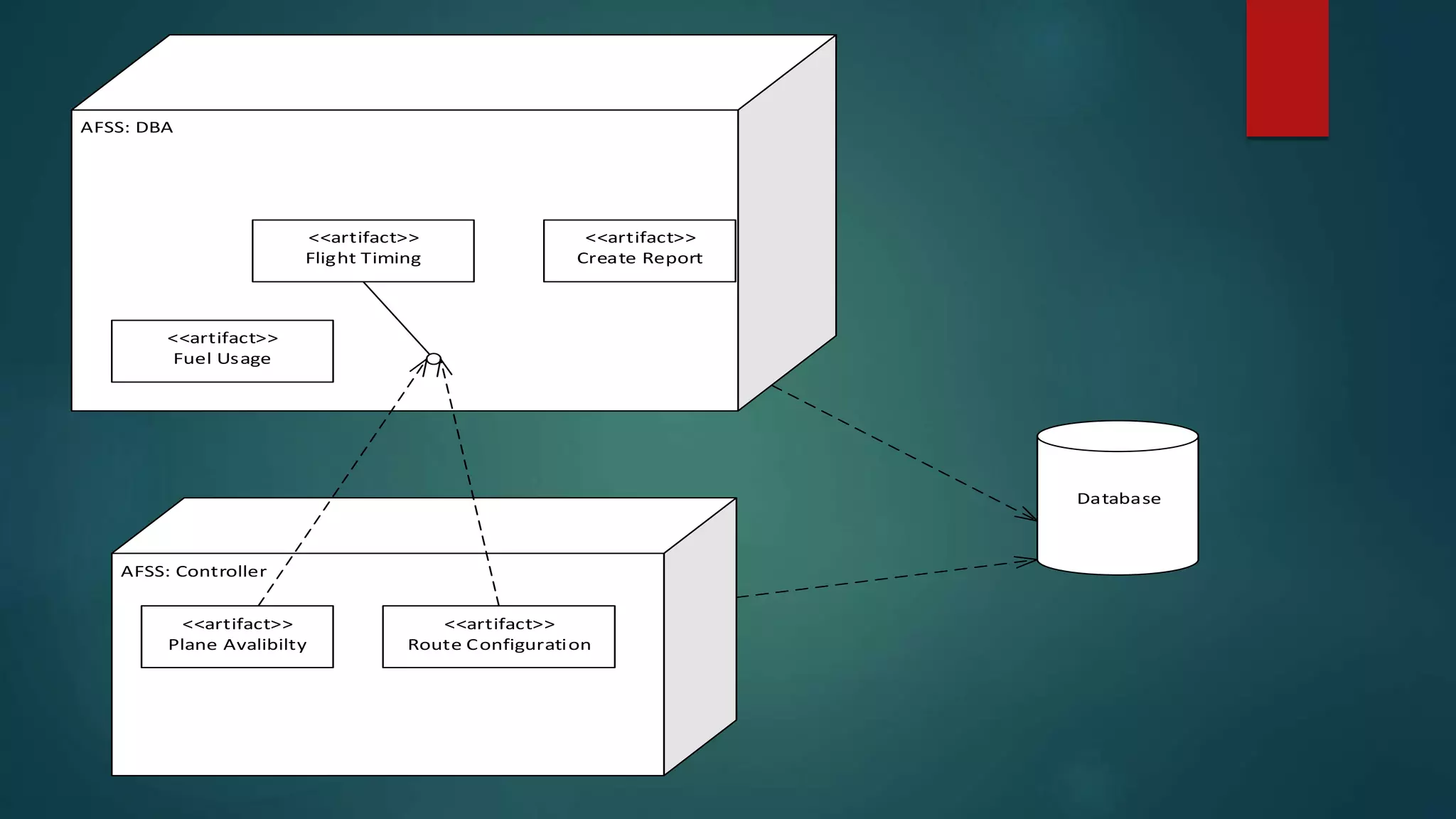
Deployment Diagram
AFSS: DBA
<<artifact>>
Flight Timing
<<artifact>>
Create Report
AFSS: Controller
<<artifact>>
Plane Avalibilty
<<artifact>>
Route Configuration
<<artifact>>
Fuel Usage
Database
Advantages / Disadvantages and Uses of
Deployment Diagram
 In deployment diagram, three dimensional rectangle is used to represent node.
 Deployment diagram is structural diagram. It is used to create architecture of some
system, e.g. architecture of computer which has processor, RAM, Hard disk etc.
 Deployment diagram is not useful for AFSS because AFSS is a software.
 It show clear architecture of system when some architectural design is created.
Behavioral Diagrams
 Behavioral diagram show the behavior of a system. It show how system behave in
a particular situation. It show what happen in a system. Some behavioral diagram
of AFSS are:-
1. Use case Diagram
2. Activity Diagram
3. State Transition Diagram
4. Sequence Diagram
5. Collaboration Diagram
Use case
log in
Home page
<<include>>
Store flight data
take off and landing
flight with date
and time
store route of flight fuel consumption
bad pin
<<extend>>
warning!!
route already in use
<<extend>>
passengers data
Maintinance
create report
fuel report
passengers and total
flights report
<<include>>
Discription
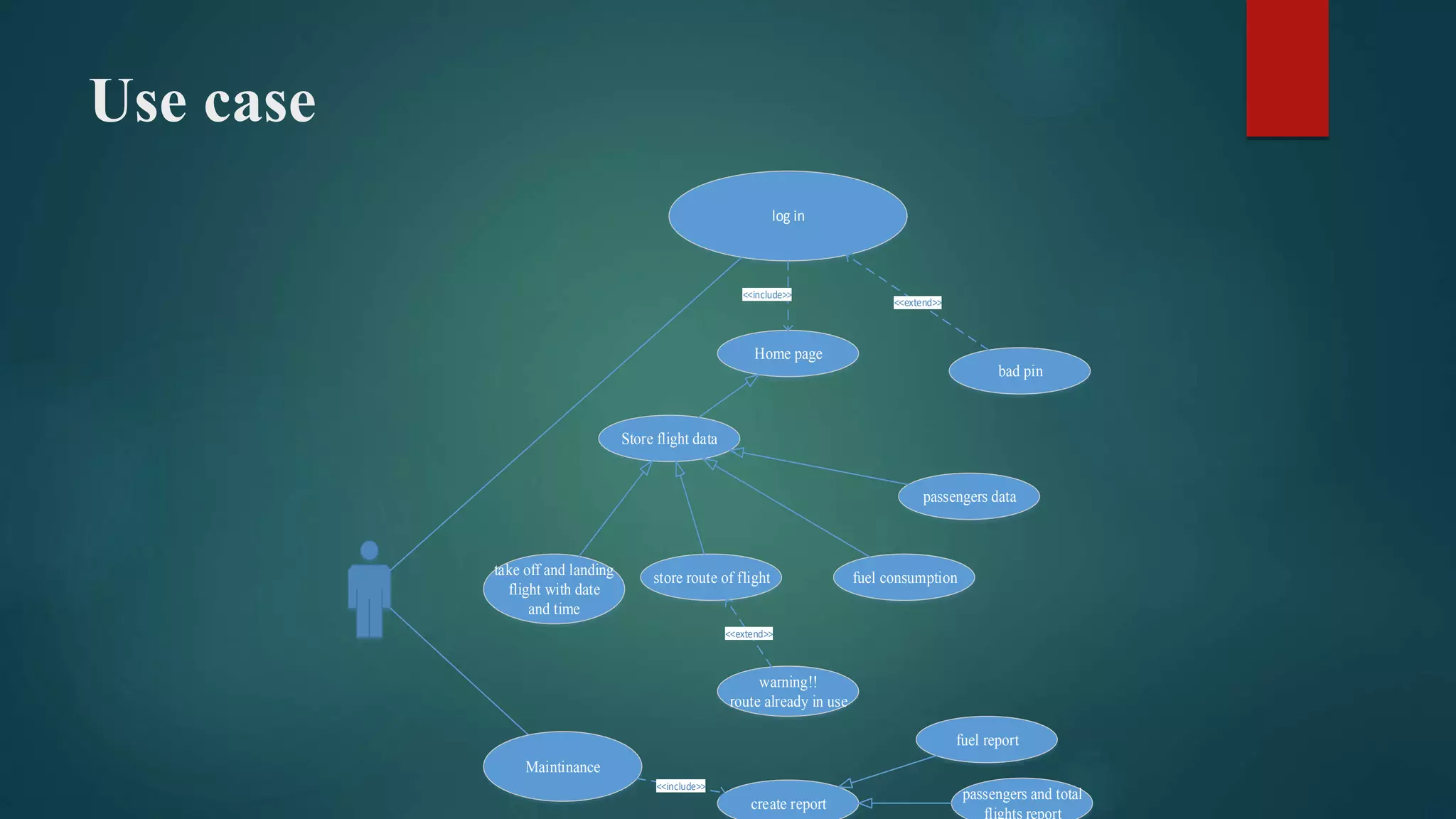
 In this use case diagram only one administrator handle all the records.
 Administrator log in firstly which is non functional requirement.
 After log in home page is appeared.
 Administrator enter data on required field and automatically message is issued if
data is already in use.
 Administrator is also responsible for maintaining and creating reports.
Activity Diagram
login
EnterFlightData
FlightTiming
PlaneNumberissue
FlightRoute
TimeCheckingWith
OtherFlights
CheckWeather
CheckRoute
Avalibilty
EnterPassengers
Data
valid
fork
Time
Available
NotAvailable
NotAvailable
End
Start
Join
Bad
Weather
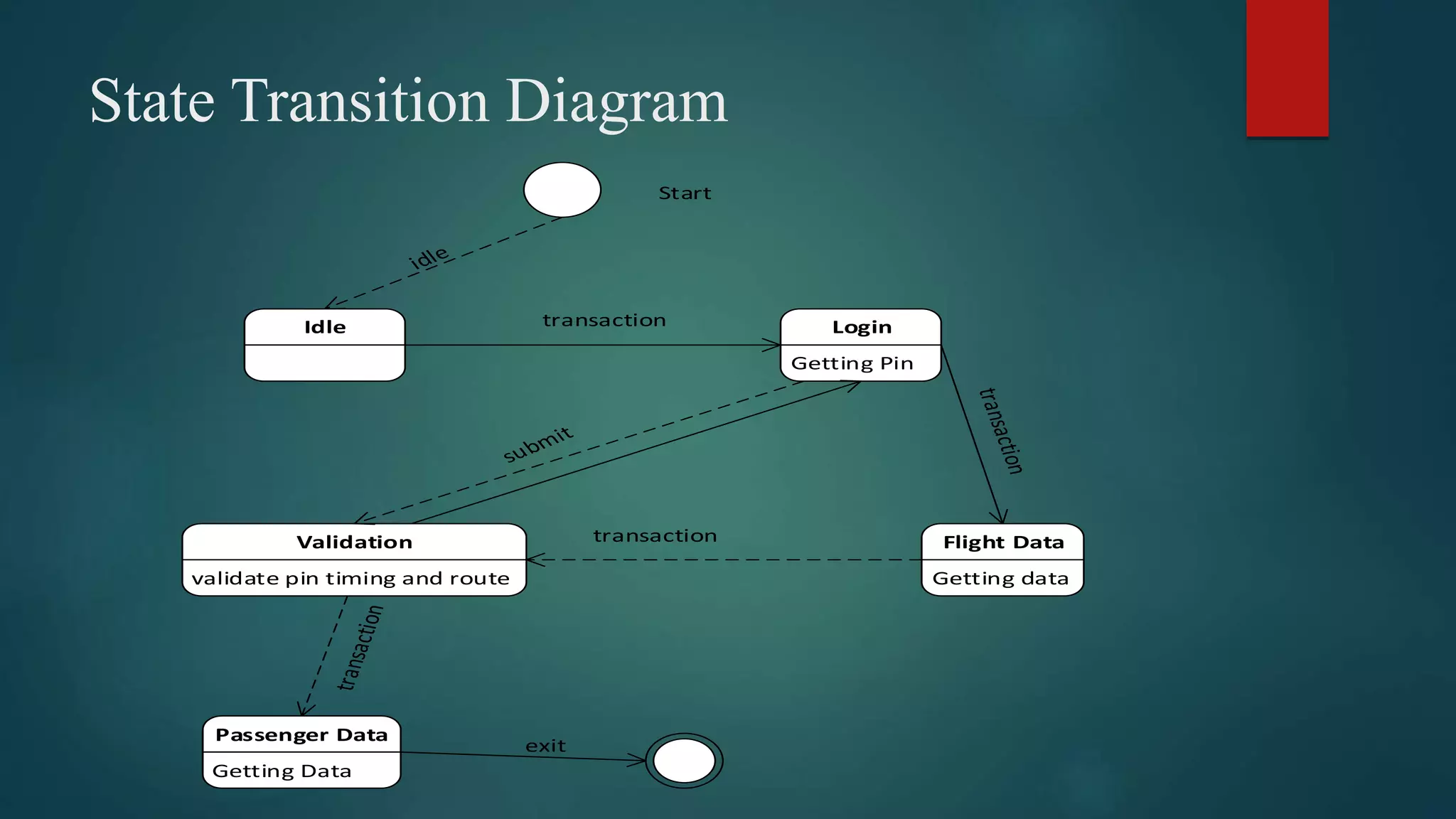
State Transition Diagram
Idle Login
Getting Pin
Flight Data
Getting data
Validation
validate pin timing and route
Passenger Data
Getting Data
Start
transaction
exit
transaction
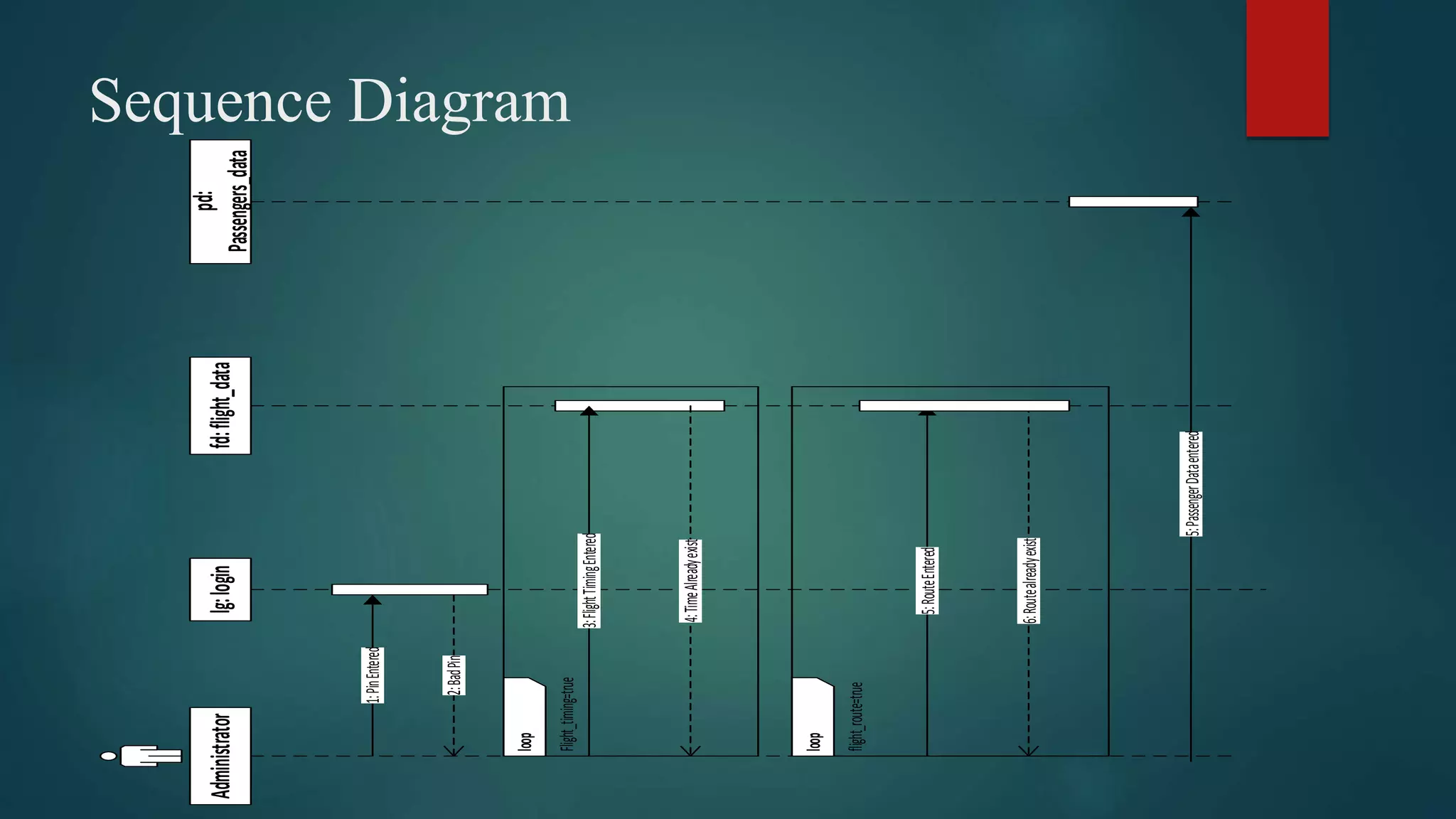
Sequence Diagram
lg:loginfd:flight_data
pd:
Passengers_data
Administrator
1:PinEntered
2:BadPin
3:FlightTimingEntered
4:TimeAlreadyexist
5:RouteEntered
6:Routealreadyexist
5:PassengerDataentered
loop
flight_route=true
loop
Flight_timing=true
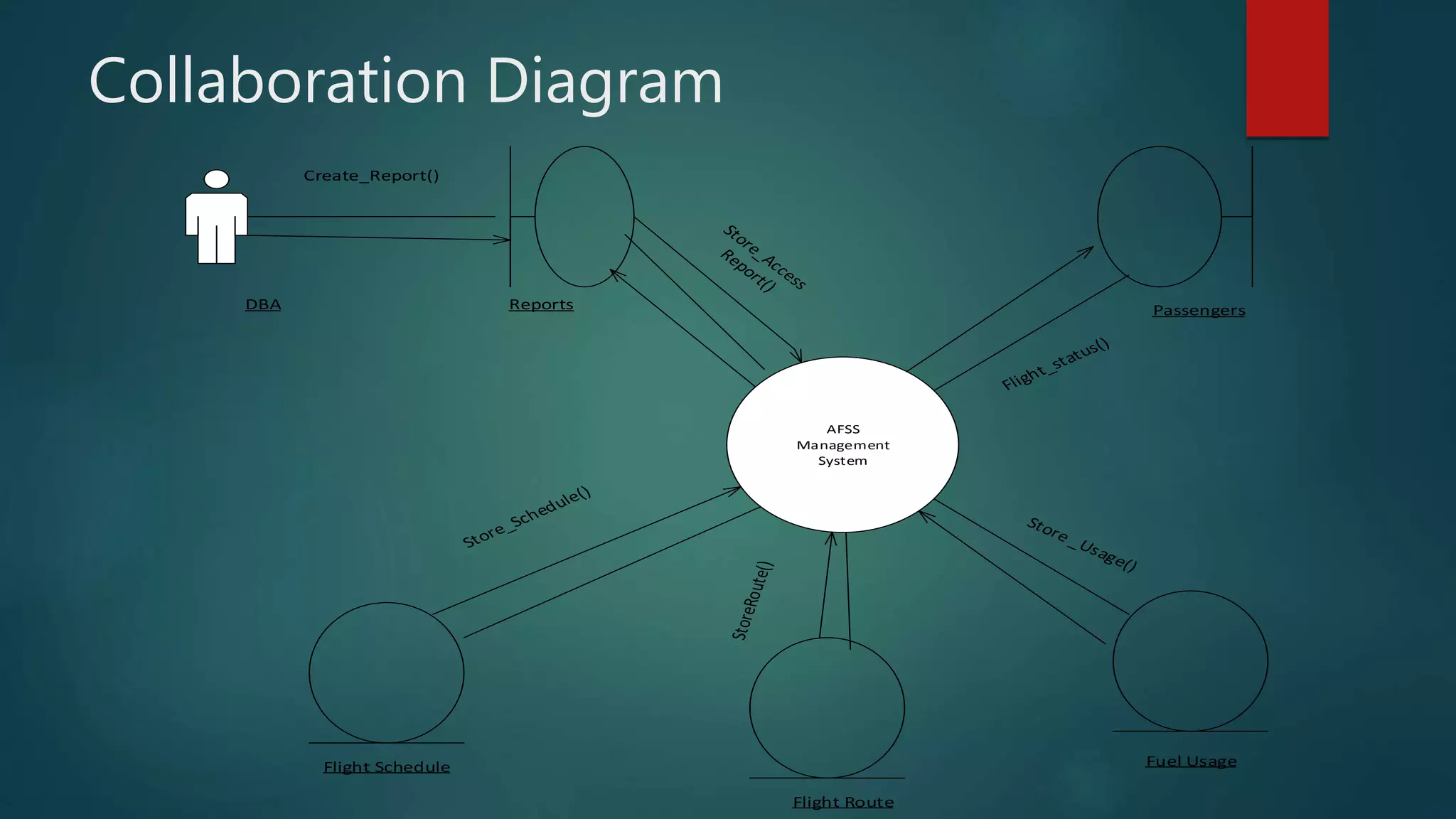
Collaboration Diagram
AFSS
Management
System
DBA Reports Passengers
Flight Schedule
Flight Route
Fuel Usage
Create_Report()
Advantages / Disadvantages and Uses
of Collaboration Diagram
 Collaboration diagram is the interaction diagram which show the interaction
between the entities.
 It show the functionality and behaviour of individual object as well as overall
operation of the system.
 It is suited in AFSS to show relationship between flights, planes, passengers,
timing& route etc.
 Collaboration Diagram harder to keep track of the flow of control.
Airport flight schedule System UML diagrams

Airport flight schedule System UML diagrams