.
.
.
SMART Home Camera
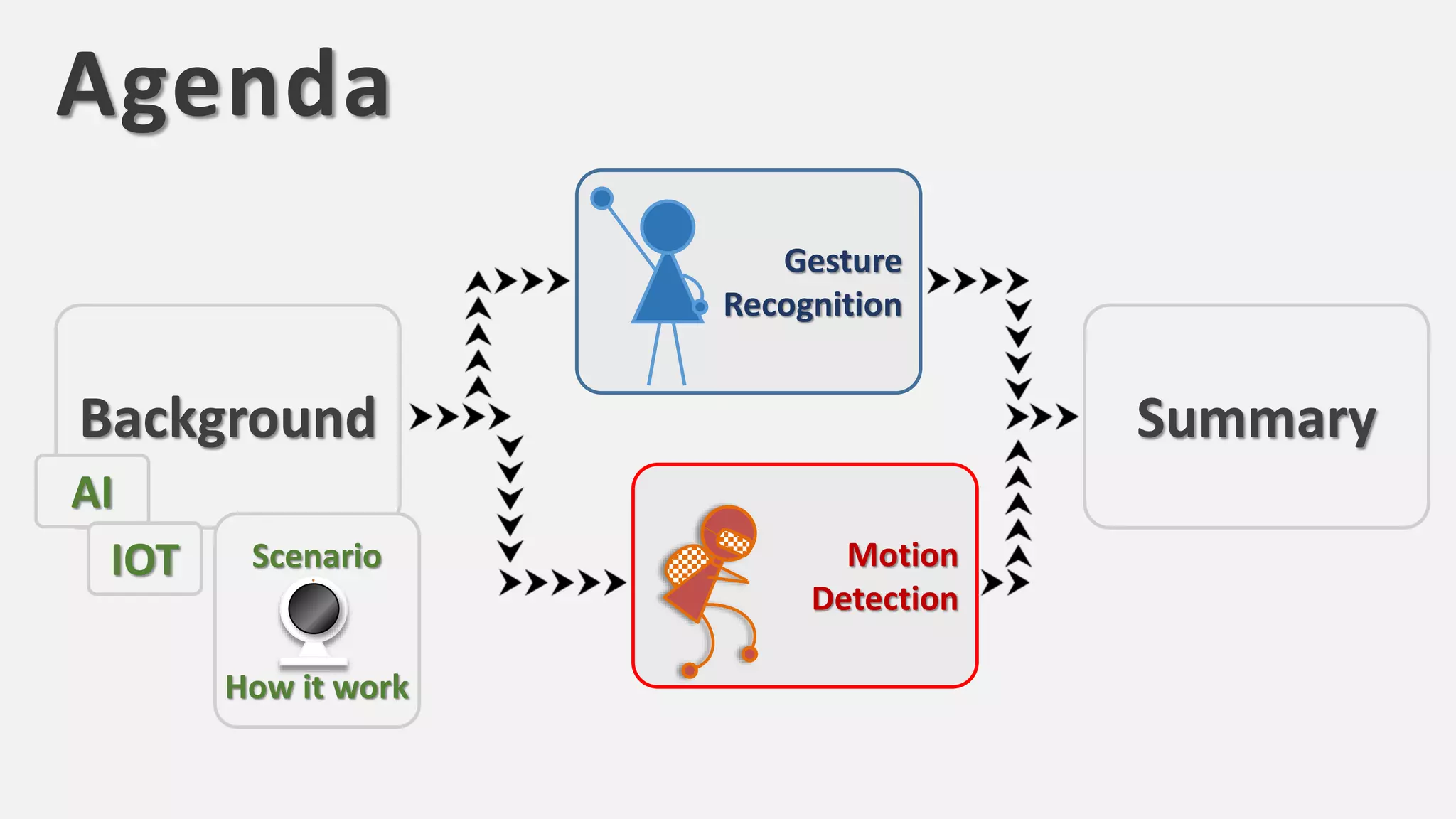
Agenda
Gesture
Recognition
Motion
Detection
Background
AI
IOT Scenario
How it work
Summary
3
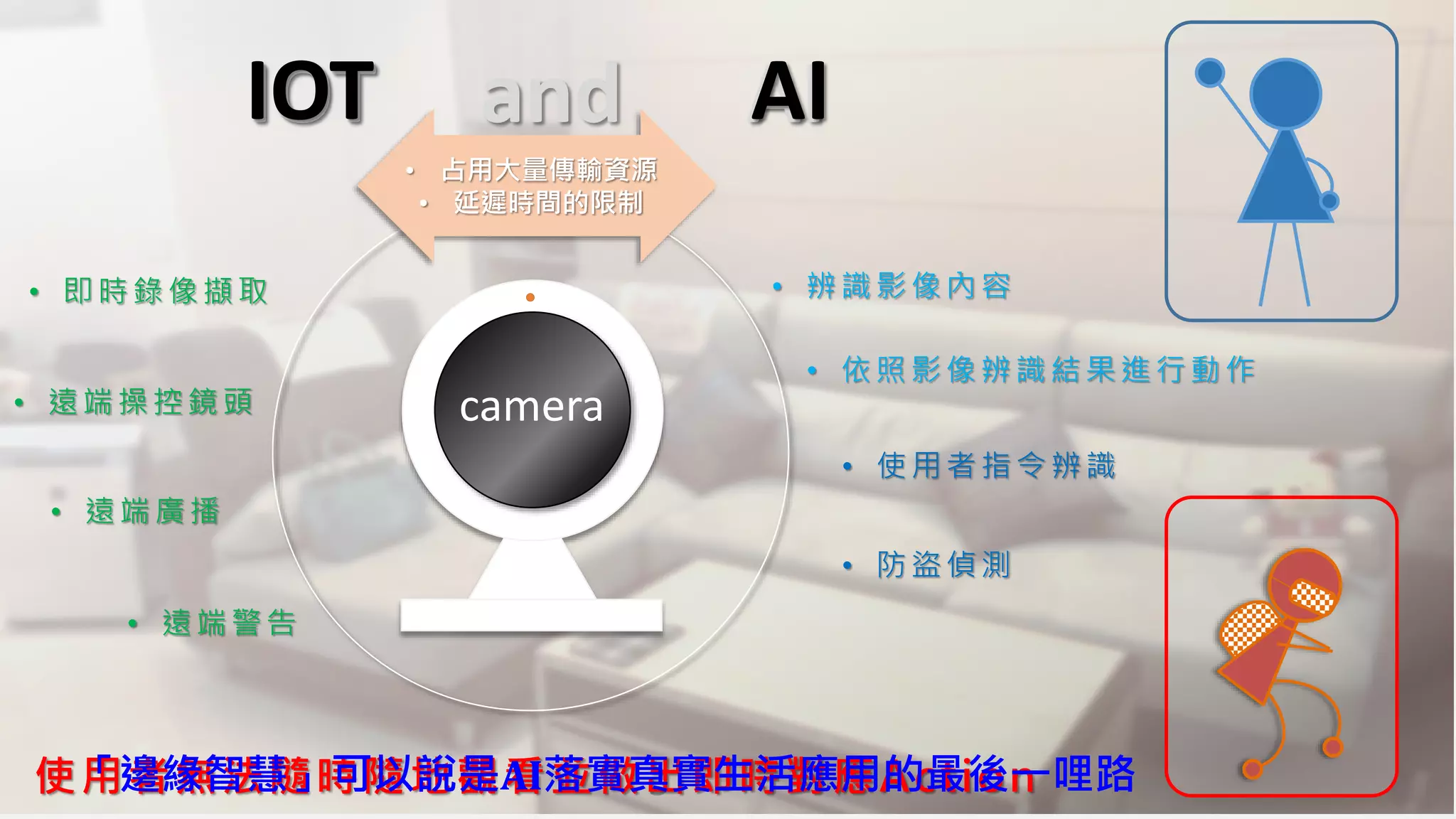
• 即時錄像擷取
• 遠端操控鏡頭
• 遠端廣播
• 遠端警告
• 辨識影像內容
• 依照影像辨識結果進行動作
• 使用者指令辨識
使用者無法隨時隨地觀看並做出即時對應Action
camera
「邊緣智慧」可以說是AI落實真實生活應用的最後一哩路
• 占用大量傳輸資源
• 延遲時間的限制
• 防盜偵測
IOT and AIAIIOT
HOWITWORKS .
.
.
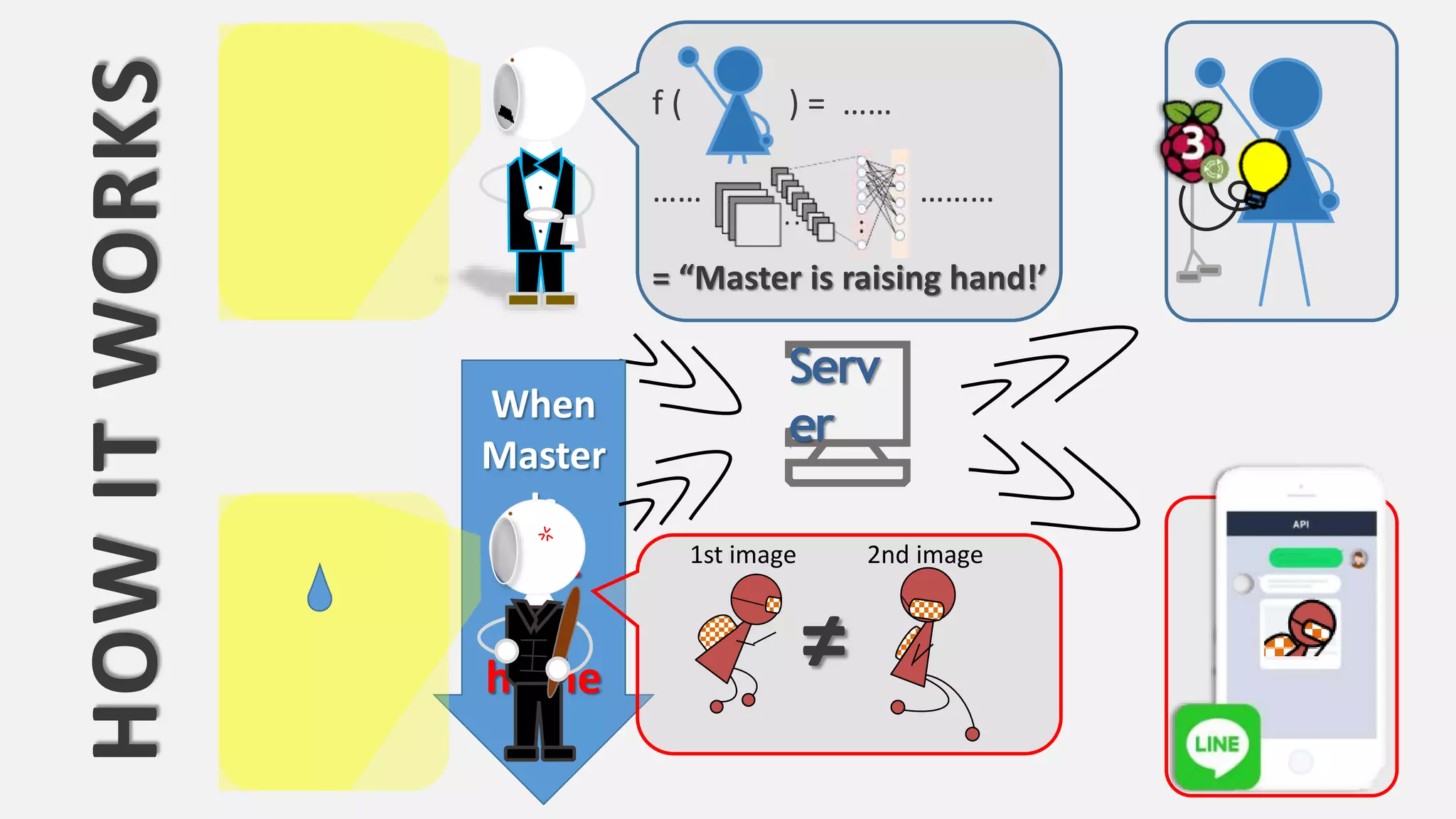
f ( ) = ……
…… ………
= “Master is raising hand!’
Serv
erWhen
Master
Is
Not
At
home ≠
2nd image1st image
Let’s take a Look at
Gesture Recognition
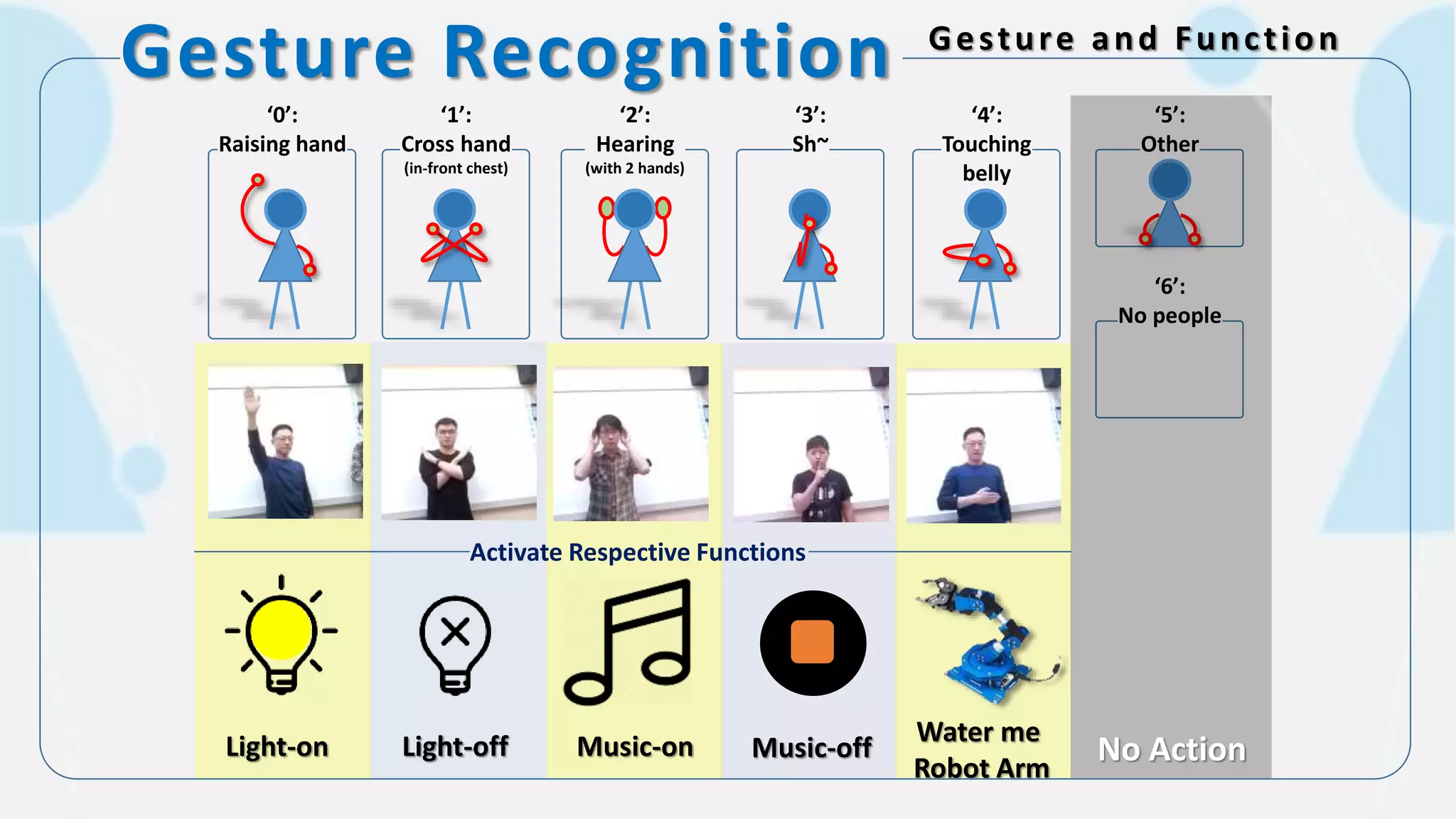
‘0’:
Raising hand
‘1’:
Cross hand
(in-front chest)
‘2’:
Hearing
(with 2 hands)
‘3’:
Sh~
‘4’:
Touching
belly
‘5’:
Other
‘6’:
No people
Light-on Water me
Robot Arm
No Action
Activate Respective Functions
Light-off Music-on Music-off
Gesture Recognition Gesture and Function
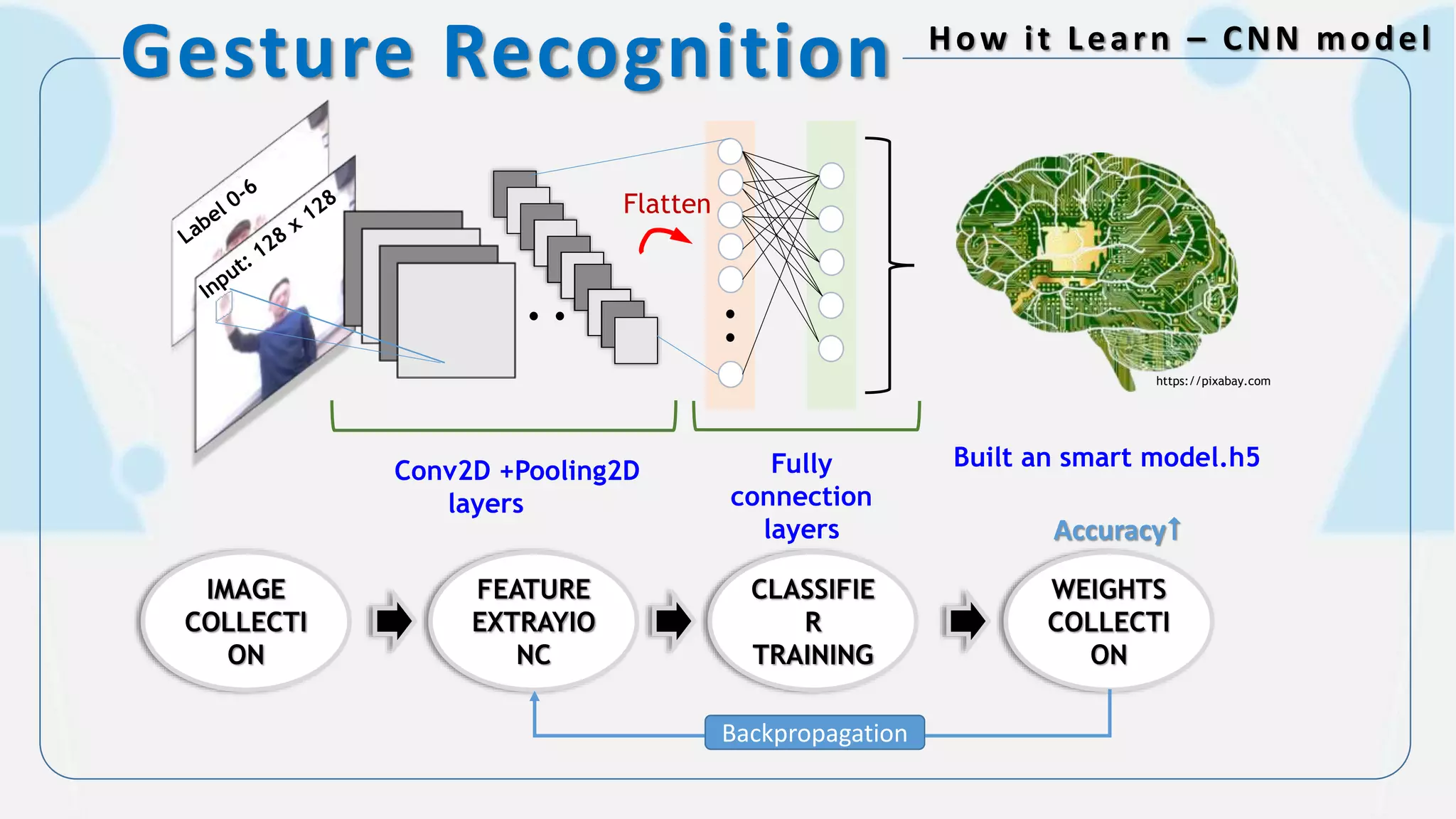
Gesture Recognition How it Learn – CNN model
Fully
connection
layers
Conv2D +Pooling2D
layers
Flatten
https://pixabay.com
Built an smart model.h5
IMAGE
COLLECTI
ON
FEATURE
EXTRAYIO
NC
CLASSIFIE
R
TRAINING
WEIGHTS
COLLECTI
ON
Backpropagation
Accuracy
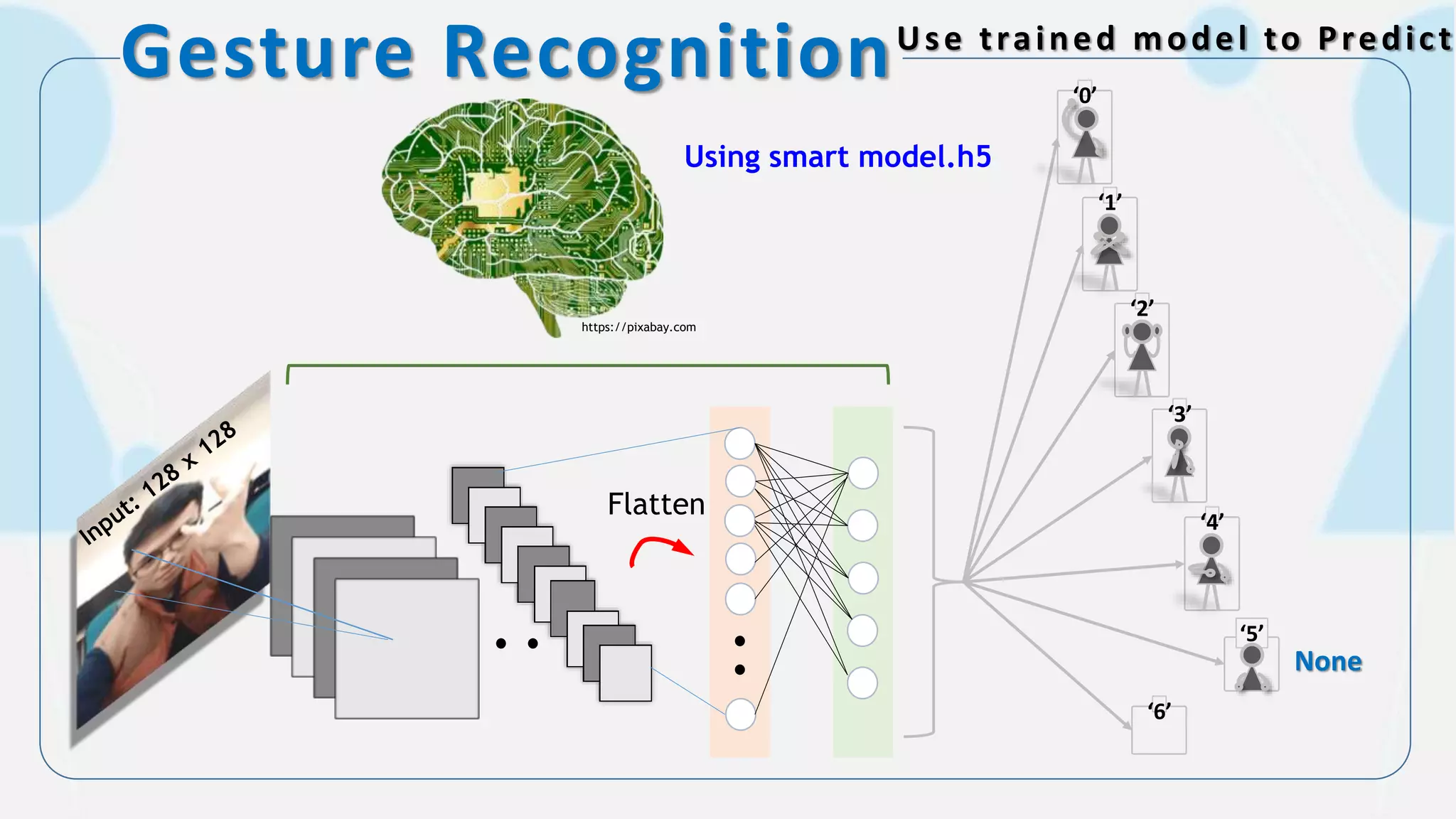
Gesture RecognitionUse trained model to Predict
Using smart model.h5
Flatten
‘0’
‘3’
‘1’
‘2’
‘4’
‘5’
‘6’
https://pixabay.com
None
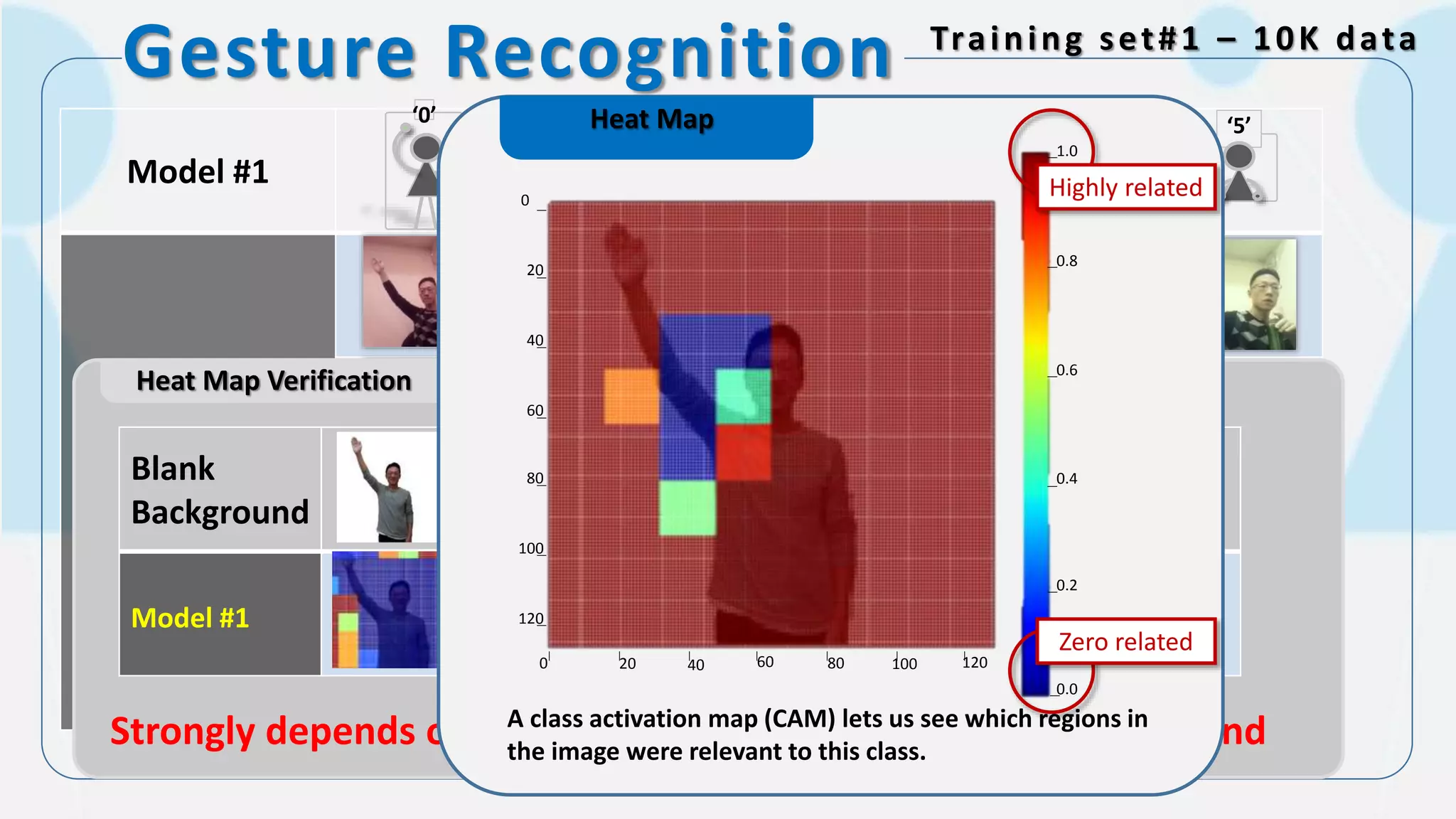
Gesture Recognition Training set#1 – 10K data
Model #1
Shuffle color filter
while taking photos
‘0’ ‘3’‘1’ ‘2’ ‘4’ ‘5’
Heat Map Verification
Blank
Background
Model #1
Strongly depends on specific face feature and specific background
Heat Map
0
20
40
60
80
100
120
120100806040200
0.2
0.4
0.6
0.8
1.0
0.0
A class activation map (CAM) lets us see which regions in
the image were relevant to this class.
Highly related
Zero related
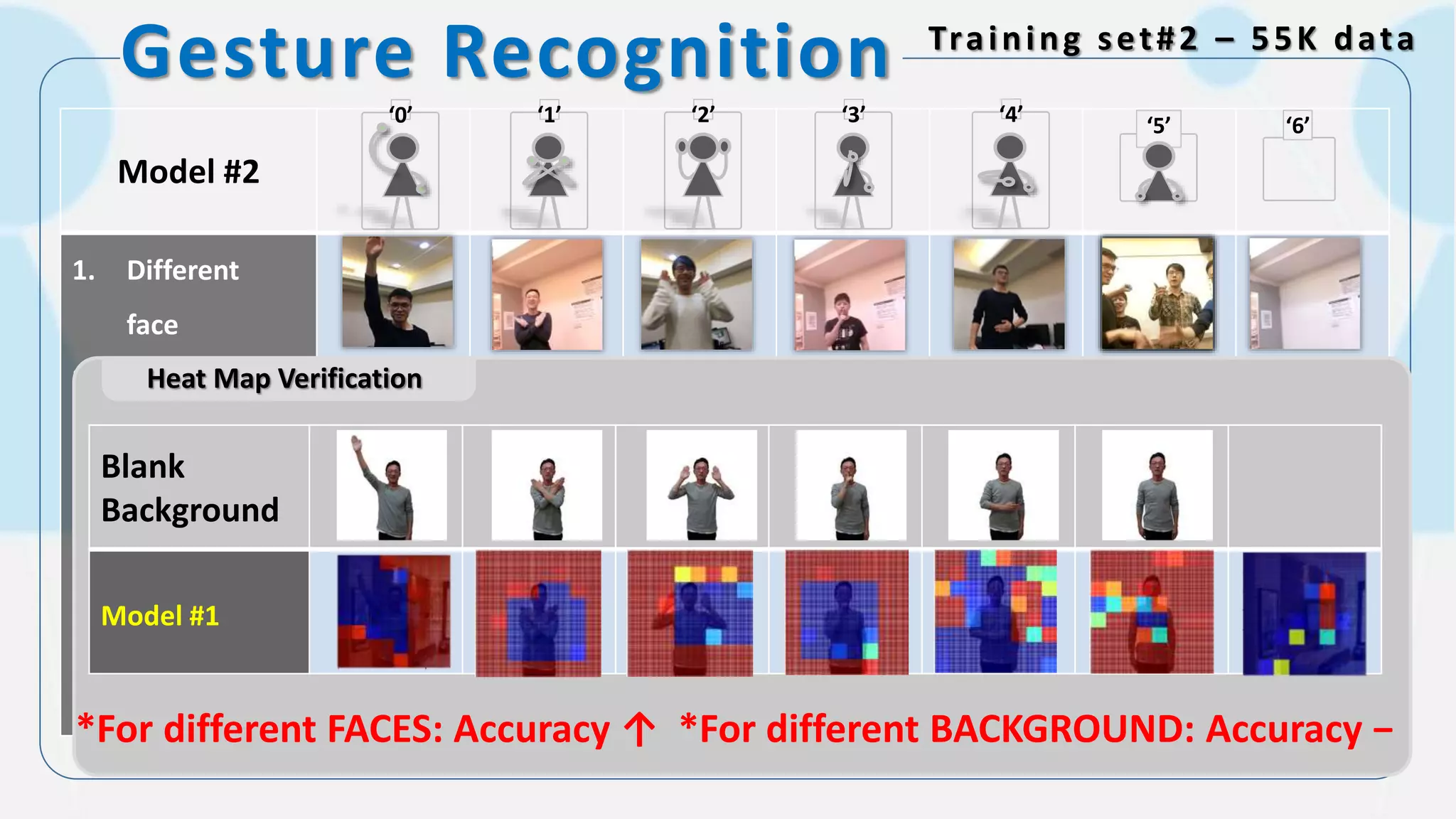
Gesture Recognition Training set#2 – 55K data
Model #2
1. Different
face
2. Different
background
3. Different
clothes
4. Add set 6 (No
people)
+Set #1
‘0’ ‘3’‘1’ ‘2’ ‘4’ ‘5’ ‘6’
Heat Map Verification
Blank
Background
Model #1
*For different FACES: Accuracy ↑ *For different BACKGROUND: Accuracy −
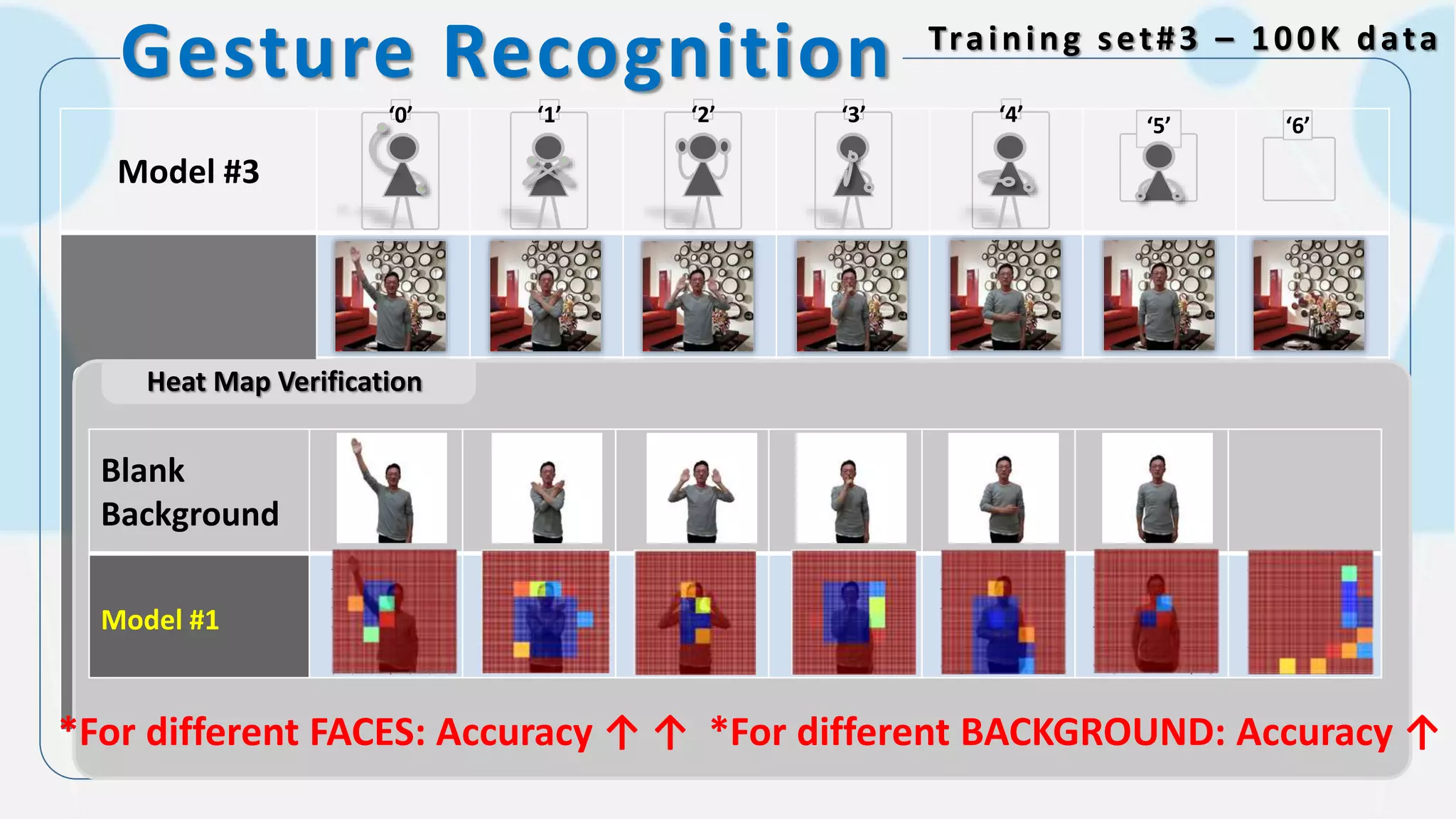
Gesture Recognition Training set#3 – 100K data
Model #3
Change
background
manually
+
Set #1 Set #2
‘0’ ‘3’‘1’ ‘2’ ‘4’ ‘5’ ‘6’
Heat Map Verification
*For different FACES: Accuracy ↑ ↑ *For different BACKGROUND: Accuracy ↑
Blank
Background
Model #1
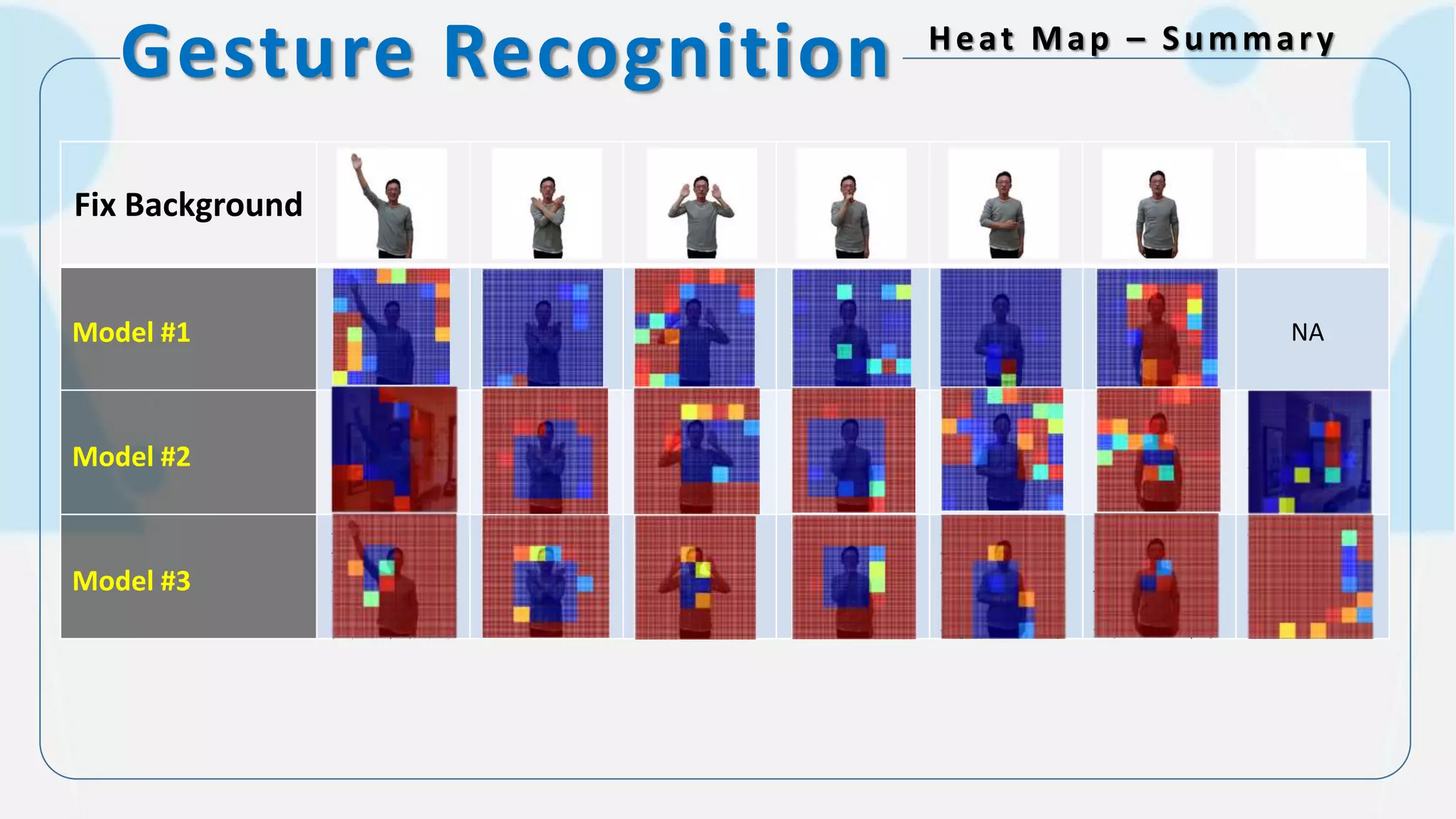
Gesture Recognition Heat Map – Summary
Fix Background
Model #1
Model #2
Model #3
NA
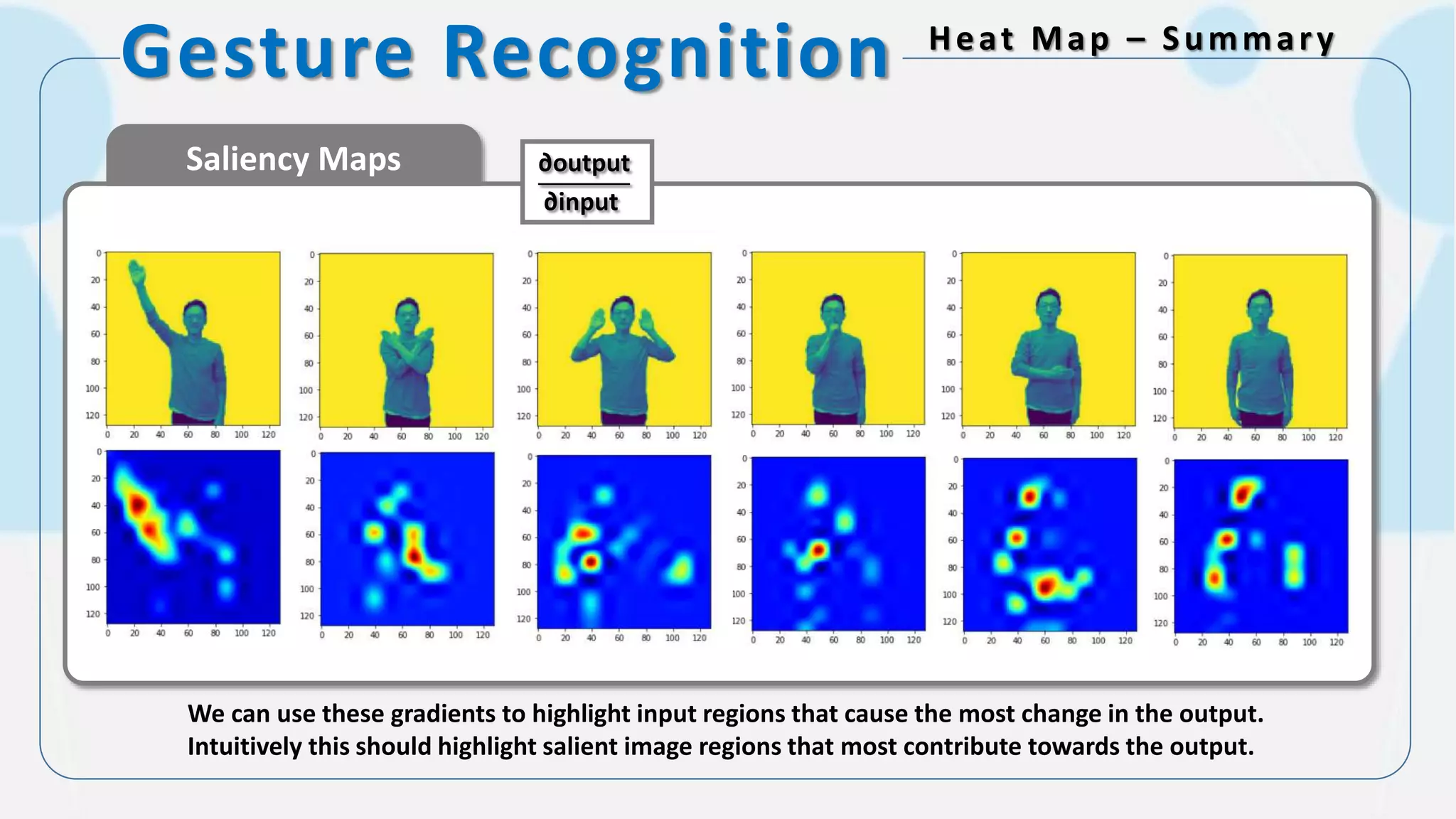
Gesture Recognition Heat Map – Summary
Saliency Maps
We can use these gradients to highlight input regions that cause the most change in the output.
Intuitively this should highlight salient image regions that most contribute towards the output.
∂output
∂input
How about the other?
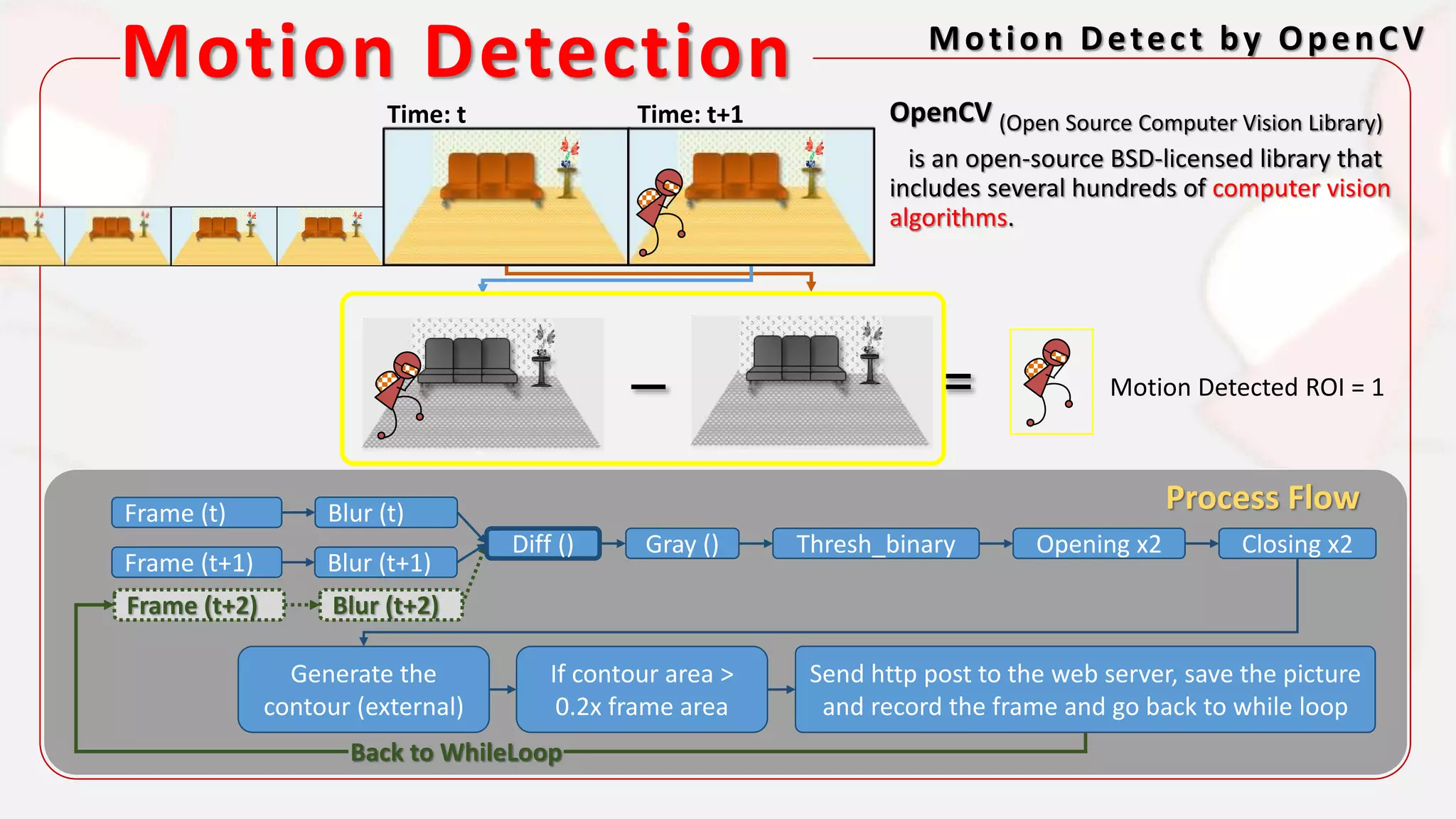
Motion Detection
Motion Detection Motion Detect by OpenCV
Motion Detected ROI = 1
Frame (t)
Frame (t+1)
Blur (t)
Blur (t+1)
Diff () Gray () Thresh_binary Opening x2
Generate the
contour (external)
Closing x2
If contour area >
0.2x frame area
Send http post to the web server, save the picture
and record the frame and go back to while loop
Frame (t+2) Blur (t+2)
Back to WhileLoop
OpenCV (Open Source Computer Vision Library)
is an open-source BSD-licensed library that
includes several hundreds of computer vision
algorithms.
Process Flow
Time: t Time: t+1
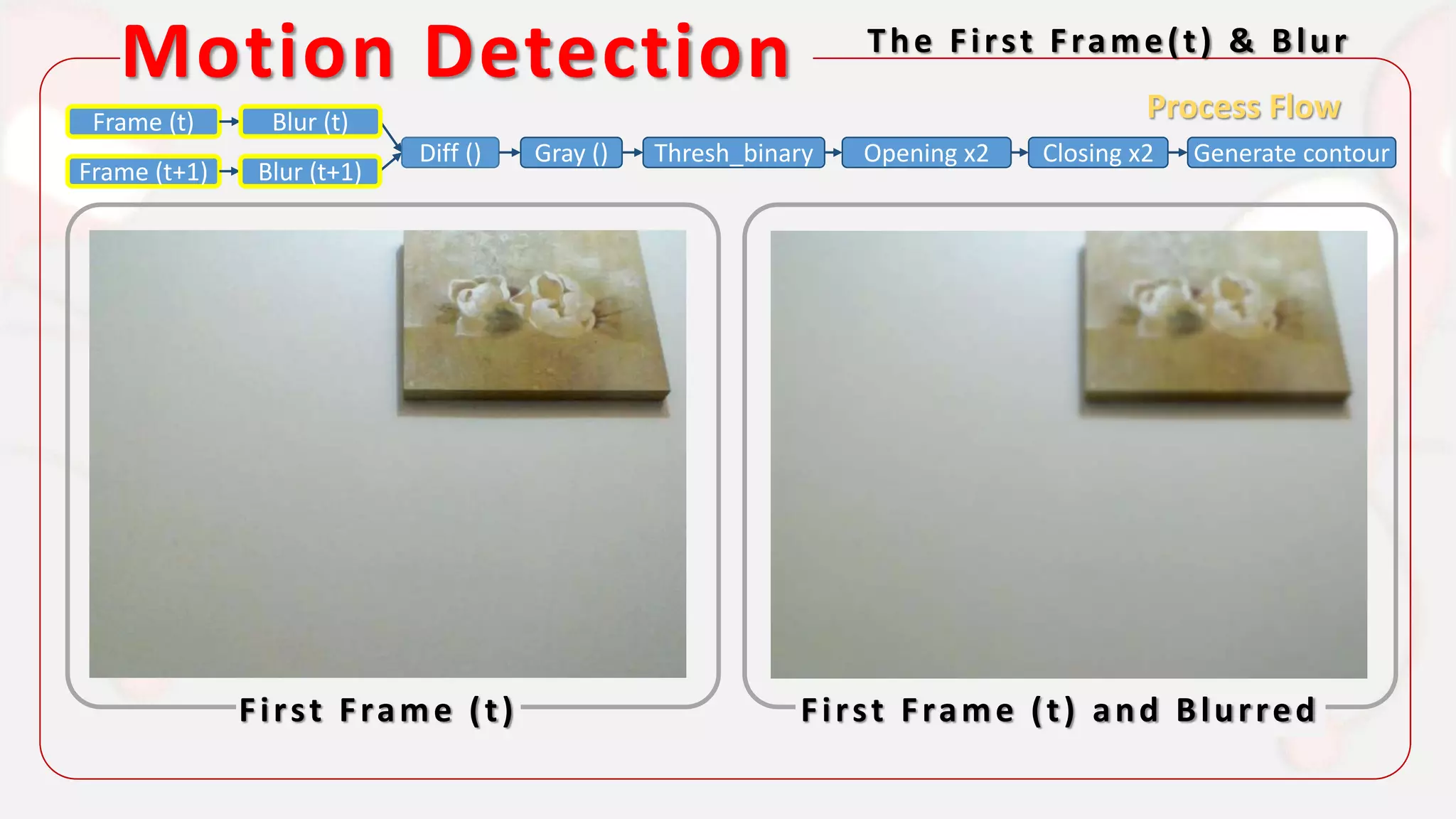
Motion Detection The First Frame(t) & Blur
First Frame (t) First Frame (t) and Blurred
Process FlowFrame (t)
Frame (t+1)
Diff () Gray () Thresh_binary Opening x2 Closing x2 Generate contour
Blur (t)
Blur (t+1)
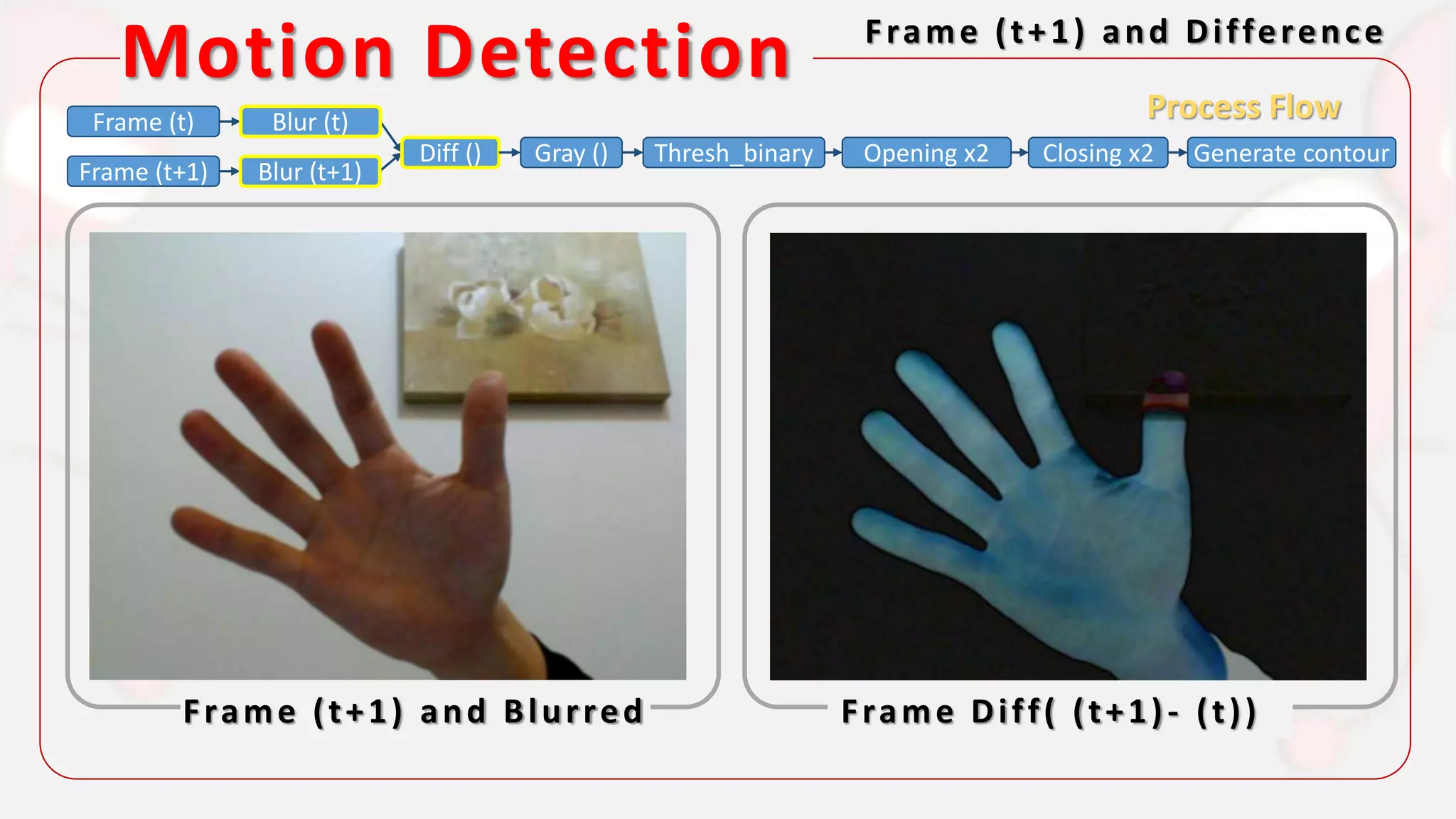
Motion Detection Frame (t+1) and Difference
Frame (t+1) and Blurred Frame Diff( (t+1)- (t))
Process FlowFrame (t)
Frame (t+1)
Diff () Gray () Thresh_binary Opening x2 Closing x2 Generate contour
Blur (t)
Blur (t+1)
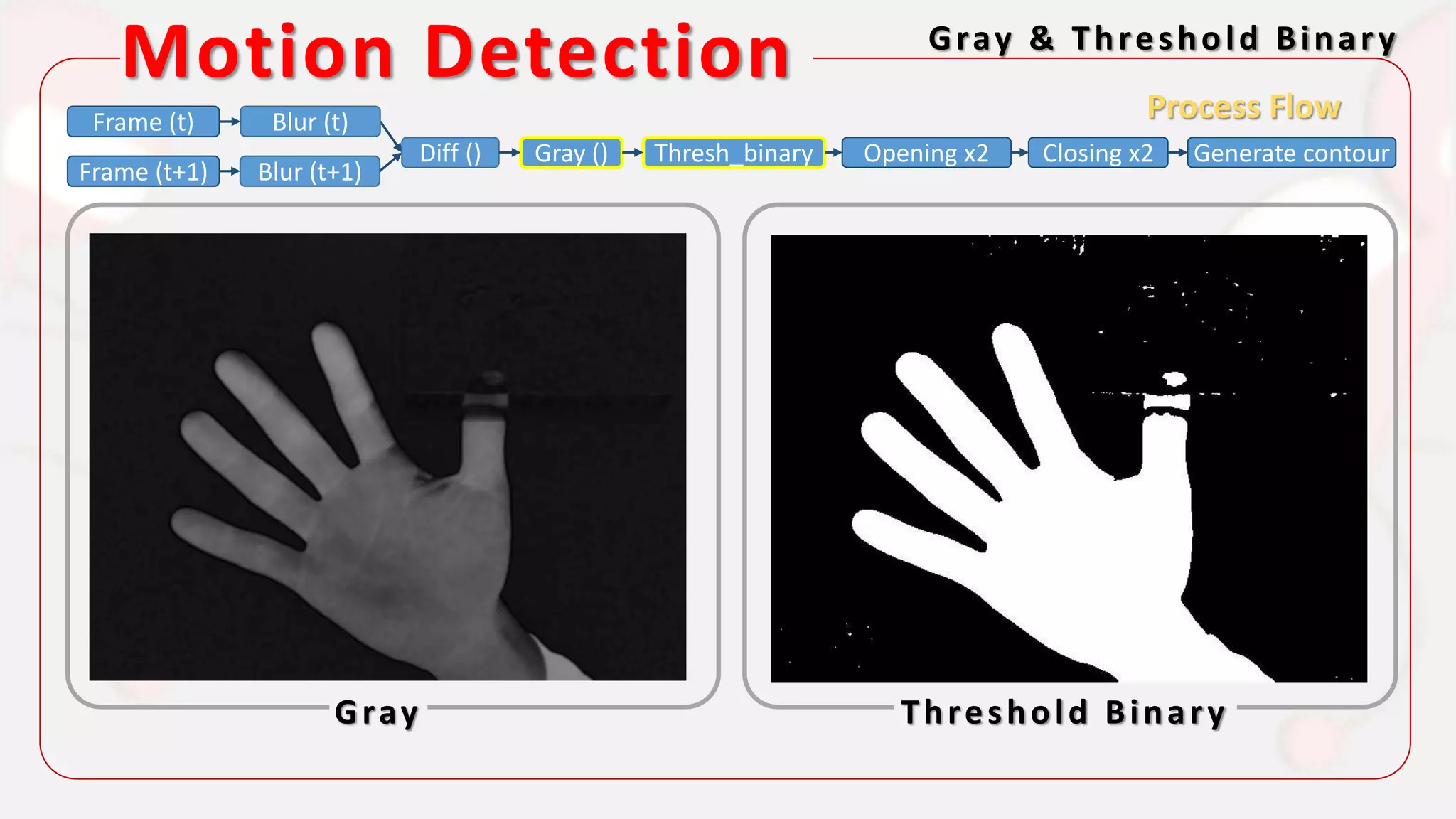
Motion Detection Gray & Threshold Binary
Gray Threshold Binary
Process FlowFrame (t)
Frame (t+1)
Diff () Gray () Thresh_binary Opening x2 Closing x2 Generate contour
Blur (t)
Blur (t+1)
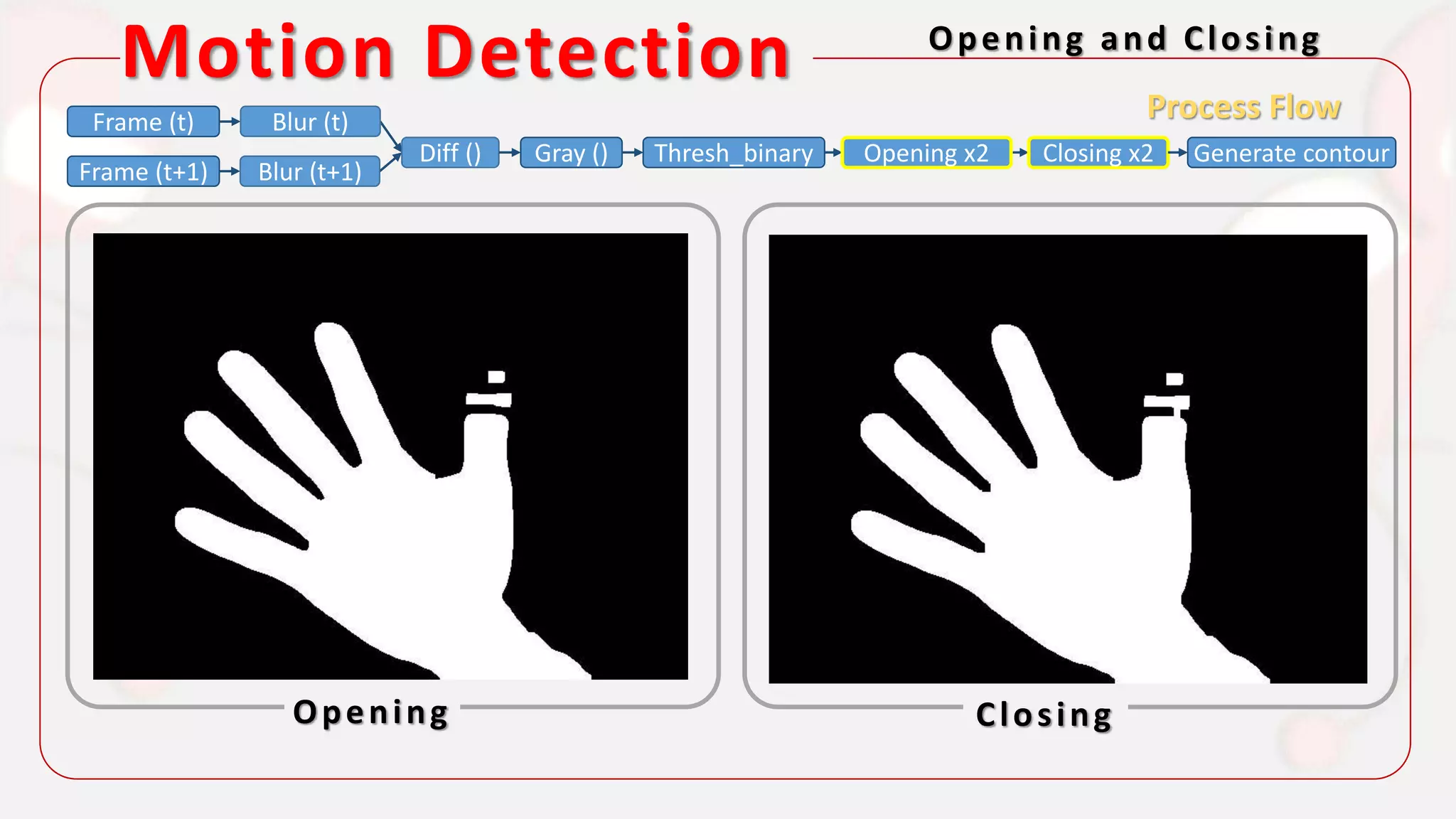
Motion Detection Opening and Closing
Opening Closing
Process FlowFrame (t)
Frame (t+1)
Diff () Gray () Thresh_binary Opening x2 Closing x2 Generate contour
Blur (t)
Blur (t+1)
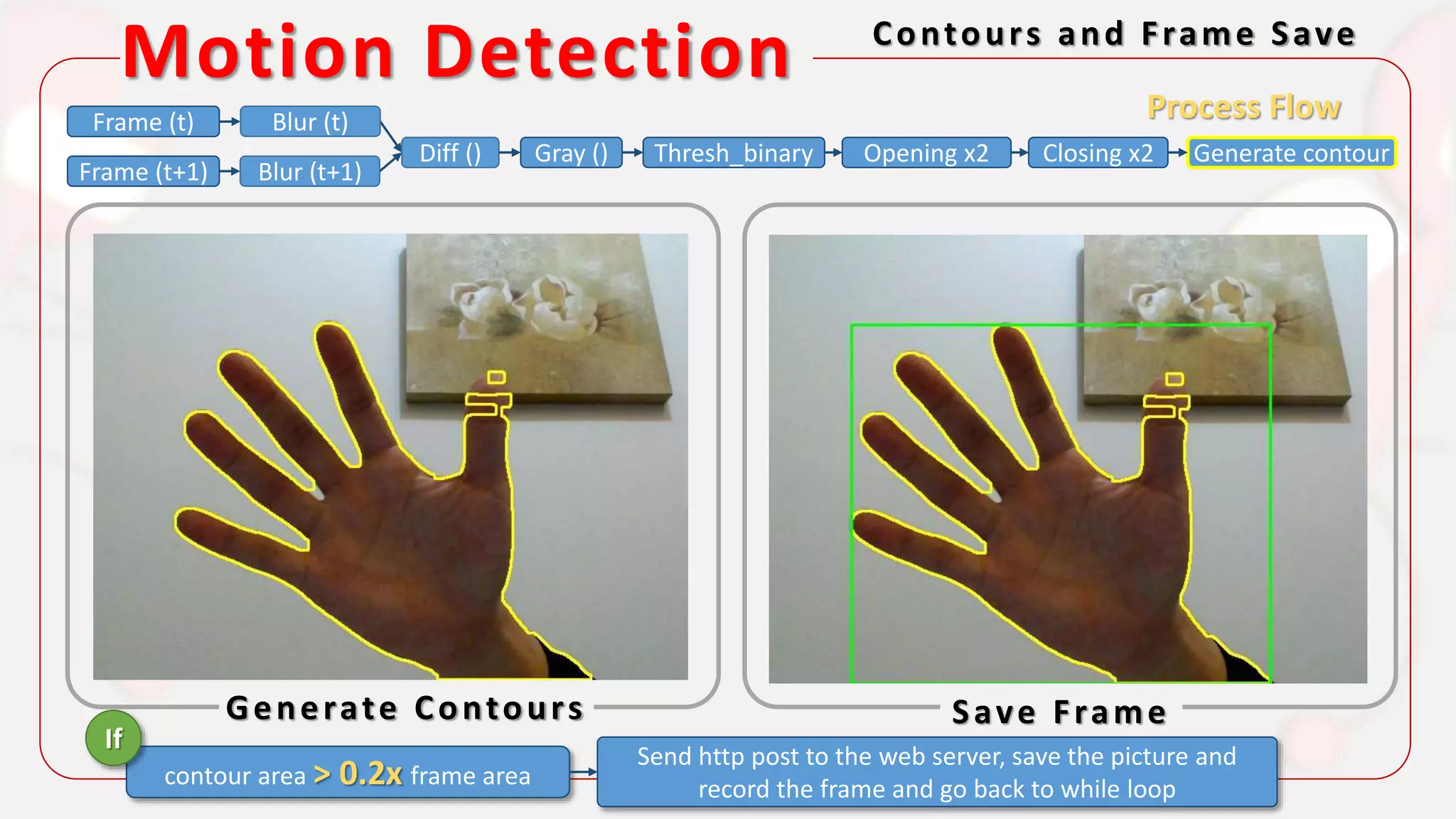
Motion Detection Contours and Frame Save
Generate Contours Save Frame
Process FlowFrame (t)
Frame (t+1)
Diff () Gray () Thresh_binary Opening x2 Closing x2 Generate contour
Blur (t)
Blur (t+1)
contour area > 0.2x frame area
Send http post to the web server, save the picture and
record the frame and go back to while loop
If
It’s How They Communicate
HTTP/Node.js/MQTT
.
.
.
Serv
er
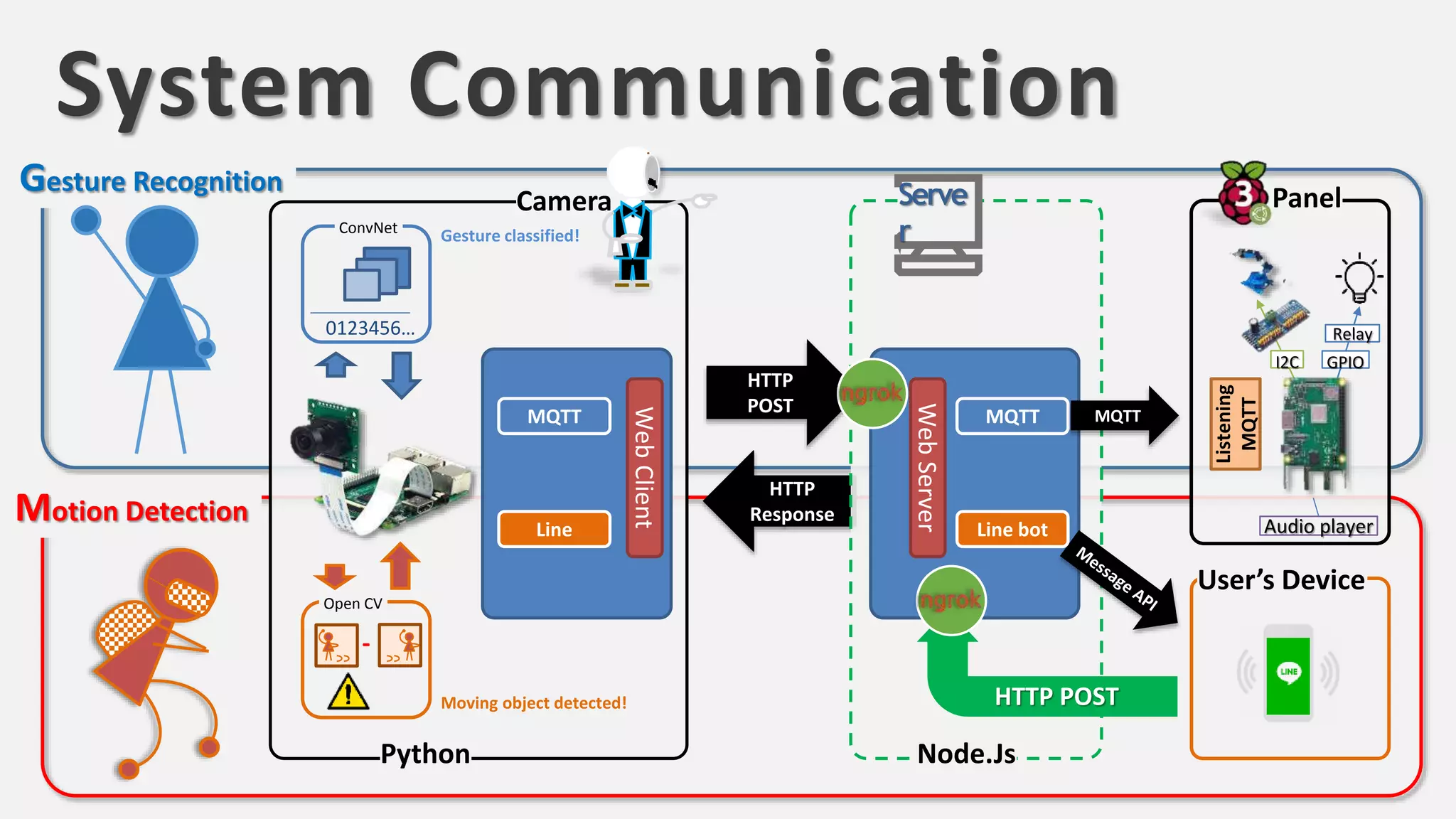
System Communication
Gesture Recognition
Motion Detection
HTTP
POST
HTTP
Response
Camera
Python
WebClient
MQTT
Open CV
-
Moving object detected!
ConvNet
0123456…
Gesture classified!
Line
Serve
r
Node.Js
User’s Device
WebServer
MQTT MQTT
HTTP POST
Panel
Line bot
Listening
MQTT
Relay
GPIOI2C
Audio player
.
.
.
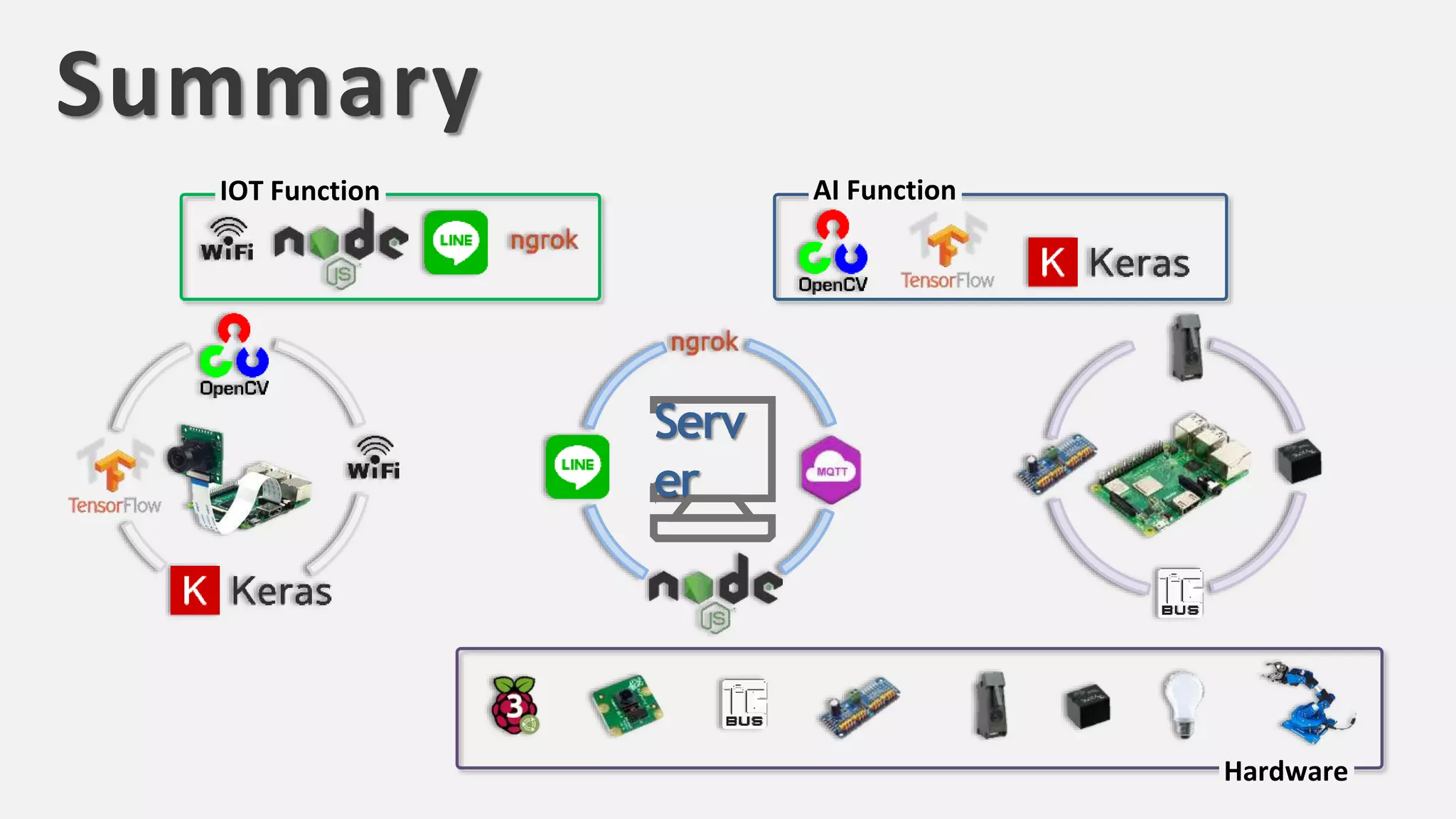
AI FunctionIOT Function
Hardware
Serv
er
Summary
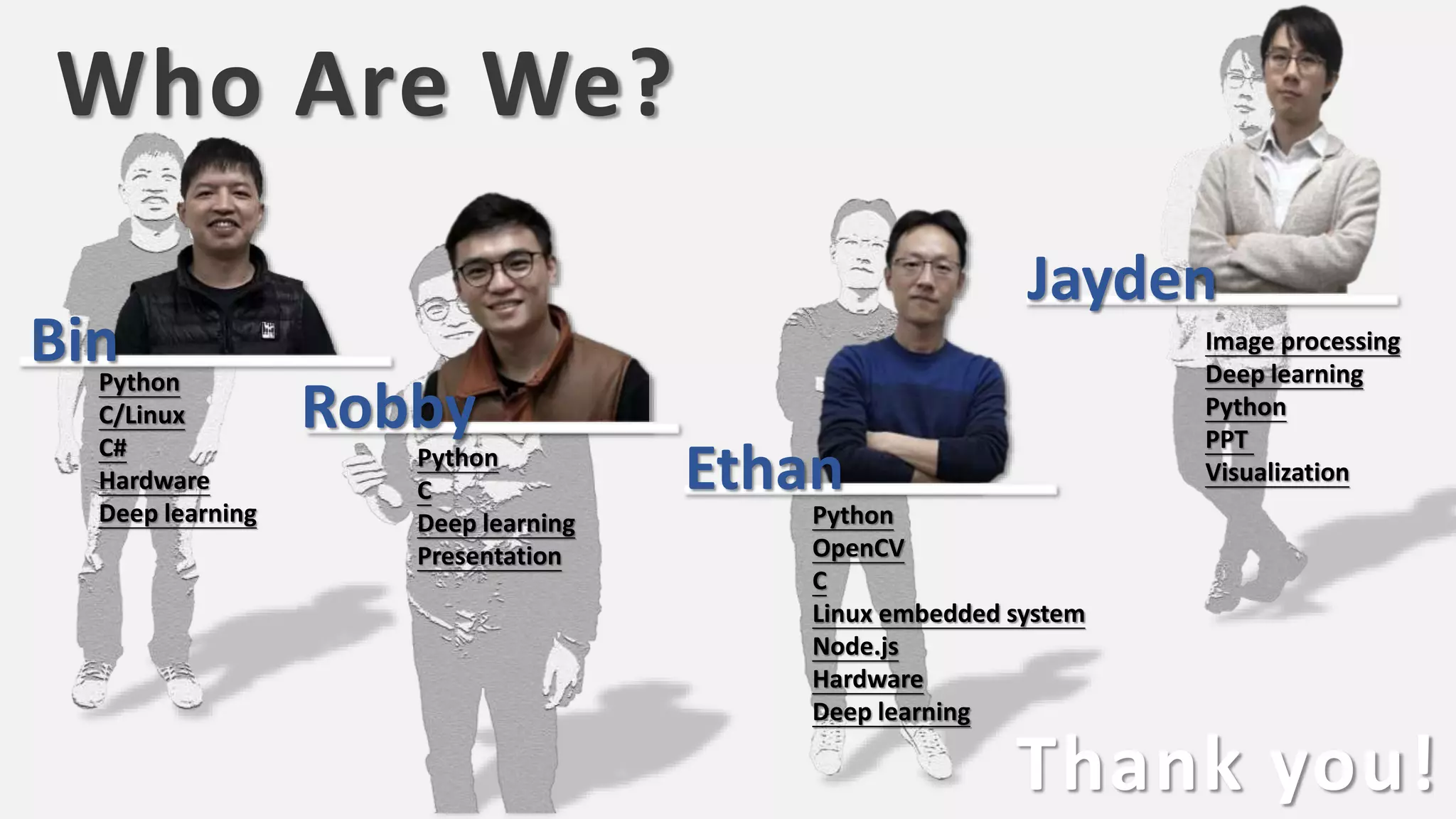
Who Are We?
Thank you!
Python
C/Linux
C#
Hardware
Deep learning Python
OpenCV
C
Linux embedded system
Node.js
Hardware
Deep learning
Python
C
Deep learning
Presentation
Image processing
Deep learning
Python
PPT
Visualization
Bin
Robby
Ethan
Jayden

AIoT居家智能應用—姿態識別 Motion detection camera v2.4

  • 1.
  • 2.
  • 3.
    3 • 即時錄像擷取 • 遠端操控鏡頭 •遠端廣播 • 遠端警告 • 辨識影像內容 • 依照影像辨識結果進行動作 • 使用者指令辨識 使用者無法隨時隨地觀看並做出即時對應Action camera 「邊緣智慧」可以說是AI落實真實生活應用的最後一哩路 • 占用大量傳輸資源 • 延遲時間的限制 • 防盜偵測 IOT and AIAIIOT
  • 4.
    HOWITWORKS . . . f () = …… …… ……… = “Master is raising hand!’ Serv erWhen Master Is Not At home ≠ 2nd image1st image
  • 5.
    Let’s take aLook at Gesture Recognition
  • 6.
    ‘0’: Raising hand ‘1’: Cross hand (in-frontchest) ‘2’: Hearing (with 2 hands) ‘3’: Sh~ ‘4’: Touching belly ‘5’: Other ‘6’: No people Light-on Water me Robot Arm No Action Activate Respective Functions Light-off Music-on Music-off Gesture Recognition Gesture and Function
  • 7.
    Gesture Recognition Howit Learn – CNN model Fully connection layers Conv2D +Pooling2D layers Flatten https://pixabay.com Built an smart model.h5 IMAGE COLLECTI ON FEATURE EXTRAYIO NC CLASSIFIE R TRAINING WEIGHTS COLLECTI ON Backpropagation Accuracy
  • 8.
    Gesture RecognitionUse trainedmodel to Predict Using smart model.h5 Flatten ‘0’ ‘3’ ‘1’ ‘2’ ‘4’ ‘5’ ‘6’ https://pixabay.com None
  • 9.
    Gesture Recognition Trainingset#1 – 10K data Model #1 Shuffle color filter while taking photos ‘0’ ‘3’‘1’ ‘2’ ‘4’ ‘5’ Heat Map Verification Blank Background Model #1 Strongly depends on specific face feature and specific background Heat Map 0 20 40 60 80 100 120 120100806040200 0.2 0.4 0.6 0.8 1.0 0.0 A class activation map (CAM) lets us see which regions in the image were relevant to this class. Highly related Zero related
  • 10.
    Gesture Recognition Trainingset#2 – 55K data Model #2 1. Different face 2. Different background 3. Different clothes 4. Add set 6 (No people) +Set #1 ‘0’ ‘3’‘1’ ‘2’ ‘4’ ‘5’ ‘6’ Heat Map Verification Blank Background Model #1 *For different FACES: Accuracy ↑ *For different BACKGROUND: Accuracy −
  • 11.
    Gesture Recognition Trainingset#3 – 100K data Model #3 Change background manually + Set #1 Set #2 ‘0’ ‘3’‘1’ ‘2’ ‘4’ ‘5’ ‘6’ Heat Map Verification *For different FACES: Accuracy ↑ ↑ *For different BACKGROUND: Accuracy ↑ Blank Background Model #1
  • 12.
    Gesture Recognition HeatMap – Summary Fix Background Model #1 Model #2 Model #3 NA
  • 13.
    Gesture Recognition HeatMap – Summary Saliency Maps We can use these gradients to highlight input regions that cause the most change in the output. Intuitively this should highlight salient image regions that most contribute towards the output. ∂output ∂input
  • 14.
    How about theother? Motion Detection
  • 15.
    Motion Detection MotionDetect by OpenCV Motion Detected ROI = 1 Frame (t) Frame (t+1) Blur (t) Blur (t+1) Diff () Gray () Thresh_binary Opening x2 Generate the contour (external) Closing x2 If contour area > 0.2x frame area Send http post to the web server, save the picture and record the frame and go back to while loop Frame (t+2) Blur (t+2) Back to WhileLoop OpenCV (Open Source Computer Vision Library) is an open-source BSD-licensed library that includes several hundreds of computer vision algorithms. Process Flow Time: t Time: t+1
  • 16.
    Motion Detection TheFirst Frame(t) & Blur First Frame (t) First Frame (t) and Blurred Process FlowFrame (t) Frame (t+1) Diff () Gray () Thresh_binary Opening x2 Closing x2 Generate contour Blur (t) Blur (t+1)
  • 17.
    Motion Detection Frame(t+1) and Difference Frame (t+1) and Blurred Frame Diff( (t+1)- (t)) Process FlowFrame (t) Frame (t+1) Diff () Gray () Thresh_binary Opening x2 Closing x2 Generate contour Blur (t) Blur (t+1)
  • 18.
    Motion Detection Gray& Threshold Binary Gray Threshold Binary Process FlowFrame (t) Frame (t+1) Diff () Gray () Thresh_binary Opening x2 Closing x2 Generate contour Blur (t) Blur (t+1)
  • 19.
    Motion Detection Openingand Closing Opening Closing Process FlowFrame (t) Frame (t+1) Diff () Gray () Thresh_binary Opening x2 Closing x2 Generate contour Blur (t) Blur (t+1)
  • 20.
    Motion Detection Contoursand Frame Save Generate Contours Save Frame Process FlowFrame (t) Frame (t+1) Diff () Gray () Thresh_binary Opening x2 Closing x2 Generate contour Blur (t) Blur (t+1) contour area > 0.2x frame area Send http post to the web server, save the picture and record the frame and go back to while loop If
  • 21.
    It’s How TheyCommunicate HTTP/Node.js/MQTT . . . Serv er
  • 22.
    System Communication Gesture Recognition MotionDetection HTTP POST HTTP Response Camera Python WebClient MQTT Open CV - Moving object detected! ConvNet 0123456… Gesture classified! Line Serve r Node.Js User’s Device WebServer MQTT MQTT HTTP POST Panel Line bot Listening MQTT Relay GPIOI2C Audio player . . .
  • 23.
  • 24.
    Who Are We? Thankyou! Python C/Linux C# Hardware Deep learning Python OpenCV C Linux embedded system Node.js Hardware Deep learning Python C Deep learning Presentation Image processing Deep learning Python PPT Visualization Bin Robby Ethan Jayden