Agile Testing Analytics
STARWEST 2016
Presenter
Jonathan Alexander
CTO of QASymphony
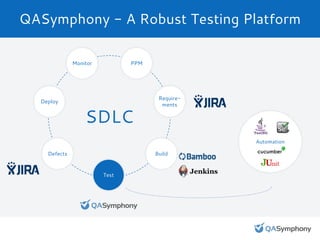
SDLC
QASymphony - A Robust Testing Platform
Monitor PPM
Require-
ments
Build
Test
Defects
Deploy
Automation
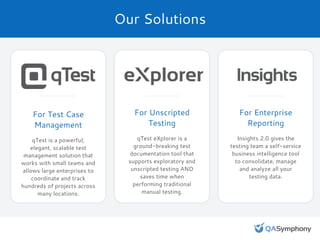
Our Solutions
For Test Case
Management
qTest is a powerful,
elegant, scalable test
management solution that
works with small teams and
allows large enterprises to
coordinate and track
hundreds of projects across
many locations.
For Unscripted
Testing
qTest eXplorer is a
ground-breaking test
documentation tool that
supports exploratory and
unscripted testing AND
saves time when
performing traditional
manual testing.
For Enterprise
Reporting
Insights 2.0 gives the
testing team a self-service
business intelligence tool
to consolidate, manage
and analyze all your
testing data.
Our Customers
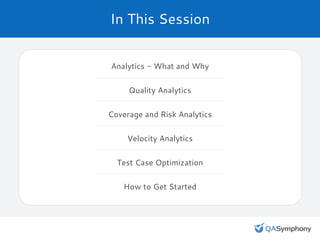
In This Session
Analytics - What and Why
Quality Analytics
Coverage and Risk Analytics
Velocity Analytics
Test Case Optimization
How to Get Started
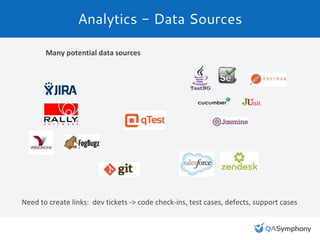
Analytics - Data Sources
Many potential data sources
Need to create links: dev tickets -> code check-ins, test cases, defects, support cases
The Goal: Leverage Data for Improvement
● Use analytics to improve:
○ Test coverage
○ Forecasting completion dates
○ Efficiency and most effective use of resources
○ Test case quality
○ Productivity
● Think of analytics as an objective input to the planning process
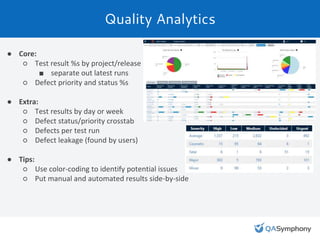
Quality Analytics
● Core:
○ Test result %s by project/release
■ separate out latest runs
○ Defect priority and status %s
● Extra:
○ Test results by day or week
○ Defect status/priority crosstab
○ Defects per test run
○ Defect leakage (found by users)
● Tips:
○ Use color-coding to identify potential issues
○ Put manual and automated results side-by-side
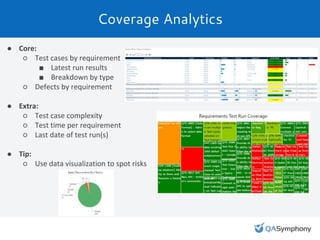
Coverage Analytics
● Core:
○ Test cases by requirement
■ Latest run results
■ Breakdown by type
○ Defects by requirement
● Extra:
○ Test case complexity
○ Test time per requirement
○ Last date of test run(s)
● Tip:
○ Use data visualization to spot risks
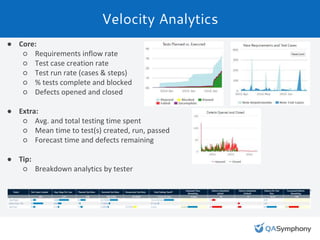
Velocity Analytics
● Core:
○ Requirements inflow rate
○ Test case creation rate
○ Test run rate (cases & steps)
○ % tests complete and blocked
○ Defects opened and closed
● Extra:
○ Avg. and total testing time spent
○ Mean time to test(s) created, run, passed
○ Forecast time and defects remaining
● Tip:
○ Breakdown analytics by tester
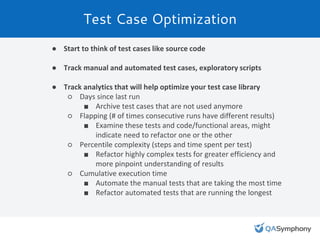
Test Case Optimization
● Start to think of test cases like source code
● Track manual and automated test cases, exploratory scripts
● Track analytics that will help optimize your test case library
○ Days since last run
■ Archive test cases that are not used anymore
○ Flapping (# of times consecutive runs have different results)
■ Examine these tests and code/functional areas, might
indicate need to refactor one or the other
○ Percentile complexity (steps and time spent per test)
■ Refactor highly complex tests for greater efficiency and
more pinpoint understanding of results
○ Cumulative execution time
■ Automate the manual tests that are taking the most time
■ Refactor automated tests that are running the longest
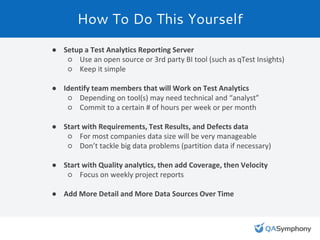
How To Do This Yourself
● Setup a Test Analytics Reporting Server
○ Use an open source or 3rd party BI tool (such as qTest Insights)
○ Keep it simple
● Identify team members that will Work on Test Analytics
○ Depending on tool(s) may need technical and “analyst”
○ Commit to a certain # of hours per week or per month
● Start with Requirements, Test Results, and Defects data
○ For most companies data size will be very manageable
○ Don’t tackle big data problems (partition data if necessary)
● Start with Quality analytics, then add Coverage, then Velocity
○ Focus on weekly project reports
● Add More Detail and More Data Sources Over Time
Thank You for Listening!
Questions?

Agile Testing Analytics

  • 1.
  • 2.
  • 3.
    SDLC QASymphony - ARobust Testing Platform Monitor PPM Require- ments Build Test Defects Deploy Automation
  • 4.
    Our Solutions For TestCase Management qTest is a powerful, elegant, scalable test management solution that works with small teams and allows large enterprises to coordinate and track hundreds of projects across many locations. For Unscripted Testing qTest eXplorer is a ground-breaking test documentation tool that supports exploratory and unscripted testing AND saves time when performing traditional manual testing. For Enterprise Reporting Insights 2.0 gives the testing team a self-service business intelligence tool to consolidate, manage and analyze all your testing data.
  • 5.
  • 6.
    In This Session Analytics- What and Why Quality Analytics Coverage and Risk Analytics Velocity Analytics Test Case Optimization How to Get Started
  • 7.
    Analytics - DataSources Many potential data sources Need to create links: dev tickets -> code check-ins, test cases, defects, support cases
  • 8.
    The Goal: LeverageData for Improvement ● Use analytics to improve: ○ Test coverage ○ Forecasting completion dates ○ Efficiency and most effective use of resources ○ Test case quality ○ Productivity ● Think of analytics as an objective input to the planning process
  • 9.
    Quality Analytics ● Core: ○Test result %s by project/release ■ separate out latest runs ○ Defect priority and status %s ● Extra: ○ Test results by day or week ○ Defect status/priority crosstab ○ Defects per test run ○ Defect leakage (found by users) ● Tips: ○ Use color-coding to identify potential issues ○ Put manual and automated results side-by-side
  • 10.
    Coverage Analytics ● Core: ○Test cases by requirement ■ Latest run results ■ Breakdown by type ○ Defects by requirement ● Extra: ○ Test case complexity ○ Test time per requirement ○ Last date of test run(s) ● Tip: ○ Use data visualization to spot risks
  • 11.
    Velocity Analytics ● Core: ○Requirements inflow rate ○ Test case creation rate ○ Test run rate (cases & steps) ○ % tests complete and blocked ○ Defects opened and closed ● Extra: ○ Avg. and total testing time spent ○ Mean time to test(s) created, run, passed ○ Forecast time and defects remaining ● Tip: ○ Breakdown analytics by tester
  • 12.
    Test Case Optimization ●Start to think of test cases like source code ● Track manual and automated test cases, exploratory scripts ● Track analytics that will help optimize your test case library ○ Days since last run ■ Archive test cases that are not used anymore ○ Flapping (# of times consecutive runs have different results) ■ Examine these tests and code/functional areas, might indicate need to refactor one or the other ○ Percentile complexity (steps and time spent per test) ■ Refactor highly complex tests for greater efficiency and more pinpoint understanding of results ○ Cumulative execution time ■ Automate the manual tests that are taking the most time ■ Refactor automated tests that are running the longest
  • 13.
    How To DoThis Yourself ● Setup a Test Analytics Reporting Server ○ Use an open source or 3rd party BI tool (such as qTest Insights) ○ Keep it simple ● Identify team members that will Work on Test Analytics ○ Depending on tool(s) may need technical and “analyst” ○ Commit to a certain # of hours per week or per month ● Start with Requirements, Test Results, and Defects data ○ For most companies data size will be very manageable ○ Don’t tackle big data problems (partition data if necessary) ● Start with Quality analytics, then add Coverage, then Velocity ○ Focus on weekly project reports ● Add More Detail and More Data Sources Over Time
  • 14.
    Thank You forListening! Questions?