






Hello, Real World.
QASymphony User Group
October 2017
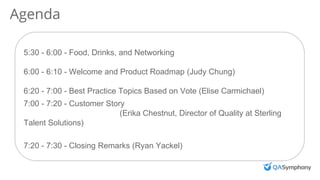
Agenda
5:30 - 6:00 - Food, Drinks, and Networking
6:00 - 6:10 - Welcome and Product Roadmap (Judy Chung)
6:20 - 7:00 - Best Practice Topics Based on Vote (Elise Carmichael)
7:00 - 7:20 - Customer Story
(Erika Chestnut, Director of Quality at Sterling
Talent Solutions)
7:20 - 7:30 - Closing Remarks (Ryan Yackel)
Hello, Real World.
Product Roadmap
Judy Chung
Product Manager
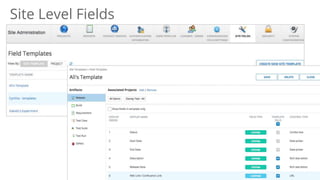
Site Level Fields
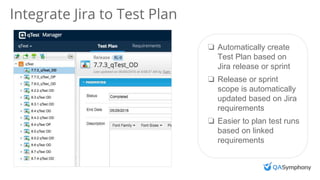
Integrate Jira to Test Plan
❏ Automatically create
Test Plan based on
Jira release or sprint
❏ Release or sprint
scope is automatically
updated based on Jira
requirements
❏ Easier to plan test runs
based on linked
requirements
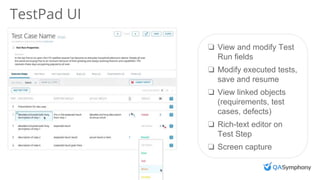
TestPad UI
❏ View and modify Test
Run fields
❏ Modify executed tests,
save and resume
❏ View linked objects
(requirements, test
cases, defects)
❏ Rich-text editor on
Test Step
❏ Screen capture
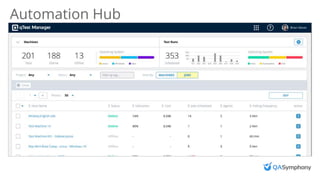
Automation Hub
Hello, Real World.
Best Practices
Elise Carmichael,
Vice President of Quality
| HELLO, REAL WORLD.
Automation Integrations & qTest
Elise Carmichael
Automation Integrations 3-ways
• API
• Jenkins / Bamboo (CI)
• Automation Agent
• Built in Frameworks
• Shell Agent
INSERT PHOTO ON TOP
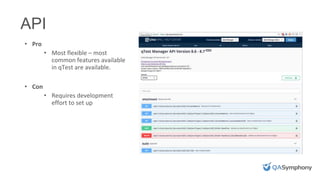
• Pro
• Most flexible – most
common features available
in qTest are available.
• Con
• Requires development
effort to set up
API
INSERT PHOTO ON TOP
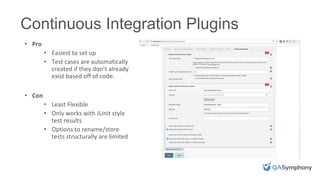
• Pro
• Easiest to set up
• Test cases are automatically
created if they don’t already
exist based off of code.
• Con
• Least Flexible
• Only works with JUnit style
test results
• Options to rename/store
tests structurally are limited
Continuous Integration Plugins
INSERT PHOTO ON TOP
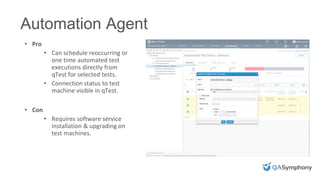
• Pro
• Can schedule reoccurring or
one time automated test
executions directly from
qTest for selected tests.
• Connection status to test
machine visible in qTest.
• Con
• Requires software service
installation & upgrading on
test machines.
Automation Agent
Automation Agent - Frameworks
• We have a number of built in Frameworks
• TestNG
• JUnit for Java
• Cucumber for Java
• Jbehave for Java
• UFT
• If you are using one of these frameworks for your testing, the
Automation agent can automatically scan the tests to create test
cases and upload results for you
Automation Agent – Shell Agent
• This is for you if
• You are using a testing framework that we don’t natively support
• You want to run any kind of custom test framework
• You want to integrate with another tool (like SauceLabs or BlazeMeter)
• You want to run any script from a command line scheduled from within qTest
• How it works
• You must provide a batch or shell script (depending on your OS) to execute
when the job is scheduled to run
• The script will be provided the essential project and selected test run
information so that you can, when the tests are complete, use the API to
upload test results to the relevant test execution logs.
Useful Links
• Our API
• https://api.qasymphony.com/
• Automation Agent Install Guide
• https://support.qasymphony.com/hc/en-us/articles/115002949746-Install-the-
Automation-Agent
• https://support.qasymphony.com/hc/en-us/articles/115004483563-Using-the-
Shell-Agent
• Jenkins plugin is called qTest Plugin
• https://wiki.jenkins.io/display/JENKINS/qTest+for+Jenkins+by+QASymphony
• GitHub Repos with Examples
• https://github.com/QASymphony/qtest-api-samples
• https://github.com/QASymphony/shell-agent-samples (TBA)
Hello, Real World.
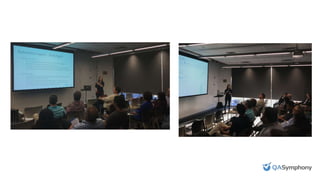
Photos from event
QASymphony Atlanta Customer User Group Fall 2017

QASymphony Atlanta Customer User Group Fall 2017

  • 1.
    Hello, Real World. QASymphonyUser Group October 2017
  • 2.
    Agenda 5:30 - 6:00- Food, Drinks, and Networking 6:00 - 6:10 - Welcome and Product Roadmap (Judy Chung) 6:20 - 7:00 - Best Practice Topics Based on Vote (Elise Carmichael) 7:00 - 7:20 - Customer Story (Erika Chestnut, Director of Quality at Sterling Talent Solutions) 7:20 - 7:30 - Closing Remarks (Ryan Yackel)
  • 3.
    Hello, Real World. ProductRoadmap Judy Chung Product Manager
  • 4.
  • 5.
    Integrate Jira toTest Plan ❏ Automatically create Test Plan based on Jira release or sprint ❏ Release or sprint scope is automatically updated based on Jira requirements ❏ Easier to plan test runs based on linked requirements
  • 6.
    TestPad UI ❏ Viewand modify Test Run fields ❏ Modify executed tests, save and resume ❏ View linked objects (requirements, test cases, defects) ❏ Rich-text editor on Test Step ❏ Screen capture
  • 7.
  • 8.
    Hello, Real World. BestPractices Elise Carmichael, Vice President of Quality
  • 9.
    | HELLO, REALWORLD. Automation Integrations & qTest Elise Carmichael
  • 10.
    Automation Integrations 3-ways •API • Jenkins / Bamboo (CI) • Automation Agent • Built in Frameworks • Shell Agent
  • 11.
    INSERT PHOTO ONTOP • Pro • Most flexible – most common features available in qTest are available. • Con • Requires development effort to set up API
  • 12.
    INSERT PHOTO ONTOP • Pro • Easiest to set up • Test cases are automatically created if they don’t already exist based off of code. • Con • Least Flexible • Only works with JUnit style test results • Options to rename/store tests structurally are limited Continuous Integration Plugins
  • 13.
    INSERT PHOTO ONTOP • Pro • Can schedule reoccurring or one time automated test executions directly from qTest for selected tests. • Connection status to test machine visible in qTest. • Con • Requires software service installation & upgrading on test machines. Automation Agent
  • 14.
    Automation Agent -Frameworks • We have a number of built in Frameworks • TestNG • JUnit for Java • Cucumber for Java • Jbehave for Java • UFT • If you are using one of these frameworks for your testing, the Automation agent can automatically scan the tests to create test cases and upload results for you
  • 15.
    Automation Agent –Shell Agent • This is for you if • You are using a testing framework that we don’t natively support • You want to run any kind of custom test framework • You want to integrate with another tool (like SauceLabs or BlazeMeter) • You want to run any script from a command line scheduled from within qTest • How it works • You must provide a batch or shell script (depending on your OS) to execute when the job is scheduled to run • The script will be provided the essential project and selected test run information so that you can, when the tests are complete, use the API to upload test results to the relevant test execution logs.
  • 16.
    Useful Links • OurAPI • https://api.qasymphony.com/ • Automation Agent Install Guide • https://support.qasymphony.com/hc/en-us/articles/115002949746-Install-the- Automation-Agent • https://support.qasymphony.com/hc/en-us/articles/115004483563-Using-the- Shell-Agent • Jenkins plugin is called qTest Plugin • https://wiki.jenkins.io/display/JENKINS/qTest+for+Jenkins+by+QASymphony • GitHub Repos with Examples • https://github.com/QASymphony/qtest-api-samples • https://github.com/QASymphony/shell-agent-samples (TBA)
  • 17.

Editor's Notes

  • #8 In progress: command line install MVP: Once you setup the test machines, this will be central place to bulk edit and tag machines In the future, setup test machines to test with Selenium grids and scale load testing
  • #11 Each have pros/cons. Can use all or just 1
  • #12 Sample with Node and Postman API tests uploaded via qTest API: https://github.com/QASymphony/qtest-api-samples