How to Update the NGA Aero App
for iPad using Wifi
Version 1.1510.12
CW2 Mike Nettleingham
Overview
• General and Minimum Requirements
• NGA PKI Enabled Account
• NGA GEOAxIS Account
• Disadvantaged User Account
• Aero App (iOS)
• Dataset Updates
General
• 101 CAB is moving to a PAPERLESS cockpit
• Each MTOE pilot will be issued an iPad mini
• It is the INDIVIDUAL AVIATOR’S RESPONSIBILITY TO
PERFORM UPDATES
• This information is current as of 1 Mar, 2016. The Aero
App and NGA websites change frequently so if your
app stops working, it’s probably due to an update.
Minimum Requirements to go
Paperless
• Each pilot has an iPad with >75% Battery life
• Each iPad has Avenza PDF Maps, (NGA) Aero
App, and ADOBE Reader apps installed
• All digital maps and publications must be
current
Establish an NGA pki enabled account
• You may establish an NGA (National Geospatial
Intelligence Agency) pki enabled account first
using your CAC card on a computer.
• You can do this from home if you have a CAC
reader, or do it at the office on a Mil computer.
• It will work on PC or MAC.
– Recommend Internet Explorer on PC
– Safari on MAC
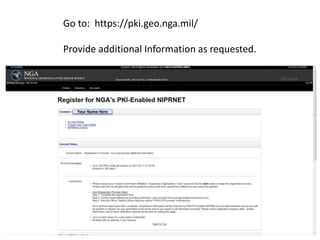
Your Name Here
Go to: https://pki.geo.nga.mil/
Provide additional Information as requested.
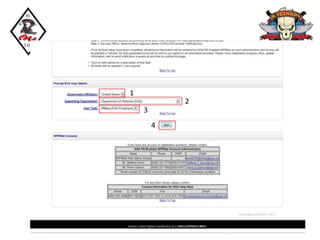
1
2
3
4
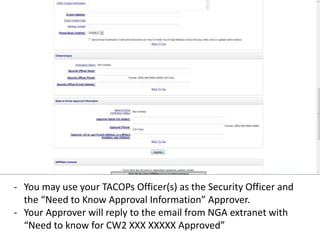
- You may use your TACOPs Officer(s) as the Security Officer and
the “Need to Know Approval Information” Approver.
- Your Approver will reply to the email from NGA extranet with
“Need to know for CW2 XXX XXXXX Approved”
Disadvantaged User
• After you’ve established your NGA account
using your CAC card, you must create a
“Disadvantaged User” name and password on
the Aeroapp website.
• This will allow you to log in to your AeroApp
on the iPad without using a CAC card
• You will need to log on using a WiFi
connection to update your apps
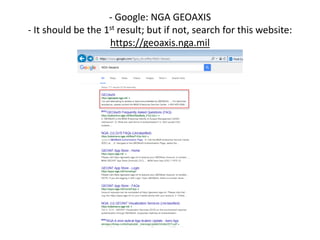
- Google: NGA GEOAXIS
- It should be the 1st result; but if not, search for this website:
https://geoaxis.nga.mil
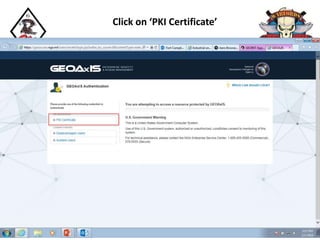
Click on ‘PKI Certificate’
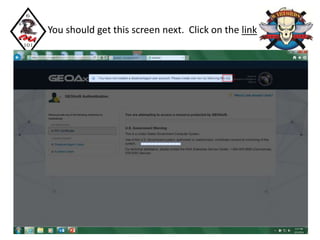
You should get this screen next. Click on the link
Your Name Here
Your Name Here
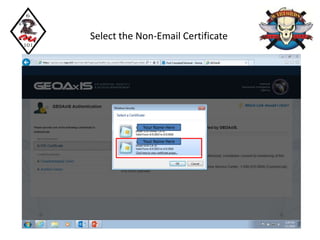
Select the Non-Email Certificate
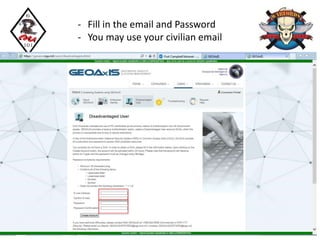
- Fill in the email and Password
- You may use your civilian email
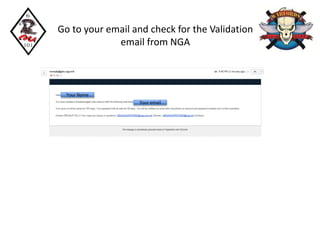
Go to your email and check for the Validation
email from NGA
Your Name
Your email
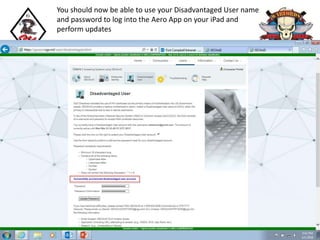
You should now be able to use your Disadvantaged User name
and password to log into the Aero App on your iPad and
perform updates
Aero App Dataset Updates
Open the Aero App on your iPad
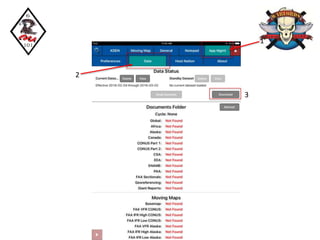
1
2
3
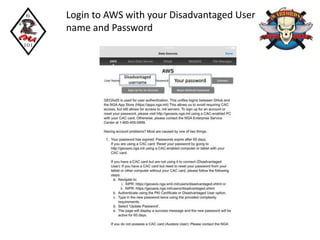
Login to AWS with your Disadvantaged User
name and Password
Disadvantaged
username Your password
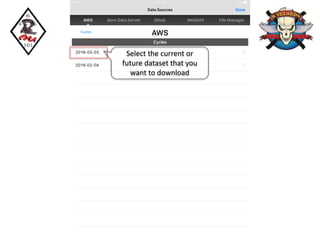
Select the current or
future dataset that you
want to download
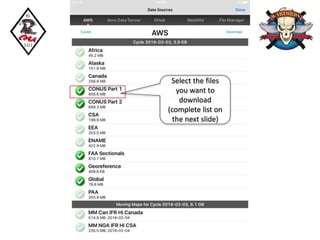
Select the files
you want to
download
(complete list on
the next slide)
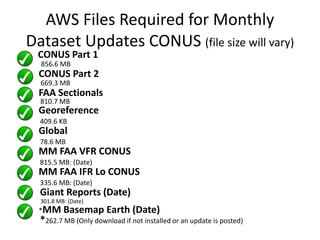
AWS Files Required for Monthly
Dataset Updates CONUS (file size will vary)
CONUS Part 1
856.6 MB
CONUS Part 2
669.3 MB
FAA Sectionals
810.7 MB
Georeference
409.6 KB
Global
78.6 MB
MM FAA VFR CONUS
815.5 MB: (Date)
MM FAA IFR Lo CONUS
335.6 MB: (Date)
Giant Reports (Date)
301.8 MB: (Date)
*MM Basemap Earth (Date)
*262.7 MB (Only download if not installed or an update is posted)
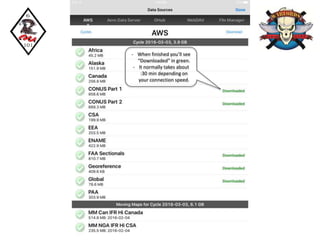
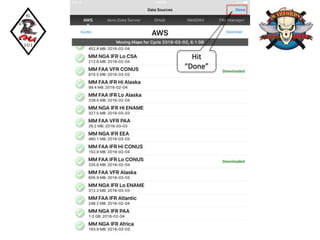
- When finished you’ll see
“Downloaded” in green.
- It normally takes about
:30 min depending on
your connection speed.
Hit
“Done”
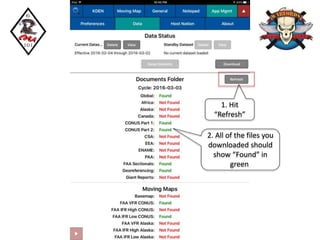
1. Hit
“Refresh”
2. All of the files you
downloaded should
show “Found” in
green.
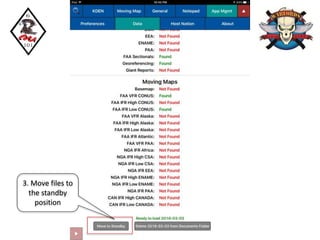
3. Move files to
the standby
position
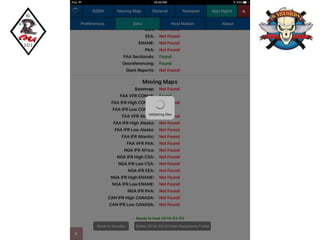
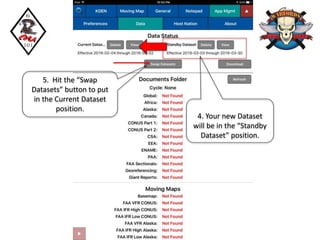
4. Your new Dataset
will be in the “Standby
Dataset” position.
5. Hit the “Swap
Datasets” button to put
in the Current Dataset
position.
You are all up to date for this month!
• Once your new Dataset is installed in the
“Current Dataset” position, all of your maps,
pubs, and procedures will be up to date until the
dataset expires.
• The new datasets are usually available about 1.5
weeks prior to the current dataset expiration.
• If you download it early, just leave it in the
standby dataset position until it’s time to swap.
• 
Conclusion
• Set up an NGA pki enabled account
• Set up a Disadvantaged User name and
password
• Update your Aero App datasets using AWS
and a WiFi connection.
• Play with the Aero and get familiar with it.

Aero app updates how to v1.1510.12

  • 1.
    How to Updatethe NGA Aero App for iPad using Wifi Version 1.1510.12 CW2 Mike Nettleingham
  • 2.
    Overview • General andMinimum Requirements • NGA PKI Enabled Account • NGA GEOAxIS Account • Disadvantaged User Account • Aero App (iOS) • Dataset Updates
  • 3.
    General • 101 CABis moving to a PAPERLESS cockpit • Each MTOE pilot will be issued an iPad mini • It is the INDIVIDUAL AVIATOR’S RESPONSIBILITY TO PERFORM UPDATES • This information is current as of 1 Mar, 2016. The Aero App and NGA websites change frequently so if your app stops working, it’s probably due to an update.
  • 4.
    Minimum Requirements togo Paperless • Each pilot has an iPad with >75% Battery life • Each iPad has Avenza PDF Maps, (NGA) Aero App, and ADOBE Reader apps installed • All digital maps and publications must be current
  • 5.
    Establish an NGApki enabled account • You may establish an NGA (National Geospatial Intelligence Agency) pki enabled account first using your CAC card on a computer. • You can do this from home if you have a CAC reader, or do it at the office on a Mil computer. • It will work on PC or MAC. – Recommend Internet Explorer on PC – Safari on MAC
  • 6.
    Your Name Here Goto: https://pki.geo.nga.mil/ Provide additional Information as requested.
  • 7.
  • 8.
    - You mayuse your TACOPs Officer(s) as the Security Officer and the “Need to Know Approval Information” Approver. - Your Approver will reply to the email from NGA extranet with “Need to know for CW2 XXX XXXXX Approved”
  • 9.
    Disadvantaged User • Afteryou’ve established your NGA account using your CAC card, you must create a “Disadvantaged User” name and password on the Aeroapp website. • This will allow you to log in to your AeroApp on the iPad without using a CAC card • You will need to log on using a WiFi connection to update your apps
  • 10.
    - Google: NGAGEOAXIS - It should be the 1st result; but if not, search for this website: https://geoaxis.nga.mil
  • 11.
    Click on ‘PKICertificate’
  • 12.
    You should getthis screen next. Click on the link
  • 13.
    Your Name Here YourName Here Select the Non-Email Certificate
  • 14.
    - Fill inthe email and Password - You may use your civilian email
  • 15.
    Go to youremail and check for the Validation email from NGA Your Name Your email
  • 16.
    You should nowbe able to use your Disadvantaged User name and password to log into the Aero App on your iPad and perform updates
  • 17.
    Aero App DatasetUpdates Open the Aero App on your iPad
  • 18.
  • 19.
    Login to AWSwith your Disadvantaged User name and Password Disadvantaged username Your password
  • 20.
    Select the currentor future dataset that you want to download
  • 21.
    Select the files youwant to download (complete list on the next slide)
  • 22.
    AWS Files Requiredfor Monthly Dataset Updates CONUS (file size will vary) CONUS Part 1 856.6 MB CONUS Part 2 669.3 MB FAA Sectionals 810.7 MB Georeference 409.6 KB Global 78.6 MB MM FAA VFR CONUS 815.5 MB: (Date) MM FAA IFR Lo CONUS 335.6 MB: (Date) Giant Reports (Date) 301.8 MB: (Date) *MM Basemap Earth (Date) *262.7 MB (Only download if not installed or an update is posted)
  • 23.
    - When finishedyou’ll see “Downloaded” in green. - It normally takes about :30 min depending on your connection speed.
  • 24.
  • 25.
    1. Hit “Refresh” 2. Allof the files you downloaded should show “Found” in green.
  • 26.
    3. Move filesto the standby position
  • 28.
    4. Your newDataset will be in the “Standby Dataset” position. 5. Hit the “Swap Datasets” button to put in the Current Dataset position.
  • 29.
    You are allup to date for this month! • Once your new Dataset is installed in the “Current Dataset” position, all of your maps, pubs, and procedures will be up to date until the dataset expires. • The new datasets are usually available about 1.5 weeks prior to the current dataset expiration. • If you download it early, just leave it in the standby dataset position until it’s time to swap. • 
  • 30.
    Conclusion • Set upan NGA pki enabled account • Set up a Disadvantaged User name and password • Update your Aero App datasets using AWS and a WiFi connection. • Play with the Aero and get familiar with it.