















WHY MOBILE, WHY NOW 
John Shehata 
Exec. Director, Search
#C3NY 
2 
AGENDA 
• Why Mobile, Why Now? 
• Mobile: Site Architecture 
• Mobile: Technical SEO Guidelines 
• Mobile Ranking Factors 
– User Experience 
– Speed/Performance 
– Broken Content 
– Mobile Errors 
• Mobile: App Indexing & Deep Linking 
• Mobile: Social 
• Mobile: Analytics & Tools
Why Mobile, Why Now? 
John Shehata | @JShehata
#C3NY 
4 
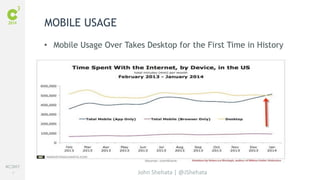
• Mobile Usage Over Takes Desktop for the First Time in History 
John Shehata | @JShehata 
MOBILE USAGE
#C3NY 
5 
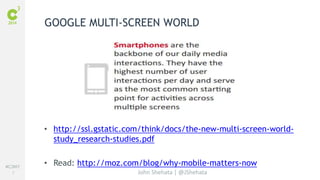
GOOGLE MULTI-SCREEN WORLD 
• http://ssl.gstatic.com/think/docs/the-new-multi-screen-world-study_ 
research-studies.pdf 
• Read: http://moz.com/blog/why-mobile-matters-now 
John Shehata | @JShehata
#C3NY 
6 
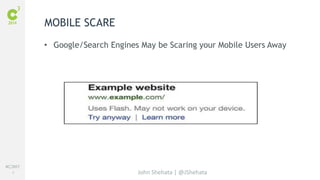
• Google/Search Engines May be Scaring your Mobile Users Away 
John Shehata | @JShehata 
MOBILE SCARE
#C3NY 
7 
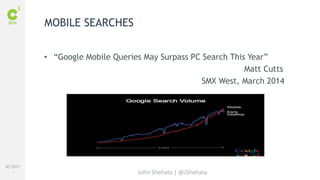
• “Google Mobile Queries May Surpass PC Search This Year” 
John Shehata | @JShehata 
Matt Cutts 
SMX West, March 2014 
MOBILE SEARCHES
#C3NY 
8 
MOBILE-FIRST DESIGN INITIATIVE - GOOGLE 
John Shehata | @JShehata
#C3NY 
9 
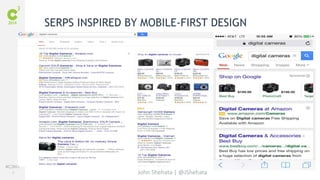
SERPS INSPIRED BY MOBILE-FIRST DESIGN 
John Shehata | @JShehata
#C3NY 
10 
“To improve the search experience for smartphone users 
and address their pain points, we plan to roll out several 
ranking changes in the near future that address sites 
that are misconfigured for smartphone users.“ 
Yoshikiyo Kato, Software Engineer, 
on behalf of Google Mobile Search 
John Shehata | @JShehata 
MOBILE RANKINGS
Mobile: Site Technical Guidelines 
John Shehata | @JShehata
#C3NY 
12 
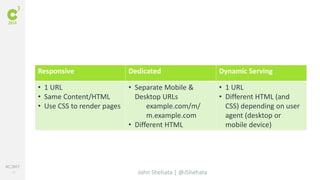
Responsive Dedicated Dynamic Serving 
John Shehata | @JShehata 
• 1 URL 
• Same Content/HTML 
• Use CSS to render pages 
• Separate Mobile & 
Desktop URLs 
example.com/m/ 
m.example.com 
• Different HTML 
• 1 URL 
• Different HTML (and 
CSS) depending on user 
agent (desktop or 
mobile device)
#C3NY 
13 
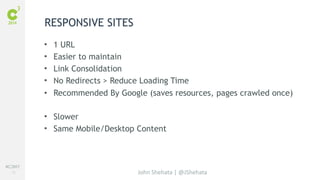
• 1 URL 
• Easier to maintain 
• Link Consolidation 
• No Redirects > Reduce Loading Time 
• Recommended By Google (saves resources, pages crawled once) 
• Slower 
• Same Mobile/Desktop Content 
John Shehata | @JShehata 
RESPONSIVE SITES
#C3NY 
14 
RESPONSIVE SITES - SEO 
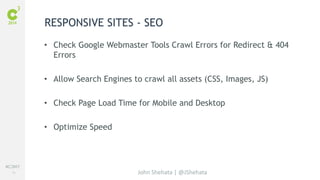
• Check Google Webmaster Tools Crawl Errors for Redirect & 404 
John Shehata | @JShehata 
Errors 
• Allow Search Engines to crawl all assets (CSS, Images, JS) 
• Check Page Load Time for Mobile and Desktop 
• Optimize Speed
#C3NY 
15 
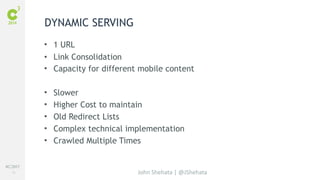
• 1 URL 
• Link Consolidation 
• Capacity for different mobile content 
• Slower 
• Higher Cost to maintain 
• Old Redirect Lists 
• Complex technical implementation 
• Crawled Multiple Times 
John Shehata | @JShehata 
DYNAMIC SERVING
#C3NY 
16 
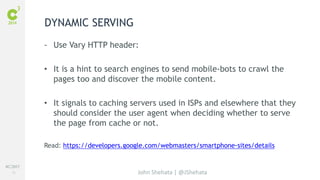
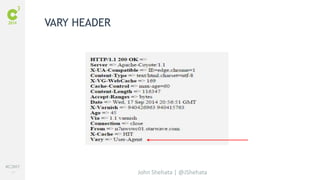
- Use Vary HTTP header: 
• It is a hint to search engines to send mobile-bots to crawl the 
pages too and discover the mobile content. 
• It signals to caching servers used in ISPs and elsewhere that they 
should consider the user agent when deciding whether to serve 
the page from cache or not. 
Read: https://developers.google.com/webmasters/smartphone-sites/details 
John Shehata | @JShehata 
DYNAMIC SERVING
#C3NY 
17 
John Shehata | @JShehata 
VARY HEADER
#C3NY 
18 
AUTOMATIC REDIRECTS AND USER-AGENT 
DETECTION 
• User-agent lists need constant maintenance and updating and will 
not match new user-agents. 
• When matching user-agents, it's common to mismatch. A common 
mistake for sites is to unintentionally treat tablet devices as 
smartphones. 
John Shehata | @JShehata
#C3NY 
19 
AUTOMATIC REDIRECTS AND USER-AGENT 
DETECTION 
• Don’t Cloak: When detecting the user-agent, the site should 
detect the device class or type by looking for the device name in 
the user-agent string; it should not be looking specifically for 
Googlebot (or any other bots). 
• All Googlebot user-agents identify themselves as specific mobile 
devices, and you should treat these Googlebot user-agents 
exactly like you would treat these devices. 
Read: https://developers.google.com/webmasters/smartphone-sites/redirects 
Googlebot- Mobile User-Agents: https://developers.google.com/webmasters/smartphone-sites/ 
John Shehata | @JShehata 
googlebot-mobile
#C3NY 
20 
REDIRECTION TECHNIQUES 
Using HTTP redirection (Recommended) 
• Faster 
• The redirection is done based on the user-agent in the HTTP request 
John Shehata | @JShehata 
headers. 
• It is important to keep the redirection consistent with the 
rel="alternate" tags 
• It does not matter if the server redirects with an HTTP 301 or a 302 
status code, but use of 302 is recommended whenever possible. (Matt 
and Maile recommended it)
#C3NY 
21 
REDIRECTION TECHNIQUES 
Using JavaScript redirects (Not Recommended) 
• Slower 
• The latency caused by the client side redirection (first page is 
downloaded, then JS is parsed and executed before triggering 
the redirect. 
John Shehata | @JShehata
#C3NY 
22 
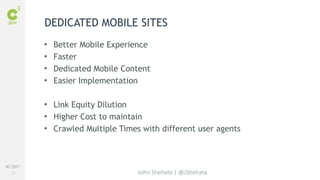
DEDICATED MOBILE SITES 
• Better Mobile Experience 
• Faster 
• Dedicated Mobile Content 
• Easier Implementation 
• Link Equity Dilution 
• Higher Cost to maintain 
• Crawled Multiple Times with different user agents 
John Shehata | @JShehata
#C3NY 
23 
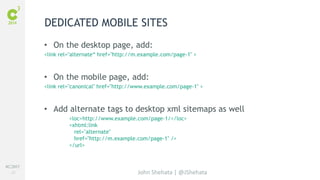
DEDICATED MOBILE SITES 
• On the desktop page, add: 
<link rel="alternate“ href="http://m.example.com/page-1" > 
• On the mobile page, add: 
<link rel="canonical" href="http://www.example.com/page-1" > 
• Add alternate tags to desktop xml sitemaps as well 
<loc>http://www.example.com/page-1/</loc> 
<xhtml:link 
rel="alternate" 
href="http://m.example.com/page-1" /> 
</url> 
John Shehata | @JShehata
#C3NY 
24 
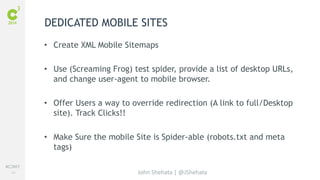
DEDICATED MOBILE SITES 
• Create XML Mobile Sitemaps 
• Use (Screaming Frog) test spider, provide a list of desktop URLs, 
and change user-agent to mobile browser. 
• Offer Users a way to override redirection (A link to full/Desktop 
John Shehata | @JShehata 
site). Track Clicks!! 
• Make Sure the mobile Site is Spider-able (robots.txt and meta 
tags)
#C3NY 
25 
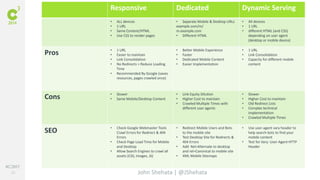
Responsive Dedicated Dynamic Serving 
• ALL devices 
• 1 URL 
• Same Content/HTML 
• Use CSS to render pages 
• Separate Mobile & Desktop URLs 
example.com/m/ 
m.example.com 
• Different HTML 
John Shehata | @JShehata 
• All devices 
• 1 URL 
• different HTML (and CSS) 
depending on user agent 
(desktop or mobile device) 
Pros • 1 URL 
• Easier to maintain 
• Link Consolidation 
• No Redirects > Reduce Loading 
Time 
• Recommended By Google (saves 
resources, pages crawled once) 
• Better Mobile Experience 
• Faster 
• Dedicated Mobile Content 
• Easier Implementation 
• 1 URL 
• Link Consolidation 
• Capacity for different mobile 
content 
Cons • Slower 
• Same Mobile/Desktop Content 
• Link Equity Dilution 
• Higher Cost to maintain 
• Crawled Multiple Times with 
different user agents 
• Slower 
• Higher Cost to maintain 
• Old Redirect Lists 
• Complex technical 
implementation 
• Crawled Multiple Times 
SEO • Check Google Webmaster Tools 
Crawl Errors for Redirect & 404 
Errors 
• Check Page Load Time for Mobile 
and Desktop 
• Allow Search Engines to crawl all 
assets (CSS, Images, JS) 
• Redirect Mobile Users and Bots 
to the mobile site 
• Test Desktop Site for Redirects & 
404 Errors 
• Add Rel=Alternate to desktop 
and rel=Canonical to mobile site 
• XML Mobile Sitemaps 
• Use user-agent vary header to 
help search bots to find your 
mobile content 
• Test for Vary: User-Agent HTTP 
Header
#C3NY 
26 
WORD OF CAUTION 
• Responsive is not the answer to all problems and may not be 
suitable for your site/industry yet!! 
• Googlebot-mobile is only used to crawl feature phones content 
• Googlebot is used to crawl smartphones content 
• If you have no mobile page, show the desktop page 
Read: http://googlewebmastercentral.blogspot.com/2014/01/a-new-googlebot-user-agent- 
John Shehata | @JShehata 
for-crawling.html
#C3NY 
27 
CHANGING CONFIGURATION ON SMARTPHONE 
WEBSITES 
Moving from separate URLs to Same URLs 
• Use 301-redirects 
Moving from Same URLs to Separate URLs 
• Use 302-redirects 
READ: https://developers.google.com/webmasters/smartphone-sites/change-configuration 
John Shehata | @JShehata
#C3NY 
28 
TABLETS 
• Google has no specific recommendations for search engine 
John Shehata | @JShehata 
friendly sites. 
• You can use any of the 3 approaches 
• Serve tablet users the desktop version (or if available, the tablet 
version). 
Read: https://developers.google.com/webmasters/smartphone-sites/tablets
Mobile: Rankings 
John Shehata | @JShehata
#C3NY 
30 
MOBILE RANKING FACTORS 
• SEO Traditional Ranking factors 
• Important Ranking Factors 
John Shehata | @JShehata 
– User Experience 
– Speed/Performance 
• Negative Mobile SEO Factors 
– Mobile Errors 
– Broken Content
Mobile: User Experience 
John Shehata | @JShehata
#C3NY 
32 
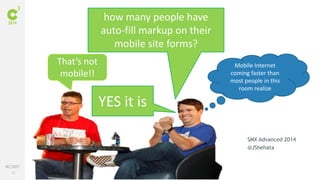
John Shehata | @JShehata 
SMX Advanced 2014 
@JShehata 
how many people have 
auto-fill markup on their 
mobile site forms? 
YES it is 
That’s not 
mobile!! 
Mobile Internet 
coming faster than 
most people in this 
room realize
#C3NY 
33 
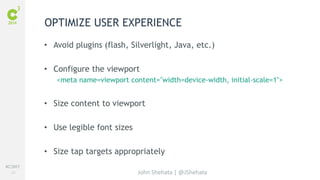
OPTIMIZE USER EXPERIENCE 
• Avoid plugins (flash, Silverlight, Java, etc.) 
• Configure the viewport 
<meta name=viewport content="width=device-width, initial-scale=1"> 
• Size content to viewport 
John Shehata | @JShehata 
• Use legible font sizes 
• Size tap targets appropriately
#C3NY 
34 
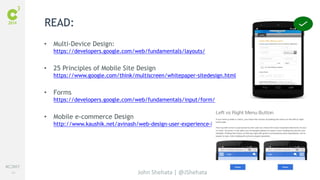
John Shehata | @JShehata 
READ: 
• Multi-Device Design: 
https://developers.google.com/web/fundamentals/layouts/ 
• 25 Principles of Mobile Site Design 
https://www.google.com/think/multiscreen/whitepaper-sitedesign.html 
• Forms 
https://developers.google.com/web/fundamentals/input/form/ 
• Mobile e-commerce Design 
http://www.kaushik.net/avinash/web-design-user-experience-best-practices/
Mobile: Speed / Performance 
John Shehata | @JShehata
#C3NY 
36 
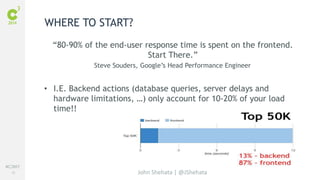
“80-90% of the end-user response time is spent on the frontend. 
Start There.” 
Steve Souders, Google’s Head Performance Engineer 
• I.E. Backend actions (database queries, server delays and 
hardware limitations, …) only account for 10-20% of your load 
time!! 
John Shehata | @JShehata 
WHERE TO START?
#C3NY 
37 
GOOGLE PAGESPEED INSIGHTS TOOL 
John Shehata | @JShehata
#C3NY 
38 
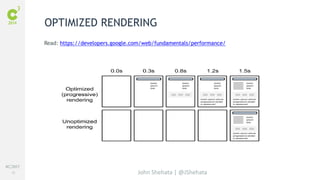
OPTIMIZED RENDERING 
Read: https://developers.google.com/web/fundamentals/performance/ 
John Shehata | @JShehata
#C3NY 
39 
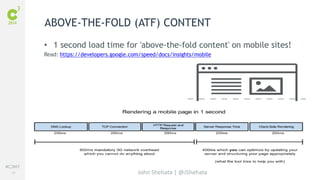
ABOVE-THE-FOLD (ATF) CONTENT 
• 1 second load time for 'above-the-fold content' on mobile sites! 
Read: https://developers.google.com/speed/docs/insights/mobile 
John Shehata | @JShehata
#C3NY 
40 
OPTIMIZE SPEED 
• Avoid Multiple Redirects 
Example.com > www.example.com > m.example.com (slow mobile 
experience) 
• Consolidate DNS requests 
• Enable gzip Compressions (reduces up to 90%) 
• Remove unnecessary / legacy code 
John Shehata | @JShehata 
• Optimize Images 
– Proper formatting and compression 
– Use Web fonts instead of encoding text in images
#C3NY 
41 
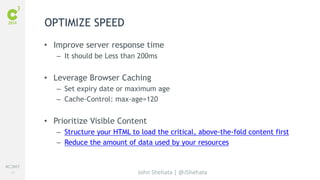
• Improve server response time 
– It should be Less than 200ms 
• Leverage Browser Caching 
– Set expiry date or maximum age 
– Cache-Control: max-age=120 
• Prioritize Visible Content 
– Structure your HTML to load the critical, above-the-fold content first 
– Reduce the amount of data used by your resources 
John Shehata | @JShehata 
OPTIMIZE SPEED
#C3NY 
42 
OPTIMIZE SPEED 
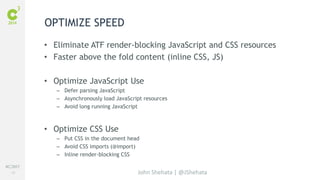
• Eliminate ATF render-blocking JavaScript and CSS resources 
• Faster above the fold content (inline CSS, JS) 
• Optimize JavaScript Use 
– Defer parsing JavaScript 
– Asynchronously load JavaScript resources 
– Avoid long running JavaScript 
John Shehata | @JShehata 
• Optimize CSS Use 
– Put CSS in the document head 
– Avoid CSS imports (@import) 
– Inline render-blocking CSS
#C3NY 
43 
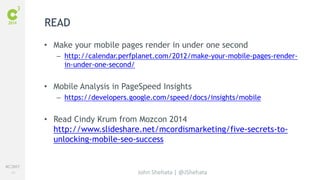
• Make your mobile pages render in under one second 
– http://calendar.perfplanet.com/2012/make-your-mobile-pages-render-in- 
John Shehata | @JShehata 
under-one-second/ 
• Mobile Analysis in PageSpeed Insights 
– https://developers.google.com/speed/docs/insights/mobile 
• Read Cindy Krum from Mozcon 2014 
http://www.slideshare.net/mcordismarketing/five-secrets-to-unlocking- 
mobile-seo-success 
READ
Mobile: Errors 
John Shehata | @JShehata
#C3NY 
45 
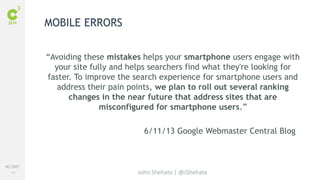
“Avoiding these mistakes helps your smartphone users engage with 
your site fully and helps searchers find what they're looking for 
faster. To improve the search experience for smartphone users and 
address their pain points, we plan to roll out several ranking 
changes in the near future that address sites that are 
misconfigured for smartphone users.” 
6/11/13 Google Webmaster Central Blog 
John Shehata | @JShehata 
MOBILE ERRORS
#C3NY 
46 
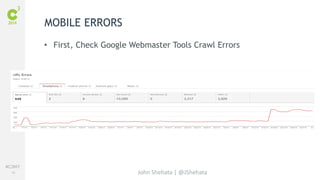
• First, Check Google Webmaster Tools Crawl Errors 
John Shehata | @JShehata 
MOBILE ERRORS
#C3NY 
47 
FAULTY REDIRECTS 
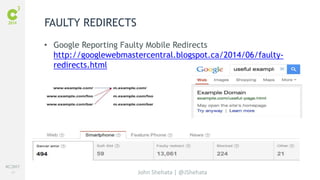
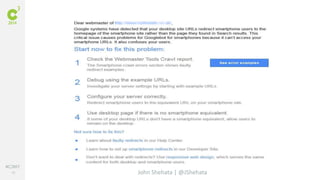
• Google Reporting Faulty Mobile Redirects 
http://googlewebmastercentral.blogspot.ca/2014/06/faulty-redirects. 
John Shehata | @JShehata 
html
#C3NY 
48 
John Shehata | @JShehata
#C3NY 
49 
UNPLAYABLE VIDEOS 
• Verify no flash is used for navigation, videos, or other elements 
John Shehata | @JShehata 
on mobile pages. 
• HTML5 is preferred for video players. 
• Google warns users of incompatible sites. 
• consider having the transcript of the video available on all 
devices as that may better serve your smartphone users.
#C3NY 
50 
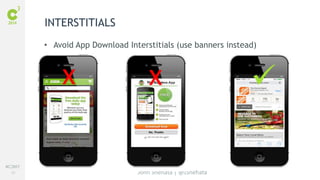
INTERSTITIALS 
x x  
• Avoid App Download Interstitials (use banners instead) 
John Shehata | @JShehata
#C3NY 
51 
MOBILE ERRORS 
• Irrelevant cross-linking between desktop and mobile content 
John Shehata | @JShehata 
• Infinite redirect loops 
– Googlebot-mobile > redirected to feature phones site > redirects to 
smartphone site > redirects to desktop site 
READ: https://developers.google.com/webmasters/smartphone-sites/common-mistakes
Mobile: Broken Content 
John Shehata | @JShehata
#C3NY 
53 
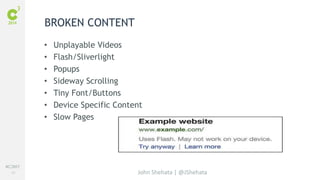
• Unplayable Videos 
• Flash/Sliverlight 
• Popups 
• Sideway Scrolling 
• Tiny Font/Buttons 
• Device Specific Content 
• Slow Pages 
John Shehata | @JShehata 
BROKEN CONTENT
Mobile: App Indexing & Deep-Linking 
John Shehata | @JShehata
#C3NY 
55 
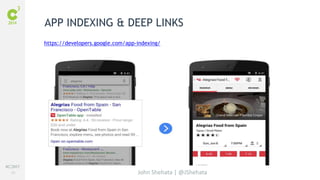
APP INDEXING & DEEP LINKS 
https://developers.google.com/app-indexing/ 
John Shehata | @JShehata
#C3NY 
56 
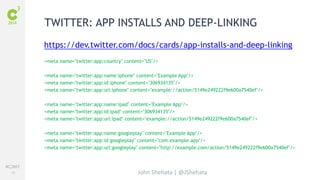
TWITTER: APP INSTALLS AND DEEP-LINKING 
https://dev.twitter.com/docs/cards/app-installs-and-deep-linking 
<meta name="twitter:app:country" content="US"/> 
<meta name="twitter:app:name:iphone" content="Example App"/> 
<meta name="twitter:app:id:iphone" content="306934135"/> 
<meta name="twitter:app:url:iphone" content="example://action/5149e249222f9e600a7540ef"/> 
<meta name="twitter:app:name:ipad" content="Example App"/> 
<meta name="twitter:app:id:ipad" content="306934135"/> 
<meta name="twitter:app:url:ipad" content="example://action/5149e249222f9e600a7540ef"/> 
<meta name="twitter:app:name:googleplay" content="Example App"/> 
<meta name="twitter:app:id:googleplay" content="com.example.app"/> 
<meta name="twitter:app:url:googleplay" content="http://example.com/action/5149e249222f9e600a7540ef"/> 
John Shehata | @JShehata
#C3NY 
57 
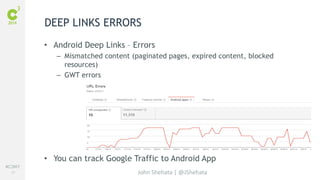
DEEP LINKS ERRORS 
• Android Deep Links – Errors 
– Mismatched content (paginated pages, expired content, blocked 
John Shehata | @JShehata 
resources) 
– GWT errors 
• You can track Google Traffic to Android App
Mobile: Social 
John Shehata | @JShehata
#C3NY 
59 
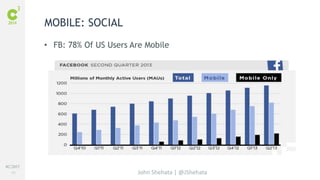
• FB: 78% Of US Users Are Mobile 
John Shehata | @JShehata 
MOBILE: SOCIAL
#C3NY 
60 
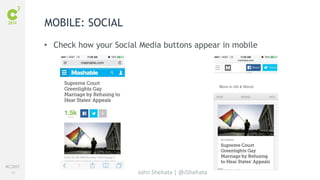
• Check how your Social Media buttons appear in mobile 
John Shehata | @JShehata 
MOBILE: SOCIAL
#C3NY 
61 
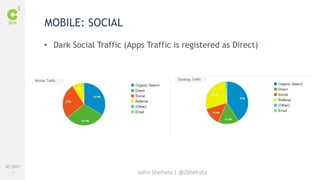
• Dark Social Traffic (Apps Traffic is registered as Direct) 
John Shehata | @JShehata 
MOBILE: SOCIAL
#C3NY 
62 
John Shehata | @JShehata 
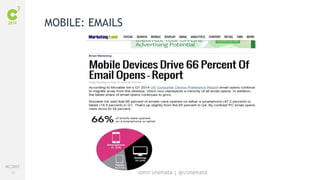
MOBILE: EMAILS
Mobile: Analytics & Tools 
John Shehata | @JShehata
#C3NY 
64 
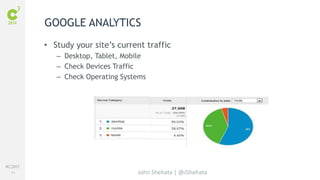
GOOGLE ANALYTICS 
• Study your site’s current traffic 
– Desktop, Tablet, Mobile 
– Check Devices Traffic 
– Check Operating Systems 
John Shehata | @JShehata
#C3NY 
65 
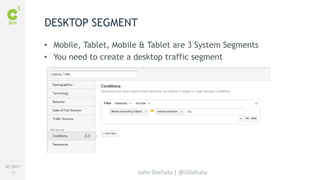
• Mobile, Tablet, Mobile & Tablet are 3 System Segments 
• You need to create a desktop traffic segment 
John Shehata | @JShehata 
DESKTOP SEGMENT
#C3NY 
66 
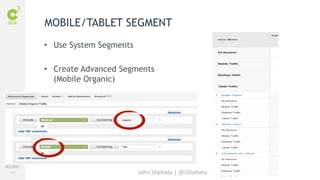
MOBILE/TABLET SEGMENT 
John Shehata | @JShehata 
• Use System Segments 
• Create Advanced Segments 
(Mobile Organic)
#C3NY 
67 
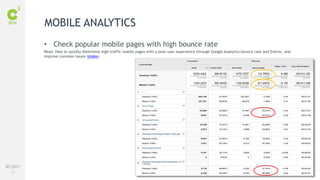
• Check popular mobile pages with high bounce rate 
Read: How to quickly determine high-traffic mobile pages with a poor user experience through Google Analytics bounce rate and Events, and 
improve common issues (slides) 
John Shehata | @JShehata 
MOBILE ANALYTICS
#C3NY 
68 
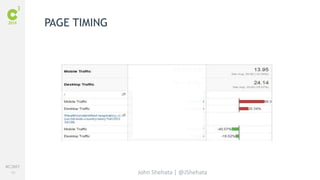
John Shehata | @JShehata 
PAGE TIMING
#C3NY 
69 
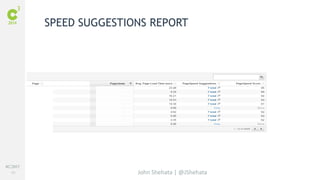
SPEED SUGGESTIONS REPORT 
John Shehata | @JShehata
#C3NY 
70 
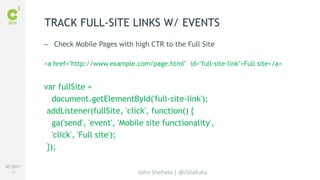
TRACK FULL-SITE LINKS W/ EVENTS 
– Check Mobile Pages with high CTR to the Full Site 
<a href="http://www.example.com/page.html" id="full-site-link">Full site</a> 
var fullSite = 
document.getElementById('full-site-link'); 
addListener(fullSite, 'click', function() { 
ga('send', 'event', 'Mobile site functionality', 
'click', 'Full site'); 
}); 
John Shehata | @JShehata
#C3NY 
71 
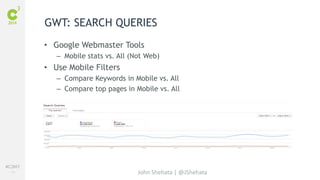
GWT: SEARCH QUERIES 
• Google Webmaster Tools 
– Mobile stats vs. All (Not Web) 
John Shehata | @JShehata 
• Use Mobile Filters 
– Compare Keywords in Mobile vs. All 
– Compare top pages in Mobile vs. All
#C3NY 
72 
GWT: SEARCH QUERIES 
• Check Mobile Keywords & Create Landing Pages 
– Coupons / Discounts / Deals 
– (Product/Brand) Reviews 
– Directions to (brand) 
– Find (brand) Store / Nearest (brand) Store 
– (Restaurant) Menu 
– Prices / Compare prices 
– Hours / Holiday Hours / 24 Hours (brand) 
– (Restaurant) What to Order? 
• Think of unique mobile scenarios for your brand 
– Car Insurance Accident Help/File a Claim 
– Recipes 
John Shehata | @JShehata
#C3NY 
73 
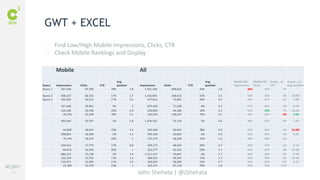
GWT + EXCEL 
- Find Low/High Mobile Impressions, Clicks, CTR 
- Check Mobile Rankings and Display 
Mobile All 
John Shehata | @JShehata 
Query Impressions Clicks CTR 
Avg. 
position Impressions Clicks CTR 
Avg. 
position 
Mobile/All 
Impressions 
Mobile/All 
Clicks 
Mobile - all 
CTR 
Mobile – all 
Avg. position 
Query 1 347,746 97,796 28% 1.8 1,761,196 609,622 35% 1.8 20% 16% -7% - 
Query 2 409,327 68,743 17% 2.7 1,146,903 268,013 23% 3.5 36% 26% -6% (0.80) 
Query 3 205,923 34,515 17% 5.5 417,812 73,891 18% 4.5 49% 47% -1% 1.00 
327,460 30,901 9% 3 875,403 71,638 8% 2.5 37% 43% 1% 0.50 
120,146 30,790 26% 2.9 229,856 44,186 19% 3.1 52% 70% 7% (0.20) 
36,276 25,349 70% 5.1 163,032 128,247 79% 2.1 22% 20% -9% 3.00 
492,042 23,797 5% 5.8 1,376,322 75,176 5% 4.6 36% 32% 0% 1.20 
44,609 18,614 42% 1.4 105,240 40,431 38% 5.6 42% 46% 4% (4.20) 
398,801 18,389 5% 4.1 949,446 52,844 6% 3.6 42% 35% -1% 0.50 
75,744 18,353 24% 1 157,273 38,309 24% 1.0 48% 48% 0% - 
104,610 17,775 17% 6.8 245,271 48,502 20% 4.7 43% 37% -3% 2.10 
84,912 16,565 20% 1 323,577 63,522 20% 1.1 26% 26% 0% (0.10) 
480,131 15,738 3% 1.9 1,117,137 70,847 6% 1.7 43% 22% -3% 0.20 
122,329 13,752 11% 1.3 368,591 49,343 13% 1.7 33% 28% -2% (0.40) 
116,071 12,695 11% 3.4 363,641 58,960 16% 2.7 32% 22% -5% 0.70 
23,389 12,470 53% 1 125,271 87,118 70% 1.0 19% 14% -17% -
#C3NY 
74 
John Shehata | @JShehata 
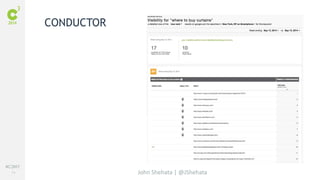
CONDUCTOR
#C3NY 
75 
John Shehata | @JShehata 
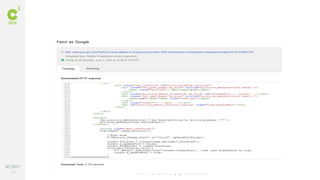
GOOGLE FETCH
#C3NY 
76 
John Shehata | @JShehata
#C3NY 
77 
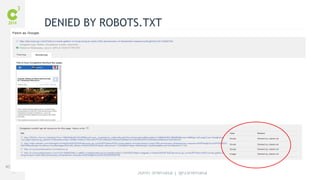
DENIED BY ROBOTS.TXT 
John Shehata | @JShehata
#C3NY 
78 
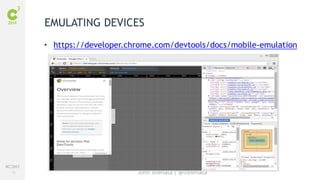
EMULATING DEVICES 
• https://developer.chrome.com/devtools/docs/mobile-emulation 
John Shehata | @JShehata
#C3NY 
79 
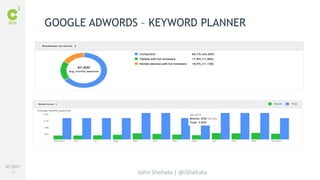
GOOGLE ADWORDS – KEYWORD PLANNER 
John Shehata | @JShehata
#C3NY 
80 
John Shehata | @JShehata 
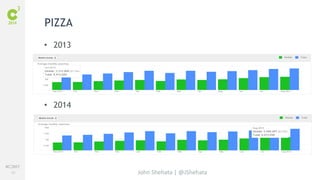
PIZZA 
• 2013 
• 2014
#C3NY 
81 
John Shehata | @JShehata 
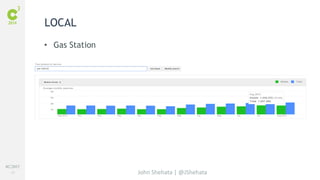
LOCAL 
• Gas Station
#C3NY 
82 
• http://mobitest.akamai.com/ 
• http://validator.w3.org/mobile/ 
• Browser Extension user-agent switcher 
• http://developers.google.com/speed/pagespeed/insights/ 
John Shehata | @JShehata 
MORE TOOLS
<Mobile /> 
John Shehata | @JShehata
#C3NY 
84 
• Choose the site structure Wisely. Responsive is not the answer for 
John Shehata | @JShehata 
all your problems!! 
• Fix broken content and faulty redirects 
• User experience is important 
• Optimize above the fold rendering 
• Local Businesses: Take Mobile Seriously 
• Check your money/important rankings regularly in Mobile SERPs 
• Check how your results look in mobile SERPs 
• Mobile Ads & Mobile Landing Pages 
• Mobile first doesn’t mean just mobile
Thank You 
John Shehata 
@JShehata 
John Shehata | @JShehata

Advanced Mobile SEO - John Shehata - C3 2014

  • 1.
    WHY MOBILE, WHYNOW John Shehata Exec. Director, Search
  • 2.
    #C3NY 2 AGENDA • Why Mobile, Why Now? • Mobile: Site Architecture • Mobile: Technical SEO Guidelines • Mobile Ranking Factors – User Experience – Speed/Performance – Broken Content – Mobile Errors • Mobile: App Indexing & Deep Linking • Mobile: Social • Mobile: Analytics & Tools
  • 3.
    Why Mobile, WhyNow? John Shehata | @JShehata
  • 4.
    #C3NY 4 •Mobile Usage Over Takes Desktop for the First Time in History John Shehata | @JShehata MOBILE USAGE
  • 5.
    #C3NY 5 GOOGLEMULTI-SCREEN WORLD • http://ssl.gstatic.com/think/docs/the-new-multi-screen-world-study_ research-studies.pdf • Read: http://moz.com/blog/why-mobile-matters-now John Shehata | @JShehata
  • 6.
    #C3NY 6 •Google/Search Engines May be Scaring your Mobile Users Away John Shehata | @JShehata MOBILE SCARE
  • 7.
    #C3NY 7 •“Google Mobile Queries May Surpass PC Search This Year” John Shehata | @JShehata Matt Cutts SMX West, March 2014 MOBILE SEARCHES
  • 8.
    #C3NY 8 MOBILE-FIRSTDESIGN INITIATIVE - GOOGLE John Shehata | @JShehata
  • 9.
    #C3NY 9 SERPSINSPIRED BY MOBILE-FIRST DESIGN John Shehata | @JShehata
  • 10.
    #C3NY 10 “Toimprove the search experience for smartphone users and address their pain points, we plan to roll out several ranking changes in the near future that address sites that are misconfigured for smartphone users.“ Yoshikiyo Kato, Software Engineer, on behalf of Google Mobile Search John Shehata | @JShehata MOBILE RANKINGS
  • 11.
    Mobile: Site TechnicalGuidelines John Shehata | @JShehata
  • 12.
    #C3NY 12 ResponsiveDedicated Dynamic Serving John Shehata | @JShehata • 1 URL • Same Content/HTML • Use CSS to render pages • Separate Mobile & Desktop URLs example.com/m/ m.example.com • Different HTML • 1 URL • Different HTML (and CSS) depending on user agent (desktop or mobile device)
  • 13.
    #C3NY 13 •1 URL • Easier to maintain • Link Consolidation • No Redirects > Reduce Loading Time • Recommended By Google (saves resources, pages crawled once) • Slower • Same Mobile/Desktop Content John Shehata | @JShehata RESPONSIVE SITES
  • 14.
    #C3NY 14 RESPONSIVESITES - SEO • Check Google Webmaster Tools Crawl Errors for Redirect & 404 John Shehata | @JShehata Errors • Allow Search Engines to crawl all assets (CSS, Images, JS) • Check Page Load Time for Mobile and Desktop • Optimize Speed
  • 15.
    #C3NY 15 •1 URL • Link Consolidation • Capacity for different mobile content • Slower • Higher Cost to maintain • Old Redirect Lists • Complex technical implementation • Crawled Multiple Times John Shehata | @JShehata DYNAMIC SERVING
  • 16.
    #C3NY 16 -Use Vary HTTP header: • It is a hint to search engines to send mobile-bots to crawl the pages too and discover the mobile content. • It signals to caching servers used in ISPs and elsewhere that they should consider the user agent when deciding whether to serve the page from cache or not. Read: https://developers.google.com/webmasters/smartphone-sites/details John Shehata | @JShehata DYNAMIC SERVING
  • 17.
    #C3NY 17 JohnShehata | @JShehata VARY HEADER
  • 18.
    #C3NY 18 AUTOMATICREDIRECTS AND USER-AGENT DETECTION • User-agent lists need constant maintenance and updating and will not match new user-agents. • When matching user-agents, it's common to mismatch. A common mistake for sites is to unintentionally treat tablet devices as smartphones. John Shehata | @JShehata
  • 19.
    #C3NY 19 AUTOMATICREDIRECTS AND USER-AGENT DETECTION • Don’t Cloak: When detecting the user-agent, the site should detect the device class or type by looking for the device name in the user-agent string; it should not be looking specifically for Googlebot (or any other bots). • All Googlebot user-agents identify themselves as specific mobile devices, and you should treat these Googlebot user-agents exactly like you would treat these devices. Read: https://developers.google.com/webmasters/smartphone-sites/redirects Googlebot- Mobile User-Agents: https://developers.google.com/webmasters/smartphone-sites/ John Shehata | @JShehata googlebot-mobile
  • 20.
    #C3NY 20 REDIRECTIONTECHNIQUES Using HTTP redirection (Recommended) • Faster • The redirection is done based on the user-agent in the HTTP request John Shehata | @JShehata headers. • It is important to keep the redirection consistent with the rel="alternate" tags • It does not matter if the server redirects with an HTTP 301 or a 302 status code, but use of 302 is recommended whenever possible. (Matt and Maile recommended it)
  • 21.
    #C3NY 21 REDIRECTIONTECHNIQUES Using JavaScript redirects (Not Recommended) • Slower • The latency caused by the client side redirection (first page is downloaded, then JS is parsed and executed before triggering the redirect. John Shehata | @JShehata
  • 22.
    #C3NY 22 DEDICATEDMOBILE SITES • Better Mobile Experience • Faster • Dedicated Mobile Content • Easier Implementation • Link Equity Dilution • Higher Cost to maintain • Crawled Multiple Times with different user agents John Shehata | @JShehata
  • 23.
    #C3NY 23 DEDICATEDMOBILE SITES • On the desktop page, add: <link rel="alternate“ href="http://m.example.com/page-1" > • On the mobile page, add: <link rel="canonical" href="http://www.example.com/page-1" > • Add alternate tags to desktop xml sitemaps as well <loc>http://www.example.com/page-1/</loc> <xhtml:link rel="alternate" href="http://m.example.com/page-1" /> </url> John Shehata | @JShehata
  • 24.
    #C3NY 24 DEDICATEDMOBILE SITES • Create XML Mobile Sitemaps • Use (Screaming Frog) test spider, provide a list of desktop URLs, and change user-agent to mobile browser. • Offer Users a way to override redirection (A link to full/Desktop John Shehata | @JShehata site). Track Clicks!! • Make Sure the mobile Site is Spider-able (robots.txt and meta tags)
  • 25.
    #C3NY 25 ResponsiveDedicated Dynamic Serving • ALL devices • 1 URL • Same Content/HTML • Use CSS to render pages • Separate Mobile & Desktop URLs example.com/m/ m.example.com • Different HTML John Shehata | @JShehata • All devices • 1 URL • different HTML (and CSS) depending on user agent (desktop or mobile device) Pros • 1 URL • Easier to maintain • Link Consolidation • No Redirects > Reduce Loading Time • Recommended By Google (saves resources, pages crawled once) • Better Mobile Experience • Faster • Dedicated Mobile Content • Easier Implementation • 1 URL • Link Consolidation • Capacity for different mobile content Cons • Slower • Same Mobile/Desktop Content • Link Equity Dilution • Higher Cost to maintain • Crawled Multiple Times with different user agents • Slower • Higher Cost to maintain • Old Redirect Lists • Complex technical implementation • Crawled Multiple Times SEO • Check Google Webmaster Tools Crawl Errors for Redirect & 404 Errors • Check Page Load Time for Mobile and Desktop • Allow Search Engines to crawl all assets (CSS, Images, JS) • Redirect Mobile Users and Bots to the mobile site • Test Desktop Site for Redirects & 404 Errors • Add Rel=Alternate to desktop and rel=Canonical to mobile site • XML Mobile Sitemaps • Use user-agent vary header to help search bots to find your mobile content • Test for Vary: User-Agent HTTP Header
  • 26.
    #C3NY 26 WORDOF CAUTION • Responsive is not the answer to all problems and may not be suitable for your site/industry yet!! • Googlebot-mobile is only used to crawl feature phones content • Googlebot is used to crawl smartphones content • If you have no mobile page, show the desktop page Read: http://googlewebmastercentral.blogspot.com/2014/01/a-new-googlebot-user-agent- John Shehata | @JShehata for-crawling.html
  • 27.
    #C3NY 27 CHANGINGCONFIGURATION ON SMARTPHONE WEBSITES Moving from separate URLs to Same URLs • Use 301-redirects Moving from Same URLs to Separate URLs • Use 302-redirects READ: https://developers.google.com/webmasters/smartphone-sites/change-configuration John Shehata | @JShehata
  • 28.
    #C3NY 28 TABLETS • Google has no specific recommendations for search engine John Shehata | @JShehata friendly sites. • You can use any of the 3 approaches • Serve tablet users the desktop version (or if available, the tablet version). Read: https://developers.google.com/webmasters/smartphone-sites/tablets
  • 29.
    Mobile: Rankings JohnShehata | @JShehata
  • 30.
    #C3NY 30 MOBILERANKING FACTORS • SEO Traditional Ranking factors • Important Ranking Factors John Shehata | @JShehata – User Experience – Speed/Performance • Negative Mobile SEO Factors – Mobile Errors – Broken Content
  • 31.
    Mobile: User Experience John Shehata | @JShehata
  • 32.
    #C3NY 32 JohnShehata | @JShehata SMX Advanced 2014 @JShehata how many people have auto-fill markup on their mobile site forms? YES it is That’s not mobile!! Mobile Internet coming faster than most people in this room realize
  • 33.
    #C3NY 33 OPTIMIZEUSER EXPERIENCE • Avoid plugins (flash, Silverlight, Java, etc.) • Configure the viewport <meta name=viewport content="width=device-width, initial-scale=1"> • Size content to viewport John Shehata | @JShehata • Use legible font sizes • Size tap targets appropriately
  • 34.
    #C3NY 34 JohnShehata | @JShehata READ: • Multi-Device Design: https://developers.google.com/web/fundamentals/layouts/ • 25 Principles of Mobile Site Design https://www.google.com/think/multiscreen/whitepaper-sitedesign.html • Forms https://developers.google.com/web/fundamentals/input/form/ • Mobile e-commerce Design http://www.kaushik.net/avinash/web-design-user-experience-best-practices/
  • 35.
    Mobile: Speed /Performance John Shehata | @JShehata
  • 36.
    #C3NY 36 “80-90%of the end-user response time is spent on the frontend. Start There.” Steve Souders, Google’s Head Performance Engineer • I.E. Backend actions (database queries, server delays and hardware limitations, …) only account for 10-20% of your load time!! John Shehata | @JShehata WHERE TO START?
  • 37.
    #C3NY 37 GOOGLEPAGESPEED INSIGHTS TOOL John Shehata | @JShehata
  • 38.
    #C3NY 38 OPTIMIZEDRENDERING Read: https://developers.google.com/web/fundamentals/performance/ John Shehata | @JShehata
  • 39.
    #C3NY 39 ABOVE-THE-FOLD(ATF) CONTENT • 1 second load time for 'above-the-fold content' on mobile sites! Read: https://developers.google.com/speed/docs/insights/mobile John Shehata | @JShehata
  • 40.
    #C3NY 40 OPTIMIZESPEED • Avoid Multiple Redirects Example.com > www.example.com > m.example.com (slow mobile experience) • Consolidate DNS requests • Enable gzip Compressions (reduces up to 90%) • Remove unnecessary / legacy code John Shehata | @JShehata • Optimize Images – Proper formatting and compression – Use Web fonts instead of encoding text in images
  • 41.
    #C3NY 41 •Improve server response time – It should be Less than 200ms • Leverage Browser Caching – Set expiry date or maximum age – Cache-Control: max-age=120 • Prioritize Visible Content – Structure your HTML to load the critical, above-the-fold content first – Reduce the amount of data used by your resources John Shehata | @JShehata OPTIMIZE SPEED
  • 42.
    #C3NY 42 OPTIMIZESPEED • Eliminate ATF render-blocking JavaScript and CSS resources • Faster above the fold content (inline CSS, JS) • Optimize JavaScript Use – Defer parsing JavaScript – Asynchronously load JavaScript resources – Avoid long running JavaScript John Shehata | @JShehata • Optimize CSS Use – Put CSS in the document head – Avoid CSS imports (@import) – Inline render-blocking CSS
  • 43.
    #C3NY 43 •Make your mobile pages render in under one second – http://calendar.perfplanet.com/2012/make-your-mobile-pages-render-in- John Shehata | @JShehata under-one-second/ • Mobile Analysis in PageSpeed Insights – https://developers.google.com/speed/docs/insights/mobile • Read Cindy Krum from Mozcon 2014 http://www.slideshare.net/mcordismarketing/five-secrets-to-unlocking- mobile-seo-success READ
  • 44.
    Mobile: Errors JohnShehata | @JShehata
  • 45.
    #C3NY 45 “Avoidingthese mistakes helps your smartphone users engage with your site fully and helps searchers find what they're looking for faster. To improve the search experience for smartphone users and address their pain points, we plan to roll out several ranking changes in the near future that address sites that are misconfigured for smartphone users.” 6/11/13 Google Webmaster Central Blog John Shehata | @JShehata MOBILE ERRORS
  • 46.
    #C3NY 46 •First, Check Google Webmaster Tools Crawl Errors John Shehata | @JShehata MOBILE ERRORS
  • 47.
    #C3NY 47 FAULTYREDIRECTS • Google Reporting Faulty Mobile Redirects http://googlewebmastercentral.blogspot.ca/2014/06/faulty-redirects. John Shehata | @JShehata html
  • 48.
    #C3NY 48 JohnShehata | @JShehata
  • 49.
    #C3NY 49 UNPLAYABLEVIDEOS • Verify no flash is used for navigation, videos, or other elements John Shehata | @JShehata on mobile pages. • HTML5 is preferred for video players. • Google warns users of incompatible sites. • consider having the transcript of the video available on all devices as that may better serve your smartphone users.
  • 50.
    #C3NY 50 INTERSTITIALS x x  • Avoid App Download Interstitials (use banners instead) John Shehata | @JShehata
  • 51.
    #C3NY 51 MOBILEERRORS • Irrelevant cross-linking between desktop and mobile content John Shehata | @JShehata • Infinite redirect loops – Googlebot-mobile > redirected to feature phones site > redirects to smartphone site > redirects to desktop site READ: https://developers.google.com/webmasters/smartphone-sites/common-mistakes
  • 52.
    Mobile: Broken Content John Shehata | @JShehata
  • 53.
    #C3NY 53 •Unplayable Videos • Flash/Sliverlight • Popups • Sideway Scrolling • Tiny Font/Buttons • Device Specific Content • Slow Pages John Shehata | @JShehata BROKEN CONTENT
  • 54.
    Mobile: App Indexing& Deep-Linking John Shehata | @JShehata
  • 55.
    #C3NY 55 APPINDEXING & DEEP LINKS https://developers.google.com/app-indexing/ John Shehata | @JShehata
  • 56.
    #C3NY 56 TWITTER:APP INSTALLS AND DEEP-LINKING https://dev.twitter.com/docs/cards/app-installs-and-deep-linking <meta name="twitter:app:country" content="US"/> <meta name="twitter:app:name:iphone" content="Example App"/> <meta name="twitter:app:id:iphone" content="306934135"/> <meta name="twitter:app:url:iphone" content="example://action/5149e249222f9e600a7540ef"/> <meta name="twitter:app:name:ipad" content="Example App"/> <meta name="twitter:app:id:ipad" content="306934135"/> <meta name="twitter:app:url:ipad" content="example://action/5149e249222f9e600a7540ef"/> <meta name="twitter:app:name:googleplay" content="Example App"/> <meta name="twitter:app:id:googleplay" content="com.example.app"/> <meta name="twitter:app:url:googleplay" content="http://example.com/action/5149e249222f9e600a7540ef"/> John Shehata | @JShehata
  • 57.
    #C3NY 57 DEEPLINKS ERRORS • Android Deep Links – Errors – Mismatched content (paginated pages, expired content, blocked John Shehata | @JShehata resources) – GWT errors • You can track Google Traffic to Android App
  • 58.
    Mobile: Social JohnShehata | @JShehata
  • 59.
    #C3NY 59 •FB: 78% Of US Users Are Mobile John Shehata | @JShehata MOBILE: SOCIAL
  • 60.
    #C3NY 60 •Check how your Social Media buttons appear in mobile John Shehata | @JShehata MOBILE: SOCIAL
  • 61.
    #C3NY 61 •Dark Social Traffic (Apps Traffic is registered as Direct) John Shehata | @JShehata MOBILE: SOCIAL
  • 62.
    #C3NY 62 JohnShehata | @JShehata MOBILE: EMAILS
  • 63.
    Mobile: Analytics &Tools John Shehata | @JShehata
  • 64.
    #C3NY 64 GOOGLEANALYTICS • Study your site’s current traffic – Desktop, Tablet, Mobile – Check Devices Traffic – Check Operating Systems John Shehata | @JShehata
  • 65.
    #C3NY 65 •Mobile, Tablet, Mobile & Tablet are 3 System Segments • You need to create a desktop traffic segment John Shehata | @JShehata DESKTOP SEGMENT
  • 66.
    #C3NY 66 MOBILE/TABLETSEGMENT John Shehata | @JShehata • Use System Segments • Create Advanced Segments (Mobile Organic)
  • 67.
    #C3NY 67 •Check popular mobile pages with high bounce rate Read: How to quickly determine high-traffic mobile pages with a poor user experience through Google Analytics bounce rate and Events, and improve common issues (slides) John Shehata | @JShehata MOBILE ANALYTICS
  • 68.
    #C3NY 68 JohnShehata | @JShehata PAGE TIMING
  • 69.
    #C3NY 69 SPEEDSUGGESTIONS REPORT John Shehata | @JShehata
  • 70.
    #C3NY 70 TRACKFULL-SITE LINKS W/ EVENTS – Check Mobile Pages with high CTR to the Full Site <a href="http://www.example.com/page.html" id="full-site-link">Full site</a> var fullSite = document.getElementById('full-site-link'); addListener(fullSite, 'click', function() { ga('send', 'event', 'Mobile site functionality', 'click', 'Full site'); }); John Shehata | @JShehata
  • 71.
    #C3NY 71 GWT:SEARCH QUERIES • Google Webmaster Tools – Mobile stats vs. All (Not Web) John Shehata | @JShehata • Use Mobile Filters – Compare Keywords in Mobile vs. All – Compare top pages in Mobile vs. All
  • 72.
    #C3NY 72 GWT:SEARCH QUERIES • Check Mobile Keywords & Create Landing Pages – Coupons / Discounts / Deals – (Product/Brand) Reviews – Directions to (brand) – Find (brand) Store / Nearest (brand) Store – (Restaurant) Menu – Prices / Compare prices – Hours / Holiday Hours / 24 Hours (brand) – (Restaurant) What to Order? • Think of unique mobile scenarios for your brand – Car Insurance Accident Help/File a Claim – Recipes John Shehata | @JShehata
  • 73.
    #C3NY 73 GWT+ EXCEL - Find Low/High Mobile Impressions, Clicks, CTR - Check Mobile Rankings and Display Mobile All John Shehata | @JShehata Query Impressions Clicks CTR Avg. position Impressions Clicks CTR Avg. position Mobile/All Impressions Mobile/All Clicks Mobile - all CTR Mobile – all Avg. position Query 1 347,746 97,796 28% 1.8 1,761,196 609,622 35% 1.8 20% 16% -7% - Query 2 409,327 68,743 17% 2.7 1,146,903 268,013 23% 3.5 36% 26% -6% (0.80) Query 3 205,923 34,515 17% 5.5 417,812 73,891 18% 4.5 49% 47% -1% 1.00 327,460 30,901 9% 3 875,403 71,638 8% 2.5 37% 43% 1% 0.50 120,146 30,790 26% 2.9 229,856 44,186 19% 3.1 52% 70% 7% (0.20) 36,276 25,349 70% 5.1 163,032 128,247 79% 2.1 22% 20% -9% 3.00 492,042 23,797 5% 5.8 1,376,322 75,176 5% 4.6 36% 32% 0% 1.20 44,609 18,614 42% 1.4 105,240 40,431 38% 5.6 42% 46% 4% (4.20) 398,801 18,389 5% 4.1 949,446 52,844 6% 3.6 42% 35% -1% 0.50 75,744 18,353 24% 1 157,273 38,309 24% 1.0 48% 48% 0% - 104,610 17,775 17% 6.8 245,271 48,502 20% 4.7 43% 37% -3% 2.10 84,912 16,565 20% 1 323,577 63,522 20% 1.1 26% 26% 0% (0.10) 480,131 15,738 3% 1.9 1,117,137 70,847 6% 1.7 43% 22% -3% 0.20 122,329 13,752 11% 1.3 368,591 49,343 13% 1.7 33% 28% -2% (0.40) 116,071 12,695 11% 3.4 363,641 58,960 16% 2.7 32% 22% -5% 0.70 23,389 12,470 53% 1 125,271 87,118 70% 1.0 19% 14% -17% -
  • 74.
    #C3NY 74 JohnShehata | @JShehata CONDUCTOR
  • 75.
    #C3NY 75 JohnShehata | @JShehata GOOGLE FETCH
  • 76.
    #C3NY 76 JohnShehata | @JShehata
  • 77.
    #C3NY 77 DENIEDBY ROBOTS.TXT John Shehata | @JShehata
  • 78.
    #C3NY 78 EMULATINGDEVICES • https://developer.chrome.com/devtools/docs/mobile-emulation John Shehata | @JShehata
  • 79.
    #C3NY 79 GOOGLEADWORDS – KEYWORD PLANNER John Shehata | @JShehata
  • 80.
    #C3NY 80 JohnShehata | @JShehata PIZZA • 2013 • 2014
  • 81.
    #C3NY 81 JohnShehata | @JShehata LOCAL • Gas Station
  • 82.
    #C3NY 82 •http://mobitest.akamai.com/ • http://validator.w3.org/mobile/ • Browser Extension user-agent switcher • http://developers.google.com/speed/pagespeed/insights/ John Shehata | @JShehata MORE TOOLS
  • 83.
    <Mobile /> JohnShehata | @JShehata
  • 84.
    #C3NY 84 •Choose the site structure Wisely. Responsive is not the answer for John Shehata | @JShehata all your problems!! • Fix broken content and faulty redirects • User experience is important • Optimize above the fold rendering • Local Businesses: Take Mobile Seriously • Check your money/important rankings regularly in Mobile SERPs • Check how your results look in mobile SERPs • Mobile Ads & Mobile Landing Pages • Mobile first doesn’t mean just mobile
  • 85.
    Thank You JohnShehata @JShehata John Shehata | @JShehata

Editor's Notes

  • #39 Wordpress requires retreiving all data from DB, assets for it to load
  • #41 How a browser loads a webpage Browser downloads HTML file It parses (looks through) the HTML It encounters something it must load (image, external CSS file, etc.) and stops parsing HTML It loads the external resource If external resource is CSS or Javascript it then parses that file It then continues to parse the HTML until it comes to another resource that must be loaded
  • #42 How a browser loads a webpage Browser downloads HTML file It parses (looks through) the HTML It encounters something it must load (image, external CSS file, etc.) and stops parsing HTML It loads the external resource If external resource is CSS or Javascript it then parses that file It then continues to parse the HTML until it comes to another resource that must be loaded
  • #43 How a browser loads a webpage Browser downloads HTML file It parses (looks through) the HTML It encounters something it must load (image, external CSS file, etc.) and stops parsing HTML It loads the external resource If external resource is CSS or Javascript it then parses that file It then continues to parse the HTML until it comes to another resource that must be loaded