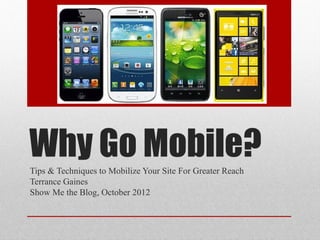
Why Go Mobile?
Tips & Techniques to Mobilize Your Site For Greater Reach
Terrance Gaines
Show Me the Blog, October 2012
• Why you’re site should be mobile-friendly
• Different methods to mobilize your site
• How to decide which method is best for you


      What You’ll Learn
Terrance (BrothaTech) Gaines

•Tech Blogger
•Freelance Tech Contributor
•Technology Concierge

•…and I fix cracked smartphones!


      About BrothaTech
Percentage of People who ONLY browse the web
                via a mobile device worldwide

•   UK 22%
•   US 25%
•   China 30%
•   South Africa 57%
•   India 59%
•   Egypt 70%

Source: http://ondeviceresearch.com/blog
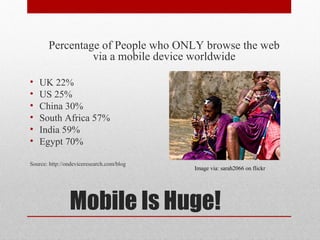
                                           Image via: sarah2066 on flickr


                Mobile Is Huge!
In the US/UK, over 90% of phones are
           internet-ready

 Mobile is fast becoming the primary
   way people browse the web!


Have Access, Will Travel
• Take advantage of increasing numbers of people
  browsing the web on mobile devices


     Why Go Mobile #1
Why share your site’s content?

Promote & expand your brand

Engage & interact with readers
•Convert to followers/customers


        Sharing is Caring
Links Dominate Social Networks


      Links a Plenty
People are Lazy


•Don’t want to pinch and zoom

•Want to read and keep it movin’


 Make your content the star of the
             show


        Content Is King In Mobile
• Take advantage of increasing numbers of people
  browsing the web on mobile devices

• Make it easy for visitors to access/interact with
  your content


Why Go Mobile #2
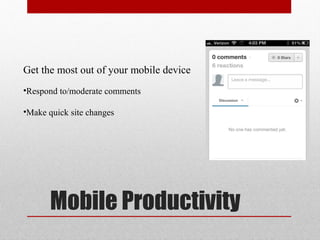
Get the most out of your mobile device
•Respond to/moderate comments

•Make quick site changes


       Mobile Productivity
• Take advantage of increasing numbers of people
  browsing the web on mobile devices


• Make it easy for visitors to access/interact with
  your content


• Make it easy to manage your content


Why Go Mobile #3
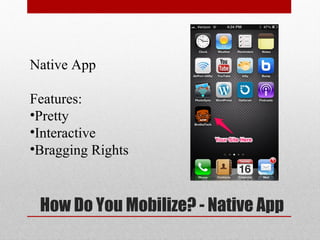
Native App

Features:
•Pretty
•Interactive
•Bragging Rights


 How Do You Mobilize? - Native App
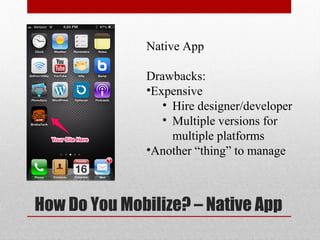
Native App

              Drawbacks:
              •Expensive
                 • Hire designer/developer
                 • Multiple versions for
                   multiple platforms
              •Another “thing” to manage


How Do You Mobilize? – Native App
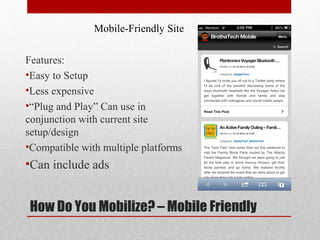
Mobile-Friendly Site

Features:
•Easy to Setup
•Less expensive
•“Plug and Play” Can use in
conjunction with current site
setup/design
•Compatible with multiple platforms
•Can include ads


How Do You Mobilize? – Mobile Friendly
Mobile-Friendly Site Option #1: Plugins
Manage Mobile version right from blog dashboard
Get right to the content (no pinch & zoom)
                   WPTouch Plugin http://techb.ro/WPTouchPlugin


        Homepage                       Content                    Comments
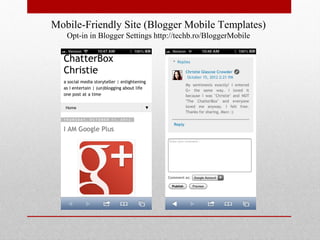
Mobile-Friendly Site (Blogger Mobile Templates)
   Opt-in in Blogger Settings http://techb.ro/BloggerMobile
Mobile-Friendly Site
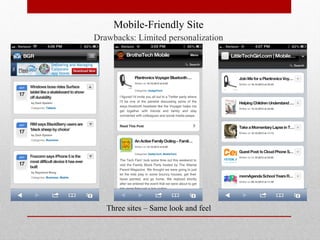
Drawbacks: Limited personalization


   Three sites – Same look and feel
Mobile-Friendly Site Option #2: Third-Party Templates
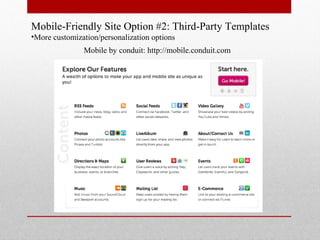
•More customization/personalization options
               Mobile by conduit: http://mobile.conduit.com
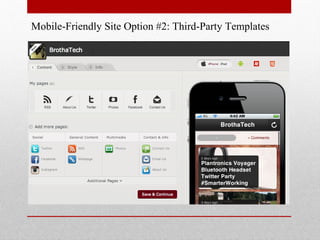
Mobile-Friendly Site Option #2: Third-Party Templates
3rd Party Template Drawbacks
Lives outside of your site
•Another site/service to manage
Freemium model
•Pay/Subscribe to get full feature compatibility
Responsive Web Design

• Mobile compatibility is built right into the site
   • No separate plugins, templates or apps to manage


• Site naturally adapts to multiple
  screen sizes

• Consistent branding & user
  experience across devices

• Visitors have access to a
  larger range of site content


    How Do You Mobilize? - Responsive Web
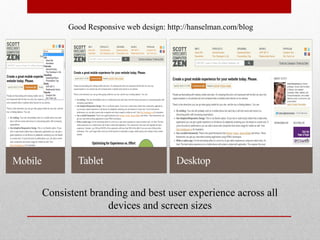
Good Responsive web design: http://hanselman.com/blog


Consistent branding and best user experience across all
               devices and screen sizes
Responsive Web Design Options:

 • Option 1: Pay a web designer to implement responsive
   web design when building your site
    • Drawback: May cost extra

 • Option 2: Use themes that include responsive web
   design
    • Drawback: Do It Yourself?

  • Drawback to Responsive Web Design?
            Will have to start from scratch!


How Do You Mobilize? - Responsive Web
Native App
Pros:
•Fully Customizable & Interactive
Cons:
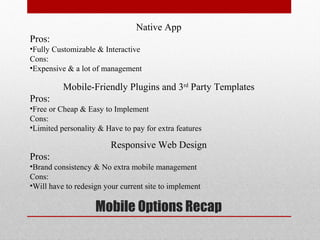
•Expensive & a lot of management

          Mobile-Friendly Plugins and 3rd Party Templates
Pros:
•Free or Cheap & Easy to Implement
Cons:
•Limited personality & Have to pay for extra features

                         Responsive Web Design
Pros:
•Brand consistency & No extra mobile management
Cons:
•Will have to redesign your current site to implement

                    Mobile Options Recap
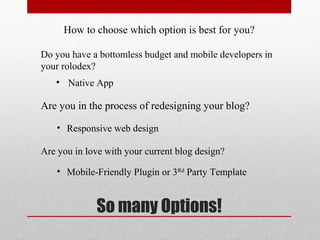
How to choose which option is best for you?

Do you have a bottomless budget and mobile developers in
your rolodex?
   • Native App

Are you in the process of redesigning your blog?

    • Responsive web design

Are you in love with your current blog design?

    • Mobile-Friendly Plugin or 3Rd Party Template


             So many Options!
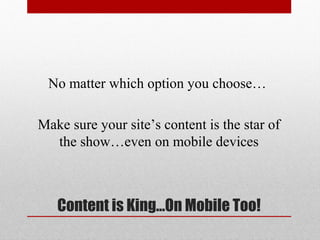
No matter which option you choose…

Make sure your site’s content is the star of
  the show…even on mobile devices


   Content is King…On Mobile Too!
Blog: http://brothatech.com
Twitter: @BrothaTech
Facebook: BrothaTech
View & Download Presentation:
http://techb.ro/MobileFriendly


               Thank-You!

Why go mobile

  • 1.
    Why Go Mobile? Tips& Techniques to Mobilize Your Site For Greater Reach Terrance Gaines Show Me the Blog, October 2012
  • 2.
    • Why you’resite should be mobile-friendly • Different methods to mobilize your site • How to decide which method is best for you What You’ll Learn
  • 3.
    Terrance (BrothaTech) Gaines •TechBlogger •Freelance Tech Contributor •Technology Concierge •…and I fix cracked smartphones! About BrothaTech
  • 4.
    Percentage of Peoplewho ONLY browse the web via a mobile device worldwide • UK 22% • US 25% • China 30% • South Africa 57% • India 59% • Egypt 70% Source: http://ondeviceresearch.com/blog Image via: sarah2066 on flickr Mobile Is Huge!
  • 5.
    In the US/UK,over 90% of phones are internet-ready Mobile is fast becoming the primary way people browse the web! Have Access, Will Travel
  • 6.
    • Take advantageof increasing numbers of people browsing the web on mobile devices Why Go Mobile #1
  • 7.
    Why share yoursite’s content? Promote & expand your brand Engage & interact with readers •Convert to followers/customers Sharing is Caring
  • 8.
    Links Dominate SocialNetworks Links a Plenty
  • 9.
    People are Lazy •Don’twant to pinch and zoom •Want to read and keep it movin’ Make your content the star of the show Content Is King In Mobile
  • 10.
    • Take advantageof increasing numbers of people browsing the web on mobile devices • Make it easy for visitors to access/interact with your content Why Go Mobile #2
  • 11.
    Get the mostout of your mobile device •Respond to/moderate comments •Make quick site changes Mobile Productivity
  • 12.
    • Take advantageof increasing numbers of people browsing the web on mobile devices • Make it easy for visitors to access/interact with your content • Make it easy to manage your content Why Go Mobile #3
  • 13.
  • 14.
    Native App Drawbacks: •Expensive • Hire designer/developer • Multiple versions for multiple platforms •Another “thing” to manage How Do You Mobilize? – Native App
  • 15.
    Mobile-Friendly Site Features: •Easy toSetup •Less expensive •“Plug and Play” Can use in conjunction with current site setup/design •Compatible with multiple platforms •Can include ads How Do You Mobilize? – Mobile Friendly
  • 16.
    Mobile-Friendly Site Option#1: Plugins Manage Mobile version right from blog dashboard Get right to the content (no pinch & zoom) WPTouch Plugin http://techb.ro/WPTouchPlugin Homepage Content Comments
  • 17.
    Mobile-Friendly Site (BloggerMobile Templates) Opt-in in Blogger Settings http://techb.ro/BloggerMobile
  • 18.
    Mobile-Friendly Site Drawbacks: Limitedpersonalization Three sites – Same look and feel
  • 19.
    Mobile-Friendly Site Option#2: Third-Party Templates •More customization/personalization options Mobile by conduit: http://mobile.conduit.com
  • 20.
    Mobile-Friendly Site Option#2: Third-Party Templates
  • 21.
    3rd Party TemplateDrawbacks Lives outside of your site •Another site/service to manage Freemium model •Pay/Subscribe to get full feature compatibility
  • 22.
    Responsive Web Design •Mobile compatibility is built right into the site • No separate plugins, templates or apps to manage • Site naturally adapts to multiple screen sizes • Consistent branding & user experience across devices • Visitors have access to a larger range of site content How Do You Mobilize? - Responsive Web
  • 23.
    Good Responsive webdesign: http://hanselman.com/blog Consistent branding and best user experience across all devices and screen sizes
  • 24.
    Responsive Web DesignOptions: • Option 1: Pay a web designer to implement responsive web design when building your site • Drawback: May cost extra • Option 2: Use themes that include responsive web design • Drawback: Do It Yourself? • Drawback to Responsive Web Design? Will have to start from scratch! How Do You Mobilize? - Responsive Web
  • 25.
    Native App Pros: •Fully Customizable& Interactive Cons: •Expensive & a lot of management Mobile-Friendly Plugins and 3rd Party Templates Pros: •Free or Cheap & Easy to Implement Cons: •Limited personality & Have to pay for extra features Responsive Web Design Pros: •Brand consistency & No extra mobile management Cons: •Will have to redesign your current site to implement Mobile Options Recap
  • 26.
    How to choosewhich option is best for you? Do you have a bottomless budget and mobile developers in your rolodex? • Native App Are you in the process of redesigning your blog? • Responsive web design Are you in love with your current blog design? • Mobile-Friendly Plugin or 3Rd Party Template So many Options!
  • 27.
    No matter whichoption you choose… Make sure your site’s content is the star of the show…even on mobile devices Content is King…On Mobile Too!
  • 28.
    Blog: http://brothatech.com Twitter: @BrothaTech Facebook:BrothaTech View & Download Presentation: http://techb.ro/MobileFriendly Thank-You!

Editor's Notes

  • #4 Speaking of smartphone, Show of hands Who has a smartphone? Who can’t leave the house without a smartphone That’s just in this room
  • #5 Constantly consuming content on a mobile device Check your stats on where your visitors are coming from Wonder why BlackBerry is still hanging around? BB is huge in other parts of the world.
  • #6 Everybody can view your site on a mobile device as long as it’s connected to the web Flip phones Feature “dumb” phones All phones are internet-ready
  • #7 In other words, more traffic. More people are going to visit your site if they can quickly access it via mobile device
  • #8 You have a message that you want to get out to the world That’s what we use social networks for: Get your content where people are Messing with their phones…which is what a good portion of you are doing now - Get people talking about your content
  • #9 Everybody is sharing something on Social networks - Every tweet, status update, has a link - Urging traffic back to a website
  • #10 When people “take the link bait” they expect to quickly read/scan read your content Don’ t want to keep moving around your site to read the content and hopefully comment and share I will forget to remember to read your link later
  • #11 The easier it is for people to browse your content on their mobile device, the more likely they will read more, comment & share
  • #12 Why not make it more easy for you to tackle certain functions on your smartphone? Respond to/moderate comments Make quick changes You spent all that money on a smartphone and data plan, why not use it to be more productive?
  • #13 Quick exercise How many of you have actually looked at your site via mobile device? Read posts Responded to a comment How mobile-friendly is your site
  • #14 Native App: developed in native code, and submitted to Appstore marketplace to add to their catalog of apps. Native App Pros: Pretty: Sky’s the limit on the amount of personalization you can achieve Interactive: Can build in many features to keep users engaged Bragging Rights: How many people do you know who can say “I have an app”
  • #15 Native App Cons: Can be expensive - Have to hire designers & developers. Have to create multiple apps for multiple platforms You have to dedicated time and resources to a native app, long after the app is created How many people contracted an outside designer for your own site? Same obstacles (pro or con) are inherent when creating a mobile app
  • #16 Mobile-Friendly (uses the web to access mobile site content) Easy to setup Less expensive Add to current site design (Plug and Play) Compatible with mobile sizes Can include ads (mobile advertising) Google Adsense & Admob Since most people have access to your website on their smartphone, why not give them a mobile version of your website?
  • #17 WP Touch plugin for WordPress Manage mobile version right from blog dashboard Puts your content front and center Easy commenting (depending on commenting option) Most mobile-friendly plugins also let you copy/paste ad code from services like Google AdSense and Admob
  • #18 Blogger includes mobile templates - No installing plugins: active in settings and personalize
  • #19 Drawbacks (WordPress) Limited personalization (Lack of Style) Will look similar to other sites with the same plugin “ BGR” site has ads that are clickable
  • #20 Mobile-Friendly Site Option #2: Third-Party Templates More customization features than plugins. Templates work for multiple blogging platforms More compatible for different kinds of websites Blogs Ecommerce Portfolio
  • #21 More customization options See changes as you go NO CODING
  • #22 Lives outside of your site Another thing to manage – When you make changes to your site’s info (about, contact, etc) you have to also emulate those changes on mobile template Versus mobile plugins automatically reflect most changes Freemium model Pay to get all the cool features
  • #23 Responsive Web Design (Wikipedia) an approach to web design in which a site is crafted to provide an optimal viewing experience—easy reading and navigation with a minimum of resizing, panning, and scrolling—across a wide range of devices
  • #24 You’ve worked so hard on the design/branding on your site, why not make that branding visible no matter what device you use. Still have access to mobile features Sidebar content (ads, social widgets, affiliations, etc.) Best user experience on any platform
  • #25 How many of you have bought, installed, and personalized your you blog theme? Purchase theme Install and activate on your Blog Personalize with theme options Process is the same with themes that include responsive web design Check your current parent theme framework for responsive template (Thesis, Genesis, Themeforest) Google search The only problem with implementing Responsive Web Design is you will have to redesign your current blog/website to implement May be a challenge if you’ve already spent a lot of time to develop your current site
  • #26 Native App Pros: Fully Customizable & Interactive – No limit to the amount of functionality you can build into a native app Cons: Expensive & a lot of management – You have to manage updates, upgrades, and multiple platforms separate from your site Mobile-Friendly Plugins and 3 rd Party Templates Pros: Free or Cheap & Easy to Implement – Doesn’t cost much or take a long time to implement. Have your mobile-friendly site up in minutes Cons: Limited personality & Have to pay for extra features – Your site is more likely to look like other users with similar options Responsive Web Design Pros: Brand consistency & No extra mobile management – Control the look and feel of your site across all devices Cons: Will have to redesign your current site to implement
  • #28 Features, widgets, and ads are nice, but the content should be what attracts visitors to your site. The easier it is for visitors to digest your site’s content no matter what device they are using, the more likely they are to return