ADVANCED LINKEDIN TECHNIQUES
More than just an Online Resume
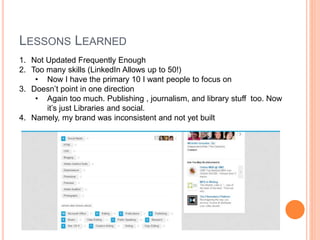
LESSONS LEARNED
1. Not Updated Frequently Enough
2. Too many skills (LinkedIn Allows up to 50!)
• Now I have the primary 10 I want people to focus on
3. Doesn’t point in one direction
• Again too much. Publishing , journalism, and library stuff too. Now
it’s just Libraries and social.
4. Namely, my brand was inconsistent and not yet built
BRANDING YOURSELF
YOUR PROFILE
 Headlines – Your header is not just your job
title. It’s how employers are going to find you.
Words in your headline optimize you in the
employer’s search for candidates (like SEO).
It’s important that you use keywords which are
relevant to the type of position you’re looking
for.
 Summary – Probably the next most important
part of your profile. Your summary also helps
with SEO (though more organically) so it’s
important to include terms you would like to be
associated with in your text.
 Skills – As mentioned before, you can input up
to 50 of these, but it’s recommended not to
have more than 10-20. Otherwise it is
overwhelming for employers and it is hard to
know what your focus is. You want the most
relevant skills toward the top. The more people
endorse you, again the higher your search
ranking.
YOUR PROFILE (CONT.)
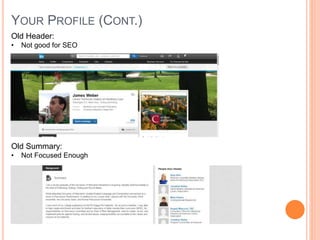
Old Header:
• Not good for SEO
Old Summary:
• Not Focused Enough
YOUR CONNECTIONS
 Endorsements - Of course you want
to try for as many of these as
possible. Visiting other people’s
profiles and endorsing them is often a
good way to get people to endorse
you back.
 Recommendations – Go to Privacy &
Settings. You may be prompted to sign
in. Under the Helpful Links section,
select Manage your
recommendations. Click the Ask for
recommendations tab at the top of the
page. Follow the prompts to request
the recommendation. Click Send.
 Groups – This is where the real
power of LinkedIn comes in to play.
Group allow you to participate in
discussions with other people in your
industry. This is a good opportunity to
find out about new trends and
operations, but also to spread
advertise yourself and your
accomplishments. Even become a
thought leader.
POSTING
 Comments – When interacting with groups, as mentioned above,
it is important that you post comments on discussions or posts
from your connections. Make sure these comments are thoughtful
and helpful to the discussion. (Comments generate 4x as many
profile views)
 Statuses – Just like many other social media, LinkedIn has a
status feature. Statuses show up in the home feed of LinkedIn
users. However, unlike most social media, statuses on LinkedIn
are not simply what you’re doing that second (unless it’s work
related and amazing!) or what you’re having for lunch. They
usually come in the form of a link to an outside article and your
brief interpretation. People can then comment on that and start
discussions.
 Blog Posts – Sometimes, linking to an outside source just isn’t
enough. You need to post something of your accomplishments.
Well LinkedIn has a blogging feature to allow for just that. Enjoy!
HOW DO I ACCOMPLISH ALL OF THIS!
 Work on it a little every day.
 If that isn’t specific enough, you
can stick to this formula created by
Lily Zhang in What You Should Be
Doing on LinkedIn Every Month,
Week, and Day (see sources at the
end).
 Day – Interact with your
NewsFeed. Comment, like
etc. other’s content.
 Week – Post statuses,
Articles (Industry Relevant) or
Blog Posts. Also, attempt to
add new contacts.
 Month - Update your profile,
participate in groups, reach
out to old contacts.
OTHER COOL FEATURES
 LinkedIn Insights -
https://www.linkedin.com/wvmx/profile?trk=hyr
 See who’s viewed your profile, where they are
located, what company they’re from.
 See which actions you did caused which views
 Youniversity - https://www.linkedin.com/edu/
 Field of Study Explorer -
https://www.linkedin.com/edu/fos?id=100583
 University insights -
https://www.linkedin.com/edu/rankings/us
SOURCES
 Lynda.com:
 Up and Running with LinkedIn –
 http://www.lynda.com/LinkedIn-tutorials/Up-Running-
LinkedIn/164460-2.html
 LinkedInSights.com
 TheMuse.com:
 The 31 Best LinkedIn Profile Tips for Job Seekers:
 https://www.themuse.com/advice/the-31-best-linkedin-profile-tips-for-
job-seekers
 What You Should Be Doing on LinkedIn Every Month, Week, and Day
 https://www.themuse.com/advice/what-you-should-be-doing-on-
linkedin-every-month-week-and-day
 4 Key Elements of a Killer LinkedIn Summary
 https://www.themuse.com/advice/4-key-elements-of-a-killer-linkedin-
summary
 5 Ways to Get the Most Out of LinkedIn Groups
 https://www.themuse.com/advice/5-ways-to-get-the-most-out-of-
linkedin-groups

Advanced LinkedIn Techniques

  • 1.
    ADVANCED LINKEDIN TECHNIQUES Morethan just an Online Resume
  • 2.
    LESSONS LEARNED 1. NotUpdated Frequently Enough 2. Too many skills (LinkedIn Allows up to 50!) • Now I have the primary 10 I want people to focus on 3. Doesn’t point in one direction • Again too much. Publishing , journalism, and library stuff too. Now it’s just Libraries and social. 4. Namely, my brand was inconsistent and not yet built
  • 3.
  • 4.
    YOUR PROFILE  Headlines– Your header is not just your job title. It’s how employers are going to find you. Words in your headline optimize you in the employer’s search for candidates (like SEO). It’s important that you use keywords which are relevant to the type of position you’re looking for.  Summary – Probably the next most important part of your profile. Your summary also helps with SEO (though more organically) so it’s important to include terms you would like to be associated with in your text.  Skills – As mentioned before, you can input up to 50 of these, but it’s recommended not to have more than 10-20. Otherwise it is overwhelming for employers and it is hard to know what your focus is. You want the most relevant skills toward the top. The more people endorse you, again the higher your search ranking.
  • 5.
    YOUR PROFILE (CONT.) OldHeader: • Not good for SEO Old Summary: • Not Focused Enough
  • 6.
    YOUR CONNECTIONS  Endorsements- Of course you want to try for as many of these as possible. Visiting other people’s profiles and endorsing them is often a good way to get people to endorse you back.  Recommendations – Go to Privacy & Settings. You may be prompted to sign in. Under the Helpful Links section, select Manage your recommendations. Click the Ask for recommendations tab at the top of the page. Follow the prompts to request the recommendation. Click Send.  Groups – This is where the real power of LinkedIn comes in to play. Group allow you to participate in discussions with other people in your industry. This is a good opportunity to find out about new trends and operations, but also to spread advertise yourself and your accomplishments. Even become a thought leader.
  • 7.
    POSTING  Comments –When interacting with groups, as mentioned above, it is important that you post comments on discussions or posts from your connections. Make sure these comments are thoughtful and helpful to the discussion. (Comments generate 4x as many profile views)  Statuses – Just like many other social media, LinkedIn has a status feature. Statuses show up in the home feed of LinkedIn users. However, unlike most social media, statuses on LinkedIn are not simply what you’re doing that second (unless it’s work related and amazing!) or what you’re having for lunch. They usually come in the form of a link to an outside article and your brief interpretation. People can then comment on that and start discussions.  Blog Posts – Sometimes, linking to an outside source just isn’t enough. You need to post something of your accomplishments. Well LinkedIn has a blogging feature to allow for just that. Enjoy!
  • 8.
    HOW DO IACCOMPLISH ALL OF THIS!  Work on it a little every day.  If that isn’t specific enough, you can stick to this formula created by Lily Zhang in What You Should Be Doing on LinkedIn Every Month, Week, and Day (see sources at the end).  Day – Interact with your NewsFeed. Comment, like etc. other’s content.  Week – Post statuses, Articles (Industry Relevant) or Blog Posts. Also, attempt to add new contacts.  Month - Update your profile, participate in groups, reach out to old contacts.
  • 9.
    OTHER COOL FEATURES LinkedIn Insights - https://www.linkedin.com/wvmx/profile?trk=hyr  See who’s viewed your profile, where they are located, what company they’re from.  See which actions you did caused which views  Youniversity - https://www.linkedin.com/edu/  Field of Study Explorer - https://www.linkedin.com/edu/fos?id=100583  University insights - https://www.linkedin.com/edu/rankings/us
  • 10.
    SOURCES  Lynda.com:  Upand Running with LinkedIn –  http://www.lynda.com/LinkedIn-tutorials/Up-Running- LinkedIn/164460-2.html  LinkedInSights.com  TheMuse.com:  The 31 Best LinkedIn Profile Tips for Job Seekers:  https://www.themuse.com/advice/the-31-best-linkedin-profile-tips-for- job-seekers  What You Should Be Doing on LinkedIn Every Month, Week, and Day  https://www.themuse.com/advice/what-you-should-be-doing-on- linkedin-every-month-week-and-day  4 Key Elements of a Killer LinkedIn Summary  https://www.themuse.com/advice/4-key-elements-of-a-killer-linkedin- summary  5 Ways to Get the Most Out of LinkedIn Groups  https://www.themuse.com/advice/5-ways-to-get-the-most-out-of- linkedin-groups