Google > More > Even More Tools for the Reference Desk Long Island Library Resource Council April 24, 2009 Diana Bitting [email_address]
Workshop Topics 1. Google Advanced Search Features   –  get free, on-demand training; become a super searcher in no time 2. Google Web Search Features   –  useful everyday information tools 3. iGoogle   -  build your own ready reference tool 4. Google Custom Search Engine   –  direct your patron’s searching; put your expertise to work
But first, a little fun!  How much do you know about Google?
Google Fun Facts The Google name is:   a name made up by staff of Stanford University, where Google was invented a play on the word Googol, a math term for the number 1 followed by 100 zeros a Russian slang word for “watch out,” chosen by Sergey Brin, Google inventor and native of Moscow.
Google Fun Facts What was the combined age of Google inventors Sergey Brin and Larry Page when they invented Google? 54 60 47 58
Google Fun Facts Google allows for the searching of pages written in how many languages? 22 45 31 39
Google Fun Facts The Google headquarters in Mountainview, CA is known as: GoogleCenter Googleville GoogleWorld GooglePlex
Google Fun Facts The simplicity of the Google interface was originally put in place because: The inventors did know enough HTML to create more content. The inventors were just playing around with an idea, and did not think it would go much further. The inventors did not want to copy other search engine models in use at the time.
Google Fun Facts The best estimate of the numbers of Web pages currently indexed by Google is: 5 billion. 1 trillion 80 billion 35 billion
Google Fun Facts The following 2008 development doubled the use of Google: Google Gadgets iGoogle Google “Did you mean?” Google Custom Search Engine
Google Fun Facts Google Translate  is capable of automatic translation between how many languages, covering 98% of the languages read by Internet users.  101 55 41 87
Google Fun Facts The original name of the search service invented by Page and Brin was: FindAll StanSearch PageIt BackRub
Google Fun Facts In 2006 Google acquired what other popular Web service? Friendster YouTube Flickr StreetView
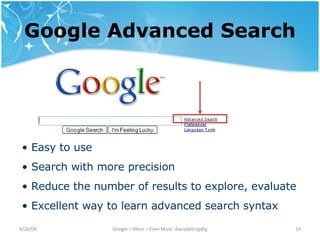
Google Advanced Search Google Advanced Search Easy to use Search with more precision Reduce the number of results to explore, evaluate Excellent way to learn advanced search syntax
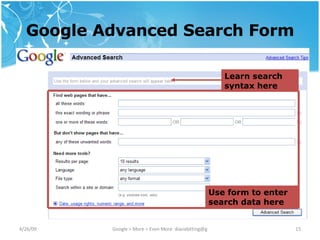
Google Advanced Search Form Use form to enter search data here Learn search syntax here
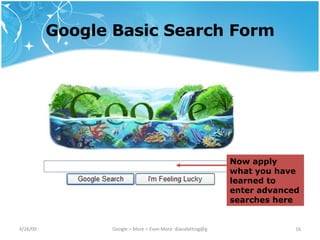
Google Basic Search Form Now apply what you have learned to enter advanced searches here
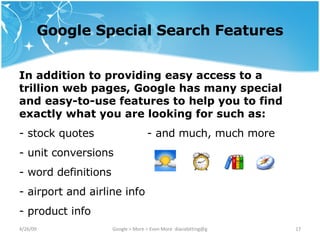
Google Special Search Features In addition to providing easy access to a trillion web pages, Google has many special and easy-to-use features to help you to find exactly what you are looking for such as: stock quotes - and much, much more unit conversions word definitions  airport and airline info product info
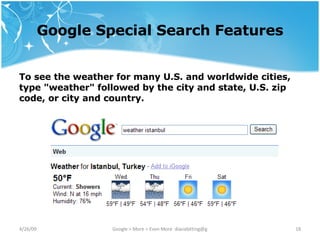
Google Special Search Features To see the weather for many U.S. and worldwide cities, type "weather" followed by the city and state, U.S. zip code, or city and country.
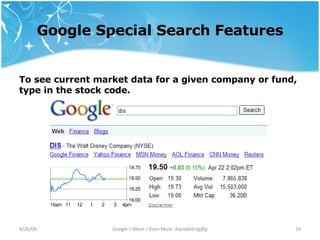
Google Special Search Features To see current market data for a given company or fund, type in the stock code.
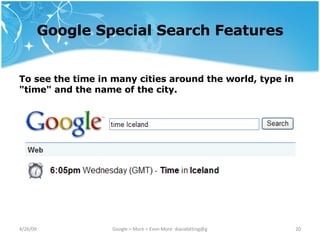
Google Special Search Features To see the time in many cities around the world, type in "time" and the name of the city.
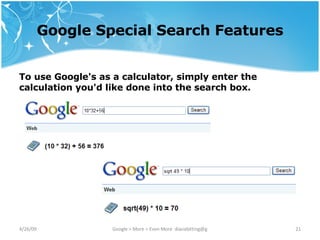
Google Special Search Features To use Google's as a calculator, simply enter the calculation you'd like done into the search box.
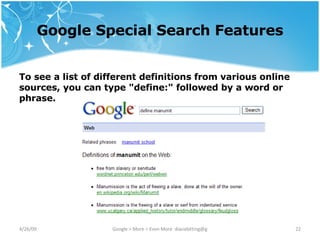
Google Special Search Features To see a list of different definitions from various online sources, you can type "define:" followed by a word or phrase.
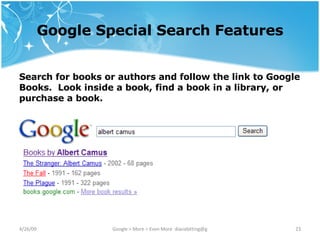
Google Special Search Features Search for books or authors and follow the link to Google Books.  Look inside a book, find a book in a library, or purchase a book.
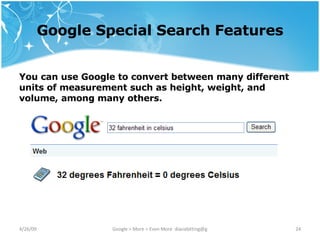
Google Special Search Features You can use Google to convert between many different units of measurement such as height, weight, and volume, among many others.
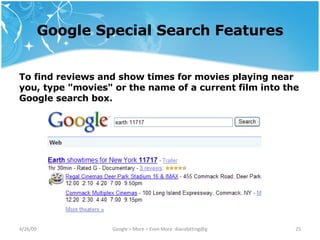
Google Special Search Features To find reviews and show times for movies playing near you, type "movies" or the name of a current film into the Google search box.
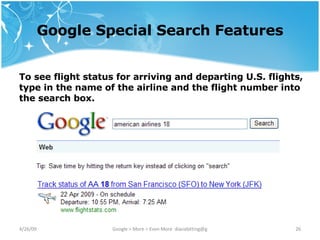
Google Special Search Features To see flight status for arriving and departing U.S. flights, type in the name of the airline and the flight number into the search box.
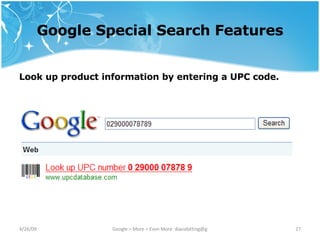
Google Special Search Features Look up product information by entering a UPC code.
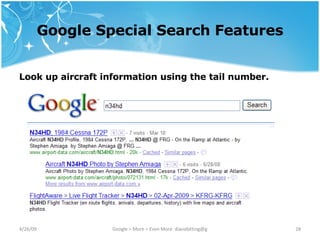
Google Special Search Features Look up aircraft information using the tail number.
iGoogle A reference librarian’s dream, iGoogle allows you to customize your Google interface to include Google and other services and gadgets, and to make them available in a customized Google interface.
iGoogle With iGoogle you can: Create a customized Google interface in which you can include the Google services and  gadgets  you use most Choose a theme for your page Customize the page for the specific work you do Arrange items on the page the way you want them Include a custom search engine for reference work, both in general and for specific topics
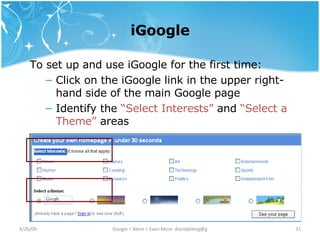
iGoogle To set up and use iGoogle for the first time: Click on the iGoogle link in the upper right-hand side of the main Google page Identify the  “Select Interests”  and  “Select a Theme”  areas
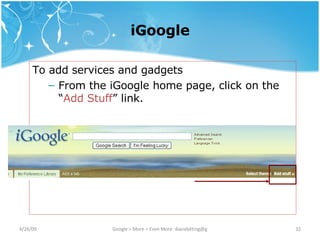
iGoogle To add services and gadgets From the iGoogle home page, click on the “ Add Stuff ” link.
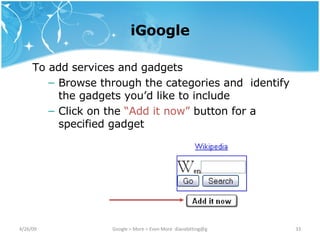
iGoogle To add services and gadgets Browse through the categories and  identify the gadgets you’d like to include Click on the  “Add it now”  button for a specified gadget
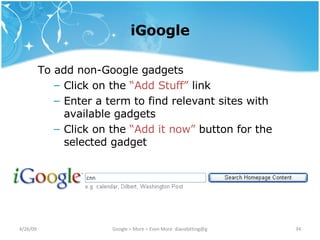
iGoogle To add non-Google gadgets Click on the  “Add Stuff”  link Enter a term to find relevant sites with available gadgets Click on the  “Add it now”  button for the selected gadget
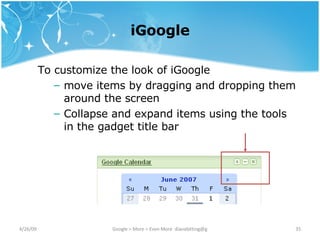
iGoogle To customize the look of iGoogle move items by dragging and dropping them around the screen Collapse and expand items using the tools in the gadget title bar
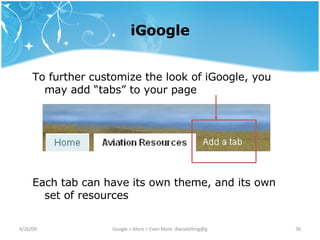
iGoogle To further customize the look of iGoogle, you may add “tabs” to your page Each tab can have its own theme, and its own set of resources
iGoogle One of the biggest benefits to using iGoogle is that your custom ready reference iGoogle tabbed pages are available to you anytime from anywhere, as long as you are logged into your Google account.
Google Custom Search Engine Google Custom Search Engine is another gadget that allows you to Specify the sites you want to include in searches.  Place a search box and search results on your iGoogle page or your website.  Customize the look and feel to match your website.  Invite your community to contribute to the search engine.
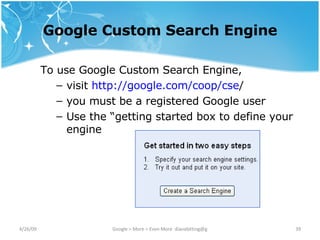
Google Custom Search Engine To use Google Custom Search Engine, visit  http:// google .com/coop/ cse /   you must be a registered Google user Use the “getting started box to define your engine
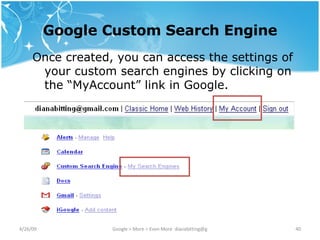
Google Custom Search Engine Once created, you can access the settings of your custom search engines by clicking on the “MyAccount” link in Google.
Summary Google Advanced Search Features   Use the Google Advanced Search form to conduct more precise searches, as well as to train yourself how to form advanced searches from the Google basic search page. strategic defense initiative -site:gov OR -site:mil allinurl:ballroom dancing OR ballroom dance vizio +1080p tv OR television $500..$750
Summary Google Web Search Features   Use the Google Web Search features to quickly and easily find and use everyday information.  Teach your patrons how to use Google as a calculator, flight tracker, dictionary, unit converter, and more. Dictionary - define: manumit Product Information – 029000078789 Unit Converter - 20 us dollars in peruvian nuevo sol Flight Information - swa 50
Summary iGoogle  -  build your own ready reference tool -  populate it with your favorite online tools - segment and organize it by type of tools - create and share your own gadgets
Summary Google Custom Search Engine   -  create custom search engines around particular topics - direct your patron’s searching - invite other topic experts to contribute - place your search engine on your iGoogle page - place your search engine on any web page
Resources for Further Exploration Google Web Search Features http://www. google .com/help/features.html   iGoogle http://www. google .com/ ig   Google Custom Search  http:// google .com/coop/ cse / Google Guide http://www. googleguide .com/

Advanced Google Ref Tools Lilrc Bitting

  • 1.
    Google > More> Even More Tools for the Reference Desk Long Island Library Resource Council April 24, 2009 Diana Bitting [email_address]
  • 2.
    Workshop Topics 1.Google Advanced Search Features – get free, on-demand training; become a super searcher in no time 2. Google Web Search Features – useful everyday information tools 3. iGoogle - build your own ready reference tool 4. Google Custom Search Engine – direct your patron’s searching; put your expertise to work
  • 3.
    But first, alittle fun! How much do you know about Google?
  • 4.
    Google Fun FactsThe Google name is: a name made up by staff of Stanford University, where Google was invented a play on the word Googol, a math term for the number 1 followed by 100 zeros a Russian slang word for “watch out,” chosen by Sergey Brin, Google inventor and native of Moscow.
  • 5.
    Google Fun FactsWhat was the combined age of Google inventors Sergey Brin and Larry Page when they invented Google? 54 60 47 58
  • 6.
    Google Fun FactsGoogle allows for the searching of pages written in how many languages? 22 45 31 39
  • 7.
    Google Fun FactsThe Google headquarters in Mountainview, CA is known as: GoogleCenter Googleville GoogleWorld GooglePlex
  • 8.
    Google Fun FactsThe simplicity of the Google interface was originally put in place because: The inventors did know enough HTML to create more content. The inventors were just playing around with an idea, and did not think it would go much further. The inventors did not want to copy other search engine models in use at the time.
  • 9.
    Google Fun FactsThe best estimate of the numbers of Web pages currently indexed by Google is: 5 billion. 1 trillion 80 billion 35 billion
  • 10.
    Google Fun FactsThe following 2008 development doubled the use of Google: Google Gadgets iGoogle Google “Did you mean?” Google Custom Search Engine
  • 11.
    Google Fun FactsGoogle Translate is capable of automatic translation between how many languages, covering 98% of the languages read by Internet users. 101 55 41 87
  • 12.
    Google Fun FactsThe original name of the search service invented by Page and Brin was: FindAll StanSearch PageIt BackRub
  • 13.
    Google Fun FactsIn 2006 Google acquired what other popular Web service? Friendster YouTube Flickr StreetView
  • 14.
    Google Advanced SearchGoogle Advanced Search Easy to use Search with more precision Reduce the number of results to explore, evaluate Excellent way to learn advanced search syntax
  • 15.
    Google Advanced SearchForm Use form to enter search data here Learn search syntax here
  • 16.
    Google Basic SearchForm Now apply what you have learned to enter advanced searches here
  • 17.
    Google Special SearchFeatures In addition to providing easy access to a trillion web pages, Google has many special and easy-to-use features to help you to find exactly what you are looking for such as: stock quotes - and much, much more unit conversions word definitions airport and airline info product info
  • 18.
    Google Special SearchFeatures To see the weather for many U.S. and worldwide cities, type "weather" followed by the city and state, U.S. zip code, or city and country.
  • 19.
    Google Special SearchFeatures To see current market data for a given company or fund, type in the stock code.
  • 20.
    Google Special SearchFeatures To see the time in many cities around the world, type in "time" and the name of the city.
  • 21.
    Google Special SearchFeatures To use Google's as a calculator, simply enter the calculation you'd like done into the search box.
  • 22.
    Google Special SearchFeatures To see a list of different definitions from various online sources, you can type "define:" followed by a word or phrase.
  • 23.
    Google Special SearchFeatures Search for books or authors and follow the link to Google Books. Look inside a book, find a book in a library, or purchase a book.
  • 24.
    Google Special SearchFeatures You can use Google to convert between many different units of measurement such as height, weight, and volume, among many others.
  • 25.
    Google Special SearchFeatures To find reviews and show times for movies playing near you, type "movies" or the name of a current film into the Google search box.
  • 26.
    Google Special SearchFeatures To see flight status for arriving and departing U.S. flights, type in the name of the airline and the flight number into the search box.
  • 27.
    Google Special SearchFeatures Look up product information by entering a UPC code.
  • 28.
    Google Special SearchFeatures Look up aircraft information using the tail number.
  • 29.
    iGoogle A referencelibrarian’s dream, iGoogle allows you to customize your Google interface to include Google and other services and gadgets, and to make them available in a customized Google interface.
  • 30.
    iGoogle With iGoogleyou can: Create a customized Google interface in which you can include the Google services and gadgets you use most Choose a theme for your page Customize the page for the specific work you do Arrange items on the page the way you want them Include a custom search engine for reference work, both in general and for specific topics
  • 31.
    iGoogle To setup and use iGoogle for the first time: Click on the iGoogle link in the upper right-hand side of the main Google page Identify the “Select Interests” and “Select a Theme” areas
  • 32.
    iGoogle To addservices and gadgets From the iGoogle home page, click on the “ Add Stuff ” link.
  • 33.
    iGoogle To addservices and gadgets Browse through the categories and identify the gadgets you’d like to include Click on the “Add it now” button for a specified gadget
  • 34.
    iGoogle To addnon-Google gadgets Click on the “Add Stuff” link Enter a term to find relevant sites with available gadgets Click on the “Add it now” button for the selected gadget
  • 35.
    iGoogle To customizethe look of iGoogle move items by dragging and dropping them around the screen Collapse and expand items using the tools in the gadget title bar
  • 36.
    iGoogle To furthercustomize the look of iGoogle, you may add “tabs” to your page Each tab can have its own theme, and its own set of resources
  • 37.
    iGoogle One ofthe biggest benefits to using iGoogle is that your custom ready reference iGoogle tabbed pages are available to you anytime from anywhere, as long as you are logged into your Google account.
  • 38.
    Google Custom SearchEngine Google Custom Search Engine is another gadget that allows you to Specify the sites you want to include in searches. Place a search box and search results on your iGoogle page or your website. Customize the look and feel to match your website. Invite your community to contribute to the search engine.
  • 39.
    Google Custom SearchEngine To use Google Custom Search Engine, visit http:// google .com/coop/ cse / you must be a registered Google user Use the “getting started box to define your engine
  • 40.
    Google Custom SearchEngine Once created, you can access the settings of your custom search engines by clicking on the “MyAccount” link in Google.
  • 41.
    Summary Google AdvancedSearch Features Use the Google Advanced Search form to conduct more precise searches, as well as to train yourself how to form advanced searches from the Google basic search page. strategic defense initiative -site:gov OR -site:mil allinurl:ballroom dancing OR ballroom dance vizio +1080p tv OR television $500..$750
  • 42.
    Summary Google WebSearch Features Use the Google Web Search features to quickly and easily find and use everyday information. Teach your patrons how to use Google as a calculator, flight tracker, dictionary, unit converter, and more. Dictionary - define: manumit Product Information – 029000078789 Unit Converter - 20 us dollars in peruvian nuevo sol Flight Information - swa 50
  • 43.
    Summary iGoogle - build your own ready reference tool - populate it with your favorite online tools - segment and organize it by type of tools - create and share your own gadgets
  • 44.
    Summary Google CustomSearch Engine - create custom search engines around particular topics - direct your patron’s searching - invite other topic experts to contribute - place your search engine on your iGoogle page - place your search engine on any web page
  • 45.
    Resources for FurtherExploration Google Web Search Features http://www. google .com/help/features.html iGoogle http://www. google .com/ ig Google Custom Search http:// google .com/coop/ cse / Google Guide http://www. googleguide .com/

Editor's Notes

  • #2 5 min Introduce Training librarians 20 years web design Internet use General computing applications Online education, instructional design