
Advanced, Composable Collection
Views
Carl Brown
CocoaCoders Feb 11, 2015
Housekeeping: A Request
This talk came out of a question from one
of our attendees
We meet a lot (43 meetings in 2014), so
we’re always looking for topics and
speakers
If you would like to speak, lead a
discussion, or just want more information
about a specific topic, please post a
comment to the meetup page, start a
discussion on the message board or send
email to Carl
Housekeeping: Logistics
I’ll post the slides tonight, so no
need to take notes
I’m happy to go off-script
Please interrupt if you have
questions
Please try to keep cross-talk to a
minimum, though
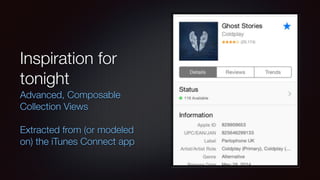
Inspiration for
tonight
Advanced, Composable
Collection Views
Extracted from (or modeled
on) the iTunes Connect app
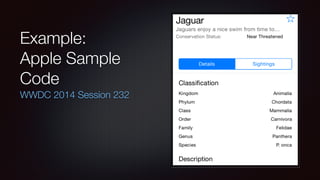
Example:
Apple Sample
Code
WWDC 2014 Session 232
Reference: WWDC 2014 Session 232
“Advanced User Interfaces with Collection Views”
Good session, covers a lot of ground
Sample project: https://developer.apple.com/devcenter/download.action?
path=/wwdc_2014/wwdc_2014_sample_code/
advanceduserinterfacesusingcollectionview.zip
I’m going to talk about a subset of what was covered in that session, but in
more detail
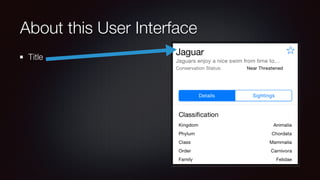
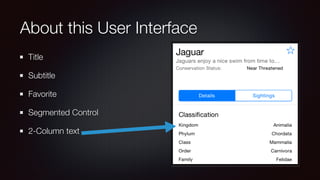
About this User Interface
Title
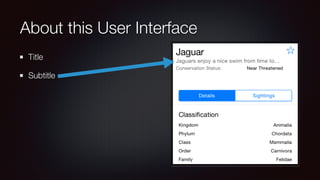
About this User Interface
Title
Subtitle
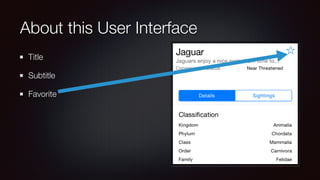
About this User Interface
Title
Subtitle
Favorite
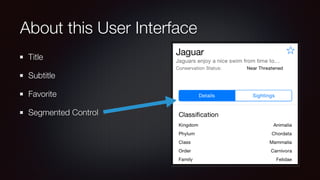
About this User Interface
Title
Subtitle
Favorite
Segmented Control
About this User Interface
Title
Subtitle
Favorite
Segmented Control
2-Column text
About this User Interface
Title
Subtitle
Favorite
Segmented Control
2-Column text
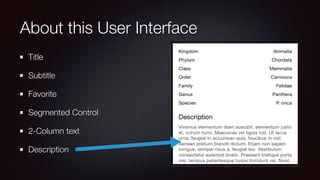
Description
About this User Interface
Title
Subtitle
Favorite
Segmented Control
2-Column text
Description
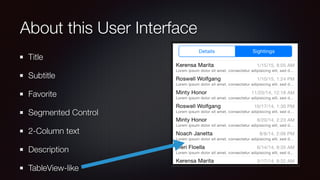
TableView-like
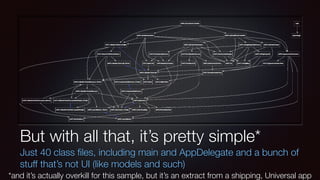
But with all that, it’s pretty simple*
Just 40 class files, including main and AppDelegate and a bunch of
stuff that’s not UI (like models and such)
*and it’s actually overkill for this sample, but it’s an extract from a shipping, Universal app
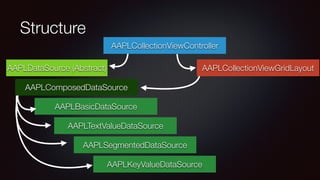
Structure
AAPLCollectionViewGridLayout
AAPLBasicDataSource
AAPLTextValueDataSource
AAPLDataSource (Abstract)
AAPLSegmentedDataSource
AAPLKeyValueDataSource
AAPLComposedDataSource
AAPLCollectionViewController
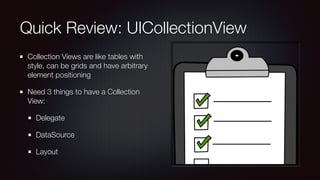
Quick Review: UICollectionView
Collection Views are like tables with
style, can be grids and have arbitrary
element positioning
Need 3 things to have a Collection
View:
Delegate
DataSource
Layout
Delegates are (mostly) Familiar
collectionView:didSelectItemAtIndexPath:
Handle events
touches, drags, interactions
highlighting, disabling, selecting
transitioning to new content
Watch session video for their transitioning (& state machine) work
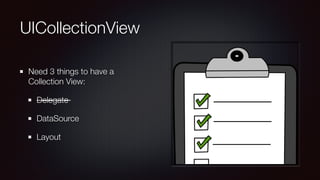
UICollectionView
Need 3 things to have a
Collection View:
Delegate
DataSource
Layout
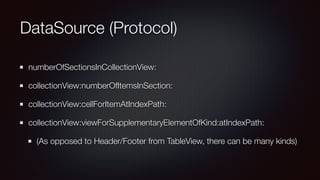
DataSource (Protocol)
numberOfSectionsInCollectionView:
collectionView:numberOfItemsInSection:
collectionView:cellForItemAtIndexPath:
collectionView:viewForSupplementaryElementOfKind:atIndexPath:
(As opposed to Header/Footer from TableView, there can be many kinds)
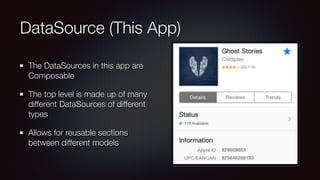
DataSource (This App)
The DataSources in this app are
Composable
The top level is made up of many
different DataSources of different
types
Allows for reusable sections
between different models
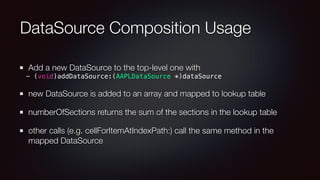
DataSource Composition Usage
Add a new DataSource to the top-level one with
- (void)addDataSource:(AAPLDataSource *)dataSource
new DataSource is added to an array and mapped to lookup table
numberOfSections returns the sum of the sections in the lookup table
other calls (e.g. cellForItemAtIndexPath:) call the same method in the
mapped DataSource
UICollectionView
Need 3 things to have a
Collection View:
Delegate
DataSource
Layout
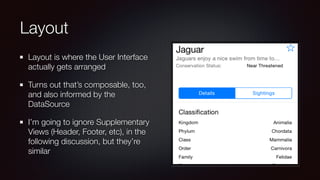
Layout
Layout is where the User Interface
actually gets arranged
Turns out that’s composable, too,
and also informed by the
DataSource
I’m going to ignore Supplementary
Views (Header, Footer, etc), in the
following discussion, but they’re
similar
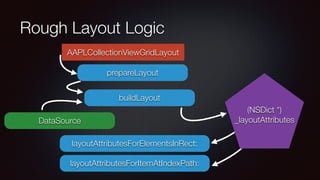
Rough Layout Logic
AAPLCollectionViewGridLayout
prepareLayout
buildLayout
layoutAttributesForElementsInRect:
layoutAttributesForItemAtIndexPath:
(NSDict *)
_layoutAttributesDataSource
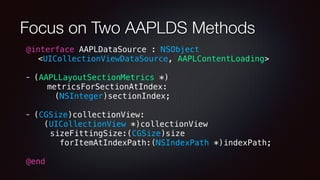
Focus on Two AAPLDS Methods
@interface AAPLDataSource : NSObject
<UICollectionViewDataSource, AAPLContentLoading>
- (AAPLLayoutSectionMetrics *)
metricsForSectionAtIndex:
(NSInteger)sectionIndex;
- (CGSize)collectionView:
(UICollectionView *)collectionView
sizeFittingSize:(CGSize)size
forItemAtIndexPath:(NSIndexPath *)indexPath;
@end
buildLayout
for (NSInteger sectionIndex = 0; sectionIndex < numberOfSections; ++sectionIndex)
{
AAPLGridLayoutSectionInfo *section = [self
sectionInfoForSectionAtIndex:sectionIndex];
[section computeLayoutWithOrigin:start measureItemBlock:
^(NSInteger itemIndex, CGRect frame) {
NSIndexPath *indexPath = [NSIndexPath indexPathForItem:itemIndex
inSection:sectionIndex];
return [dataSource collectionView:collectionView
sizeFittingSize:frame.size forItemAtIndexPath:indexPath];
}
[self addLayoutAttributesForSection:section atIndex:sectionIndex
dataSource:dataSource];
}
UICollectionView
Need 3 things to have a
Collection View:
Delegate
DataSource
Layout
So what do you do with this thing?
In theory, you could use the AAPLDataSource, the
AAPLCollectionViewController and the AAPLStateMachine as the core/
engine of your own app’s UI
They seem to be planning for that case
Or, you could use the concepts they introduce here to make your own
(hopefully simpler) implementation to suit your specific use-cases
Good News, Everyone!!
This kind of structure lets you make really complicated interfaces out of
reusable building blocks
It mostly favors composition over inheritance, and if you chose, you could do
it all with just @protocols
Since it’s all one collection view, you don’t have to deal with Dueling
ScrollViews
You could embed pretty much any kind of cell/content/layout in this format
you want
Questions?
Comments?
Snide Remarks?

Advanced, Composable Collection Views, From CocoaCoders meetup Austin Feb 12, 2015