Advance Mobile Application
Development
Local Database
Dr. Mazin Alkathiri
IT Department
Seiyun University
2023-2024
Flutter – Database Concepts
• Flutter provides many advanced packages to work with databases.
The most important packages are:
• sqflite – Used to access and manipulate SQLite database, and
• firebase_database – Used to access and manipulate cloud hosted
NoSQL database from Google.
SQLite
• SQLite database is the de-facto and standard SQL based embedded database engine.
• It is small and time-tested database engine.
• sqflite package provides a lot of functionality to work efficiently with SQLite database.
• It provides standard methods to manipulate SQLite database engine.
• The core functionality provided by sqflite package is as follows:
• Create / Open (openDatabase method) a SQLite database.
• Execute SQL statement (execute method) against SQLite database.
• Advanced query methods (query method) to reduce to code required to query and get information
from SQLite database.
• SQLite doesn’t need a server or backend code, all the info is saved to a
computer file within the device, or we will say it’s native to storage.
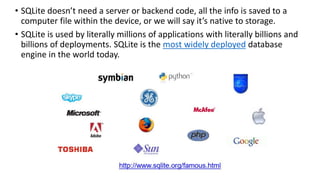
• SQLite is used by literally millions of applications with literally billions and
billions of deployments. SQLite is the most widely deployed database
engine in the world today.
SQLite Browser
SQLite is a very popular database - it is free and fast and small SQLite
Browser allows us to directly manipulate SQLite files
http://sqlitebrowser.org/
SQLite is embedded in Python and a number of other languages
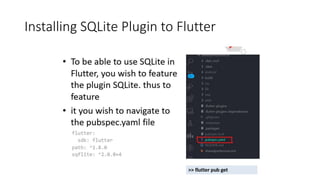
Installing SQLite Plugin to Flutter
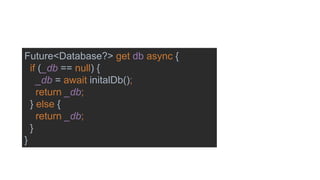
Define the database variable DB
Future<Database?> get db async {
if (_db == null) {
_db = await initalDb();
return _db;
} else {
return _db;
}
}
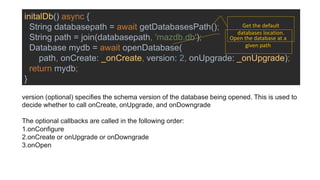
initalDb() async {
String databasepath = await getDatabasesPath();
String path = join(databasepath, 'mazdb.db');
Database mydb = await openDatabase(
path, onCreate: _onCreate, version: 2, onUpgrade: _onUpgrade);
return mydb;
}
Get the default
databases location.
Open the database at a
given path
version (optional) specifies the schema version of the database being opened. This is used to
decide whether to call onCreate, onUpgrade, and onDowngrade
The optional callbacks are called in the following order:
1.onConfigure
2.onCreate or onUpgrade or onDowngrade
3.onOpen
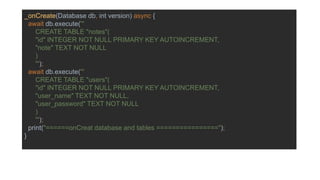
_onCreate(Database db, int version) async {
await db.execute('''
CREATE TABLE "notes"(
"id" INTEGER NOT NULL PRIMARY KEY AUTOINCREMENT,
"note" TEXT NOT NULL
)
''');
await db.execute('''
CREATE TABLE "users"(
"id" INTEGER NOT NULL PRIMARY KEY AUTOINCREMENT,
"user_name" TEXT NOT NULL,
"user_password" TEXT NOT NULL
)
''');
print("======onCreat database and tables ================");
}
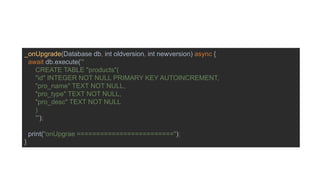
_onUpgrade(Database db, int oldversion, int newversion) async {
await db.execute('''
CREATE TABLE "products"(
"id" INTEGER NOT NULL PRIMARY KEY AUTOINCREMENT,
"pro_name" TEXT NOT NULL,
"pro_type" TEXT NOT NULL,
"pro_desc" TEXT NOT NULL
)
''');
print("onUpgrae =========================");
}
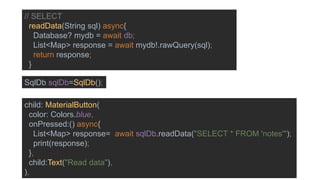
// SELECT
readData(String sql) async{
Database? mydb = await db;
List<Map> response = await mydb!.rawQuery(sql);
return response;
}
SqlDb sqlDb=SqlDb();
child: MaterialButton(
color: Colors.blue,
onPressed:() async{
List<Map> response= await sqlDb.readData("SELECT * FROM 'notes'");
print(response);
},
child:Text("Read data"),
),
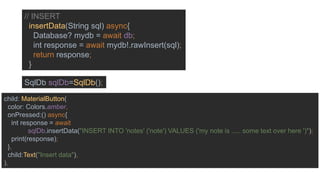
// INSERT
insertData(String sql) async{
Database? mydb = await db;
int response = await mydb!.rawInsert(sql);
return response;
}
SqlDb sqlDb=SqlDb();
child: MaterialButton(
color: Colors.amber,
onPressed:() async{
int response = await
sqlDb.insertData("INSERT INTO 'notes' ('note') VALUES ('my note is ..... some text over here ')");
print(response);
},
child:Text("Insert data"),
),
// UPDATE
updateData(String sql) async{
Database? mydb = await db;
int response = await mydb!.rawUpdate(sql);
return response;
}
SqlDb sqlDb=SqlDb();
child: MaterialButton(
color: Colors.blue,
onPressed:() async{
int response= await sqlDb.updateData("UPDATE 'notes' SET note = 'not two' WHERE id = 2");
print(response);
},
child:Text("update data"),
),
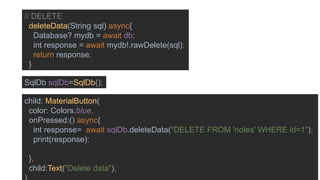
// DELETE
deleteData(String sql) async{
Database? mydb = await db;
int response = await mydb!.rawDelete(sql);
return response;
}
SqlDb sqlDb=SqlDb();
child: MaterialButton(
color: Colors.blue,
onPressed:() async{
int response= await sqlDb.deleteData("DELETE FROM 'notes' WHERE id=1");
print(response);
},
child:Text("Delete data"),

Advance Mobile Application Development class 01

  • 1.
    Advance Mobile Application Development LocalDatabase Dr. Mazin Alkathiri IT Department Seiyun University 2023-2024
  • 2.
    Flutter – DatabaseConcepts • Flutter provides many advanced packages to work with databases. The most important packages are: • sqflite – Used to access and manipulate SQLite database, and • firebase_database – Used to access and manipulate cloud hosted NoSQL database from Google.
  • 3.
    SQLite • SQLite databaseis the de-facto and standard SQL based embedded database engine. • It is small and time-tested database engine. • sqflite package provides a lot of functionality to work efficiently with SQLite database. • It provides standard methods to manipulate SQLite database engine. • The core functionality provided by sqflite package is as follows: • Create / Open (openDatabase method) a SQLite database. • Execute SQL statement (execute method) against SQLite database. • Advanced query methods (query method) to reduce to code required to query and get information from SQLite database.
  • 4.
    • SQLite doesn’tneed a server or backend code, all the info is saved to a computer file within the device, or we will say it’s native to storage. • SQLite is used by literally millions of applications with literally billions and billions of deployments. SQLite is the most widely deployed database engine in the world today.
  • 5.
    SQLite Browser SQLite isa very popular database - it is free and fast and small SQLite Browser allows us to directly manipulate SQLite files http://sqlitebrowser.org/ SQLite is embedded in Python and a number of other languages
  • 9.
  • 10.
  • 11.
    Future<Database?> get dbasync { if (_db == null) { _db = await initalDb(); return _db; } else { return _db; } }
  • 12.
    initalDb() async { Stringdatabasepath = await getDatabasesPath(); String path = join(databasepath, 'mazdb.db'); Database mydb = await openDatabase( path, onCreate: _onCreate, version: 2, onUpgrade: _onUpgrade); return mydb; } Get the default databases location. Open the database at a given path version (optional) specifies the schema version of the database being opened. This is used to decide whether to call onCreate, onUpgrade, and onDowngrade The optional callbacks are called in the following order: 1.onConfigure 2.onCreate or onUpgrade or onDowngrade 3.onOpen
  • 13.
    _onCreate(Database db, intversion) async { await db.execute(''' CREATE TABLE "notes"( "id" INTEGER NOT NULL PRIMARY KEY AUTOINCREMENT, "note" TEXT NOT NULL ) '''); await db.execute(''' CREATE TABLE "users"( "id" INTEGER NOT NULL PRIMARY KEY AUTOINCREMENT, "user_name" TEXT NOT NULL, "user_password" TEXT NOT NULL ) '''); print("======onCreat database and tables ================"); }
  • 14.
    _onUpgrade(Database db, intoldversion, int newversion) async { await db.execute(''' CREATE TABLE "products"( "id" INTEGER NOT NULL PRIMARY KEY AUTOINCREMENT, "pro_name" TEXT NOT NULL, "pro_type" TEXT NOT NULL, "pro_desc" TEXT NOT NULL ) '''); print("onUpgrae ========================="); }
  • 16.
    // SELECT readData(String sql)async{ Database? mydb = await db; List<Map> response = await mydb!.rawQuery(sql); return response; } SqlDb sqlDb=SqlDb(); child: MaterialButton( color: Colors.blue, onPressed:() async{ List<Map> response= await sqlDb.readData("SELECT * FROM 'notes'"); print(response); }, child:Text("Read data"), ),
  • 17.
    // INSERT insertData(String sql)async{ Database? mydb = await db; int response = await mydb!.rawInsert(sql); return response; } SqlDb sqlDb=SqlDb(); child: MaterialButton( color: Colors.amber, onPressed:() async{ int response = await sqlDb.insertData("INSERT INTO 'notes' ('note') VALUES ('my note is ..... some text over here ')"); print(response); }, child:Text("Insert data"), ),
  • 18.
    // UPDATE updateData(String sql)async{ Database? mydb = await db; int response = await mydb!.rawUpdate(sql); return response; } SqlDb sqlDb=SqlDb(); child: MaterialButton( color: Colors.blue, onPressed:() async{ int response= await sqlDb.updateData("UPDATE 'notes' SET note = 'not two' WHERE id = 2"); print(response); }, child:Text("update data"), ),
  • 19.
    // DELETE deleteData(String sql)async{ Database? mydb = await db; int response = await mydb!.rawDelete(sql); return response; } SqlDb sqlDb=SqlDb(); child: MaterialButton( color: Colors.blue, onPressed:() async{ int response= await sqlDb.deleteData("DELETE FROM 'notes' WHERE id=1"); print(response); }, child:Text("Delete data"),