


Ad-hoc Big-Data Analysis with Lua
And LuaJIT
Alexander Gladysh <ag@logiceditor.com>
@agladysh
Lua Workshop 2015
Stockholm
1 / 32
Outline
Introduction
The Problem
A Solution
Assumptions
Examples
The Tools
Notes
Questions?
2 / 32
Alexander Gladysh
CTO, co-owner at LogicEditor
In löve with Lua since 2005
3 / 32
The Problem
You have a dataset to analyze,
which is too large for "small-data" tools,
and have no resources to setup and maintain (or pay for) the
Hadoop, Google Big Query etc.
but you have some processing power available.
4 / 32
Goal
Pre-process the data so it can be handled by R or Excel or
your favorite analytics tool (or Lua!).
If the data is dynamic, then learn to pre-process it and build a
data processing pipeline.
5 / 32
An Approach
Use Lua!
And (semi-)standard tools, available on Linux.
Go minimalistic while exploring, avoid frameworks,
Then move on to an industrial solution that fits your newly
understood requirements,
Or roll your own ecosystem! ;-)
6 / 32
Assumptions
7 / 32
Data Format
Plain text
Column-based (csv-like), optionally with free-form data in the
end
Typical example: web-server log files
8 / 32
Data Format Example: Raw Data
2015/10/15 16:35:30 [info] 14171#0: *901195
[lua] index:14: 95c1c06e626b47dfc705f8ee6695091a
109.74.197.145 *.example.com
GET 123456.gif?q=0&step=0&ref= HTTP/1.1 example.com
NB: This is a single, tab-separated line from a time-sorted file.
9 / 32
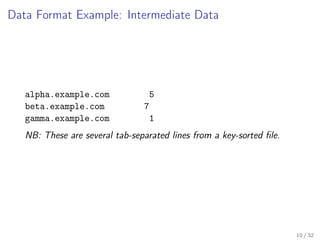
Data Format Example: Intermediate Data
alpha.example.com 5
beta.example.com 7
gamma.example.com 1
NB: These are several tab-separated lines from a key-sorted file.
10 / 32
Hardware
As usual, more is better: Cores, cache, memory speed and
size, HDD speeds, networking speeds...
But even a modest VM (or several) can be helpful.
Your fancy gaming laptop is good too ;-)
11 / 32
OS
Linux (Ubuntu) Server.
This approach will, of course, work for other setups.
12 / 32
Filesystem
Ideally, have data copies on each processing node, using
identical layouts.
Fast network should work too.
13 / 32
Examples
14 / 32
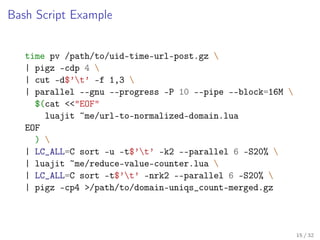
Bash Script Example
time pv /path/to/uid-time-url-post.gz 
| pigz -cdp 4 
| cut -d$’t’ -f 1,3 
| parallel --gnu --progress -P 10 --pipe --block=16M 
$(cat <<"EOF"
luajit ~me/url-to-normalized-domain.lua
EOF
) 
| LC_ALL=C sort -u -t$’t’ -k2 --parallel 6 -S20% 
| luajit ~me/reduce-value-counter.lua 
| LC_ALL=C sort -t$’t’ -nrk2 --parallel 6 -S20% 
| pigz -cp4 >/path/to/domain-uniqs_count-merged.gz
15 / 32
Lua Script Example: url-to-normalized-domain.lua
for l in io.lines() do
local key, value = l:match("^([^t]+)t(.*)")
if value then
value = url_to_normalized_domain(value)
end
if key and value then
io.write(key, "t", value, "n")
end
end
16 / 32
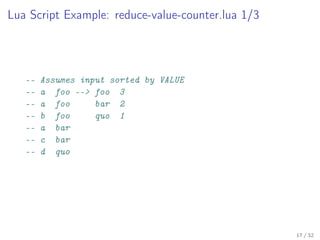
Lua Script Example: reduce-value-counter.lua 1/3
-- Assumes input sorted by VALUE
-- a foo --> foo 3
-- a foo bar 2
-- b foo quo 1
-- a bar
-- c bar
-- d quo
17 / 32
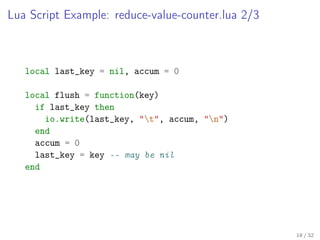
Lua Script Example: reduce-value-counter.lua 2/3
local last_key = nil, accum = 0
local flush = function(key)
if last_key then
io.write(last_key, "t", accum, "n")
end
accum = 0
last_key = key -- may be nil
end
18 / 32
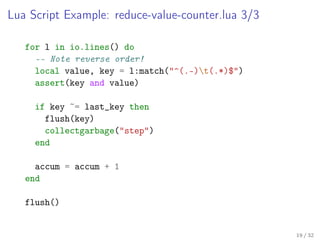
Lua Script Example: reduce-value-counter.lua 3/3
for l in io.lines() do
-- Note reverse order!
local value, key = l:match("^(.-)t(.*)$")
assert(key and value)
if key ~= last_key then
flush(key)
collectgarbage("step")
end
accum = accum + 1
end
flush()
19 / 32
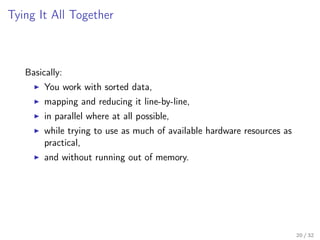
Tying It All Together
Basically:
You work with sorted data,
mapping and reducing it line-by-line,
in parallel where at all possible,
while trying to use as much of available hardware resources as
practical,
and without running out of memory.
20 / 32
The Tools
21 / 32
The Tools
parallel
sort, uniq, grep
cut, join, comm
pv
compression utilities
LuaJIT
22 / 32
LuaJIT?
Up to a point:
2.1 helps to speed things up,
FFI bogs down development speed.
Go plain Lua first (run it with LuaJIT),
then roll your own ecosystem as needed ;-)
23 / 32
Parallel
xargs for parallel computation
can run your jobs in parallel on a single machine
or on a "cluster"
24 / 32
Compression
gzip: default, bad
lz4: fast, large files
pigz: fast, parallelizable
xz: good compression, slow
...and many more,
be on lookout for new formats!
25 / 32
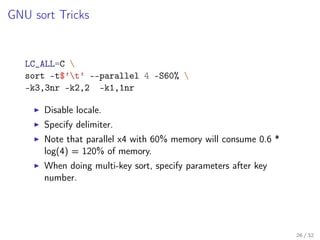
GNU sort Tricks
LC_ALL=C 
sort -t$’t’ --parallel 4 -S60% 
-k3,3nr -k2,2 -k1,1nr
Disable locale.
Specify delimiter.
Note that parallel x4 with 60% memory will consume 0.6 *
log(4) = 120% of memory.
When doing multi-key sort, specify parameters after key
number.
26 / 32
grep
http://stackoverflow.com/questions/9066609/fastest-possible-grep
27 / 32
Notes and Remarks
28 / 32
Why Lua?
Perl, AWK are traditional alternatives to Lua, but, if you’re not
very disciplined and experienced, they are much less maintainable.
29 / 32
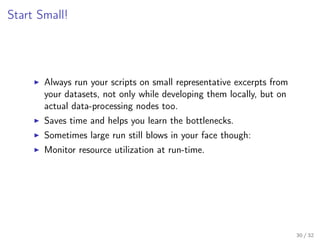
Start Small!
Always run your scripts on small representative excerpts from
your datasets, not only while developing them locally, but on
actual data-processing nodes too.
Saves time and helps you learn the bottlenecks.
Sometimes large run still blows in your face though:
Monitor resource utilization at run-time.
30 / 32
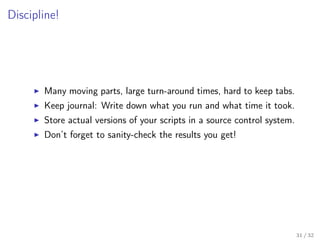
Discipline!
Many moving parts, large turn-around times, hard to keep tabs.
Keep journal: Write down what you run and what time it took.
Store actual versions of your scripts in a source control system.
Don’t forget to sanity-check the results you get!
31 / 32
Questions?
Alexander Gladysh, ag@logiceditor.com
32 / 32

Ad-hoc Big-Data Analysis with Lua

  • 1.
    Ad-hoc Big-Data Analysiswith Lua And LuaJIT Alexander Gladysh <ag@logiceditor.com> @agladysh Lua Workshop 2015 Stockholm 1 / 32
  • 2.
  • 3.
    Alexander Gladysh CTO, co-ownerat LogicEditor In löve with Lua since 2005 3 / 32
  • 4.
    The Problem You havea dataset to analyze, which is too large for "small-data" tools, and have no resources to setup and maintain (or pay for) the Hadoop, Google Big Query etc. but you have some processing power available. 4 / 32
  • 5.
    Goal Pre-process the dataso it can be handled by R or Excel or your favorite analytics tool (or Lua!). If the data is dynamic, then learn to pre-process it and build a data processing pipeline. 5 / 32
  • 6.
    An Approach Use Lua! And(semi-)standard tools, available on Linux. Go minimalistic while exploring, avoid frameworks, Then move on to an industrial solution that fits your newly understood requirements, Or roll your own ecosystem! ;-) 6 / 32
  • 7.
  • 8.
    Data Format Plain text Column-based(csv-like), optionally with free-form data in the end Typical example: web-server log files 8 / 32
  • 9.
    Data Format Example:Raw Data 2015/10/15 16:35:30 [info] 14171#0: *901195 [lua] index:14: 95c1c06e626b47dfc705f8ee6695091a 109.74.197.145 *.example.com GET 123456.gif?q=0&step=0&ref= HTTP/1.1 example.com NB: This is a single, tab-separated line from a time-sorted file. 9 / 32
  • 10.
    Data Format Example:Intermediate Data alpha.example.com 5 beta.example.com 7 gamma.example.com 1 NB: These are several tab-separated lines from a key-sorted file. 10 / 32
  • 11.
    Hardware As usual, moreis better: Cores, cache, memory speed and size, HDD speeds, networking speeds... But even a modest VM (or several) can be helpful. Your fancy gaming laptop is good too ;-) 11 / 32
  • 12.
    OS Linux (Ubuntu) Server. Thisapproach will, of course, work for other setups. 12 / 32
  • 13.
    Filesystem Ideally, have datacopies on each processing node, using identical layouts. Fast network should work too. 13 / 32
  • 14.
  • 15.
    Bash Script Example timepv /path/to/uid-time-url-post.gz | pigz -cdp 4 | cut -d$’t’ -f 1,3 | parallel --gnu --progress -P 10 --pipe --block=16M $(cat <<"EOF" luajit ~me/url-to-normalized-domain.lua EOF ) | LC_ALL=C sort -u -t$’t’ -k2 --parallel 6 -S20% | luajit ~me/reduce-value-counter.lua | LC_ALL=C sort -t$’t’ -nrk2 --parallel 6 -S20% | pigz -cp4 >/path/to/domain-uniqs_count-merged.gz 15 / 32
  • 16.
    Lua Script Example:url-to-normalized-domain.lua for l in io.lines() do local key, value = l:match("^([^t]+)t(.*)") if value then value = url_to_normalized_domain(value) end if key and value then io.write(key, "t", value, "n") end end 16 / 32
  • 17.
    Lua Script Example:reduce-value-counter.lua 1/3 -- Assumes input sorted by VALUE -- a foo --> foo 3 -- a foo bar 2 -- b foo quo 1 -- a bar -- c bar -- d quo 17 / 32
  • 18.
    Lua Script Example:reduce-value-counter.lua 2/3 local last_key = nil, accum = 0 local flush = function(key) if last_key then io.write(last_key, "t", accum, "n") end accum = 0 last_key = key -- may be nil end 18 / 32
  • 19.
    Lua Script Example:reduce-value-counter.lua 3/3 for l in io.lines() do -- Note reverse order! local value, key = l:match("^(.-)t(.*)$") assert(key and value) if key ~= last_key then flush(key) collectgarbage("step") end accum = accum + 1 end flush() 19 / 32
  • 20.
    Tying It AllTogether Basically: You work with sorted data, mapping and reducing it line-by-line, in parallel where at all possible, while trying to use as much of available hardware resources as practical, and without running out of memory. 20 / 32
  • 21.
  • 22.
    The Tools parallel sort, uniq,grep cut, join, comm pv compression utilities LuaJIT 22 / 32
  • 23.
    LuaJIT? Up to apoint: 2.1 helps to speed things up, FFI bogs down development speed. Go plain Lua first (run it with LuaJIT), then roll your own ecosystem as needed ;-) 23 / 32
  • 24.
    Parallel xargs for parallelcomputation can run your jobs in parallel on a single machine or on a "cluster" 24 / 32
  • 25.
    Compression gzip: default, bad lz4:fast, large files pigz: fast, parallelizable xz: good compression, slow ...and many more, be on lookout for new formats! 25 / 32
  • 26.
    GNU sort Tricks LC_ALL=C sort -t$’t’ --parallel 4 -S60% -k3,3nr -k2,2 -k1,1nr Disable locale. Specify delimiter. Note that parallel x4 with 60% memory will consume 0.6 * log(4) = 120% of memory. When doing multi-key sort, specify parameters after key number. 26 / 32
  • 27.
  • 28.
  • 29.
    Why Lua? Perl, AWKare traditional alternatives to Lua, but, if you’re not very disciplined and experienced, they are much less maintainable. 29 / 32
  • 30.
    Start Small! Always runyour scripts on small representative excerpts from your datasets, not only while developing them locally, but on actual data-processing nodes too. Saves time and helps you learn the bottlenecks. Sometimes large run still blows in your face though: Monitor resource utilization at run-time. 30 / 32
  • 31.
    Discipline! Many moving parts,large turn-around times, hard to keep tabs. Keep journal: Write down what you run and what time it took. Store actual versions of your scripts in a source control system. Don’t forget to sanity-check the results you get! 31 / 32
  • 32.