Presented by Chad Kafka
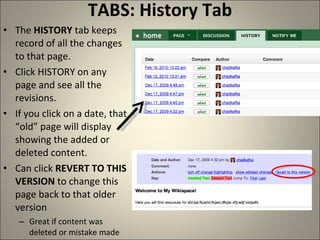
TABS: History Tab The  HISTORY  tab keeps record of all the changes to that page.  Click HISTORY on any page and see all the revisions.  If you click on a date, that “old” page will display showing the added or deleted content. Can click  REVERT TO THIS VERSION  to change this page back to that older version Great if content was deleted or mistake made
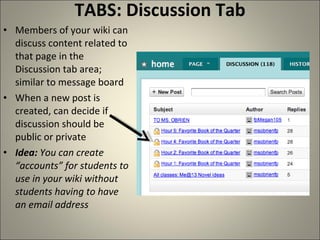
TABS: Discussion Tab Members of your wiki can discuss content related to that page in the Discussion tab area; similar to message board When a new post is created, can decide if discussion should be public or private Idea:  You can create “accounts” for students to use in your wiki without students having to have an email address
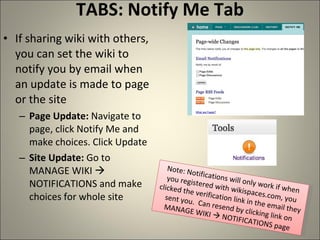
TABS: Notify Me Tab If sharing wiki with others, you can set the wiki to notify you by email when an update is made to page or the site Page Update:  Navigate to page, click Notify Me and make choices. Click Update Site Update:  Go to MANAGE WIKI    NOTIFICATIONS and make choices for whole site Note: Notifications will only work if when you registered with wikispaces.com, you clicked the verification link in the email they sent you.  Can resend by clicking link on MANAGE WIKI    NOTIFICATIONS page

Additions

  • 1.
  • 2.
    TABS: History TabThe HISTORY tab keeps record of all the changes to that page. Click HISTORY on any page and see all the revisions. If you click on a date, that “old” page will display showing the added or deleted content. Can click REVERT TO THIS VERSION to change this page back to that older version Great if content was deleted or mistake made
  • 3.
    TABS: Discussion TabMembers of your wiki can discuss content related to that page in the Discussion tab area; similar to message board When a new post is created, can decide if discussion should be public or private Idea: You can create “accounts” for students to use in your wiki without students having to have an email address
  • 4.
    TABS: Notify MeTab If sharing wiki with others, you can set the wiki to notify you by email when an update is made to page or the site Page Update: Navigate to page, click Notify Me and make choices. Click Update Site Update: Go to MANAGE WIKI  NOTIFICATIONS and make choices for whole site Note: Notifications will only work if when you registered with wikispaces.com, you clicked the verification link in the email they sent you. Can resend by clicking link on MANAGE WIKI  NOTIFICATIONS page