Presented by Chad Kafka
Topics BASICS How to add a widget
Widgets What is a widget? Short for “web gadget”  A small program or interactive piece to a  webpage Examples:  video, audio, slideshows, games, calendar, poll, chat window, document, bookmarks, map Putting a widget on a page is known as  embedding Example:  This page has a video embedded Anything with an EMBED code on the web can be EMBEDDED on your wiki and it doesn’t take up any of the space you are allowed for your wiki!!!  
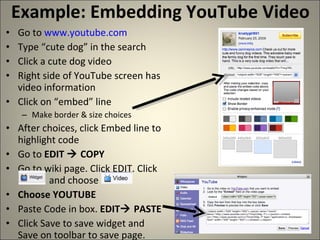
Example: Embedding YouTube Video Go to  www.youtube.com Type “cute dog” in the search Click a cute dog video Right side of YouTube screen has video information Click on “embed” line Make border & size choices After choices, click Embed line to highlight code Go to  EDIT    COPY Go to wiki page. Click EDIT. Click    and choose Choose YOUTUBE Paste Code in box.  EDIT   PASTE Click Save to save widget and Save on toolbar to save page.

Widgets

  • 1.
  • 2.
    Topics BASICS Howto add a widget
  • 3.
    Widgets What isa widget? Short for “web gadget” A small program or interactive piece to a webpage Examples: video, audio, slideshows, games, calendar, poll, chat window, document, bookmarks, map Putting a widget on a page is known as embedding Example: This page has a video embedded Anything with an EMBED code on the web can be EMBEDDED on your wiki and it doesn’t take up any of the space you are allowed for your wiki!!! 
  • 4.
    Example: Embedding YouTubeVideo Go to www.youtube.com Type “cute dog” in the search Click a cute dog video Right side of YouTube screen has video information Click on “embed” line Make border & size choices After choices, click Embed line to highlight code Go to EDIT  COPY Go to wiki page. Click EDIT. Click and choose Choose YOUTUBE Paste Code in box. EDIT  PASTE Click Save to save widget and Save on toolbar to save page.

Editor's Notes

  • #4 FPS Summer Academy Kafka - Wikis & Blogs
  • #5 FPS Summer Academy Kafka - Wikis & Blogs