
Adding OCLC numbers,
ISSNs and ISBNs to the
Knowledge Base
JEFF SIEMON, ANDERSON UNIVERSITY
SEPTEMBER 27, 2017
Session description
Collection Level Cooperative Cataloging enhances patrons' ability
to discover expensive electronic resources.
A review by PALNI shows 1/8th of KB collections are lacking
OCLC numbers for more than 40% of their titles.
A workflow for adding 100s of OCLC numbers at a time to KB
collections will be demonstrated. Software for adding OCLC
numbers includes Collection Manager, Connexion Client, and
Excel; for ISSNs and ISBNs MarcEdit is also necessary.
Plea for Catalogers to add
WMS Collection Manager to their skill set.
Catalogers have been active in item cooperative cataloging for
decades. We need to make the move to Collection Level
Cooperative Cataloging.
• Many “Electronic Resources Librarians” came from Serials or
Acquisitions, and focus on negotiating prices, etc.
• Catalogers traditionally focus on Discovery, and these
e-Resources need better Discovery
• Catalogers are good with detail, and Knowledge Base collections
need librarians to improve the details of this metadata.
• Libraries are purchasing fewer individual books, and fewer print
books, and more collections of materials, especially eBooks,
Thus, catalogers need to also work at the collection level
• WMS Collection Manager is the only Discovery service that
encourages the cooperative (us) to improve the metadata.
Sugiyama, Yukari, Marlene van Ballegooie, and Fabiano
Takashi Rocha. "Harnessing the Power of the Cooperative:
Improving Access to the JapanKnowledge E-Resource
Collection." Journal of East Asian Libraries 2016, no. 163
“E-resource discovery is almost entirely dependent upon metadata
that is supplied by parties outside of the library. Since e-resources
are often purchased in large packages and metadata pertaining to
these resources is dynamic and changeable, most libraries rely on
content providers to supply MARC records to enable e-resource
discovery within local systems. To further assist libraries in
managing and facilitating access to their electronic resource
collections, there is also an expectation that content providers will
supply knowledge base vendors (such as Proquest, EBSCO and
OCLC) with information pertaining to the availability and
accessibility of resources. Thus, libraries now work in an environment
where there are more interdependencies than ever; the successful provision
of access to electronic resources is fully dependent on the transmission of
high quality metadata throughout the e-resource supply chain.”
Ways to improve OCLC Knowledge
Base collections
• Delete incorrect OCLC numbers (OCN) in KB titles.
• Change/override the primary OCLC number with the OCN of
the best record.
• Add subtitles to prevent incorrect matches with Bib records
• Add a primary OCN to Knowledge base titles without a primary
OCNs (today’s session)
• Add new titles to Knowledge base collections, when the title is
missing.
• Contribute Knowledge Base collections for vendor collections not
available in the OCLC knowledge base.
• Add free or open access journals not in any KB collection to the
collection: Other Free Journals, collection ID:freeAccess.misc
Some reasons
why you’d
want to do
cooperative
collection
level
cataloging:
When one library creates
this data, then we can
share it.
The vendor
may not
supply
metadata
(yet)
Some reasons why you’d
want to do cooperative
collection level cataloging
Example:
• I created: 03/16/2015
Digitalia Hispanica 6465 titles
collection ID: global.268.84
• created 08/25/2016 by another Fuller
Theological Seminary librarian
Digitalia Hispanica OLD @ Fuller
Libraries 12,373 titles
• Added 3/3/2017 by vendor
Digitalia Hispanica, 14,174 titles
collection ID: digitalia.hispanica
-- So cooperative collections may no
longer be needed;
But 2291 titles do not have an OCN.
The vendor
may not
supply
adequate
metadata.
Some reasons why you’d
want to do cooperative
collection level cataloging
• e.g. JapanKnowledge
Collection ID: global.544.9.1
• Bib Records without LCSH, and
non-standard Romanization
• Multi-volume sets must be
carefully added to KB
• Needed OCLC numbers for KB –
WorldCat linkage
Librarians are
metadata experts.
Cheer!!!
Vendor may
be behind in
sending
metadata to
discovery
services.
Some reasons why you’d
want to do cooperative
collection level cataloging
• e.g. JSTOR Open Access eBooks =
jstor.oaebooks
• 6/7/2017 Baylor University
Libraries added 24 new eBooks
• 4/25/2017 Baylor University
Libraries added 3 new eBooks
• 2/17/2017 Baylor University
Libraries added 2 new eBooks
• 2/9/2017 Baylor University
Libraries added 2 new eBooks
• 2/7/2017 I added 26 new eBooks to
this collection
Vendor may use
only the current
journal title in
their metadata,
even though they
have full-text for
preceding titles
of the "same"
journal.
Some reasons why you’d
want to do cooperative
collection level cataloging
• e.g. 111 new Open Access titles
that Taylor and Francis 5/8/2017
hadn't sent to OCLC,
• some were acquired titles,
• some were new journals (began in
2016 or 2017),
• some were preceding titles, when
T&F only distributed metadata for
the current title
Vendor data
may need to
be improved.
Some reasons why you’d
want to do cooperative
collection level cataloging
e.g. Gale Literature Resource Center
Collection ID: galegroup.sb5102
• I added 6/27/2017
– 35 OCLC numbers,
– 235 ISSNs and
– 10 original bib records for eSerials to
WorldCat
These improvements are shared
with other OCLC WMS libraries
which use this Knowledge Base
collection.
Vendor may
be reluctant
to release
their data.
Some reasons why you’d
want to do cooperative
collection level cataloging
• e.g. Judy Chu (University of the
West) created a Knowledge Base
collection for ProQuest open access
dissertations, to connect some
ProQuest full-text with WorldCat
bib records:
• ProQuest Dissertations and Theses
Open (PQDT Open) 6,682 titles
• Collection ID: global.5644.234
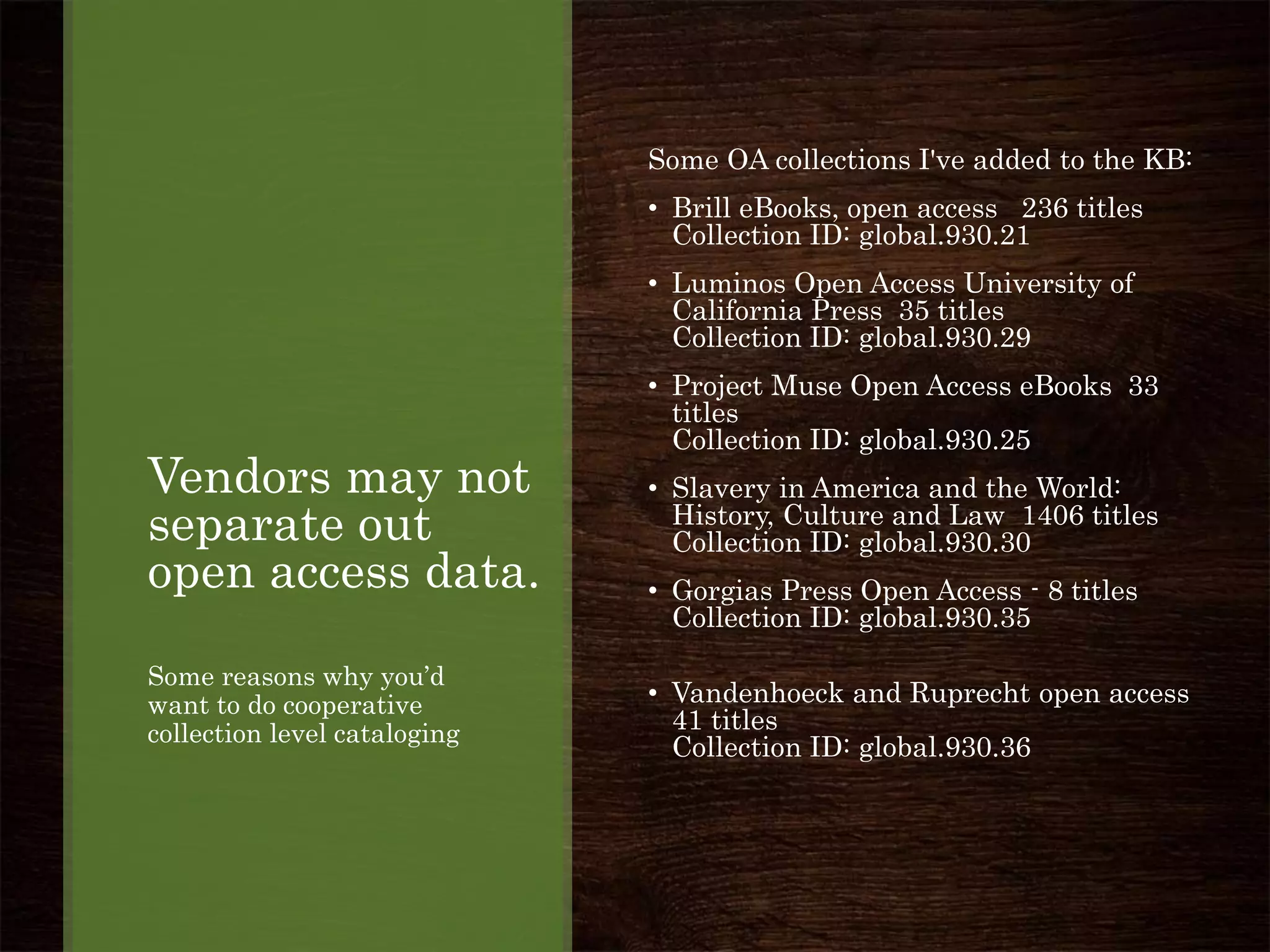
Vendors may not
separate out
open access data.
Some reasons why you’d
want to do cooperative
collection level cataloging
Some OA collections I've added to the KB:
• Brill eBooks, open access 236 titles
Collection ID: global.930.21
• Luminos Open Access University of
California Press 35 titles
Collection ID: global.930.29
• Project Muse Open Access eBooks 33
titles
Collection ID: global.930.25
• Slavery in America and the World:
History, Culture and Law 1406 titles
Collection ID: global.930.30
• Gorgias Press Open Access - 8 titles
Collection ID: global.930.35
• Vandenhoeck and Ruprecht open access
41 titles
Collection ID: global.930.36
Which
Cooperative
Management
Changes Kept
in Knowledge
Base
Even when vendor supplied
data is loaded.
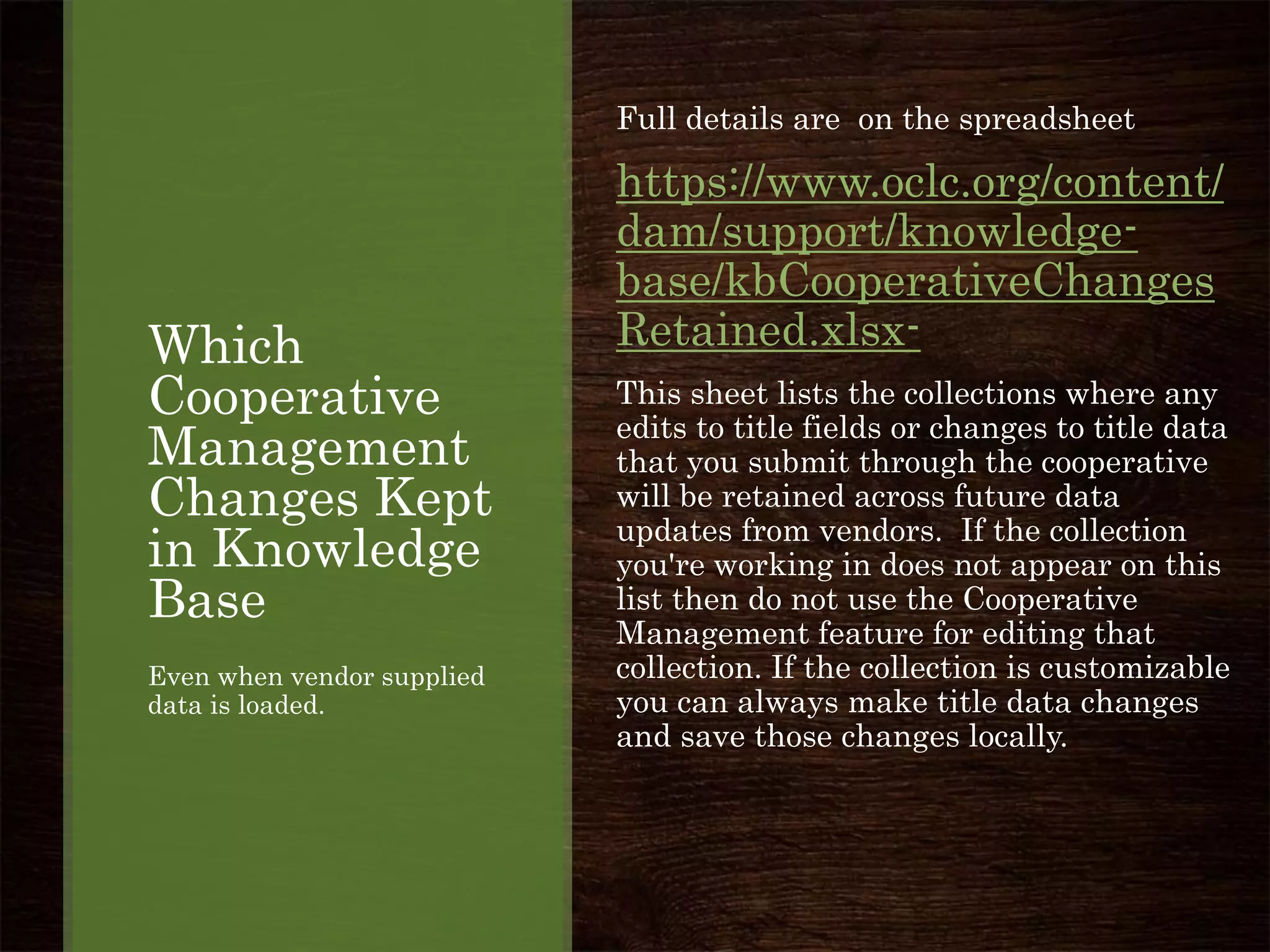
Full details are on the spreadsheet
https://www.oclc.org/content/
dam/support/knowledge-
base/kbCooperativeChanges
Retained.xlsx-
This sheet lists the collections where any
edits to title fields or changes to title data
that you submit through the cooperative
will be retained across future data
updates from vendors. If the collection
you're working in does not appear on this
list then do not use the Cooperative
Management feature for editing that
collection. If the collection is customizable
you can always make title data changes
and save those changes locally.
Which
Cooperative
Management
Changes Kept
in Knowledge
Base
Even when vendor supplied
data is loaded.
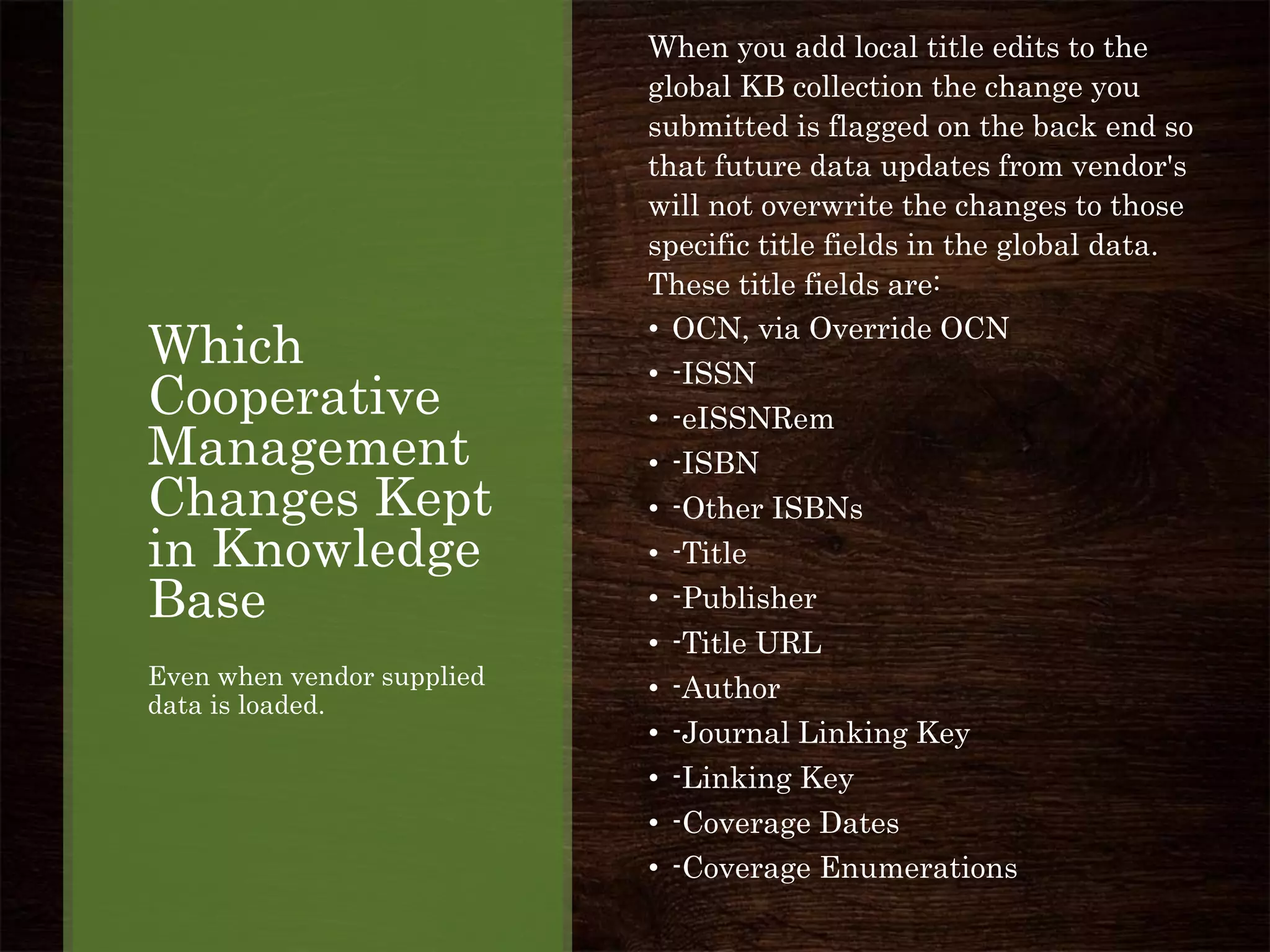
When you add local title edits to the
global KB collection the change you
submitted is flagged on the back end so
that future data updates from vendor's
will not overwrite the changes to those
specific title fields in the global data.
These title fields are:
• OCN, via Override OCN
• -ISSN
• -eISSNRem
• -ISBN
• -Other ISBNs
• -Title
• -Publisher
• -Title URL
• -Author
• -Journal Linking Key
• -Linking Key
• -Coverage Dates
• -Coverage Enumerations
Why add a
subtitle or
series title to
a Knowledge
Base title?
Improvements to collections
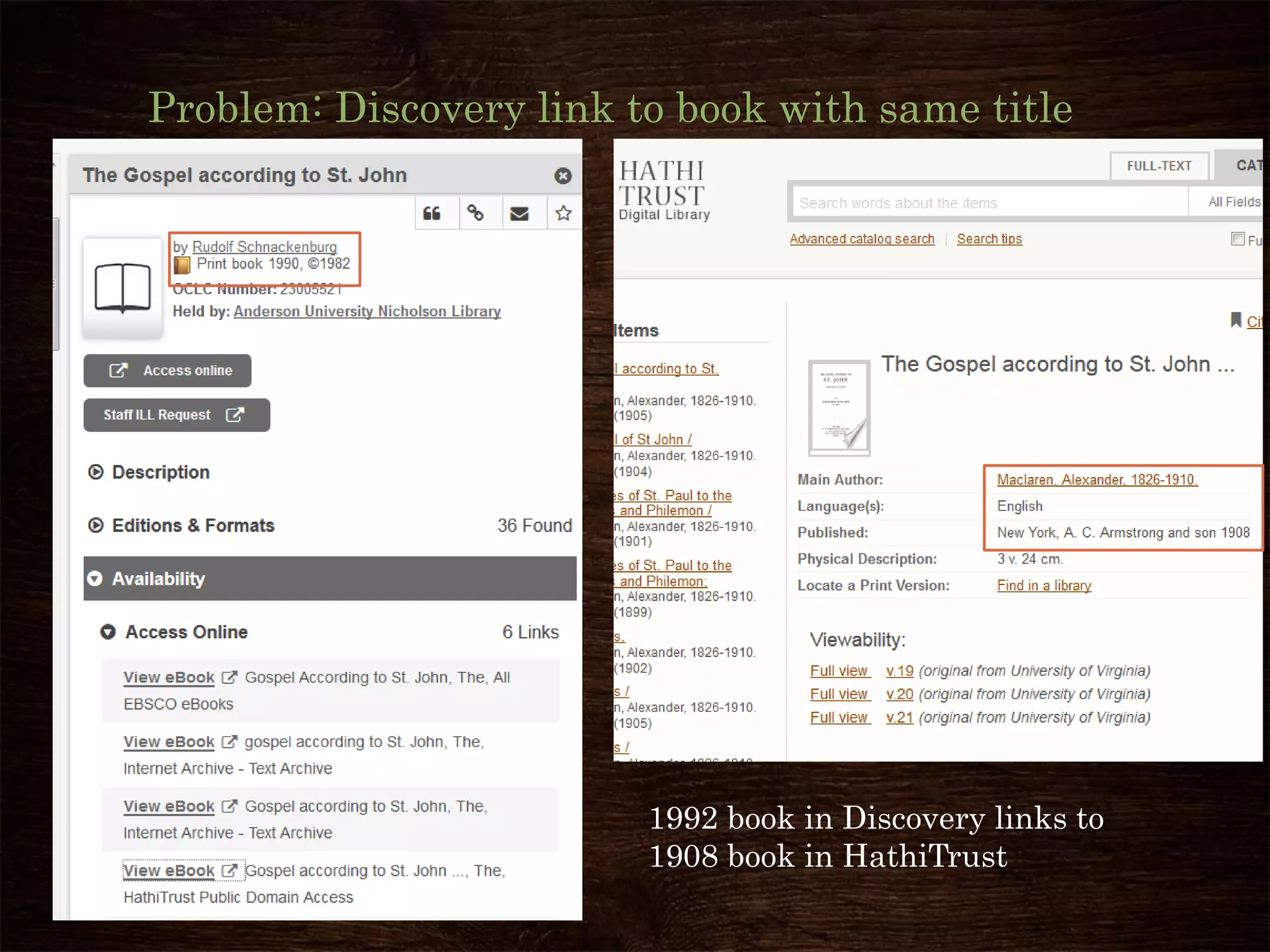
Problem: Discovery link to book with same title
1992 book in Discovery links to
1908 book in HathiTrust
Solution:
Add subtitle or series title to Kbart record for the
HathiTrust title.
This prevents incorrect matches to other Bib
records with the same title.
How to overview in next slides:
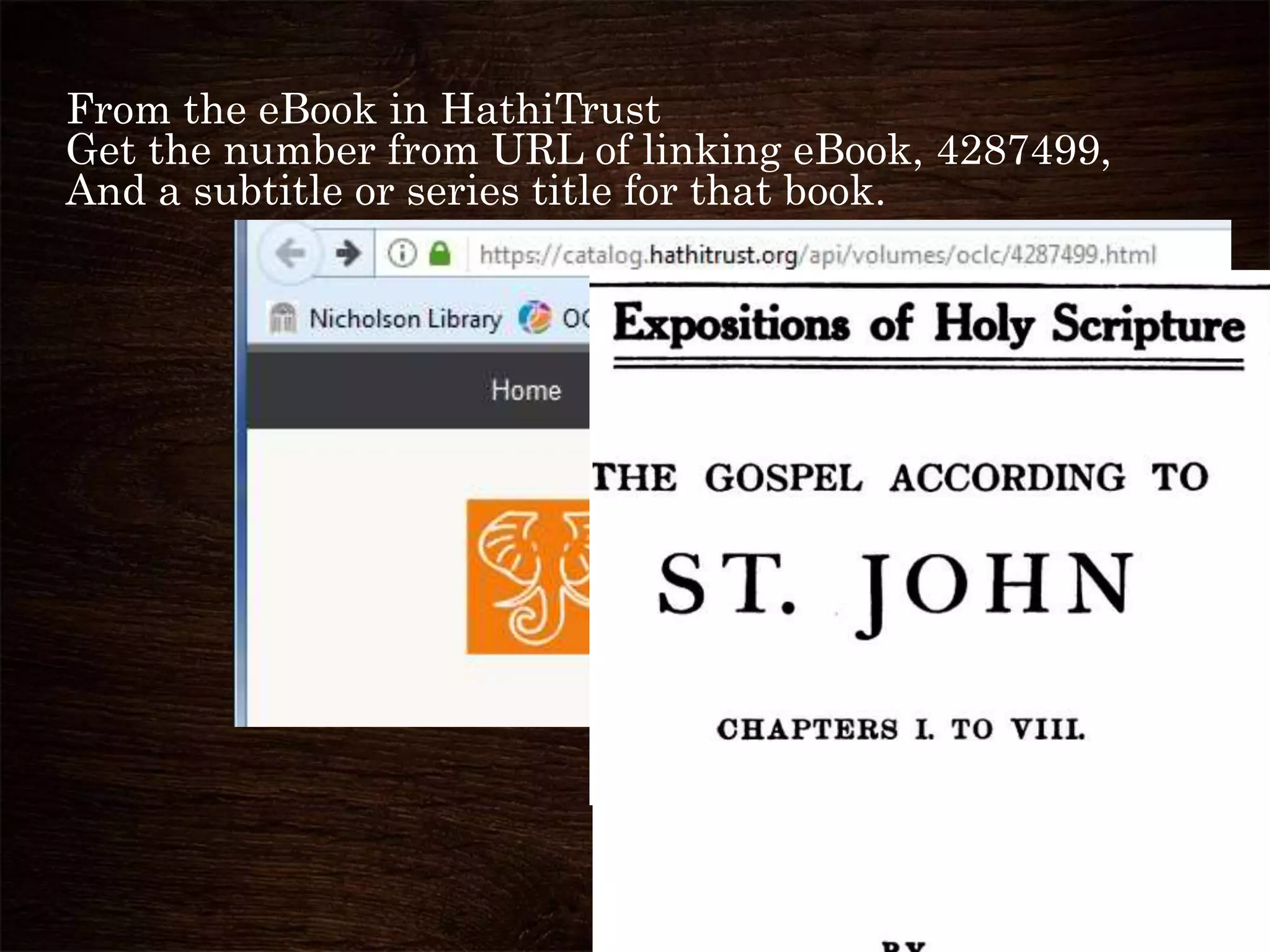
From the eBook in HathiTrust
Get the number from URL of linking eBook, 4287499,
And a subtitle or series title for that book.
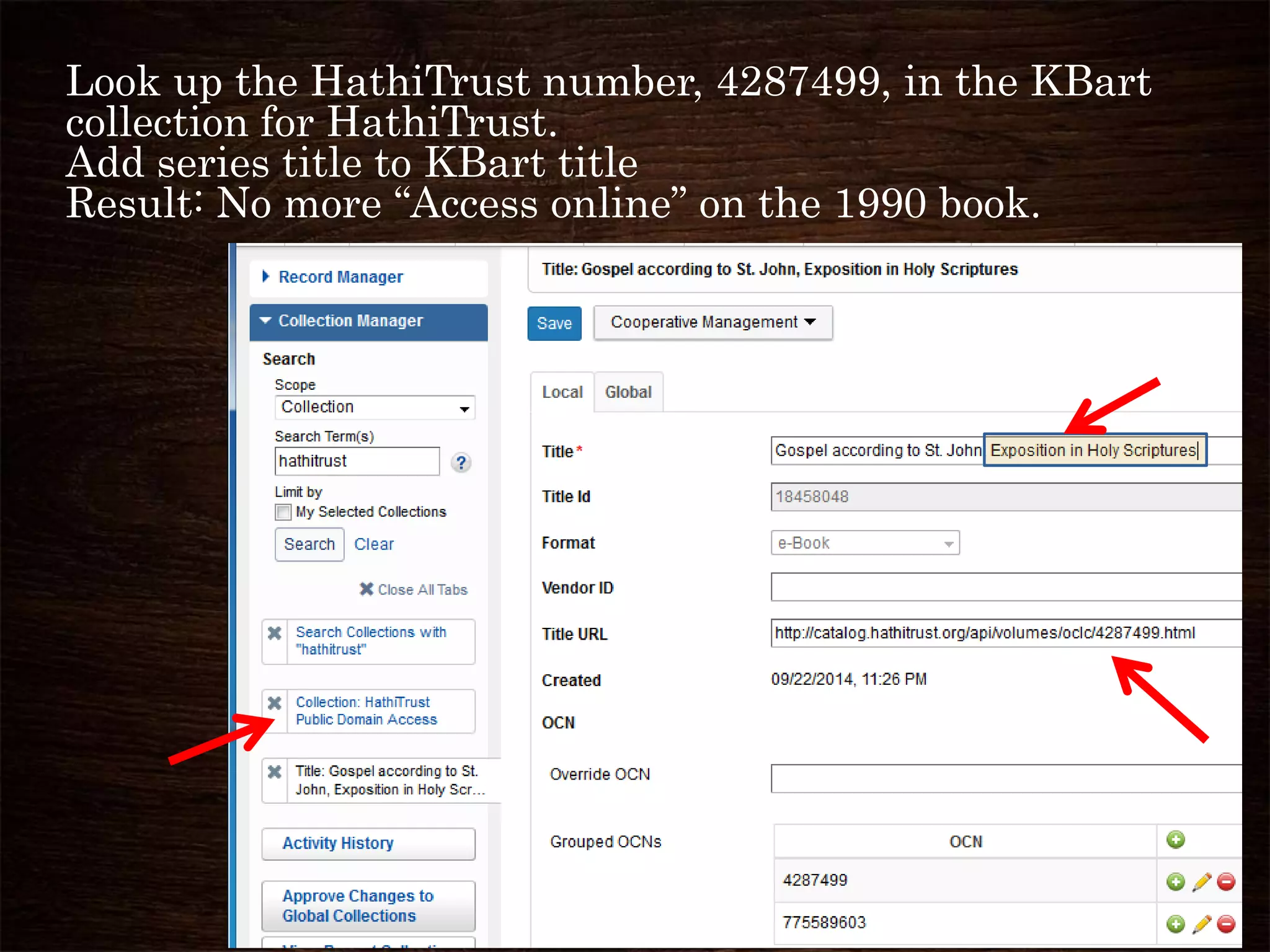
Look up the HathiTrust number, 4287499, in the KBart
collection for HathiTrust.
Add series title to KBart title
Result: No more “Access online” on the 1990 book.
Why add
OCLC
numbers to a
Knowledge
Base
Collection?
I’m going to demonstrate
How,
and How is complicated.
So there better be a good
answer to Why.
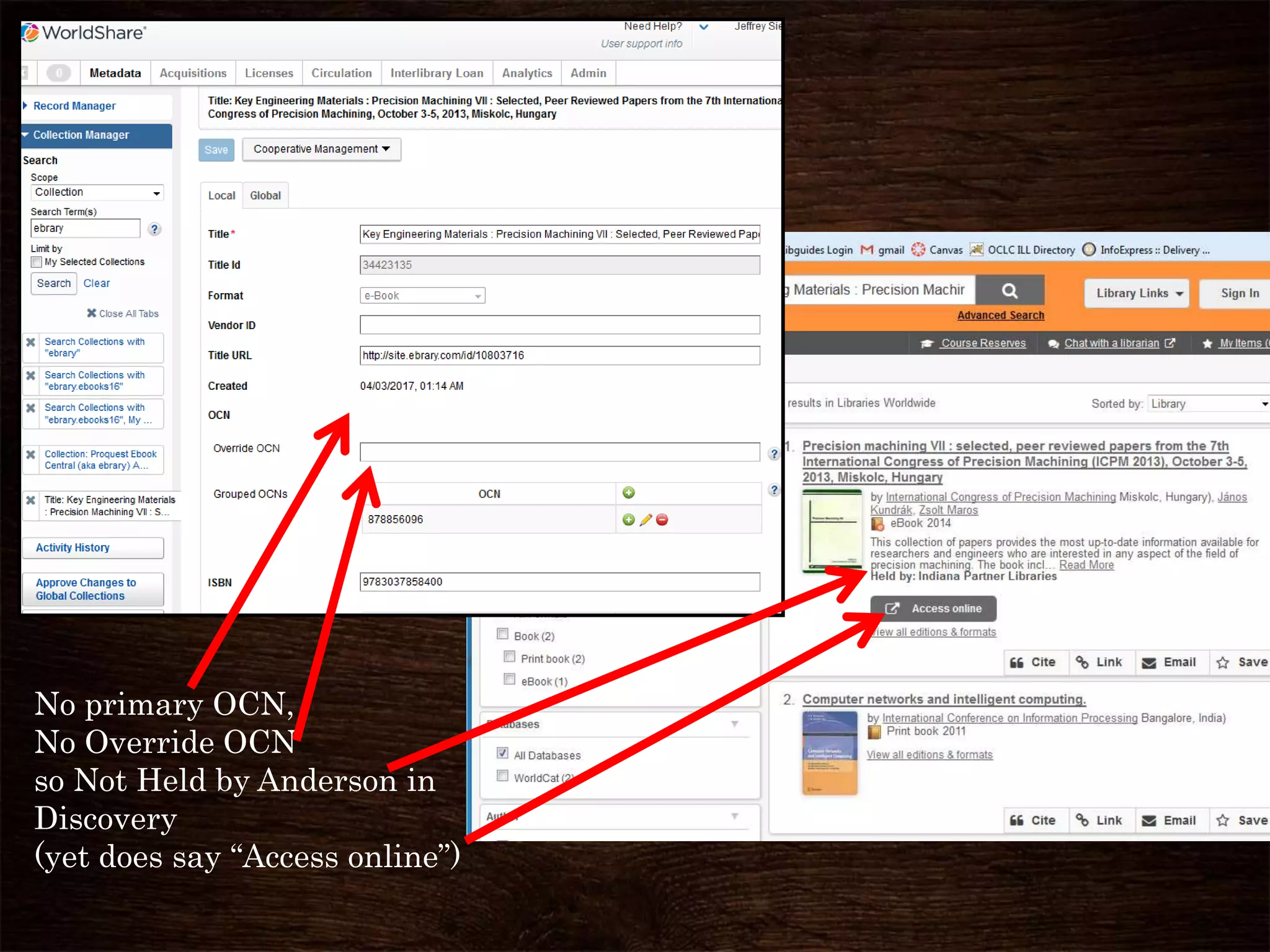
No primary OCN,
No Override OCN
so Not Held by Anderson in
Discovery
(yet does say “Access online”)
Why Discovery is improved by adding
OCLC numbers to KB collection
When there is no primary OCN in the KB,
then holdings are not set in WorldCat.
Therefore, that title (bib record) drops down in search results
And that title will not display if the search is limited to My
Library Holdings.
The “Access online” link will still show up on a result,
if it matches ISBN/ISSN
or if the OCN is in the KB in the “grouped OCNs” list.
Detailed instructions for adding Barcodes to
an existing Knowledge Base collection
• Detailed instructions for adding OCNs to an
existing Knowledge Base collection can be found
at:
• https://drive.google.com/open?id=0B2sHKamxnI
-dQmFkcUVmS1d4RTQ (about 50 pages)
Let me give you a shorter overview of
How to add OCNs
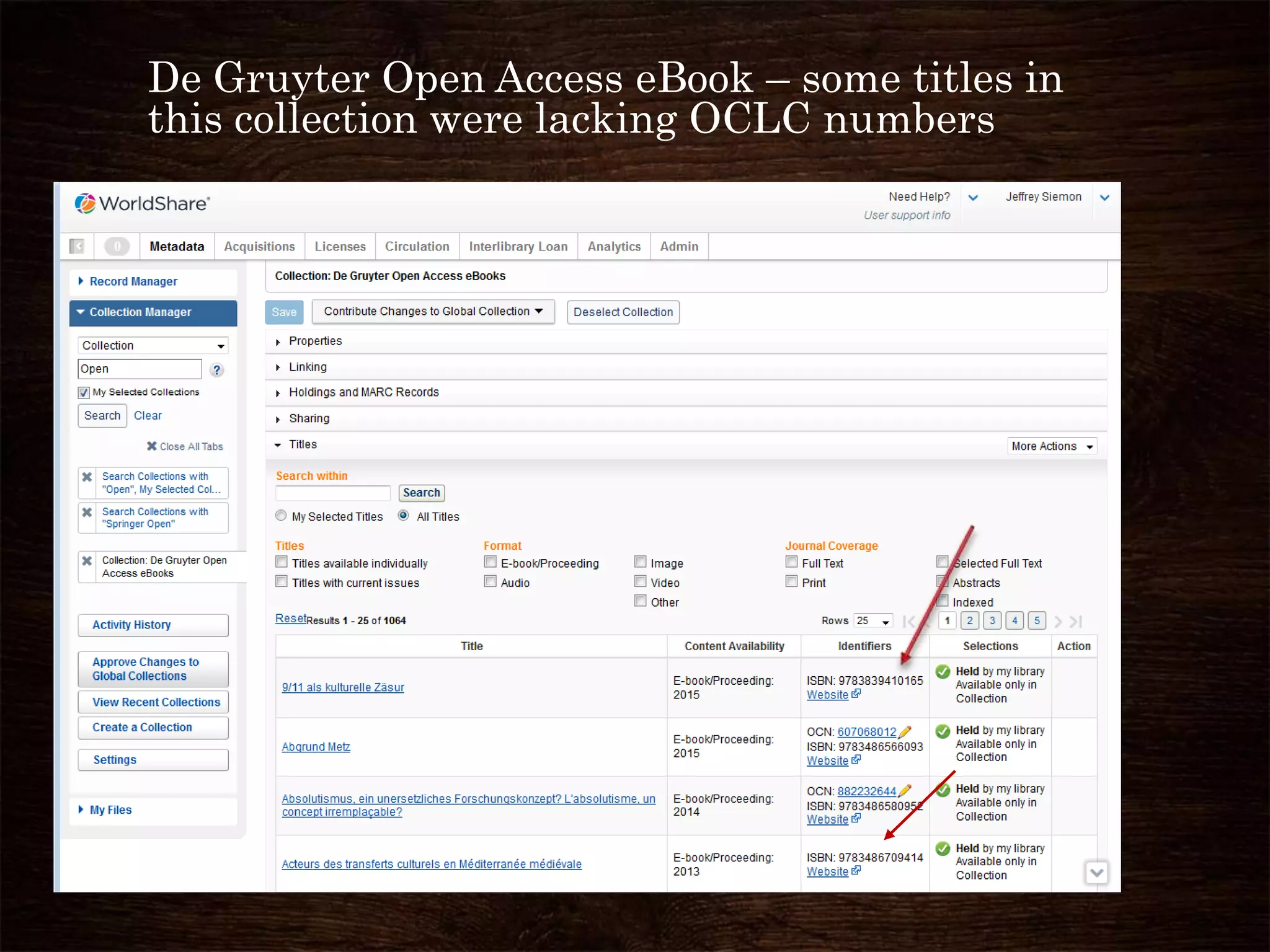
De Gruyter Open Access eBook – some titles in
this collection were lacking OCLC numbers
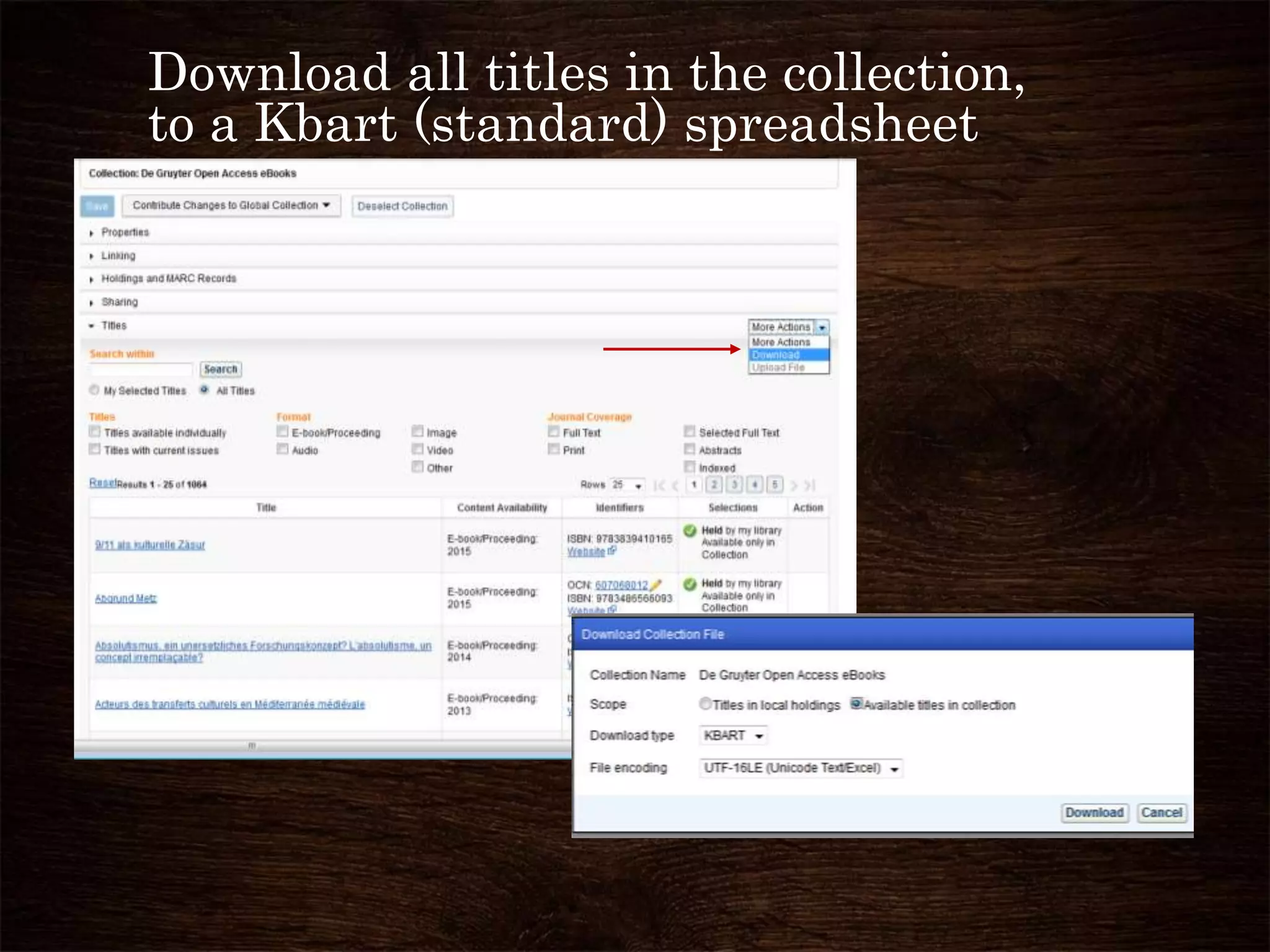
Download all titles in the collection,
to a Kbart (standard) spreadsheet
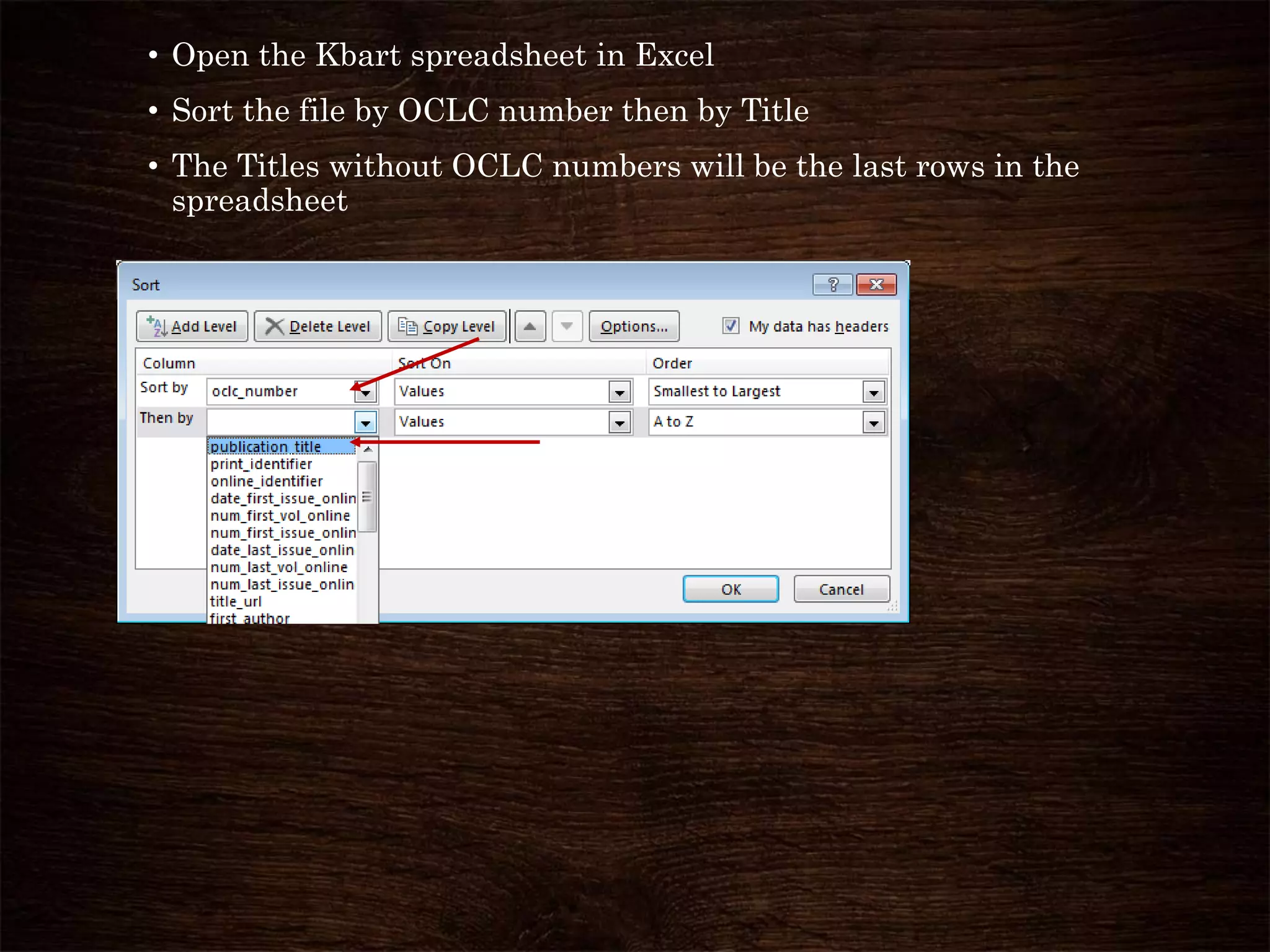
• Open the Kbart spreadsheet in Excel
• Sort the file by OCLC number then by Title
• The Titles without OCLC numbers will be the last rows in the
spreadsheet
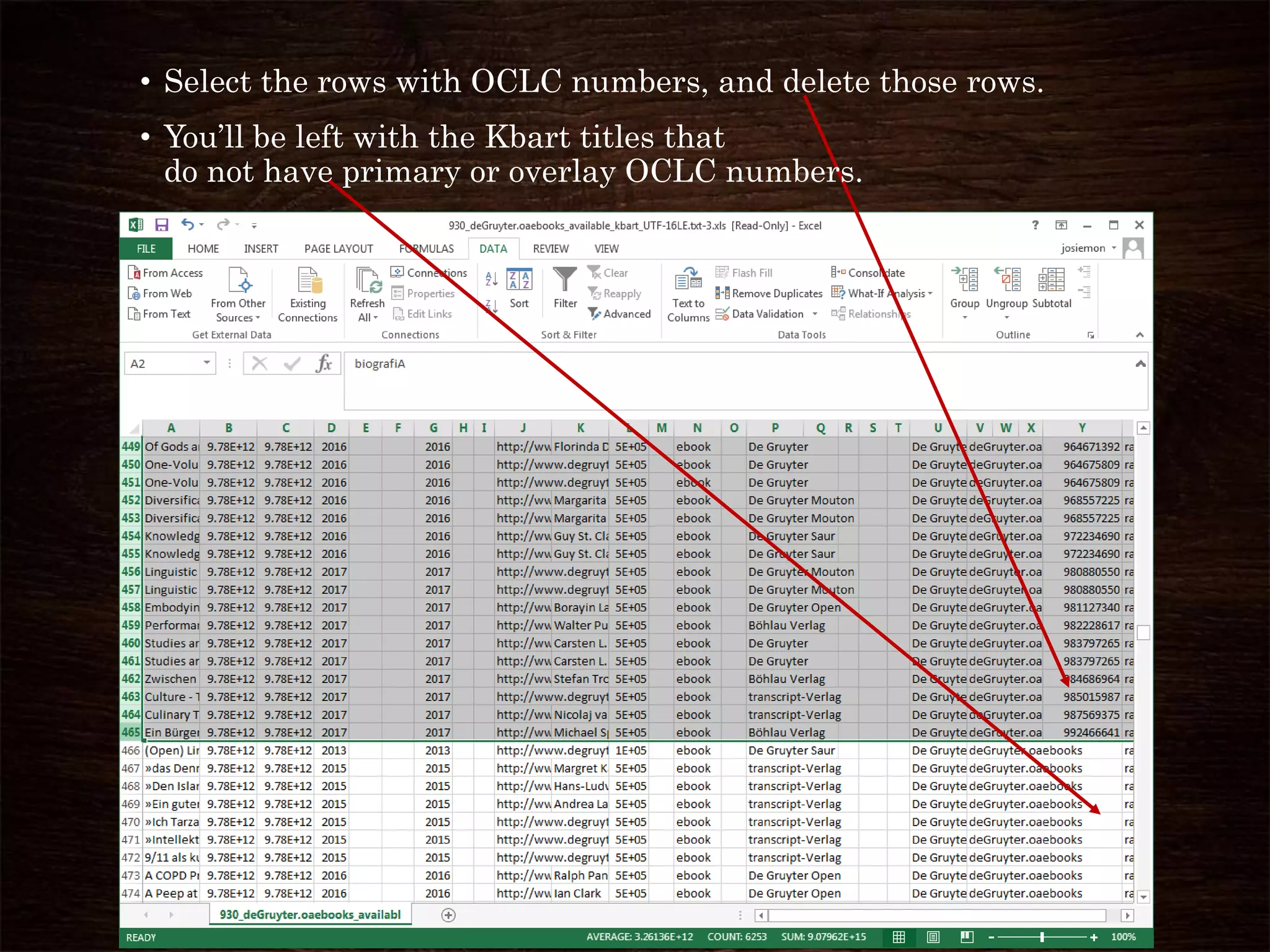
• Select the rows with OCLC numbers, and delete those rows.
• You’ll be left with the Kbart titles that
do not have primary or overlay OCLC numbers.
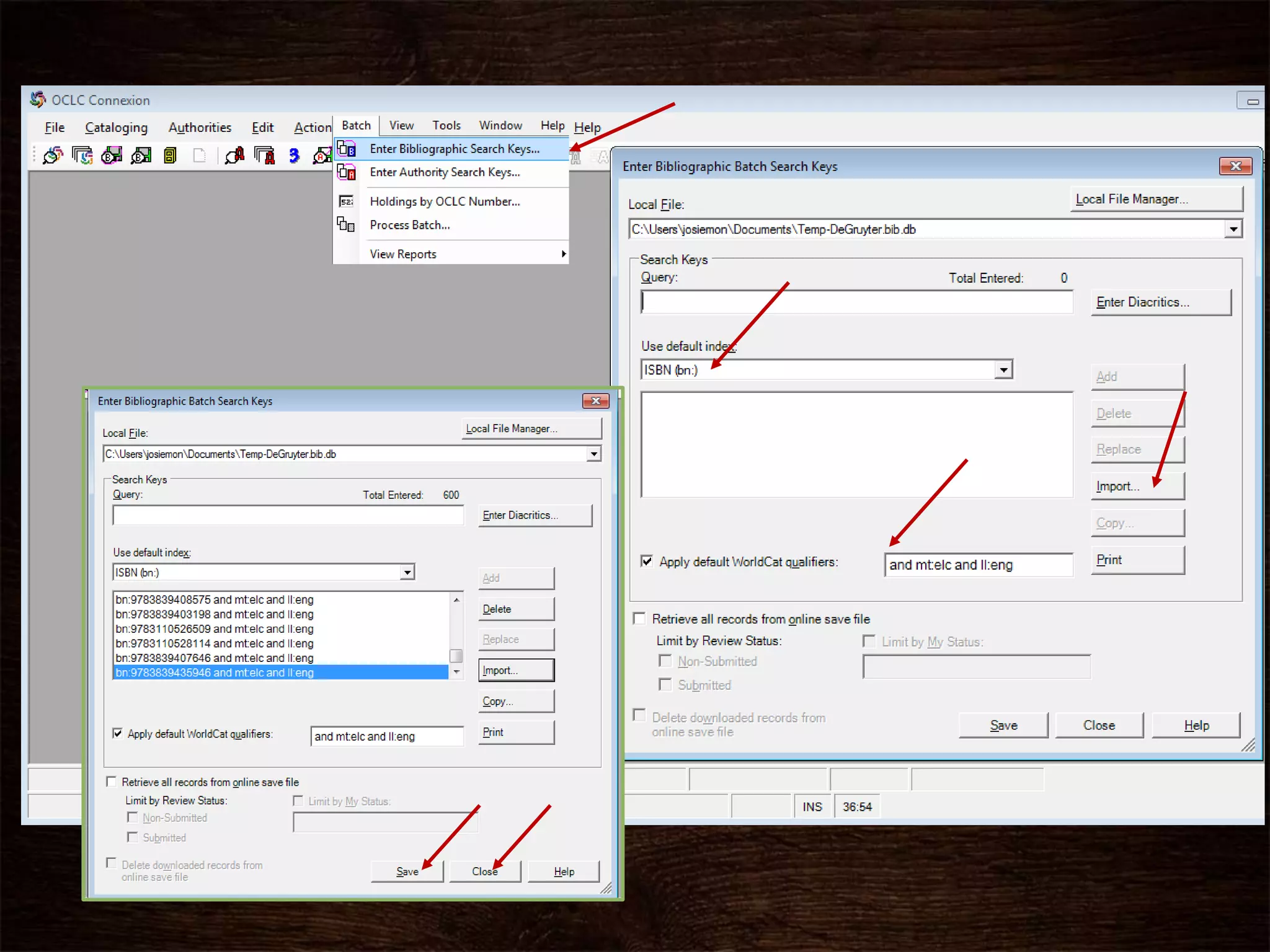
Use Connexion Client batch search function
and the ISBNs, to get OCLC numbers for the
titles. (You might also use title and date.
• Save the ISBN numbers from an Excel column as a text file (I
use notepad)
• Import this file into Connexion as search keys.
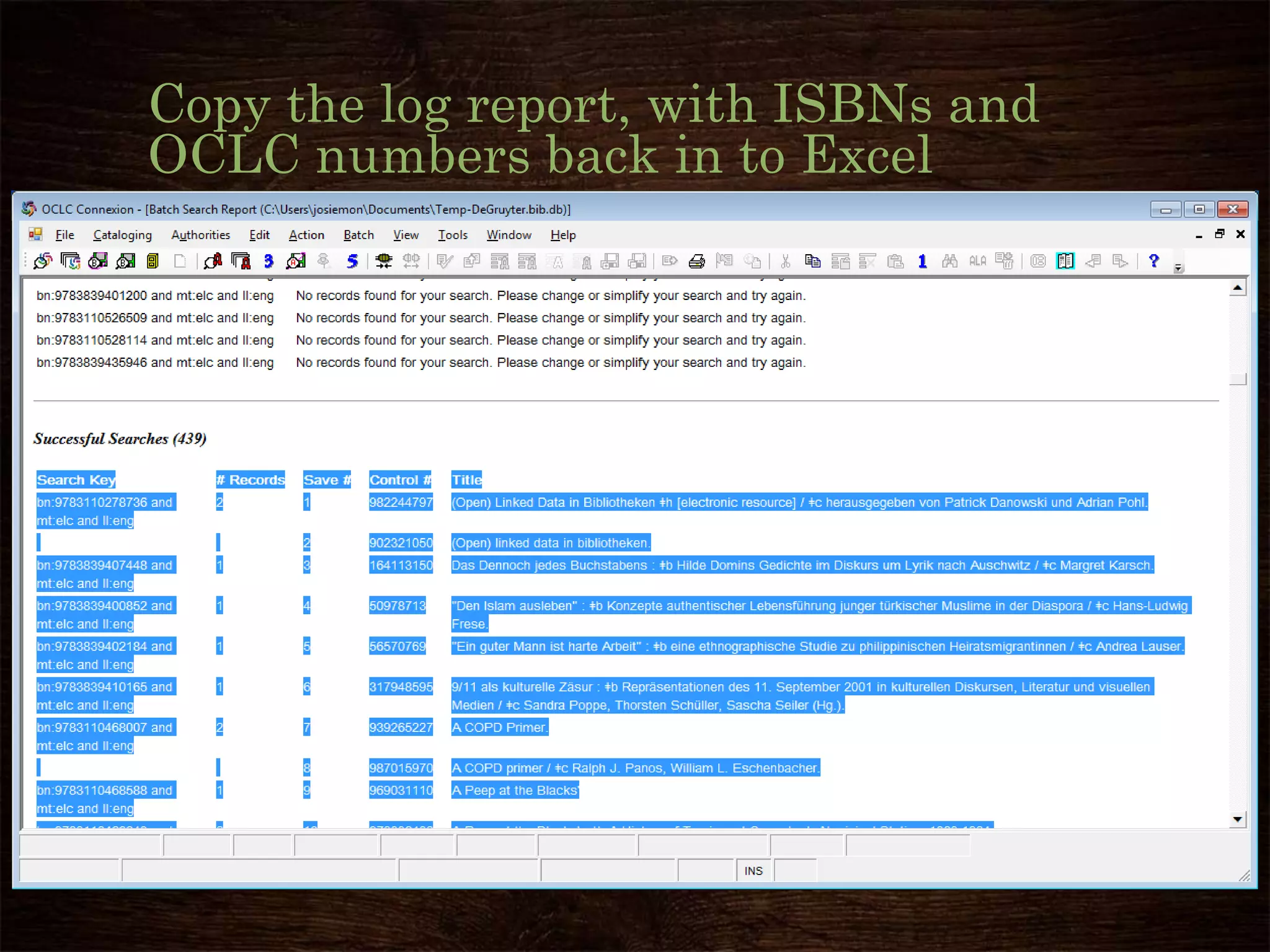
Copy the log report, with ISBNs and
OCLC numbers back in to Excel
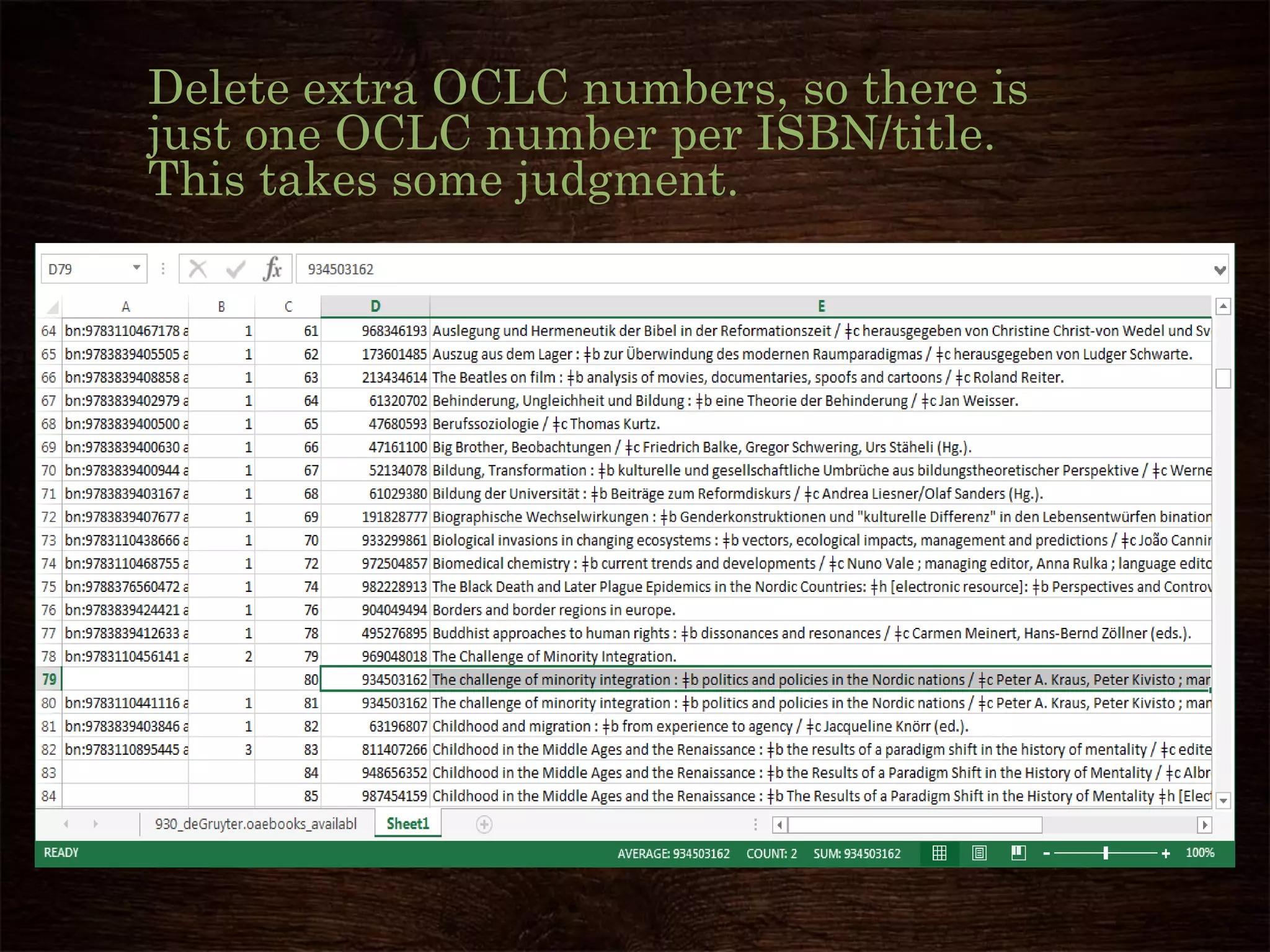
Delete extra OCLC numbers, so there is
just one OCLC number per ISBN/title.
This takes some judgment.
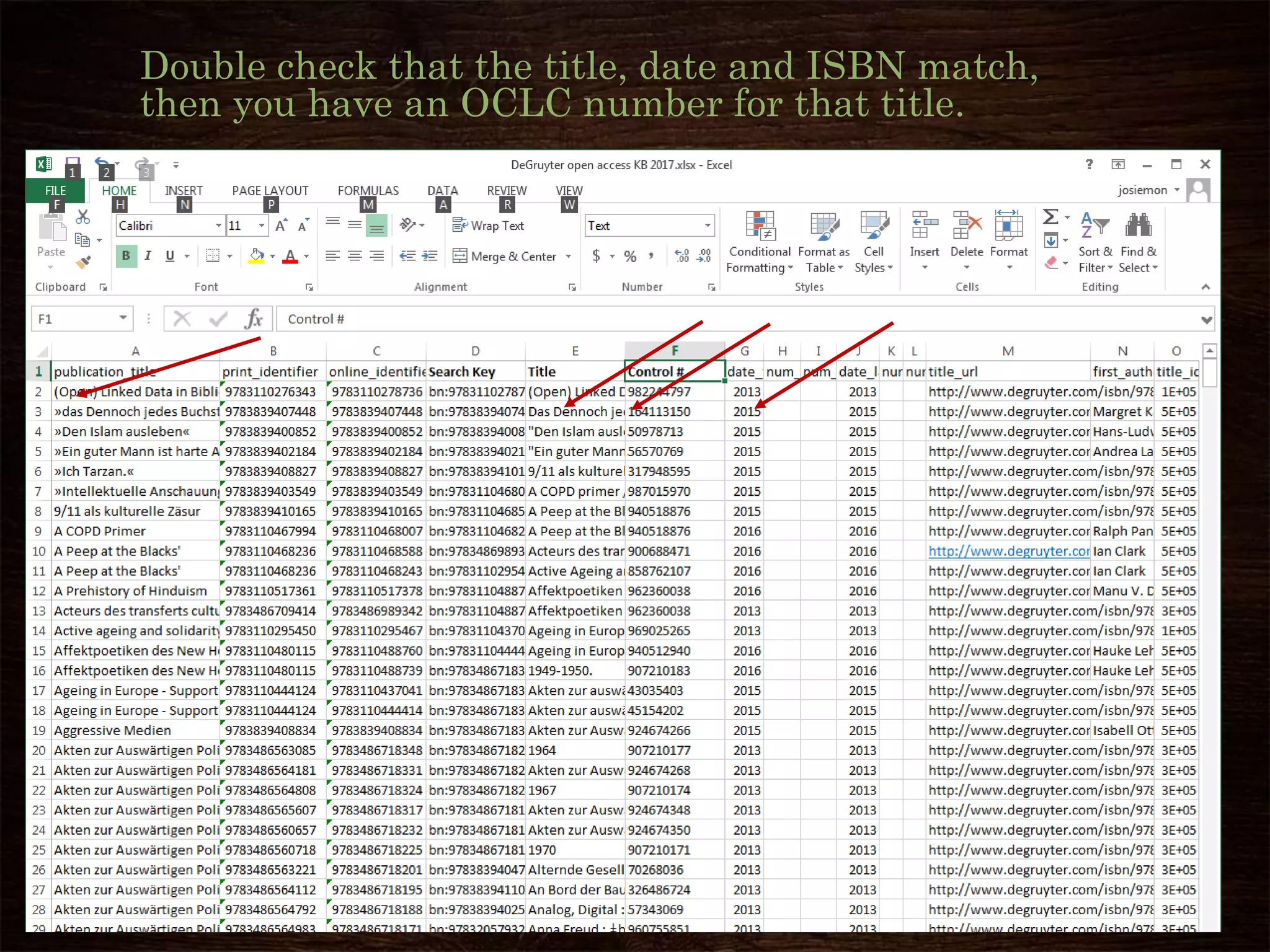
Double check that the title, date and ISBN match,
then you have an OCLC number for that title.
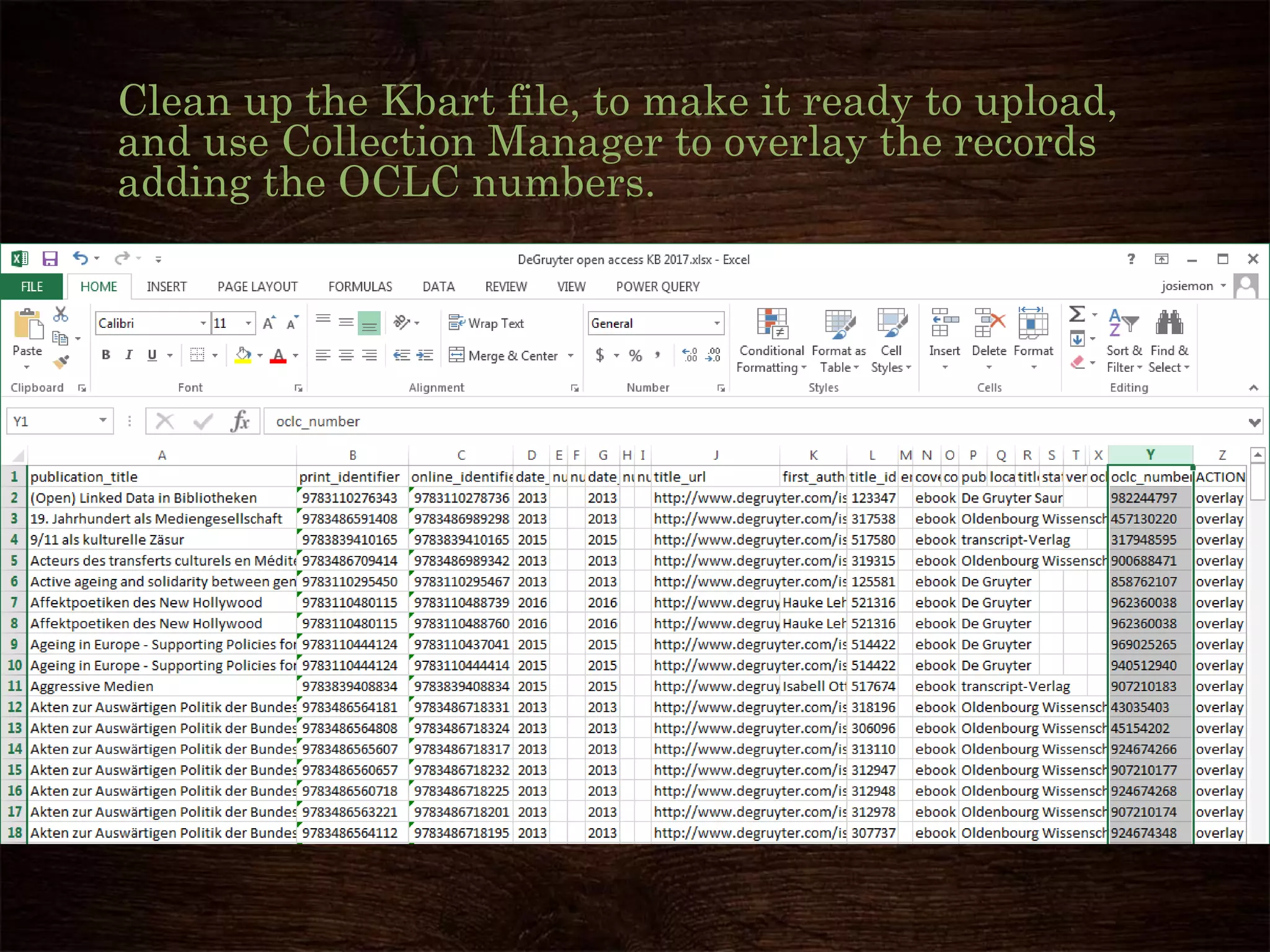
Clean up the Kbart file, to make it ready to upload,
and use Collection Manager to overlay the records
adding the OCLC numbers.
Success!!
These titles with
OCLC numbers
can now be
Discovered by
and Delivered to
your patrons!
Why add OCLC numbers
to a Knowledge Base
Collection?
Questions? Comments?
How to Create new Collection in the
Knowledge Base if the vendor has not
supplied one.
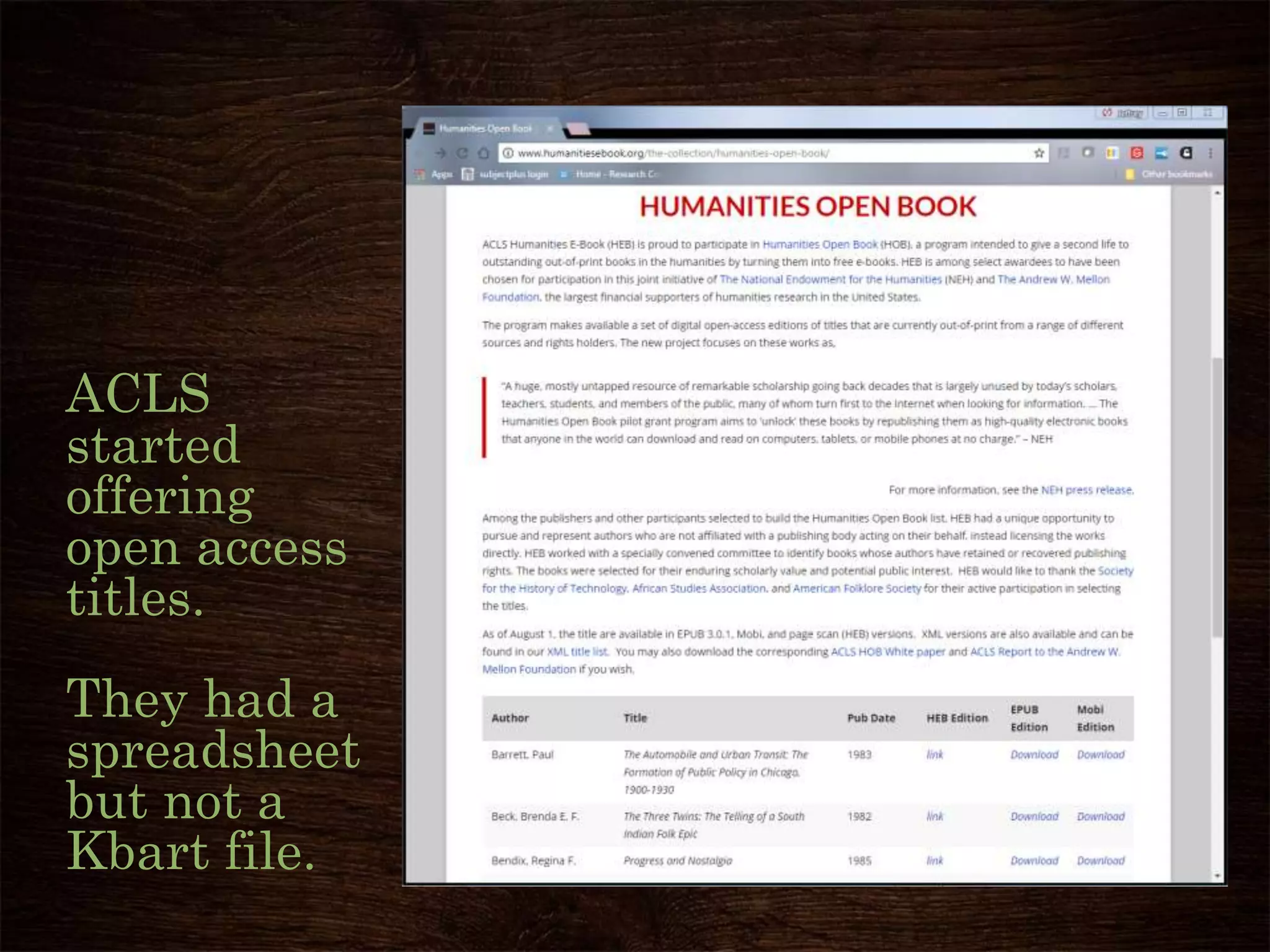
ACLS
started
offering
open access
titles.
They had a
spreadsheet
but not a
Kbart file.
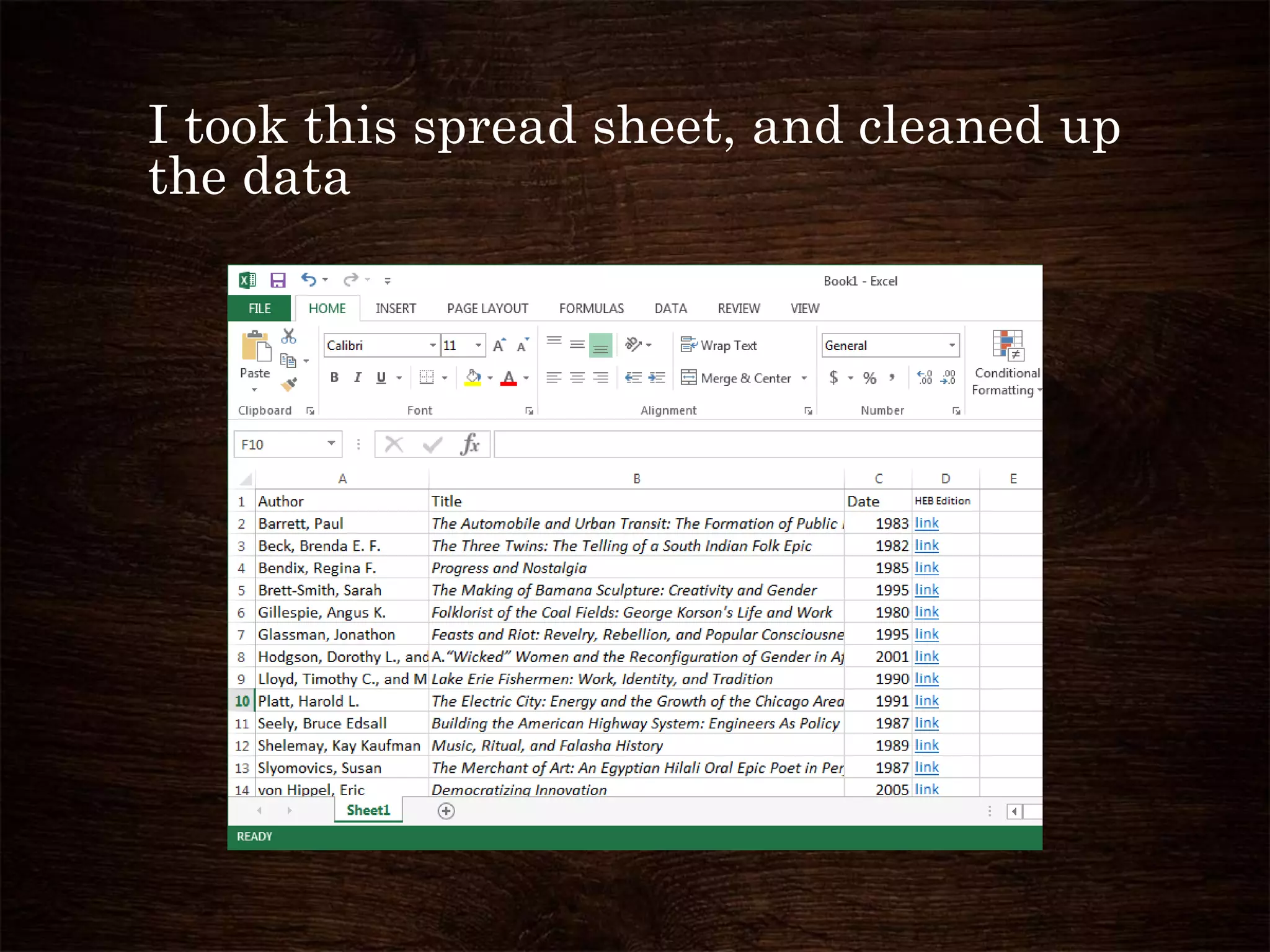
I took this spread sheet, and cleaned up
the data
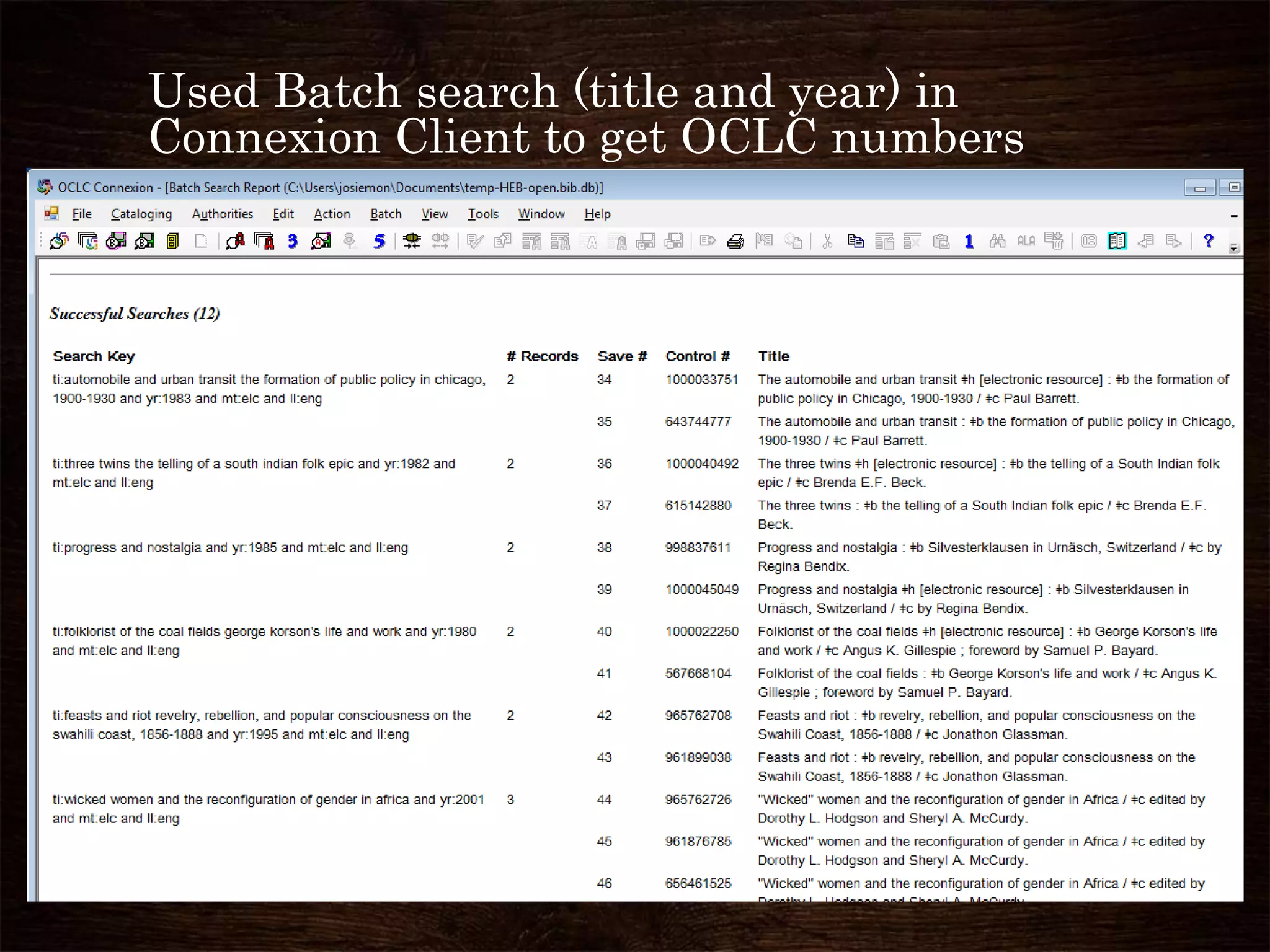
Used Batch search (title and year) in
Connexion Client to get OCLC numbers
Got ISBNs from the WorldCat MARC
records.
Since this collection only had 13 titles, I simply
copied each ISBN from Connexion and Pasted
into the Excel spreadsheet.
For larger collections, I’ve imported the MARC
records into MarcEdit, and exported a spread
sheet of ISBNs or ISSNs, and authors, and
publisher and publication date.
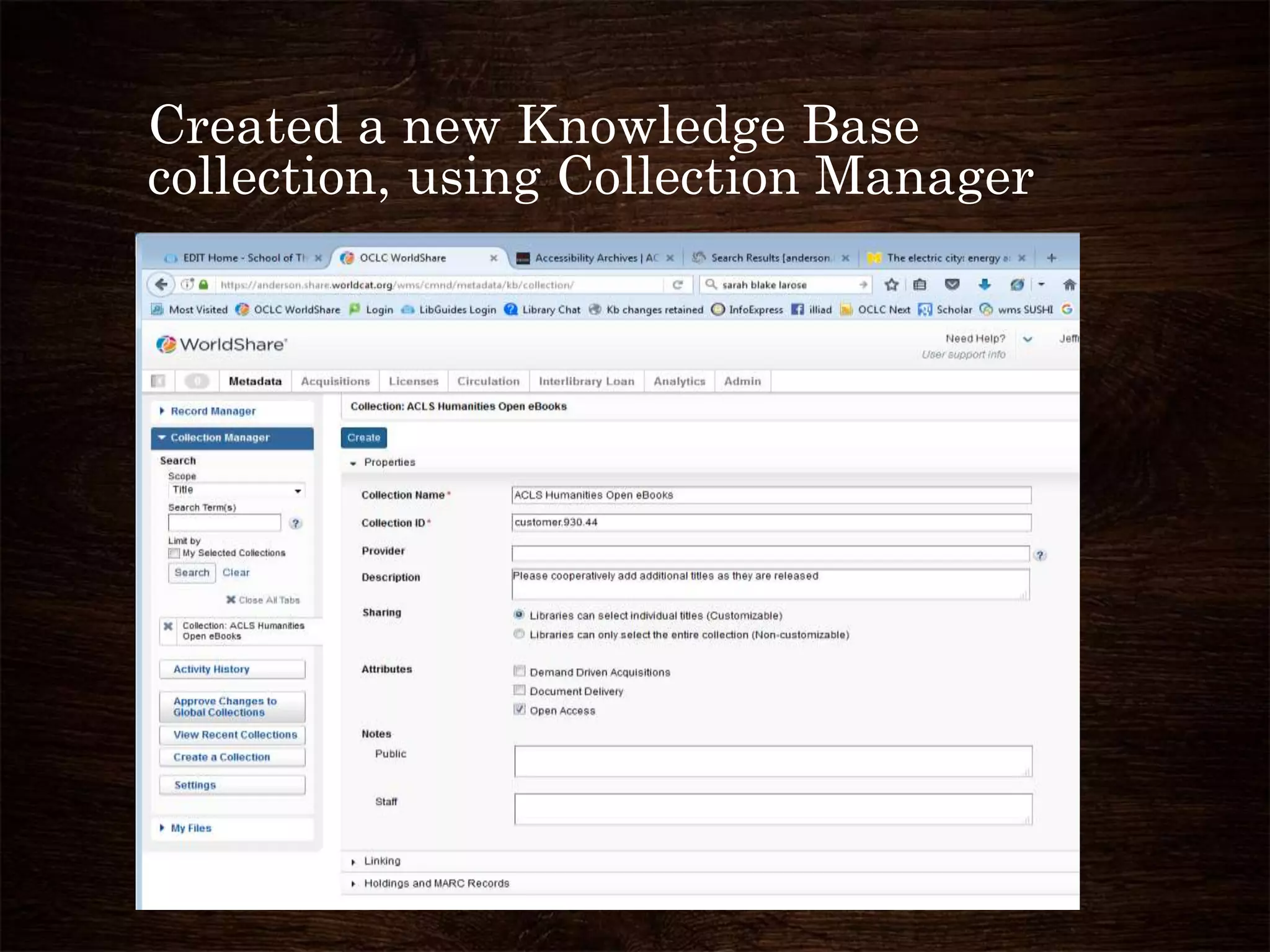
Created a new Knowledge Base
collection, using Collection Manager
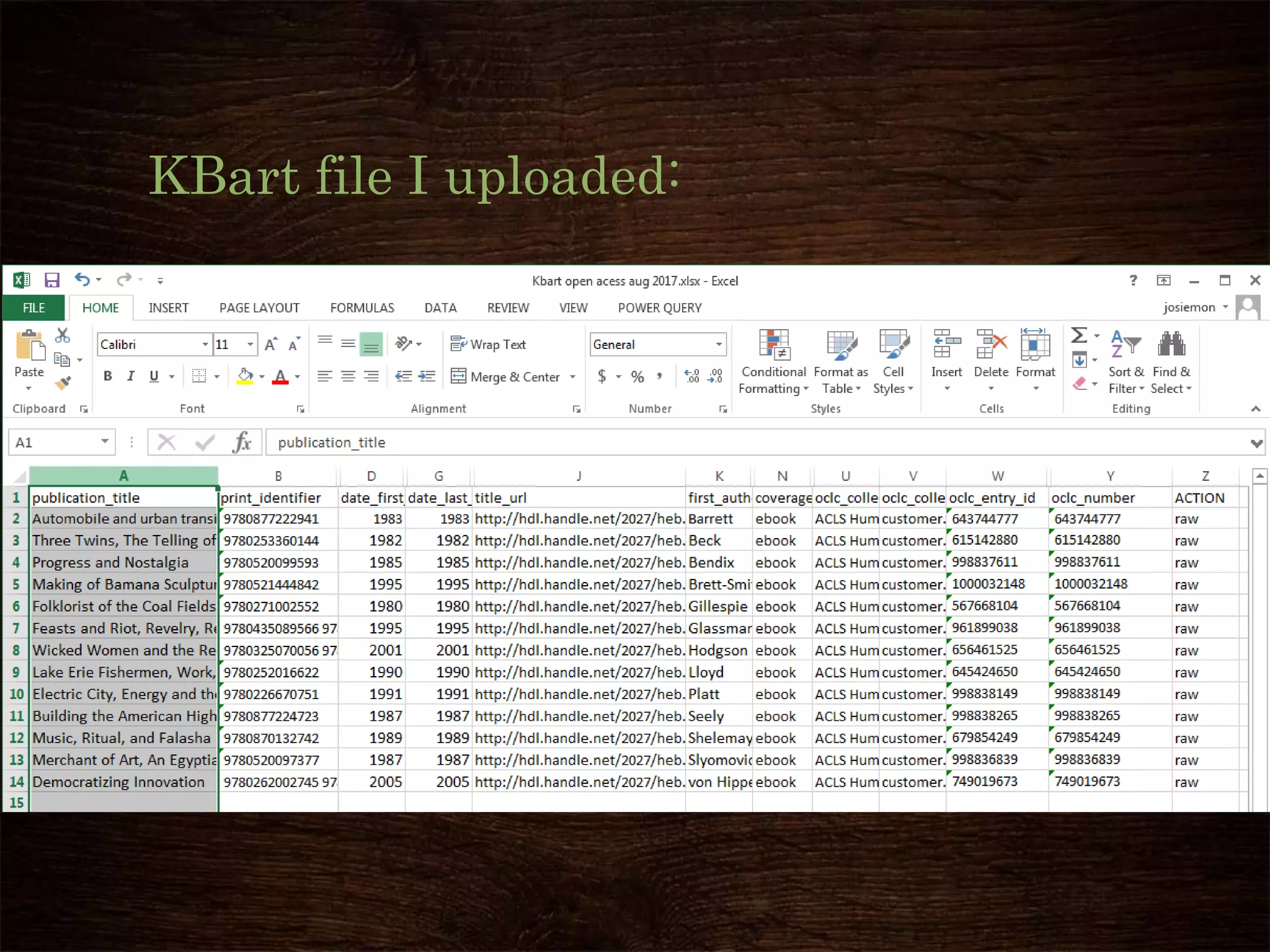
KBart file I uploaded:
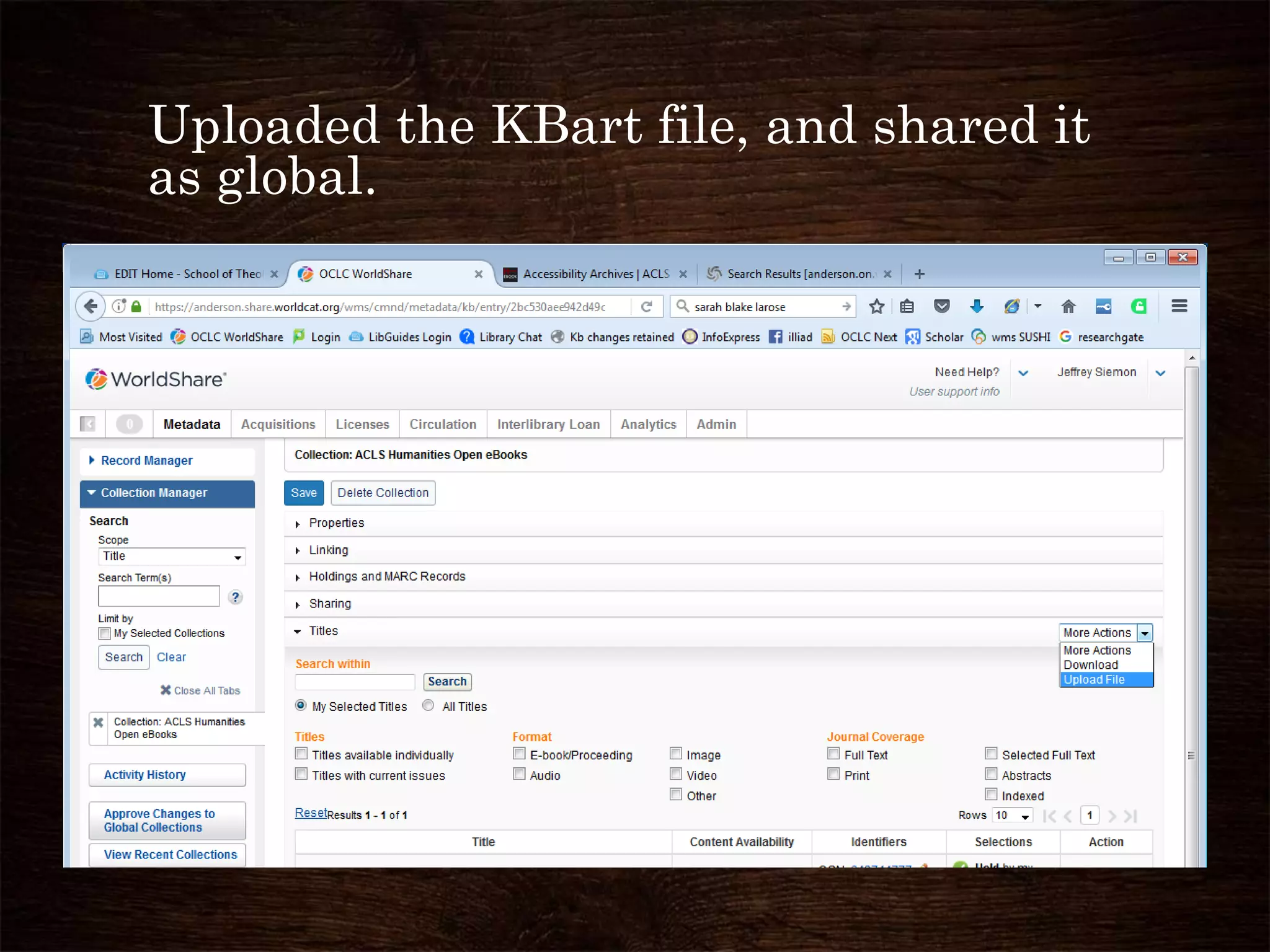
Uploaded the KBart file, and shared it
as global.
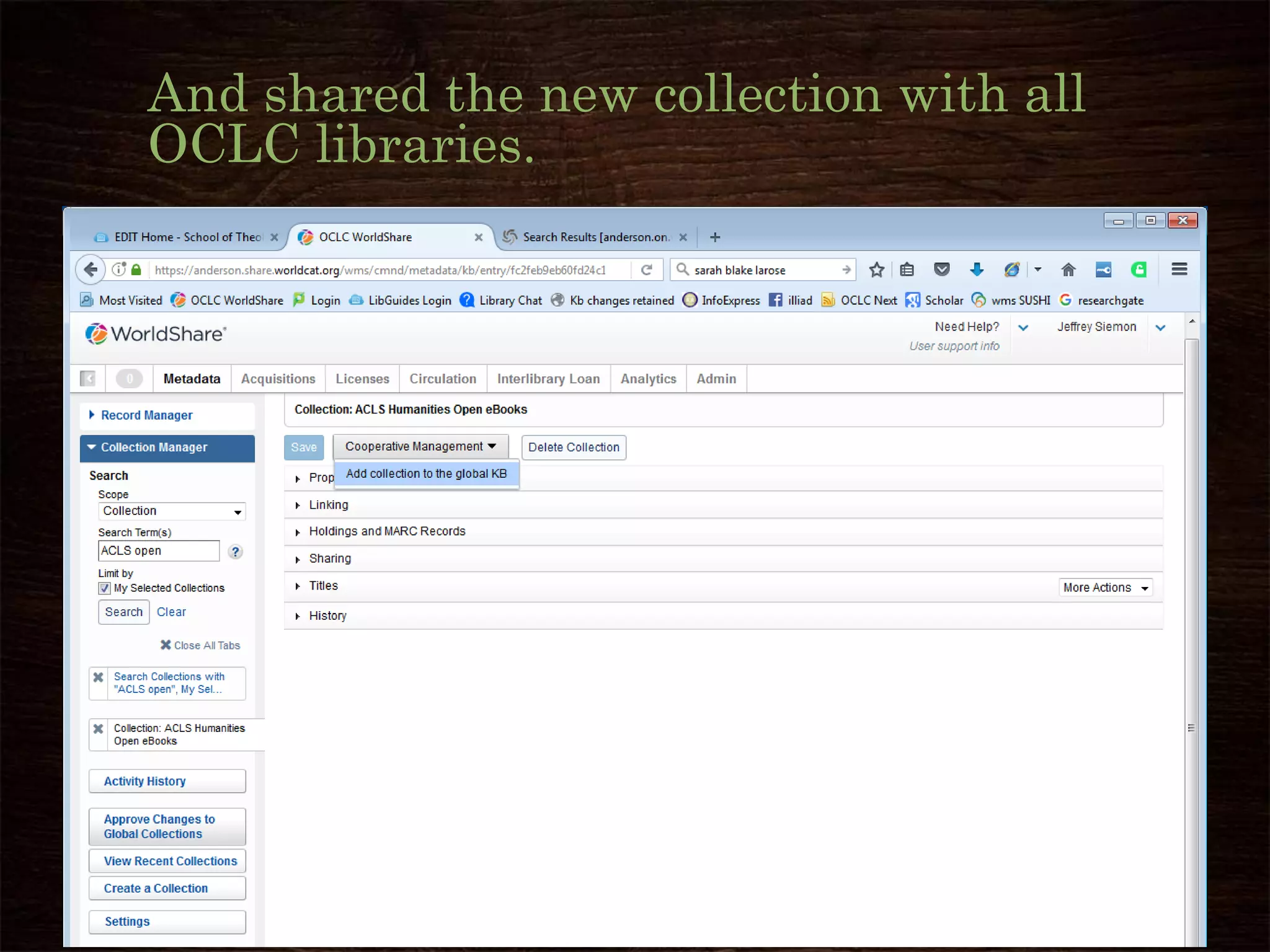
And shared the new collection with all
OCLC libraries.
Adding oclc numbers, issns and isbns to the knowledge base: enhancing discovery and delivery of electronic resources

Adding oclc numbers, issns and isbns to the knowledge base: enhancing discovery and delivery of electronic resources

  • 1.
    Adding OCLC numbers, ISSNsand ISBNs to the Knowledge Base JEFF SIEMON, ANDERSON UNIVERSITY SEPTEMBER 27, 2017
  • 2.
    Session description Collection LevelCooperative Cataloging enhances patrons' ability to discover expensive electronic resources. A review by PALNI shows 1/8th of KB collections are lacking OCLC numbers for more than 40% of their titles. A workflow for adding 100s of OCLC numbers at a time to KB collections will be demonstrated. Software for adding OCLC numbers includes Collection Manager, Connexion Client, and Excel; for ISSNs and ISBNs MarcEdit is also necessary.
  • 3.
    Plea for Catalogersto add WMS Collection Manager to their skill set. Catalogers have been active in item cooperative cataloging for decades. We need to make the move to Collection Level Cooperative Cataloging. • Many “Electronic Resources Librarians” came from Serials or Acquisitions, and focus on negotiating prices, etc. • Catalogers traditionally focus on Discovery, and these e-Resources need better Discovery • Catalogers are good with detail, and Knowledge Base collections need librarians to improve the details of this metadata. • Libraries are purchasing fewer individual books, and fewer print books, and more collections of materials, especially eBooks, Thus, catalogers need to also work at the collection level • WMS Collection Manager is the only Discovery service that encourages the cooperative (us) to improve the metadata.
  • 4.
    Sugiyama, Yukari, Marlenevan Ballegooie, and Fabiano Takashi Rocha. "Harnessing the Power of the Cooperative: Improving Access to the JapanKnowledge E-Resource Collection." Journal of East Asian Libraries 2016, no. 163 “E-resource discovery is almost entirely dependent upon metadata that is supplied by parties outside of the library. Since e-resources are often purchased in large packages and metadata pertaining to these resources is dynamic and changeable, most libraries rely on content providers to supply MARC records to enable e-resource discovery within local systems. To further assist libraries in managing and facilitating access to their electronic resource collections, there is also an expectation that content providers will supply knowledge base vendors (such as Proquest, EBSCO and OCLC) with information pertaining to the availability and accessibility of resources. Thus, libraries now work in an environment where there are more interdependencies than ever; the successful provision of access to electronic resources is fully dependent on the transmission of high quality metadata throughout the e-resource supply chain.”
  • 5.
    Ways to improveOCLC Knowledge Base collections • Delete incorrect OCLC numbers (OCN) in KB titles. • Change/override the primary OCLC number with the OCN of the best record. • Add subtitles to prevent incorrect matches with Bib records • Add a primary OCN to Knowledge base titles without a primary OCNs (today’s session) • Add new titles to Knowledge base collections, when the title is missing. • Contribute Knowledge Base collections for vendor collections not available in the OCLC knowledge base. • Add free or open access journals not in any KB collection to the collection: Other Free Journals, collection ID:freeAccess.misc
  • 6.
    Some reasons why you’d wantto do cooperative collection level cataloging: When one library creates this data, then we can share it.
  • 7.
    The vendor may not supply metadata (yet) Somereasons why you’d want to do cooperative collection level cataloging Example: • I created: 03/16/2015 Digitalia Hispanica 6465 titles collection ID: global.268.84 • created 08/25/2016 by another Fuller Theological Seminary librarian Digitalia Hispanica OLD @ Fuller Libraries 12,373 titles • Added 3/3/2017 by vendor Digitalia Hispanica, 14,174 titles collection ID: digitalia.hispanica -- So cooperative collections may no longer be needed; But 2291 titles do not have an OCN.
  • 8.
    The vendor may not supply adequate metadata. Somereasons why you’d want to do cooperative collection level cataloging • e.g. JapanKnowledge Collection ID: global.544.9.1 • Bib Records without LCSH, and non-standard Romanization • Multi-volume sets must be carefully added to KB • Needed OCLC numbers for KB – WorldCat linkage Librarians are metadata experts. Cheer!!!
  • 9.
    Vendor may be behindin sending metadata to discovery services. Some reasons why you’d want to do cooperative collection level cataloging • e.g. JSTOR Open Access eBooks = jstor.oaebooks • 6/7/2017 Baylor University Libraries added 24 new eBooks • 4/25/2017 Baylor University Libraries added 3 new eBooks • 2/17/2017 Baylor University Libraries added 2 new eBooks • 2/9/2017 Baylor University Libraries added 2 new eBooks • 2/7/2017 I added 26 new eBooks to this collection
  • 10.
    Vendor may use onlythe current journal title in their metadata, even though they have full-text for preceding titles of the "same" journal. Some reasons why you’d want to do cooperative collection level cataloging • e.g. 111 new Open Access titles that Taylor and Francis 5/8/2017 hadn't sent to OCLC, • some were acquired titles, • some were new journals (began in 2016 or 2017), • some were preceding titles, when T&F only distributed metadata for the current title
  • 11.
    Vendor data may needto be improved. Some reasons why you’d want to do cooperative collection level cataloging e.g. Gale Literature Resource Center Collection ID: galegroup.sb5102 • I added 6/27/2017 – 35 OCLC numbers, – 235 ISSNs and – 10 original bib records for eSerials to WorldCat These improvements are shared with other OCLC WMS libraries which use this Knowledge Base collection.
  • 12.
    Vendor may be reluctant torelease their data. Some reasons why you’d want to do cooperative collection level cataloging • e.g. Judy Chu (University of the West) created a Knowledge Base collection for ProQuest open access dissertations, to connect some ProQuest full-text with WorldCat bib records: • ProQuest Dissertations and Theses Open (PQDT Open) 6,682 titles • Collection ID: global.5644.234
  • 13.
    Vendors may not separateout open access data. Some reasons why you’d want to do cooperative collection level cataloging Some OA collections I've added to the KB: • Brill eBooks, open access 236 titles Collection ID: global.930.21 • Luminos Open Access University of California Press 35 titles Collection ID: global.930.29 • Project Muse Open Access eBooks 33 titles Collection ID: global.930.25 • Slavery in America and the World: History, Culture and Law 1406 titles Collection ID: global.930.30 • Gorgias Press Open Access - 8 titles Collection ID: global.930.35 • Vandenhoeck and Ruprecht open access 41 titles Collection ID: global.930.36
  • 14.
    Which Cooperative Management Changes Kept in Knowledge Base Evenwhen vendor supplied data is loaded. Full details are on the spreadsheet https://www.oclc.org/content/ dam/support/knowledge- base/kbCooperativeChanges Retained.xlsx- This sheet lists the collections where any edits to title fields or changes to title data that you submit through the cooperative will be retained across future data updates from vendors. If the collection you're working in does not appear on this list then do not use the Cooperative Management feature for editing that collection. If the collection is customizable you can always make title data changes and save those changes locally.
  • 15.
    Which Cooperative Management Changes Kept in Knowledge Base Evenwhen vendor supplied data is loaded. When you add local title edits to the global KB collection the change you submitted is flagged on the back end so that future data updates from vendor's will not overwrite the changes to those specific title fields in the global data. These title fields are: • OCN, via Override OCN • -ISSN • -eISSNRem • -ISBN • -Other ISBNs • -Title • -Publisher • -Title URL • -Author • -Journal Linking Key • -Linking Key • -Coverage Dates • -Coverage Enumerations
  • 16.
    Why add a subtitleor series title to a Knowledge Base title? Improvements to collections
  • 17.
    Problem: Discovery linkto book with same title 1992 book in Discovery links to 1908 book in HathiTrust
  • 18.
    Solution: Add subtitle orseries title to Kbart record for the HathiTrust title. This prevents incorrect matches to other Bib records with the same title. How to overview in next slides:
  • 19.
    From the eBookin HathiTrust Get the number from URL of linking eBook, 4287499, And a subtitle or series title for that book.
  • 20.
    Look up theHathiTrust number, 4287499, in the KBart collection for HathiTrust. Add series title to KBart title Result: No more “Access online” on the 1990 book.
  • 21.
    Why add OCLC numbers toa Knowledge Base Collection? I’m going to demonstrate How, and How is complicated. So there better be a good answer to Why.
  • 22.
    No primary OCN, NoOverride OCN so Not Held by Anderson in Discovery (yet does say “Access online”)
  • 23.
    Why Discovery isimproved by adding OCLC numbers to KB collection When there is no primary OCN in the KB, then holdings are not set in WorldCat. Therefore, that title (bib record) drops down in search results And that title will not display if the search is limited to My Library Holdings. The “Access online” link will still show up on a result, if it matches ISBN/ISSN or if the OCN is in the KB in the “grouped OCNs” list.
  • 24.
    Detailed instructions foradding Barcodes to an existing Knowledge Base collection • Detailed instructions for adding OCNs to an existing Knowledge Base collection can be found at: • https://drive.google.com/open?id=0B2sHKamxnI -dQmFkcUVmS1d4RTQ (about 50 pages) Let me give you a shorter overview of How to add OCNs
  • 25.
    De Gruyter OpenAccess eBook – some titles in this collection were lacking OCLC numbers
  • 26.
    Download all titlesin the collection, to a Kbart (standard) spreadsheet
  • 27.
    • Open theKbart spreadsheet in Excel • Sort the file by OCLC number then by Title • The Titles without OCLC numbers will be the last rows in the spreadsheet
  • 28.
    • Select therows with OCLC numbers, and delete those rows. • You’ll be left with the Kbart titles that do not have primary or overlay OCLC numbers.
  • 29.
    Use Connexion Clientbatch search function and the ISBNs, to get OCLC numbers for the titles. (You might also use title and date. • Save the ISBN numbers from an Excel column as a text file (I use notepad) • Import this file into Connexion as search keys.
  • 31.
    Copy the logreport, with ISBNs and OCLC numbers back in to Excel
  • 32.
    Delete extra OCLCnumbers, so there is just one OCLC number per ISBN/title. This takes some judgment.
  • 33.
    Double check thatthe title, date and ISBN match, then you have an OCLC number for that title.
  • 34.
    Clean up theKbart file, to make it ready to upload, and use Collection Manager to overlay the records adding the OCLC numbers.
  • 35.
    Success!! These titles with OCLCnumbers can now be Discovered by and Delivered to your patrons! Why add OCLC numbers to a Knowledge Base Collection?
  • 36.
  • 37.
    How to Createnew Collection in the Knowledge Base if the vendor has not supplied one.
  • 38.
    ACLS started offering open access titles. They hada spreadsheet but not a Kbart file.
  • 39.
    I took thisspread sheet, and cleaned up the data
  • 40.
    Used Batch search(title and year) in Connexion Client to get OCLC numbers
  • 41.
    Got ISBNs fromthe WorldCat MARC records. Since this collection only had 13 titles, I simply copied each ISBN from Connexion and Pasted into the Excel spreadsheet. For larger collections, I’ve imported the MARC records into MarcEdit, and exported a spread sheet of ISBNs or ISSNs, and authors, and publisher and publication date.
  • 42.
    Created a newKnowledge Base collection, using Collection Manager
  • 43.
    KBart file Iuploaded:
  • 44.
    Uploaded the KBartfile, and shared it as global.
  • 45.
    And shared thenew collection with all OCLC libraries.

Editor's Notes

  • #24 Steve McDonald, Tufts U. “There are two different kinds of information in the Collection Manager.  First is the information from the vendor about the title.  Second is the match between that title and a WorldCat record. The knowledgebase is basically a set of data about what is contained in a collection.  You library can signify that it owns an entire vendor collection, or a specific set of titles within a vendor collection, or create your own local collection. Completely separate from that is a match between the titles in that collection and MARC records in WorldCat.  You can be marked as holding a title in the knowledgebase, but if that title has not been matched to an OCLC record, you will not receive a MARC record for the title and WorldCat will not record your holding. In Collection Manager, you can manually specify an OCLC number for a matching WorldCat record.  You can do this to override the record chosen by the automated matching system, or to provide an OCN when the automated matching system failed to provide a match.  You can also contribute this information to the knowledgebase using the Cooperative Management feature.  By doing that, you will help all the other libraries who are subscribed to that collection. I would go into greater detail about how to use the Cooperative Management feature of Collection Manager, but I am writing from home and I am about to go on a long vacation.  I do hope you will investigate the Cooperative Management feature, and supply OCLC numbers for those titles you have found. “
  • #29 That is the OCLC matching algorithm did not find an automatic match.